



Free WordPress booking plugins look simple on the surface. Install, configure, accept bookings. But most "free" plugins hold back the one feature you actually need: taking payments, syncing a calendar, or sending automated reminders.
This guide focuses on the free side first. We reviewed what each plugin delivers before you pay anything, where it becomes limited, and which paid upgrade makes sense if you need to grow.
Whether you run a salon, a clinic, a law firm, or a rental property, one of these plugins will let you start accepting bookings without a monthly SaaS subscription.
Quick Verdict
| Use case | Best pick |
|---|---|
| Best overall free booking plugin | Booknetic |
| Best free event booking plugin | Eventnetic |
| Best simple appointment scheduler | Simply Schedule Appointments |
| Best free Google Calendar sync for service teams | Booktics |
| Best calendar-based booking plugin | Booking Calendar |
| Best lightweight free option | WP Booking System |
| Best for basic service businesses | Easy Appointments |
| Best for multi-location teams | MotoPress Appointment Booking Lite |
Our overall top pick is Booknetic. A free version is available directly from the official Booknetic website. It covers services, staff, locations, time slots, on-site payment collection, and email notifications before you spend a dollar.
How We Reviewed These Free Booking Plugins
We evaluated each plugin across six areas:
- Official free plan: What the plugin actually delivers at no cost, checked against the developer's own website and WordPress.org listing.
- Booking flow: Whether a visitor can complete a full end-to-end booking without hitting a paywall.
- Payment options: Which payment methods are available in the free tier, and which require a paid upgrade.
- Calendar sync: Whether appointments sync to Google Calendar or other external calendars in the free plan.
- Notifications: Automated email and SMS support in the free tier.
- Pricing: Verified starting prices from official sources for the first paid tier.
We also captured clean screenshots from live demos or official sources for each plugin.
How Free Booking Plugins Actually Work
Most free booking plugins follow one of three models:
- Freemium on WordPress.org: A lite version in the plugin directory. Core scheduling is free. Payments, calendar sync, or SMS are locked behind paid tiers.
- Free direct download: The developer offers a free base plugin from their own website. Usually more capable, but upgrades are sold as annual plans or one-time licenses.
- Free core with paid extensions: The scheduling engine is completely free. Add-ons for payments, sync, and SMS are sold separately.
The table below shows what each plugin offers across key areas, so you know what to expect before installing.
Comparison Table
| Plugin | Best for | Payment option in free version | Calendar sync | Notifications | Starting paid price |
|---|---|---|---|---|---|
Booknetic |
Full-featured service businesses |
Pay on-site / manual payment |
Paid plan |
Email free, SMS paid |
$45/ |
Eventnetic |
Event organizers, ticketed events |
Pay on-site / manual payment |
Not included |
Email (free) |
$99/ |
Simply Schedule Appointments |
Consultants, solopreneurs |
Paid plan only |
Paid ($99/ |
Email (free) |
$99/ |
Booktics |
Service businesses and teams |
Pay on-site / manual payment |
Two-way Google Calendar (free) |
Email (free) |
$63/ |
Easy Appointments |
Salons, clinics, basic scheduling |
Pro add-on only |
Pro add-on only |
Email (free) |
$39 one-time |
Booking Calendar |
Rentals, events, availability display |
Paid plan only (from $149 one-time) |
Free (import only) |
Email (free) |
$79 one-time |
WP Booking System |
Property rentals, simple availability |
Paid plan only |
Not included |
Email (free) |
$79/ |
MotoPress Appointment Lite |
Multi-location service teams |
Pay on-site / manual payment |
Client .ics export (free) |
Email (free) |
$49/ |
1. Booknetic: Best Overall Free WordPress Booking Plugin
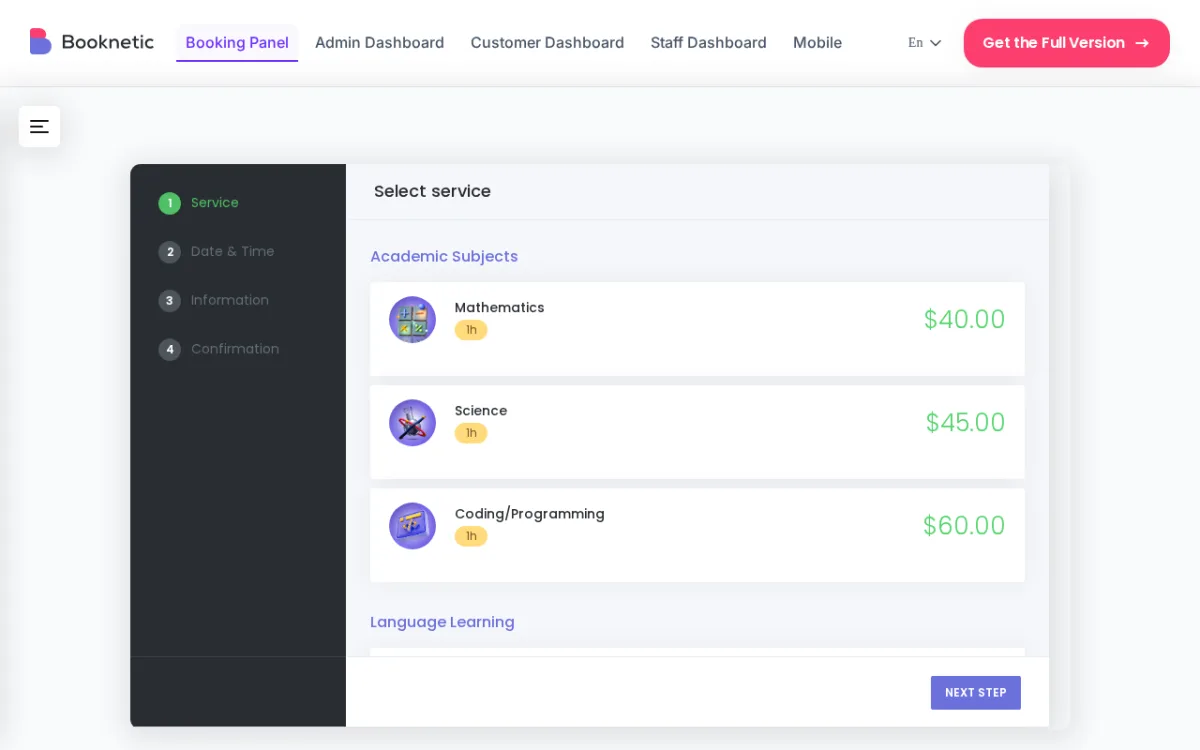
Verdict: The most capable free-to-start booking plugin for WordPress. Booknetic delivers a professional booking system before you pay anything, with a clear and affordable upgrade path when you need more.
What the free version is good for
- Building a complete booking flow: services, staff, locations, and time slots
- Collecting on-site payments (pay-in-person or manual confirmation)
- Sending automated email confirmations and reminders
- Managing all bookings from a clean admin dashboard
- Testing the full booking experience before committing to a plan
What becomes limited
- Online payment gateways (Stripe, PayPal, WooCommerce) require the Standard plan or higher
- Mobile app access requires Standard plan
- Google Calendar sync requires a paid plan
- Revenue tools including taxes, invoices, and coupons require Premium
When NOT to choose Booknetic
Skip Booknetic free if online card payments at the time of booking are a day-one requirement: you will need the Standard plan ($99/year) for Stripe or PayPal. It is also not the right fit if you only need a simple date-availability display without staff scheduling, since Booking Calendar or WP Booking System handle that use case more lightly. If you need two-way Google Calendar sync in the free tier, look at MotoPress Appointment Booking Lite instead.
Best for
Service businesses that want a professional system from day one: clinics, salons, spas, gyms, law firms, and consultants who plan to accept online payments once they are ready to upgrade.
Pricing
- Free: Available directly from the official Booknetic website at booknetic.com
- Basic: $45/year
- Standard: $99/year
- Premium: $149/year
- Elite: $299/year
2. Eventnetic: Best Event Booking Plugin
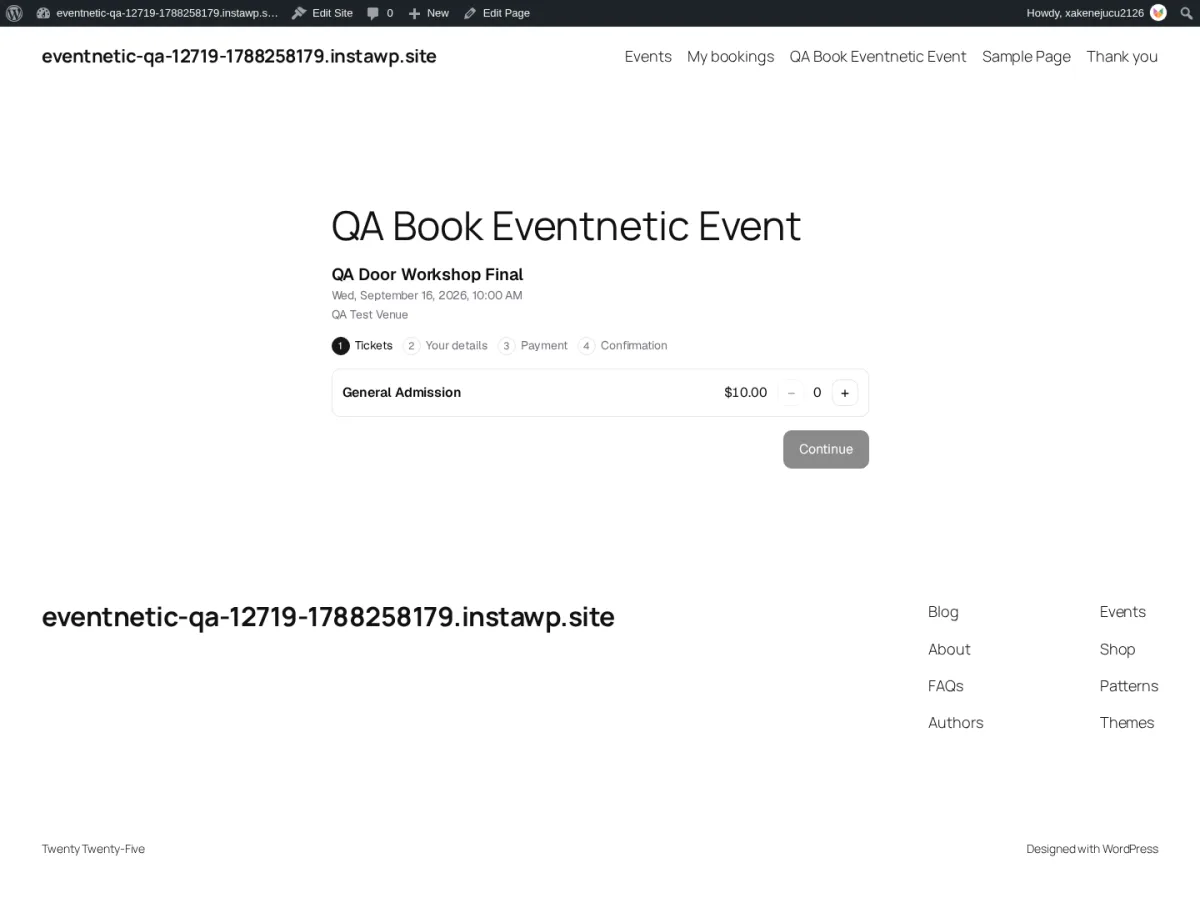
Verdict: Eventnetic is a dedicated event ticketing plugin, built for a different job than the appointment schedulers on this list: selling tickets to a dated event instead of booking a one-on-one time slot. The free version has no artificial usage limits, unlimited active events and unlimited bookings, with a clear upgrade path for recurring dates, online payments, and reserved seating.
What the free version is good for
- Unlimited active events and unlimited bookings, with no time limit or usage cap
- Multiple ticket types per event, with mixed baskets so a customer can buy different ticket types in one booking
- Booking shortcodes for the booking panel, events list, thank-you page, and "my bookings" page
- Assigning staff to events and reusing venue details across every event held at that venue
- Online events with a meeting link delivered to ticket holders for each date
- Cash and offline (pay-on-site) payment collection
- 15 workflow automation triggers with free email notifications, covering booking created, payment received, check-in, and event start/end
- Door list check-in by name and a live "who's inside" count at the door
- CSV export of bookings and attendees, role-based staff permissions, and a sales dashboard
What becomes limited
- Recurring event dates (multiple dates under one event) require a paid plan
- Online payment gateways (Stripe, PayPal) and WooCommerce checkout require a paid plan
- Seat maps and reserved seating require a paid plan
- PDF tickets, QR check-in, and custom booking fields require a paid plan
- SMS, WhatsApp, and Telegram notifications require a paid plan
When NOT to choose Eventnetic
Eventnetic is not an appointment-scheduling plugin: if you need staff to book one-on-one time slots with clients, such as a haircut, consultation, or class with a specific instructor, Booknetic or the other plugins on this list fit that job better. Skip it too if recurring event dates or online card payments are a day-one requirement, since both sit behind a paid plan. It is also a brand-new product (launched in 2026), so it does not yet have the install base or track record of an established plugin like Booking Calendar or WP Booking System.
Best for
Businesses and organizers that sell tickets to a dated event rather than book appointments: cinemas, yoga and fitness studios running scheduled classes, live music venues, museums and galleries with timed entry, theatres, walking tour operators, and conference organizers.
Pricing
- Free: No time limit, unlimited active events, unlimited bookings, available directly from the official Eventnetic website
- Starter: $99/year first year (renews at $199/year)
- Pro: $199/year first year (renews at $299/year)
- Elite: $299/year first year (renews at $399/year)
3. Simply Schedule Appointments: Best Simple Appointment Scheduler
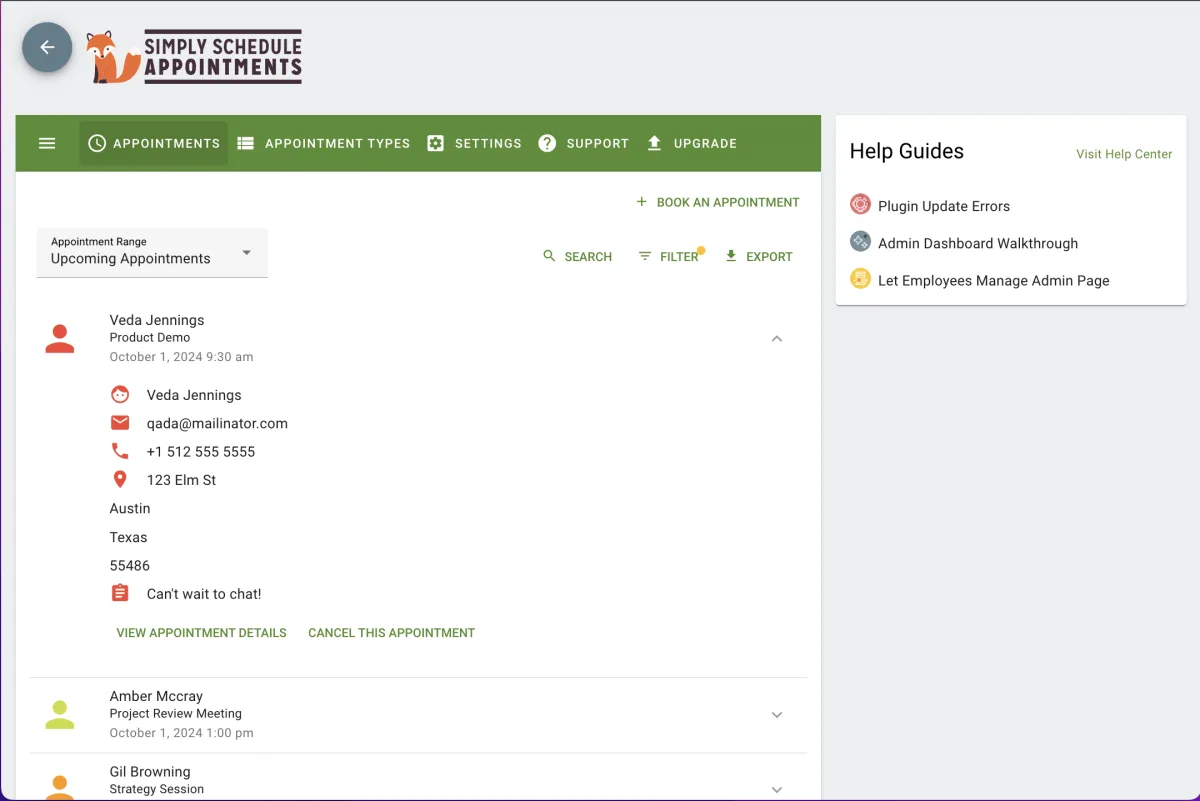
Verdict: The cleanest booking experience for solo service providers and consultants. The free Basic edition handles unlimited appointment types, blackout dates, and email notifications with no configuration hassle.
What the free version is good for
- Unlimited appointment types with custom availability windows
- Blackout dates for holidays and time off
- Customizable email notification templates for clients and admins
- Page builder integrations with Elementor, Divi, and Beaver Builder
- WordPress user account integration for returning clients
What becomes limited
- Google Calendar sync requires the Plus plan ($99/year)
- Zoom and Google Meet integration requires Plus
- Group and class-style bookings require Plus
- Online payments (Stripe, PayPal) require the Professional plan ($199/year)
- SMS reminders require Professional
When NOT to choose Simply Schedule Appointments
The free tier is genuinely limited to scheduling only: no Google Calendar sync, no payments, no SMS. If you need any of those features from day one, you will need to commit to a paid plan. It is also not well suited for multi-staff businesses: the free tier has no built-in staff management, and team scheduling is only available on the Business plan ($399/year). For multi-location or multi-staff setups, Easy Appointments or MotoPress Appointment Booking Lite cover more ground for free.
Best for
Coaches, consultants, tutors, and freelancers who want a polished scheduler and are comfortable waiting to add payments or calendar sync later.
Pricing
- Basic: Free (WordPress.org)
- Plus: $99/year (Google Calendar, Zoom, group bookings, custom fields)
- Professional: $199/year (Stripe, PayPal, SMS, Google Analytics)
- Business: $399/year (team scheduling, multiple resources, priority support)
4. Booktics: Best Free WordPress Booking Plugin with Two-Way Google Calendar Sync
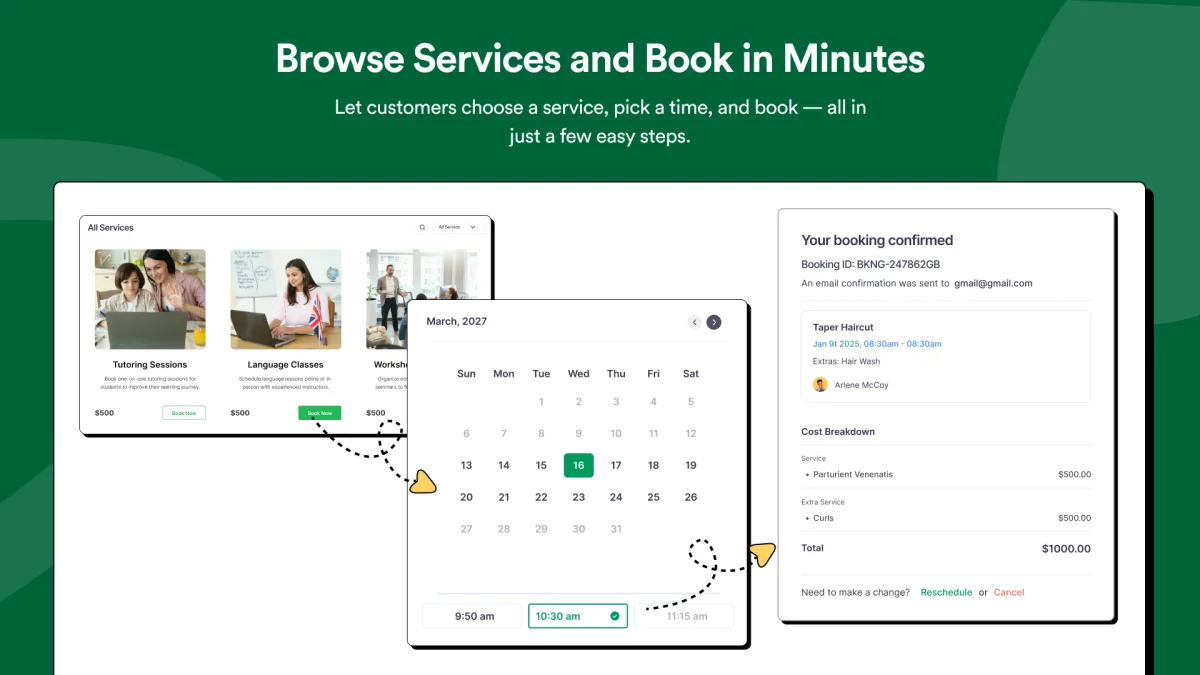
Verdict: A capable free booking plugin for service businesses that includes two-way Google Calendar sync at no cost. Booktics handles services, staff, time slots, and automated email notifications in its free version, with an affordable upgrade path for businesses that need online payments and advanced automation.
What the free version is good for
- Customers select a service, available time slot, and submit a booking directly from the website
- Organize appointment-based services into categories from the WordPress dashboard
- Assign staff members to specific services and manage their individual availability
- Two-way Google Calendar sync included in the free plan: new bookings appear on your calendar instantly, and changes sync back automatically
- Automated email notifications for booking confirmations, reminders, and cancellations
- Centralized booking dashboard with all appointments, customer details, and booking history
What becomes limited
- Online payment gateways (Stripe, PayPal) require the Starter plan or higher
- Advanced booking automation and integrations require a paid plan
- WooCommerce integration for tax management and invoicing requires a paid plan
When NOT to choose Booktics
Booktics is a solid free option for appointment-based scheduling, but if your day-one requirement is collecting online card payments, you will need to upgrade to a paid plan. The plugin is also a newer option with a smaller active install base than established plugins like Booking Calendar or WP Booking System, which can be a factor if long-term community support matters to you. For businesses that need WooCommerce-level payment and invoicing workflows in the free tier, no plugin on this list covers that completely.
Best for
Salons, consultants, coaches, healthcare providers, and other appointment-based businesses that want a free booking system with two-way Google Calendar sync built in.
Pricing
- Free: Available on WordPress.org
- Starter: $63/year
- Professional: $109/year
- Agency: $149/year
5. Easy Appointments: Best for Basic Service Businesses
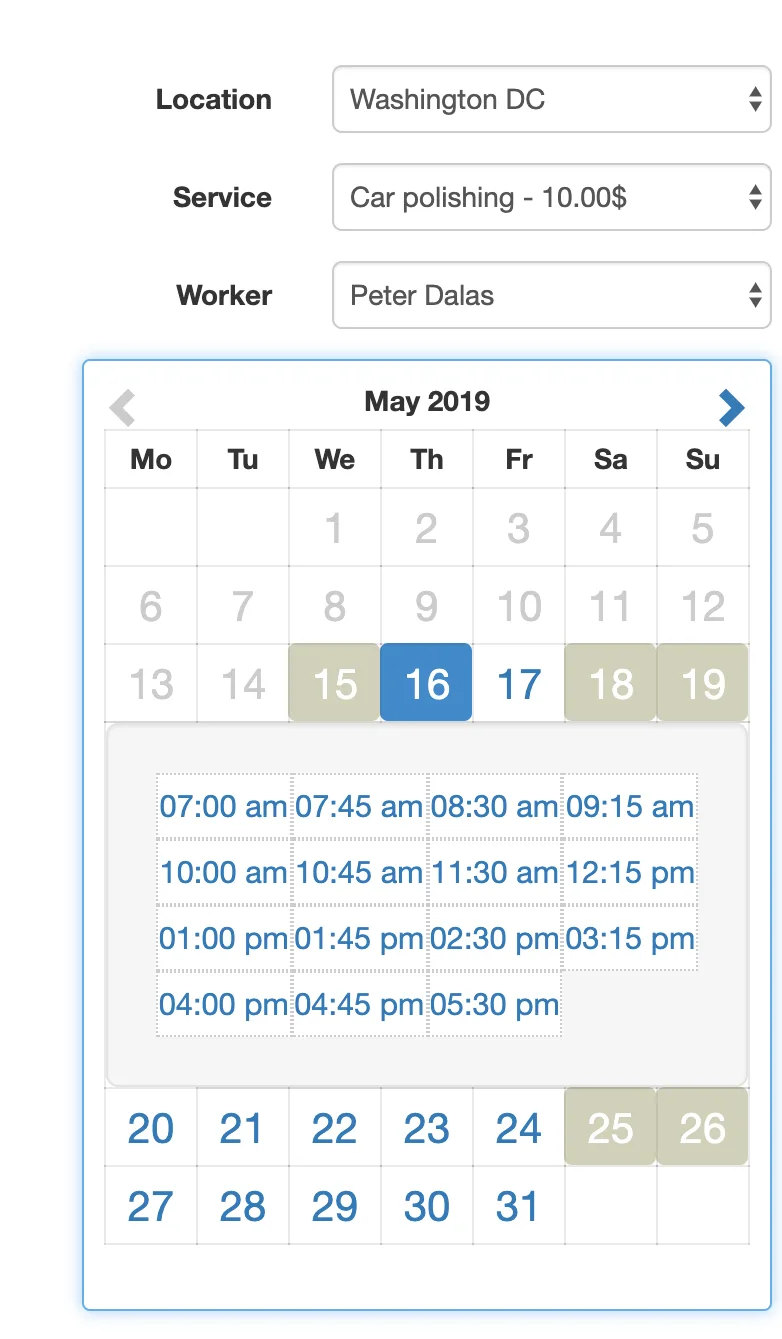
Verdict: The core plugin is genuinely free with no feature locks on the scheduling engine. If you need to collect appointments without taking online payments, Easy Appointments handles it completely at no cost.
What the free version is good for
- Multiple locations, staff members, and services with no cost
- Responsive booking forms in single or two-column layout
- Automated email notifications to customers, staff, and admins
- Custom form fields: text inputs, dropdowns, and description areas
- Reporting and CSV export for spreadsheet use
- Translations available for 10+ languages
What becomes limited
- Google Calendar two-way sync requires the Pro add-on
- Online payments (Stripe, PayPal, WooCommerce) require the Pro add-on
- SMS and WhatsApp notifications require the Pro add-on
- iCalendar feed sync requires the Pro add-on
When NOT to choose Easy Appointments
Easy Appointments works well for appointment collection, but if you need online payments, Google Calendar sync, or SMS reminders, every one of those requires a separate Pro add-on purchase. The add-on model means the cost stacks up quickly once you need more than basic scheduling. If you want a single plan that bundles these features, Booknetic or Simply Schedule Appointments offer a cleaner upgrade path. The plugin also has a smaller install base and community than Booking Calendar or WP Booking System, which can matter for long-term plugin support.
Best for
Hair salons, dental clinics, law firms, and service businesses that need appointment collection without online payment processing, and are happy to add Pro add-ons selectively later.
Pricing
- Free: Core plugin on WordPress.org (10,000+ active installs)
- Personal: $39 one-time (1 site, 1 year of updates, all Pro add-on features)
- Multiple: $59 one-time (3 sites)
- Webmaster: $79 one-time (10 sites)
- Freelancer: $99 one-time (25 sites)
6. Booking Calendar: Best Calendar-Based Booking Plugin
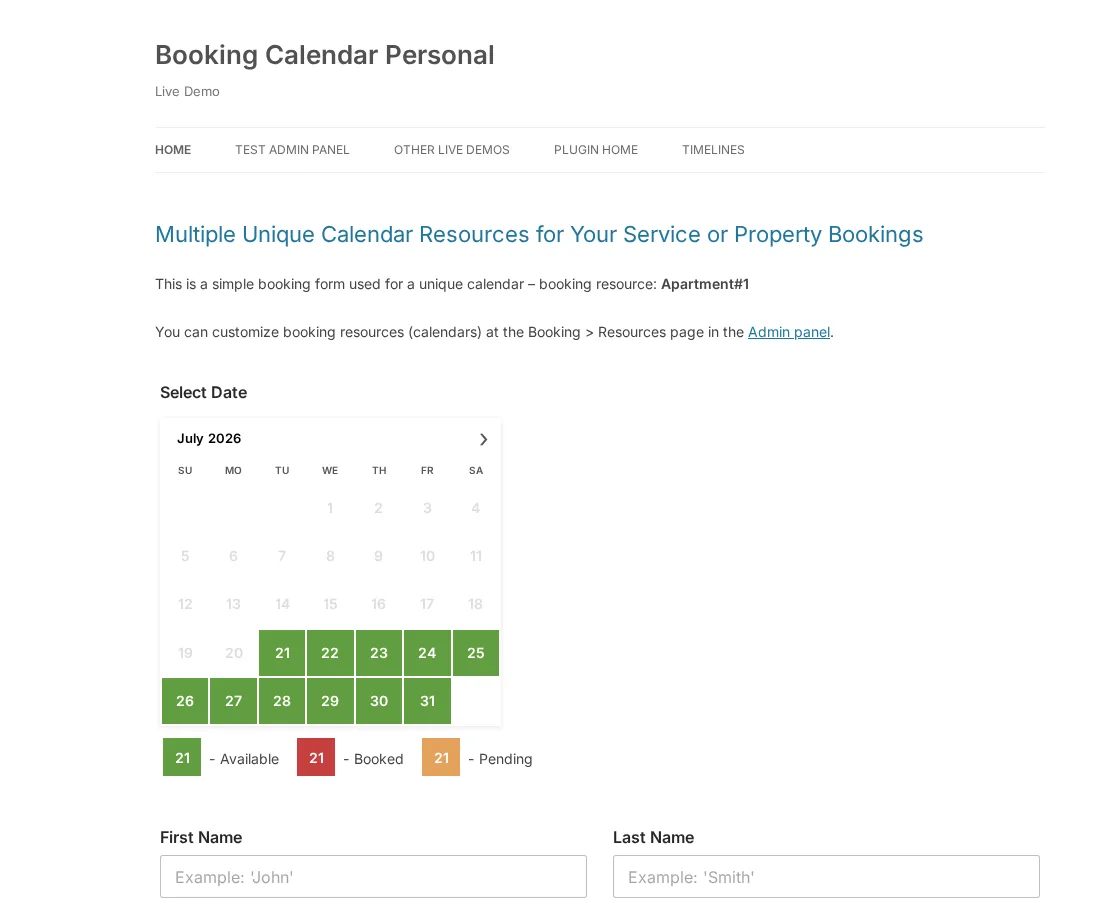
Verdict: The most established date-based booking plugin on WordPress.org, with 50,000+ active installs and a 4.7-star rating. The best pick when displaying availability on a calendar is the main requirement.
What the free version is good for
- Full-day and time-slot booking on a visual calendar
- Drag and drop booking form builder
- Google Calendar event import and .ics feed reading (one-directional)
- Email notifications for admins and customers
- Built-in CAPTCHA spam protection
- 25+ language translations
- All booking data stored locally on your server
What becomes limited
- Advanced email templates and CSV export require the Personal tier ($79 one-time)
- Online payments (Stripe, PayPal, Authorize.Net) require Business Small ($149 one-time)
- Seasonal pricing and deposit payments require Business Medium ($249 one-time)
- Capacity management and coupons require Business Large ($349 one-time)
When NOT to choose Booking Calendar
Booking Calendar is optimized for date-based availability, not time-slot service scheduling. If you run a salon or clinic where customers book specific 30-minute slots with a specific staff member, the interface is not designed for that use case. Online payments also require at least the Business Small plan ($149 one-time), so it is not the right choice if payment collection is a free-tier requirement. For complex multi-staff or multi-service scheduling, Booknetic or Easy Appointments give you a better foundation.
Best for
Vacation rentals, event spaces, and any business where showing available dates on a calendar is the primary need.
Pricing
- Free: WordPress.org
- Personal: $79 one-time (advanced email templates, CSV export)
- Business Small: $149 one-time (Stripe, PayPal, Authorize.Net payments)
- Business Medium: $249 one-time (seasonal pricing, deposit payments)
- Business Large: $349 one-time (capacity management, search, coupons)
7. WP Booking System: Best Lightweight Free Option
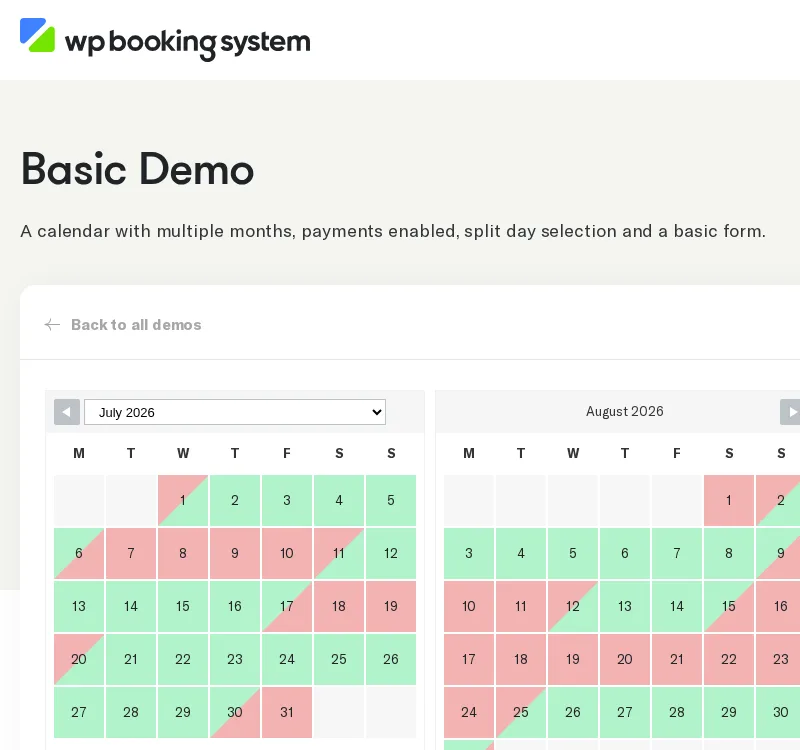
Verdict: The highest-rated free booking plugin on WordPress.org at 4.9 stars with 20,000+ active installs. Simple, stable, and focused. Ideal if you need a reliable availability calendar without complex scheduling logic.
What the free version is good for
- Creating custom booking calendars with a visual drag-and-drop interface
- Embedding calendars via shortcode or Gutenberg block
- Multi-language support for international sites
- Basic form fields with booking storage and admin management
- Email notifications for new bookings
What becomes limited
- Online payments (Stripe, PayPal, Square) require the Business plan ($149/year)
- SMS notifications require the Business plan
- Invoices, discounts, and coupons require the Business plan
- External calendar sync is not included even in paid plans; the plugin focuses on availability display
When NOT to choose WP Booking System
WP Booking System is intentionally minimal. If you need staff-level scheduling, service categories, or client accounts, this plugin does not cover those needs even in paid tiers. Calendar sync with Google Calendar or Outlook is not part of the product. If payment collection or automated reminders are important to you in the free tier, this is not the right fit: both require the Business plan. Choose it only if a clean, reliable availability calendar with basic form collection is all you need.
Best for
Property owners, vacation rental managers, and accommodation businesses that need a clean, reliable availability display with no complex scheduling requirements.
Pricing
- Free: WordPress.org
- Personal: $79/year (offline payments, 7 basic add-ons)
- Business: $149/year (online payments, 21 premium add-ons including Stripe, PayPal, SMS)
- Developer: $249/year (unlimited websites)
8. MotoPress Appointment Booking Lite: Best for Multi-Location Teams
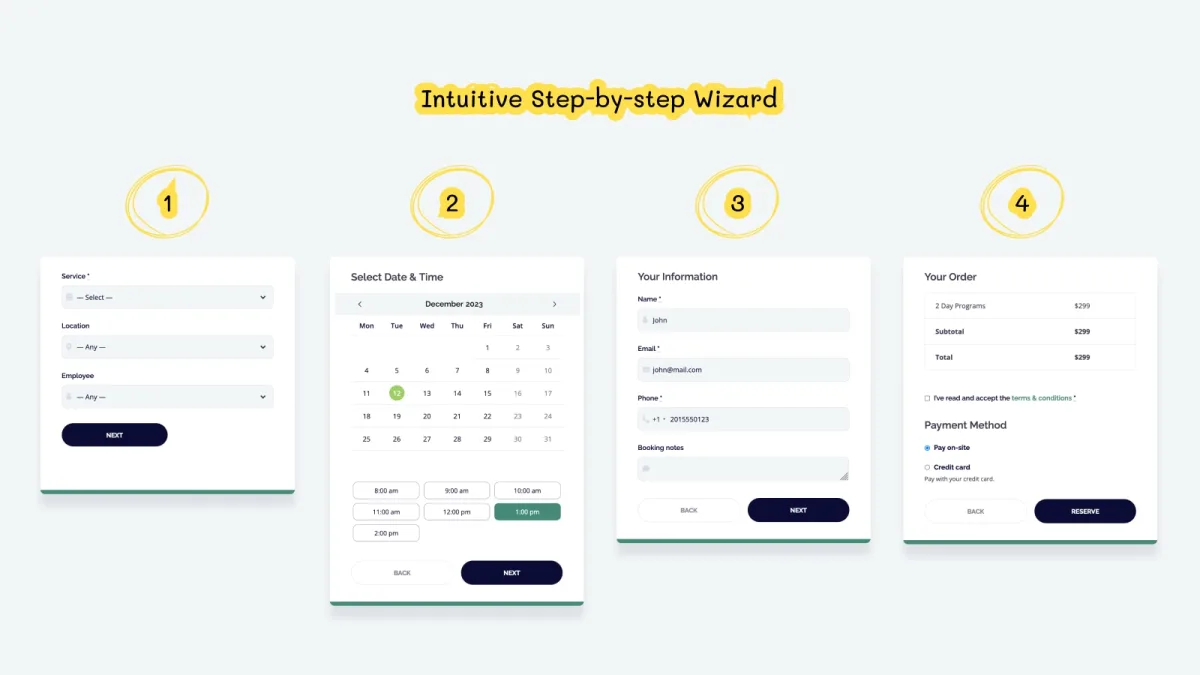
Verdict: One of the most generous free tiers on this list. MotoPress Appointment Booking Lite includes unlimited staff, unlimited locations, group bookings, client .ics calendar export, and on-site manual payment collection, all at no cost.
What the free version is good for
- Unlimited employees, locations, and services with no tier restrictions
- Group and class bookings with capacity settings
- Clients can download a .ics file to add their appointment to Google, Apple, Outlook, or Yahoo Calendar
- Automated email confirmations, reminders, and cancellation notices
- On-site or manual payment collection with deposit and coupon code support
- Gutenberg blocks, Elementor widgets, and Divi modules included
What becomes limited
- Online payment gateways (Stripe, PayPal, Apple Pay) require the Pro plan
- Two-way Google Calendar sync for staff availability management requires Pro
- Manual backend booking entry by staff requires Pro
When NOT to choose MotoPress Appointment Booking Lite
The client .ics export is not the same as a live two-way calendar sync: staff calendars do not automatically reflect bookings until you upgrade to Pro. If your team manages availability through Google Calendar and expects bookings to appear there automatically, you need the paid plan. Online card payments at booking time are also behind the Pro paywall. For solo practitioners who need a quick, clean setup without multi-location complexity, Simply Schedule Appointments or Booknetic are easier to start with.
Best for
Multi-location service businesses: medical practices, physiotherapy clinics, cleaning services, or any team with multiple staff who need individual scheduling and are comfortable collecting payment on arrival.
Pricing
- Free (Lite): WordPress.org (2,000+ active installs)
- Pro (1 Site): $49/year at motopress.com (online payments, two-way Google Calendar sync, backend booking)
Which Free Booking Plugin Should You Choose?
Here is a short decision guide:
- Need the most complete free system before deciding: Booknetic. The free version delivers a full working booking system, and the upgrade path is clear and affordable.
- Selling tickets to a dated event instead of booking appointments: Eventnetic. The free plan supports unlimited events and unlimited bookings, with no time limit.
- Simple scheduler for a solo service provider: Simply Schedule Appointments (free Basic edition).
- Service business that wants free two-way Google Calendar sync from day one: Booktics. The free plan includes bidirectional calendar sync, staff management, and automated email notifications.
- Multi-staff salon or clinic that just needs to collect appointments: Easy Appointments or MotoPress Appointment Booking Lite.
- Rental property or event space with a date availability calendar: Booking Calendar or WP Booking System.
- Smallest setup with the highest reliability score: WP Booking System (4.9 stars, 20,000+ installs).
If you plan to accept online payments eventually, Booknetic has the most direct upgrade path. The Standard plan at $99/year adds Stripe, PayPal, and WooCommerce to the booking system you already have running.
Looking for a broader comparison that includes premium booking tools across every category? Our full guide to the free and paid WordPress booking plugins covers both free and paid options side by side.
FAQ
Is there a truly free WordPress booking plugin?
Yes. Several plugins on this list offer a genuinely useful free tier for the core scheduling engine. Easy Appointments and MotoPress Appointment Booking Lite support multi-staff scheduling at no cost. Booknetic also has a free version available directly from the official Booknetic website. In most cases, "free" covers basic scheduling and email notifications, while payments and calendar sync require a paid upgrade. If you need to sell tickets to a dated event rather than book appointments, Eventnetic's free plan supports unlimited events and unlimited bookings.
What is the best free WordPress booking plugin overall?
Booknetic is the top pick for 2026. It delivers a complete, professional booking system in the free version: services, staff, time slots, email notifications, and on-site payment collection. You can start free and upgrade to add online payment gateways when your business is ready.
Can I accept online payments with a free booking plugin?
Most free booking plugins do not include Stripe or PayPal in the free tier. Booknetic and MotoPress Appointment Booking Lite both support on-site or manual payment collection in the free version. For online card payments processed at the time of booking, a paid upgrade is required across all plugins in this list.
Does Booknetic have a free version?
Yes. Booknetic has a free version available directly from the official Booknetic website.
What is the best free booking plugin for a salon or clinic?
Easy Appointments is a solid free choice for salons and clinics. It supports multiple staff, services, and locations with no cost. MotoPress Appointment Booking Lite is another strong option if you want on-site payment support in the free tier. For a full-featured system with a clear upgrade path, Booknetic is the better long-term choice.
Can I use a free WordPress booking plugin for a rental property?
Yes. Booking Calendar and WP Booking System are both designed for property-style bookings. Booking Calendar's free version includes Google Calendar import, .ics feed reading, and date-based availability display. WP Booking System has the highest user rating on WordPress.org (4.9 stars) and offers a simple two-month calendar that works straight out of the box.
Is there a free WordPress plugin for event ticketing instead of appointment booking?
Yes. The plugins above are built for appointment-style bookings, where one client books a time slot with a specific staff member. If you are selling tickets to a dated event instead, such as a concert, workshop, class, or screening, Eventnetic is a dedicated free WordPress event ticketing plugin. The free version supports unlimited events and unlimited bookings with no time limit, and paid plans starting at $99/year add recurring dates, online payments, and reserved seating.
Write once. Post to 26 networks.
- 26 social networks
- Schedule & auto-repost
- Runs inside wp-admin


