


WordPress is a CMS that has been around since 2003. According to W3Techs statistics for October 2026, 40.1% of all websites in the world are built on the WordPress CMS. WordPress itself was designed for blog sites, but with the help of plugins any WordPress site can be turned into a full-featured booking site.
I'm Sakhavat Ismayilov, founder of FS Code, the company behind the FS Poster plugin. I've been developing WordPress plugins for close to 10 years, and today I'll walk you through the tests and research I did on the 5 booking plugins I tested. Which plugin has which strengths, where each one is weak, how much they cost, and which plugin to pick in which situation: I'll explain all of that in detail in this post.
First, a note: "WordPress booking plugin" is a broad term. It covers appointment booking plugins, event booking plugins, seat booking, rental booking, WooCommerce booking plugins, hotel booking and so on. In this roundup I'll cover the plugins I tested and note which type of booking plugin each one is.
My test results in short: the best WordPress booking plugins
Before the detailed comparison, here is a short table.
| Booking plugin | Main strength | Main weakness | Price range |
|---|---|---|---|
Booknetic | Modern UI + rich functionality | The amount of customization makes it harder to manage | $45/ |
Amelia | Solid UX, modern UI | Not enough customization options and features | $49/ |
LatePoint | Low price and animated transitions | Missing features and customization, booking panel UX jumps | $79/ |
Bookly | Lots of features and customization options | Outdated UI, messy UX | $39/ |
Eventnetic | Event ticketing, seat reservation | Event presentation on the site, it doesn't generate event pages automatically | $99/ |
How I tested these booking plugins in WordPress
To keep this comparison from being marketing hype, I installed every plugin I mention either on a WordPress site I set up on my local machine, or I signed up for the sandbox version the plugins offer on their official sites and tested it there.
For each plugin I tested both the admin/desk side and the customer-facing booking interfaces, setting them up and checking how they work.
Setup: I set up each plugin and made real customer bookings, noting how long the process took, how hard it was, the difficulties, the downsides and what was missing.
Integrations and features: I researched and tested all the features and integrations of all 5 plugins, noting the standout features and the missing ones.
Performance: I watched each plugin's performance on both the admin/desk side and the customer booking side and took notes.
Price and value: Finally, based on all my notes and each plugin's pricing, I worked out the value each one delivers and built the ranking.
The 5 best WordPress booking plugins
- Booknetic
- Amelia
- LatePoint
- Bookly
- Eventnetic
1. Booknetic
Booknetic is an appointment booking plugin for WordPress. It first went on sale on CodeCanyon in 2019, so it has 7+ years of appointment booking experience. On CodeCanyon it has a 4.91-star rating from 471 reviews. Today they sell through their own official site.
There is a free version, also offered from their official site.
The current version of the plugin is 5.10.2 (released September 30, 2026); I installed it locally and tested it.
Booknetic's top 5 features
- Workflow automations: think of it as a mini Zapier. You can build trigger > action chains inside your booking system however you like. It's an interesting approach and one of the things that sets it apart from other plugins.
- Google Calendar integration: two-way Google Calendar sync. Your bookings are copied to Google Calendar, and the events you add in Google Calendar are read by Booknetic's time-slot algorithm and marked as busy.
- Recurring & group appointments: you can manage daily, weekly and monthly recurring appointments here. The downside: the feature would be more complete with recurring payments. Right now the customer either pays for the full package or only for the first booking. The rest is handled either from the customer cabinet or by staff.
- Smart custom fields: you can add any field to both the booking form and the customer. The strong point of the feature is that you can set conditions, for example when field A's value is > 18, hide field B, and so on.
- Payment gateways: they offer native integrations with 8 popular payment gateways, but in my view the more valuable one is the WooCommerce integration, which opens up both WooCommerce's payment gateways and its checkout plugins to you.
My impressions during testing
Unlike other WordPress plugins, Booknetic comes with a dedicated dashboard. That is, when you use Booknetic you don't see the standard WordPress menus. This can split opinions: some WordPress users want to see the WordPress interface they're used to and may not like this dedicated desk, while others find it convenient that unrelated plugin menus don't get in the way while they work with their customer base and booking records. My own view here is more positive; for plugins of this kind it's a different and useful approach. Especially when staff work in the desk, their attention isn't pulled to unrelated menus, they only see their own data.
When the admin dashboard first opened, I saw far too many menu items on the left. It scared me a bit at first glance.
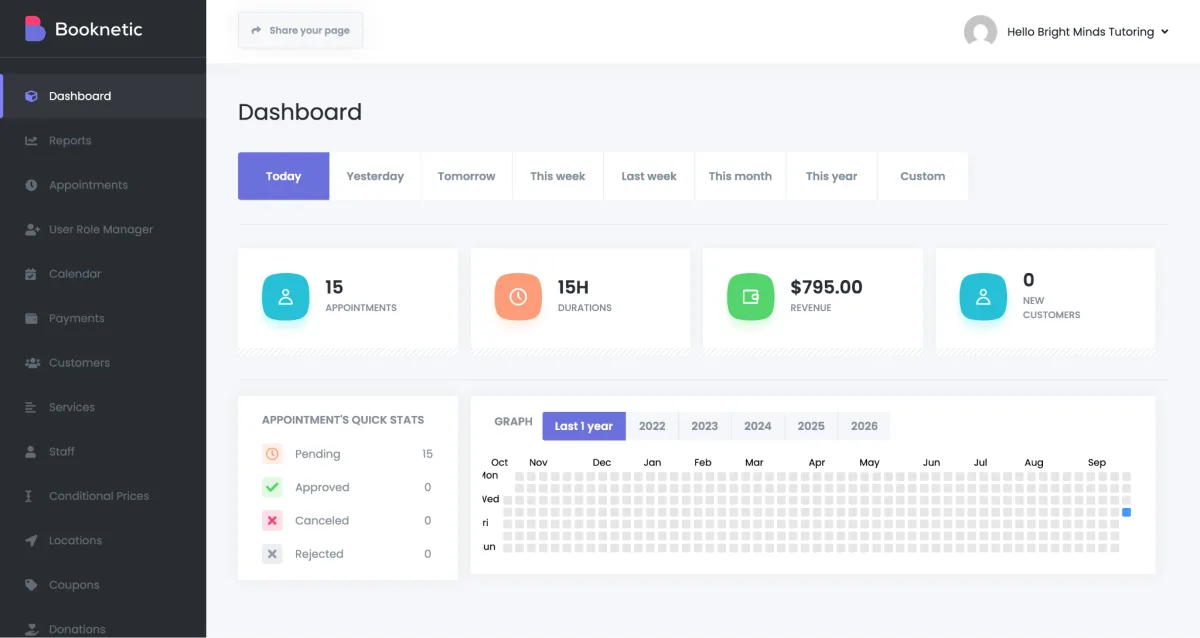
It makes the plugin look hard. Piling up this many menus shows that the plugin is functionally rich, but it also signals that using it won't be easy. It would be better if they grouped these menus neatly. For example, the menus that staff and admins use day to day could stay visible, while setup, customization and settings menus could be combined under one parent menu to make the sidebar simpler.
A setup wizard appeared as a guide right after the first setup. It had steps for Add location, Add service, Add staff and Set company information; I think a few more steps could be added. In systems this big, helpers like a setup wizard and a starting guide are very important.
I set everything up from the admin panel through to the booking panel, created real bookings and tested them.
What I liked
- I liked that the admin and staff desk is separated into a dedicated dashboard. Staff working in the desk end up isolated from WordPress's core and plugin menus, so they won't be distracted.
- It's a very rich plugin in terms of functionality and customization. If, like me, you start "digging into" the depths, settings and options of a plugin the moment you install it, you'll like Booknetic's depth of customization.
- The UI on both the admin and booking side is modern, I liked it. The booking panel in particular is split step by step, and each step can be customized. There's an Appearance module to customize everything in the booking panel from colors to fonts, and you can add custom CSS to shape it however you want.
- The workflow engine: one trigger can fire several actions at once (email + SMS + WhatsApp), and you can scope them with filters (location, staff, service, status).
- The customer panel gives real self-service: customers can rebook, reschedule and cancel on their own, which reduces the support load.
- Ease of translation. In Booknetic, apart from static texts, you can also translate data stored in the database: service names, location names, extra names, descriptions and so on. This is very useful for multilingual sites. I didn't see this in the other plugins, they only let you translate static texts. On top of that, in settings they give you a ready Translator tool for translating the texts end users see, which removes your dependence on third-party translation plugins.
What I didn't like
- The developers leaned more toward functionality, and UX for the admin and staff desk stayed in the background. Non-tech people in particular may struggle to set the plugin up.
- Refunds aren't accounted for in payments. It would be good if refunds were picked up automatically and bookings changed status accordingly.
- The Reports module is very basic, just 4 reports. For a system this big they could offer detailed reports and charts.
- They don't give a shortcode to list services on the front end in a grid, like a directory. Other plugins have this. In Booknetic you have to build it manually with Elementor or other page builders.
- The admin dashboards aren't mobile friendly. Instead they offer a mobile app, so you have to install the mobile app on your phone.
- To use SMS and WhatsApp notifications in workflows you need third-party tools (Twilio, Amazon SNS integrations). It would be better if they offered this themselves as a cloud solution, so the customer doesn't have to go elsewhere.
Price
Booknetic offers 4 plans, each with annual and lifetime versions. Annual prices range from $45 to $299, lifetime prices from $99 to $699.
My take on the price: I wouldn't put the plugin in the cheap category. I don't count it as mid-range either :) It's among the expensive ones. Of course the $45 starter plan can look attractive, and it can even be useful for small use cases, but the main features start from the higher plans.
Every plan comes with a 14-day unconditional money-back guarantee.
Who I recommend Booknetic to
Booknetic actually supports simple use cases too, but it's better known as a plugin where unusual customer requests can be customized and implemented. If you need a booking system with non-standard business processes, I recommend Booknetic. Or if you're a WordPress tech person who loves deep plugins with rich customization options, Booknetic is for you.
Who I don't recommend it to
If you need a simple booking calendar, or you're a bit far from technology and struggle to learn complex apps, Booknetic may not be the right fit for you. For that, check the simpler alternatives below or the simplest SaaS solutions, Calendly for example.
2. Amelia
Amelia is an appointment and event booking plugin for WordPress. It was first published on WordPress.org in 2018. It has 90,000+ active installs and a 4.6-star rating from 790 reviews. Amelia's biggest difference: alongside appointment booking, it offers event booking as an equally core feature, while many competing plugins have no event management at all or treat it as a secondary add-on.
The current version of the plugin is 9.9.1 (released October 2, 2026); I installed it locally and tested it.
Amelia's top 5 features
- Event and appointment booking in one: unlike other plugins, Amelia supports event booking built in.
- Google Calendar integration: like the other plugins, Amelia supports two-way Google Calendar sync.
- Refunds: there are native integrations with popular payment gateways like Stripe and PayPal. Unlike Booknetic, Amelia has a refund feature: when you cancel for a customer, you can also refund them directly from the admin desk, with no need to go to the payment processor's site.
- Resources feature: you can create shared resources, for example rooms, cars and so on, and during booking the time slots share availability according to these resources.
- Custom fields: you can add any field to the booking form. Unlike Booknetic, you can't apply conditions between fields here. Also unlike Booknetic, custom fields in Amelia are only for bookings; you can't add custom fields for customers.
- Recurring appointments & events: Amelia supports recurring appointments and events. You can accept weekly, daily and monthly recurring appointments and events. Like Booknetic, Amelia has no recurring payment support either. This is a general weakness of the market, and there's no plugin that supports it.
My impressions during testing
Amelia adds its own menu inside WordPress; it doesn't have a dedicated dashboard like Booknetic. The UI is very neat, simple and beautiful. Especially in the latest v9, Amelia has improved further in UX and UI. I'd say UI/UX is Amelia's biggest advantage.
Unlike Booknetic, the dashboard menu looks rich, with lots of widgets and analytics graphs.
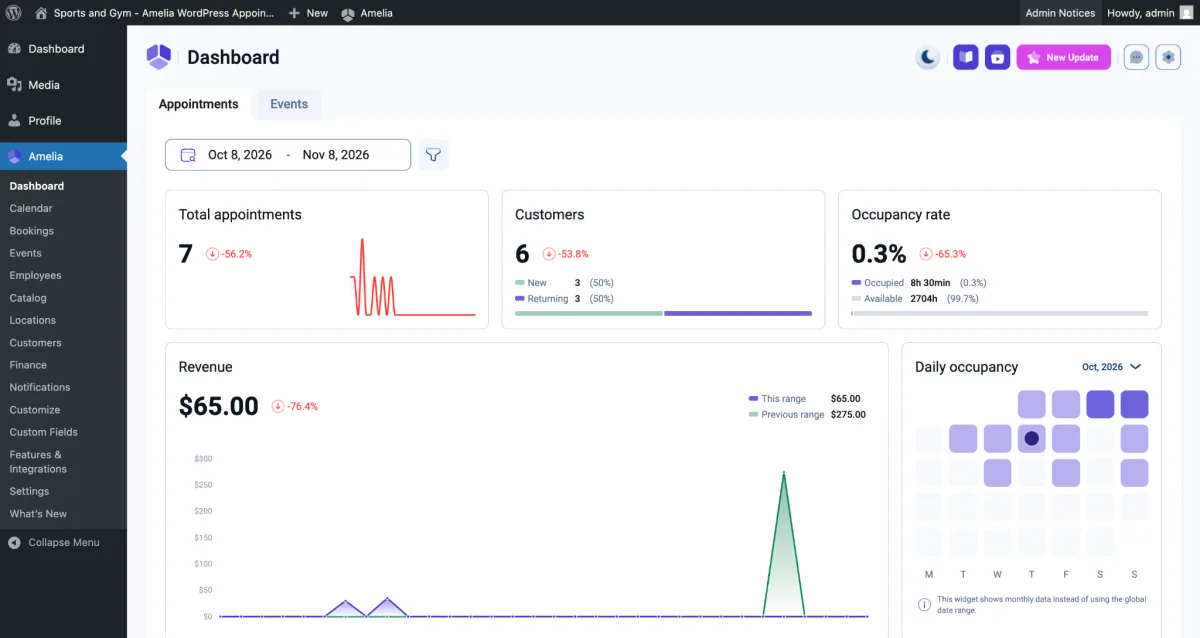
The dashboard had a day/night UI mode switcher, which I liked a lot. It's an unusual feature in WordPress, but for people like me who love a dark background it can be useful.
In my opinion it would have been better if they had kept the plugin to one purpose. Right now Amelia is built for both appointments and events, and this makes the system needlessly complex and heavy. Imagine you only need simple appointment booking, but Amelia also loads event booking functionality onto your site.
Functionality and customization options aren't many. From what I saw, Amelia's developers went for looks and presentation more than functionality.
What I liked
- The UI and UX are built beautifully and neatly, everything is clear. The admin side in particular is smooth, and everything is where it should be UX-wise. Your staff will learn fast while working in the dashboard.
- They provide a ready WP shortcode to list service catalogs on the front end. [ameliacatalogbooking] lists all services in a directory format, with various filters and search options. In Booknetic you have to build this manually with Elementor.
- Refunds feature: a feature the other booking plugins don't have. You can cancel bookings directly in the admin dashboard and also refund online payments.
- Notifications & reminders: they supply ready-made notification and reminder templates, so you don't have to write a template from scratch for every event.
- Customer panel: customers can see and manage their bookings. The customer panel's UI in particular looks simple and nice.
- It's translatable. Like Booknetic, in Amelia you can translate both static texts and the core data written to the DB into any language. I consider this a useful feature for multilingual sites.
What I didn't like
- I didn't like that they added events to the plugin and complicated it. It could have been a separate add-on or a separate plugin, so the sites of users who don't need event booking wouldn't be loaded with extra code.
- It lags behind in features and customization. Sometimes the features and integrations we'd call must-haves aren't in Amelia. For example: gift cards/vouchers, extras for events, rating/review options for bookings, multi-booking, multi-day services and so on. Some fairly basic features or customization options are simply not in the plugin.
- Notifications & reminders: compared with Booknetic's workflow module it looks very basic. It does let you set simple templates, but it closes the door on more varied customizations.
- The front-end booking panel has very few customization options. For example, it doesn't let you reorder the booking steps or hide unnecessary steps. Amelia basically works on the principle of "we built one thing and you use it as is". That is both its strength and its weakness. The strength is that it keeps the UI beautiful and the UX simple. The weakness is that when you want somewhat different customization or functionality, Amelia can't handle it.
- The admin dashboard mixes with the WordPress menus. My view is that for plugins that provide a desk like this, a dedicated dashboard is more useful.
Price
Amelia offers 4 plans, each with annual and lifetime versions. Annual prices range from $49 to $399, lifetime prices from $249 to $899.
My take on the price: like Booknetic, Amelia is in the expensive booking plugin category, and the $49 basic plan can only be useful for small use cases, since the main features start from the higher plans.
Every plan comes with a 15-day unconditional money-back guarantee.
Who I recommend Amelia to
Amelia is for simpler use cases, for customers looking for a beautiful UI and a simple management panel.
Who I don't recommend it to
If the booking process you need is different, if it will require a lot of customization or a lot of functionality, I don't recommend Amelia.
3. LatePoint
LatePoint is a WordPress appointment booking plugin. Created in 2018, the plugin currently has 100,000+ active installs on WordPress.org and a 4.9-star rating from 103 reviews. LatePoint's main difference is its pricing model: all features are the same on all paid plans, the only difference is how many sites you can use it on.
The current version of the plugin is 5.7.4 (released October 5, 2026); I signed up for the sandbox and tested it there.
LatePoint's top 5 features
- Recurring and group bookings: like the other plugins, LatePoint supports daily, weekly and monthly recurring bookings. You can also create group-enabled services and take group bookings.
- Google Calendar integration: two-way Google Calendar sync is available, so the bookings you make are added to your Google Calendar automatically.
- Payment gateway integrations: native integrations with popular payment gateways like Stripe and PayPal. Refunds aren't supported in LatePoint. There's also a WooCommerce integration that indirectly opens the way to other payment gateways.
- Customer panel: it gives customers a front-end cabinet with a neat UI and UX. It can be added to any page with a WordPress shortcode. Booknetic and Amelia have this too, but LatePoint goes one step further and brings chat into the customer panel, so customer and staff can chat around a booking.
- Custom fields: you can add custom fields to the booking form. The field types are somewhat limited, for example: radio buttons, multi-option checkboxes, multi-upload field, link, email input and so on.
- Multi staff & locations: you can create any number of staff and locations, with no limit on either the free or the other plans.
My impressions during testing
Like Booknetic, LatePoint also has a dedicated admin dashboard. The UI/UX looks normal, and its advantage over the other plugins is that transitions in LatePoint are more dynamic and animated.
Right after install, a setup guide opens. A simple 4-step setup guide. Of course this isn't enough to set up the full system, but it's useful for getting started.
The dashboard menu isn't very rich, it consists of just 2 statistics widgets.
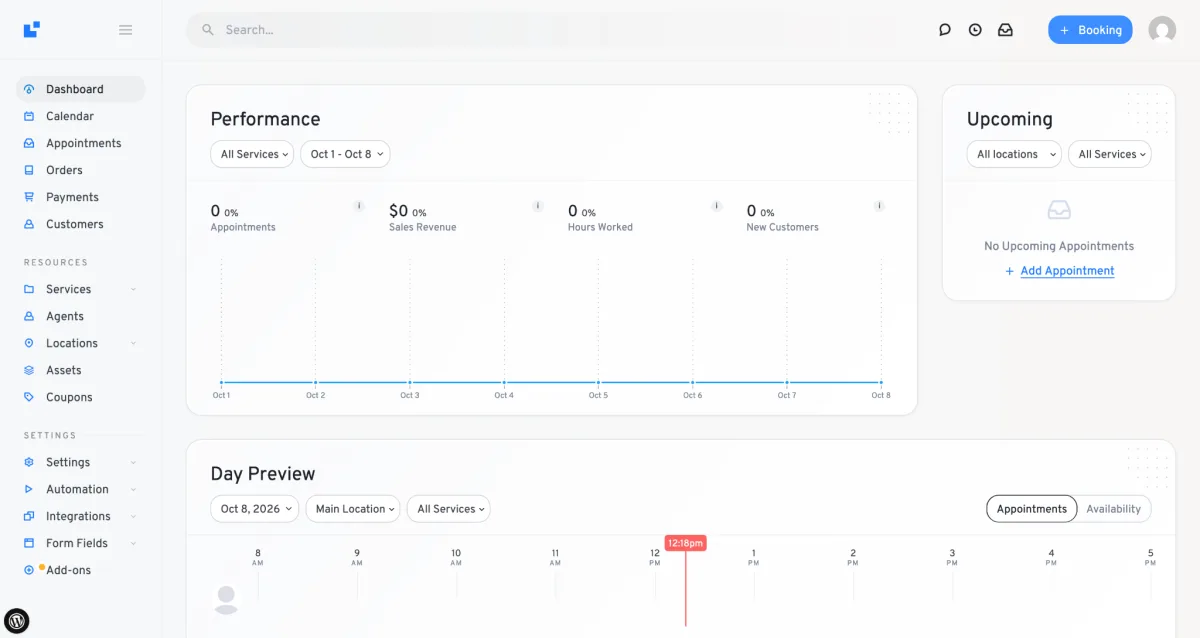
Overall I didn't like this UI much; the monotonous light colors will cause eye fatigue for your staff after a while.
The plugin has a sticky search in the top bar. It's an interesting approach: it searches across the whole system. It can help speed up staff's work. But on sites with a large database it may cause speed and performance problems.
The plugin is built on an add-on logic. Every function is a separate add-on. That's good in my assessment, because as a developer I also look at things through a performance lens. Booknetic works this way too, unlike Amelia. The result is that you only activate the add-ons you need, your site isn't loaded with code you won't use, and it stays light.
In functionality it lags far behind both Booknetic and Amelia. LatePoint is a somewhat basic, lightweight booking plugin. Customization options are few too. In return, it's the cheapest booking plugin on the market. They sell the plugin at a price well below the market.
What I liked
- The UX and the transitions between pages are animated, dynamic and smooth
- Because of the add-on logic, the plugin stays light and puts little load on your site
- Workflow automation: like Booknetic, LatePoint uses workflow automation instead of the basic Notification & Reminder found in Amelia and other plugins. In my opinion this is one of LatePoint's most valuable features.
- Simple with few functions: the plugin is basic and doesn't have many functions, so it's comfortable to use and easy to learn.
- Dedicated dashboard and a well-grouped menu: they separated the admin and staff desk from WordPress and grouped the main sidebar menu very correctly, in line with business logic. Menus useful for daily use stay at the top, and everyday use is comfortable.
- Chat in the customer cabinet. One of LatePoint's rare features that almost none of its competitors have: chatting between customer and staff is possible.
What I didn't like
- Booking panel UX: one of the things I seriously disliked here. As the booking panel moves step by step, its dimensions change. It causes jumps; the panel takes a different width and height on every step, sometimes stretching, sometimes shrinking. Especially during mobile testing this makes the customer's booking process harder.
- In the admin UI the monotony and poor choice of colors tires the eyes and causes discomfort after long use. The designer put a lot of effort into the admin dashboard, UI components were added as if designing a beautiful website, and the result makes everyday use hard and tiring.
- There are many gaps in features and customization. Even in the existing features and modules it lags behind its competitors because of their simplicity, low functionality and limited customization options.
- No mobile app: unlike Booknetic and Amelia, they don't offer a native mobile app.
- Not fully translatable: you can translate your static texts with third-party translation tools. But unlike Booknetic and Amelia, you can't translate the data added to the DB here. So if you build a multilingual site, the static texts in your booking panel will be translated, but DB data like service name, description, location name and so on won't be.
Price
LatePoint's biggest advantage over its competitors is that it's very cheap. $79/year with all functionality included. The plans differ only by the number of sites. The lifetime plan costs $199, again with everything included.
My take on the price: considering the limited functionality and customization options, I find this low price fairer.
Every plan comes with a 14-day unconditional money-back guarantee.
Who I recommend LatePoint to
If you need a cheap and simple booking calendar, and you want your booking form to work in an unusually animated, dynamic way, LatePoint is the right choice for you.
Who I don't recommend it to
If you need customization and more functionality, if you need a mobile app, or if you'll release your site in many languages, I don't recommend LatePoint.
4. Bookly
Bookly is a WordPress appointment and event booking plugin that has been in development since 2014. Its free version is published on WordPress.org, with 60,000+ active installs and a 4.4-star rating from 583 reviews. Bookly has been on the market for 12 years, one of the oldest booking plugins, which means both trust and a risk of aging.
The current version of the plugin is 28.5 (released October 6, 2026); I signed up for the sandbox and tested it there.
Bookly's top 5 features
- Recurring and group bookings: like the other plugins, Bookly supports daily, weekly and monthly recurring bookings. You can create services that support group booking. In the booking panel, for group bookings the customer can choose the number of participants if others will join alongside them.
- Google Calendar integration: two-way Google Calendar sync is available. Bookings sync to Google Calendar automatically.
- Notifications feature: it isn't workflow automation like Booknetic's, but it has one advantage over the other competitors: when writing email templates you can use loops like for/each. It may rarely be needed, but it's an unusual feature that none of the other competitors have.
- Many front-end forms: besides the booking panel there are widgets to add to the front end such as a customer panel, staff panel, search form and service form.
- Custom fields: the custom fields feature is smart like Booknetic's and lets you create fields for both bookings and customers.
- Tax & invoices: you create the invoice layout yourself and customize it as you like with an HTML editor and shortcodes. There's also the ability to create tax/VAT for the booking checkout.
My impressions during testing
Bookly was created in 2014 and, in terms of modernity and UI/UX, it has stayed in 2014. The developers mainly focused on functionality and customization options, and literally neglected UI/UX. Whether in the admin panel dashboard or in the booking panel, everything is in a very outdated design and everything is very cluttered. For a non-developer, finding their way around here is genuinely hard.
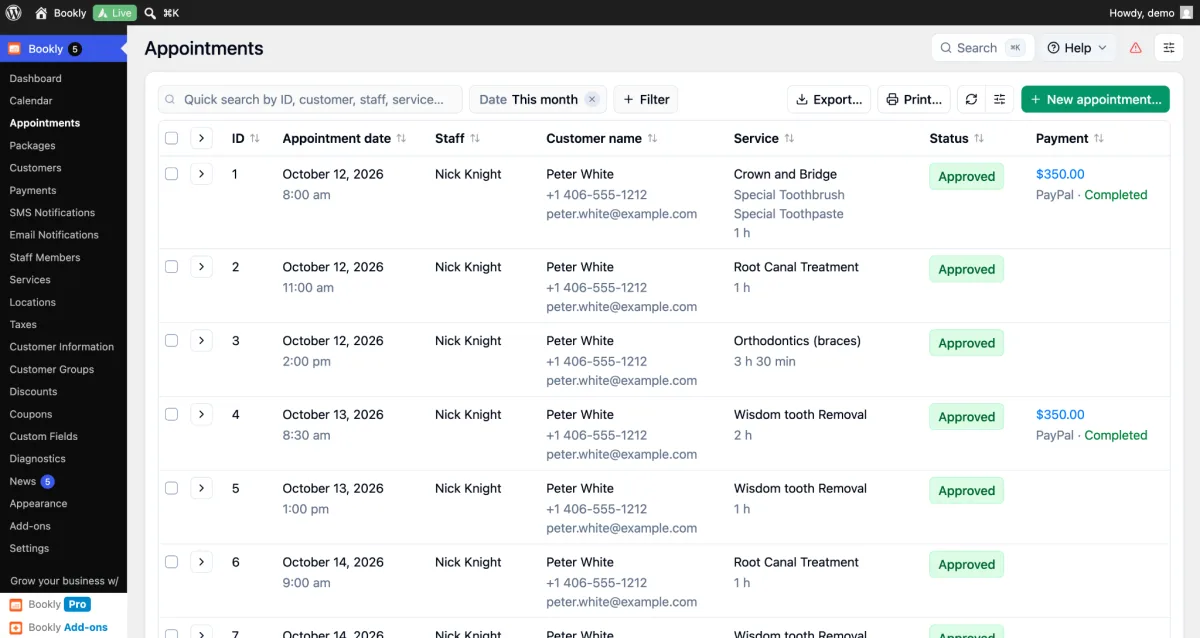
There's no dedicated dashboard; it sits directly inside WordPress, with tons of menus dumped into the sidebar, plus menus I don't need: News, Bookly Pro, Addons, Cloud ads and so on.
The plugin comes with an add-on logic. In my view that's a plus, and by enabling only the add-ons you need you can keep your site's performance high.
Its other plus is that it has lots of add-ons, customization options and functions.
What I liked
- Because of the add-on logic, with only the needed add-ons active the plugin stays light and puts little load on your site
- Lots of add-ons, functionality and customization options. Besides the high number of features, almost every feature has plenty of customization options built in.
- Bookly Cloud: they offer certain functions as a cloud solution, for example SMS, WhatsApp, Stripe, SMTP, cron tasks and so on. For non-tech people who aren't developers this removes the dependence on third-party tools and keeps the customer inside Bookly. The Cloud functions are credit-based and work on a pay-as-you-go basis.
- Notifications & reminders: you add simple notification templates, separately for email and for SMS. There's no workflow automation, trigger > actions logic like in Booknetic or LatePoint.
- Booking panel customization: the booking panels are step by step and have lots of customization options. Custom CSS can be added. The only thing missing is being able to turn off unnecessary steps or reorder the steps.
- Custom fields feature: you can create smart fields, and custom fields can be added for customers too. The only shortcoming is that smart conditions only exist on fields added to the booking. You can't build conditions on customer custom fields.
What I didn't like
- The booking panel UI isn't good. It has a very old UI; service, staff and location are chosen with HTML selects. In other plugins these are neat card-box UI elements.
- Admin panel/desk UI/UX: very old, everything is WordPress's standard UI components, it isn't user friendly and everything is very cluttered.
- Mobile app: there is a mobile app, but when I tested it I saw it's just a webview. In my view a webview is no different from opening the site directly.
- Not fully translatable: only static texts can be translated. Dynamic data saved in the DB can't be. For example service names, descriptions, location names, tax labels and other dynamic data will stay in one language.
- No dedicated admin dashboard. This means staff working in the desk will be distracted by unrelated WordPress menus and will see things they don't need.
Price
Bookly offers 3 plans, each available as an annual subscription and as a lifetime license.
Annual prices: $39-$299
Lifetime prices: $99-$699
My take on the price: the price is roughly the same as the other competing plugins. It gives a lot of functionality but lags in UI/UX. If the developers improved the UI/UX and brought it up to date, I think the prices would be fairer.
Every plan comes with a 30-day unconditional money-back guarantee.
Who I recommend Bookly to
If you're a developer, UI/UX doesn't matter much to you, you're used to and like the WordPress UI and you're against a new UI entering WordPress, then you'll like Bookly, and its rich functionality and customization options will serve you well.
Who I don't recommend it to
If you care about UI/UX, if along with rich functionality the comfort of using it matters to you, if its presentation and modernity matter to you, then I don't recommend Bookly.
5. Eventnetic
Eventnetic is a WordPress event booking & ticketing plugin created in 2026. Its free version is on WordPress.org; its install and review counts are still far behind the other plugins on this list because it's new. But as a developer who likes innovation, I wanted to give space in this roundup to a new product that deserves a place on the list.
The current version of the plugin is 1.4.0 (released October 5, 2026); I installed it locally and tested it there.
Eventnetic's top 5 features
- Recurring & package events: you can register recurring events. You can add recurring occurrence dates to each event: daily, weekly, monthly and yearly dates. By creating a package you can offer different dates as a bundle at a different price.
- Seat reservation: there are very few plugins that can do native seat reservation in WordPress. What I liked about this feature in Eventnetic is that creating a seat map felt very easy, and I saw a sector function: you drop a sector onto the map, then go inside it and design it as a separate map. This could make it possible to build large halls and stadiums. Frankly though, I'm skeptical about how well seat reservation for large stadiums or halls can perform in WordPress.
- Workflow automation: like Booknetic and LatePoint, workflow automation is built in here too. As a developer I love this automation; there's even webhook support, which lets you pass data automatically to various CRMs or to systems like Zapier.
- Ticket types & PDF tickets: Eventnetic lets you create any number of tickets, each with a different price, capacity, sale window, deposit and so on. Most importantly, you can create a different PDF for each ticket. You build the ticket PDF with an HTML editor using ready shortcodes, and after booking the customer can download this PDF, or you send it by email with workflow automation.
- Custom forms: things I want to highlight in this feature: you can build a form easily with drag & drop, and most importantly, fields have a per-attendee option. When you select it, the custom field is asked separately for each attendee in the customer's booking.
- Payment integrations: I tested the native Stripe and PayPal integrations; there's also a WooCommerce integration, and during testing I saw it work like this: when the customer finishes the booking, a virtual WC product is created automatically and added to the cart, and the customer is redirected to the WooCommerce checkout. So the checkout + payment part happens through WooCommerce, and you get access to WC's entire plugin ecosystem. When the order is completed in WC, it's automatically confirmed in Eventnetic via API.
My impressions during testing
As I mentioned above, Eventnetic is a new plugin, created in 2026. I like new things, that's my personal opinion. Eventnetic is designed very modern in UI and UX, and I really enjoyed their dashboards. It reminds me a bit of Shopify's dashboard, which is a very modern dashboard; in my view, Shopify's dashboards have the best UX in the world.
Like Booknetic and LatePoint, a dedicated dashboard greets us here too. It seems the trend in plugins of this kind is moving toward dedicated dashboards and away from WordPress.
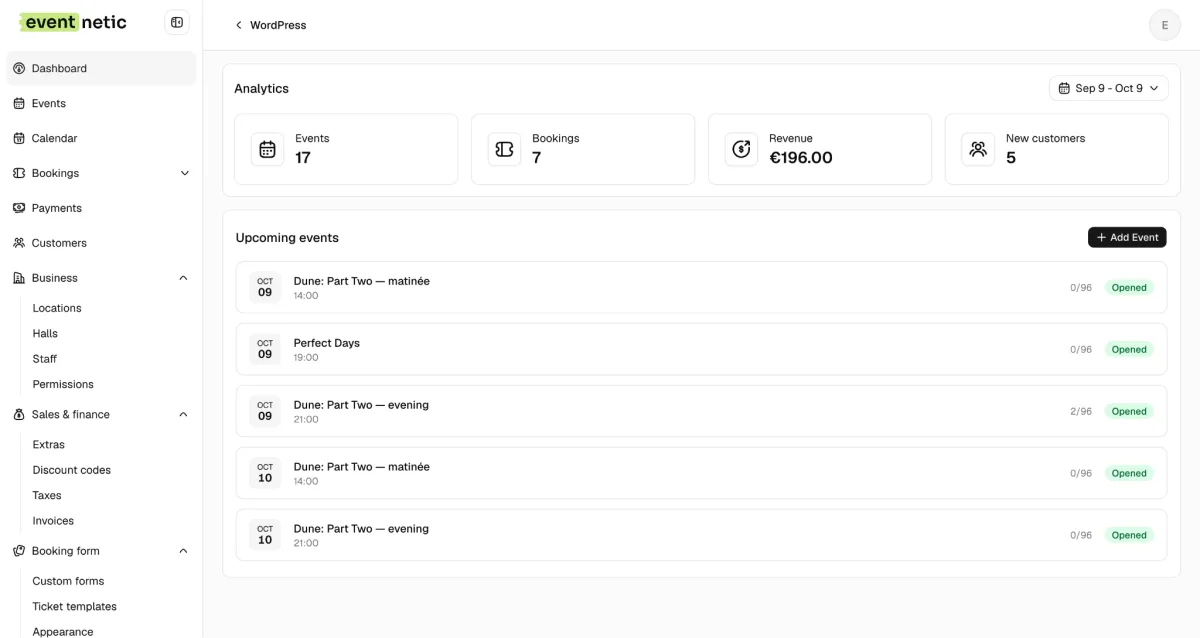
The sidebar menus are grouped correctly and for ease of use.
The plugin isn't add-on based, and I didn't fully like that side of it. In my view, splitting systems this big into add-ons is the better approach: people load only what they need onto their sites, and I consider that right performance-wise for plugins this big.
On top of that, despite being newly released, Eventnetic currently promises more functionality than most event ticketing plugins on the market. Honestly, I tested about 90% of the functionality; it isn't just dry functionality, but I did run into minor bugs sometimes. Since it's a new plugin, these are acceptable to me, but running into these errors may look negative to you.
What I liked
- I really liked the UI/UX, especially the admin dashboard looks very neat. The booking forms are somewhat simple, but there are customization options through the Appearance module, plus custom CSS support.
- Workflow automation: it works on a trigger > action logic, and above all, having a webhook action is very valuable. Alongside webhooks there's email, SMS, WhatsApp and Telegram support. Here you can automate both notifications to customers and staff and integration with other systems.
- Front-end blocks: besides the booking panel there's an event catalog view that lists events in a grid, and an event calendar view, where I saw monthly, weekly, daily and list views.
- Waiting list: during testing this feature caught my attention in particular. I set the event's capacity to 5, reserved all 5 spots and filled the event. When I went back in, the system said the event was sold out and the waiting list form opened. Those who filled in the form appear in the admin panel, and when I canceled 1 of the 5 bookings, it automatically emailed the first customer in the waitlist queue so they could book.
- Permissions: an interesting feature that caught my attention. You can give your staff permissions module by module. Each module has different permission types, like view, edit and so on. And you can define who has which access based on staff/user role.
- Custom form feature: they've done everything needed for a custom form feature. There are custom fields for both the booking and the customer, and conditions can be set.
What I didn't like
- The booking panel stays simple in its UI. Even though you can customize the colors and add custom CSS, there's no way to change the order of the steps, they're fixed.
- No mobile app. In my view, for apps of this kind having a mobile app for iOS and Android is very important, especially to make check-in at the door easier.
- No add-on logic: performance-wise, if they split this many features into add-ons the plugin would be lighter, because everyone would load only the add-ons they need onto their site.
- Not fully translatable: the plugin's static texts are translatable, but data saved in the DB can't be translated. For example event name, ticket name, description and so on. This will be left half-done on multilingual sites.
- Event pages aren't created automatically in WP. The plugin developers put the main weight on handling the ticketing side. They left the presentation side more to the site admin. True, when creating an event there's a checkbox, and when you tick it, it automatically creates a WP page for the event, but this page stays plain, and you're forced to edit this page yourself with Elementor or other page builders.
Price
Eventnetic offers 3 plans, each available as an annual subscription and as a lifetime license.
Annual prices: $99-$299
Lifetime prices: $199-$599
My take on the price: the price is roughly the same as the other plugins, but considering they're a new plugin, I think it would be better if they offered discounted prices for their first customers through discount campaigns.
Every plan comes with a 14-day unconditional money-back guarantee.
Who I recommend Eventnetic to
If you need to automate event booking & ticketing, or you need a seat reservation solution, I recommend Eventnetic.
Who I don't recommend it to
If you need an appointment booking solution, Eventnetic isn't the right fit for you.
Conclusion
Each of these 5 plugins is a top plugin I picked in the WordPress booking category. What you need to make your choice is knowing what matters to you. If functionality and modern design matter to you, Booknetic is our top recommendation. If you need basic functions but more user-friendliness, then Amelia. If you need an event ticketing & seat reservation plugin, then I recommend using Eventnetic. If your budget is small and you're looking for a cheaper, less functional solution, you can look at LatePoint.
Write once. Post to 26 networks.
- 26 social networks
- Schedule & auto-repost
- Runs inside wp-admin


