


A document library plugin turns a folder of scattered PDFs, spreadsheets and Word files into something visitors or clients can actually search, filter and open. That matters for law firms sharing case files, schools and training sites distributing handouts, HR teams running an internal policy hub, agencies with client-facing deliverables, and WooCommerce stores selling downloadable products. Plain WordPress media library links don't do any of that on their own.
This comparison is based on each plugin's official documentation and pricing pages, not hands-on testing.
- Document Library Pro by Barn2 combines three layout styles (table, grid, folder), access control, and full-text search inside documents on its Advanced plan, in one plugin.
- WP Document Library by WooNinjas pairs a free core plugin with Stripe-based document selling and LearnDash integration elsewhere in its feature set, though WooNinjas' pricing page doesn't say which tier includes either one.
- WP Document Revisions is the one to pick if you want version control for an internal team and don't want to pay anything.
- Document Embedder is a good lightweight, mostly-free option for simple front-end libraries.
- FileBird Document Library is another lightweight, mostly-free option, built on your existing FileBird folders.
- Download Monitor is built around download tracking and gated access rather than library browsing, and fits best when tracking and access rules matter more than layout.
Disclosure: FS Poster has a content partnership with Barn2. That relationship, not an independent test, is part of why Document Library Pro is featured first below, alongside its own documented feature set.
Quick comparison table
| Plugin | Best for | Starting price | Free version | Standout feature |
|---|---|---|---|---|
Document Library Pro (Barn2) | A polished, full-featured document library | $149/ | Yes (Lite) | Table, grid and folder layouts with instant search and filters |
WP Document Library (WooNinjas) | Client portals, LMS resource hubs, selling documents | $49/ | Yes | Stripe-based document selling and LearnDash integration |
WP Document Revisions | Internal teams that need version control | Free | Yes | Check-in/ |
Document Embedder (bPlugins) | Letting visitors preview files without downloading | Free, or $47/ | Yes | Four in-page viewers, including a flipbook mode |
FileBird Document Library (NinjaTeam) | Sites already organizing media with FileBird folders | Free, or $89 one-time (Pro add-on) | Yes | Turns existing FileBird folders into document categories |
Download Monitor | Download tracking and gated files | Free, library view from $90/ | Yes | Download analytics plus form-gated access rules |
Prices were checked on each vendor's official pricing page or WordPress.org listing on 6 November 2026, in USD. Several vendors show introductory or sale pricing that can differ from the renewal price. Each plugin's facts box below has the details.
1. Document Library Pro by Barn2
Best for: teams that want a dedicated, professional-looking document library without stitching together multiple plugins.
- Starting price
- $149/year, 1 site (Essentials)
- Free version
- Document Library Lite on WordPress.org
- Paid plans
- Essentials $149 to $399/year, Advanced $199 to $599/year, 1 to 50 sites
- Lifetime
- From $749 (Essentials, 1 site)
- Requirements
- WordPress 6.1+, PHP 7.4+
- WordPress.org
- 4.1/5 from 12 reviews, 4,000+ installs (Lite)
Document Library Pro builds a searchable library of any file type using a dedicated Document post type. Libraries can display as a sortable table, a grid, or folders, with instant search, filtering and file-type icons. The Advanced plan adds search inside PDF, Word and Excel files, password or role-based access control, a lead-capture form before download, version control, and auto-expiring documents.
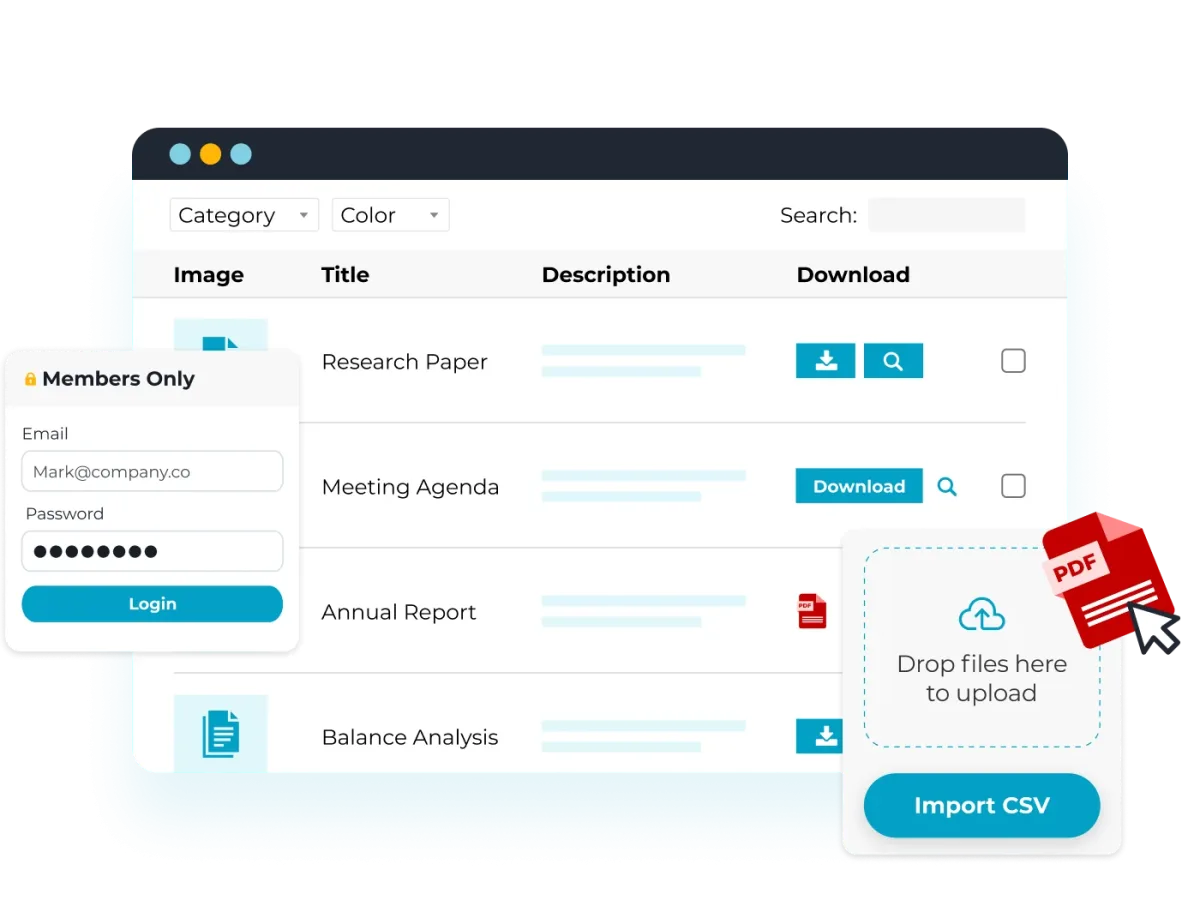
Document Library Pro's table layout, from Barn2's official product page.
Strengths
- Three layout styles (table, grid, folder) cover most use cases without custom development.
- The Advanced plan searches inside documents, not just filenames. Among the plugins compared here, only WP Document Revisions also does this, and only for PDF, DOCX and ODT files.
- Free setup and a front-end demo make it easy to evaluate before buying.
- 30-day money-back guarantee on the WordPress plugin.
Limitations
- The free version, Document Library Lite, offers only table and grid layouts with search, sorting and category filters. Folders, bulk upload, access control and version control need a paid plan.
- Scanned or image-only files can't be searched even on the Advanced plan.
- Document previews are limited to certain file types.
2. WP Document Library by WooNinjas
Best for: client portals, course or membership sites that need a LearnDash-aware library, and sites that want to sell individual documents.
- Starting price
- $49/year, 1 site (sale price)
- Free version
- Core plugin, no updates or support
- Paid plans
- $49, $79 or $129/year for 1, 3 or unlimited sites
- Renewal
- Not stated on the pricing page
- Lifetime
- $179, $249 or $399 for 1, 3 or unlimited sites
- Requirements
- WordPress 6.1+, PHP 7.4+
- WordPress.org
- Not listed
WP Document Library lets you build a front-end library from uploads, existing media library files, or external URLs, with list, grid or folder layouts, search and filtering. It includes password protection, role-based access, a front-end management dashboard for logged-in users, a LearnDash integration for course-linked resources, and a Stripe integration for selling document or library access. WooNinjas' pricing page doesn't state which tier includes the Stripe selling or LearnDash features, so confirm that detail directly if either is central to your use case. If your site already runs WooCommerce to sell files or courses, it's worth checking how a library like this fits alongside a dedicated WooCommerce plugin stack rather than treating the two as competing checkout paths.

WP Document Library's feature graphic, from WooNinjas' official product page.
Strengths
- Free tier includes the core plugin itself, not just documentation, with no site-license requirement.
- Stripe-based document selling and a LearnDash integration are unusual for a plugin in this category, though WooNinjas' pricing page doesn't specify which tier includes either feature.
- Frontend library management means logged-in users can upload their own documents without admin access.
Limitations
- Not distributed on WordPress.org. It's sold and supported directly from WooNinjas, so there's no independent install/rating count to check.
- The free tier excludes technical support and security updates.
3. WP Document Revisions
Best for: internal teams that need version control and an audit trail more than a polished public-facing library.
- Starting price
- Free
- Free version
- Yes, the whole plugin
- Requirements
- WordPress 5.9+ and PHP 8.0+ in the sidebar, 5.0+ and 7.4+ in the install notes
- WordPress.org
- 3.7/5 from 23 reviews, 2,000+ installs
WP Document Revisions is a fully free, open-source plugin for document management and version control. Every file keeps a document history, documents can move through custom workflow states, and a check-in/check-out system creates an audit trail for collaborative editing. Access can be set to private, password-protected, or public, and files can be stored outside the public web root for extra security. Newer versions add full-text search inside PDF, DOCX and ODT files, a REST API, and WP-CLI support.
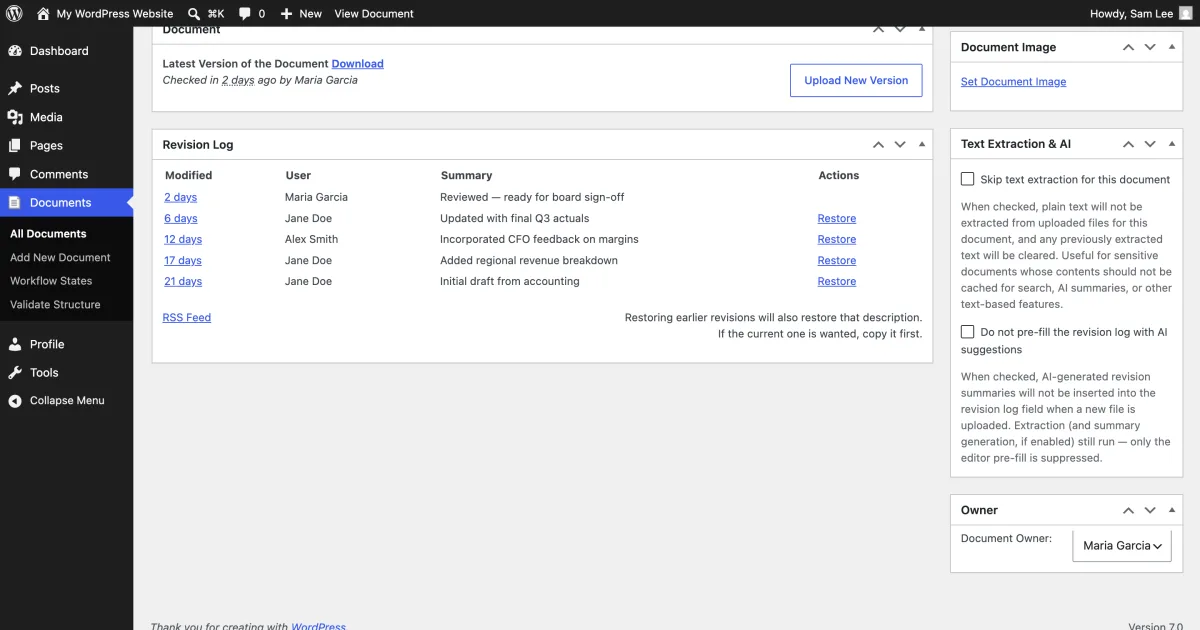
A document's revision log in WP Document Revisions, from the plugin's WordPress.org listing.
Strengths
- 100% free, with no paid upgrade tier to steer you toward.
- Check-in/check-out workflow and document history are built for teams editing the same files over time, not just storing finished ones.
- Files can be kept outside the public web root for better access control than a plain uploads folder.
Limitations
- No visual grid or table browsing layout out of the box. It's closer to a document management system than a showcase library.
- Smaller install base (2,000+ active installs) and a 3.7/5 rating from 23 reviews, so less public track record than some paid alternatives.
- Best fit is internal/team use rather than a public-facing resource hub.
4. Document Embedder by bPlugins
Best for: letting visitors read a document in the page itself, without a download step.
- Starting price
- Free, or $47/year for 1 site (Pro)
- Free version
- Yes, 5 documents per library
- Paid plans
- Pro $4.99/month or $47/year, 1 site
- Lifetime
- $119 one-time, 1 site
- Refund
- 14 days
- Requirements
- WordPress 6.5+, PHP 7.1+
- WordPress.org
- 4.9/5 from 120 reviews, 9,000+ installs
Document Embedder focuses on in-page viewing rather than a downloadable archive. It supports 16+ file types, including Google Docs, through four viewer modes: Google viewer, PDF.js, a flipbook-style viewer and a slider. Files can come from the media library, a direct URL, or Google Drive, Dropbox and Box. The free version includes a document library layout with search, filtering and sorting, a download counter, and a Gutenberg block plus an Elementor widget.
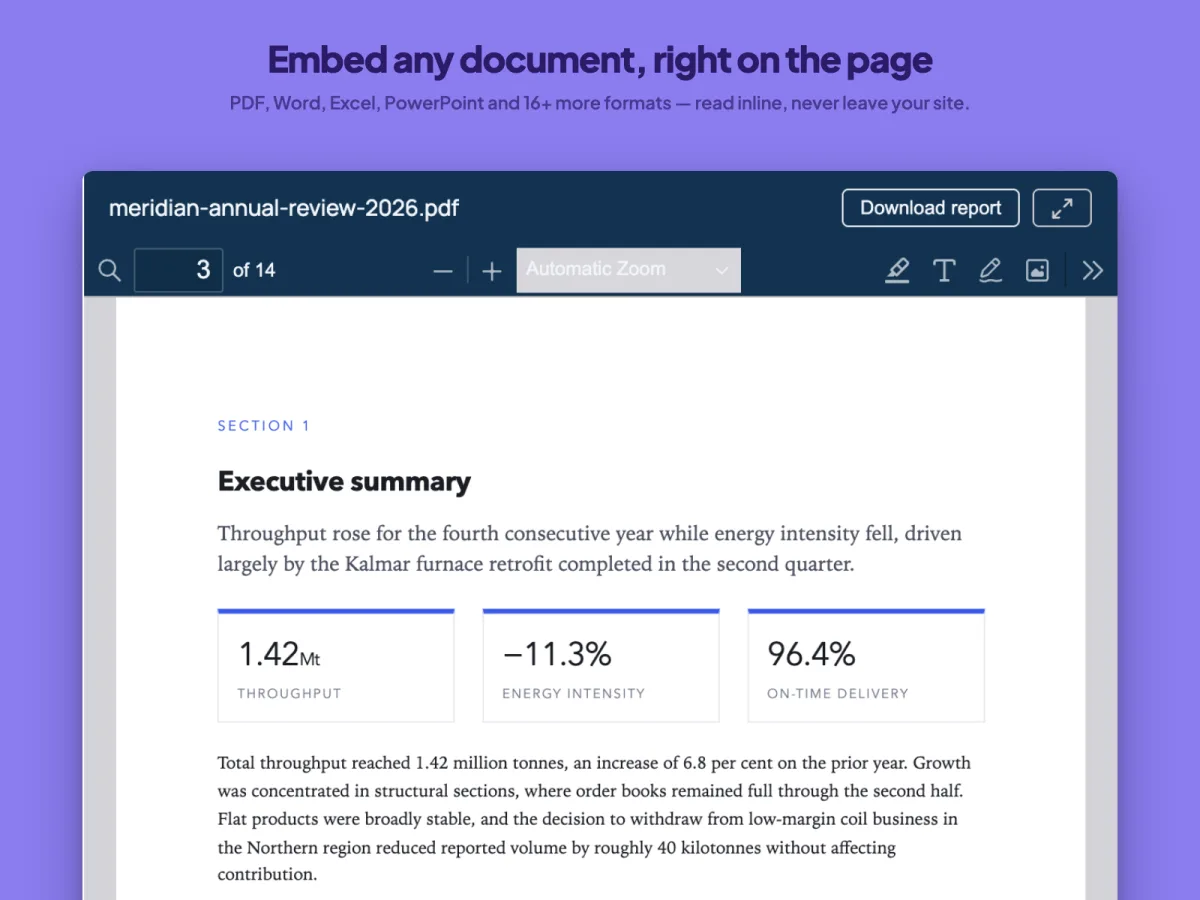
A PDF opened inline with Document Embedder, from the plugin's WordPress.org listing.
Strengths
- Four embedded viewer styles, including a flipbook mode, go beyond a simple download link.
- Strong free-tier feature set for a plugin with a free/Pro split: 9,000+ active installs and a 4.9/5 rating from 120 reviews on WordPress.org.
- Cloud-source support (Drive, Dropbox, Box) without needing a separate sync add-on.
Limitations
- Free version caps each document library at 5 documents. Pro removes the cap.
- Table and folder layouts, access control, and the lead-capture/email-gate feature all require the Pro upgrade.
- Free-tier download insights only show today's figures, with no history or CSV export.
5. FileBird Document Library by NinjaTeam
Best for: sites that already use FileBird to organize the media library and want a quick front-end document gallery on top of it.
- Starting price
- Free, or $89 one-time (Pro add-on)
- Free version
- Yes, with the free FileBird plugin 5.0+
- Paid plans
- Pro add-on $89 one-time on CodeCanyon
- Updates and support
- Future updates, 6 months of support
- FileBird Pro
- Not required
- Requirements
- WordPress 5.0+, FileBird 5.0+
- WordPress.org
- 4.9/5 from 8 reviews, 5,000+ installs
FileBird Document Library is a free add-on for the FileBird folder-organizer plugin. It turns existing FileBird folders into document categories and displays them as a grid or list gallery via a Gutenberg block, with sorting by name, date or size, per-page limits, and download buttons. The free version supports unlimited Gutenberg blocks but only one shortcode-based library. A separately sold Pro version adds nested folder trees, breadcrumbs, sidebar navigation and custom search scope.
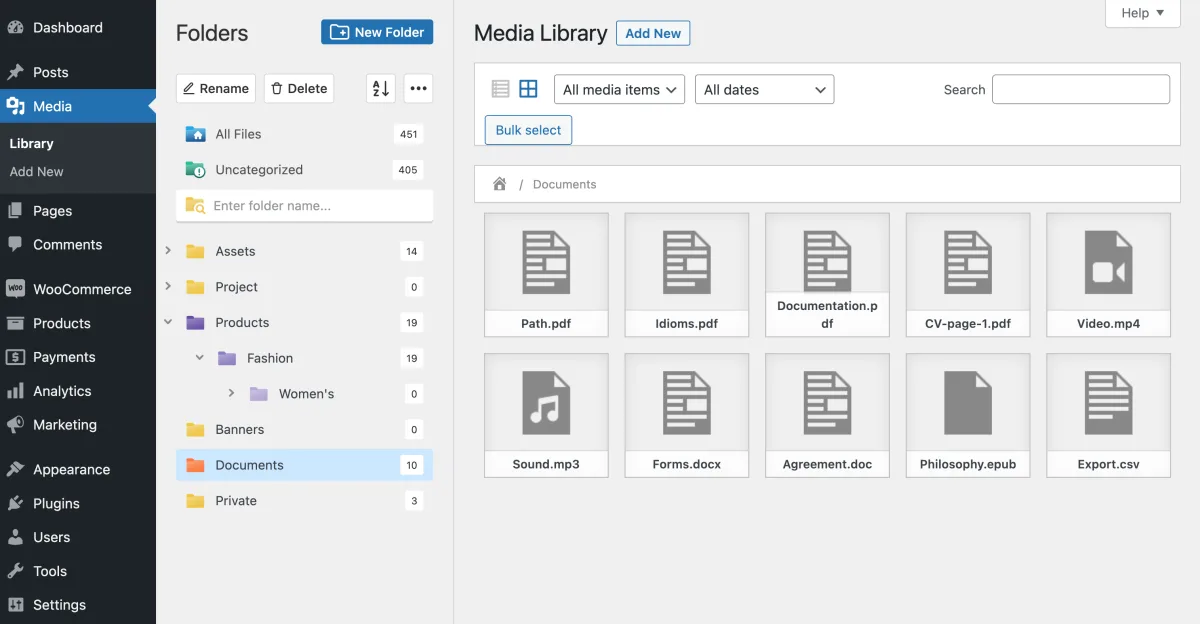
A Documents folder in the WordPress media library, from FileBird Document Library's WordPress.org listing.
Strengths
- If you already use FileBird to organize uploads, this turns that existing folder structure into a public library with no new taxonomy to set up.
- Unlimited Gutenberg blocks on the free version covers most single-page use cases.
- Straightforward file-type support (PDF, Word, PowerPoint, Excel, ebook formats and more) through the existing media library.
Limitations
- Requires the separate FileBird plugin (version 5.0+) as a dependency. It isn't a standalone library plugin.
- The free version is limited to one shortcode library, which matters if you need the gallery in more than one place via shortcode.
6. Download Monitor
Best for: sites where tracking downloads and gating files behind a form matters more than a browsable library layout.
- Starting price
- Free, library view from $90/year (3 sites)
- Free version
- Download management, no library view
- Basic
- $48 first year, then $138/year, 1 site
- Popular
- $90 first year, then $258/year, 3 sites, adds the library
- Complete
- $139 first year, then $398/year, 5 sites, adds access rules and form locks
- Lifetime
- Lifetime deal available
- Requirements
- WordPress 6.4+, PHP 7.4+
- WordPress.org
- 4.5/5 from 525 reviews, 80,000+ installs
Download Monitor is a long-running, free download management plugin with a large install base (80,000+ active installs, 4.5/5 from 525 reviews). The free version lets you insert tracked download links into posts and pages and view basic reporting. Paid add-ons layer in a Document Library Manager (available from the Popular tier upward), a downloading page, CSV import/export, and Amazon S3 and Google Drive file hosting. The Complete tier adds rule-based access by user, role, IP, date or daily download count, plus form locks for WPForms, Gravity Forms, MailChimp and Contact Form 7.
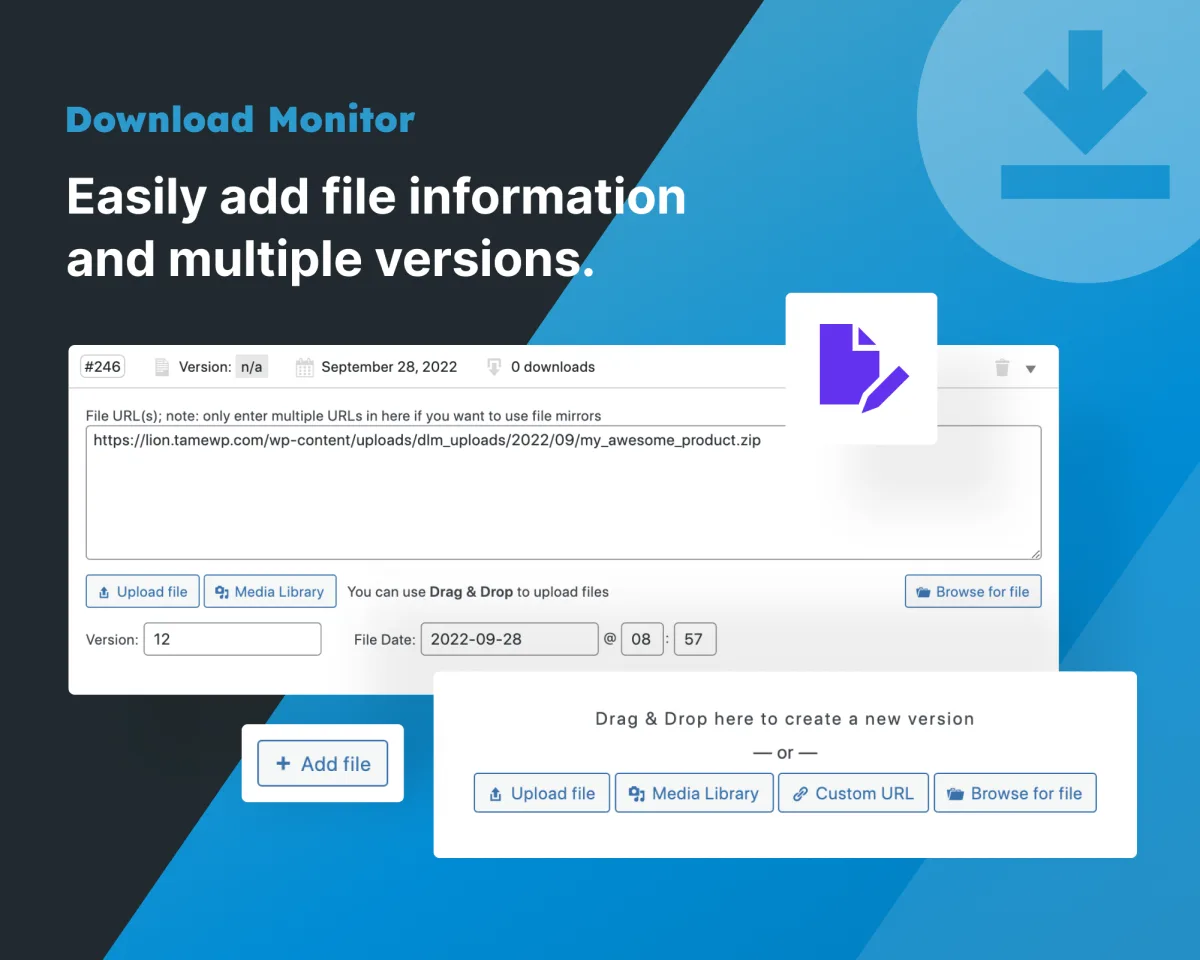
Adding a trackable download in Download Monitor, from the plugin's WordPress.org listing.
Strengths
- The largest install base and review count of any plugin on this list that publishes those numbers on WordPress.org.
- Form-gated downloads (email capture before download) are a built-in add-on on the Complete plan rather than a third-party workaround.
- Rule-based access by role, IP, date or download count, also on the Complete plan, goes further than most library plugins' access controls.
Limitations
- The core free plugin is a download manager first. The browsable "document library" layout isn't included at all until you buy the Popular add-on tier or above, so the Basic tier alone won't get you a library view.
- Add-on pricing is tiered and renews at a notably higher rate than the introductory price (for example, the Complete bundle renews around $398/year after the first year).
- Less suited to sites that want a single all-in-one plugin rather than a base plugin plus add-ons.
How to choose
- If you want one plugin that looks and works like a dedicated document library out of the box, choose Document Library Pro. It combines table, grid and folder layouts, access control, lead capture and, on its Advanced plan, in-document search.
- If you need a free starting point with the option to sell documents or tie into LearnDash later, WP Document Library is a good freemium pick.
- If the priority is version control for a team editing the same internal files, WP Document Revisions does that for free and doesn't try to be anything else.
- For a simple in-page viewer, Document Embedder's free tier is enough for a small library.
- For sites already standardized on FileBird, its Document Library add-on needs the least setup.
- If tracking who downloaded what, or gating a file behind a form, matters more than the library's visual layout, Download Monitor is built around that. Pick at least the Popular tier for the library view, and Complete for form locks.
Whichever plugin you choose, these libraries tend to hold files that matter: contracts, policies, client deliverables, course materials. It's worth pairing the one you pick with a solid backup routine. Our best WordPress backup plugins roundup covers the current options if you don't already have one in place. And if your library is part of a bigger internal workflow with tasks and deadlines attached to each document, our best WordPress project management plugins roundup is a natural next read.
Write once. Post to 26 networks.
- 26 social networks
- Schedule & auto-repost
- Runs inside wp-admin


