


A WordPress site without a working backup is a bet against bad luck — a failed update, a server crash, a hostile login, or a clumsy edit on a Friday afternoon. The day a backup actually matters is never the day you planned for. Picking the right backup plugin is one of the most underrated maintenance decisions a site owner makes.
I shortlisted seven of the most-installed, most-trusted WordPress backup plugins on the market in May 2026 and reviewed each one's backup model, restore flow, pricing, documentation, WordPress.org data, changelog and public reputation. BlogVault — the plugin that ends up at #1 — also went through a hands-on test on a real WordPress site (auto-install, WooCommerce, two phases of backups, change detection, and a UX-level pass through Restore, Staging, Migration and Download). The other six were evaluated through current official documentation, pricing pages, WordPress.org listings, changelogs and public reputation signals. Every entry below makes that distinction explicit so you can tell editorial commentary from documented capability.
Short version: BlogVault is my top recommendation for serious sites and WooCommerce stores that want offsite, server-side, "set and forget" backups. UpdraftPlus suits owners who want a real free tier and their own remote storage. Jetpack VaultPress Backup is the natural pick for sites already in the Automattic ecosystem. Duplicator is the migration specialist. Solid Backups, WPvivid and BackWPup round out the list with strong niches of their own.
How I chose and compared these plugins
Six dimensions drove the ranking: backup engine (full or incremental, on-origin or vendor-side, frequency), restore story (selective restore, test-restore, broken-WordPress recovery), bundled migration and staging, pricing transparency and renewal cost, reputation and maintenance signal (active install count, current rating, recent changelog), and fit for the listicle's category.
BlogVault sits at #1 because the architecture, the hands-on drill in the linked review, the pricing transparency and the public reputation all line up. Where I had hands-on evidence I used it. Where I did not, I labeled the claim as researched.
Quick comparison table
| Plugin | Backup engine | Free tier | Entry paid plan, billed yearly | Best for |
|---|---|---|---|---|
BlogVault |
Server-side, incremental, offsite |
No (7-day full trial) |
$99/ |
Business sites, agencies, WooCommerce |
UpdraftPlus |
On-site (PHP), incremental on Premium |
Yes (basic backups, BYO storage) |
$70/ |
DIY owners who want to keep costs low |
Jetpack VaultPress Backup |
Real-time, offsite on Automattic infra |
No |
$4.95/ |
WooCommerce / Automattic users |
Duplicator |
On-site, package-based + scheduled (Pro) |
Yes (manual backups + migration) |
$79/ |
Migration-heavy and developer workflows |
Solid Backups |
On-site, incremental, includes 20 GB cloud storage |
No (free trial via SolidWP) |
$99/ |
SolidWP ecosystem and longtime BackupBuddy users |
WPvivid |
On-site, incremental on Pro |
Yes (full backup + restore + BYO storage) |
$49/ |
Hobbyists and small sites on a budget |
BackWPup |
On-site, scheduled, full archive |
Yes (free version is generous) |
$49/ |
Owners who already trust the WP Rocket / WP Media team |
Pricing reflects official vendor pages I checked 6–9 May 2026. UpdraftPlus and Jetpack VaultPress Backup pricing can vary by region, currency and tax rules; check the official pricing pages from your locale for the exact amount you would pay. Promotional discounts run at every vendor and are not shown.
1. BlogVault — best overall for serious WordPress sites
Best for: business-critical WordPress sites, agencies managing 5–50+ client sites, and WooCommerce stores that want hourly customizable backups.
BlogVault is a managed WordPress backup, staging and migration platform — the agent plugin runs on your site, the heavy work (snapshot, store, restore, stage, migrate) runs on BlogVault's infrastructure.
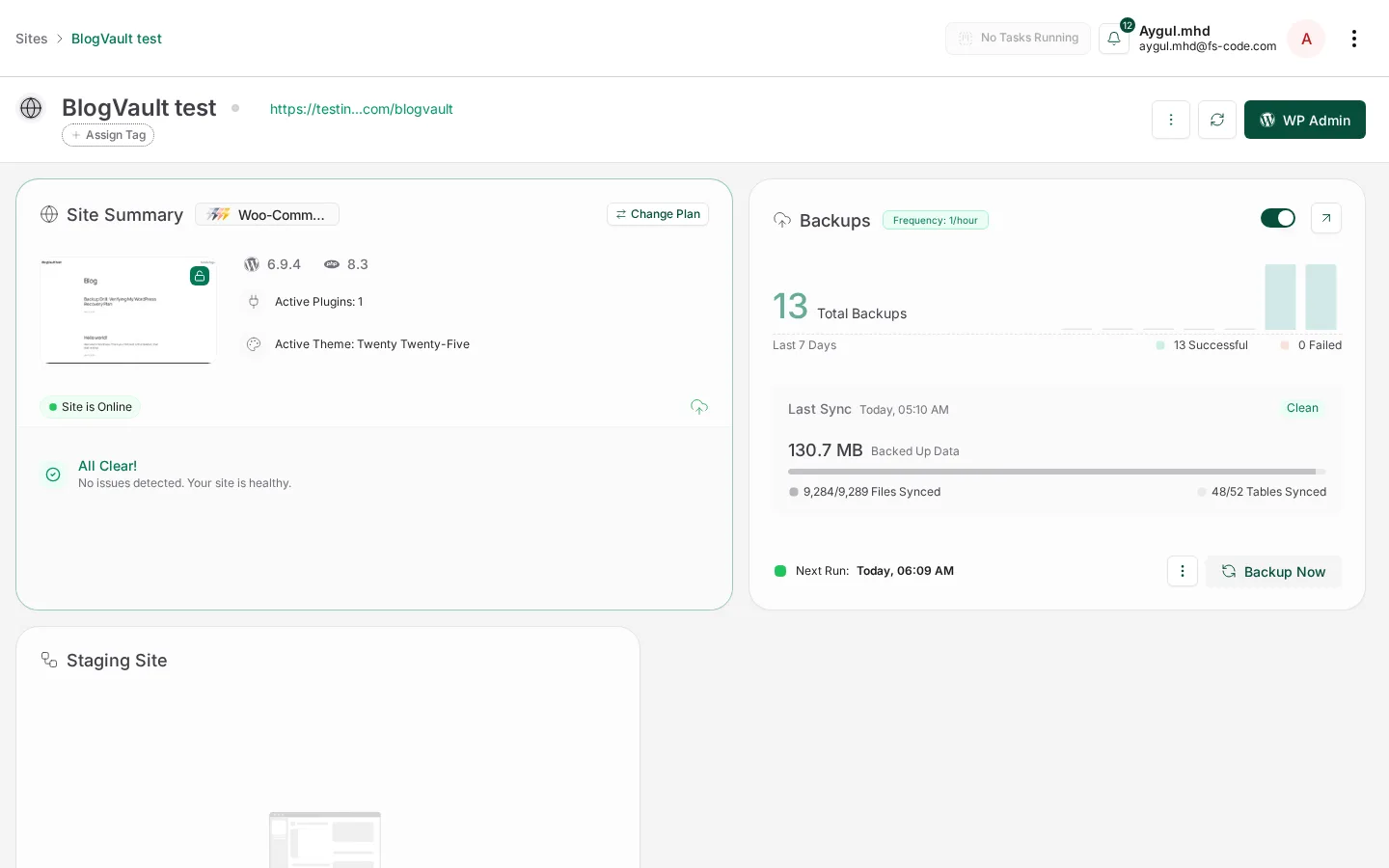
Hands-on test basis: I ran a full drill on a real WordPress site. The dashboard remotely installed and activated the agent using only my admin credentials, then I attached a WooCommerce backup plan and tested in two phases: two manual backups on a vanilla install, followed by 11 more scheduled snapshots after I activated WooCommerce and imported 18 sample products. Combined: 13 successful incremental backups, 0 failed, with the snapshot size growing roughly 76 MB → 130 MB once WooCommerce + product data was active. Change detection fired between the manual snapshots after I edited a published post. I walked Restore, Staging, Migration and Download at the UX level but did not trigger the destructive end. Real-time WooCommerce order-level capture, multisite restore, malware-cleanup outcomes and the "lower server load than PHP-side plugins" claim were not measured and remain vendor-claimed in the linked review.
Main strengths
- Auto-install via WP admin credentials worked first-attempt — useful for agencies.
- 13 incremental backups completed cleanly across vanilla WordPress and WooCommerce + 18-product phases; change detection captured an edit between snapshots.
- Bundled staging and free 1-click migration on every paid Backup plan.
- Hourly customizable WooCommerce backups with up to 365-day retention.
- Pricing transparent between the public pricing page and in-app plan picker.
- Actively maintained, recent healthy changelog.
Main limitations
- Annual-only billing; no monthly option.
- No permanent free backup tier (UpdraftPlus and WPvivid both have one).
Pricing snapshot (1 site, billed yearly; pricing-page wording, re-verified 9 May 2026):
- Personal — $99/yr. Backups every 24 hours, 30-day retention, 20 GB, 1-day staging, 1-click restore + migration.
- Business — $299/yr. Every 12 hours, 90-day retention, 50 GB, multisite up to 25 subsites, 30-day staging, priority support.
- WooCommerce — $499/yr. Every 1 hour (customizable) — what BlogVault markets as "real-time" for store data; 365-day retention, 100 GB, multisite up to 100 subsites, 6-month staging.
- 14-day refund window; 7-day no-credit-card trial via in-app onboarding.
Who should choose it: owners and agencies who want backups, staging and migration handled on the vendor's infrastructure. The deeper hands-on writeup is in the BlogVault review.
2. UpdraftPlus — best DIY-friendly backup plugin

Best for: site owners who want a real free tier, are comfortable wiring up their own remote storage, and prefer to keep costs predictable.
Research basis: official UpdraftPlus pricing page, WordPress.org listing and changelog, public reputation across long-form reviews and a decade of WordPress.org reviews.
UpdraftPlus is the most-installed dedicated backup plugin in the WordPress ecosystem (3 million+ active installs). The free version covers manual and scheduled backups, restore, and remote storage to Dropbox, Google Drive, Amazon S3, FTP and a few others. Premium adds incremental backups, one-click migration, automatic pre-update backups, encrypted database backups, multisite, more storage destinations and priority support.
Main strengths
- A genuinely usable free tier — many small sites never need to pay.
- Bring-your-own remote storage; works well if you already have an S3 bucket or a Drive policy.
- Mature ecosystem (a multi-site management console, clone/migrate add-on).
Main limitations
- Backups run inside your WordPress install (PHP) — CPU, memory and execution-time pressure on shared hosts and on very large sites.
- Premium pricing scales by license seats and gets expensive at the agency tier.
- No bundled staging environment in the BlogVault sense.
Pricing snapshot (May 2026): Personal starts at $70/yr for up to 2 sites. The paid tier ladder is Personal ($70/yr, 2 sites) → Business ($95/yr, 10 sites) → Agency ($145/yr, 35 sites) → Enterprise ($195/yr, unlimited sites, 1 GB storage) → Gold ($399/yr, unlimited sites, 50 GB storage, multi-site management console). Pricing can vary by region, currency and tax rules, so the checkout amount may differ by locale. 10-day money-back guarantee. Free version available without site limits on basic features.
Who should choose it: owners with their own remote-storage destination who want the most cost-efficient way to back up a few sites without paying for managed infrastructure.
3. Jetpack VaultPress Backup — best for the Automattic / WooCommerce ecosystem
Best for: WooCommerce store owners and Jetpack-equipped sites who want real-time, offsite backups on every plan.
Research basis: official Jetpack VaultPress Backup pricing page (USD locale), WordPress.org listings for the Jetpack and Jetpack Backup plugins, public reputation.
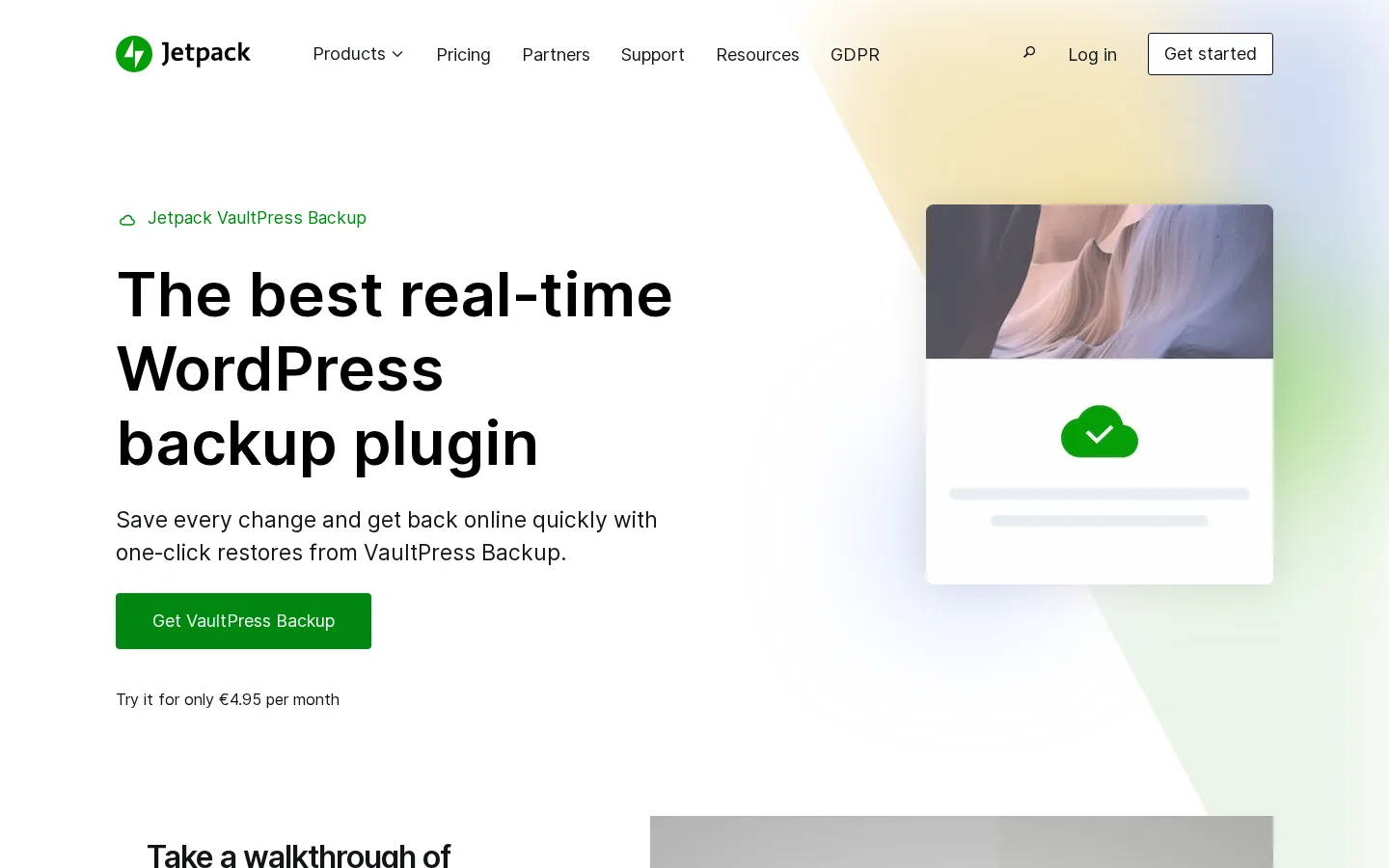
Jetpack VaultPress Backup includes real-time offsite cloud backups, one-click restores (including from the Jetpack mobile app when WordPress itself is offline), site cloning, site migration, a 30-day activity log, and 10 GB starting backup storage on every paid plan. The Security Bundle layers Jetpack Scan and Akismet on top.
Main strengths
- Real-time backups on every paid plan — not gated behind the top tier.
- Backups run on Automattic infrastructure, so origin-server impact is minimal.
- 30-day activity log gives a forensic record alongside the snapshots.
- Mobile-app-triggered restore when WordPress is offline is a real disaster-recovery feature.
Main limitations
- Renewal pricing roughly doubles after the first year.
- 10 GB starting storage is tight for media-heavy sites.
- Less of an agency UX than BlogVault — no multi-site, multi-client dashboard in the same sense.
Pricing snapshot (May 2026, billed yearly, USD locale): VaultPress Backup (standalone) $4.95/mo first year, $9.95/mo regular. Security Bundle $9.95/mo first year, $19.95/mo regular (bundles VaultPress Backup + Jetpack Scan + Akismet). No standalone monthly billing — annual contracts only. Pricing may vary by region and currency; the Jetpack pricing page renders in your locale.
Who should choose it: WooCommerce store owners who already run Jetpack, sites on WordPress.com Business / Commerce plans, and owners who prefer a single Automattic vendor relationship.
4. Duplicator — best for migration-heavy and developer workflows
Best for: developers, freelancers and agencies who clone, migrate or stand up new WordPress sites every week.
Research basis: official Duplicator pricing page, WordPress.org listing and changelog, public reputation across long-form reviews.
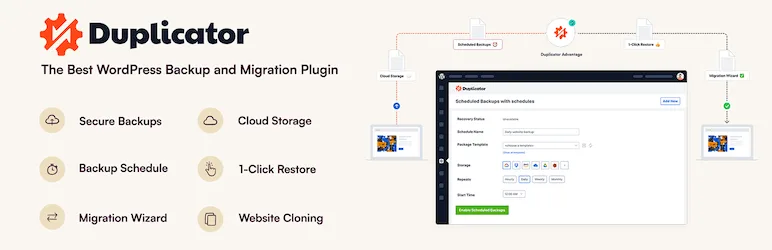
Duplicator has 1+ million active installs on its free Lite plugin and a 4.9/5 rating across 4,800+ reviews on WordPress.org. Its "package + installer" model — bundle the site into a single archive plus a PHP installer, drop both onto a new server, run the installer — is why most freelancers reach for it first. Duplicator Pro adds scheduled backups, recovery points (1-click rollbacks), cloud storage integrations (Dropbox, Google Drive, OneDrive, Amazon S3, Cloudflare R2, Wasabi, Backblaze B2 and more), staging, multisite migration, and a streamlined 2-step installer.
Main strengths
- Cleanest migration UX in the category; works on an empty destination.
- Capable free tier — full manual backups and migrations without paying.
- Recovery Points (Pro) give near-instant rollbacks for failed updates.
- Wide cloud storage support including modern object stores.
Main limitations
- Managed nightly backups are not Duplicator's core strength.
- No bundled malware scan or activity log.
- Backups run on your origin server (PHP).
Pricing snapshot (May 2026, billed yearly): Basic $79/yr (2 sites), Plus $199/yr (5 sites), Pro $399/yr (20 sites, staging + multisite), Elite Bundle $599/yr (100 sites, Activity Log). 14-day money-back guarantee.
Who should choose it: developer-flavored teams who treat sites as portable artifacts. Pair with BlogVault or Jetpack VaultPress for the managed-nightly-backup half of the story.
5. Solid Backups — best for the SolidWP ecosystem
Best for: owners already on the SolidWP stack and longtime BackupBuddy users.
Research basis: official SolidWP pricing and product pages, long-form coverage of the BackupBuddy → Solid Backups rebrand.
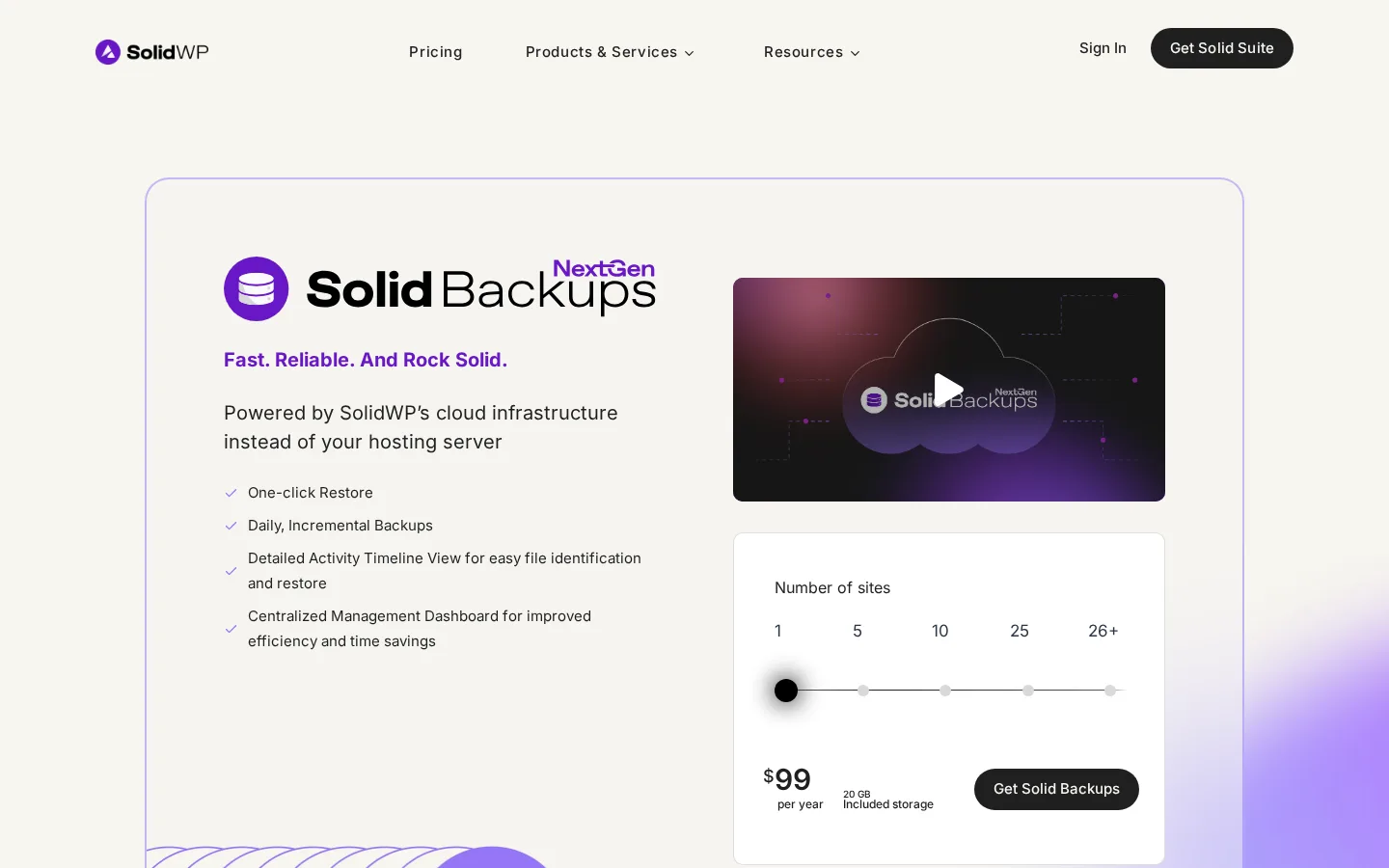
Solid Backups is the current-generation product from the SolidWP family, alongside Solid Security and Solid Central. It is the rebrand of BackupBuddy (around since 2010). The current "Solid Backups — NextGen" generation includes daily incremental backups, one-click restore, automatic versioning, a centralized management dashboard via Solid Central, and a detailed activity timeline. The standalone product ships with 20 GB of included cloud storage — a meaningful difference from competitors that ask you to bring your own destination.
Main strengths
- Bundled cloud storage on the standalone plan — no BYO storage step.
- Integrates with Solid Security and Solid Central for owners who want one SolidWP dashboard.
- Long product history and stable agency customer base.
Main limitations
- No permanent free tier.
- Pricing page is less explicit about migration and staging than BlogVault's or Duplicator's.
- Brand confusion is real — "Solid Backups", "BackupBuddy" and "iThemes BackupBuddy" all refer to the same lineage.
Pricing snapshot (May 2026, billed yearly): Solid Backups (NextGen) $99/yr (1 site, 20 GB included), with scaling for 5/10/25/26+ sites. Solid Suite $199/yr (1 site) bundles Solid Security Pro + Backups + Central + Academy + Performance Basic + Mail Basic. 30-day money-back guarantee.
Who should choose it: owners already running SolidWP, longtime BackupBuddy users, or anyone who specifically wants included cloud storage rather than BYO.
6. WPvivid — best free-friendly WordPress backup plugin
Best for: hobbyists, personal blogs, small business brochure sites and developers who want a capable free backup tool with the option to upgrade.
Research basis: official WPvivid pricing page, WordPress.org listing, public reputation.
WPvivid's free tier is genuinely useful: full files + database backup, one-click restore, scheduled backups, basic retention, remote storage to Dropbox, Google Drive, S3, OneDrive, DigitalOcean Spaces, FTP and SFTP, and a subdirectory staging environment — all without paying. WPvivid Pro adds incremental backups, selective content migration, "crash-protection when migrating", multiple staging environments, enhanced scheduling and 24/7 ticket support.
Main strengths
- One of the most capable free tiers in the category.
- Lifetime license option alongside annual licensing — a rarity in 2026.
- Subdirectory staging bundled even on the free plan.
Main limitations
- Backups run on your origin server (PHP).
- Smaller install base means a thinner long-form review trail.
- Pro features split across multiple plans; budget Blogger at $49/yr does not include unlimited license transfers.
Pricing snapshot (May 2026): Free — unlimited sites. Blogger $49/yr or $99 lifetime (2 sites). Freelancer $69/yr or $139 lifetime (10 sites). Small Business $99/yr or $199 lifetime (50 sites). Ultimate $149/yr or $299 lifetime (unlimited). 30-day money-back guarantee.
Who should choose it: hobbyists and low-budget sites who want a free, no-nonsense, BYO-storage backup solution with an optional lifetime upgrade.
7. BackWPup — best for owners who already trust the WP Rocket / WP Media team
Best for: owners who want a long-running, free-tier-capable backup plugin from a team they already trust on the performance side (WP Rocket, Imagify).
Research basis: official BackWPup pricing page, WordPress.org listing and changelog, public reputation.
BackWPup has 500,000+ active installs, has been around since 2009 and is developed by WP Media (the team behind WP Rocket and Imagify). The free tier covers full backups, restore, scheduling, and remote storage to Dropbox, Amazon S3, FTP, Rackspace Cloud, Microsoft Azure and SugarSync. Pro adds Amazon Glacier / Google Drive / OneDrive / HiDrive destinations, encrypted backups, a standalone restore application that runs without WordPress, seamless URL migration and premium support. Recent changelogs cover PHP 8.4 deprecation cleanups, a security fix, SFTP storage, and a WP-CLI integration.
Main strengths
- Backed by an established WordPress team with a strong product portfolio.
- Free tier includes restore.
- Standalone restore application (Pro) is genuinely useful for the locked-out-of-WordPress disaster scenario.
Main limitations
- The v5.x relaunch had a rocky start; the rating dipped to 4/5 and has since stabilized.
- Backups run on your origin server (PHP).
- Pricing tops out at 20 domains on the Pro plan.
Pricing snapshot (May 2026, billed yearly): Starter $49/yr (2 domains), Advanced $99/yr (5 domains), Pro $199/yr (20 domains). All paid tiers include premium support, premium storage, encryption, migration, and the standalone restore app. 14-day money-back guarantee.
Who should choose it: owners already on WP Rocket or Imagify, or who specifically want the standalone restore app.
Which plugin should you choose?
- Business-critical site, agency client work, or WooCommerce store: BlogVault. The architecture, the bundled staging and migration, and the hourly-customizable WooCommerce tier are the right shape for sites where downtime costs money. Jetpack VaultPress Backup is the runner-up because real-time backups are included on every paid plan.
- Migration-heavy developer or agency workflow: Duplicator, paired with BlogVault or Jetpack VaultPress for the managed-nightly-backup half.
- Free tier with your own S3, Google Drive or Dropbox: UpdraftPlus or WPvivid. UpdraftPlus has the larger ecosystem; WPvivid's free feature set is more generous.
- SolidWP ecosystem or longtime BackupBuddy user: Solid Backups, with 20 GB of included cloud storage.
- WP Media team trust, performance + backup in one vendor: BackWPup, especially for the standalone restore app.
The honest meta-advice: pick a plugin, set up the first backup, then test the restore on a staging copy. The day a backup actually matters is the wrong day to discover you have never restored from one before.
FAQ
Is the free version of UpdraftPlus or WPvivid enough for a small site? For a low-traffic personal blog or small brochure site, yes — both free tiers cover a real backup-and-restore loop. You bring your own remote storage. Once a site becomes business-critical, the value calculation shifts toward a managed product.
What is the difference between an offsite backup and an incremental backup? Offsite means the archive is stored somewhere other than your WordPress server — if the server fails, the backup survives. Incremental means each new backup only saves the changes since the previous one. Most modern backup plugins do both, but not always.
Does WordPress need a backup plugin if my host already takes backups? Yes. Host-level backups protect against server failure but typically do not let you restore a single post, plugin or WooCommerce order, and they rarely solve migration to a new host. A WordPress-aware plugin gives you point-in-time and selective restores plus a portable archive.
How often should I back up my WordPress site? For a content site that publishes a few times a week, daily is enough. For a busy WooCommerce store, 12-hour or hourly/real-time is the right cadence — losing four hours of orders is a real cost.
Can I switch backup plugins without losing my history? Mostly no — backup archives are usually plugin-specific. Keep the old plugin running long enough to retain a fallback restore window (30 days minimum), set up the new plugin from scratch, verify it can restore on a staging clone, and then deactivate the old one. Plan a one-month overlap.
Final verdict
BlogVault is the plugin I would reach for first when the site I am protecting actually matters — for the architecture, the dashboard-driven auto-install that worked end-to-end in my hands-on test, the 13 clean incremental backups across vanilla WordPress and a WooCommerce + 18-product configuration, and the maintenance signal of a recent changelog. UpdraftPlus is the best DIY answer, Jetpack VaultPress Backup is the best ecosystem play, Duplicator is the migration specialist, and Solid Backups, WPvivid and BackWPup each own a clear, narrower lane. The fuller hands-on writeup with screenshots and methodology lives in the BlogVault review.
— Compared by Emily Carter, SEO Content Specialist · Pricing checked 6–9 May 2026 against official vendor pages. UpdraftPlus and Jetpack VaultPress Backup pricing can vary by region and currency; check each vendor's pricing page from your locale for the exact amount.
Write once. Post to 26 networks.
- 26 social networks
- Schedule & auto-repost
- Runs inside wp-admin


