


Can Easy Social Feed really cover Facebook, Instagram, YouTube and X feeds from one WordPress plugin — or am I going to install it, hit a wall on day two, and end up paying for four separate Smash Balloon plugins anyway? And which plan actually fits a typical WordPress site running a single Facebook page plus an Instagram account — is the $49 per-network Pro enough, or do I need to climb to the $89/yr COMBO to get everything I'd realistically use?
If you've been comparing the "buy four Smash Balloon plugins" stack against the "one Easy Social Feed install" stack and trying to figure out where the catches are, you're not alone. To clear it up, I tested Easy Social Feed v6.7.6 (the free plugin on WordPress.org, slug easy-facebook-likebox) on a dedicated WordPress test site, walked the 6-tab Facebook builder, the 6-tab Instagram builder, the new YouTube and X modules, the 3-tab Settings panel (General, GDPR, Translation), the Add-Ons screen and the in-admin Pricing screen, then built a live demo page that renders a real Facebook page feed, a Facebook Page Plugin (Like Box) embed and an Instagram grid side-by-side on desktop 1440×900 and mobile 390×844. I cross-checked everything against 30,000+ active installs, 500 public reviews on WordPress.org and the vendor's checkout-verified pricing on easysocialfeed.com. This Easy Social Feed review distills what I found into a clear buying recommendation.
What Is Easy Social Feed?
Easy Social Feed – Social Photos Gallery and Post Feed for WordPress — listed on WordPress.org under the historical slug easy-facebook-likebox, and labeled inside the wp-admin sidebar as a single Easy Social Feed menu group — is a WordPress plugin built by Malta Themes, a small WordPress vendor whose lead developer Sajid Javed has been shipping it since April 25, 2014. Co-maintainer Danish Ali Malik handles a meaningful share of the WordPress.org support forum replies under his own name, and the licensing and checkout layer is powered by Freemius.
It is best for multi-network SMBs, agencies and freelancers who want one plugin (and one admin menu) to display Facebook, Instagram, YouTube and X feeds on a WordPress site, GDPR-first European sites that need consent-aware feed loading without writing custom code, and long-term WordPress sites that want a lifetime purchase option instead of a recurring annual subscription.
The problem it solves is the cost and complexity of running four separate Smash Balloon plugins to cover four social networks. Easy Social Feed collapses all four networks into a single install with a unified admin menu (Easy Social Feed → Facebook / Instagram / YouTube / X-Twitter / Settings / Affiliation / Add-Ons / Upgrade), a consistent 3-step builder per network (1. Authenticate → 2. Use (Display) → 3. Customize (Skins)), and one Pro COMBO SKU at $89/yr that unlocks every Pro feature across all four networks.
One detail to keep straight before you buy: Easy Social Feed is inbound display only. It pulls posts from Facebook, Instagram, YouTube and X into your WordPress site — it does not publish out to those networks. Outbound auto-posting is the opposite half of the workflow and the job of FS Poster. The two products are complements, not competitors.
Easy Social Feed Review Quick Verdict
Easy Social Feed is the cheapest credible "all four mainstream networks in one plugin" WordPress feed display I've tested, with the strongest GDPR consent integration and the most thorough frontend label translation panel in the niche — the catch is that the richer Instagram and Facebook layouts (Masonry, Carousel, Half-width, Full-width), Visual Moderation, Advanced Popup, hashtag and mentions feeds, Stories display, Shoppable Instagram, Load More pagination and Live Stream all require Pro.
| Criteria | Verdict |
|---|---|
| Best for | Multi-network SMBs, budget-conscious agencies and freelancers, GDPR-first European sites, long-term WordPress sites that want a lifetime SKU, sites that still need a Facebook Page Plugin (Like Box) embed |
| Starting price | Free on WordPress.org; per-network Pro from $49 / yr (1 site, billed annually); COMBO all-four-networks bundle from $89 / yr (1 site); COMBO Lifetime from $259 one-time (1 site, list price) |
| Free plan / trial | Yes — generous free plugin on WordPress.org across all four networks; in-admin Free 7-Day PRO Trial button on Pro-gated tabs; 14-day no-questions-asked money-back guarantee on every paid plan |
| Update frequency | ~8–12 versioned releases per year in 2025–2026; latest version 6.7.6 shipped May 7, 2026 |
| Most valuable features | Four networks in one plugin (Facebook + Instagram + YouTube + X), Facebook Page Plugin (Like Box) generator with 75+ Facebook locales, form-driven shortcode generators with auto-generated copy-paste shortcode, real-time WordPress Customizer-based skin editor, native GDPR consent integration with 9 popular cookie plugins, site-level Translation tab covering every frontend string |
| UI/ |
7.5/ |
| Feature richness score | 8/ |
| Product performance | 7.5/ |
| Product rating | 4.6★ from 500 reviews on WordPress.org (414 × 5★ / 33 × 4★ / 12 × 3★ / 8 × 2★ / 33 × 1★); 30,000+ active installs |
Easy Social Feed Features & Functionality
For a freemium plugin sitting in the mid-tier of installs, Easy Social Feed's free feature surface is wider than its 30,000+ active install count suggests — during hands-on testing on v6.7.6, the most important findings are below.
1. Four real social networks in one plugin and one admin menu
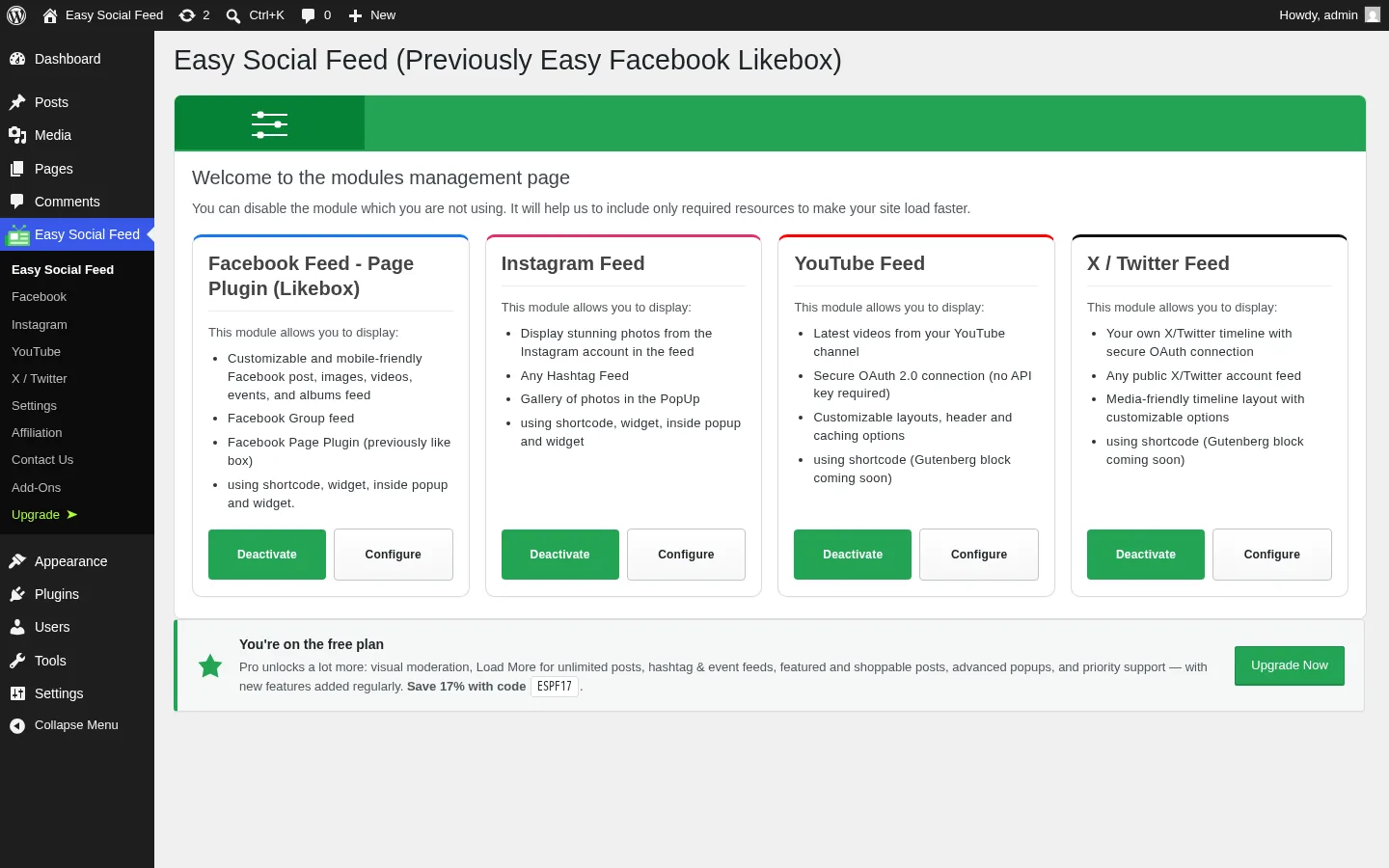
This is the headline architectural decision and Easy Social Feed's strongest positioning lever. Inside wp-admin, a single Easy Social Feed sidebar group expands into Facebook, Instagram, YouTube, X / Twitter, Settings, Affiliation, Add-Ons and Upgrade — one plugin, one menu, one set of shared settings (GDPR, Translation, Feed language) and one license. The YouTube module shipped in v6.7.5 (Q4 2025) and the X / Twitter module shipped in v6.7.6 (May 2026), so the vendor has added two full networks in roughly nine months — a freshness signal that matters when you're betting on a multi-network plugin to stay current.
Each network follows the same shape: an Authenticate step, a Use (Display) step that auto-generates a copy-paste shortcode, and a Customize (Skins) step that opens the WordPress Customizer for real-time design edits. Smash Balloon and Spotlight ship one plugin per network — installing the equivalent four-network stack from Smash Balloon means installing four separate plugins with four separate admin areas, four separate licenses and four separate update cadences. Easy Social Feed is one of two plugins in the niche (Feed Them Social is the other) that consolidates all four into a single install, and the only one I've tested that pairs that consolidation with the modern 3-step builder per module.
2. Form-driven shortcode generators with auto-generated copy-paste output
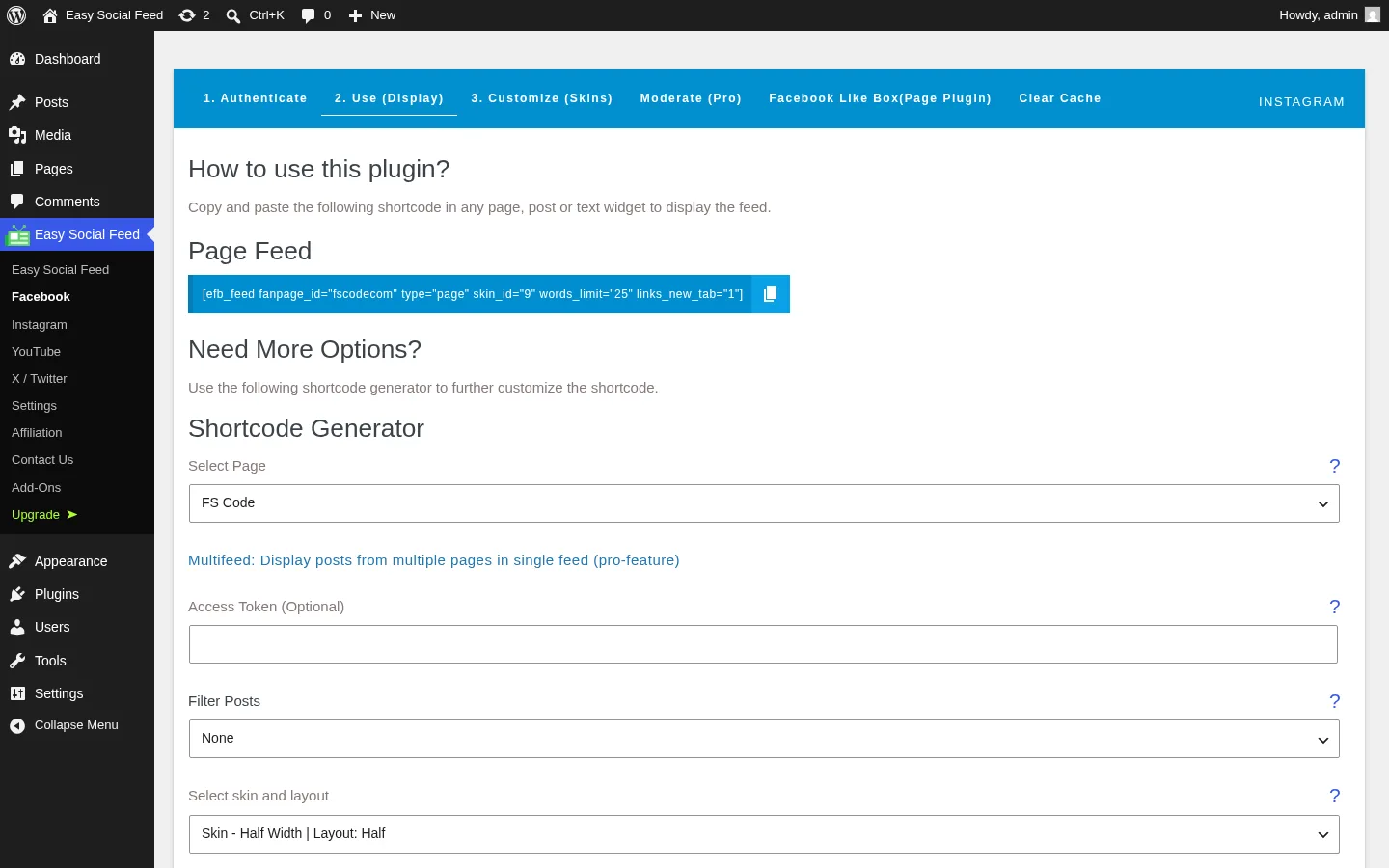
This is the feature that makes the plugin feel friendlier than it actually is. On every network's Use (Display) tab, Easy Social Feed prints a working shortcode at the top — in my test setup, the Facebook page I connected produced [efb_feed fanpage_id="fscodecom" type="page" skin_id="9" words_limit="25" links_new_tab="1"] — and then renders a form-driven generator below that lets you pick the page or account, choose a skin, set the post count and caption-word truncation, configure cache unit (Minutes / Hours / Days) and cache duration, and toggle the various display options. Every time you change a field, the shortcode at the top updates live. There is a clipboard button to copy it, plus widget instructions for users who prefer the Classic Widgets sidebar.
The Instagram generator follows the same pattern with its own attribute set — [my-instagram-feed user_id="27123611833994995" skin_id="6" links_new_tab="1"] was the auto-generated shortcode for the fscode Instagram account I connected during testing. The Facebook Page Plugin (Like Box) generator does the same for [efb_likebox fanpage_url="fscodecom" responsive="1"]. For non-technical clients and freelancers who hand off the plugin to site owners, the "no shortcode attributes to memorize" UX is a meaningful time-saver.
3. Facebook Page Plugin (Like Box) generator with 75+ Facebook locales
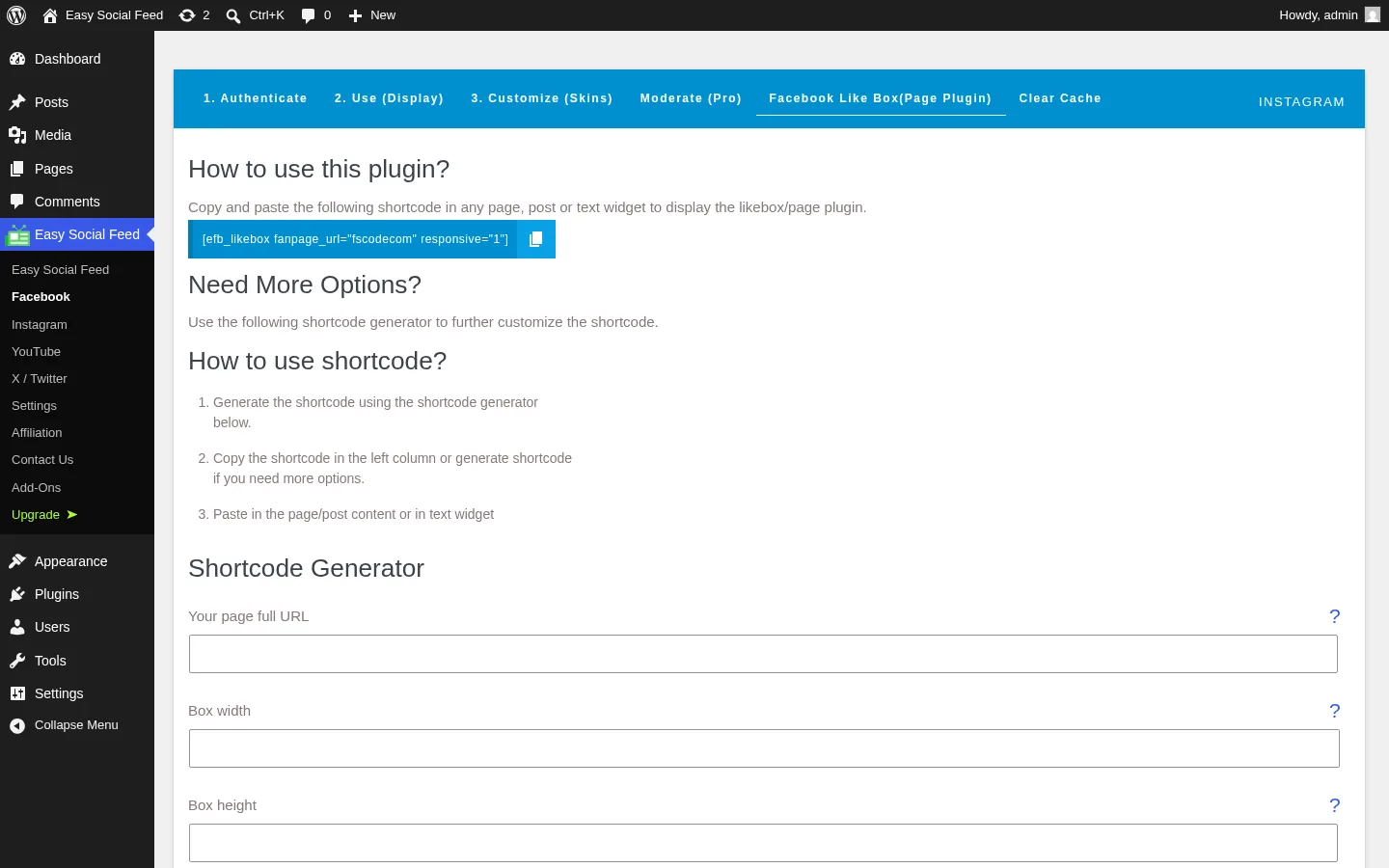
This is a quiet differentiator that restaurants, churches, community organizations, event venues and non-profits will care about disproportionately. Easy Social Feed ships the legacy "Like Box" use case — the official Facebook Page Plugin embed that shows page faces, the posts stream, the cover image and a Like / Follow button inside an iframe — as a dedicated tab with its own form-driven generator. Smash Balloon and WPZOOM Social Feed both dropped this use case years ago. Easy Social Feed kept it.
The generator lets you set the page URL, box width and height, choose from a dropdown of 75+ Facebook UI locales (Afrikaans through Traditional Chinese (Taiwan)), toggle responsive mode, show or hide faces, the posts stream and the cover image, switch to a small header, hide the call-to-action button, and on Pro select the events and messages tabs in addition to the default timeline tab. On the demo page I built during testing, the rendered Like Box behaved exactly as the official Meta embed does — the practical "page proof" element that converts well on local-business landing pages.
4. Real-time WordPress Customizer-based skin editor (7 Facebook skins + 6 Instagram skins)
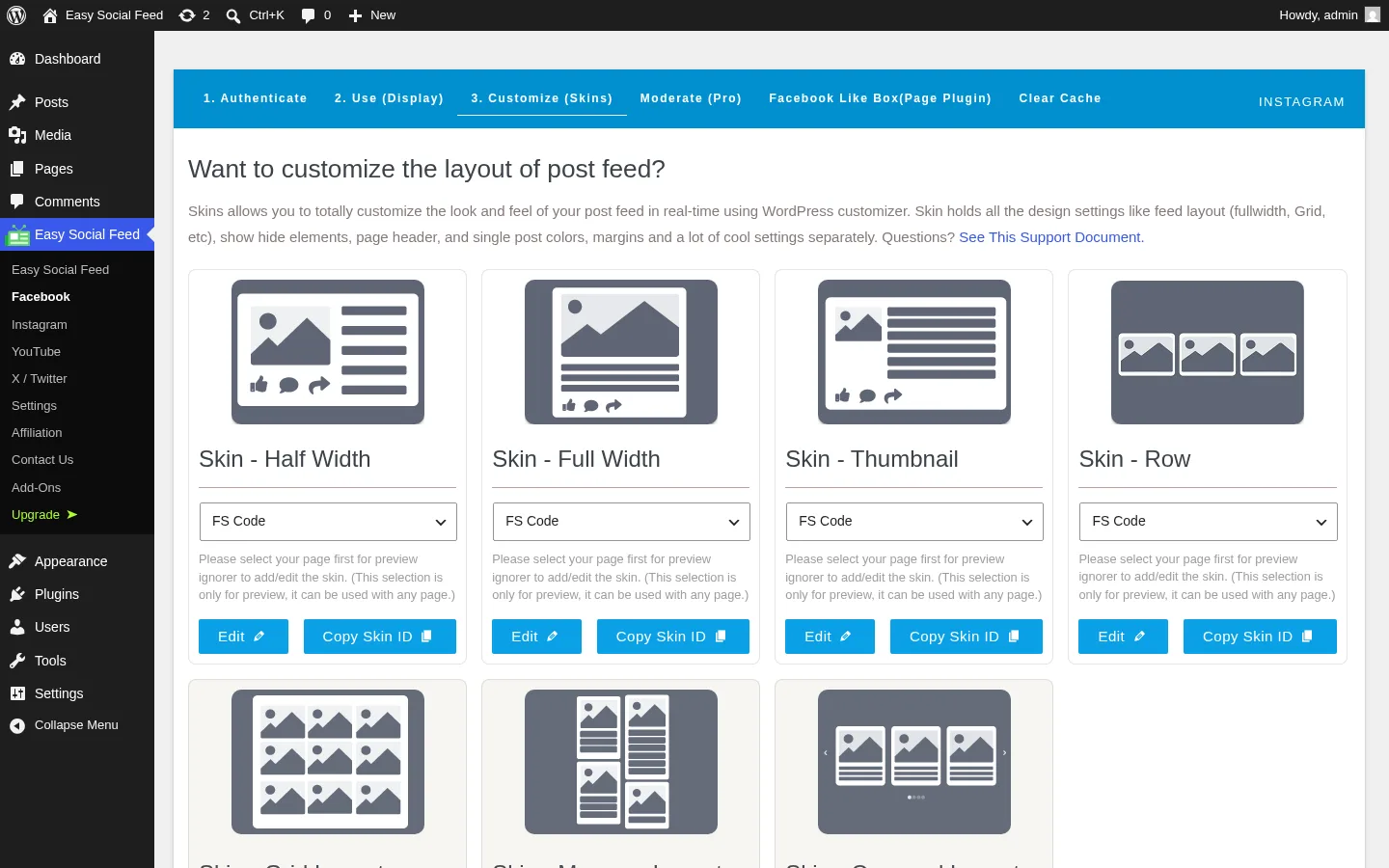
The Customize (Skins) tab is where Easy Social Feed does its design work. Facebook ships seven skins — Half Width, Full Width, Thumbnail and Row free, plus Grid, Masonry and Carousel on Pro — and Instagram ships six skins (Grid and Row free, plus Masonry, Carousel, Half Width and Full Width on Pro). Each skin tile has an Edit button that opens the native WordPress Customizer with the skin loaded as a live preview on the right and the design fields on the left, plus a Copy Skin ID button that drops the matching skin_id="N" into your clipboard for use inside the shortcode.
The Customizer approach is the right call for two reasons. First, the design changes are previewed in real time against the actual rendered feed — no save-and-refresh cycle. Second, every WordPress site owner who has touched the Customizer already knows the UI, which means there's no plugin-specific design language to learn. The constraint to flag honestly: on the free tier, Facebook gives you four skins (the ones built around row-and-card layouts) and Instagram gives you only two (Grid and Row). The richer Pinterest-style Masonry, sliding Carousel and edge-to-edge Half-width and Full-width layouts are Pro across both networks. For a buyer who specifically wants a Masonry or Carousel Instagram grid, the free tier is going to feel thin and the upgrade path is unavoidable.
5. Native GDPR consent integration with nine popular cookie plugins
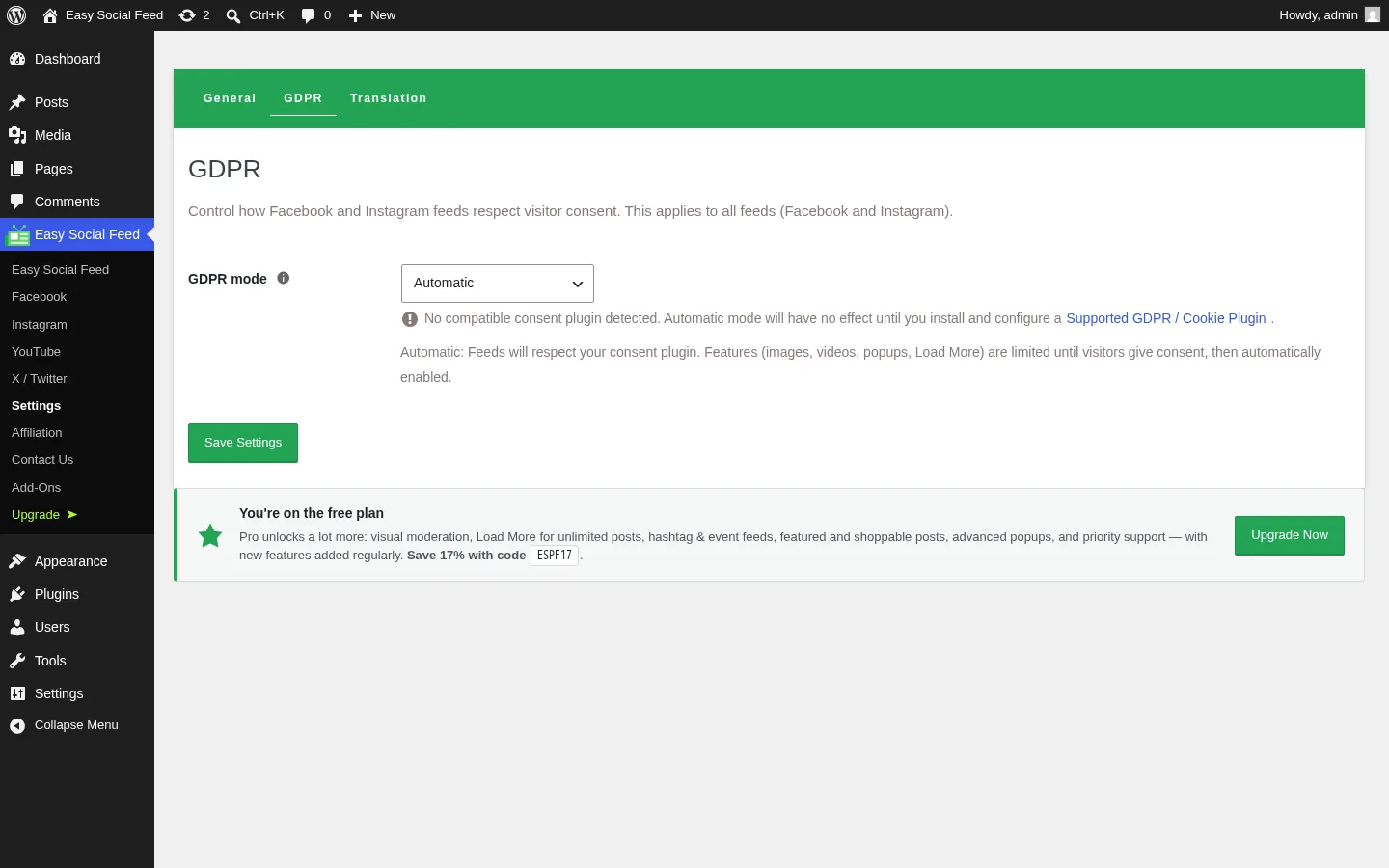
This is the strongest free-tier differentiator in the niche. Inside Settings → GDPR, Easy Social Feed exposes a single GDPR mode dropdown (Automatic / Always Enabled / Disabled) that, on Automatic, auto-detects whichever cookie / consent plugin is active on your site and respects the visitor's consent state before loading Facebook or Instagram media. The vendor explicitly integrates with nine plugins — Real Cookie Banner, GDPR Cookie Compliance by Moove, Cookie Notice by dFactory, GDPR Cookie Consent by WebToffee, CookieYes, Cookiebot, Complianz, Borlabs Cookie and WPConsent — and the integration ships in the free tier.
For European sites and any WordPress site that takes GDPR posture seriously, this is the kind of feature you'd otherwise pay for separately or build yourself. No other plugin in the cluster I tested ships out-of-the-box consent integration with this many cookie plugins at the free tier. One UX nuance worth flagging: when Automatic is on and a visitor hasn't accepted cookies, the lightbox media won't load — that's the intended behavior, but it surfaces as a "broken popup" perception in one recent WordPress.org review. The vendor-documented workaround is to either accept cookies on the front end or switch GDPR mode to Disabled for testing. It's a UX issue, not a bug.
6. Site-level Translation tab and AI translation autofill (Pro)
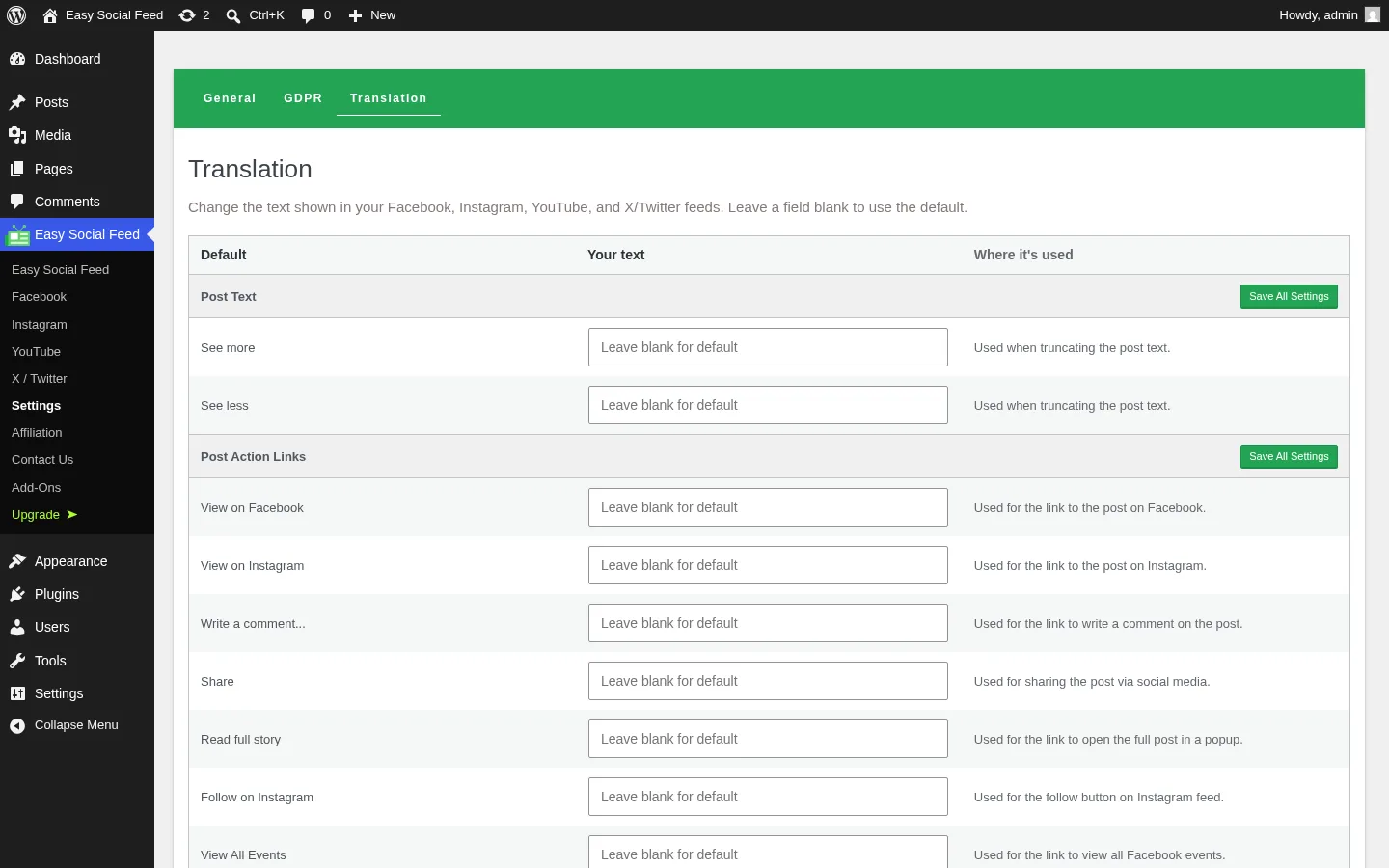
The Settings → Translation tab is the most thorough frontend localization panel I've seen in any social-feed plugin. It lets you override every frontend string the plugin renders — Follow on Instagram, View All Events, Buy Tickets, View Map, the comments labels (Click To View All Comments, View Replies, All Comments), the time-unit labels (ago, second / seconds, minute / minutes, hour / hours, day / days, week / weeks, month / months, year / years, decade, upcoming), No More Found / Load More / Loading..., Followers, the full YouTube Feed label block (Subscribe, Watch on YouTube, views) and the full X / Twitter Feed label block (Following, Tweets, Follow, View on X, Retweeted from, Retweet, Replies, Likes, Retweets, Quotes, Share on X / Facebook / LinkedIn / WhatsApp, Verified account).
Pro adds AI translation autofill — a one-click button that translates every label in the panel into a chosen language, with a one-click reset to English defaults. For multilingual WordPress sites that don't otherwise have a string-replacement workflow, this single feature can replace a translation-management plugin for the social-feed labels specifically. On the free tier you still get the full manual override panel, which is enough for most single-language non-English sites.
Easy Social Feed Ease of Use / UI & UX
For most WordPress site owners, Easy Social Feed is a "first feed in under five minutes" plugin once a Facebook page or Instagram account is connected — the 3-step builder per module keeps the UX predictable, the form-driven shortcode generators remove almost all the typing, and the in-admin upsells (while loud) at least signal what Pro unlocks clearly.
1. UI / UX
The plugin uses a unified sidebar group (Easy Social Feed → Facebook / Instagram / YouTube / X-Twitter / Settings / Affiliation / Add-Ons / Upgrade) and a consistent in-page tab strip per module (Authenticate → Use → Customize → Moderate (Pro) → Clear Cache, plus the Like Box tab on Facebook and Shoppable (Pro) on Instagram). Tab switches happen in a single page load and the Customizer preview is the same Customizer every WordPress site owner already knows.
2. Setup
The Authenticate tab on each network gives you two paths — OAuth Login (recommended) or Setup Manually with a paste-in access token. Connected accounts list with avatar, name and an internal ID; switching accounts later is one click. For Instagram specifically, the plugin recommends the Business Basic or Business Advanced connection mode for new accounts (Business Advanced is required for hashtag and mentions feeds and requires the Instagram account to be linked to a Facebook Page), and v6.7.1 added a pre-connection check to confirm the IG→FB Page link is in place before letting you start.
3. Shortcode generator clarity
The Use (Display) tab on each network is the most user-friendly part of the plugin. The auto-generated shortcode prints at the top, the form fields below it produce a live-updating shortcode below them, and every Pro-gated field carries a visible PRO badge so you can see exactly what you're not paying for. Non-technical site owners who hand off the plugin to a designer for the layout can confidently send them a working shortcode out of the box.
4. Customizer skin editor
The Customize (Skins) tab opens the native WordPress Customizer with whichever skin you click as a live preview. There's no save-and-refresh dance and no plugin-specific design UI to learn — every field is the standard Customizer control set. The constraint to remember is the free-skin count (four free Facebook skins, two free Instagram skins).
5. Friction points
Three small annoyances. The in-admin pricing card displays Pro prices as "$4.08 / mo BILLED ANNUALLY" — a monthly-equivalent number on an annual plan, not true monthly billing. Read past the per-month figure to the annual list price ($49 / yr or $89 / yr COMBO). The persistent sitewide upgrade banner on every plugin screen ("You're on the free plan — Pro unlocks…") plus the sticky review-prompt footer plus the "Free 7-Day PRO Trial" CTAs inside Pro tabs are aggressive — they're not deal-breakers but they generate occasional 2★ reviews complaining about admin clutter. And the Settings → General tab headline still reads "These settings apply to all modules (Facebook, Instagram)…" even though YouTube and X / Twitter have shipped — a cosmetic copy-lag, but a freshness signal that the in-admin documentation runs one or two versions behind the plugin code.
Easy Social Feed Performance
In day-to-day use, Easy Social Feed lands in the middle of the niche on raw performance and slightly above the middle on practical performance, because the caching defaults and the per-module load isolation pull the same direction as the heavier-weight category leaders.
1. Frontend render speed
On the published demo page that embedded a Facebook page feed (Half Width skin), a Facebook Like Box, and an Instagram Grid feed all on the same URL, the page chrome rendered immediately on a 1440×900 desktop viewport and each feed populated cleanly with cached posts and thumbnails. The Facebook feed showed eight cached posts including "The clock is ticking for International Women's Day" and "Save your hard work easier with Backuply". The Instagram grid showed nine thumbnails in a 3-column desktop layout, dropping to a single column at 390×844 mobile.
2. Caching
Sane defaults. Every feed has its own configurable cache settings — a Cache Unit dropdown (Minutes / Hours / Days) and a Cache Duration numeric input — plus a global Clear Cache action per module and a per-feed clear-cache action inside the YouTube and X feed editors. On the YouTube module specifically, the v6.7.5 release added local thumbnail serving so channel and video thumbnails are served from your own WordPress install rather than hot-linked from YouTube's CDN.
3. Per-module load isolation
The plugin only loads the JS and CSS for the modules you've actually used on a given page. If a site only embeds a Facebook feed, the Instagram, YouTube and X module assets stay out of the response — that keeps page weight controlled relative to a heavyweight social-suite plugin that loads everything by default.
4. Responsive behavior
Both desktop (1440×900) and mobile (390×844) rendered correctly in testing. The Facebook feed collapsed cleanly to a single column, the Like Box stayed responsive (page faces hide when the width is narrow, as the official Page Plugin behaves natively), and the Instagram grid dropped from esf-insta-col-lg-4 to esf-insta-col-12 on mobile. Lazy loading is on by default via standard loading="lazy" on rendered images.
5. Stability
Across the full hands-on workflow — connecting Facebook and Instagram accounts (already pre-connected for testing), generating all three shortcodes, building the demo page through the WordPress REST API and rendering it on desktop and mobile — I saw no PHP fatals and no browser console exceptions. The standard Facebook image popup worked on click; the standard Instagram popup did not surface reliably in headless Chromium automation on first attempt, which I'd flag for manual visual check before launching the lightbox-heavy use case to production. The Advanced FB-style popup with comments and reactions is Pro-only and was not testable in this free-tier review.
Easy Social Feed Support, Documentation & Learning Resources
Support is split by tier. Free users rely on the public WordPress.org support forum at wordpress.org/support/plugin/easy-facebook-likebox/, where lead developer Sajid Javed (handle sjaved) and co-maintainer Danish Ali Malik (handle danish-ali) personally reply to most threads under their real names. Paid users get Email & Help Center Support at the per-network plan level, and the COMBO plan upgrades to Priority Email & Help Center Support. There is no live chat and no in-admin ticket form, though every Pro tab surfaces a Free 7-Day PRO Trial button that unlocks Pro support during the trial window.
Vendor publicly-documented response times aren't advertised in hours, but the WordPress.org support forum shows healthy responsiveness over a multi-year window — Danish Ali Malik is mentioned by name in multiple 5-star reviews ("Danish is a joy to work with"), and Sajid Javed replies to negative reviews under his real name across recent threads. Visible response timestamps tend to land under 24 hours for free-forum threads.
Support quality is, on balance, good and well-evidenced. The 4.6★ average across 500 reviews lines up with the "support quality" praise theme that dominates the 5-star cluster, and the vendor's habit of shipping hotfixes within one to two weeks after Facebook Graph API changes (the v6.7.4 changelog explicitly fixes the Dec 2024 Instagram Business connection deprecation) is the right behavior for the structural risk every Facebook-feed plugin carries.
On the documentation side, the documentation is lighter than Smash Balloon's documentation hub but cleaner than the average mid-tier WordPress plugin. The vendor's site at easysocialfeed.com ships live demo pages for the Facebook feed, Instagram feed, YouTube feed, X / Twitter feed and the Facebook Page Plugin (Like Box). The in-admin onboarding walks new users through Authenticate → Use → Customize per module without a separate tutorial. There is no dedicated video tutorial channel, though the WordPress.org listing screenshots cover the main flows.
Easy Social Feed User Reviews & Reputation
I read through the visible WordPress.org review pages across both the 5-star and 1-star filters — Easy Social Feed has been on WordPress.org since April 25, 2014, which is roughly 12 years, and the 500 ratings in total give it the second-largest review denominator in the multi-network feed niche after Smash Balloon's individual plugins (WPZOOM Social Feed has 48, Instagram Feed Gallery has 301, Spotlight has roughly 200+, WP Social Ninja has roughly 200+).
Overall impression. The 4.6★ average is genuinely credible on a 500-review base — well above the WordPress.org 4.5 "well-reviewed" threshold, and statistically robust (not three reviews from friends and family). The 82.8% share of 5-star reviews matches the category leaders. The 33-review 1-star tail is the honest counterweight and the part of the review base that deserves the most reading time.
Most praised strengths. Across the 5-star cluster, four themes recur. The first is support quality — the most-cited praise theme, with Danish Ali Malik mentioned by name across multiple reviews. The second is "just works out of the box" — reviewers who tried multiple plugins before settling on Easy Social Feed (sayhi2lonnie's "I have tried a few other plugins, which either didn't work right out of the box, or failed to work after a week. THIS plugin is like magic." is the cleanest example). The third is affordability vs Smash Balloon — multiple reviews call out the COMBO bundle as cheaper than buying four Smash Balloon plugins separately. And the fourth is caching control — reviewers specifically appreciate the configurable cache unit + duration per feed.
Most criticized weaknesses. The 33-review 1-star tail clusters around four patterns. The first and biggest is Facebook Graph API breakage windows — when Facebook ships a Graph API change (regularly), every Facebook-feed plugin breaks until the vendor ships a fix, and Easy Social Feed is no exception. The vendor typically ships a fix within one to two weeks; users who hit the broken window before the fix leave 1-star reviews. This is a category-shared structural risk, not a plugin-specific bug. The second is setup friction around the Business Advanced flow for hashtag and mentions feeds — users who try those features without realizing they need to link their Instagram account to a Facebook Page leave frustrated 1-star reviews. v6.7.1 added a pre-connection check that should reduce this going forward. The third is the GDPR-mode lightbox quirk mentioned earlier — when GDPR mode is Automatic and cookies aren't accepted, the lightbox doesn't load, which is intended behavior but reads as broken on first impression. And the fourth is the aggressive in-admin upsells — the persistent upgrade banner plus the sticky review-prompt footer plus the Free 7-Day PRO Trial CTAs draw occasional 2-star reviews complaining about admin clutter.
One reputation caveat to keep visible. The vendor publishes "60,000+ active installs" on the homepage and "Trusted by More than 105,000 Blogs, Online Shops & Websites!" inside the in-admin pricing card. The WordPress.org meta shows 30,000+ active installs as of May 2026. The vendor figures aggregate lifetime activations and likely include the sister Easy TikTok Feed plugin from the same vendor; the WordPress.org-verified number is the defensible figure for evergreen buying decisions.
Easy Social Feed Pricing & Value
Easy Social Feed is sold as a freemium product, with a free plugin on WordPress.org and a paid Pro tier delivered via the Freemius SDK as an in-place license unlock (no separate paid plugin to install). All paid tiers are available at either an annual or a one-time Lifetime price, and at 1 / 5 / 10 / Unlimited site counts. The list prices below were verified at the time of writing on both the vendor's pricing page and the in-admin Pricing screen.
- Free — $0, unlimited sites, unlimited feeds. All four network modules included (Facebook, Instagram, YouTube, X / Twitter), plus the Facebook Page Plugin (Like Box) generator. Four free Facebook skins (Half Width, Full Width, Thumbnail, Row) and two free Instagram skins (Grid, Row). GDPR mode, Translation tab, configurable per-feed caching, three Gutenberg blocks, Classic Widgets and shortcode all included. Support via the WordPress.org plugin forum.
- Instagram Feed Pro — $49 / yr (1 site), $99 / yr (10 sites), $249 / yr (Unlimited). Lifetime: $149 one-time (1 site), $439 (Unlimited). Unlocks Visual Moderation, Advanced PopUp, Masonry / Carousel / Half-width / Full-width layouts, Instagram Stories display, hashtag and mentions feeds (Business Advanced required), Multi-account combined feeds, Shoppable WooCommerce Instagram, image filters and animated filters, Load More pagination, Featured Post and priority support.
- Facebook Feed Pro — $49 / yr (1 site), $99 / yr (10 sites), $249 / yr (Unlimited). Lifetime: $149 one-time (1 site), $439 (Unlimited). Unlocks every Instagram Pro feature plus Albums feed, Single album feed, Post filters (photos / videos / events / status / albums / mentioned), Page Plugin Events / Messages tabs, Carousel and Grid Masonry layouts, Multifeed (multiple Facebook pages combined), Live Stream display, Visual Moderation and Featured Post.
- YouTube Feed Pro — $49 / yr (1 site), $69 / yr (5 sites), $99 / yr (10 sites), $249 / yr (Unlimited). Lifetime: $149 one-time (1 site), $439 (Unlimited). Unlocks every Facebook Pro feature plus Multiple YouTube accounts, Load More button, Popup / lightbox video player with full stats, in-feed Subscribe button, channel banner in header and per-feed Popup options.
- X / Twitter Feed Pro — $49 / yr (1 site), $69 / yr (5 sites), $99 / yr (10 sites), $249 / yr (Unlimited). Lifetime: $149 one-time (1 site), $439 (Unlimited). Unlocks every YouTube Pro feature plus Multiple X accounts, Add Public X accounts (no app setup required), Popup Media Lightbox, Popup Element Controls, Load More Pagination, Load More Button Styling, Header Follow Button Control and Faster Cache Refresh Options.
- COMBO (all four networks) — $89 / yr (1 site), $199 / yr (10 sites), $298 / yr (Unlimited). Lifetime: $259 one-time (1 site), $699 (Unlimited). Bundles every Pro feature from Facebook + Instagram + YouTube + X under one license, with Priority Email & Help Center Support.
- Optional one-time add-ons — Multifeed ($9.99 one-time) lets you display posts, photos and videos from multiple Facebook or Instagram pages in a single combined feed. Featured Post ($9.99 one-time) lets you pin any single Facebook or Instagram post as a featured post. Both add-ons are already bundled inside Facebook Pro, Instagram Pro and COMBO — they exist as a $9.99 SKU only for buyers who want the specific capability without the full Pro upgrade.
The free tier is genuinely usable across all four networks. For a single-brand site that just needs a Facebook feed, an Instagram grid, a YouTube channel feed and an X timeline, you can ship without ever paying Easy Social Feed a cent. Pro is worth pausing on if you specifically need Visual Moderation, Advanced PopUp, Masonry / Carousel / Half-width / Full-width layouts, hashtag or mentions feeds, Stories display, Shoppable Instagram, image filters, Load More pagination, Live Stream display, multi-account feeds, AI translation autofill, or priority support.
The headline pricing differentiator is the COMBO. At $89 / yr (1 site), it bundles all four networks under one license — materially cheaper than buying Smash Balloon Facebook Pro + Instagram Pro + YouTube Pro + Twitter Pro individually (which approaches $196 / yr at the per-plugin entry tiers) and roughly a third the price of the Smash Balloon All Access Bundle. The COMBO Lifetime at $259 one-time (list) breaks even against the COMBO annual at roughly the three-year mark — for any agency or long-term project planning to run Easy Social Feed for 3+ years on a single domain, the Lifetime SKU is the cheaper math.
The COMBO support tier matters too. Per-network plans ship "Single Site Email & Help Center Support"; COMBO upgrades to "Priority Email & Help Center Support" — a real tier difference rather than marketing copy.
A few commercial caveats. The in-admin pricing card displays prices as "$4.08 / mo BILLED ANNUALLY" — these are annual plans displayed at a monthly-equivalent number, not true monthly billing. The vendor pricing page shows post-coupon promo prices (the ESPF17 coupon is auto-applied at checkout for a ~17% discount), but renewals bill at the standard non-promo list price — quote the list price for evergreen buying decisions. Currency at checkout can be toggled between USD, EUR and GBP. Payment methods are Visa, Mastercard, American Express and PayPal via the Freemius checkout. The plugin ships a 14-day no-questions-asked money-back guarantee on every paid plan (annual and lifetime).
Easy Social Feed Pros and Cons
Easy Social Feed is the kind of plugin you can recommend to a multi-network SMB or a budget-conscious agency and trust to cover the four mainstream social networks on a single license — the free tier is broad, the Pro ladder is cheap, the GDPR and Translation differentiators are real, and the vendor ships steady updates. The weaknesses are partly category-shared (Facebook Graph API breakage windows) and partly product-specific (the free-skin tier is thin on Instagram, the in-admin upsells are aggressive, and several Pro features genuinely matter for buyers who want a polished look).
Pros
- Four mainstream networks in one plugin and one admin menu: Facebook, Instagram, YouTube (added v6.7.5, Q4 2025) and X / Twitter (added v6.7.6, May 2026) all live under a single sidebar group with a consistent 3-step builder per module. One plugin, one license, one update cadence.
- $89/yr COMBO is the cheapest "all four networks" Pro license in the niche: Materially cheaper than buying Smash Balloon Facebook + Instagram + YouTube + Twitter individually (~$196/yr) and roughly a third the price of the Smash Balloon All Access Bundle. The $259 one-time Lifetime breaks even against COMBO Annual at the ~3-year mark.
- Native GDPR consent integration with nine cookie plugins at the free tier: Real Cookie Banner, GDPR Cookie Compliance by Moove, Cookie Notice by dFactory, GDPR Cookie Consent by WebToffee, CookieYes, Cookiebot, Complianz, Borlabs Cookie and WPConsent. The strongest free-tier GDPR posture in the cluster.
- Best-in-class frontend Translation tab: Override every plugin-rendered string on the site without writing PHP — general buttons, comments labels, time units, Load More / Loading copy, the full YouTube and X / Twitter blocks, and the error and connection messages. AI translation autofill is Pro but the manual panel is free.
- Facebook Page Plugin (Like Box) generator with 75+ locales: A use case Smash Balloon and WPZOOM dropped. Still wanted by restaurants, churches, community sites, event venues and non-profits.
Cons
- Only two free Instagram skins (Grid + Row) and four free Facebook skins: The richer Masonry, Carousel, Half-width and Full-width Instagram layouts are Pro across the board, and Facebook's Grid, Masonry and Carousel skins are Pro too. Buyers who specifically want a Masonry or Carousel grid will need to upgrade.
- Aggressive in-admin upsells: Persistent sitewide upgrade banner on every plugin screen, sticky review-prompt footer, "Free 7-Day PRO Trial" CTAs inside Pro tabs and a separately-priced Add-Ons screen. Functional but draws occasional 2-star reviews complaining about admin clutter.
- Inflated vendor-claimed install counts: The homepage says "60,000+ active installs" and the in-admin pricing card claims "Trusted by More than 105,000 Blogs, Online Shops & Websites!" — the WordPress.org-verified figure is 30,000+ active installs. Always cite the WordPress.org number in evergreen content.
- No outbound posting, no TikTok inside the same plugin, no LinkedIn / Pinterest / Threads: Display-only across Facebook, Instagram, YouTube and X. TikTok requires the separate Easy TikTok Feed plugin from the same vendor. LinkedIn, Pinterest, Threads and Mastodon are out of scope.
Who Should Use Easy Social Feed?
Easy Social Feed is sharp where it's sharp — multi-network feed display on a budget, GDPR-first European deployments, long-term WordPress sites that want a lifetime SKU — and clearly wrong for the buyer who needs outbound posting or a unified Reviews / Social Wall stack.
Who Should Use It
- Multi-network SMBs running Facebook + Instagram + YouTube + X: One plugin, one admin menu, one license. The COMBO at $89/yr is the cheapest way to cover all four networks under a single Pro tier in the WordPress niche.
- Budget-conscious agencies and freelancers: At ~$89/yr per client site for COMBO (or $49/yr per network if you only need one), Easy Social Feed fits a per-site plugin budget under $100/yr — meaningful when you're managing 10–30 client sites with multi-network feeds.
- GDPR-first European sites: The native GDPR mode auto-detects nine popular consent plugins (CookieYes, Cookiebot, Complianz, Real Cookie Banner, GDPR Cookie Compliance by Moove, Cookie Notice, GDPR Cookie Consent by WebToffee, Borlabs, WPConsent) and respects visitor consent before loading Facebook or Instagram media. Strongest free-tier GDPR posture in the cluster.
- Long-term WordPress sites that want a lifetime SKU: The COMBO Lifetime at $259 one-time (list) is rare in the niche — Smash Balloon's individual plugins are annual-only, WP Social Ninja is annual-only and Spotlight is annual-only. For 3+ year horizons on a single domain, Lifetime is the cheaper math.
- Sites that need both a Facebook page feed and the Facebook Page Plugin (Like Box) embed: Easy Social Feed is one of the few plugins still shipping the official Like Box generator with 75+ Facebook locales, alongside the modern feed renderer.
Who Should Skip It
- Buyers who need to auto-post to social networks from WordPress: Display-only. For outbound auto-posting, look at FS Poster, Blog2Social, NextScripts SNAP or Revive Old Posts. Easy Social Feed and FS Poster pair naturally — inbound display plus outbound publishing covers both halves of the workflow.
- Buyers who need a built-in reviews aggregation module (Google / TripAdvisor / Yelp / Booking): Not offered. Use WP Social Ninja for Google Business Profile, Yelp, Tripadvisor, Airbnb, Booking.com, Amazon, AliExpress, Facebook, WooCommerce and FluentCart reviews, or Smash Balloon Reviews Feed Pro for a broader source list including Trustpilot.
- Buyers who need a "social wall" mixed-network masonry: Not offered. Look at Smash Balloon's All Access Bundle (Social Wall Pro) instead.
- Buyers who need TikTok inside the same plugin admin: TikTok requires the separate Easy TikTok Feed plugin from the same vendor and won't show up in the Easy Social Feed sidebar group.
- Buyers who want category-leader trust signals: Smash Balloon's Instagram Feed sits at 4.9★ on 4,340 reviews — a substantially larger review base than Easy Social Feed's 500. Easy Social Feed's 4.6★ on 500 reviews is credible mid-tier authority, not category-leader authority.
Best Easy Social Feed Alternatives
If Easy Social Feed isn't the right fit — usually because you need outbound posting, a unified Reviews stack, a mixed-network social wall, or category-leader trust signals — these are the alternatives I'd shortlist. For the full ranked comparison across every credible plugin I tested in this category, see my best WordPress social media feed plugins roundup.
- Smash Balloon (Custom Facebook Feed Pro / Instagram Feed Pro / YouTube Feed Pro / Twitter Feed Pro / All Access Bundle): The category leader, with Instagram Feed Pro alone at 1M+ active installs and 4.9★ from 4,340 reviews; the wider family rates between 4.3★ and 4.9★ across its six free plugins. Strongest pick if you have a budget for the All Access Bundle ($299 / yr intro, $598 / yr renewal, unlimited sites) and you want the deepest Pro feature set, the strongest brand authority, and the All Access add-ons (Reviews Feed Pro, Social Wall Pro, TikTok Feed Pro). Easy Social Feed is the value play; Smash Balloon is the authority play. Read the full Smash Balloon review.
- WP Social Ninja: An all-in-one social proof plugin from the WPManageNinja team (FluentCRM, FluentForms). Broader scope than Easy Social Feed — five-network feeds (Instagram, Facebook, YouTube, TikTok, X) plus 10+ business review sources (Google Business Profile, Yelp, TripAdvisor, Airbnb, Booking.com, Amazon, AliExpress, Facebook, WooCommerce, FluentCart) plus 15+ chat-widget channels (WhatsApp, Messenger, Telegram and more) plus notification popups and testimonials. Single Site from $89 / yr (currently $44 / yr at the 50% promo), no Lifetime SKU. Best for sites that want feeds, reviews and on-page chat under one plugin. Read the full WP Social Ninja review.
- Spotlight Social Media Feeds: Instagram-only at ~60,000+ installs and 4.7★ from 169 reviews. Closely-matched on install count but Instagram-only — modern Gutenberg-first builder, nine templates, four layouts, custom CSS at free, and Promotions automation in Pro that maps hashtags to WordPress pages or products. Essentials from $59 / yr. Best for buyers who only need Instagram and want a deeper IG-specific feature set than Easy Social Feed's free skin tier offers. Read the full SpotlightWP review.
- WPZOOM Social Feed Widget & Block: Instagram-only at 60,000+ installs and 4.3★. Lightest Instagram-only plugin in the cluster — asset-gating off by default, AJAX initial load with skeleton placeholder, server-side image caching to WordPress uploads. Starter from $49 / yr. Best for performance-first single-Instagram-account sites; not viable if you need Facebook, YouTube or X. Read the full WPZOOM Social Feed review.
- Instagram Feed Gallery (QuadLayers Social Feed Gallery): Instagram-only at ~80,000+ installs and 4.5★ from 301 reviews. The cheapest IG-only Lifetime tier in the niche ($99 / $199 / $299 per-plugin). Best for cost-sensitive buyers who only want Instagram and prefer a one-time payment. Read the full Instagram Feed Gallery review.
Final Verdict: Is Easy Social Feed Worth It?
Yes — with two caveats. If you run a multi-network WordPress site on a per-site plugin budget under $100/yr and you want to cover Facebook, Instagram, YouTube and X feeds from a single install with one license and one update cadence, Easy Social Feed is the strongest value pick in the niche. The free tier is broad enough to ship a working multi-network display without paying anything. The $89/yr COMBO is the cheapest "all four networks" Pro license in the WordPress niche, and the $259 one-time COMBO Lifetime is the right buy for any agency or long-term project planning to use the plugin for three or more years on a single domain. The GDPR consent integration with nine cookie plugins and the site-level Translation tab are both genuine free-tier differentiators that no direct peer matches.
The two caveats. First, the free Instagram skin tier is thin — only Grid and Row are free, and the richer Masonry, Carousel, Half-width and Full-width layouts are Pro. Buyers who specifically want a Masonry or Carousel Instagram grid should budget for the $49/yr Instagram Pro plan or the COMBO. Second, the vendor publishes inflated install / usage counts ("60,000+ users" and "105,000+ blogs and websites") that conflict with the WordPress.org-verified 30,000+ active installs — the WP.org number is the defensible buying-decision figure, and treat the 4.6★ rating on 500 reviews as credible mid-tier authority rather than category-leader trust.
If both caveats are acceptable, this is the cheapest, broadest-network and most GDPR-friendly multi-network social-feed plugin you can buy in 2026. And if you also need to push WordPress posts out to Facebook, Instagram, YouTube and X in the other direction, pair Easy Social Feed with FS Poster — inbound display plus outbound publishing covers both halves of the WordPress + social workflow.
Easy Social Feed FAQ
Is there a free version of Easy Social Feed?
Yes. The free plugin is listed on WordPress.org as Easy Social Feed – Social Photos Gallery and Post Feed for WordPress (slug easy-facebook-likebox) and includes unlimited feeds across Facebook, Instagram, YouTube and X / Twitter, plus the Facebook Page Plugin (Like Box) generator with 75+ Facebook locales. The free tier ships four free Facebook skins (Half Width, Full Width, Thumbnail, Row) and two free Instagram skins (Grid, Row), plus GDPR mode with native integration into nine consent plugins, the Settings → Translation tab, per-feed configurable caching, three Gutenberg blocks and Classic Widgets. 30,000+ active installs run on the free tier alone.
Is Easy Social Feed beginner-friendly? Yes. The 3-step builder per module (Authenticate → Use → Customize) keeps the UX predictable across all four networks, the auto-generated shortcode prints at the top of each Use (Display) tab with a clipboard button, and the Customize (Skins) tab opens the native WordPress Customizer — the same Customizer every WordPress site owner already knows. Most users build their first working feed in under five minutes once a Facebook page or Instagram account is connected.
Does Easy Social Feed support YouTube and X / Twitter? Yes — both are included in the free plugin. The YouTube module shipped in v6.7.5 (Q4 2025) and adds Google OAuth connection, channel feeds with header controls, per-feed Custom CSS, smart caching and local thumbnail serving. The X / Twitter module shipped in v6.7.6 (May 2026) and adds X OAuth connection, timeline feeds, header / stats display and smart caching. Pro unlocks Multiple YouTube accounts, channel banner, Subscribe button, popup video gallery, Load More, Multiple X accounts, Add Public X accounts and the popup media lightbox.
Do I need an Instagram Business account? Yes, for new connections. Easy Social Feed supports two Instagram connection modes — Business Basic (simple feeds from a Professional / Business / Creator Instagram account) and Business Advanced (required for hashtag and mentions feeds; requires the Instagram account to be linked to a Facebook Page). Personal Instagram accounts can no longer connect — an Instagram Graph API restriction Meta enforced in December 2024 that affects every Instagram-feed plugin, not Easy Social Feed specifically. Switching a Personal account to Creator is free inside the Instagram app.
What are the best Easy Social Feed alternatives? For the deepest Pro feature set and category-leader trust signals, Smash Balloon and its All Access Bundle. For a one-plugin-for-feeds-and-reviews-and-chat stack, WP Social Ninja. For an Instagram-only deeper-feature pick, Spotlight Social Feeds. For the lightest Instagram-only footprint, WPZOOM Social Feed Widget & Block. For the cheapest Instagram-only Lifetime SKU, Instagram Feed Gallery (QuadLayers). See the alternatives section above for the side-by-side detail.
Write once. Post to 26 networks.
- 26 social networks
- Schedule & auto-repost
- Runs inside wp-admin


