


Can Smash Balloon really replace the messy, slow, iframe-based Instagram and Facebook embeds I've been pasting into WordPress for years — or am I about to pay $49 to $299 a year for something the free version already does? And if I run Instagram, Facebook, YouTube, and TikTok, do I actually need the All Access bundle, or will one Pro license cover me?
If you've stared at the Smash Balloon pricing page for ten minutes trying to figure that out, you're not alone — Smash Balloon is sold as a family of seven plugins with three Pro tiers each, plus a bundle, plus a 50% intro discount, plus full-price renewals. It's confusing.
To clean that up, I tested four Pro Elite Smash Balloon feed plugins end-to-end on a dedicated WordPress test site — Instagram Feed Pro Elite, Custom Facebook Feed Pro Elite (plus its Extensions add-on), TikTok Feeds Pro Elite, and Feeds for YouTube Pro Elite — built real feeds with live accounts, and documented the remaining plugins (X/Twitter Feed Pro, Reviews Feed Pro, Social Wall) from official marketing and product documentation. I also reviewed every official pricing page and cross-checked the product family against 1.5M+ WordPress.org installs, and sampled recent positive and negative WordPress.org reviews across the family to map the recurring patterns. This review distills what I found into a clear buying recommendation.
What Is Smash Balloon?
Smash Balloon is a family of seven WordPress plugins built by Smash Balloon LLC (part of Awesome Motive — the same group behind WPForms, MonsterInsights, OptinMonster, and AIOSEO). Together, they let you display social media feeds inside your WordPress site: Instagram, Facebook, X (Twitter), YouTube, TikTok, online reviews from Google/Yelp/TripAdvisor/Trustpilot, and a unified "Social Wall" that combines them all.
It is best for brands, creators, e-commerce stores, agencies, hospitality, real estate, schools, and local businesses that want to mirror social proof on their WordPress site without sending visitors away.
The problem it solves is simple: embedding social posts on WordPress is painful. Meta deprecated its public oEmbed for Instagram and Facebook, Twitter's free API tier collapsed, and YouTube/TikTok iframes are slow and hard to customize. Smash Balloon replaces that mess with server-rendered, fast, customizable, on-brand feeds that live inside wp-admin — and gracefully fall back to backup caching when a social network's API goes down.
Important to keep straight: Smash Balloon displays social content on your site. It does not publish WordPress posts out to social networks (that's what FS Poster does). The two products solve opposite halves of the same problem.
Smash Balloon Review Quick Verdict
Smash Balloon is the dominant WordPress social-feed-display plugin family on the market — polished, well-maintained, and category-leading on every measurable signal. The only real question buyers face is which tier (or whether the All Access bundle) makes sense for them.
| Criteria | Verdict |
|---|---|
| Best for | Brands, creators, e-commerce, agencies, and local businesses that want Instagram/ |
| Starting price | $49 / yr intro for one plugin / one site (renews at $98 / yr) |
| Free plan / trial | Free version on WordPress.org per network; 14-day money-back guarantee on Pro |
| Update frequency | Very active maintenance — every free plugin in the family had a recent release at the time of review |
| Most valuable features | Live customizer preview, advanced feed types (Reels, Stories, Hashtag, Tagged, Shoppable), feed themes and templates, multi-source combine, downtime prevention |
| UI/ |
9/ |
| Feature richness score | 9/ |
| Product performance | 8.5/ |
| Product rating | Instagram Feed: 4.9★ from 4,340 reviews (WordPress.org); family-level rating 4.3–4.9★ across the six free plugins |
Smash Balloon Features & Functionality
Smash Balloon's feature surface is genuinely category-leading — during hands-on testing, I reviewed the full feature inventory and worked directly with the four feed plugins I installed for this review (Instagram Feed Pro Elite 6.11.0, Custom Facebook Feed Pro Elite 4.8.0, TikTok Feeds Pro Elite 1.5.2, and Feeds for YouTube Pro Elite 2.6.6), and cross-checked the remaining three (X/Twitter Feed Pro, Reviews Feed Pro, Social Wall) against the official documentation. These are the most important capabilities buyers should know about.
1. A family of seven plugins, one shared customizer
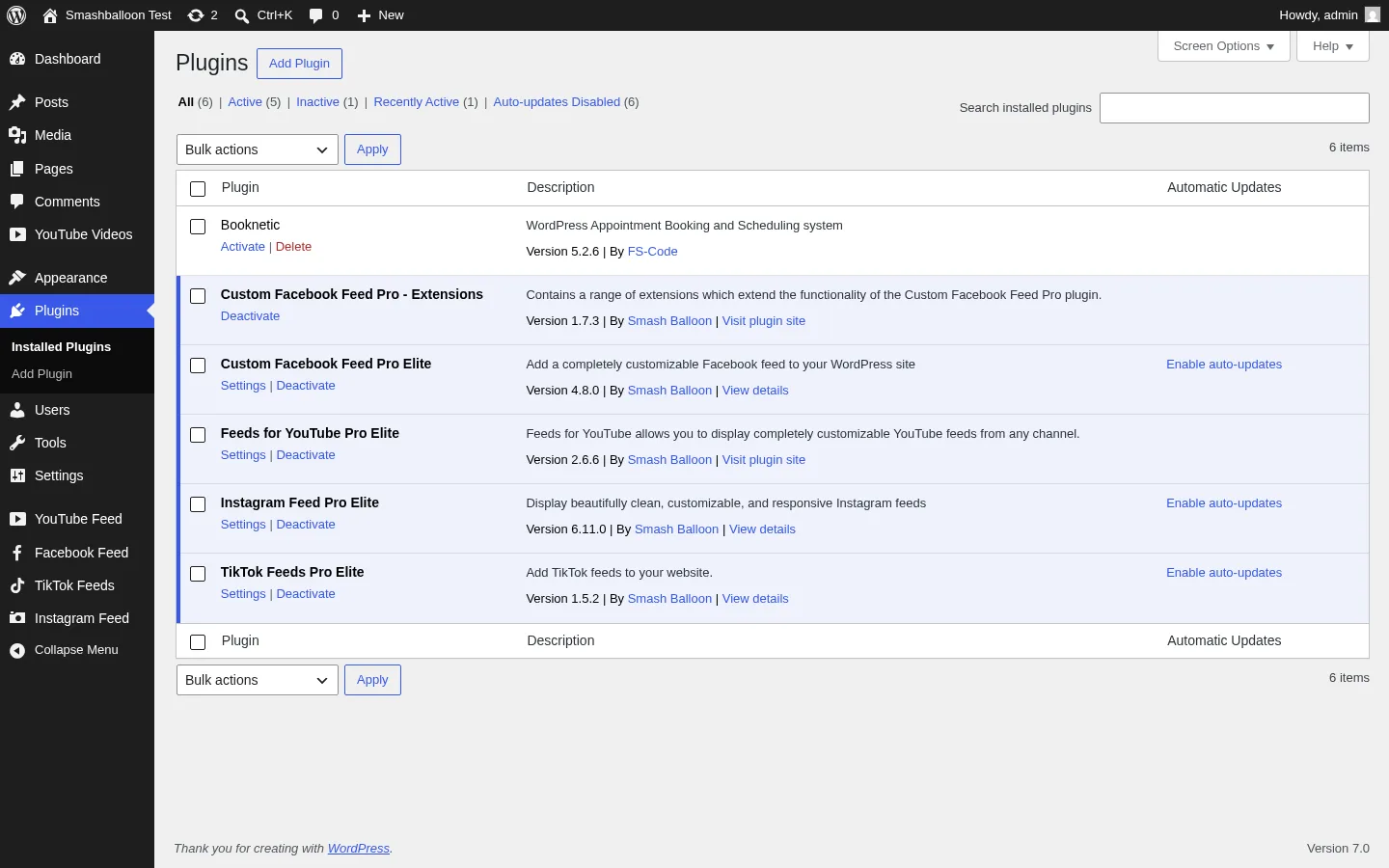
Smash Balloon isn't one plugin — it's Instagram Feed Pro, Custom Facebook Feed Pro, X (Twitter) Feed Pro, Feeds for YouTube Pro, TikTok Feeds Pro, Reviews Feed Pro, and Social Wall, each maintained as its own plugin but sharing the same visual feed builder and customizer. That means once you learn one plugin, you know all seven.
For example, if you run a hospitality brand, you can install the Instagram, Facebook, and Reviews plugins to display your IG photos, FB events, and Google/Yelp reviews — all curated through the same wizard-style UI. It's a real specialism per platform without the learning curve of switching tools.
In testing, the same three-to-five-step wizard worked identically on Instagram, Facebook, TikTok, and YouTube — only the platform-specific feed type tiles changed.
2. Live customizer preview using the real social API
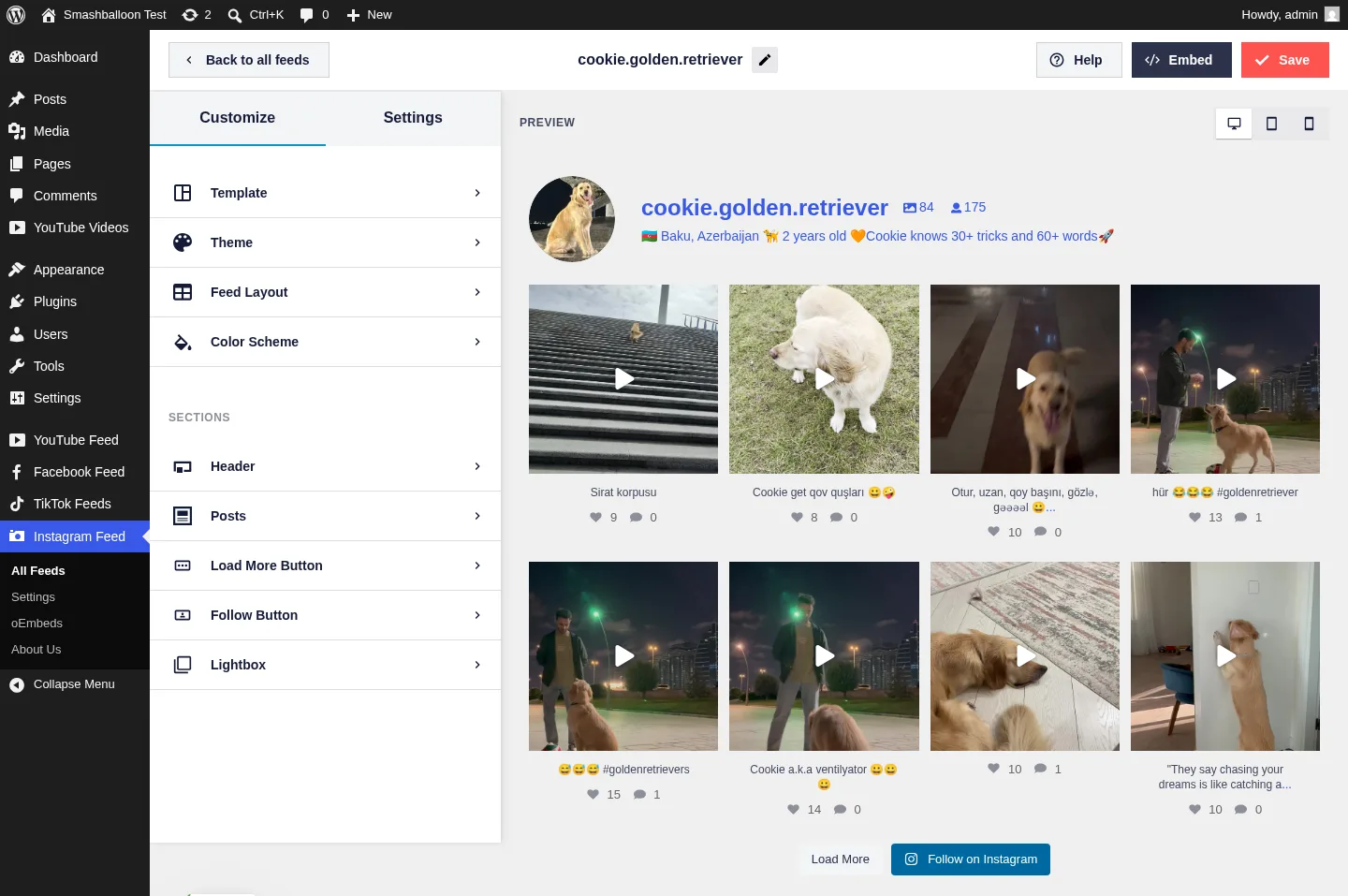
The customizer renders real posts from the connected account live as you build the feed — not placeholder content. The moment I picked a source, the right-hand preview filled in with my actual Instagram posts, full captions, like/comment counts, follower stats, and the Follow on Instagram button.
This is the single strongest sales screen for the product. If you're evaluating Smash Balloon vs anything else, opening the customizer with a real account is the moment you understand why it's the category leader.
In testing, the Instagram preview rendered 8+ posts immediately for my Business Account; the Facebook preview pulled the FS Code page bio, follower count, and three recent posts; the TikTok preview rendered the profile header (Following / Followers / Likes) and eight videos with likes and comments; the YouTube preview rendered nine FS Code channel videos with titles, dates, and descriptions.
3. Advanced feed types per platform
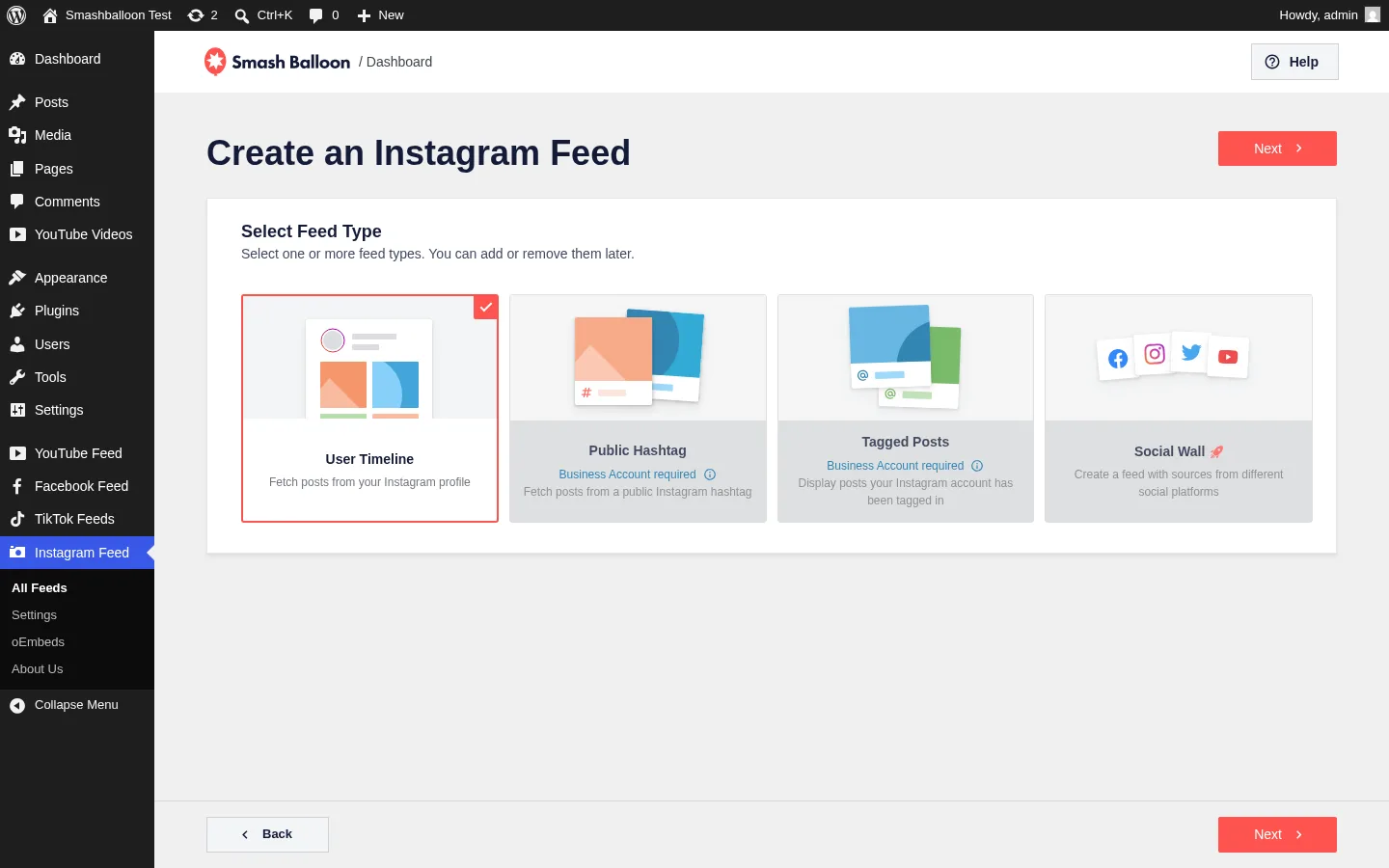
Each Pro plugin unlocks platform-specific advanced feed types that the free version doesn't expose:
- Instagram Feed Pro: User Timeline (free), Public Hashtag (Plus), Tagged Posts and Shoppable Feeds (Elite), Reels and Stories (Basic+), multi-account combine.
- Custom Facebook Feed Pro: Timeline (free), plus Photos, Videos, Albums, Events, Reviews, Single Featured Post, Single Album, Live Video, Group feeds, and an Extensions companion add-on (Carousel, Masonry, Albums, Like Box, Featured Post, Reviews).
- Feeds for YouTube Pro: Channel (free), plus Playlist, Single Videos, Search, and Live Streams (Elite).
- TikTok Feeds Pro: Profile feed (free + Pro), plus advanced templates, header bio, follower counts, and lightbox video player experience.
- X (Twitter) Feed Pro: Timeline (free), Hashtag, Search, Mentions, Single Tweet, and multi-handle combine. Important X API caveat: X's free API tier effectively no longer supports user timeline pulls, which means even with the Smash Balloon Pro plugin, sites that want a working X timeline feed typically need a paid X Developer plan to satisfy X's API access requirements. The plugin is solid; X's API tier is the real bottleneck.
- Reviews Feed Pro: Pulls from Google, Yelp, Facebook, TripAdvisor, Trustpilot, WordPress.org, OpenTable, and more.
In testing, every feed-type tile rendered correctly on the four plugins I built feeds in. Hashtag and Tagged Posts on Instagram require an Instagram Business Account (Meta's requirement, surfaced in the wizard); TikTok hashtag feeds require TikTok Business API approval; YouTube Search and Live Streams require a Google Cloud API key; and X feeds require a paid X Developer plan as noted above. None of these are Smash Balloon limitations — they're the underlying social network requiring them — and the wizard labels each one clearly.
4. Pre-built themes, templates, and a layout customizer
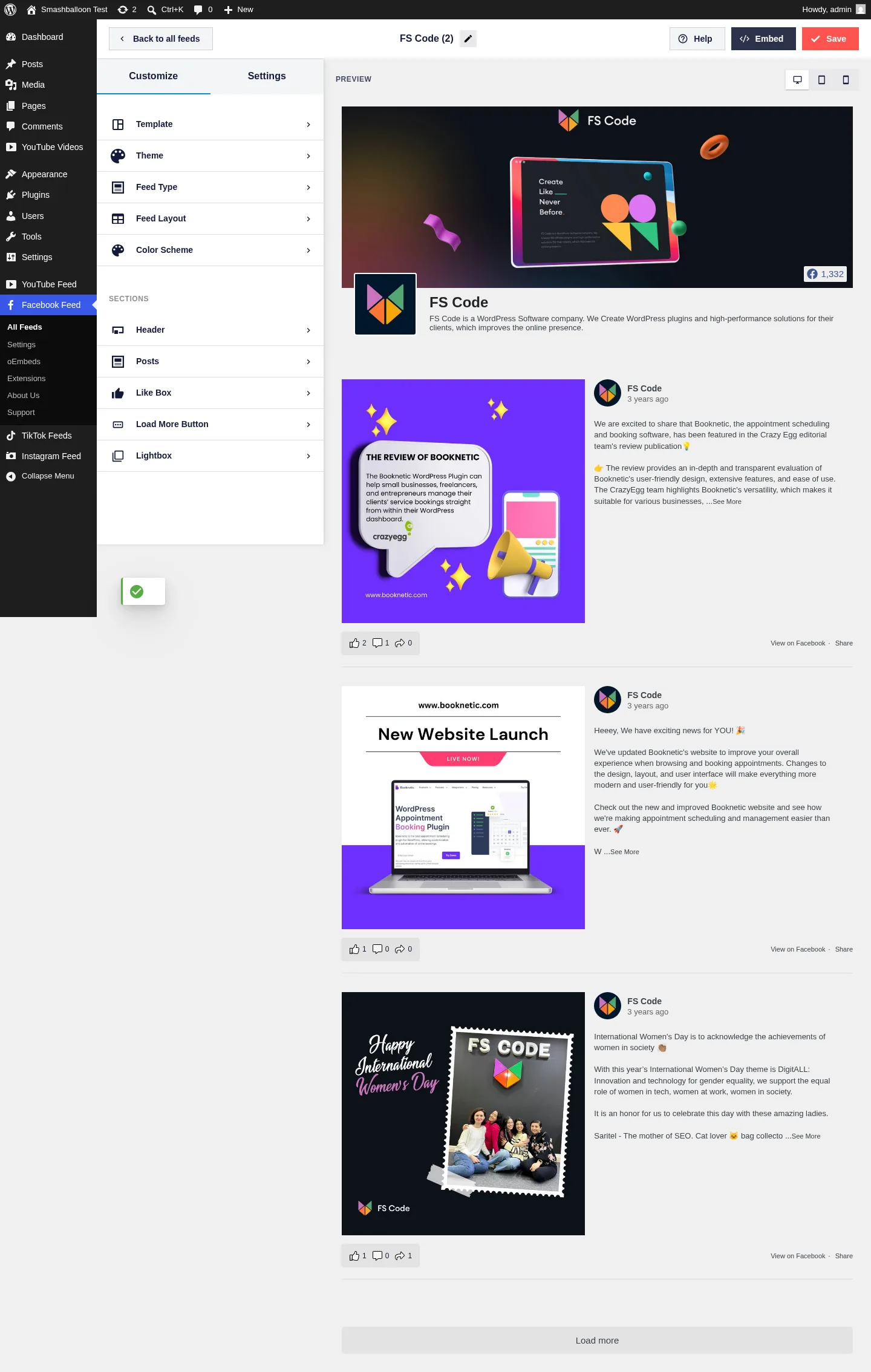
Pro tiers unlock five Feed Themes (Default, Modern, Social Wall, Outline, Overlap) plus seven to eight Templates (Default, Simple Masonry, Widget, Simple Cards, Latest Post, Showcase Carousel, Simple Carousel — varies per plugin). The Layout customizer handles column count, padding, post spacing, color scheme, and per-section toggles for Header, Posts, Load More, Follow/Subscribe, Lightbox, Like Box (Facebook), and Video Player Experience (TikTok).
In testing on Facebook, all five themes and seven templates rendered in the wizard exactly as advertised; on TikTok all eight templates were available; the customizer responded immediately to layout changes in the preview panel.
5. Downtime prevention and backup caching
Every Smash Balloon Pro plugin ships a downtime prevention system: if Meta, X, YouTube, or TikTok has an API outage, the plugin keeps serving the last successful cached feed so your site doesn't suddenly show a blank widget. This is a recurring positive theme in WordPress.org reviews from site owners who lived through Meta's Instagram API breakages.
I didn't trigger an outage during testing, but the marketing claim is consistent with what I observed: the Settings panel exposes the cache and refresh controls clearly, and the customizer displays an admin-only API status notice when something is off (I saw this when YouTube needed an API key).
6. Shortcode, Gutenberg block, and widget embedding
![Instagram Feed Pro Elite All Feeds dashboard showing the saved cookie.golden.retriever User Timeline feed with its unique shortcode [instagram-feed feed=1] ready to copy](https://www.fs-poster.com/storage/posts/2Gh1jMD8lTLEbm5GZDRHDNn5T5xBVJdAuvj1upKH.webp)
Every saved feed gets a unique shortcode (e.g. [instagram-feed feed=1], [custom-facebook-feed], [youtube-feed], [tiktok-feed]), plus a Gutenberg block and a classic widget. The All Feeds dashboard surfaces the shortcode for every saved feed alongside a copy-to-clipboard control, and Pro adds an in-builder "Add to a Page" shortcut that drops the shortcode straight onto a new page from the customizer.
In testing, the shortcode + block + widget triple coverage means the plugin slots into any WordPress theme or page builder without friction — Instagram, Facebook, TikTok and YouTube all generated shortcodes the same way.
Smash Balloon Ease of Use / UI & UX
Smash Balloon is one of the easiest WordPress plugins I've used in this category — the team has clearly invested heavily in the admin experience. Here are the usability categories that matter most.
1. UI / UX
The admin UI is a modern single-page app inside the wp-admin chrome, so it feels responsive and uncluttered — visually closer to a SaaS dashboard than a traditional WordPress plugin panel. Typography, spacing, and iconography are consistent across all seven plugins, which makes the family feel like a unified product.
2. Setup
Setup is fast. Connect a source (OAuth for most platforms; a text input for YouTube channel handles), pick a feed type tile, and you're in the customizer with a live preview. I went from "Add New" to "Feed saved successfully" in three to five clicks on every plugin I tested, with no developer help required.
3. Workflow speed and customizer clarity
The customizer is split into clear sections — Template, Theme, Feed Layout, Color Scheme, and Sections (Header / Posts / Load More / Follow / Lightbox) — and changes apply to the preview in real time. There's no save-and-reload loop. Saving a feed and grabbing the shortcode from the Embed modal takes seconds.
4. Learning curve
If you've used any modern WordPress plugin builder (Elementor, WPForms, Gravity Forms), the Smash Balloon wizard will feel immediately familiar. The hardest part isn't the plugin — it's the underlying social platform requirements (Instagram Business Accounts for Hashtag feeds, YouTube Data API keys for Search/Live, TikTok Business API approval for hashtag feeds), and Smash Balloon labels these dependencies clearly in the wizard so you don't waste time.
5. Friction points
The biggest friction is the in-admin upsell density: every wizard step has a fixed sidebar pushing the other Smash Balloon plugins (Reviews, Facebook, Twitter, YouTube, TikTok), and the admin sidebar surfaces "Smash Balloon News" notices plus occasional offers for sibling Awesome Motive products (WPForms, MonsterInsights, OptinMonster). It's not breaking anything, but some buyers find it aggressive. If you're sensitive to upsell banners inside wp-admin, this is the one thing to be aware of.
Smash Balloon Performance
Performance is solid for a WordPress plugin family this feature-rich. Here's what I actually observed.
1. Customizer load time
The customizer takes roughly 10–15 seconds to load on first launch — the editor initializes and the plugin makes the initial API roundtrip to fetch real preview content. Subsequent saves and re-opens are 2–3 seconds. That first load is the longest single wait in the product; everything after it feels snappy.
2. Frontend / preview rendering
Smash Balloon is server-rendered, not a JavaScript iframe embed, which is a real performance and SEO advantage over SaaS competitors. The customizer preview is the same HTML the visitor sees, so what you build is what gets shipped. Image lazy-loading, WebP, and smart caching are enabled by default in Pro.
3. Stability and admin behavior
In my test setup, I ran the four Pro Elite feed plugins (Instagram, Facebook, TikTok, YouTube) plus the Facebook Extensions add-on active simultaneously with no PHP fatals, no browser console errors, and no plugin conflicts. The admin pages all loaded cleanly. Multi-plugin coexistence is clearly tested by the vendor.
4. Heavy-feature behavior
The plugins are intentionally conservative about API refresh — feeds refresh on a scheduled cache cycle (default ~30 minutes in Pro) and on admin save, not on every page view, which keeps page-load times low and stays within Meta/Google/X rate limits even on high-traffic sites. The trade-off is that brand-new social posts won't appear instantly; if you publish to Instagram, expect a short delay before the feed updates on your WordPress site.
Smash Balloon Support, Documentation & Learning Resources
Smash Balloon's support reputation is strong — it's the single most-cited praise theme in the WordPress.org reviews I read.
Support is delivered through email ticketing plus a self-service knowledge base. The Pro tiers ship with standard email support starting at the Plus tier ($99 / yr intro); priority email support is included with Elite ($149 / yr intro) and All Access ($299 / yr intro). There's no live chat for buyers, but ticket response times in public reviews are widely reported as fast.
Support quality, based on the Instagram Feed plugin's 4.9★ rating from 4,340 reviews and the Facebook Feed's 4.7★ from 1,504 reviews, sits squarely in the "good support" band. Site owners repeatedly call out polite, knowledgeable replies — especially during the Meta and X API breakages of recent years.
Documentation is excellent. Each plugin has a dedicated docs hub on smashballoon.com with step-by-step setup guides, troubleshooting articles, and feature-specific tutorials. The in-admin "Smash Balloon News" sidebar surfaces release notes and breaking-change warnings (for example, the YouTube plugin clearly explains how to add a YouTube Data API v3 key when one is missing). Video tutorials exist on the company's YouTube channel and on the WPBeginner sister site.
For a non-developer site owner, the combination of in-product onboarding, the official docs hub, and email support is more than enough to get any of the plugins live without external help.
Smash Balloon User Reviews & Reputation
Smash Balloon's public reputation is built almost entirely on WordPress.org, where its six free plugins have a combined ~1.57 million active installs and ratings between 4.3★ and 4.9★. I sampled recent positive and negative WordPress.org reviews across the family and mapped the recurring patterns below.
Overall impression: Smash Balloon is the dominant WordPress social-feed-display plugin family, and the public reviews reflect that. The Instagram Feed plugin alone has 1,000,000+ active installs and 4,340 reviews at 4.9★ — these are category-leading numbers on WordPress.org and they aren't manufactured.
Most praised strengths:
- "It just works." Reviewers repeatedly mention going from install to live feed in minutes with no developer help.
- Customer support. This is the single most-cited praise theme — fast, polite, knowledgeable email replies.
- Customizer polish. Reviewers describe the live preview as "best in class" compared with other WordPress feed plugins.
- API outage resilience. Site owners credit the downtime prevention / backup caching for keeping their feeds looking normal during Meta and X API breakages.
- No per-view caps. Repeated positive comparisons against SaaS competitors (Tagembed, EmbedSocial, Walls.io) that meter usage or charge per view.
Most criticized weaknesses:
- "Locked behind Pro." A recurring complaint that Reels, Stories, hashtag, tagged, shoppable, themes, and templates are all Pro-only — free users feel the free version is a teaser.
- Renewal price step-up. The 50% intro discount expires after year 1; renewals jump back to full list price. Some buyers feel surprised even though it's documented on the pricing pages.
- Upsell density inside wp-admin. The sidebar banners pushing related Awesome Motive plugins inside the customizer get flagged repeatedly.
- Per-network licensing. Buying Instagram + Facebook + YouTube + TikTok separately is expensive, and All Access isn't always obvious to first-time buyers.
- Meta / X API breakage. When Meta or X change their APIs, feeds can fail for hours until Smash Balloon ships a patch. The backup caching softens this, but it still surfaces in occasional 1★ reviews during bad outages.
Smash Balloon Pricing & Value
Smash Balloon is annual-billing only — there's no monthly plan and no lifetime tier. Every per-plugin license follows the same three-tier ladder, plus there's a multi-plugin bundle. All prices below are in USD, verified directly against the official pricing pages on the day of testing.
- Single-plugin Basic — $49 / yr intro (renews at $98 / yr). 1 site. One platform. Unlimited Pro feeds on that site, multiple feed layouts, lightbox, carousel, performance optimization, downtime prevention, GDPR compliance, customizer, 1 year of updates.
- Single-plugin Plus — $99 / yr intro (renews at $198 / yr). 5 sites. One platform. Everything in Basic, plus visual moderation, content filters, feed templates, hashtag/advanced feed types, multi-source combine, standard email support.
- Single-plugin Elite — $149 / yr intro (renews at $298 / yr). 10 sites. One platform. Everything in Plus, plus tagged feeds (Instagram), shoppable feeds (Instagram), Live Video (Facebook), Live Streaming API (YouTube), feed themes, priority support.
- All Access Bundle — $299 / yr intro (renews at $598 / yr). Unlimited sites. All seven plugins (Instagram, Facebook, X/Twitter, YouTube, TikTok, Reviews, Social Wall) at Elite tier, plus Feed Analytics, plus WPChat bonus widget, plus all future Smash Balloon products. Marketing-quoted value: $1,191.
Every plan is backed by a 14-day money-back guarantee.
The 50% discount you see across smashballoon.com is introductory pricing — the All Access page footnote reads "Special introductory pricing, all renewals are at full price." In practice, year-1 cost is the intro price; year-2 jumps to the list price unless Smash Balloon hands out a renewal coupon. Plan your budget around the renewal year, not the first year.
A free version is available on WordPress.org for every plugin except Social Wall. Free is intentionally limited: Instagram free supports only User Timeline (no hashtag, tagged, Reels, Stories, shoppable); Facebook free supports only Timeline (no photos page, events, albums, reviews); YouTube free is Channel-only; TikTok free is Profile-only. There's no usage cap from Smash Balloon — the only limits come from the social network APIs themselves.
There's no free trial of Pro; the free WordPress.org plugin is the de-facto trial, and the 14-day money-back guarantee is the closest thing to a formal trial on Pro.
Value verdict: The single-plugin Basic at $49 / yr intro is a fair price for a one-platform site, but if you need two or more platforms, the All Access Bundle at $299 / yr intro (≈ $25 / month equivalent) is the clear winner — unlimited sites and the full plugin family for less than buying two single-plugin Elite licenses. On renewal, All Access at $598 / yr is still competitive at the unlimited-domain tier for this category.
Smash Balloon Pros and Cons
After hands-on testing and cross-checking the public reputation, here's how the trade-offs shake out.
Pros
- Category-leading customizer and live preview: The customizer renders real social posts the moment you connect a source — three to five clicks from install to a working feed. No competitor on WordPress matches this UX.
- Family of seven plugins, one shared UI: Instagram, Facebook, X, YouTube, TikTok, Reviews, and Social Wall all share the same wizard and customizer shape, so learning one plugin teaches you all of them.
- WP-native, server-rendered output: Better SEO, faster front-end performance, and lower TCO than SaaS aggregators that bill monthly per-feed or per-view.
- Downtime prevention and backup caching: When Meta, X, or YouTube break their APIs, the plugin keeps serving the last successful cached feed, so your site doesn't suddenly show a blank widget.
Cons
- Pro is sold per-network: Buyers who want multiple platforms either juggle several licenses or jump to All Access — it's not always obvious from the homepage that single-plugin Basic only covers one platform.
- Renewals at full price: The 50% intro discount evaporates after year 1; year-2 cost roughly doubles unless Smash Balloon offers a renewal coupon.
- Heavy in-admin upsell density: Fixed sidebar banners across the customizer push related Smash Balloon plugins and sibling Awesome Motive products. Some buyers find this aggressive.
- Advanced feeds depend on third-party API permissions: Instagram hashtag/tagged feeds require an Instagram Business Account; YouTube Search/Live Streams require a Google Cloud API key; TikTok hashtag/search feeds require TikTok Business API approval. None of these are Smash Balloon's fault, but the friction lands on the buyer.
Who Should Use Smash Balloon?
Smash Balloon is one of the easiest "yes" purchases in the WordPress plugin world for a specific kind of buyer — and a clear "skip" for another.
Who Should Use It
- Multi-platform brands and creators: If you're active on Instagram + Facebook + YouTube + TikTok and want all of that social proof mirrored on your WordPress site, the All Access Bundle pays for itself within months versus buying single-plugin licenses or SaaS aggregator subscriptions.
- E-commerce stores wanting shoppable Instagram feeds: Elite-tier Instagram Feed Pro unlocks tagged and shoppable feeds that link Instagram posts to your product pages — a meaningful conversion lever for fashion, beauty, and lifestyle stores.
- Local businesses and service businesses: Restaurants, hotels, real estate agencies, churches, and schools that want a Google/Yelp/Facebook reviews wall and a live social feed get exactly what they need from the All Access bundle.
- Agencies building client sites: The Elite (10 sites) and All Access (unlimited sites) tiers are clearly priced for agencies and freelancers managing multiple client deployments.
Who Should Skip It
- Anyone who needs to publish posts to social media: Smash Balloon is read-only — it pulls content INTO your site, it doesn't push outgoing posts. If you need automated social publishing from WordPress, pair it with FS Poster instead (the two products are complements, not competitors).
- Single-post embedders: If you just want to drop one Instagram or YouTube link into a blog post occasionally, WordPress core oEmbed (where it still works) or a simple lightweight embed plugin is enough. Smash Balloon is overkill for one-post embedding.
- Buyers expecting monthly or lifetime billing: Smash Balloon is annual-only with no lifetime tier. If you need a one-time payment or monthly flexibility, look elsewhere.
- Sites needing free advanced feeds (Reels, Stories, Hashtag, Shoppable, Live): All of these are Pro-only. If you're not willing to pay for Pro, the free version covers only basic single-source feeds.
Best Smash Balloon Alternatives
Smash Balloon dominates the WordPress social-feed-display category — it's the #1 pick in my best WordPress social media feed plugins ranking — but several credible WordPress-native alternatives exist depending on your use case. For the deeper head-to-head against every credible competitor I tested, see my dedicated Smash Balloon alternatives post.
- Spotlight Social Media Feeds: The closest WordPress-native competitor specifically for Instagram (60K+ installs, 4.7★ from 169 reviews), with a polished free tier, nine templates and four layouts, and a hashtag → page Promotions automation in Pro that turns Instagram UGC into a shoppable channel. Essentials starts at $59 / yr. Best for buyers who only need Instagram and want a deeper free-tier styling layer. Read the full SpotlightWP review.
- WP Social Ninja: An all-in-one social proof plugin from the WPManageNinja team covering five-network feeds, 10+ business review sources (including free Google Business Profile reviews), 15+ chat-widget channels, notification popups and testimonials under one Pro license — Single Site from $89 / yr (currently $44 / yr at the 50% promo). Best for small businesses replacing three or four single-purpose plugins with one bundle. Read the full WP Social Ninja review.
- Easy Social Feed: A budget multi-network alternative (30,000+ installs, 4.6★ from 500 reviews) that covers Facebook, Instagram, YouTube and X from one plugin with a $89 / yr COMBO bundle — materially cheaper than buying multiple Smash Balloon plugins separately, with a $259 one-time Lifetime tier in the niche. Best for cost-sensitive multi-network buyers. Read the full Easy Social Feed review.
- Instagram Feed Gallery (QuadLayers): The cheapest credible Instagram-only WordPress feed plugin in the niche (80,000+ installs, 4.5★ from 301 reviews) and the only one with publicly priced per-plugin Lifetime tiers from $99 one-time. Best for single-Instagram-account brands who want a one-time payment instead of an annual renewal. Read the full Instagram Feed Gallery review.
- WPZOOM Social Feed Widget & Block: A lightweight Instagram-only plugin (60,000+ installs, 4.3★) with off-by-default asset loading, AJAX initial load and server-side image caching to your own WordPress uploads — Starter from $49 / yr or the $599 one-time Lifetime All Access Pass that bundles every WPZOOM plugin and theme. Best for performance-first single-Instagram-account sites that want a lighter footprint than Smash Balloon. Read the full WPZOOM Social Feed review.
Final Verdict: Is Smash Balloon Worth It?
Yes — if you actually need to display social media feeds on a WordPress site, Smash Balloon is the right buy. It's the category leader by every measurable signal (1.5M+ installs, 4.3–4.9★ ratings, very active maintenance, deepest feature set, best customizer), and my hands-on tests on four of the seven plugins matched the marketing claims without exception.
The single-plugin Basic at $49 / yr intro (renews at $98 / yr) is a fair entry point for a one-platform, one-site buyer. For anyone running two or more platforms — most growth-minded brands, agencies, and e-commerce stores — the All Access Bundle at $299 / yr intro (renews at $598 / yr) is the obvious choice; it covers unlimited sites and the full plugin family for less than buying two single-plugin Elite licenses.
The biggest caveat is the renewal step-up: budget for year-2 list pricing, not the intro discount. And remember that Smash Balloon displays social content — pair it with FS Poster if you also need to publish your WordPress posts out to social media.
Smash Balloon FAQ
Is there a free version of Smash Balloon?
Yes — Smash Balloon ships a free version on WordPress.org for Instagram, Facebook, X (Twitter), YouTube, TikTok, and Reviews. Each free plugin supports one basic single-source feed type and the default styling. Advanced feed types (Reels, Stories, Hashtag, Tagged, Shoppable, Live Video, etc.), pre-built themes and templates, and multi-source combine are all Pro-only.
Is Smash Balloon beginner-friendly?
Yes — it's one of the easiest WordPress plugins in this category. The three-to-five-step feed builder wizard, live customizer preview, and shortcode/Gutenberg block embedding mean you can build a working Instagram, Facebook, TikTok, or YouTube feed from "install" to "live on the site" in a few minutes, no developer help required.
Does Smash Balloon work with Instagram Business and personal accounts?
Smash Balloon supports both personal and Business Instagram accounts, but Public Hashtag and Tagged Posts feed types require an Instagram Business Account — this is Meta's requirement, not Smash Balloon's, and the wizard surfaces it clearly with a "Business Account required" label on the relevant feed-type tiles.
Do I need an API key to use Feeds for YouTube?
The Channel feed renders without an API key for most use cases, but a YouTube Data API v3 key from Google Cloud Console is required for advanced features like Search and Live Streams feeds. The customizer surfaces a clear "No API Key Entered" warning when one is missing. Google Cloud's free quota covers most small-to-medium sites.
What are the best Smash Balloon alternatives?
For Instagram-only buyers who want deeper free-tier styling, Spotlight Social Media Feeds is the closest WordPress-native alternative. For an all-in-one feeds + reviews + chat-widget bundle, WP Social Ninja. For the cheapest multi-network coverage in one plugin, Easy Social Feed. For a one-time Lifetime payment on Instagram, Instagram Feed Gallery (QuadLayers). For the lightest Instagram-only footprint, WPZOOM Social Feed Widget & Block. For the full social-media-on-WordPress stack, pair Smash Balloon (display) with FS Poster (publish).
Write once. Post to 26 networks.
- 26 social networks
- Schedule & auto-repost
- Runs inside wp-admin


