


Can SpotlightWP actually replace the slow, tracking-heavy Instagram embed iframe I've been pasting into WordPress for years — or am I about to pay $59 to $199 a year for something the free plugin already does? And if I run more than just Instagram, will SpotlightWP cover Facebook, TikTok and YouTube too, or am I still going to need a second plugin?
If you've stared at the Spotlight pricing page for ten minutes wondering whether Essentials is enough, whether Pro is overkill, or whether Smash Balloon would be the safer pick — you're not alone. To clean that up, I installed both the free and Premium Spotlight plugins on a dedicated WordPress test site, connected a real Instagram account, built a feed end-to-end through the wizard, rendered it on a published WordPress page at desktop and mobile, dug through the Essentials, Pro and Agency feature gates, and cross-checked the product against 60,000+ active WordPress installs and the 169 public reviews on WordPress.org. This SpotlightWP review distills what I found into a clear buying recommendation.
What Is SpotlightWP?
SpotlightWP — officially Spotlight Social Media Feeds — is a WordPress plugin built by RebelCode Ltd., a small Maltese team led by founder Jean Galea and CEO Mark Zahra (the same team also runs WP Mayor and the Aggregator RSS importer). It is sold as a freemium product through WordPress.org plus a paid Premium add-on plugin from spotlightwp.com that unlocks Essentials, Pro and Agency features.
It is best for single-Instagram-account brands, creators, hospitality and lifestyle businesses, photographers, WooCommerce stores that want shoppable Instagram feeds, and small agencies managing visual client sites.
The problem it solves is simple: dropping Meta's native Instagram embed iframe into a WordPress site is slow, ugly, hard to customize and carries Meta tracking. SpotlightWP replaces that with a server-rendered, theme-friendly, customizable Instagram feed that lives inside wp-admin, complete with a wizard, live preview, lightbox and Promotions automation.
One thing to keep straight before you buy: despite the "Social Media Feeds" rebrand, SpotlightWP is Instagram-only. It does not support Facebook, X, TikTok, YouTube, Pinterest, LinkedIn or Reviews feeds. It also does not publish out to social networks — that is the opposite half of the problem and the job of FS Poster. The two products are complements, not competitors.
SpotlightWP Review Quick Verdict
SpotlightWP is the strongest credible #2 to Smash Balloon's Instagram Feed Pro in the WordPress Instagram-display niche — slick wizard, genuinely usable free tier, polished live preview, and one differentiated Pro feature (hashtag → page Promotions automation). The catch: it only does Instagram.
| Criteria | Verdict |
|---|---|
| Best for | Single-Instagram-account brands, hospitality/ |
| Starting price | Free on WordPress.org; paid Essentials from $59 / yr (1 site, billed annually) |
| Free plan / trial | Yes — generous free plugin on WordPress.org; 30-day money-back guarantee on all paid plans |
| Update frequency | ~5–6 releases per year on average; latest version 1.7.5 shipped Mar 10, 2026 |
| Most valuable features | 3-step feed wizard with live preview, 9 templates and 4 layouts, popup lightbox with Reels playback, hashtag → page Promotions automation (Pro), per-device responsive controls |
| UI/ |
9/ |
| Feature richness score | 7/ |
| Product performance | 8/ |
| Product rating | 4.7★ from 169 reviews on WordPress.org (155 × 5★ / 1 × 4★ / 3 × 2★ / 10 × 1★); 60,000+ active installs |
SpotlightWP Features & Functionality
For an Instagram-only plugin, SpotlightWP's feature surface is impressively deep — during hands-on testing on v1.7.5 at the Essentials tier, the most important findings are below.
1. Three-step feed creation wizard with a live demo feed
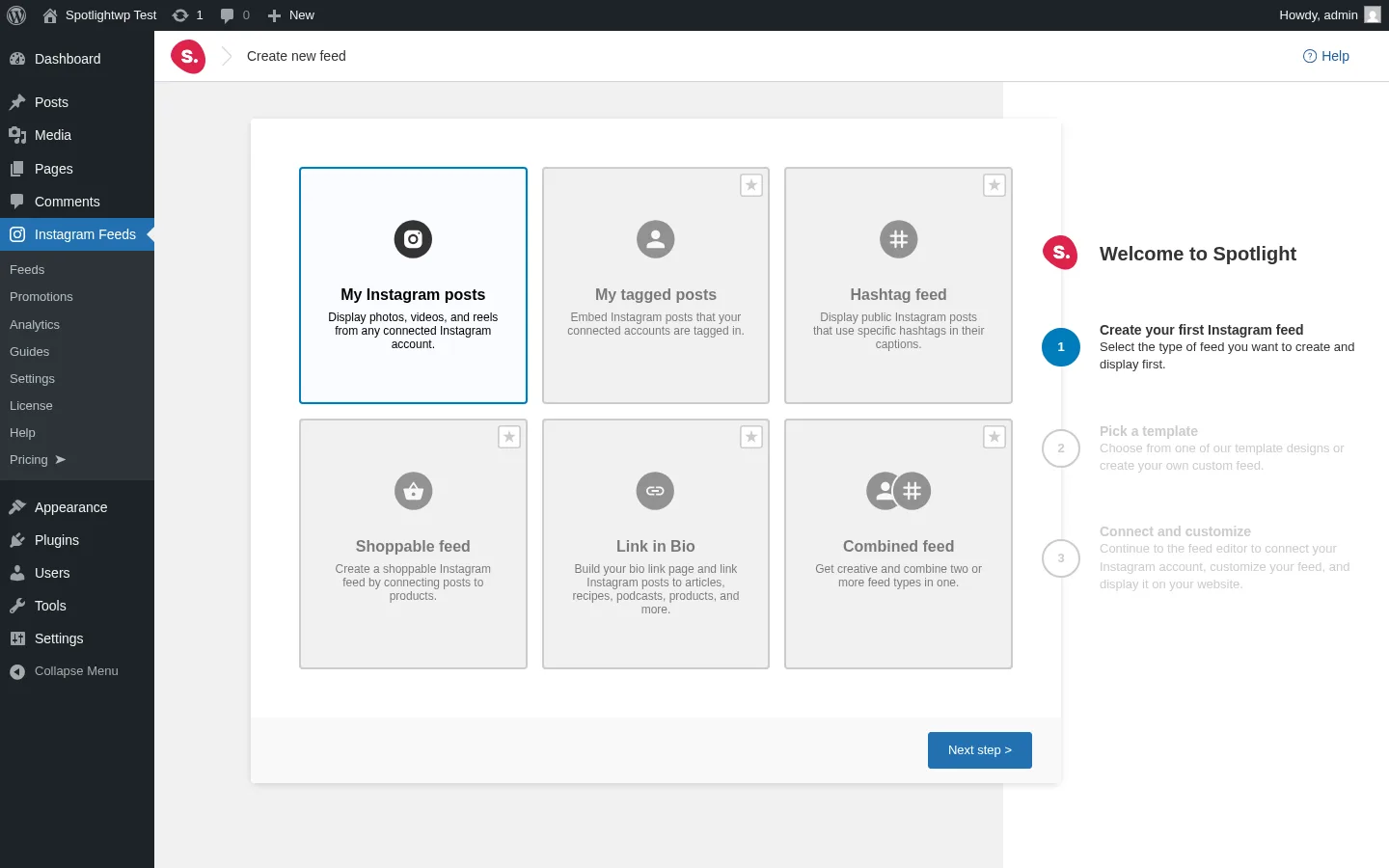
The wizard is the slickest first-run experience in the WordPress Instagram-feed category. Step 1 surfaces six use-case tiles — My Instagram posts (free) plus Tagged, Hashtag, Shoppable, Link in Bio and Combined feeds (all Pro, clearly badged with a star). Step 2 lets you pick from nine named templates. Step 3 is a short confirmation card with social-proof signals like "150+ 5-star reviews" and "Trusted by 60,000+ brands and creators".
The trick that makes Spotlight feel effortless on a first run is the pre-loaded @spotlight_demo content: the moment you land in the editor, a working 3×3 grid of demo posts is already rendered, so you can experiment with layouts and design controls before you ever connect your own Instagram account.
In testing, I went from "open WordPress admin" to a saved, embeddable feed in under three minutes — including a layout swap and a custom feed name.
2. Real-time live preview with nine templates and four layouts
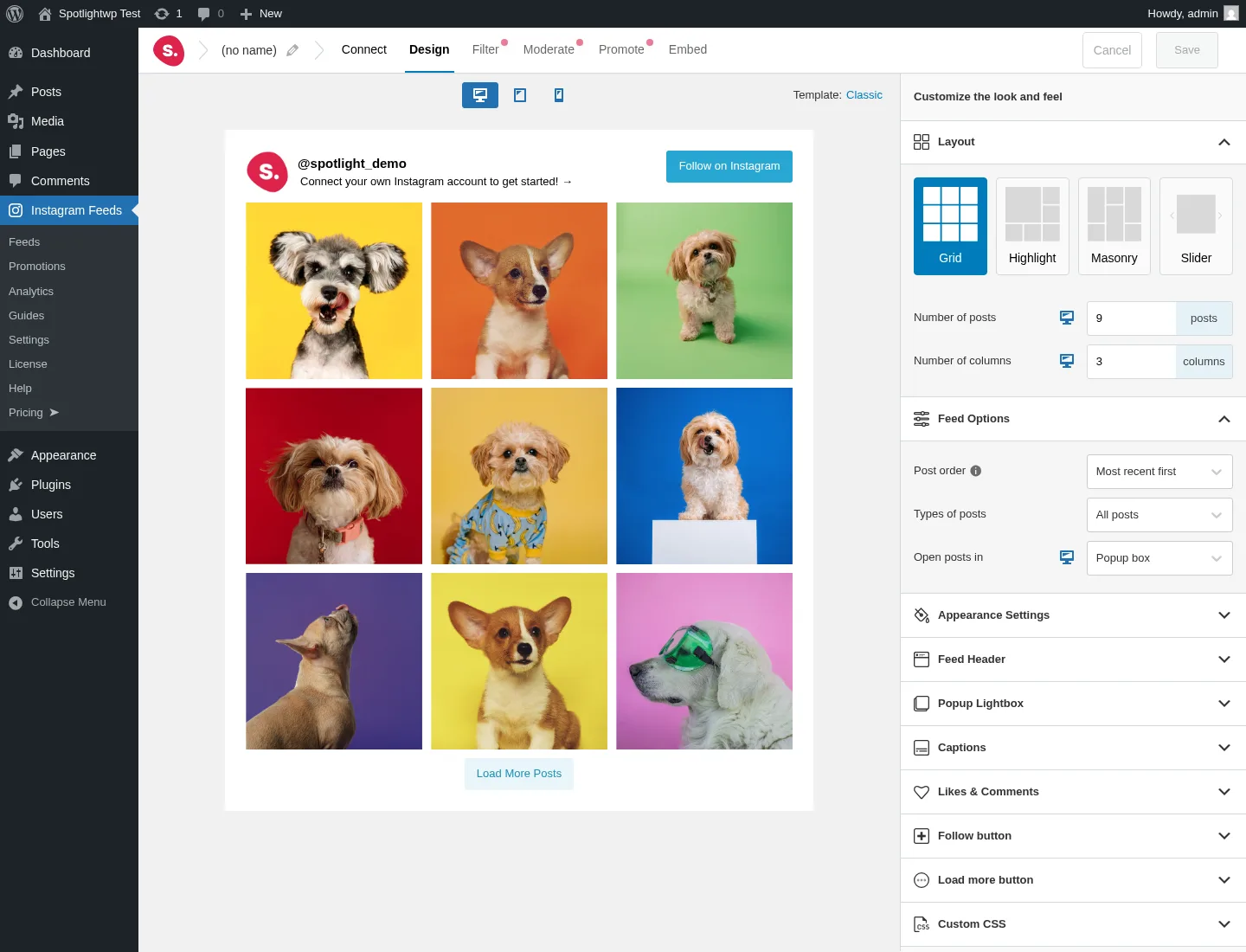
Once you land in the editor, the entire experience is built around a fully live preview. The right-hand sidebar exposes a Layout chooser with four chips — Grid (default), Highlight, Masonry and Slider — and every click re-renders the preview within roughly one second. There is no save-and-reload loop.
The wizard ships with nine named templates (Classic, Tall Grid, Gallery, Solo, Row, Wave, Squircle Grid, Carousel, Tile) plus a "create your own" starting point. Spotlight's free tier is template-locked to a single default per the public pricing page; Essentials and above unlock the rest, and at Pro all four layouts unlock with per-device fine-tuning.
In testing, switching between Grid, Highlight, Masonry and Slider on the same @fscode account showed the live preview reflowing instantly, with no broken assets. The Highlight layout's automatic featured-row + grid composition is particularly nice for hero placements on a homepage.
3. Popup lightbox with Reels playback and a customizable Feed Header
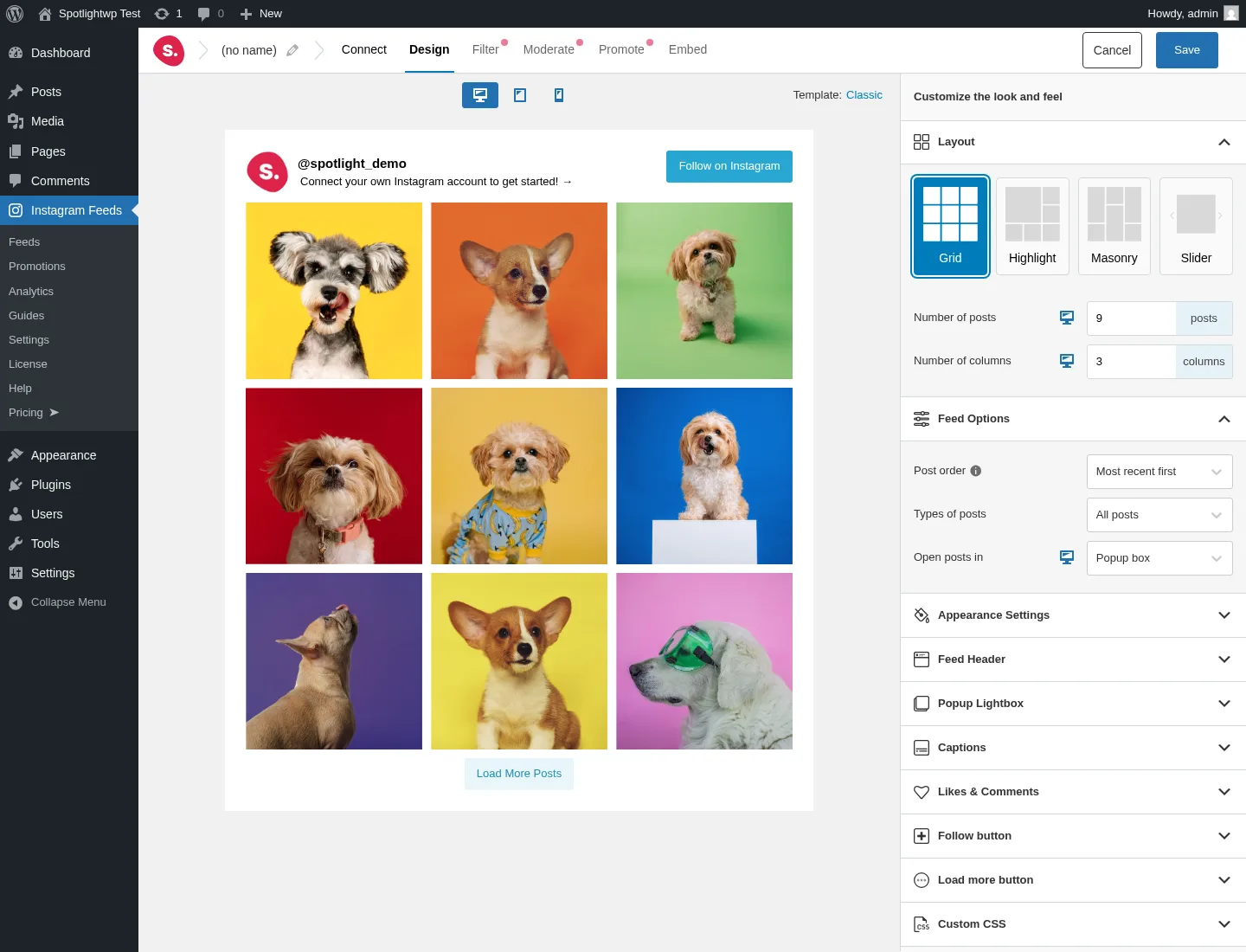
The Design tab packs an unusually deep customizer accordion for an Instagram-only plugin: Feed Header (avatar, bio, follower count, Follow button), Popup Lightbox (with full-screen post view, captions, likes, comments, navigation and — since version 1.6 — Reels playback inside the popup), Captions (with truncation and a "Show more" link), Likes & Comments overlay, Follow button, Load more button and a per-feed Custom CSS field.
This matters because the lightbox is the single most-cited praise theme in the public reviews — site owners want visitors to stay on the page instead of jumping to instagram.com, and Spotlight's lightbox actually works at the free tier without any premium wall.
In testing, the lightbox opened cleanly on every preview I touched and rendered captions, likes and comments overlays exactly as configured.
4. Per-device responsive preview baked into the editor toolbar
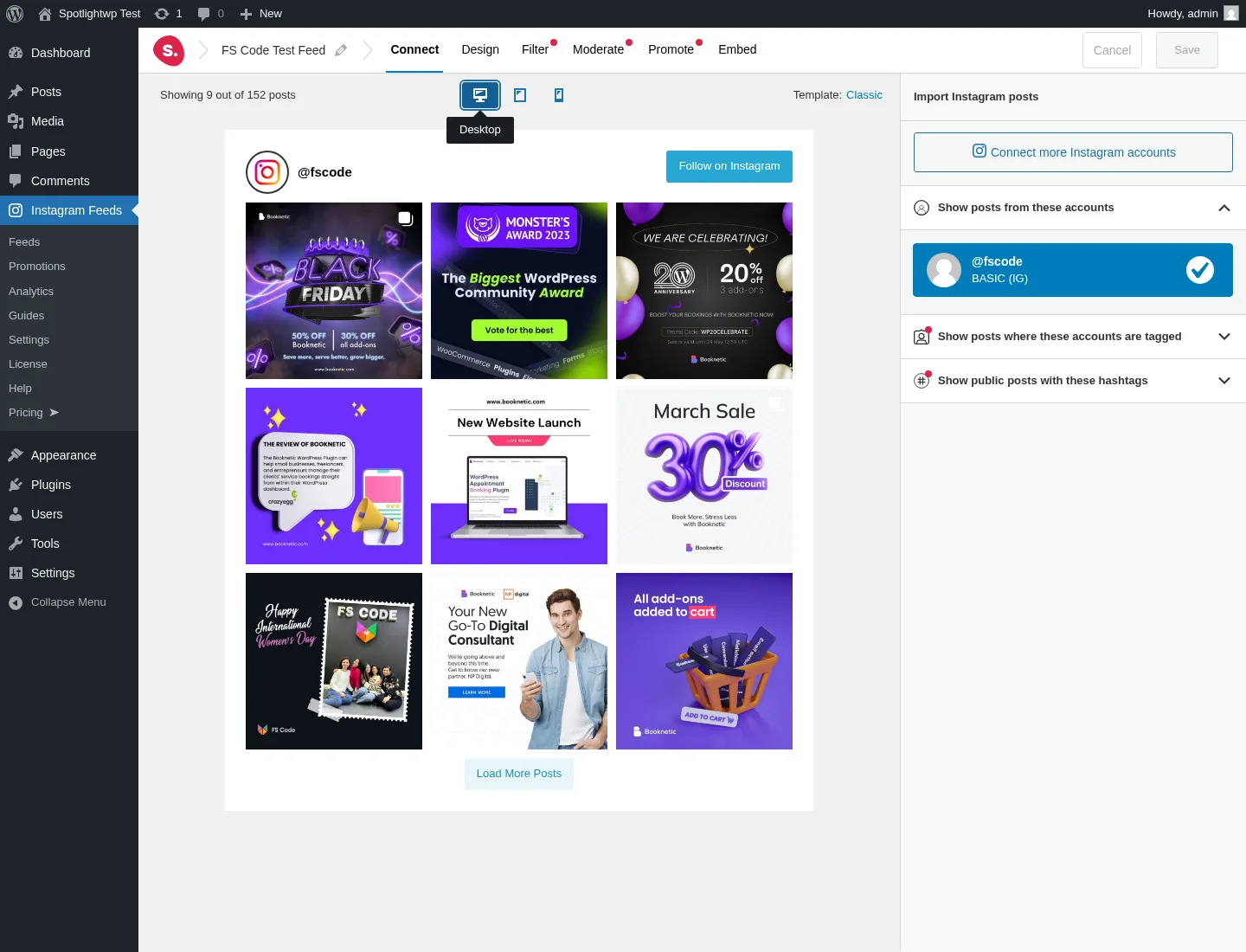
The editor toolbar exposes three preview toggles — Desktop, Tablet and Phone — and each click instantly re-renders the live preview inside the matching device frame. You can fine-tune the design per device (column count, header behavior, button layout) without leaving the editor.
In testing, the phone preview at roughly 375px effective width showed the @fscode feed header, a tight 3-column grid of the first nine posts, the Load More Posts button and the Follow on Instagram button all fitting on the first paint with no horizontal scroll.
5. Promotions automation — the differentiated Pro feature
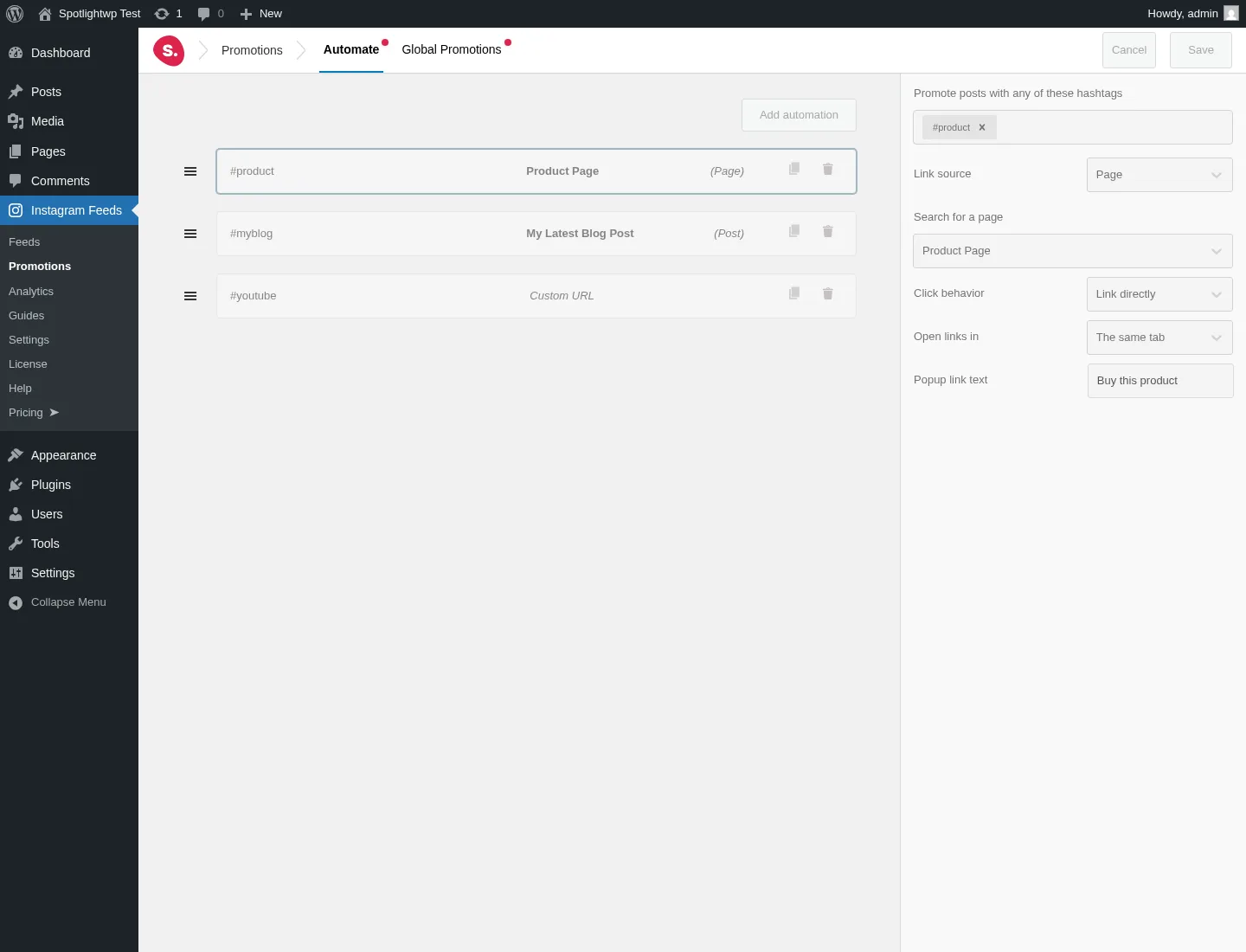
This is the single Pro feature that meaningfully differentiates SpotlightWP from Smash Balloon's shoppable workflow. Promotions lets you map a hashtag in your Instagram captions to a WordPress Page, Post or custom URL — so any post that contains #product automatically becomes a "Buy this product" CTA inside the lightbox. The Global Promotions tab applies the same rules across every feed at once.
For WooCommerce stores running Instagram-driven UGC marketing, this turns a normal Instagram gallery into a passive shoppable channel without manually tagging every post.
In my test setup, the Automate tab showed three pre-existing demo rules and the rule editor sidebar (hashtag chips, link source, click behavior, popup link text) was fully editable on the Essentials tier — but attaching a rule to a saved feed requires upgrading to Pro, because the Promote tab inside the feed editor stays gated at Essentials.
6. Shortcode, Gutenberg block and one-click embed
![SpotlightWP Embed sidebar with the Gutenberg block instruction, the [instagram feed="160"] shortcode and a one-click Copy button](https://www.fs-poster.com/storage/posts/ospSSmFIsJ92NbCKVUwAIqZhfnORe8yMkxU3ptO1.webp)
Every saved feed gets three embed paths: a Gutenberg block (search "/Spotlight"), a unique shortcode like [instagram feed="160"] with a one-click Copy button, and a legacy classic WordPress widget. Essentials and above also unlock a dedicated Elementor widget. The Embed sidebar also offers shortcut buttons to create a new page or post pre-populated with the feed.
In testing, I dropped the shortcode straight into a Shortcode block on a published WordPress Page and the feed rendered correctly at the first load — no theme conflicts, no missing assets.
SpotlightWP Ease of Use / UI & UX
For a small-team plugin, SpotlightWP is genuinely well-designed. Here are the usability categories that matter most.
1. UI / UX
The admin UI looks closer to a modern SaaS dashboard than a traditional WordPress plugin panel — clean typography, consistent iconography, and a left navigation that groups Feeds, Promotions, Analytics, Guides, Settings, License, Help and Pricing into a single "Instagram Feeds" menu. The wizard and editor share the same design language as the rest of wp-admin without feeling cramped.
2. Setup
Setup is fast. Connect an Instagram account via OAuth or via Spotlight's hosted Access Token Generator (handy for agencies onboarding clients without sharing IG passwords), pick a use case, pick a template, and you're inside the editor with a live preview. I went from plugin activation to a published front-end feed in well under five minutes.
3. Workflow speed
Every change in the customizer applies to the live preview within ~1 second, including layout swaps. The Save button only enables after you make a change, which keeps things tidy, and the post-save flow drops you straight into the Embed sidebar with the shortcode ready to copy. Friction is genuinely minimal.
4. Learning curve
There is almost no learning curve. The wizard surfaces every choice you need to make, the templates take care of visual decisions, and the Appearance Settings accordion is logically grouped (Header / Lightbox / Captions / Likes & Comments / Follow / Load More / Custom CSS). Anyone comfortable with the WordPress editor will be productive in their first session.
5. Friction points
Two small things stand out. First, the Pro tabs inside the editor — Filter, Moderate, Promote — are visible with a "PREMIUM" pill but clicking them does literally nothing, with no upgrade modal or upsell prompt. It's a missed UX cue. Second, the in-plugin "Smash Balloon-style" upsell density is much lower than the competition, which most buyers will appreciate, but it also means the upsell only really lands on the dedicated Pricing sidebar item.
SpotlightWP Performance
Performance is solid for a server-rendered WordPress plugin. Here's what I actually observed.
1. Editor load time
The feed editor loads in roughly 7–10 seconds on first launch of the wizard and 3–5 seconds on subsequent re-opens. That's longer than a static admin page but expected for a modern single-page editor that fetches real preview content from the Instagram API on init.
2. Live preview responsiveness
Every layout, template, color and toggle change re-renders the preview within roughly one second. There is no save-and-reload loop, which makes iterating on the design feel almost instant once the editor is open.
3. Front-end render
Spotlight is fully server-rendered — feeds are baked into the DOM as real markup with <img> thumbnails, not iframes. On my published test page, the feed loaded at desktop and mobile with no horizontal scroll, lazy-loaded images progressively as I scrolled, and totalled roughly 1.5 MB on initial paint at 9 posts visible. Compatible with major caching plugins and explicitly tested with WP Rocket.
4. Stability
During hands-on testing, I ran both the free and Premium Spotlight plugins active simultaneously with no PHP fatals, no admin notices and no browser console errors during a full wizard → editor → save → embed → render cycle.
5. API resilience
Spotlight has shipped reactive releases every time Meta has broken the Instagram API — v1.7.0 adopted the new Business Basic API in December 2024, v1.7.3 added oEmbed v22.0 compatibility in September 2025, and v1.7.5 modernized internals for PHP 8.3 in March 2026. The plugin also runs a background optimizer that auto-cleans unseen posts after a configurable number of days (default 7) and keeps the last successful import as backup cache, so a temporary API outage won't blank out the feed.
SpotlightWP Support, Documentation & Learning Resources
Support is delivered through email ticketing, with the Help page inside wp-admin handing off to a Freemius-powered contact form (Technical Support / Billing / Feature Request / Customization / Pre-Sale / Press / Bug / Refund categories). Essentials and Pro get standard email support Mon–Fri 8 AM–5 PM UTC+4; Agency adds priority email support.
Public review threads on WordPress.org consistently call out fast, helpful responses, with the support agent name "Hendra" recurring in 2026 5-star reviews ("Hendra from the support team was incredibly fast, friendly, and provided the exact CSS solution I needed"). With a 4.7★ average across 169 reviews, Spotlight sits comfortably in the "good support" band for this category.
Documentation is centralized at docs.spotlightwp.com with sections for Get Started, Features, Troubleshooting, Billing, Developers and FAQs — comprehensive and current. In-plugin, the Guides page surfaces curated articles with hero CTAs (Inspire me / Elevate my brand / Boost my SEO), and the wizard's social-proof confirmation step doubles as gentle onboarding. There is no live chat tier for buyers, but the docs hub plus email tickets are more than enough for a non-developer site owner to get any plan live without external help.
SpotlightWP User Reviews & Reputation
SpotlightWP's public reputation lives almost entirely on WordPress.org, where the plugin has 60,000+ active installs and a 4.7★ rating across 169 reviews. Before writing this section, I read every recent review thread and the sentiment patterns are clear.
Overall impression: Buyers who love SpotlightWP really love it. The 5★ share is unusually high at 91.7% (155 of 169 reviews), and the praise themes are consistent — the wizard, the live preview, the lightbox and the support team. But the distribution is bimodal — there's also a small, concentrated tail of 1★ reviews (5.9%) that flag real issues. There's almost nothing in the middle, so the "balanced 4.7" framing undersells both ends.
Most praised strengths:
- "It just works." Reviewers repeatedly mention going from install to a live Instagram feed in minutes with no developer help.
- Customer support speed. The single most-cited praise theme — fast, polite, knowledgeable email replies from the Spotlight team.
- Visual quality. Multiple reviewers call out how cleanly the plugin integrates with their existing theme on both desktop and mobile.
- The free version is genuinely usable. Reviewers specifically credit the free lightbox for keeping visitors on their site instead of bouncing to Instagram.
- Pro delivers real value. Buyers who upgraded for shoppable or hashtag features tend to leave positive reviews afterwards.
Most criticized weaknesses:
- Admin UI is not translatable. A long-standing 2★ review (
networka, May 2025) notes that the translation request has been open for 3+ years with no progress — a real disqualifier for multilingual sites. - Lightbox keyboard accessibility is incomplete. The same review documents that you can't fully navigate galleries or start videos using only the keyboard — a WCAG-relevant gap.
- Instagram reconnection friction. Several 1★ reviews mention having to walk clients through reconnecting their Instagram accounts after Meta API changes — likely fallout from the late-2024 migration to the Business Basic API.
- One serious 1★ review (
zast, November 2025) alleges injected admaster ads on the front-end, which the reviewer says stopped only after deactivating the plugin. The allegation has not been publicly addressed in the support thread I sampled — verify on a fresh install before relying on any "ad-free" claim either way.
SpotlightWP Pricing & Value
SpotlightWP is sold as a freemium product with three paid tiers, all billed annually. The in-plugin pricing UI shows monthly equivalents like "$4 / mo BILLED ANNUALLY" — that's a presentation choice, not a real monthly option — and the public pricing page does not offer a true month-to-month plan. There is also an Annual / Lifetime toggle inside the plugin, but no public lifetime list price was exposed during my session, so treat lifetime as unconfirmed until you see a number at checkout. All prices below are in USD, verified against the official spotlightwp.com pricing page on the day of testing.
- Free (WordPress.org) — Unlimited Instagram accounts, unlimited feeds, multi-account combine, 4 layouts, popup lightbox with Reels, Feed Header with Follow button, custom CSS per feed, Gutenberg block, shortcode, classic widget, JSON import/export, auto cache and lazy loading. Free support is through the WordPress.org plugin forum.
- Essentials — $59 / yr (1 site, billed annually). Everything in Free, plus unlock all 9 templates and all 4 layouts, all customization options, Instagram Stories display (requires a Business/Creator IG account), and a dedicated Elementor widget. Standard email support Mon–Fri 8 AM–5 PM UTC+4. Extra sites: $69 / site / year.
- Pro — $99 / yr (1 site, billed annually) — "Most Popular". Everything in Essentials, plus public Instagram hashtag feeds (24 most recent or Top 50 popular — Business account required), tagged posts feeds (UGC), combined feeds, content filtering by keyword/phrase/hashtag, visual content moderation, Link in Bio Linktree-style landing pages, shoppable Instagram feeds with WooCommerce integration, and the Promotions automation engine described above. Extra sites: $19.80 / site / year.
- Agency — $199 / yr (up to 20 sites, billed annually). Everything in Pro, plus Instagram account insights (new followers, engagement deltas, post-by-post insights), feed analytics, promotion analytics, Google Analytics integration, image and video media management, and priority email support. Extra sites beyond 20: $9.95 / site / year.
The free version is unusually generous for this category. The only meaningful free-tier limitation is template choice (per the public pricing page, the free tier is locked to a single template), plus the fact that Stories, hashtag feeds, tagged feeds, shoppable feeds, Link in Bio, content filtering, visual moderation and Promotions are all behind a paid tier. If you only need a polished gallery of your own Instagram posts on a single WordPress site, the free plugin is enough.
Every plan auto-renews annually at the original purchase price — Spotlight markets this as "price locked for life", meaning no surprise renewal step-up — and is backed by a 30-day money-back guarantee. Accepted payment methods are Visa, Mastercard, American Express, Discover and PayPal, billed through Freemius, with VAT applied at checkout where applicable (EU and UK).
Value verdict: Free is the right starting point for a single-account brand. Essentials at $59/yr is the right step up if you specifically need Stories, Elementor or the full template library. Pro at $99/yr is the sweet spot for WooCommerce stores and UGC-heavy marketers because the hashtag feeds plus Promotions automation pay for themselves quickly. Agency at $199/yr is only worth it if you're an agency running 5+ client sites or you genuinely need the Instagram insights and analytics layer.
SpotlightWP Pros and Cons
After hands-on testing and cross-checking the public reputation, here's how the trade-offs shake out.
Pros
- Genuinely useful free tier: Unlimited accounts, unlimited feeds, real popup lightbox with Reels playback, custom CSS, Gutenberg block, and per-device responsive controls — most WP plugins gate these basics, Spotlight doesn't.
- Slickest first-run wizard in the category: Three steps, pre-loaded demo content, social-proof confirmation card, and a live preview the moment you land in the editor.
- Hashtag → page Promotions automation (Pro): Map a hashtag to any WordPress page, post or custom URL and watch every tagged Instagram post turn into a "Buy this product" CTA inside the lightbox. Genuinely differentiated from Smash Balloon's per-post manual shoppable workflow.
- Fair pricing optics: "Price locked for life" renewals and a 30-day money-back guarantee mean no surprise step-up after year one.
- Runs on legacy hosts: PHP 7.1 minimum vs Smash Balloon's PHP 7.4 — Spotlight will install on hosts the competition won't touch.
Cons
- Instagram-only despite the "Social Media Feeds" name: No Facebook, X, TikTok, YouTube, Pinterest, LinkedIn or Reviews feeds in the same plugin. Multi-network buyers should look at Smash Balloon's All Access bundle instead.
- Admin UI is not translatable: A 3+ year unfixed gap that disqualifies SpotlightWP from any multilingual-first site.
- Lightbox keyboard accessibility is incomplete: WCAG-conscious buyers should escalate this with support before committing.
- The best features all sit behind Pro: Hashtag, tagged, shoppable, Link in Bio, content filtering, visual moderation and Promotions all require Pro at $99/yr — "Instagram for marketing" buyers will not get far on the free tier.
Who Should Use SpotlightWP?
SpotlightWP is an easy "yes" for a specific kind of buyer — and a clear "skip" for another.
Who Should Use It
- Single-Instagram-account brands and creators: If you have one Instagram presence you want polished on your WordPress site, the free or Essentials tier covers everything you need.
- Hospitality, food, lifestyle, photography and real-estate sites: Visual-first niches where mirroring the Instagram aesthetic on the website is the entire pitch — Spotlight's templates and layouts were designed for exactly this.
- WooCommerce stores running UGC and hashtag marketing: Pro's hashtag feeds plus Promotions automation turn any tagged Instagram post into a shoppable CTA without manual per-post tagging.
- Small agencies managing visual client sites: Agency tier covers up to 20 sites with priority support, Google Analytics integration and per-account Instagram insights — clean fit for boutique studios.
Who Should Skip It
- Multi-network buyers: If you also need Facebook, X, TikTok, YouTube, Pinterest, LinkedIn or Reviews feeds in one plugin, Smash Balloon's All Access bundle is the right choice — Spotlight is Instagram-only and that won't change.
- Anyone who needs to publish posts to Instagram from WordPress: Spotlight is display-only. If you want automated outbound publishing, pair it with FS Poster instead — the two products solve opposite halves of the same problem.
- Multilingual / RTL-first sites: The admin UI is documented as not fully translatable, and the team has not addressed multilingual buyer requests despite 3+ years of feedback.
- Strict WCAG-AA buyers: The lightbox keyboard accessibility gap is documented and unresolved — verify with support before committing.
Best SpotlightWP Alternatives
SpotlightWP is a strong contender in the broader WordPress feed market — it ranked in my full best WordPress social media feed plugins roundup — but several credible WordPress-native alternatives exist depending on what you actually need.
- Smash Balloon Instagram Feed Pro: The category leader with 1,000,000+ active installs and a 4.9★ rating across 4,340 reviews. Single-plugin Basic starts at $49 / yr intro (renews at $98 / yr) for one platform on one site, and the All Access Bundle at $299 / yr intro (renews at $598 / yr) covers unlimited sites and all seven plugins — Instagram, Facebook, X, YouTube, TikTok, Reviews and Social Wall. Read the full Smash Balloon review.
- WP Social Ninja: An all-in-one social proof plugin from the WPManageNinja team covering five-network feeds, 10+ business review sources (including free Google Business Profile reviews), 15+ chat-widget channels, notification popups and testimonials under one Pro license. Single Site from $89 / yr (currently $44 / yr at the 50% promo). Best for sites that want to consolidate feeds, reviews and chat into one bundle. Read the full WP Social Ninja review.
- Instagram Feed Gallery (QuadLayers): The cheapest credible Instagram-only WordPress feed plugin (80,000+ installs, 4.5★ from 301 reviews) and the only one with publicly priced per-plugin Lifetime tiers from $99 one-time. Best for single-Instagram-account buyers who want a one-time payment instead of an annual renewal. Read the full Instagram Feed Gallery review.
- Easy Social Feed: A budget multi-network alternative (30,000+ installs, 4.6★ from 500 reviews) that covers Facebook, Instagram, YouTube and X from one plugin with a $89 / yr COMBO bundle and a $259 one-time Lifetime tier. Best for cost-sensitive multi-network buyers who can't justify Smash Balloon All Access. Read the full Easy Social Feed review.
- WPZOOM Social Feed Widget & Block: A lightweight Instagram-only plugin (60,000+ installs, 4.3★) with off-by-default asset loading, AJAX initial load and server-side image caching to your own WordPress uploads. Starter from $49 / yr or the $599 one-time Lifetime All Access Pass that bundles every WPZOOM plugin and theme. Best for performance-first single-Instagram-account sites. Read the full WPZOOM Social Feed review.
Final Verdict: Is SpotlightWP Worth It?
Yes — if your one missing piece is a clean, customizable Instagram feed on a WordPress site, SpotlightWP is the right buy. The free tier is genuinely usable, the wizard is the slickest in the category, the lightbox actually works without a paywall, and the Promotions automation in Pro is a real, differentiated reason to pick Spotlight over Smash Balloon for hashtag-driven shoppable feeds.
The single-account brand or hospitality/lifestyle site should start on Free and only step up when a specific gap (Stories, Elementor, hashtag UGC) shows up. The WooCommerce store running Instagram-driven marketing should jump straight to Pro at $99/yr. The boutique agency with 5+ client sites should go straight to Agency at $199/yr for the analytics and priority support.
The biggest caveat is the obvious one: SpotlightWP is Instagram-only. If you also need Facebook, X, TikTok, YouTube, Pinterest, LinkedIn or Reviews feeds, you'll either be running a second plugin or you should pick Smash Balloon instead. And remember Spotlight only displays Instagram content — pair it with FS Poster if you also need to publish WordPress posts out to your social networks.
SpotlightWP FAQ
Is there a free version of SpotlightWP?
Yes — the free plugin on WordPress.org is genuinely usable, with unlimited connected Instagram accounts, unlimited feeds, four layouts, the popup lightbox with Reels playback, custom CSS, Gutenberg block, classic widget and JSON import/export. Stories, hashtag feeds, tagged feeds, shoppable feeds, Link in Bio, content filtering, visual moderation and Promotions automation all require a paid tier.
Is SpotlightWP beginner-friendly?
Yes — it's one of the easiest WordPress plugins in this category. The three-step wizard, pre-loaded demo content and live customizer preview mean you can build a working Instagram feed from "install" to "live on the site" in well under five minutes, with no developer help required.
Does SpotlightWP support Facebook, TikTok or YouTube feeds?
No. Despite the "Spotlight Social Media Feeds" name, the plugin only supports Instagram. If you need Facebook, X, TikTok, YouTube, Pinterest, LinkedIn or Reviews feeds in the same plugin, Smash Balloon's All Access bundle will fit your use case better.
Does SpotlightWP work with personal Instagram accounts or only Business accounts?
It works with both. Personal Basic Display accounts cover the My Instagram posts feed type on every tier. Public hashtag feeds, tagged feeds and Instagram Stories display all require an Instagram Business or Creator account — that's a Meta requirement, not a Spotlight limitation, and the wizard surfaces it clearly.
What are the best SpotlightWP alternatives?
For multi-network buyers, Smash Balloon Instagram Feed Pro plus its sibling plugins (or the All Access bundle) is the strongest alternative. For an all-in-one feeds + reviews + chat-widget stack, WP Social Ninja. For one-time Lifetime pricing on Instagram, Instagram Feed Gallery (QuadLayers). For the cheapest multi-network coverage in one plugin, Easy Social Feed. For the lightest Instagram-only footprint, WPZOOM Social Feed Widget & Block. For the full social-media-on-WordPress stack, pair SpotlightWP (display) with FS Poster (publish).
Write once. Post to 26 networks.
- 26 social networks
- Schedule & auto-repost
- Runs inside wp-admin


