


Can Social Warfare still earn its place on a WordPress site in 2026, or has the brand quietly fallen behind newer share-button plugins? Is the $29 single-site Pro license actually a "lifetime" deal, and is the free tier enough on its own? If you're staring at the 3.3-star rating on WordPress.org and trying to decide whether Social Warfare's Pinterest features and Click-to-Tweet box justify the trade-offs, you're asking the right questions.
This Social Warfare review is the result of a full hands-on evaluation. I installed Social Warfare 4.5.6 from WordPress.org into a current WordPress test environment, walked through every option in all four free admin tabs (Display, Styles, Social Identity, Advanced), enabled the floating bar and confirmed how it behaves on desktop and mobile, and checked the buyer-facing pieces that actually move the purchase decision — what renders on a post, what's free vs. paid, what shows up in social-card previews. I also weighed the plugin's current public reputation, the vendor's recent maintenance pace, and how the free tier's usable network list compares to competitors. Below is what I'd tell a colleague before they install it.
What Is Social Warfare?
Social Warfare is a freemium WordPress share-button plugin from Warfare Plugins, LLC. It adds visitor-facing share buttons to your posts and pages — inline (above, below, or both around the content), a floating bar (top, bottom, left, or right), a Click-to-Tweet quote box, and a Popular Posts by share count widget — across five default networks in the free tier (Facebook, Twitter/X, LinkedIn, Pinterest, Mix) and roughly nine additional networks unlocked by the separately sold Pro add-on.
It's pitched at Pinterest-heavy bloggers, food and lifestyle publishers, and content marketers who specifically want per-post custom Pin images, custom tweet text, and a one-time-fee Pro license instead of an annual subscription. The free plugin has been on WordPress.org since July 2016, has 20,000+ active installs, and is currently at version 4.5.6 (released 2025-03-18, the last release for 14+ months at the time of this review).
One important clarification up front: Social Warfare is passive share buttons, not auto-publishing. It does not post your content to your own social accounts. If that's what you need, you want FS Poster or a similar publishing plugin — and the two work side by side on the same site.
Social Warfare Review Quick Verdict
Social Warfare is a polarized plugin with a genuinely good Pinterest Pro workflow and a built-in Click-to-Tweet feature, wrapped around a free tier that's narrower than most competitors and a brand that has clearly slowed down in 2025–2026. It's the right pick for a specific buyer; it's the wrong default for most general-purpose share-button shoppers.
| Criteria | Verdict |
|---|---|
| Best for | Pinterest-heavy bloggers and Click-to-Tweet authors who want a one-time Pro license |
| Starting price | $0 free; Pro from $29 (single site, one-time) |
| Free plan / trial | Yes — free plugin on WordPress.org; no trial of Pro |
| Update frequency | Slowing — 4.5.0 → 4.5.6 over 8 months, then 14+ months silent at audit time |
| Most valuable features | Pinterest Pro workflow (Image Hover Pin, custom Pin image), Click-to-Tweet, floating bar, Frame Buster |
| UI/ |
7/ |
| Feature richness score | 6.5/ |
| Product performance | 7.5/ |
| Product rating | 3.3/ |
Social Warfare Features & Functionality
Social Warfare's free feature set is narrower than it looks from the marketing copy, but a few features hit harder than competitors — Click-to-Tweet, the Popular Posts widget, and the in-bundle Frame Buster. The Pro add-on is where the Pinterest and per-post override workflow lives. Below are the most important findings from the hands-on test.
1. Inline and floating share buttons across 5 free networks
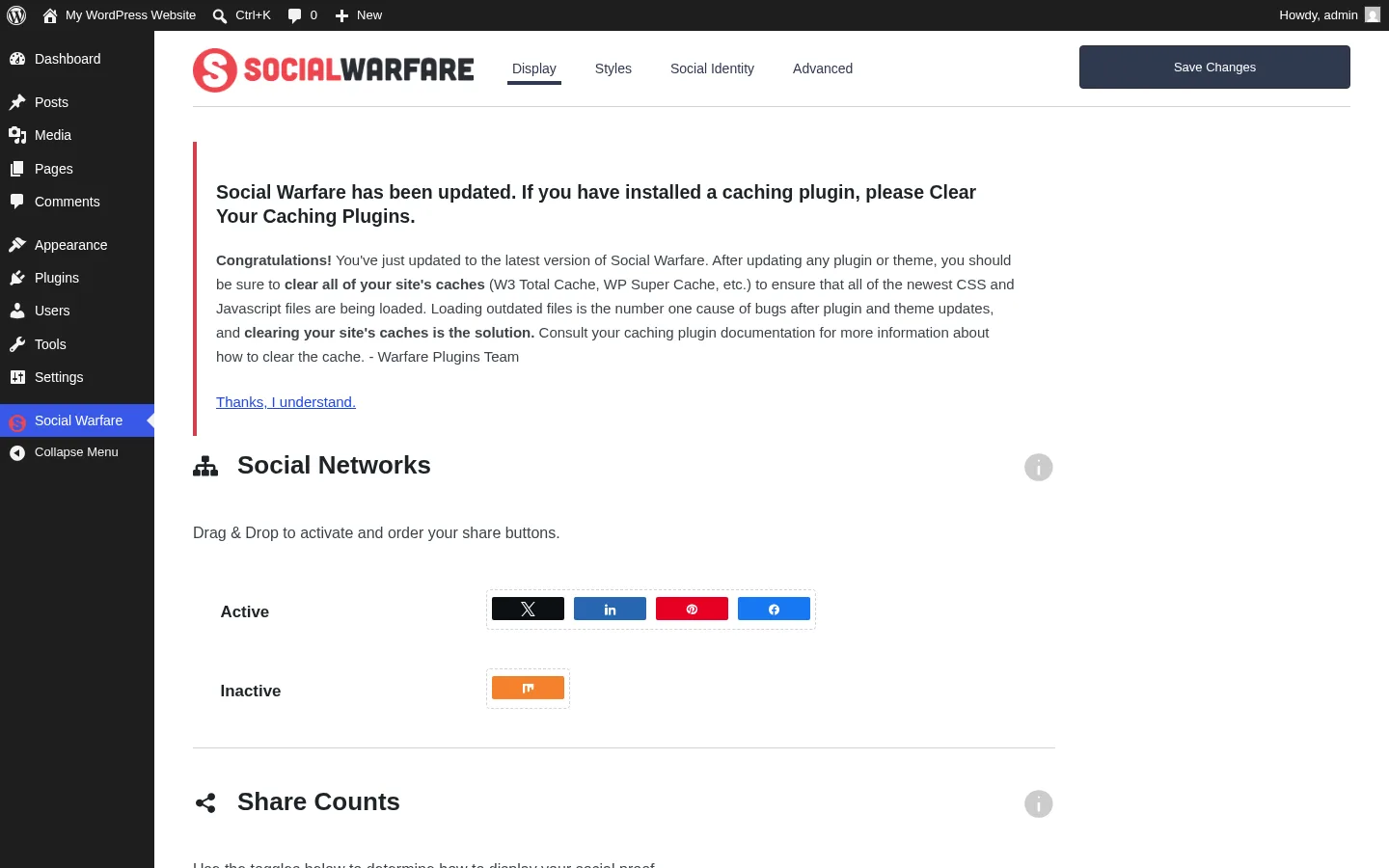
The Display tab is where you choose which networks to show and where to show them. A drag-and-drop column lets you move Facebook, Twitter, LinkedIn, Pinterest, and Mix between Active and Inactive lists, and a position table below lets you pick Above / Below / Both / None per post type — the default is Both, which puts a button row at the top and bottom of every post. In testing, a fresh install immediately rendered two button rows on a sample post, each with four working buttons (Twitter, LinkedIn, Pinterest, Facebook in the default order) and a Total Shares pill — no configuration needed.
Two practical caveats. First, Mix shows in the network list but its destination service shut down in June 2022 — the share URL still routes to mix.com, but nothing happens there. Second, StumbleUpon is no longer offered as an option at all, since the service was discontinued years ago. So while the marketing says "5 networks," the realistic working count of the free tier is four.
2. Floating share bar with four positions
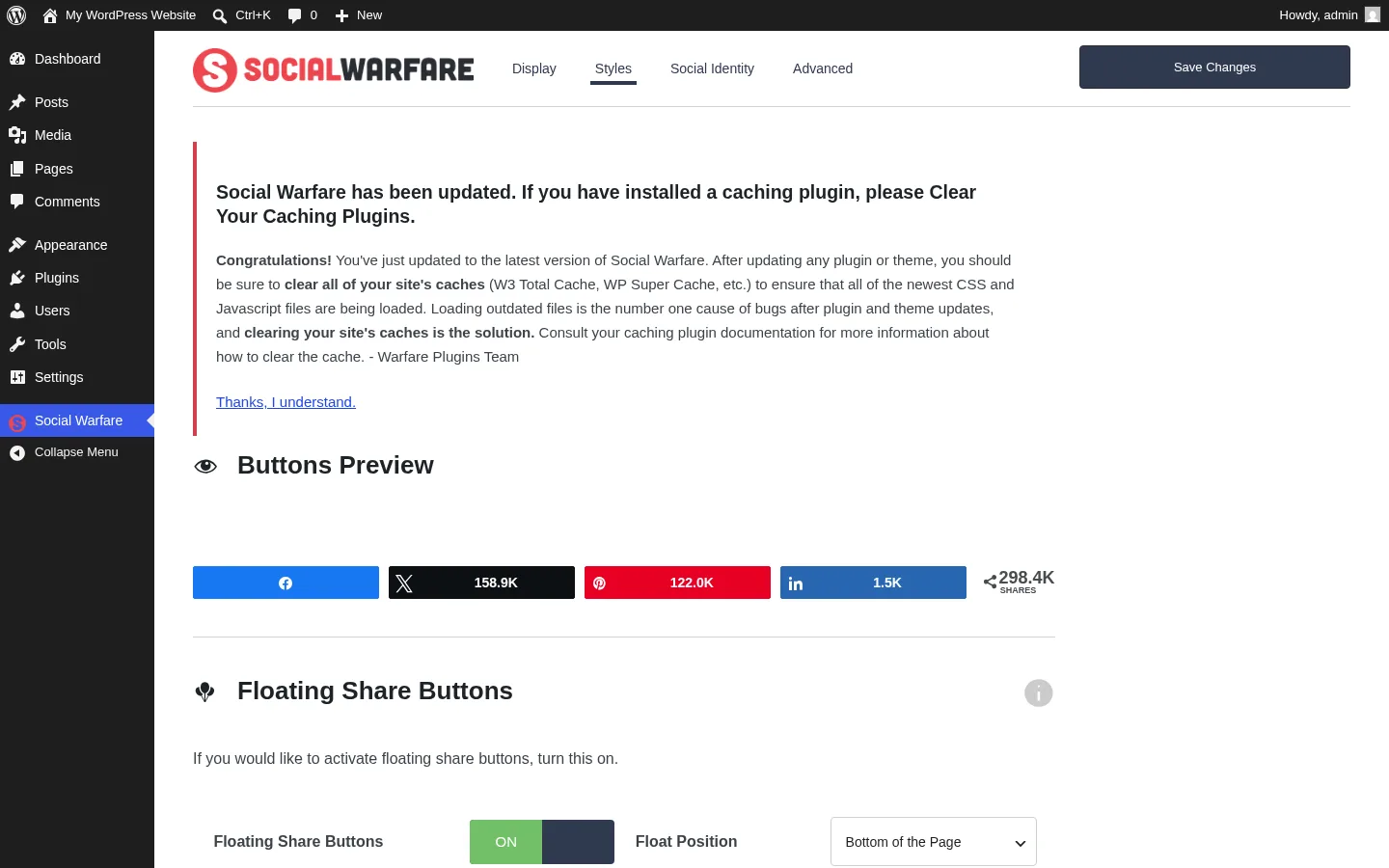
Flipping the Floating Share Buttons toggle on the Styles tab adds a sticky panel to the frontend in Top, Bottom, Left, or Right position with a slide or fade transition. The left and right variants honor a configurable minimum-screen-width threshold (default 1,100 px), so the floating bar disappears on tablet and mobile by design, with the inline row picking up the slack. The top and bottom variants take a configurable background color and an optional "Float Before Content" toggle that reveals the bar before the inline row scrolls into view.
In testing, enabling the master toggle and saving cleanly added the floating bar alongside the two inline button rows. The 1,100 px breakpoint behaves as advertised — on a 375 × 800 mobile viewport, only the inline panel renders, which is the sensible default for small screens.
3. Click-to-Tweet in the free tier
The Click-to-Tweet feature is one of Social Warfare's genuine differentiators in the category. The classic editor gets a TinyMCE button, the block editor gets a dedicated Gutenberg block, and there's a [click_to_tweet] shortcode for placing branded "tweet this" quote boxes inside post content. Most other share-button plugins either gate this behind a paid tier or require a separate "tweet this" plugin; Social Warfare bundles it in the free tier.
The feature is wired into the plugin as expected, but in my test environment the front-end rendering of the box didn't fully validate end-to-end, so I'd treat this as wired but not visually confirmed in this round. If Click-to-Tweet is the main reason you're considering Social Warfare, plan to re-check the rendering on a staging install before committing.
4. Popular Posts widget with eight visual styles
The Popular Posts widget ranks blog posts by share count (per-network or a combined total) and renders them with one of eight built-in visual styles, from a transparent default through to charcoal, navy, and the brand colors of Facebook, LinkedIn, and Pinterest. Configurable thumbnail size, font scaling, custom background and link colors, an age limit (in days), and a post-type filter give you enough control to drop the widget into a sidebar without it looking like a default WordPress widget.
The widget is registered and configurable, but I didn't visually exercise it in this test because the default theme in the sandbox is a full-site-editor theme without a traditional sidebar. On a classic widget-enabled theme it should drop in cleanly under Appearance → Widgets — but confirm the rendering on your own theme before relying on it for a high-traffic slot.
5. Frame Buster, self-hosted assets, and what's actually in the social-card preview
Two unsung free features show their value once you look closely. Frame Buster is on by default in the Advanced tab and detects when your site is loaded inside another origin's frame, then breaks out to the canonical URL — protection against content-scraping aggregators that Warfare Plugins used to sell as a separate standalone plugin. Self-hosted assets mean every stylesheet, script, and icon file is served from your own WordPress install rather than a third-party CDN, which is a real privacy and performance edge over Shareaholic and ShareThis (both of which load their button bundles from a vendor CDN).
The most important correction from this audit, and the one that affects how buyers should think about the free tier: the free plugin does not generate Open Graph or Twitter Card meta tags. When a reader pastes your post URL into Facebook, LinkedIn, or X, the social-card preview pulled from your page won't include anything contributed by Social Warfare's free tier — it relies on whatever your theme or another SEO plugin already provides. Open Graph, Twitter Card, and Pinterest Rich Pin output is exclusive to the Pro add-on. If you're staying on the free tier and want consistent social-card previews, pair Social Warfare with an SEO plugin like Yoast, Rank Math, or All in One SEO.
Social Warfare Ease of Use / UI & UX
The admin experience feels late-2010s rather than 2026 — functional and learnable, but visually dated compared with Sassy Social Share or Hubbub Lite. Below are the categories that matter most day-to-day.
1. UI / UX
The admin lives under a top-level "Social Warfare" menu in the sidebar with the brand's icon. Inside, four tabs (Display, Styles, Social Identity, Advanced) sit under a navy header with the Social Warfare wordmark and a Save Changes button. The look is utilitarian — native form controls, no accordion-heavy hiding, and a buttons preview at the top of the Styles tab. There's no welcome wizard, no Pro upsell modal interrupting your flow, and no premium banner above settings, which is more restrained than most freemium plugins.
2. Setup
After activation, the plugin defaults to Both-position inline buttons across all post types — so a fresh install renders share rows above and below every post immediately, with the four default networks active. Most publishers won't need to open the settings page on day one. The Floating bar and Click-to-Tweet are off by default and worth a 10-minute pass once you're sure the defaults look right.
3. Settings clarity
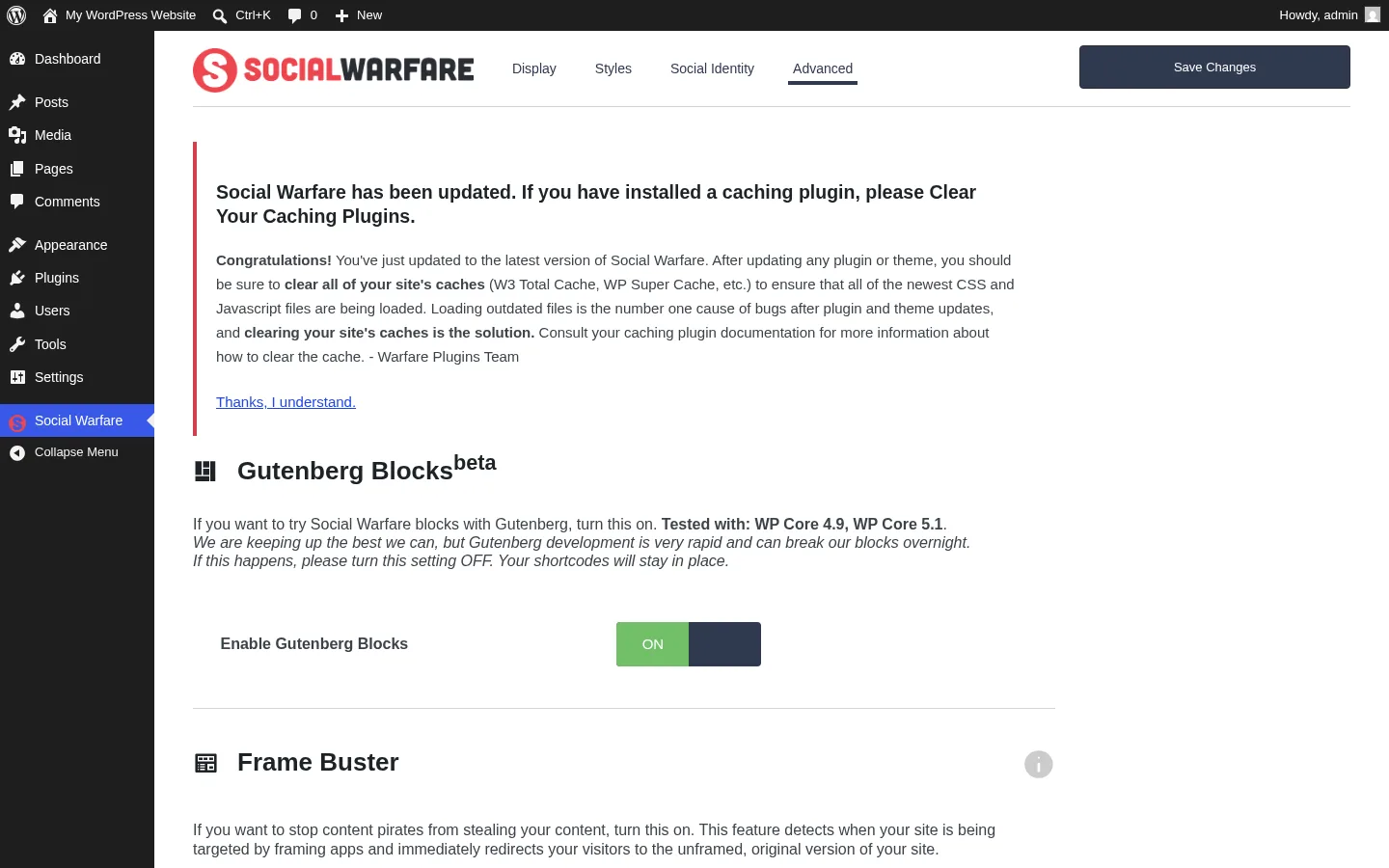
Labels are plain English ("Floating Share Buttons", "Minimum Screen Width", "Frame Buster"), and conditional fields appear after saving the parent toggle, which keeps each tab uncluttered. The Advanced tab is the densest one, with three independent toggles that affect different behaviors (Gutenberg Blocks beta, Frame Buster, Full Content versus Excerpts). The Social Identity tab is just two text inputs — sitewide Twitter and Pinterest usernames — and those values feed Pro-only "via @username" injection on tweets and pins.
4. Learning curve
If you accept the defaults: zero learning curve. If you want to enable the floating bar, configure the breakpoint, and tune the Popular Posts widget, expect a 20-minute first pass. Developers have a couple of light extension hooks (a buttons-panel template tag, a [social_warfare] shortcode that accepts an alternate post ID), but the developer documentation is thin compared with bigger competitors.
5. Friction points
The biggest day-to-day friction is the dated "Tested up to" declaration on the WordPress.org listing — it hasn't been refreshed in over a year, which makes some site owners hesitant to install on the latest WordPress core. The other friction is the dated visual styling of the admin page itself; on a high-resolution monitor in 2026 it looks visibly older than modern React-based plugin admins.
Social Warfare Performance
Social Warfare is in the lighter half of share-button plugins, with a few choices worth flagging.
1. Frontend rendering
On the test post, two inline button rows render — one above and one below the content — each with four buttons and a Total Shares pill. The buttons appear before any third-party scripts run, so the first paint isn't blocked. Total additions to the page for the default setup are modest for a plugin with this much feature surface.
2. Asset loading
The plugin's stylesheet, script bundle, and icon font are all served directly from your own WordPress install — there's no third-party CDN dependency. That's a real privacy and consistency win over Shareaholic and ShareThis, both of which load their button rendering from a vendor CDN that has to stay reachable for the buttons to work.
3. Mobile behavior
At a 375 × 800 mobile viewport, the inline row still renders cleanly inside the post body, and the floating bar respects the 1,100 px breakpoint by hiding itself. So mobile readers see only the in-content row — a sensible default versus a sticky bar that would cover 60 px of vertical space on a small phone.
4. Caching and share-count APIs
Share counts are cached per post and refreshed on a TTL rather than fetched on every page view. The catch is that several upstream count sources — Pinterest's public counter and Facebook's public counter — have been deprecated or restricted by their respective platforms, so the counts you see on a real production site may stop updating regardless of Social Warfare doing the right thing on its end. Twitter share counts are Pro-only and require a separate third-party service account to reactivate.
5. Outbound link behavior
Every outbound share link on the rendered frontend uses rel="nofollow noreferrer noopener". The noreferrer part strips the Referer header — useful for privacy, but it also breaks partner-attribution analytics on the destination side. Most direct competitors use only rel="nofollow noopener" and preserve the Referer header. Worth noting if you run referral analytics with social partners.
Social Warfare Support, Documentation & Learning Resources
Support is split by tier — and worth understanding before you commit.
The free-tier support channel is the WordPress.org plugin support forum. There's no email ticketing, no live chat, and no community Slack for free users; the plugin readme is explicit that email support requires a Pro license. The most recent visible vendor reply on the support forum is from more than two years ago, and the active maintainer footprint there has shrunk noticeably since 2023. Pro buyers get email support via the vendor site, which has had reachability issues during this review period and would need to be back online for that channel to work reliably.
Given the 3.3 / 5 average rating and the prominent "Unreliable company" / "support told me to use a different theme" review themes on WordPress.org, I'd describe the current support experience as weak — both in response time and in resolution outcomes. Buyers expecting AddToAny-style maintainer engagement on the forum should set lower expectations here.
Documentation is mid-tier. The vendor maintains a knowledge base on their support site with articles on the options page, share-count recovery, multi-site licensing, and refund policy. The articles are useful when reachable, but live site availability has been fragile lately. There are no official video tutorials; most YouTube content for Social Warfare is dominated by third-party tutorials from 2017–2019, many of which reference the older 3.x admin layout rather than the current 4.5.x version.
Social Warfare User Reviews & Reputation
I reviewed Social Warfare's full WordPress.org reputation footprint — all 186 ratings and the most recent set of 5-star and 1-star reviews — and the picture is more polarized than any other plugin in this category.
The overall impression is unusually split. Social Warfare holds a 3.3 / 5 average from 186 reviews, with 51.6% (96) at 5 stars and 36.6% (68) at 1 star. Only one direct competitor (ShareThis) has a similarly bimodal distribution, and Social Warfare's 1-star share is materially higher than AddToAny, Sassy Social Share, or Hubbub Lite. Buyers should expect a love-it-or-hate-it relationship with this plugin rather than a quiet, broadly satisfied one.
The most praised strengths repeat across the 5-star reviews. Users describe Social Warfare as "lightweight and beautiful," with several reviewers explicitly calling it "the best-looking share buttons on the market" at the time of installation. The Pinterest Pro workflow gets called out by food and lifestyle bloggers as worth the license fee on its own. The Click-to-Tweet feature is the second-most-praised differentiator. Several reviewers mention the brand's pre-2020 reputation as a reason they originally installed it, and a smaller cohort praises the one-time-license framing on Pro.
The most criticized weaknesses are recurring and concerning. The single dominant 1-star theme is "this plugin broke my site on update" — multiple reviewers explicitly say they've stopped auto-updating Social Warfare and only update manually after a staging-site test. The second recurring theme is broken share counters (Facebook, Pinterest, and Twitter counts are widely reported as inaccurate or zero). Vendor responsiveness is the third recurring theme — at least one prominent recent review is titled "Unreliable company," and the support-forum reply timeline supports the perception. A handful of complaints reference confusion around multi-site pricing changes and the gap between "lifetime license" framing and the year-1-only update window on checkout.
Social Warfare Pricing & Value
Social Warfare's pricing is straightforward, but the framing deserves a careful read.
- WordPress.org free plugin — $0 for the free Social Warfare plugin (5 listed networks, 4 button positions, floating bar, Click-to-Tweet, Popular Posts widget, Frame Buster, sitewide Twitter/Pinterest @username inputs,
[social_warfare]and[total_shares]shortcodes). The free plugin does not generate Open Graph or Twitter Card meta tags — that's Pro-only. - Social Warfare – Pro (Single Site) — $29, one-time payment per vendor display. Adds the Pro feature set and a 1-site license.
- Social Warfare – Pro (Up to 5 Sites) — $89, same one-time model.
- Social Warfare – Pro (Up to 10 Sites) — $139, same one-time model.
- Social Warfare – Pro (Unlimited) — $349, same one-time model.
The free plugin is fully usable for visitor-facing share buttons, but the four-network practical roster (Mix's destination is offline, StumbleUpon is gone) is the narrowest free tier in the comparable category. Buyers who want Reddit, WhatsApp, Tumblr, Pocket, Buffer, or Email share buttons need the Pro add-on, which unlocks roughly nine additional networks plus the per-post Pinterest customization, custom tweet text, Open Graph and Twitter Card overrides, Rich Pins, Bitly link shortening, Google Analytics UTM auto-tagging, GA event tracking for share clicks, Minimum Social Proof thresholds, Share Recovery after URL changes, and the Social Optimizer scoring tool.
The Pro license has historically been sold as a one-time payment that includes 1 year of plugin updates and email support, with annual renewal required for continued updates after year 1. The current product-page sidebar doesn't repeat that disclaimer up front, but the checkout still defaults to annual renewal — so the "lifetime" framing should be read as "lifetime license to use the version you bought, with optional annual renewal for ongoing updates." That's the single most important caveat for buyers comparing Social Warfare Pro to competitors' annual recurring plans.
There is a vendor money-back guarantee referenced in the support article on the no-free-trial policy, but the exact window should be verified at purchase time. Free users get only the WordPress.org support forum; Pro users get email support through the vendor site — currently fragile due to recent reachability issues.
For buyers who specifically dislike annual SaaS-style renewals and only need the Pro features once, the one-time pricing structure is a genuine differentiator in this category. Most direct competitors with paid tiers use annual recurring pricing — so over a multi-year ownership window, Social Warfare Pro can come out ahead, assuming the vendor and the plugin stay actively maintained long enough to deliver that ownership.
Social Warfare Pros and Cons
Here's a balanced view of where Social Warfare stands out and where the gaps actually matter.
Pros
- Pinterest Pro workflow is genuinely class-leading: Per-post custom Pin image, per-post custom Pin description, the Image Hover Pin Button, and Rich Pins metadata are bundled together in a way no free or freemium WordPress competitor offers. For Pinterest-heavy publishers, the Pro license pays for itself quickly.
- Click-to-Tweet in the free tier: Branded "tweet this" quote boxes via TinyMCE button, Gutenberg block, and shortcode — most direct competitors gate this behind a paid tier or require a separate "tweet this" plugin install.
- One-time Pro pricing: $29 for a single site (Pro) is competitive with annual recurring plans from direct competitors, and the one-time structure can be cheaper over a multi-year ownership window for buyers who don't need ongoing premium support past year 1.
- Self-hosted assets and bundled Frame Buster: All stylesheets, scripts, and icons load from your own site (no third-party CDN), and the anti-frame-hijack Frame Buster ships on by default — both useful for privacy-conscious and content-protection-conscious publishers.
Cons
- Lowest rating in the category: 3.3 / 5 from 186 reviews, with 36.6% at 1 star — the most polarized rating distribution among comparable WordPress share-button plugins. The dominant 1-star theme is "broke my site on update," which has been consistent across 2019–2025 reviews.
- Maintenance has clearly slowed: The last release was 4.5.6 on 2025-03-18 — 14+ months silent at the time of this audit. The vendor's "Tested up to" declaration on WordPress.org has not been refreshed in over a year, and the vendor site has had reachability issues. Modern networks (Bluesky, Mastodon, Threads, Snapchat, Microsoft Teams) have not been added to either tier.
- Free plugin doesn't generate Open Graph or Twitter Card meta tags: This contradicts how the feature has historically been marketed. Free-tier buyers who want consistent social-card previews must install a separate SEO plugin (Yoast, Rank Math, All in One SEO) or upgrade to Pro.
- "Lifetime license" framing needs a footnote: The Pro license is one-time payment for use, but checkout includes only 1 year of automatic updates and email support — annual renewal is required to keep receiving updates after that. Combined with the vendor-site reachability issue, this carries more risk than a fully maintained, actively supported share-button plugin.
Who Should Use Social Warfare?
Social Warfare fits a narrow but well-defined audience. Outside it, you'll usually be happier with a different default.
Who Should Use It
- Pinterest-heavy bloggers in food, lifestyle, DIY, or wedding niches: If per-post custom Pin images and descriptions and the Image Hover Pin Button are core to your traffic strategy, Social Warfare Pro is the best WordPress option in that specific lane.
- Click-to-Tweet authors who want everything in one plugin: If you regularly publish quote-driven posts and want tweet-this boxes natively, Social Warfare bundles the feature alongside a full share-button suite — no separate "tweet this" plugin install required.
- Buyers who specifically prefer one-time Pro licensing over annual subscriptions: The $29 single-site Pro license can be cheaper over a multi-year window than category competitors with annual recurring plans, provided you don't need ongoing premium support past year 1.
- Existing Social Warfare customers with established Pinterest workflows: Switching costs are real — custom Pin images per post would need migration to another plugin. If your current setup works and you've stopped auto-updating, you can keep using 4.5.6 safely.
Who Should Skip It
- Anyone shopping for share buttons by rating alone: At 3.3 stars with 36.6% 1-star reviews, Social Warfare is the lowest-rated mainstream plugin in the WordPress share-button category. AddToAny, Sassy Social Share, and Hubbub Lite are all materially better-reviewed defaults.
- Sites that need Bluesky, Mastodon, Threads, or other post-2020 networks: Neither the free tier nor Pro supports these. AddToAny ships all of them by default.
- Buyers who want a wide free-tier network roster: Five listed networks (four practically working) is the narrowest free tier in the category. AddToAny and Sassy Social Share both ship roughly 100 services in the free tier.
- Anyone whose primary need is auto-publishing to their own social accounts: That's FS Poster territory — Social Warfare is visitor-facing share buttons, a different category entirely.
Best Social Warfare Alternatives
If Social Warfare doesn't quite fit, here are the alternatives I'd realistically consider — chosen because each maps to a specific shortcoming above rather than because it's popular by itself. For the full ranked comparison, see our best WordPress social share buttons plugins roundup.
- AddToAny Share Buttons: The category's clear install-volume leader at 300,000+ active installs and 4.7 stars from over 1,100 reviews. Free forever, no Pro tier, ships Bluesky / Mastodon / Threads by default, and the universal "+" menu covers roughly 100 services. The honest default replacement for Social Warfare for most buyers. See the full AddToAny Share Buttons review for the head-to-head case.
- Sassy Social Share: 100,000+ active installs at 4.8 stars from 520 reviews, with a much larger default network catalog and in-admin share-count display. Buyers should know the vendor's brand website is currently parked, so historical Pro/Premium add-on pricing isn't actively purchasable today — but the free WordPress.org plugin is still maintained and full-featured. See the full Sassy Social Share review for where it beats Social Warfare on free-tier breadth.
- Hubbub Lite: 30,000+ active installs at 4.7 stars from 172 reviews — the privacy-clean self-contained option from NerdPress, with in-WP click analytics built into the plugin admin and the best Pinterest UX in the category. Pinterest depth lives in Hubbub Pro at $99/yr recurring rather than Social Warfare Pro's one-time $29, but the modern admin UI, active maintenance, and a real support footprint balance the price. Default install exposes only seven networks until you complete a free NerdPress email registration. See the full Hubbub Lite review for the Pinterest-workflow side-by-side.
- Shareaholic: A heavier toolkit that bundles share buttons with related-content recommendations, native-ad monetization, and a cloud analytics dashboard. 10,000+ active installs at 4.4 stars from over 1,000 reviews, and it does require a vendor account. Worth a look if "related posts + share buttons + click analytics" as a single bundle is what you want. See the full Shareaholic review for the trade-offs.
- ShareThis Share Buttons: 10,000+ active installs at 3.5 stars from 26 reviews — a cross-CMS hosted plugin with one centralized dashboard that drives the same button design across WordPress, Shopify, Wix, React, Cloudflare, and raw HTML. Modern network coverage (Bluesky, Threads, Mastodon) where Social Warfare hasn't kept up, and a bundled TCF v2 Consent Management Platform in the same admin. Buttons only render after you pair the plugin with a free ShareThis property ID. See the full ShareThis Share Buttons review for the cross-CMS comparison.
If you also need to auto-publish your WordPress posts to your own social accounts — a separate problem from share buttons — pair Social Warfare (or any of these alternatives) with FS Poster. They're complementary tools and many sites install both.
Final Verdict: Is Social Warfare Worth It?
Conditionally. For Pinterest-heavy publishers and Click-to-Tweet authors with a real budget for the $29 Pro license, Social Warfare is still the most feature-aligned WordPress plugin for that specific job — and the one-time pricing is a genuine differentiator against the annual-recurring competitors. If you're already a Pro customer with a working setup, there's no reason to migrate today.
For everyone else, the honest answer is that the rating, the maintenance silence, the vendor-site reachability issue, the missing free-tier Open Graph and Twitter Card output, and the absence of modern networks (Bluesky, Mastodon, Threads) all add up to a default recommendation against Social Warfare in 2026. AddToAny is the more reliable free choice; Hubbub Lite is the more modern paid choice with active maintenance and an in-WP analytics dashboard. Pick Social Warfare deliberately for the Pinterest workflow or the Click-to-Tweet — not as a general-purpose share-button default.
Social Warfare FAQ
Is Social Warfare really free? The base Social Warfare plugin is fully free on WordPress.org with no signup or account. The Social Warfare – Pro add-on is sold separately starting at $29 for a single site, with one-time pricing per the vendor's current display (annual renewal required for continued updates).
Is Social Warfare beginner-friendly?
Reasonably. After installing from Plugins → Add New and activating, the plugin renders share buttons above and below every post immediately with sensible defaults. The four-tab settings page (Display, Styles, Social Identity, Advanced) uses plain labels and standard form controls, though the visual styling is dated compared with modern React-based plugin admins.
Does Social Warfare support Bluesky, Mastodon, and Threads? No. Neither the free tier nor Pro currently supports Bluesky, Mastodon, Threads, Snapchat, Microsoft Teams, WeChat, or Line. The last network additions to either tier predate 2020. If modern networks are important to you, AddToAny is a better default.
Does the free version generate Open Graph or Twitter Card meta tags? No. The free plugin does not contribute Open Graph or Twitter Card meta tags to your social-card previews — that's exclusive to the Pro add-on. Free-tier buyers who want consistent previews when posts are shared on Facebook, LinkedIn, or X should pair Social Warfare with Yoast SEO, Rank Math, or All in One SEO.
What are the best Social Warfare alternatives? AddToAny Share Buttons for a free, broadly recommended default with roughly 100 services and modern network support. Sassy Social Share for a wider free network catalog and in-admin share counts. Hubbub Lite for a privacy-clean self-contained plugin with in-WP click analytics and best-in-class Pinterest UX. Shareaholic if you want share buttons bundled with related-content recommendations and native-ad monetization. ShareThis Share Buttons for centralized cross-CMS button management and a bundled TCF v2 consent banner. If your need is auto-publishing to your own social accounts rather than visitor share buttons, the right tool is FS Poster — and it pairs naturally with any of these.
Write once. Post to 26 networks.
- 26 social networks
- Schedule & auto-repost
- Runs inside wp-admin


