


Can AddToAny actually replace AddThis on my WordPress site without breaking how my posts get shared? Is the free version really enough, or will I need to chase a Pro plan later? If you've asked yourself either of those questions, you're not alone — most publishers I talk to are stuck deciding between "free and reliable" and "premium with a visual designer," and the wrong choice shows up months later as missing shares or a slow site.
This AddToAny review is the result of a full hands-on evaluation. I installed AddToAny Share Buttons v1.8.17 directly from WordPress.org into a fresh sandbox, walked through every option in the Standard and Floating settings tabs, tested the frontend rendering on a real post, opened the universal share menu, ran three different [addtoany] shortcode variations, and inspected the DOM. I cross-checked findings against the AddToAny FAQ, the JavaScript API reference, the WordPress.org plugin info API, and the 1,113 public reviews on the plugin's WP.org page. Below is what I'd tell a friend before they install it.
What Is AddToAny Share Buttons?
AddToAny Share Buttons is a free WordPress plugin that adds visitor-facing share buttons to your posts and pages. It lets readers send your content to roughly 95 destinations — Facebook, X, Bluesky, Mastodon, Threads, WhatsApp, LinkedIn, Pinterest, Reddit, Telegram, WeChat, email, print, and many more — through inline buttons, a sticky floating bar, an image overlay, or a single universal "+" menu.
It's built for publishers who want a lightweight, dependable share-button experience without paid tiers: bloggers, news and magazine sites, restaurants and event sites, SMBs, and any team migrating away from the now-shuttered AddThis. The plugin has been on WordPress.org continuously since March 2007, has 300,000+ active installs, and is maintained by Pat Diven III (the founder of the AddToAny platform itself).
One important clarification up front: AddToAny is passive share buttons, not auto-publishing. It does not post your content to your own social accounts. If that's what you need, you want FS Poster or a similar publishing plugin — and the two work beautifully side by side.
AddToAny Review Quick Verdict
AddToAny is the easiest "install it and stop thinking about it" share-button plugin on WordPress, and the free tier is genuinely the whole product. The only real reasons to pick something else are if you specifically need a visual drag-and-drop designer or an in-WP click analytics dashboard.
| Criteria | Verdict |
|---|---|
| Best for | Bloggers, news/ |
| Starting price | $0 (no paid tier sold today) |
| Free plan / trial | Yes — the entire plugin is free forever |
| Update frequency | ~14 releases per year on average; latest 1.8.17 shipped 2026-03-27 |
| Most valuable features | Universal "+" hosted menu, Standard auto-placement, Floating vertical + horizontal bars, ~95 share services, automatic GA4/ |
| UI/ |
9/ |
| Feature richness score | 8.5/ |
| Product performance | 9.5/ |
| Product rating | 4.7/ |
AddToAny Features & Functionality
AddToAny's feature depth is much broader than its quiet two-tab settings page suggests — it ships every share-button format publishers actually use, plus a developer-grade JavaScript API. I reviewed the tested feature notes from the WordPress Playground sandbox session and the AddToAny vendor documentation, and below are the most important findings.
1. Standard inline share buttons
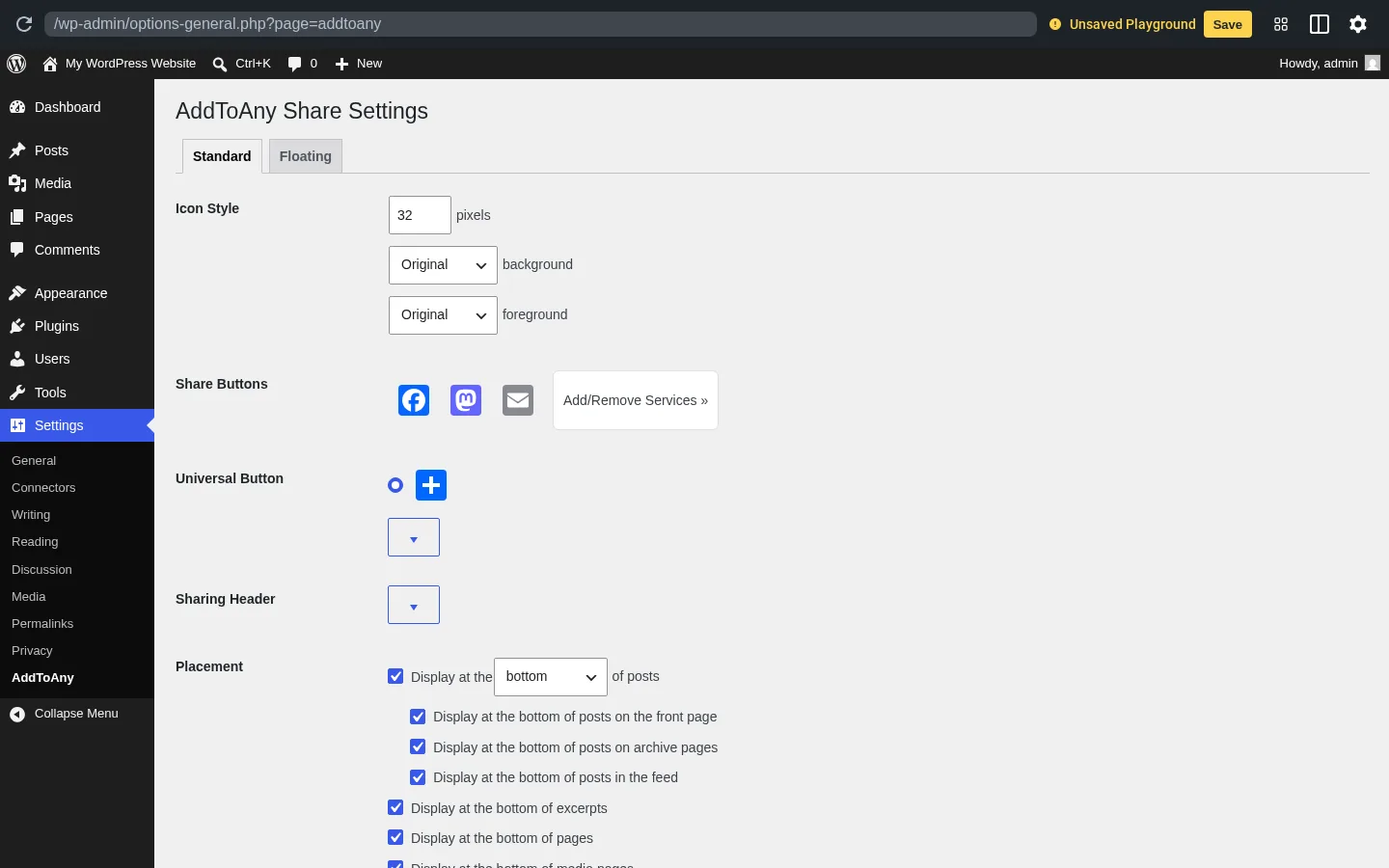
Standard buttons are the share-button row that AddToAny auto-injects at the top or bottom of your posts. Out of the box you get a clean three-icon row — Facebook, Mastodon, Email — plus the universal "+" button at the end. You can swap in any of ~95 supported services, change icon size and colors, add a "Share this:" caption, and toggle six placement targets (front page, archives, RSS feed, excerpts, pages, and media pages) with a single checkbox each.
In testing, the bottom-of-post placement rendered immediately on a brand-new sample post with no extra configuration. The rendered DOM was clean SVG icons with rel="nofollow noopener" and target="_blank" on every share link, plus aria-hidden="true" and a visible <span class="a2a_label"> for screen readers — exactly the defaults I'd want without having to add them myself.
2. Floating share bars (vertical + horizontal)
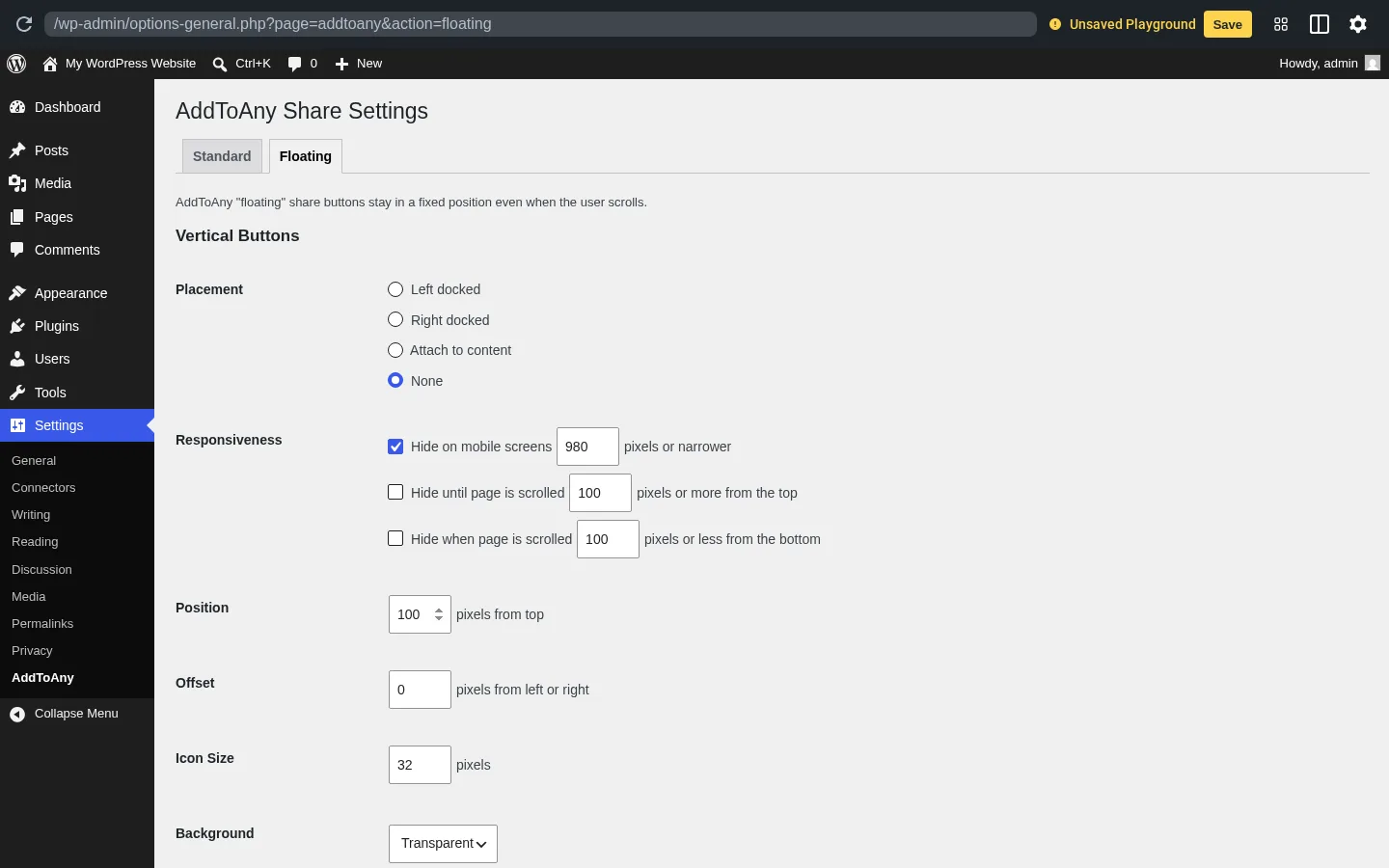
The Floating tab gives you two independent sticky bars: a vertical one (left or right docked, or attached to a CSS selector like article so it follows your content), and a horizontal one (left, right, or center docked at the bottom of the viewport). Each has its own placement, responsiveness, position, offset, icon size, and background settings.
The smartest default here is the responsive split: the vertical bar hides on screens ≤980 px and the horizontal bar hides on screens ≥981 px, so out of the box you get a sidebar on desktop and a sticky-bottom bar on mobile without having to configure anything. The vertical bar's "attach to content" mode is also great if your theme uses an unusual layout — it pins the bar relative to a selector you control, so you don't fight your theme's container widths.
3. The universal "+" share menu
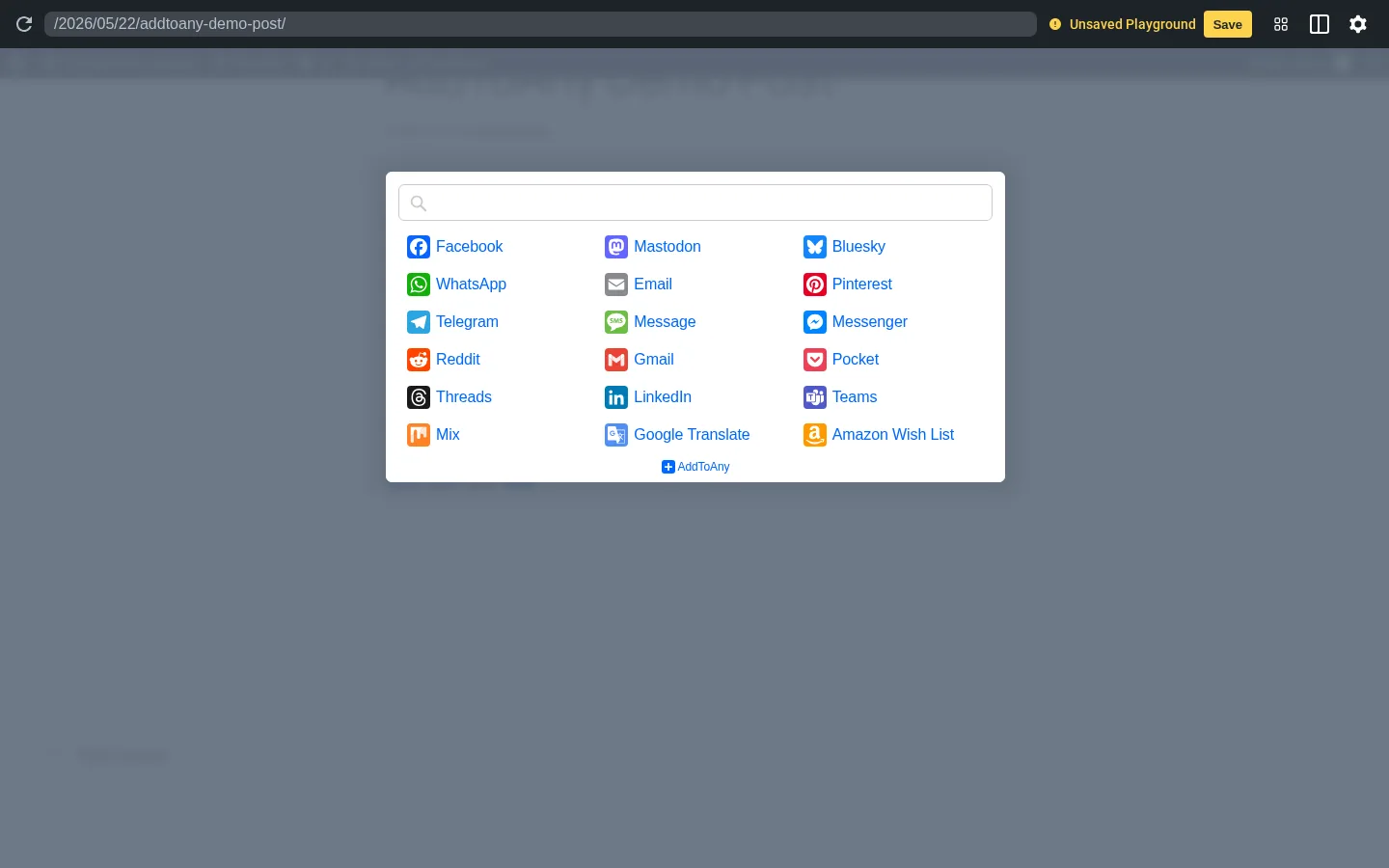
This is the AddToAny feature that nothing else in the category really replicates. The "+" button opens an AddToAny-hosted modal with a search box and a grid of services — 18 on the default view, including Bluesky, Mastodon, and Threads, all the way down to Amazon Wish List, Google Translate, and Pocket. The menu prioritizes services each visitor uses most often, so a reader who shares to Mastodon a lot will see Mastodon higher on their next visit.
In practice, this means you don't have to choose between "five buttons on the row" and "fifteen buttons cluttering the post." You keep the row short and let the "+" handle long-tail services. The menu's bundle (static.addtoany.com/menu/page.js) loads with defer and the heavier core.js module only loads after the visitor actually opens the menu — so you're not paying for it on every page.
4. Shortcodes, Gutenberg block, and developer API
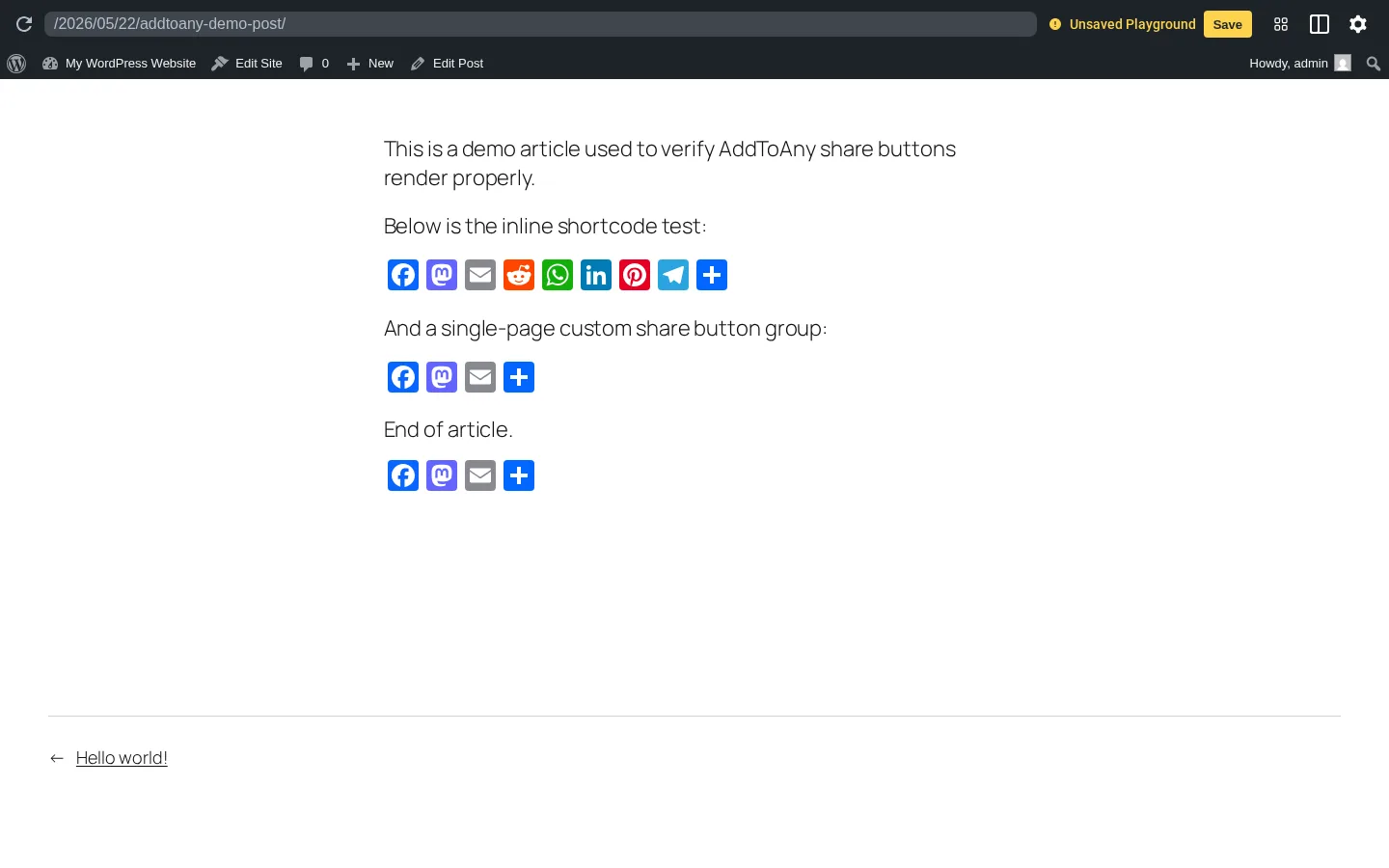
If you don't want automatic placement, AddToAny gives you four other ways to drop in buttons: the [addtoany] shortcode, a Gutenberg block, a sidebar widget, and a PHP template tag (ADDTOANY_SHARE_SAVE_KIT()). The shortcode is the workhorse — it accepts buttons, url, and title parameters, so you can render a custom set of services with a custom share URL on any single page.
I ran three variations in testing: the default [addtoany], a custom-URL version [addtoany url="..." title="..."], and a custom-button-list version with eight services. All three rendered correctly and the per-instance data-a2a-url and data-a2a-title attributes flowed through to the DOM exactly as documented. For developers, the JavaScript API (a2a_config) exposes hover behavior, service prioritization, image-overlay configuration, callbacks for share events, custom share endpoint templates, and a Bitly/custom-shortener hook — without ever leaving the plugin's settings page.
5. Built-in analytics and modern network freshness
AddToAny auto-fires a AddToAnyShare event in Google Analytics 4 with two parameters (addtoany_service and addtoany_shared_url), and it falls back gracefully to Universal Analytics and GTM if you're still on those. You don't need to write any custom event tracking. If you already have GA on your site, every share click shows up under your event reporting automatically.
The other thing the analytics integration quietly tells you is that AddToAny treats every network as first-class. The default share list ships with Bluesky, Mastodon, Threads, X, WeChat, Teams, Snapchat, and Google Classroom already enabled — networks several competitors only added years after the fact, if at all. For sites with even a small federated/decentralized audience, that's a real edge.
AddToAny Ease of Use / UI & UX
The plugin is one of the easiest in this category to get running, partly because it makes very few decisions for you up front and partly because the settings page never tries to upsell anything. Below are the categories that matter most for the day-to-day experience.
1. UI / UX
The admin UI lives entirely under Settings → AddToAny, with two tabs (Standard and Floating). Each section uses native WordPress form controls — checkboxes, radios, number inputs, dropdowns — and three accordions hide the advanced configuration so the default view stays short. There's no premium banner, no "Pro" tab, no upsell modal, and no welcome onboarding wizard demanding an account.
2. Setup
After install and activate, AddToAny dismisses a one-line welcome popup and shows the share row at the bottom of every post immediately. No service account, no API key, no signup. Most publishers won't open the settings page at all for the first week.
3. Settings clarity
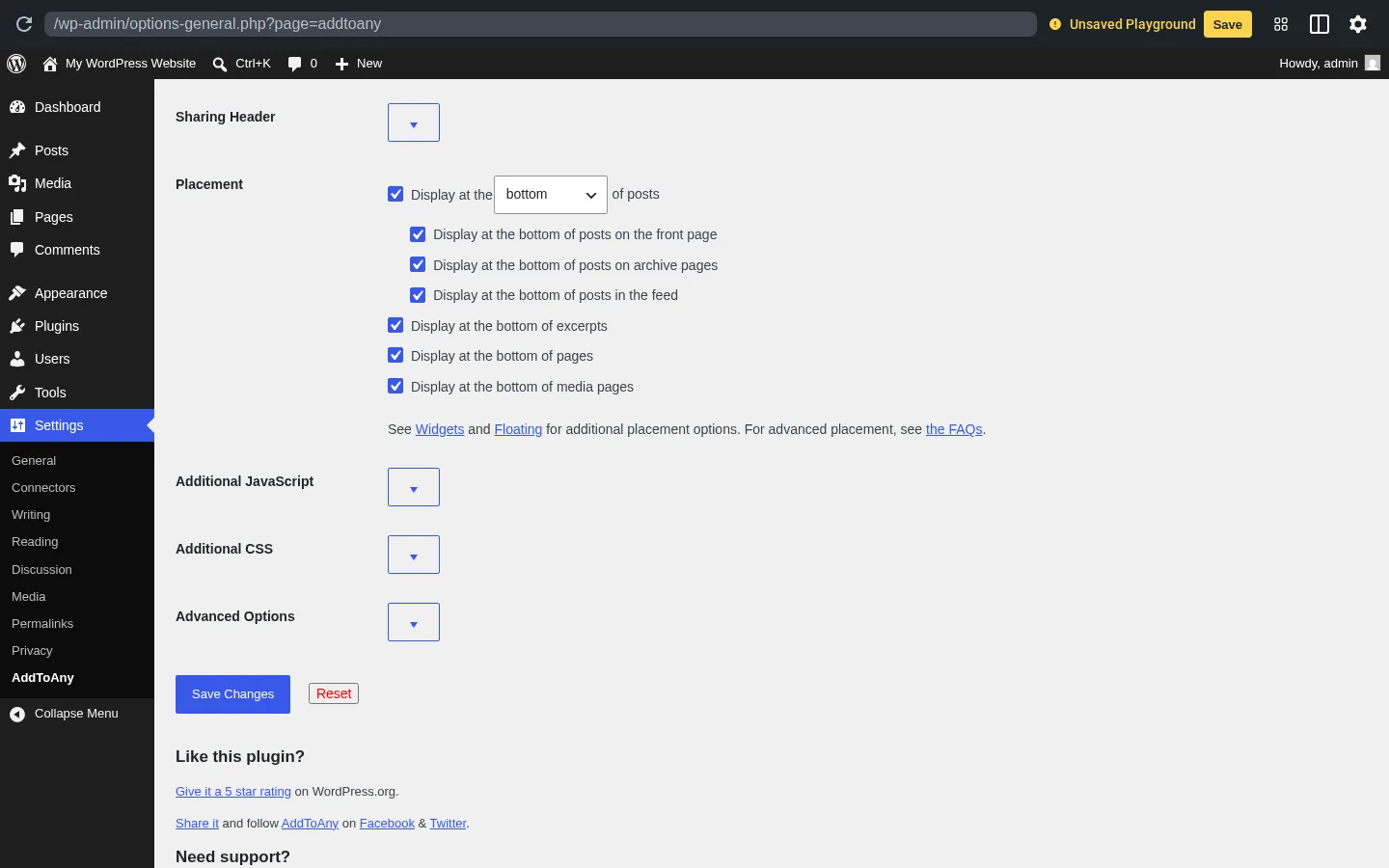
The Placement section is a single dropdown plus six checkboxes — top or bottom of posts, then on/off for front page, archives, RSS feed, excerpts, pages, and media pages. Everything is checked by default in sensible spots, so you can usually leave it alone. The Floating tab is denser, but every setting is labeled in plain language ("Hide on mobile screens X pixels or narrower") and the defaults already encode a desktop-sidebar / mobile-sticky split.
4. Learning curve
If you only want share buttons at the bottom of posts: zero learning curve. If you want to add a sticky floating bar with a custom CSS selector or hand-tuned responsiveness, expect 10–15 minutes the first time. For developers who want to use the JavaScript API and a2a_config overrides, the docs are extensive and the in-plugin Additional JavaScript box gives you a place to put it without editing theme files.
5. Friction points
The biggest source of friction in this category — opening the "Add/Remove Services" picker — is a wide modal with ~95 service tiles. It loads fine in real installs, but you'll wait a beat the first time. Once your service list is set, you almost never reopen it.
AddToAny Performance
AddToAny is one of the lighter share-button plugins on WordPress.org, and the technical choices show. Below is what stood out during testing.
1. Script loading strategy
AddToAny loads two main scripts on every page (addtoany.min.js for inline button registration and static.addtoany.com/menu/page.js for the menu shell) and both use defer. The third bundle (core.bycdb5qo.js, the heavier menu UI) only loads after the visitor first interacts with the universal "+" button. That means most page views never download the heavy module at all.
2. Frontend rendering
On the test post, the share row rendered immediately at the bottom of post content, before the More Posts archive and the footer block. The DOM was clean — one .addtoany_share_save_container, one .a2a_kit, and four <a> elements (three services + the universal "+"). Each icon is an inline SVG, so there's no extra image request per icon, and the SVG viewBox is fixed at 32×32 so the buttons scale crisply at any icon size.
3. Stability across themes
Across 19 years on WordPress.org, the most consistent 1-star complaint pattern has been theme conflicts where automatic placement doesn't fire — usually with heavily customized commercial themes that don't follow the the_content filter contract. The vendor's standard fix is to use the [addtoany] shortcode or template tag instead, which always works regardless of theme. In my test the default Twenty Twenty-Five FSE theme picked up auto-placement correctly.
4. Caching and CDN friendliness
The plugin's own script is served from your WordPress install; the menu module is served from static.addtoany.com over their CDN. That keeps your bandwidth low but means your share menu depends on a third-party host being reachable. For most sites this is a non-issue; for ultra-privacy-strict deployments, AddToAny also documents a "self-host & cache script" option to serve the menu from your own server.
AddToAny Support, Documentation & Learning Resources
Support is community-driven through the WordPress.org forum, but it's substantially better than that label usually implies.
The primary support channel is the WordPress.org plugin support forum, where the plugin's author Pat Diven (micropat) personally replies — unusual for a plugin with 300,000+ active installs. There's no email ticketing, no live chat, and no paid premium support tier currently sold. Average response time isn't formally published, but the WordPress.org API reports a 100% resolution rate (4 of 4) on the most recent batch of support threads, which is consistent with a maintainer who is actively engaged.
Given the plugin's overall 4.7-star rating and the small share of 1-star reviews that mention support specifically, I'd describe the support experience as good for a free product — most issues raised are theme conflicts or feature-request mismatches, and the maintainer's responses point to fixes or workarounds quickly.
Documentation is the strongest part of the learning experience. The vendor maintains a full Customize guide with code examples for every API call, a JavaScript API reference, a public FAQ, and a Google Analytics integration page. The docs are technical but well-organized — a developer can usually find the exact a2a_config snippet they need in a couple of minutes. The one gap is video tutorials: AddToAny doesn't publish official video walkthroughs, so most YouTube content for the plugin is third-party.
AddToAny User Reviews & Reputation
I reviewed AddToAny's full public reputation footprint on WordPress.org — all 1,113 ratings and a hand-sample of the most recent 5-star and 1-star reviews — and the picture is unusually consistent.
The overall impression is strongly positive and remarkably stable. Across 19 years and 300,000+ active installs, AddToAny holds a 4.7 / 5 average from 1,113 reviews, with 90.1% (1,003) at 5 stars and only 3.9% (43) at 1 star. There's no bimodal "love it or hate it" pattern; this is a plugin that consistently lands above 4 stars across heterogeneous WordPress setups.
The most praised strengths repeat across reviews. Users describe it as "install and forget" reliability, with no configuration needed for a working share row. Lightweight loading — the deferred scripts and lazy-loaded menu module — gets called out specifically by performance-conscious bloggers. The "free forever, no nag screens" framing draws explicit praise; many reviewers explicitly contrast it with plugins that paywall basic features. A meaningful share of recent positive reviews are from former AddThis users who migrated after AddThis shut down in May 2023 and found AddToAny a clean replacement. Developers separately praise the JavaScript API, per-button data attributes, and custom CSS/JS hooks.
The most criticized weaknesses are environmental rather than fundamental. Theme conflicts (typically heavily customized commercial themes) account for a large share of 1-star reviews — the fix is usually the shortcode or template tag instead of automatic placement. Some users complain that "buttons don't show," which AddToAny's FAQ traces to ad-blockers filtering social icons on the visitor side. A handful of reviews are expectation mismatches — readers expecting AddToAny to auto-post to their accounts and discovering it only adds share buttons. The Facebook share-count issue is mentioned occasionally but is industry-wide (Facebook deprecated public counter API access in 2017), not specific to AddToAny.
AddToAny Pricing & Value
AddToAny's pricing is the simplest section in this review.
- WordPress.org free plugin — $0, with no paid tier currently sold. The entire plugin — Standard buttons, Floating bars, universal "+", Follow widget, Image overlays, GA4/UA/GTM integration, Bitly support, AMP, WP-CLI install, Gutenberg block, shortcodes, template tags, and the JavaScript API — is included.
There is no free version with a paywall; the plugin is the same for personal blogs, agencies, enterprise sites, and multisite networks. There are no per-share limits, watermarking, throttling, or branding banners. The plugin has been distributed under this model for 19 years and the author has shown no appetite to change it.
The free plan has no missing features in the practical sense — every share-button format ships in the box. The only "premium" thing on the horizon is a vendor-acknowledged forthcoming premium service to manage private API access for Facebook share counters, which AddToAny says they "will soon begin rolling out." As of this review there is no published price, no billing cadence, and no signup. Until that ships with a real price tag, AddToAny should be described as fully free rather than freemium.
Support is included for free through the WordPress.org forum, where the plugin author personally responds. There's no money-back guarantee because there's nothing to refund. There are also no commercial conditions to navigate — no account creation, no email collection inside the plugin, no terms of service to accept beyond the standard WordPress.org plugin license.
For a serious share-button plugin, that pricing is hard to beat. Most meaningful competitors in the category have at least a paid tier (Hubbub Pro from $99/yr, Shareaholic Professional at $96/yr, Social Warfare Pro at a one-time $29, ShareThis Share Buttons free but requiring a ShareThis Cloud account, Sassy Social Share's historical Pro and Premium add-ons from $11.99/yr — currently not directly purchasable while the Heateor checkout site is parked, plus a handful of other paid share-button plugins). AddToAny's free tier is more feature-complete than most of those plugins' free tiers.
AddToAny Pros and Cons
Here is a balanced view of where AddToAny stands out and where the gaps actually matter.
Pros
- Genuinely free forever, with no upsell pressure: There's no paid tier, no "Pro" tab in the admin, no welcome wizard, and no banner pushing an upgrade. After 19 years on WordPress.org under the same maintainer, "free" feels permanent rather than promotional.
- Universal "+" menu with ~95 services: The hosted modal lets you keep a short button row on the page and still give visitors every service they might want. The menu personalizes per visitor and lazy-loads the heavy code only after the first interaction.
- Modern network coverage out of the box: Bluesky, Mastodon, Threads, WeChat, Teams, Snapchat, and Google Classroom all ship in the default service list. Competitors are often months or years behind on emerging networks.
- Lightweight performance footprint: Scripts use
defer, the menu module is split into a small shell and a heavier core that only loads on interaction, and the icons are inline SVGs rather than image requests. The plugin doesn't slow your pages.
Cons
- No drag-and-drop visual button designer: Configuration is settings-page driven — pixel sizes and color dropdowns rather than a live preview canvas. If you want to design buttons by dragging them around, other paid share-button plugins with a live-preview canvas will feel more natural.
- No in-WordPress click analytics dashboard: Share tracking is offloaded entirely to Google Analytics (or GTM). You won't see share counts inside
wp-adminthe way Hubbub Lite or Sassy Social Share show them. If you don't already have GA installed, you won't get any reporting at all. - Facebook share counters are paused: Facebook deprecated public counter API access in 2017 and AddToAny — like every other share-button plugin — can't show accurate Facebook counts today. The vendor has hinted at a forthcoming premium recovery service, but it isn't yet purchasable.
- Share clicks route through addtoany.com: When a visitor clicks a service icon, the click goes through
addtoany.com/add_to/<service>before reaching the network. This is by design (it enables visitor personalization and keeps the plugin lightweight), and AddToAny states it deletes server logs within 30 days and doesn't set cross-site cookies — but privacy-strict audiences may want to know.
Who Should Use AddToAny?
AddToAny fits a wide band of WordPress publishers, but it lands hardest with specific use cases.
Who Should Use It
- Bloggers, news sites, magazines, and SMB content sites: If you want share buttons that work the day you install them and stay out of your way after that, this is the plugin to start with. The default trio plus the universal "+" covers almost every reader.
- Sites migrating from AddThis: AddThis shut down in May 2023 and AddToAny has explicitly positioned itself as the replacement, with a dedicated blog post and a feature set that maps cleanly to the old AddThis configuration patterns.
- Privacy-aware EU/UK publishers: AddToAny limits server log retention to ≤30 days, doesn't set cross-site visitor tracking cookies, and is GDPR/CCPA-ready by default — materially friendlier than AddThis's pre-shutdown behavior.
- Developers and agencies who need deep customization without leaving the plugin: Between shortcodes, the template tag, the
a2a_configJavaScript API, per-buttondata-a2a-*overrides, additional JS/CSS boxes, and Gutenberg block support, you have every customization hook a typical client project needs.
Who Should Skip It
- Anyone who wants to auto-publish posts to their own social accounts: That's FS Poster territory — AddToAny is visitor-facing share buttons, not publisher-side auto-posting.
- Buyers who want a drag-and-drop visual designer: If a live-preview canvas with click-and-drop button styling matters to you, premium share-button competitors with a visual designer canvas will feel more comfortable than AddToAny's settings page.
- Sites that need detailed click-share analytics inside wp-admin: AddToAny offloads analytics to Google Analytics with no in-WP dashboard. If you specifically want share counts visible in WordPress, Sassy Social Share, Shareaholic, or Hubbub Lite keep that data inside the WP admin.
- Anyone whose primary need is an Instagram or Facebook feed embed on their site: That's Smash Balloon or Spotlight — a completely different category from share buttons.
Best AddToAny Alternatives
If AddToAny doesn't quite fit, here are the alternatives I'd realistically consider — chosen because they map to a specific shortcoming above, not because they're popular by themselves. For the full ranked comparison, see our best WordPress social share buttons plugins roundup.
- Sassy Social Share (Heateor): 100,000+ active installs and a strong free tier with a larger default service catalog and more in-admin customization controls. It's heavier than AddToAny on asset weight, but a good fit if you want share counts visible inside WordPress without going through GA. The WordPress.org plugin itself is free; the vendor's historical Pro tier ranged from $11.99 to $99.99/yr and the Premium tier from $33.99 to $199.99/yr, but the Heateor checkout site is currently parked, so those add-ons are not directly purchasable today. See the full Sassy Social Share review for the head-to-head case.
- Hubbub Lite: 30,000+ active installs at 4.7 stars from 172 reviews — the privacy-clean self-contained option from NerdPress, with in-WP click analytics built into the plugin admin and the best Pinterest UX in the category. Default install exposes only seven networks; unlocking the rest requires a free email registration with NerdPress. Pick it when an in-WP analytics dashboard and self-hosted assets matter more than AddToAny's instant zero-signup setup. See the full Hubbub Lite review for the privacy-clean side-by-side.
- Shareaholic: A heavier analytics-and-content-recommendations platform built on top of share buttons. Free, with paid analytics plans from $13/mo. Requires a vendor account, which is a friction point AddToAny avoids — but it's worth a look if "related posts + share buttons + click analytics" as a single bundle is what you want. See the full Shareaholic review for the trade-offs.
- Social Warfare: 20,000+ active installs at 3.3 stars from 186 reviews. The one freemium plugin in the category with a built-in Click-to-Tweet box and a class-leading Pinterest Pro workflow (per-post custom Pin images, Image Hover Pin Button, Rich Pins), sold as a one-time $29 single-site Pro license instead of an annual subscription. Maintenance has clearly slowed and the free tier is the narrowest in the comparable bracket, so pick it deliberately for the Pinterest workflow or Click-to-Tweet rather than as a general-purpose default. See the full Social Warfare review for the trade-offs.
- ShareThis Share Buttons: 10,000+ active installs at 3.5 stars from 26 reviews — the cross-CMS architectural twin, with one hosted dashboard that drives the same button design across WordPress, Shopify, Wix, React, Cloudflare, and raw HTML. A bundled TCF v2 Consent Management Platform sits in the same admin, which is a real bonus for EU publishers. Buttons only render after you pair the plugin with a free ShareThis property ID, so it's not the "install and forget" replacement most AddToAny buyers want. See the full ShareThis Share Buttons review for the cross-CMS comparison.
If you also need to auto-publish your WordPress posts to your own social accounts — a separate problem from share buttons — pair AddToAny with FS Poster. They're complementary tools and many sites install both.
Final Verdict: Is AddToAny Worth It?
Yes. For the vast majority of WordPress publishers, AddToAny Share Buttons is the right starting point and very often the right ending point too. It's free, lightweight, dependable, supports the networks people actually use today, and has been maintained by the same author for 19 years with no signs of changing course. If you want share buttons that install cleanly, render well by default, don't slow your pages, and never push a paid upgrade, this is the plugin to install first.
The honest caveat is that AddToAny is a settings-page tool rather than a designer-led one. If a drag-and-drop visual editor is a hard requirement, other premium share-button plugins will fit better — and you'll pay for the privilege; if an in-WordPress analytics dashboard matters more, Hubbub Lite is the reviewed pick. For everyone else, AddToAny delivers more than most paid competitors do, at zero dollars, with a privacy posture that holds up to scrutiny. Install it, accept the defaults for a week, then come back to tune the Floating bar and shortcodes if you need more.
AddToAny FAQ
Is AddToAny really free? Yes — entirely. There's no paid tier sold today, no signup, no account creation, and no upgrade banner in the admin. The vendor has hinted at a future premium service to manage private API access for Facebook share counts, but as of this review it isn't yet purchasable.
Is AddToAny beginner-friendly?
Very. After installing from Plugins → Add New, the default share row appears at the bottom of every post immediately. Most beginners never need to open the settings page in the first week. Adding a floating sidebar takes 10–15 minutes the first time.
Does AddToAny support Bluesky, Mastodon, and Threads? Yes. All three are in the default selectable service list, and Mastodon ships as one of the three default visible buttons out of the box. Bluesky is also one of the 18 services shown when the universal "+" menu first opens.
Why don't Facebook share counts show up? Facebook deprecated public counter API access in 2017, which paused Facebook share counts industry-wide across every share-button plugin. AddToAny has acknowledged a forthcoming premium service to recover counters through private API access, but it isn't yet sold.
What are the best AddToAny alternatives? Sassy Social Share for the deepest free design customization and native AI-platform icons, Hubbub Lite for a privacy-clean self-contained plugin with in-WP click analytics, Shareaholic if you want share buttons bundled with related-content recommendations, Social Warfare for the Pinterest Pro workflow and built-in Click-to-Tweet, and ShareThis Share Buttons for centralized cross-CMS button management. If your need is auto-publishing to your own social accounts rather than share buttons, the right tool is FS Poster — and it pairs naturally with AddToAny.
Write once. Post to 26 networks.
- 26 social networks
- Schedule & auto-repost
- Runs inside wp-admin


