


Can Hubbub Lite really replace the share-button plugin I already use, or will I just trade one bloated toolbar for another? Which Hubbub plan actually fits a small WordPress blog — is the free version enough, or do I really need Pro at $99 a year?
If those questions sound familiar, you are not alone. Hubbub has changed name three times (Social Pug → Grow Social by Mediavine → Hubbub Lite), changed owner (NerdPress acquired it from Mediavine in 2023), and quietly added a free-tier registration wall in October 2025 that most older review articles still do not mention. So the picture you see in older roundups is no longer the picture you get when you install the plugin today.
To clear that up, I installed Hubbub Lite v1.36.3 into a dedicated WordPress test environment, activated every free tool, configured every option that is unlocked in the Lite tier, and tested the frontend share flow against real share endpoints. I cross-checked the result against the WordPress.org API (30,000+ active installs, 4.7★ from 172 ratings, 0 open support threads), against NerdPress's pricing page on morehubbub.com, against 35+ versions of changelog history, and against every public review and complaint thread I could find. This article is the result.
What Is Hubbub Lite?
Hubbub Lite is a free WordPress plugin that adds social share buttons to your posts and pages. It ships two display tools — an Inline Content row above or below the post body, and a Floating Sidebar that docks to the left or right of the viewport and follows the reader as they scroll.
It is made for food, recipe, and lifestyle bloggers first — the same audience NerdPress already serves through its paid WordPress maintenance business. The Pinterest features, the Feast/Trellis theme compatibility, and the built-in Mediavine "Grow" audience-network button all point at that buyer.
The problem it solves is simple: give readers a clean way to share a post to Facebook, X, Pinterest, LinkedIn, and a handful of other networks, without slowing the site down or routing clicks through a third-party tracker. Hubbub goes directly to each network's official share endpoint with no middle layer.
Hubbub Lite Review Quick Verdict
Hubbub Lite is a polished, well-supported share-button plugin with a genuinely best-in-class in-WordPress analytics dashboard — but the free version is more limited than most listicles admit, and Pro pricing sits at the high end of the category.
| Criteria | Verdict |
|---|---|
| Best for | Food, recipe, and lifestyle bloggers — especially Pinterest-heavy publishers and Mediavine sites |
| Starting price | $0 (free Lite tier); paid plans from $99 / year (Hubbub Pro, 1 site) |
| Free plan / trial | Yes — free Lite tier; 30-day money-back guarantee on paid plans |
| Update frequency | Roughly every 4–6 weeks (35+ released versions; last release 2025-12-09; readme refreshed 2026-05-21) |
| Most valuable features | Inline + Floating Sidebar tools, in-WP Dashboard with per-post share counts, Pinterest depth (Pro), Save This email opt-in (Pro+), Find & Fix social-data audit (Pro+) |
| UI/ |
8 / 10 |
| Feature richness score | 7 / 10 |
| Product performance | 7 / 10 |
| Product rating | 4.7 / 5 from 172 reviews on WordPress.org |
Hubbub Lite Features & Functionality
The free tier is intentionally narrow but well-built: two display tools, a modern dashboard, and a settings page that is easier to read than most competitors. I evaluated every free-tier option in the test environment and cross-referenced the locked Pro / Pro+ features against NerdPress's documentation. These are the findings that matter to a buyer.
1. Inline Content share buttons
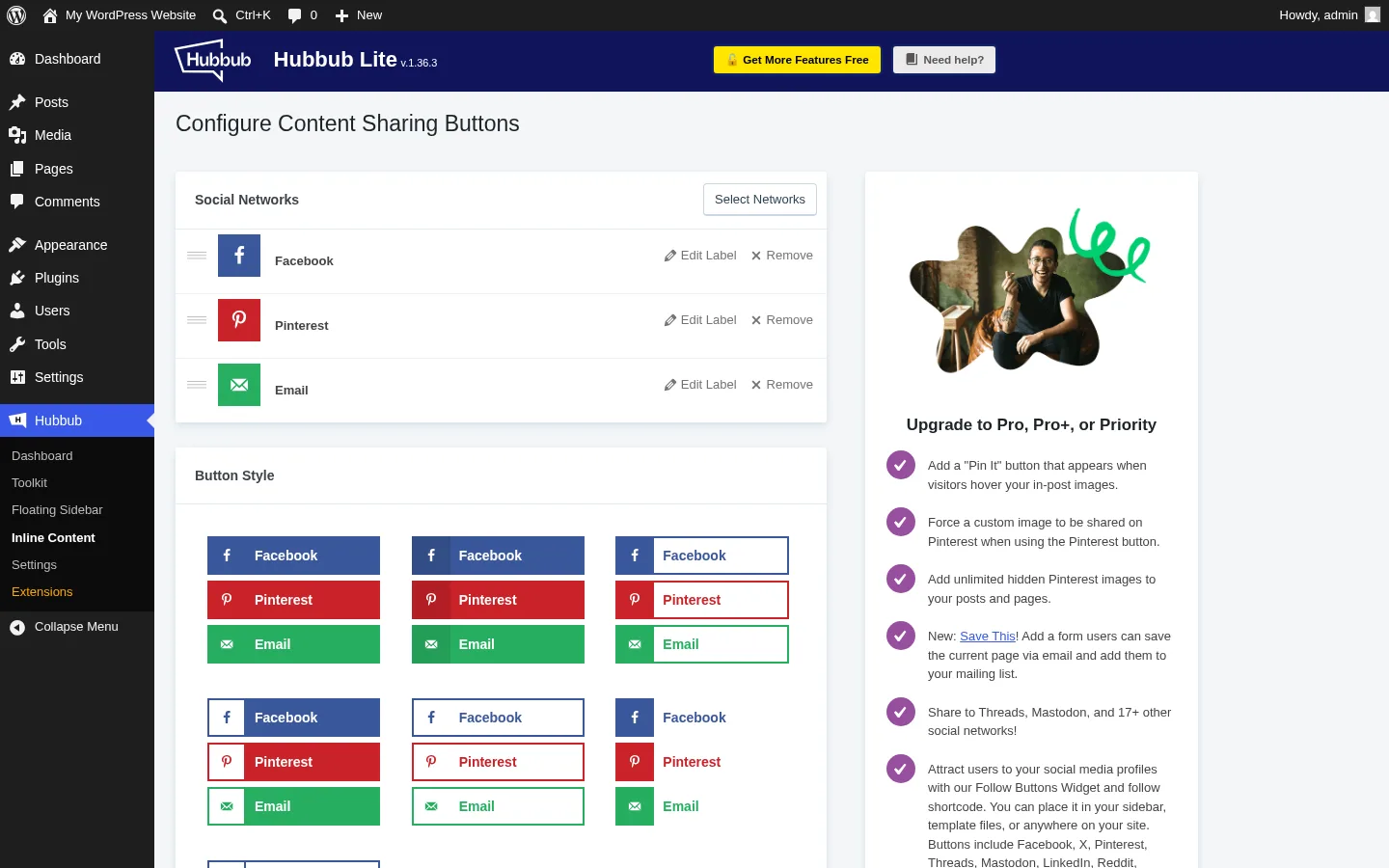
The Inline Content tool drops a horizontal row of share buttons above, below, or both above and below the post body. It is the simplest and most-used Hubbub feature.
In practice, this is where most readers will see the buttons — a food blogger who wants Facebook and Pinterest above the recipe card can have it live in under two minutes. The tool gives you shape (rectangular, rounded, circle), size (small, medium, large), spacing, columns, custom "Share this:" text, mobile show/hide, separate desktop and mobile label toggles, second-render (above AND below), and per-post-type display. I confirmed all of these persisted correctly after a save.
2. Floating Sidebar
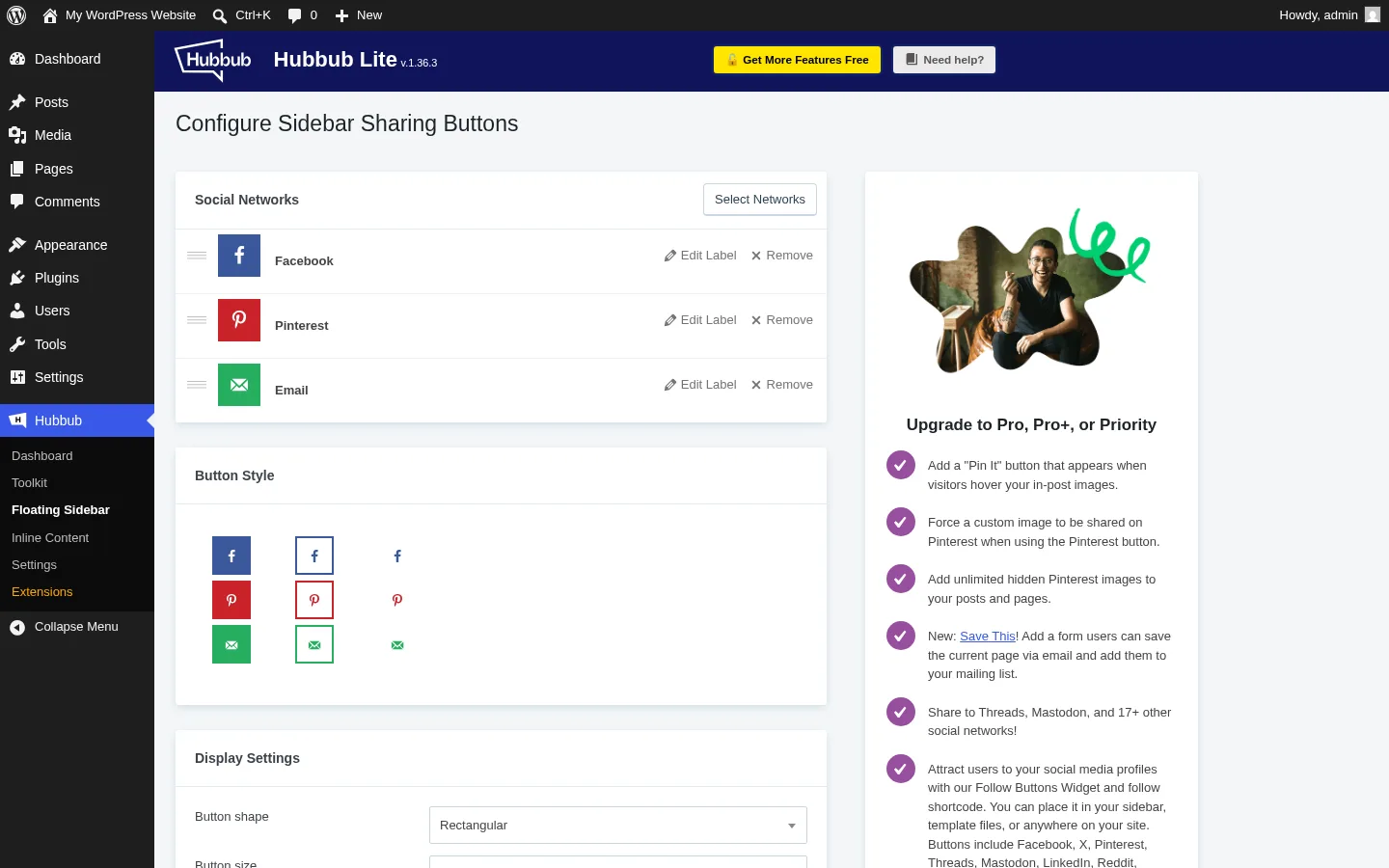
The Floating Sidebar docks to the left or right edge of the viewport and stays visible as the reader scrolls. It supports an intro animation, a "show after N pixels scrolled" trigger, a "hide after reaching CSS selector" rule for keeping it off the footer, and an explicit mobile show/hide (off by default — a sensible choice).
In testing, the sidebar rendered exactly as configured, applied the right dpsp-hide-on-mobile class at 375 px viewport, and stayed put through long-scroll pages without flicker.
3. In-WordPress Dashboard
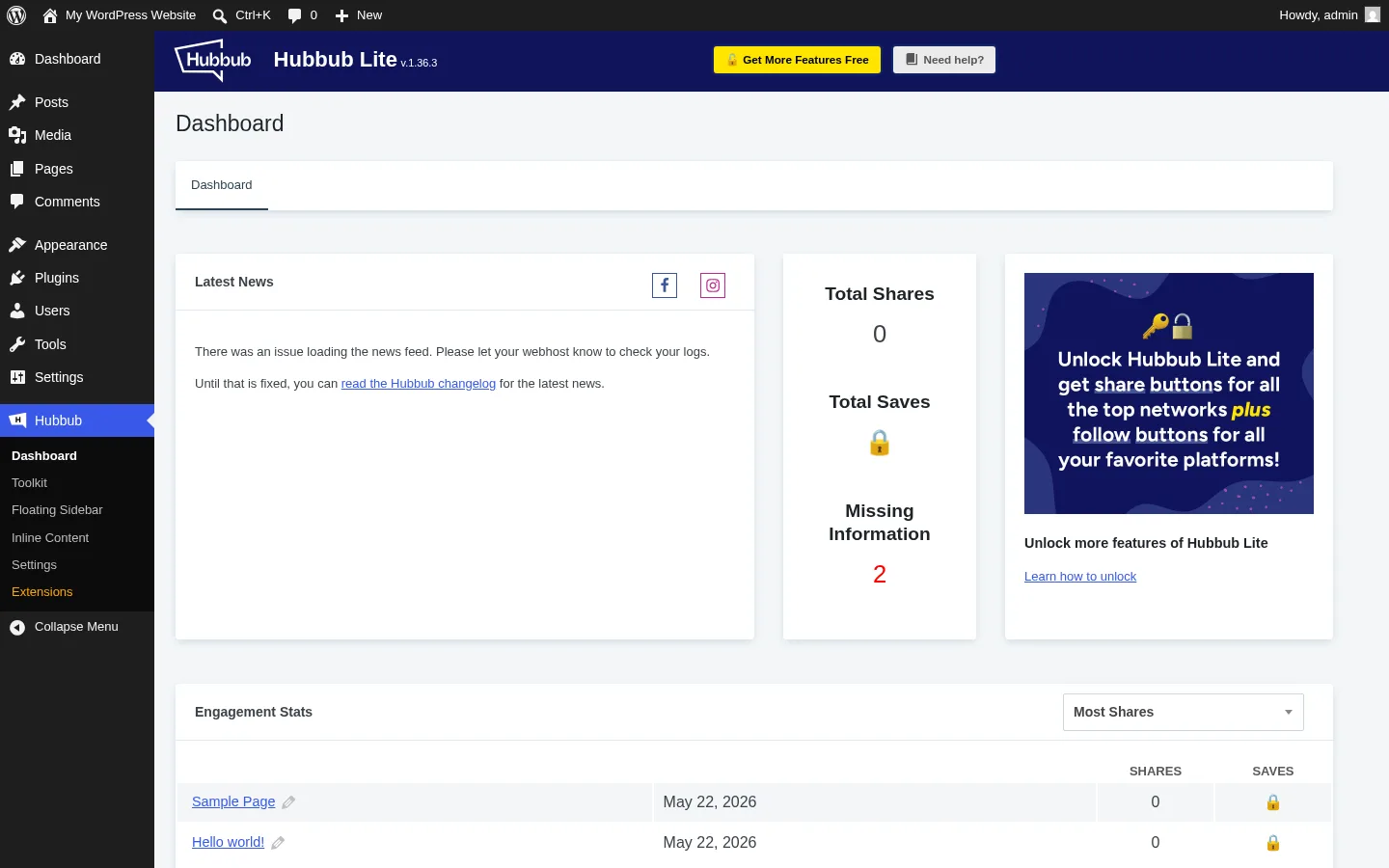
This is Hubbub's strongest free feature and the single thing that no comparable free competitor matches today. Added in v1.35.0 (May 2025), the Dashboard shows Total Shares across all posts, a Missing Information count (posts without a featured image or open-graph data), and a sortable Engagement Stats table listing every post with its share counts.
Total Saves is locked behind a padlock unless you upgrade to Pro+, but the rest is genuinely useful out of the box. AddToAny, Shareaholic free, and other free share-button plugins generally push analytics off-site to Google Analytics — Hubbub is the only one in the free tier that gives you a per-post engagement view inside WordPress.
4. Pinterest depth (Pro)
This is the feature set NerdPress invests in most. Pro unlocks a hover Pin It button that appears over <img> tags, an "always on" Pin It variant, multiple hidden Pinterest images per post (so the portrait image you only want on Pinterest never has to render in the post body), per-image Pinterest titles and descriptions, and custom Pin repin IDs. Food bloggers and lifestyle bloggers will recognise this as exactly the feature stack they actually use; no other major competitor matches the depth.
5. Save This email opt-in (Pro+)
The Save This add-on is the reason Hubbub Pro+ exists. It puts an inline "save this post via email" opt-in into the post, captures the visitor's email, sends them the article, and adds them to your list — with native integrations for Mailchimp, Kit (formerly ConvertKit), ActiveCampaign, MailerLite, MailPoet, Brevo, and Zapier. NerdPress's own testimonial cites a 49% email-signup lift in five days from food blogger Sam Turnbull, and at $179/yr Pro+ is competitive against single-purpose opt-in tools like OptinMonster ($199/yr+).
6. Find & Fix social-data audit (Pro+)
Find & Fix lists every post on the site that is missing a featured image, OG image, OG title, OG description, Pinterest title, or Pinterest description, and lets you patch the metadata inline from the dashboard without opening the editor. For a 500-post blog this is a real time saver, and it ties directly into the Missing Information count you can already see in the free Dashboard.
Hubbub Lite Ease of Use / UI & UX
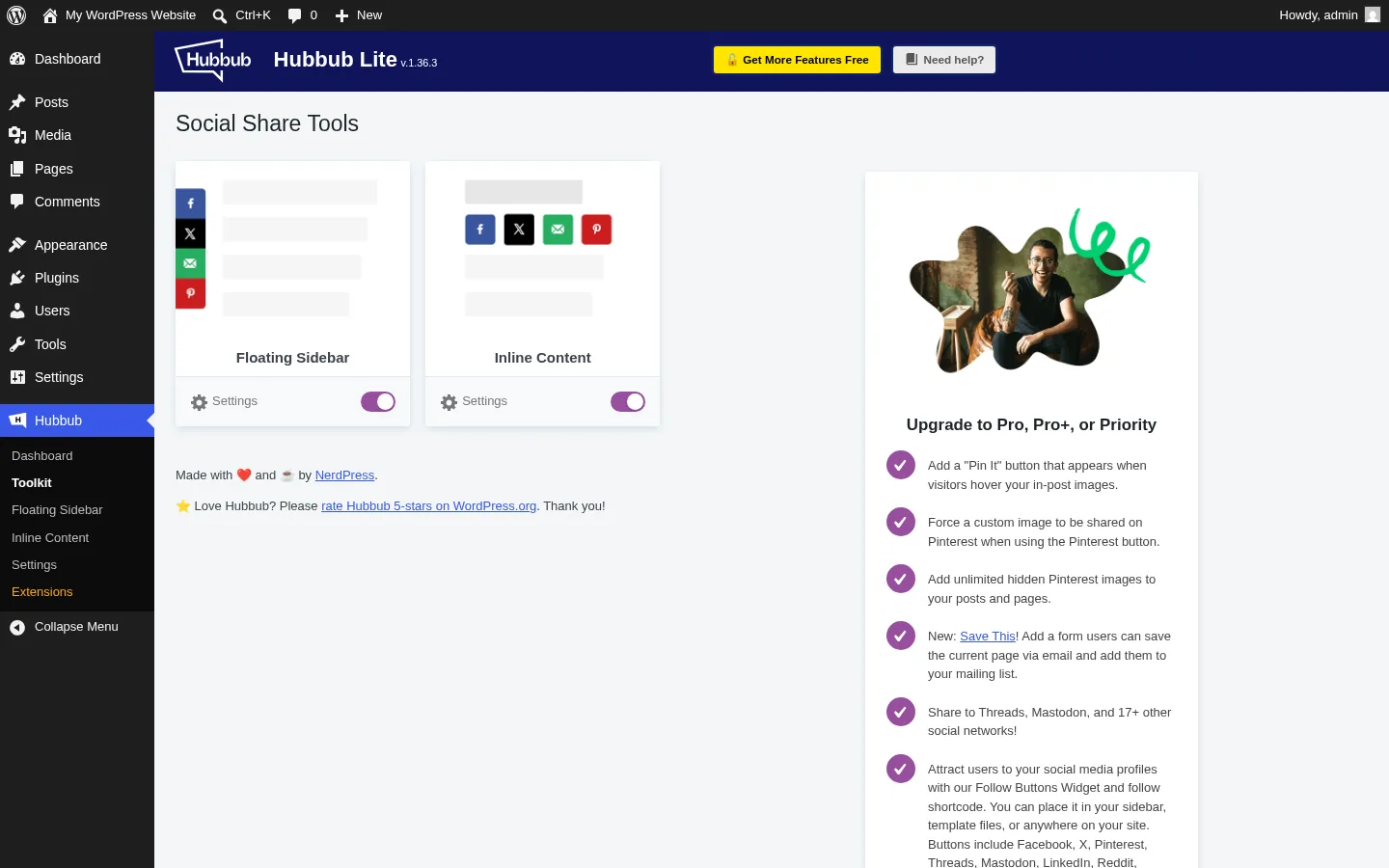
The admin experience is noticeably cleaner than the Heateor / Sassy Social Share school of share-button plugins, but the Pro upsell is always present in the right rail.
1. UI / UX
The Hubbub menu is short — Dashboard, Toolkit, Floating Sidebar, Inline Content, Settings, Extensions — and each page uses a calm two-column layout with the controls on the left and a single Pro upsell card on the right. Nothing feels like a tab maze.
2. Setup
Activate the plugin, open the Toolkit, flip on the Floating Sidebar and Inline Content tools, choose your networks. That is the entire onboarding. There is no setup wizard and no welcome modal hijacking the screen — refreshing the page kept both tools active and the chosen settings intact.
3. Network picker clarity
The Select Networks picker shows a grid with each available network as a small card. Once selected, networks move into a drag-sortable active list where each one can have a custom label. The grid makes the limitation obvious too — in unregistered Lite, only 7 cards appear in the picker (more on that below).
4. Friction points
The biggest friction is the persistent upgrade card on every Hubbub admin page plus the yellow "Get More Features Free" header CTA. It is not aggressive enough to feel spammy, but it is always in your eyeline. Buyers who hate any in-product upsell will notice it.
5. Learning curve
Almost none. If you have configured a WordPress widget before, you can configure Hubbub. The labels read like plain English ("Show buttons on mobile", "Hide after reaching Element"), and the defaults are sensible.
Hubbub Lite Performance
Hubbub feels responsive in the admin and on the frontend, but it does add a real CSS + JavaScript payload, and one PageSpeed-drop complaint in the public review pile is worth taking seriously.
1. Admin responsiveness
Every settings save, every tool toggle, and every network add fired and persisted without lag in my testing. The AJAX activation of each tool returns near-instantly, and reloading the page never showed stale state.
2. Frontend rendering speed
Inline and Floating Sidebar buttons rendered in the first paint cycle on the test post and stayed put through scroll. The SVG icons are crisp at every size and the Pinterest button opens its pin-builder modal on click without a noticeable freeze.
3. CSS + JS weight
Hubbub enqueues a dedicated CSS file and a frontend JS bundle on every page that runs an active tool. v1.36.1 (November 2025) explicitly reduced the CSS payload, and v1.34.0 added compatibility with WP Rocket and Cloudflare Rocket Loader. That said, one WordPress.org review titled "Slows down website from 96 to 88/100" describes a real 8-point PageSpeed drop after install. If you obsess over Lighthouse > 95, profile before committing.
4. Direct share endpoints (no middle layer)
This is a privacy win and a performance win at once. I captured the rendered href attributes during testing: the Facebook button links straight to facebook.com/sharer/sharer.php, X to twitter.com/intent/tweet, LinkedIn to linkedin.com/sharing/share-offsite/, and Email to a plain mailto: link. Nothing routes through hubbub.com or morehubbub.com. That matches Sassy Social Share's posture and is the opposite of AddToAny, which routes clicks through addtoany.com/add_to/<service>.
5. Stability
35+ released versions across ten years on WordPress.org, an actively maintained changelog, and a vendor (NerdPress) that runs a paid WordPress maintenance business adds up to a stable product. I did not see a PHP notice, a JavaScript console error, or a broken admin page during testing.
Hubbub Lite Support, Documentation & Learning Resources
Support is one of the cleanest stories in the share-button category. NerdPress is a real, US-based, B Corp-certified WordPress maintenance company, and they treat Hubbub as a relationship-builder rather than a freemium funnel.
Free Lite users are pointed at the public WordPress.org support forum, where NerdPress staff respond under the nerdpressteam and eatingrules handles (the latter is CEO Andrew Wilder). Email support is reserved for paid Pro / Pro+ / Priority customers. Average response time is not published, but the public signal is unusually strong: at the time of this review there are 0 open support threads on WordPress.org, compared with 4 for AddToAny and 3 for Sassy Social Share.
Review sentiment around support is the dominant positive theme — titles like "Fast and World Class Support!", "Outstanding product and service", and "nice plugin, responsive support" appear repeatedly across the 152 five-star ratings. Anchored to a 4.7★ rating with that volume, I would call support quality genuinely good rather than just acceptable.
Documentation lives at morehubbub.com/docs and is publicly accessible — a small thing, but worth noting because the comparable Heateor docs are currently offline. The docs cover Pinterest setup, developer filters, and the Lite registration unlock flow. Video tutorials are sparse but the UI is simple enough that text docs are usually sufficient.
Hubbub Lite User Reviews & Reputation
The plugin holds a 4.7★ rating from 172 ratings on WordPress.org, with 88% of all ratings at five stars. I read every visible WordPress.org review thread title and cross-referenced them with NerdPress's pricing-page testimonials.
Overall impression: mature, well-liked plugin with a small but loyal user base. The negative reviews are sparse, specific, and not systemic — there is no pattern of "vendor abandoned the plugin", "broke after update", or "secretly tracks users".
Most praised strengths: NerdPress support quality dominates positive reviews ("Fast and great support!", "Outstanding product and service", "Fast and World Class Support!"). Reviewers also call out stability over the years ("Our Go To Social Sharing Plugin"), lack of bloat ("Lean social sharing plugin"), and the simple-it-just-works experience ("Perfect", "Works fine", "Awesome Plugin").
Most criticized weaknesses: A small cluster of complaints around Pro features not delivering as advertised ("Beware: Does Not Deliver Promised Pro Feature!"), one specific PageSpeed-drop complaint (96 → 88 after install), an older complaint about the plugin pushing its menu item too high in the WordPress admin (largely addressed in v1.33.0), and edge-case rendering issues on bbPress forums. None of these are concentrated enough to be a pattern. The new free-tier registration wall introduced in v1.36.0 (October 2025) has not yet surfaced in public reviews at any volume, but it is the most likely complaint to grow through 2026.
Hubbub Lite Pricing & Value
Hubbub uses an annual subscription model with four tiers. All prices below are for a 1-site license; multi-site licenses up to 5 sites are sold via a dropdown on the pricing page.
- Hubbub Lite (unregistered) — $0, free forever. Inline + Floating Sidebar tools, in-WP Dashboard, and 7 networks in the picker (Facebook, X, Pinterest, LinkedIn, Grow, Email, Print).
- Hubbub Lite (free registered) — $0 + a free email registration at morehubbub.com. Unlocks 17+ additional share networks (Threads, Bluesky, Mastodon, Flipboard, Yummly, Reddit, WhatsApp, Telegram, SMS, Tumblr, VK, Xing, Buffer, Pocket, Mix, Grow.me).
- Hubbub Pro — $99 / year (annual auto-renew). Adds Sticky mobile bar, Pop-up share buttons, Click-to-Tweet, Pinterest hover and hidden images, custom button colors, Bit.ly shortening, Google Analytics UTM tagging, Open Graph customization, Follow Buttons widget (~35 platforms), and email support.
- Hubbub Pro+ — $179 / year (annual auto-renew). Adds Save This email opt-in, Find & Fix social-data audit, and the new Action Buttons (Google Trusted Source, ChatGPT, Gemini, Claude).
- Hubbub Priority — $399 / year (annual auto-renew). Adds priority email response and personal setup assistance from the NerdPress team.
The free version is unusual: it is technically free, but as of v1.36.0 (October 2025) only 7 network buttons are usable out of the box. To unlock the other 17+ free networks you must register an email at morehubbub.com and paste the returned Lite License key into the plugin's Settings page. Buyers who hate vendor registration walls will resent this; the practical free-tier ceiling on a non-Mediavine site is actually only 6 networks (Facebook, X, Pinterest, LinkedIn, Email, Print), because the Grow button only renders if Mediavine's Grow.me detection script is loaded.
There is meaningful daylight between the tiers. Pro is the share-button feature pack. Pro+ adds two distinct tools (Save This and Find & Fix) that essentially make Hubbub a two-in-one share + email-capture plugin. Priority is white-glove support for sites that need it.
Lifetime licenses are not offered — every tier is annual. Email support is included from Pro onward; Lite users are forum-only. NerdPress publishes a 30-day satisfaction guarantee on the pricing page, so buyers who hit a "Pro feature didn't deliver" wall have a clear refund path. Upgrades between tiers and from smaller-site to larger-site licenses are prorated automatically.
Hubbub Lite Pros and Cons
A summary of the strongest reasons to choose Hubbub Lite — and the limitations that should be on the table before you buy.
Pros
- In-WordPress analytics dashboard: Hubbub's Dashboard (Total Shares, Engagement Stats per post, Missing Information count) is the only one of its kind in the free share-button tier. Most competitors push you to Google Analytics for the same data.
- Pinterest depth in Pro: Hover Pin It, multiple hidden Pinterest images per post, and per-image Pinterest titles and descriptions are best-in-class for the food / recipe / lifestyle niche. No other major competitor goes this deep.
- Responsive, credible vendor: NerdPress is a US-based, B Corp-certified WordPress maintenance company with 0 open WP.org support threads at audit time. Positive reviews about support quality are the dominant theme.
- Privacy posture is genuinely good: Share clicks go directly to each network's official endpoint with no third-party redirector, no tracking cookies, and no Google Fonts loaded since v1.33.1 — a strong GDPR posture for EU publishers.
Cons
- Free-tier registration wall (since v1.36.0, October 2025): Out of the box, only 7 networks appear in the picker, and only 6 actually render on a non-Mediavine site. The other 17+ free networks require email registration with NerdPress — a friction many older review articles still do not disclose.
- Pro pricing is on the high end of the category: $99/yr Pro is meaningfully more expensive than several premium share-button competitors (Sassy Social Share Pro was historically listed in the low-double-digit range before the Heateor vendor site went offline, Social Warfare Pro is a one-time $29 for a single site, and Shareaholic Professional sits at $96/yr). It is only competitive once you factor in the Pinterest depth, Follow widget, and Dashboard polish.
- Food-blog / Pinterest tilt is real: The roadmap, theme compatibility (Feast, Trellis), the built-in Grow button, and the Pinterest-heavy Pro features all aim at one niche. B2B, news, and tech publishers will get less product attention from the vendor.
- Adds measurable CSS + JS payload: One public review documents an 8-point PageSpeed drop after install. v1.36.1 reduced the CSS, but if you target Lighthouse > 95 on a lean theme, profile before committing.
Who Should Use Hubbub Lite?
The plugin is genuinely good for some buyers and a poor fit for others. The fit question matters more than the absolute quality question.
Who Should Use It
- Food, recipe, and lifestyle bloggers: The Pinterest depth, Feast/Trellis theme compatibility, Mediavine Grow integration, and Save This email opt-in were all built for this audience. Pro at $99/yr is hard to beat for the niche.
- Bloggers who want in-WordPress analytics without leaving the admin: If you check "how is each post performing?" inside WP-Admin rather than in GA4, the Hubbub Dashboard alone justifies the install.
- Privacy-aware EU / UK publishers: Direct share endpoints, no third-party tracker, no Google Fonts, no tracking cookies. The GDPR story is cleaner than most competitors.
- Buyers who want a small, stable, well-supported plugin from a real vendor: NerdPress is a B Corp-certified WordPress maintenance company, not a one-person side project. 0 open support threads on WordPress.org is unusually clean.
Who Should Skip It
- Sites that need 50+ share networks free with no registration: AddToAny ships 95 networks free with zero signup; Hubbub's unregistered Lite ships 7.
- Sites that need WeChat, Line, Naver, Sina Weibo, KakaoStory, Mail.Ru, or other regional networks: Hubbub does not cover most non-Western networks, even in Pro.
- Sites that want auto-publishing from the editor: Hubbub is a share-button display plugin, not an auto-publisher. Auto-publishing belongs to a tool like FS Poster.
- Buyers on a strict budget who want lifetime pricing: Hubbub has no lifetime option. If $99/yr renewals are a non-starter, Social Warfare Pro at a one-time $29 single-site fee is the closest reviewed-cluster alternative — narrower free tier and slowing maintenance, but no recurring renewal.
Best Hubbub Lite Alternatives
If Hubbub Lite is not the right fit, these are the alternatives I would shortlist next based on the same hands-on category research. For the full ranked comparison, see our best WordPress social share buttons plugins roundup.
- AddToAny Share Buttons: The biggest free share-button plugin on WordPress.org (300,000+ installs, 4.7★ from 1,113 reviews) with broad network coverage and zero registration. Best when you want the widest free network list without any commercial relationship. Weaker than Hubbub on Pinterest depth and in-WP analytics, and it routes clicks through
addtoany.com/add_to/<service>rather than going direct. See the full AddToAny Share Buttons review for the head-to-head case. - Sassy Social Share (Heateor): 100,000+ installs and 4.8★ from 520 reviews on WordPress.org, with around 100 free networks including newer AI-platform buttons (ChatGPT, Claude, Perplexity, Grok). The free plugin is still being maintained on WordPress.org, but the Heateor brand site is currently parked at the time of this review — meaning historical Pro pricing is no longer directly purchasable through the vendor checkout, and the support KB is offline. Worth shortlisting only if you can live on the free tier. See the full Sassy Social Share review for where it edges out Hubbub on network breadth.
- Social Warfare: 20,000+ active installs at 3.3 stars from 186 reviews — the other Pinterest-leaning freemium plugin in the category, with per-post custom Pin images, the Image Hover Pin Button, and Rich Pins on a one-time $29 single-site Pro license rather than Hubbub Pro's $99/yr recurring. Also bundles a Click-to-Tweet quote-box feature that Hubbub Pro gates separately. Maintenance has clearly slowed and the free tier is narrower than Hubbub's, so pick it deliberately for the lifetime-style Pinterest license rather than as a general-purpose default. See the full Social Warfare review for the trade-offs.
- Shareaholic: 10,000+ active installs and 4.4★ from 1,051 reviews on WordPress.org, with vendor-hosted analytics and a content-recommendation widget bundled in. Best for sites that want share buttons + a related-content widget in one plugin. Worth noting: the free plugin has not had a release in over 18 months, and clicks route through Shareaholic's hosted cloud rather than going direct to each network. See the full Shareaholic review for the trade-offs.
- ShareThis Share Buttons: 10,000+ active installs at 3.5★ from 26 reviews — a cross-CMS architectural option, with one hosted dashboard that drives the same button design across WordPress, Shopify, Wix, React, Cloudflare, and raw HTML. A bundled TCF v2 Consent Management Platform sits in the same admin, useful for EU publishers who don't already run a dedicated CMP. Like Shareaholic, the buttons depend on a hosted vendor platform — so it loses Hubbub's privacy-clean self-contained architecture. See the full ShareThis Share Buttons review for the cross-CMS comparison.
For sites that actually need outbound auto-publishing to social networks from the editor rather than just visitor-facing share buttons, Hubbub is the wrong category entirely — FS Poster is built for that job and pairs naturally with a passive share-button plugin like Hubbub.
Final Verdict: Is Hubbub Lite Worth It?
Hubbub Lite is worth installing if you run a food, recipe, or lifestyle blog — especially on Mediavine, especially if Pinterest is a real channel for you. Pro at $99/yr is fair for the Pinterest depth + Follow widget + Click-to-Tweet + the Dashboard, and Pro+ at $179/yr earns its premium once you treat Save This as a working replacement for a separate email-capture tool.
It is harder to recommend at full price for B2B, news, tech, or international sites. The free tier has narrowed (7 networks before registration, 6 effectively usable on a non-Mediavine install), regional networks like WeChat / Line / Naver / Sina Weibo are absent, and Pro is materially more expensive than other commercial share-button competitors in the same WordPress.org category.
The biggest caveat for everyone: the post-October-2025 free-registration wall is real, and most older reviews of "free Hubbub" are now stale. Test in the free tier, decide whether you can live with the registration step or whether the 6 default networks are enough, and use the 30-day money-back guarantee on paid plans if Pro features do not deliver for your specific site. If you also need to auto-publish posts to social networks from the editor, pair Hubbub with FS Poster — they are complementary, not competing, products.
Hubbub Lite FAQ
Is Hubbub Lite really free? Yes — Lite is free forever and there is no time-limited trial. Since v1.36.0 (October 2025), only 7 share networks are usable out of the box; the remaining 17+ free networks require a one-time email registration at morehubbub.com to receive a Lite License key.
Is Hubbub Lite beginner-friendly? Yes. Activate the plugin, open the Toolkit page, flip on the two tools, pick your networks, and you are done. There is no setup wizard required and the labels read like plain English.
Does Hubbub Lite slow down my site? It adds a small CSS + JavaScript payload. One public review reports an 8-point PageSpeed drop after install; v1.36.1 reduced the CSS payload. If you target Lighthouse > 95 on a lean theme, profile before committing.
Does Hubbub work with my caching / Pinterest / Mediavine setup? Yes — explicit WP Rocket and Cloudflare Rocket Loader compatibility was added in v1.34.0, Feast theme support in v1.34.3, and Trellis theme support in v1.36.0. The "Grow" button is built specifically for Mediavine's audience network.
What are the best Hubbub Lite alternatives? AddToAny Share Buttons (300,000+ installs, broad free network list, no signup), Sassy Social Share (around 100 free networks, vendor brand site currently parked so Pro is not directly purchasable), Social Warfare (Pinterest Pro workflow and Click-to-Tweet on a one-time $29 license), Shareaholic (built-in content-recommendation widget but no release in over 18 months), and ShareThis Share Buttons (cross-CMS hosted dashboard with a bundled TCF v2 consent banner). FS Poster is the right pick if you need auto-publishing instead of share buttons.
Write once. Post to 26 networks.
- 26 social networks
- Schedule & auto-repost
- Runs inside wp-admin


