


Will ShareThis Share Buttons work as a true "install and forget" plugin, or do I really need a ShareThis account before any buttons show up on my site? Is the free plan a fair deal once I read the privacy policy — or am I trading button rendering for share-event telemetry I didn't expect? Those are the two questions I hear most from buyers comparing ShareThis to AddToAny or Sassy Social Share in 2026, and they're the right ones to ask before you click Install.
This ShareThis review is the result of a full hands-on evaluation. I installed the latest release from WordPress.org, worked through the three product tools the plugin ships — Inline Share Buttons, Sticky Share Buttons, and the bundled Consent Management Platform — and cross-checked everything against the official plugin page, the vendor's own product pages, and the 26 public reviews from real users. The visitor-facing button design ultimately depends on a real ShareThis production account, so screenshots from the vendor and the documented behavior of each tool fill in that part of the picture. Below is what I'd tell a friend before they install it.
What Is ShareThis?
ShareThis Share Buttons is a free WordPress plugin from ShareThis, Inc. — a US ad-tech and "sharing intelligence" company that has run a cross-platform hosted share-button service since 2007. The WordPress plugin itself launched on WordPress.org in August 2017 and is a thin wrapper around the wider ShareThis hosted platform.
It's built for bloggers, news sites, small ecommerce stores, and multi-platform publishers who already run ShareThis buttons elsewhere (Shopify, Wix, Weebly, React, Angular, Cloudflare, raw HTML) and want one centralized ShareThis dashboard to design buttons everywhere — including WordPress. It ships three tools in one plugin admin: Inline Share Buttons, Sticky Share Buttons (vertical left/right floating bar), and a TCF v2 Consent Management Platform banner. Roughly 57 networks are pre-defined, with Bluesky, Threads, and Mastodon among the modern additions, and Instagram and TikTok intentionally excluded because both platforms block third-party share dialogs at the API level.
One important clarification up front: ShareThis is passive visitor share buttons, not an auto-publisher. It does not push your posts to your own social accounts. If that's what you need, you want FS Poster or a similar publishing plugin — and the two work well side by side.
ShareThis Review Quick Verdict
ShareThis is a viable free pick for multi-CMS publishers who genuinely want one dashboard across WordPress and other platforms, but the silent account requirement, third-party CDN dependency, and 3.5-star reputation make AddToAny or Sassy Social Share the safer default for most WordPress-only buyers.
| Criteria | Verdict |
|---|---|
| Best for | Multi-platform publishers who already use ShareThis on Shopify/ |
| Starting price | $0 (free WP.org plugin); free ShareThis account required for buttons to render |
| Free plan / trial | Yes — fully free, but practically gated on a free ShareThis property ID |
| Update frequency | ~5–6 releases per year on average; recent patch cluster shows active maintenance |
| Most valuable features | Centralized cross-CMS dashboard, ~57 networks with Bluesky/ |
| UI/ |
6/ |
| Feature richness score | 7/ |
| Product performance | 6/ |
| Product rating | 3.5/ |
ShareThis Features & Functionality
ShareThis offers a focused feature mix that goes deep on centralized button management and consent tooling but lighter on visual design depth than the strongest competitors. I reviewed the tested feature notes from the hands-on session and the plugin's three main admin tools, and below are the most important findings.
1. Centralized cross-CMS dashboard sync
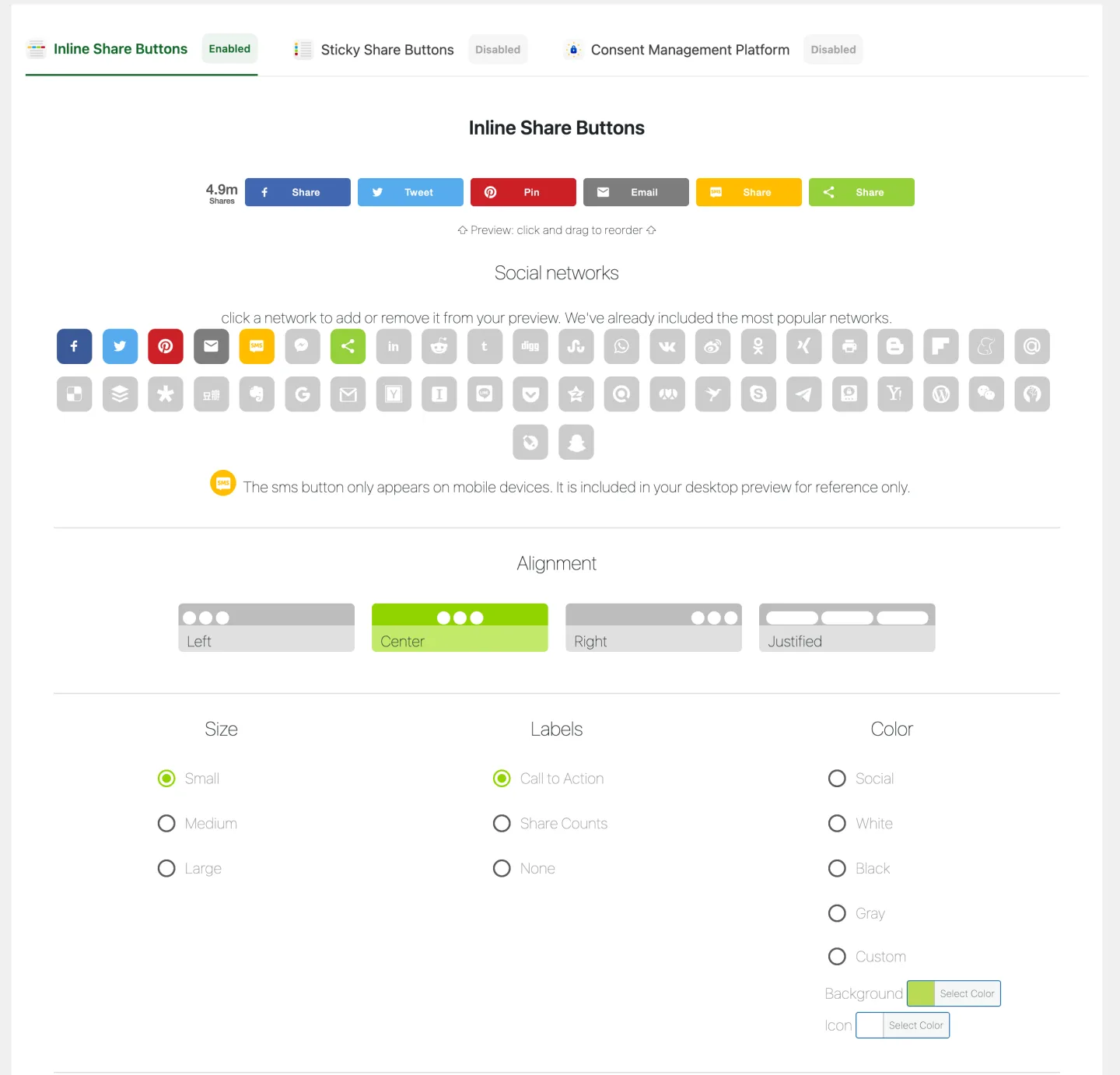
This is the feature that genuinely sets ShareThis apart in the WordPress share-button category. Once you connect the plugin to a free ShareThis account and paste in your property ID, the button design — networks, alignment, size, labels, color, language — is driven by your ShareThis dashboard rather than by local WordPress options. Change the network mix or palette in the ShareThis hosted admin, and every property that points at the same property ID updates automatically. That includes the WordPress plugin alongside ShareThis embeds on Shopify, Wix, Weebly, React, Angular, Cloudflare Workers, or raw HTML.
In practical terms, this matters when you're managing more than one storefront or site. A single-WordPress-site publisher will see this as overhead, because the same buttons could just as easily be configured locally inside any other free share-button plugin. For an agency or multi-brand publisher running ShareThis on five or six properties, this is the headline reason to choose this plugin over a self-contained alternative — one place to redesign, one rollout, no per-site cleanup.
2. Inline Share Buttons with placement-by-content-type controls
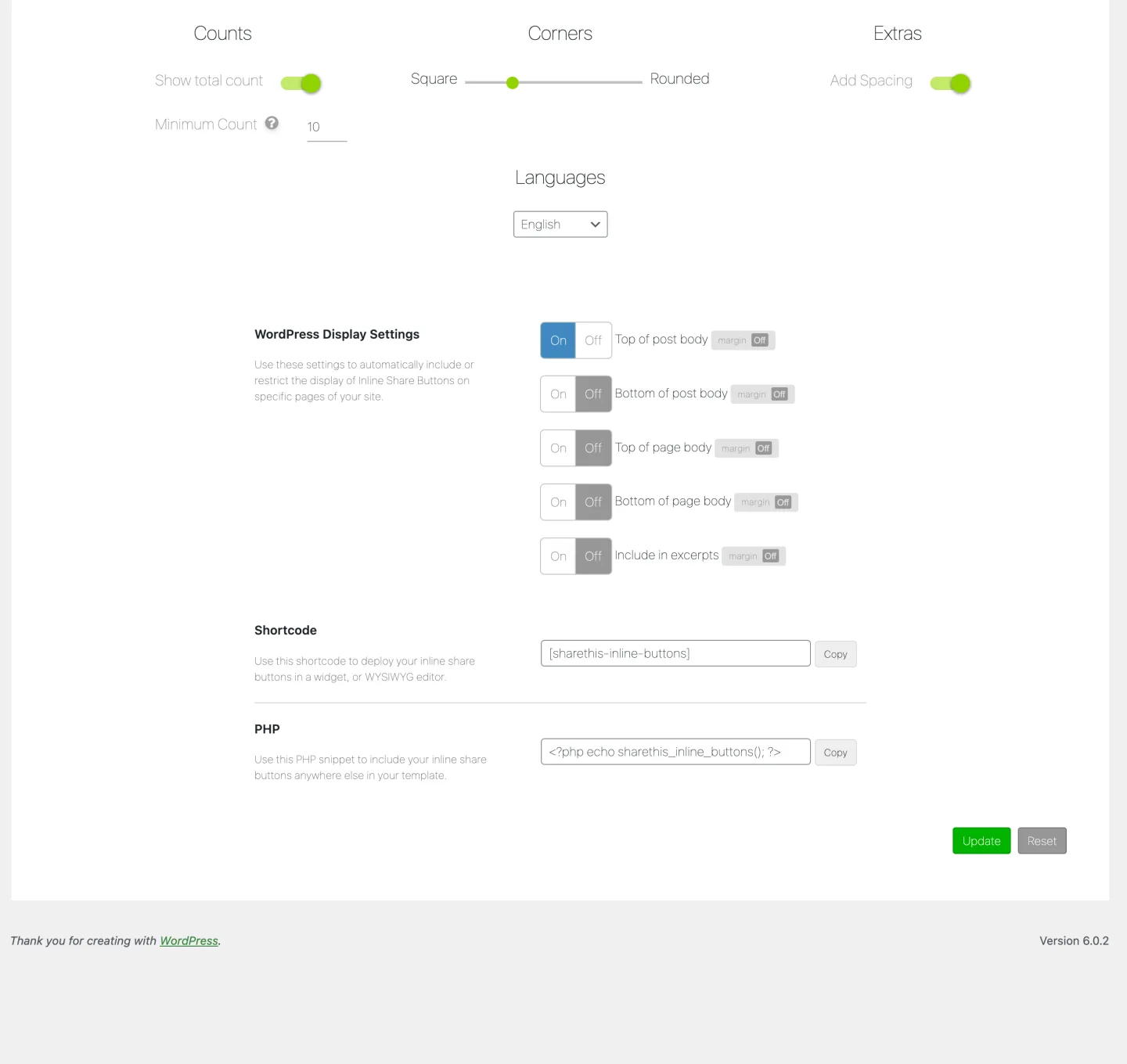
The Inline product is the standard in-content share row. The WordPress side gives you five on/off placement checkboxes — top of post body, bottom of post body, top of page body, bottom of page body, and include in excerpts — plus a [sharethis-inline-buttons] shortcode for placing the row anywhere you want, a PHP template helper for theme developers, a Gutenberg block for the editor, and a classic widget for older sidebar layouts.
The design half of the Inline tab loads the ShareThis hosted button-config widget directly inside the admin column: tile-based network picker with drag-to-reorder, four-way alignment (Left, Center, Right, Justified), three sizes (Small, Medium, Large), three label modes (Call to Action like "Share" or "Tweet", Share Counts, or icons only), a Social-versus-Custom color toggle with a 30-swatch palette, a combined-total-count toggle, and a ten-language dropdown. The split between WordPress-side placement and ShareThis-side design takes a moment to internalize, but once you understand the pattern, choosing where buttons appear is fast.
3. Sticky Share Buttons — a vertical floating bar with archive coverage
The Sticky product is a left- or right-docked vertical floating bar with broader placement coverage than the Inline tab. You can toggle it on for the home page, posts, custom post types, pages, category archives, tag archives, and author pages, with searchable exclude-list inputs for specific pages or category archives. Vertical offset from the viewport top defaults to 160 px, and the mobile breakpoint defaults to 1024 px — below that width, the sticky bar is hidden entirely and mobile visitors see only the inline row.
One real gap to flag: the Sticky product is vertical only. There is no horizontal bottom-docked mobile bar like AddToAny offers. If a significant share of your traffic is on phones and you want a persistent share bar in that mode, ShareThis doesn't ship it; you'd need to fall back to the inline row, which is always present.
4. Bundled TCF v2 Consent Management Platform
A third tab in the same plugin admin gives you a Consent Management Platform tool that integrates an IAB Europe Transparency & Consent Framework v2 banner. You pick the visitor scope (EU-only or worldwide), choose which TCF "purposes" (Personalization, Ad selection, Measurement, and so on) you allow, and select the vendors you support from the live IAB Europe vendor registry. The CMP toggle is independent of the share-button toggles — you can run one without the other.
For an EU publisher who doesn't already run a dedicated consent plugin like Cookiebot, OneTrust, or Complianz, this is one of the few free share-button plugins that ships a real TCF v2 banner in the same package. The honest caveat is that it only makes sense if you're using ShareThis's hosted buttons, because the CMP and the share-button bundle are delivered by the same ShareThis platform. If you already run another consent manager, leave this tool off.
5. ~57 networks with modern coverage, two notable gaps
The plugin ships roughly 57 networks out of the box, including Facebook, X (Twitter), LinkedIn, WhatsApp, Pinterest, Reddit, Telegram, Tumblr, Email, SMS (mobile only), Bluesky, Threads, Mastodon, WeChat, Microsoft Teams, Snapchat, VKontakte, Naver, Line, and the green ShareThis universal "+" button that opens a full-list picker similar to AddToAny's universal icon. Bluesky, Threads, and Mastodon are all in the default selectable set, so modern-network coverage is current.
Two gaps are worth calling out before you commit. A handful of older networks (iorbix, koapp, BLM, Skype, surfingbird) were retired in a recent update because those networks are either offline or no longer relevant. And Instagram and TikTok are intentionally absent — both networks block third-party share dialogs at the API level, an industry-wide limitation rather than a ShareThis-specific gap. Compared to AddToAny's roughly 95 networks and Sassy Social Share's roughly 100, ShareThis's 57 is adequate for most blogs but weaker for sites with long-tail regional audiences.
ShareThis Ease of Use / UI & UX
The plugin sits in the lower half of the ease-of-use band in this category — install is straightforward, but the "no buttons render until you pair an account" reality and the embedded vendor-design widget make it less obvious than AddToAny or Sassy Social Share.
1. UI / UX
The admin lives under its own top-level "ShareThis Share Buttons" menu in the WP sidebar, with three horizontal tabs across the top of the same admin page: Inline Share Buttons (default), Sticky Share Buttons, and Consent Management Platform. Each tab has a left column of WordPress display checkboxes — placement, exclusion lists — and a right column that loads the ShareThis hosted button-design widget. The two halves use different visual languages because one is a native WordPress form and the other is the same design surface ShareThis serves to its Shopify, Wix, and React customers, which takes a beat to get used to.
2. Setup
After install and activation, an admin notice appears at the top of the Plugins screen: "Your ShareThis Share Button plugin requires configuration." That's the soft tell — the plugin is installed but it won't render any buttons on the frontend yet. To actually see buttons, you have to create a free ShareThis account at sharethis.com, copy your property ID, paste it into the WordPress plugin's settings, and pick a default product (Inline or Sticky). That step is mandatory in practice — without a paired property, the plugin stays inactive on the frontend and visitors see nothing where the share buttons should be. Most negative WordPress.org reviews trace back to this surprise.
3. Settings density
The Inline and Sticky tabs are surprisingly tidy on the WordPress side — five and seven placement toggles respectively, plus the design widget on the right. The CMP tab adds a visitor scope dropdown, a purposes selector, and a TCF vendor list. There is no upsell column, no paid-tier teaser, and no nag screens — the plugin admin itself doesn't try to sell you anything. The friction is on the account pairing, not on the in-WP UI.
4. Embedded vendor design widget
The design half of each tab is the same ShareThis hosted design surface that powers the vendor's Shopify, Wix, React, and HTML embeds rather than a native WordPress form. That's the trade-off behind the cross-CMS sync feature, and it does come with a quirk: if your admin is on a strict content-security policy, behind an aggressive ad blocker, or otherwise can't reach the ShareThis platform from inside wp-admin, the design column won't load and you'll see a blank space where the picker should be. On hardened or air-gapped admin setups, plan to whitelist the vendor or pick a plugin whose design is purely local.
5. Learning curve
If you just want share buttons at the bottom of posts and you're willing to create a ShareThis account, plan on 15–20 minutes for the first end-to-end pass: install plugin, create account, paste property ID, pick networks in the design widget, toggle the WordPress placement boxes, and visit a post to confirm. If you don't want a vendor account, ShareThis isn't the right plugin and you'll be frustrated within the first ten minutes. AddToAny is the better answer for that buyer.
ShareThis Performance
ShareThis is fundamentally a hosted-buttons plugin: the WordPress side decides where buttons appear, and the ShareThis platform delivers the actual button design and assets to the visitor's browser when a page loads. That architecture is the through-line behind every observation below.
1. Hosted-platform dependency
Because the buttons are delivered by the ShareThis platform rather than served from your own WordPress install, every page that displays them depends on the ShareThis service being reachable and responsive for each visitor. When the service is healthy, this is invisible. When it's slow — or when the visitor's network blocks third-party services for privacy reasons — the buttons either appear late or don't render at all. This vendor dependency is the most common theme in the plugin's negative reviews, where 1-star comments cite slow load, "Adware slowing down your site," and outright caching-plugin incompatibility.
2. Account requirement is also a reliability factor
Because nothing renders on the frontend until the plugin is paired with a free ShareThis account, the plugin is effectively inert on a site that hasn't completed signup. For buyers evaluating reliability, this pairs with the hosted-platform point above: both the rendering pipeline and the buttons themselves are tied to the vendor relationship being in good standing.
3. Caching-plugin compatibility
A consistent thread across the 1-star reviews is friction with caching plugins. Because the buttons are painted into the page after it arrives in the visitor's browser, aggressive page-cache, fragment-cache, or HTML-minification rules can interact unpredictably with them — sometimes the buttons render twice, sometimes not at all. With WP Rocket, LiteSpeed Cache, W3 Total Cache, or similar plugins set to merge or inline scripts, plan on extra time excluding the ShareThis assets from the optimization rules.
4. Stability and recent patch cadence
Cadence across the plugin's 9-year life has been uneven, but the recent patch series shows active engagement, with the latest release tested against the current WordPress compatibility target listed by the plugin. The same series also includes a publicly-fixed cross-site-scripting vulnerability in the inline shortcode, plus a cluster of stability fixes. The pattern reads as "recently re-stabilized after a quieter maintenance period." Existing sites running an older build should update to the current release as soon as possible.
ShareThis Support, Documentation & Learning Resources
Support runs through two surfaces with different quality bars. The primary day-to-day channel is the WordPress.org plugin support forum, where ShareThis replies under its corporate handle with two named contributors listed. The WordPress.org statistics currently show 1 of 1 recent open threads resolved (100% on a small trailing window), but the wider 9-year history shows intermittent response cadence — replies clustered around release windows and quieter during the long inter-release stretches.
Average response time isn't published, and the historical pattern in older support threads suggests a few days is realistic rather than the "24/7" claim some other vendors make. Anchored against the public rating context, support quality reads as mixed: the 3.5-star average across 26 reviews is the lowest in the comparable WordPress share-button category (AddToAny 4.7, Sassy Social Share 4.8, Hubbub Lite 4.7, Shareaholic 4.4), and several 1-star reviews complain specifically about settings not saving or buttons not rendering — issues that would be hard to triage without a quick support reply.
Documentation is split between ShareThis's general support center at sharethis.com/support and the WordPress.org plugin readme, which is shorter than most peers. There is no in-WP help wizard or tooltip layer; the embedded design widget assumes you already know what each control does. Video tutorials aren't officially published, and the third-party walkthroughs on YouTube cover the basics rather than the integration with the ShareThis dashboard. For a feature like the CMP banner, you'll spend more time on the IAB TCF v2 specification than on ShareThis's own docs.
ShareThis User Reviews & Reputation
I reviewed ShareThis's full public reputation footprint on WordPress.org — all 26 ratings, the star distribution, and a sample of recent 5-star and 1-star reviews — and the picture is unusually polarized.
The overall impression is divided — half the reviewers loved it on install, and almost a third walked away one-starring it. Across 9 years and 10,000+ active installs, ShareThis Share Buttons holds a 3.5 / 5 average from 26 reviews, with 50% (13) at 5 stars and 30.8% (8) at 1 star. The middle ratings are nearly empty (only 5 reviews sit between). That J-shape is more pronounced than any other plugin in the category, and combined with the low total review count (26 reviews over nearly a decade, against AddToAny's 1,113 and Sassy Social Share's 520), it tells you the install base is engaged enough to either champion or condemn the plugin but rarely lands in the middle.
The most praised strengths repeat across the 5-star reviews. The install flow is described as straightforward, the design experience is called clean and visual, and reviewers who actively use the ShareThis dashboard appreciate the centralized cross-platform management. Some 5-star reviews say it beat alternatives the reviewer tried, and several specifically endorse support responsiveness when issues did come up.
The most criticized weaknesses cluster into a few clear themes. The single biggest one is the property-ID requirement that the WP.org listing doesn't fully foreshadow — multiple 1-star reviews title-line with "Requires an account" or "Why is registration required?" because they expected an install-and-forget plugin and got a configuration nag. The second is buttons not rendering or settings not saving, often related to the same property-ID setup confusion but sometimes pointing at genuine bugs that the recent patch series has been addressing. The third is performance: titles like "Adware slowing down your site" and "Good but Slows Down Your Website" reflect the hosted-platform dependency. The fourth is caching-plugin friction, with one reviewer asking outright "How can I make it work with a catching plugin?" The fifth, smaller but worth flagging, is the bundled GDPR Compliance Tool re-enabling itself unexpectedly after the publisher had disabled it.
The polarized distribution and the explicit "requires an account" frustration are the single most useful signals when deciding whether ShareThis is the right plugin for a given buyer. If your reader is willing to create a ShareThis account and accept the data-collection model, the 5-star half of the distribution is who they'll join. If they're not, the 1-star half is.
ShareThis Pricing & Value
ShareThis's pricing has the cleanest free-tier headline in the category and a more honest set of fine-print caveats than most.
- WordPress.org free plugin — $0. Includes Inline Share Buttons, Sticky Share Buttons, the TCF v2 Consent Management Platform tool, ~57 networks, a Gutenberg block, the
[sharethis-inline-buttons]shortcode, a PHP template helper for theme developers, a classic widget, a per-post Share Buttons meta box, ten languages, and parity with the ShareThis hosted dashboard that drives Shopify, Wix, React, Angular, Cloudflare, and HTML embeds. GPLv2-licensed for the plugin code. - ShareThis hosted account — $0 (free signup). The free ShareThis account at sharethis.com issues the property ID that the WordPress plugin requires to actually render buttons on the frontend. Includes the centralized button-design dashboard, the Sharing Intelligence® analytics dashboard, and AI-driven Smart Share Buttons (vendor-exclusive, account-gated).
- ShareThis Data Solutions — Custom pricing (sales-led). Includes Audience Segments, Atlas Global ID, Curated Data Feed, and related ad-tech products. These are sold to advertisers and brands, not to WordPress publishers, and they're unrelated to share-button rendering. Don't lump them into the plugin's price.
The free tier genuinely covers the full share-button feature surface for typical WordPress publishers. There is no Pro tier sold for the plugin itself, no usage limits, no per-network throttling, no watermarking, and no nag banner inside the admin. In normal "compare prices across the category" terms, ShareThis is the only plugin in the bracket alongside AddToAny that doesn't sell a paid plugin tier at all.
The honest caveats are not about price. They're about what you give up to keep the price at zero. First, the account requirement is a soft paywall via signup friction rather than a price tag — until you pair the plugin with a ShareThis account, the share buttons stay invisible on the frontend. Second, the centralized dashboard creates vendor lock-in: once your buttons are designed inside the ShareThis hosted UI, switching to AddToAny or Sassy Social Share means re-doing that work locally inside the new plugin. Third, the business model is data. ShareThis monetizes via aggregated sharing telemetry sold as Audience Segments and Atlas Global ID to advertisers, and the vendor discloses that directly on the WP.org listing: "ShareThis may collect interaction data related to button engagement and usage." That doesn't make the plugin unusable, but it does mean privacy-conscious publishers should price the data trade-off the same way they'd price a paid tier.
There is no money-back guarantee — there's no purchase to refund. There is no premium support tier sold for the WordPress plugin. The free version is the whole product.
ShareThis Pros and Cons
Here is a balanced view of where ShareThis stands out and where the gaps actually matter.
Pros
- Centralized cross-CMS dashboard sync: One ShareThis account drives the button design for WordPress alongside Shopify, Wix, Weebly, React, Angular, Cloudflare Workers, and raw HTML embeds. No competitor in the WordPress share-button category offers anything like it. If you genuinely run multiple platforms, this saves real time.
- Bundled TCF v2 Consent Management Platform: A real IAB Europe-compliant consent banner integrated into the same plugin admin, with visitor-scope (EU-only or worldwide) and purposes/vendors controls. Rare among free share-button plugins and useful for EU publishers who don't already run a dedicated CMP.
- Modern network coverage with active maintenance: Bluesky, Threads, Mastodon, WhatsApp, Telegram, WeChat, Microsoft Teams, and Snapchat are all default-supported, and the recent patch series shows the vendor is actively engaged with the plugin again.
- Genuinely free with no paid plugin tier: $0 for the WordPress plugin and $0 for the ShareThis account required to render buttons. No upsell column inside the admin and no paid-feature labels. The trade-off is the data-collection business model rather than a paywall.
Cons
- Silent account requirement contradicts the "no signup required" framing: The WP.org listing markets the plugin as "no paid upgrades, no signup," but in practice the share buttons only appear on your site after you create a free ShareThis account and paste your property ID into the plugin settings. Without that pairing, the plugin sits silently in WordPress while visitors see nothing where the buttons should be. This is the single biggest source of 1-star reviews.
- Hosted-platform dependency and data-collection business model: Every page that shows ShareThis buttons depends on the ShareThis service being reachable for the visitor, and the vendor's own disclosure says "ShareThis may collect interaction data related to button engagement and usage." For performance-critical or privacy-first sites, this combination is a meaningful downside next to AddToAny's no-data-sale posture or Hubbub Lite's mostly self-contained architecture.
- Lowest WP.org rating in the category and a recent XSS fix: 3.5 stars from 26 reviews is the lowest in the comparable WordPress share-button bracket, with 30.8% of reviews at 1 star. A recent release publicly patched a cross-site-scripting vulnerability in the inline-buttons shortcode, so any recommendation of ShareThis should note that the plugin should be kept on the latest version.
- Vertical-only sticky bar and weaker network breadth: The Sticky product is left- or right-docked only, with no horizontal bottom-docked mobile bar, and is hidden below the 1024 px breakpoint by default. The 57-network library is roughly two-thirds of AddToAny's 95 and slightly more than half of Sassy Social Share's 100. Adequate for most blogs, but weaker for long-tail regional networks or mobile-heavy sites that want a persistent share bar on phones.
Who Should Use ShareThis?
ShareThis fits a narrow but real set of WordPress publishers very well, and there are clear cases where AddToAny, Sassy Social Share, or Hubbub Lite is a better starting point.
Who Should Use It
- Multi-platform publishers already on the ShareThis dashboard: If you run ShareThis buttons on Shopify, Wix, Weebly, React, Angular, Cloudflare, or raw HTML and want one central design surface that also powers WordPress, this plugin is the obvious choice. No competitor matches the cross-CMS dashboard sync, and that's the single reason ShareThis exists for a WordPress buyer.
- EU publishers who don't run a dedicated CMP: The bundled TCF v2 Consent Management Platform tab is one of the few free, in-plugin consent banners with real IAB Europe vendor-list integration. If your site doesn't already use Cookiebot, OneTrust, or Complianz, ShareThis can serve both jobs from the same plugin.
- Buyers who want AI-driven Smart Share Buttons: ShareThis's vendor-exclusive Smart Share Buttons feature automatically customizes which networks appear based on visitor regional sharing patterns. It's account-gated rather than paid, and it's genuinely useful for global publishers with heterogeneous audiences.
- Agencies running many client sites: One ShareThis account can administer share buttons across multiple WordPress installs without each site needing its own configuration. Centralized control, especially when paired with other ShareThis-hosted properties, can be a workflow win.
Who Should Skip It
- Anyone who wants to auto-publish posts to their own social accounts: That's FS Poster territory. ShareThis is visitor-facing share buttons, not publisher-side auto-posting, and the two solve different problems.
- Buyers who want a true install-and-forget plugin: AddToAny renders all ~95 networks immediately on install with no account, no property ID, and no configuration nag. Sassy Social Share renders ~100 immediately the same way. If "open the box and it works" is your standard, ShareThis will frustrate you within the first 15 minutes.
- Privacy-first or Core Web Vitals-critical sites: The data-collection business model and the hosted-platform dependency both push against strict privacy and performance budgets. AddToAny (no data sale, lazy-loaded menu) and Hubbub Lite (self-contained, no third-party service in the loading path) are cleaner choices for these buyers.
- Sites that need a horizontal mobile sticky bar or long-tail network coverage: ShareThis's Sticky product is vertical-only and hidden below 1024 px, and the network library is 57 against AddToAny's 95 and Sassy Social Share's 100. If either of those gaps matches your design or audience, pick a different plugin.
Best ShareThis Alternatives
If ShareThis doesn't quite fit, here are the alternatives I'd realistically consider — chosen because they map to a specific shortcoming above, not because they're popular by themselves. For the full ranked comparison, see our best WordPress social share buttons plugins roundup.
- AddToAny Share Buttons: The category default — 300,000+ active installs, 4.7 stars from 1,113 reviews, 19 years on WP.org under the same maintainer, no paid tier ever sold, ~95 networks, lazy-loaded universal menu, vertical and horizontal mobile sticky bars, and a privacy policy that explicitly says the vendor doesn't sell personal data. Pick it when "install and forget with no vendor account" matters more than centralized cross-CMS management. See the full AddToAny Share Buttons review for the head-to-head case.
- Sassy Social Share: The strongest free customization in the category, with shape/size/hover-color/border controls in the free tier, no middle layer, no visitor cookies, and the first WordPress share-button plugin to ship native AI-platform icons (ChatGPT, Grok, Perplexity, Google AI, Claude). 4.8 stars from 520 reviews on 100,000+ installs. Pick it when design depth and privacy posture matter more than ShareThis's cross-CMS angle. See the full Sassy Social Share review for the deep-customization side-by-side.
- Hubbub Lite Social Sharing: The privacy-clean self-contained option from NerdPress. 4.7 stars from 172 reviews on 30,000+ installs, with in-WP click analytics built into the plugin admin and the best Pinterest UX in the category. Free tier covers 7 networks unregistered with the additional 15+ behind a free email registration. Pick it when self-hosted assets and no third-party service in the loading path are non-negotiable. See the full Hubbub Lite review for the privacy-clean side-by-side.
- Shareaholic: The closest architectural twin to ShareThis — also an account-gated hosted plugin, but with related-content recommendations and native-ad monetization layered on top of share buttons. 4.4 stars from 1,051 reviews on 10,000+ installs. Pick it when you want share-buttons-plus-monetization in one bundle and you're comfortable with a plugin that hasn't shipped a release in some time. See the full Shareaholic review for the architectural twin comparison.
- Social Warfare: 20,000+ active installs at 3.3 stars from 186 reviews — the Pinterest-leaning freemium plugin in the category, with per-post custom Pin images, the Image Hover Pin Button, Rich Pins, and a built-in Click-to-Tweet box. Self-hosted assets, no Cloud account, and a one-time $29 single-site Pro license rather than ShareThis's vendor-account pairing. Maintenance has clearly slowed and the free tier is the narrowest in the comparable bracket. Pick it deliberately for the Pinterest workflow or Click-to-Tweet rather than as a general-purpose ShareThis replacement. See the full Social Warfare review for the trade-offs.
If your need is auto-publishing your WordPress posts to your own social accounts rather than share buttons — a separate problem entirely — the right tool is FS Poster. ShareThis and FS Poster solve different problems, and many sites install both.
Final Verdict: Is ShareThis Worth It?
Yes, for one narrow buyer. ShareThis Share Buttons is genuinely worth installing when you already run the ShareThis hosted platform on at least one other property — Shopify, Wix, Weebly, React, Angular, Cloudflare, raw HTML — and want one centralized dashboard to design buttons across all of them, WordPress included. The bundled TCF v2 Consent Management Platform is a real bonus for EU publishers who don't already run a dedicated CMP, and the modern network coverage (Bluesky, Threads, Mastodon) plus the actively-maintained recent patch series mean the plugin isn't a maintenance risk on a current WordPress install. Install the latest release, set up the free ShareThis account, accept the data-collection trade-off, and the plugin does its job.
The honest caveat is that for everyone else, AddToAny or Sassy Social Share is the better default. The silent account requirement, hosted-platform dependency, and 3.5-star reputation across only 26 reviews make ShareThis a deliberate choice rather than the obvious one — and it's only the right choice when the cross-CMS dashboard genuinely earns its keep. If you're a single-WordPress-site publisher who just wants share buttons at the bottom of posts, install AddToAny instead and move on.
ShareThis FAQ
Is ShareThis really free? Yes — the WordPress plugin is GPLv2-licensed and $0 to install, and the ShareThis account required to render buttons is also $0 to create. There is no paid plugin tier sold for the WordPress plugin itself. The business model on the vendor side is aggregated sharing data sold to advertisers as Audience Segments and Atlas Global ID, which is unrelated to share-button rendering but disclosed on the WP.org listing.
Do I really need a ShareThis account to use the plugin? Yes in practice, despite the WP.org listing's "no signup" framing. Until you create a free ShareThis account and paste your property ID into the plugin settings, the share buttons stay invisible on the frontend — the plugin is installed and activated, but visitors see nothing where the buttons should be. Plan on a 10-minute account-creation step as part of installation, or pick AddToAny if you want zero account friction.
Does ShareThis support Bluesky, Mastodon, and Threads? Yes. Bluesky, Threads, and Mastodon are all in the default selectable network set, alongside WhatsApp, Telegram, WeChat, Microsoft Teams, and Snapchat. Instagram and TikTok are not supported — both networks block third-party share dialogs at the API level, which is an industry-wide limitation rather than something specific to ShareThis.
Why are some negative reviews saying ShareThis slowed down their site? ShareThis is a hosted-platform plugin — the actual button design and assets are delivered to each visitor by the ShareThis service when a page loads, rather than served from your own WordPress install. That dependency is the reason the loading path is sensitive to caching, minification, and script-merging rules on a heavily-optimized site. The plugin's WordPress side is straightforward and works as expected with default settings, but the visible buttons depend on a valid ShareThis property and config, and you'll likely need to exclude the ShareThis assets from any aggressive optimization rules to keep performance clean.
What are the best ShareThis alternatives? AddToAny Share Buttons for an install-and-forget plugin with no vendor account, ~95 networks, and a clean privacy posture. Sassy Social Share for the deepest free design customization and native AI-platform icons. Hubbub Lite for a privacy-clean self-contained plugin with in-WP click analytics. Shareaholic if you want share-buttons-plus-related-content-and-ads in one bundle. Social Warfare for the Pinterest Pro workflow and built-in Click-to-Tweet on a one-time license. If you need to auto-publish to your own social accounts rather than show visitor share buttons, pair ShareThis with FS Poster — they're complementary tools.
Write once. Post to 26 networks.
- 26 social networks
- Schedule & auto-repost
- Runs inside wp-admin


