


Can Sassy Social Share solve my share-button problem for free, or will I bump into a paywall the moment I want anything beyond the basics? Is it really safe to install in 2026, given that Heateor's brand website has gone offline? If those are the two questions on your mind, you're asking exactly the right ones — most publishers I talk to are stuck between "I want a free, customizable plugin with every modern network" and "I don't want to bet my site on a vendor whose homepage is parked."
This Sassy Social Share review is the result of a full hands-on evaluation. I installed v3.3.79 directly from WordPress.org into a fresh sandbox, walked through every option across the seven settings tabs (Theme Selection, Standard Interface, Floating Interface, Miscellaneous, Shortcode & Widget, Troubleshooter, and FAQ), tested the frontend rendering on a real post, opened the universal share popup, ran the [Sassy_Social_Share] shortcode, and inspected the DOM. I cross-checked findings against the WordPress.org plugin info API, the changelog for 148 published versions, the Wayback Machine archives of the now-parked heateor.com store, and the 520 public reviews on the plugin's WP.org page. Below is what I'd tell a friend before they install it.
What Is Sassy Social Share?
Sassy Social Share is a free WordPress plugin from Heateor that adds visitor-facing share buttons and follow icons to your posts, pages, custom post types, WooCommerce products, BuddyPress activity, and bbPress topics. It supports roughly 95 networks — Facebook, X, Reddit, LinkedIn, Pinterest, Mastodon, WhatsApp, Mix, Telegram, Bluesky, Threads, Tumblr, Email, Print, and many more — plus a brand-new AI cluster (ChatGPT, Grok, Perplexity, Google AI, Claude) added in August 2025.
It's built for bloggers, news and magazine sites, small ecommerce stores, and EU/GDPR-conscious publishers who want a feature-dense, fully free share-button plugin and don't mind a slightly busier admin UI in exchange for deeper customization. The plugin has been on WordPress.org since December 2015, has 100,000+ active installs, and ships two interfaces in one package — inline Standard buttons and a Floating bar (vertical sidebar + horizontal mobile bar).
One important clarification up front: Sassy Social Share is visitor-facing share buttons, not an auto-publisher. It does not post your content to your own social accounts. If that's what you need, you want FS Poster or a similar publishing plugin — and the two work beautifully side by side.
Sassy Social Share Review Quick Verdict
Sassy Social Share is the deepest free customization in the WordPress share-button category and one of the very few plugins that ship native "share to AI" buttons in 2026 — but the vendor's brand website is currently parked, so I'd treat it as a free-tier-only recommendation today.
| Criteria | Verdict |
|---|---|
| Best for | Publishers who want deep free icon customization, AI-platform share buttons, and a no-cookie / no-middle-layer architecture |
| Starting price | $0 (free WP.org plugin); historical Pro $11.99/ |
| Free plan / trial | Yes — the free version is fully featured for typical buyers |
| Update frequency | ~14–16 releases per year on average; latest 3.3.79 shipped 2025-09-15 |
| Most valuable features | ~95 share networks + AI cluster, Standard inline row, Floating vertical/ |
| UI/ |
7/ |
| Feature richness score | 9/ |
| Product performance | 9/ |
| Product rating | 4.8/ |
Sassy Social Share Features & Functionality
The plugin's feature depth is wider than almost anything else in the WP.org share-button category, especially in the free tier. I reviewed the tested feature notes from the WordPress Playground sandbox session and the vendor's WordPress.org listing, and below are the most important findings.
1. Standard inline share buttons with drag-and-drop service picker
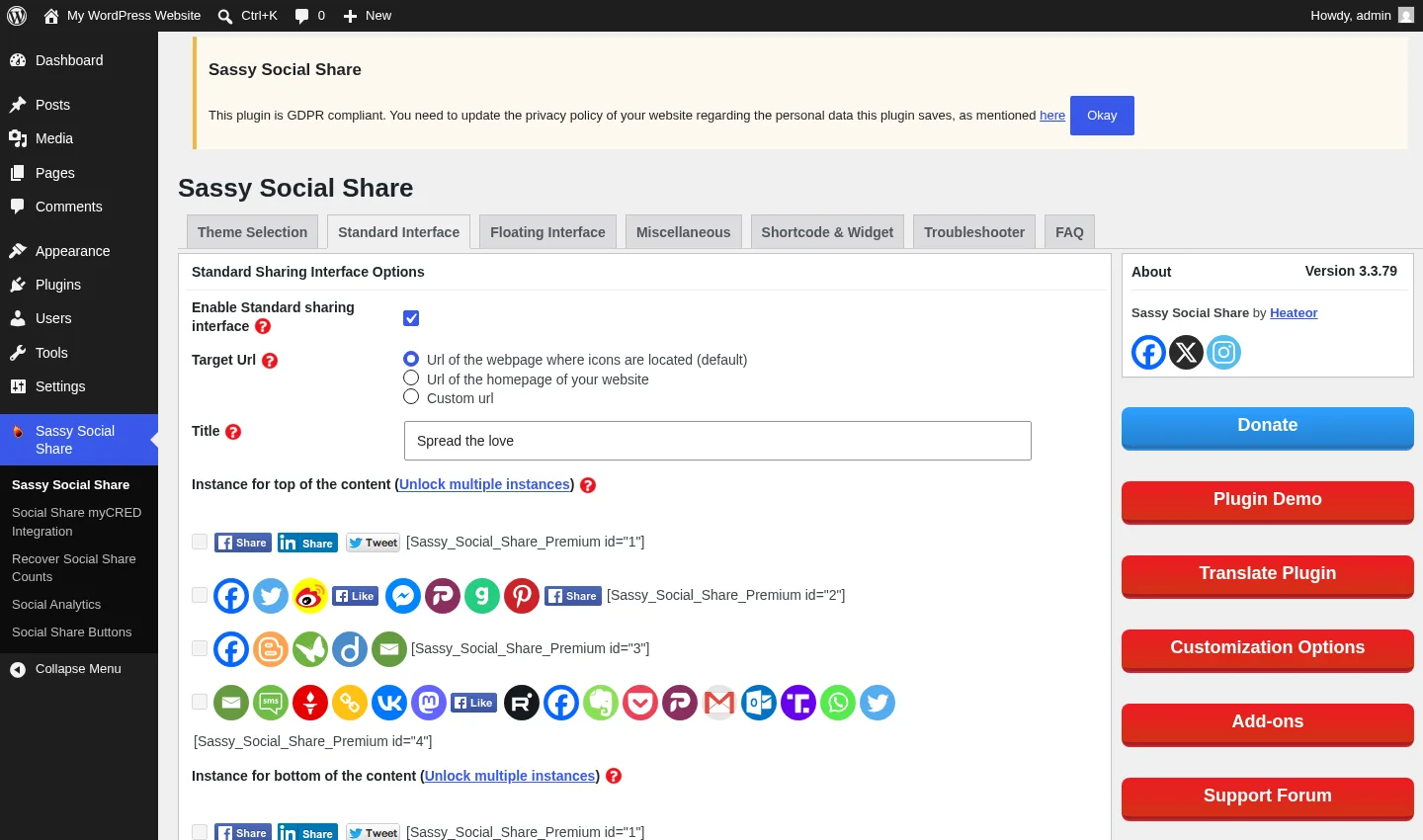
Standard buttons are the inline share row that Sassy Social Share auto-injects at the top of your posts. Out of the box you get a tidy nine-button row — Facebook, X, Reddit, LinkedIn, Pinterest, Mastodon, Mix, WhatsApp, and the universal "More" button at the end. You can swap in any of ~95 supported services through a two-region drag-and-drop picker, set a sharing-title caption (default: "Spread the love"), pick alignment, and toggle eight placement scopes (homepage, posts, pages, excerpts, category archives, archive pages, attachment pages, custom post types) with one checkbox each.
In testing, the top-of-post placement rendered immediately on a brand-new sample post with zero configuration. Every share link in the rendered DOM had rel="nofollow noopener", target="_blank", an aria-label, and a title attribute — exactly the SEO and accessibility defaults I'd want to see by default.
2. Floating vertical sidebar + horizontal mobile bar
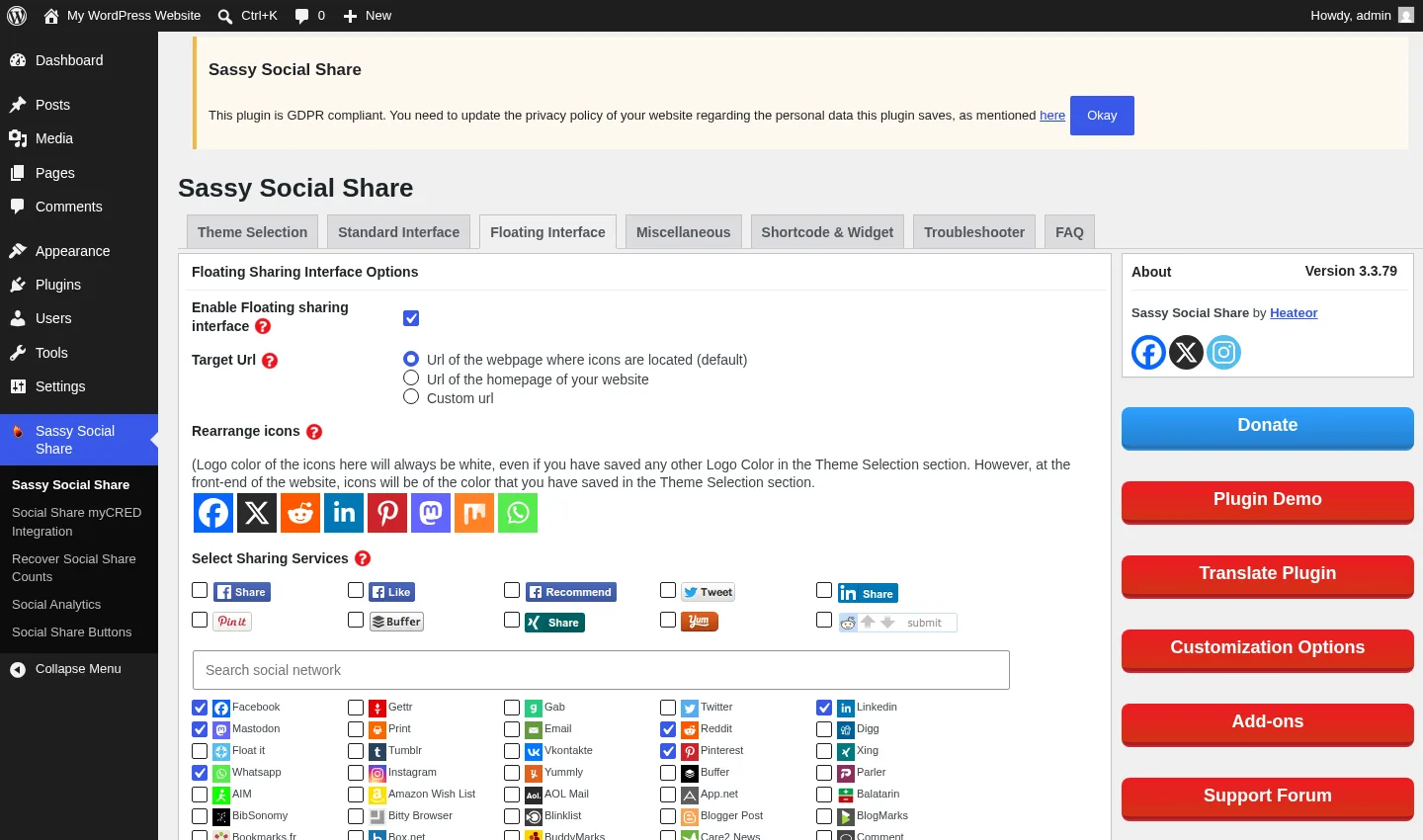
The Floating tab gives you two independent sticky interfaces: a vertical sidebar (left or right docked, with top/left/right offset numeric inputs) and a separate horizontal bar pinned at the bottom of the viewport on mobile. Each has its own service selection that's independent of the Standard row, so you can run nine icons inline and a tighter four-icon vertical bar without compromising either.
The defaults already encode a sensible responsive split: the vertical bar hides on screens ≤980 px and the mobile bar fills the gap. The vertical bar also includes a small "Hide" arrow at the bottom that lets visitors collapse the bar to a thin tab — a nice respect-the-reader touch that not every floating-bar plugin offers.
3. AI-platform share buttons (ChatGPT, Grok, Perplexity, Google AI, Claude)
This is the feature that genuinely sets Sassy Social Share apart in 2026. In version 3.3.78 (August 2025), the vendor added native share buttons for ChatGPT, Grok, Perplexity, Google AI, and Claude — and the v3.3.79 follow-up added language-aware summarization so the AI platforms respect the reader's interface language when summarizing the shared page.
I haven't seen any other established WordPress share-button plugin ship the AI cluster yet. If you write the kind of content readers want to "save to my AI for later" — research notes, longform analysis, technical documentation, product roundups — having a one-click "share to ChatGPT" or "share to Perplexity" button on your articles is a small but meaningful conversion advantage. The icons are also available inside the universal More popup, so visitors who don't see them in your default row can still find them on demand.
4. Theme Selection — the deepest free customization in the category
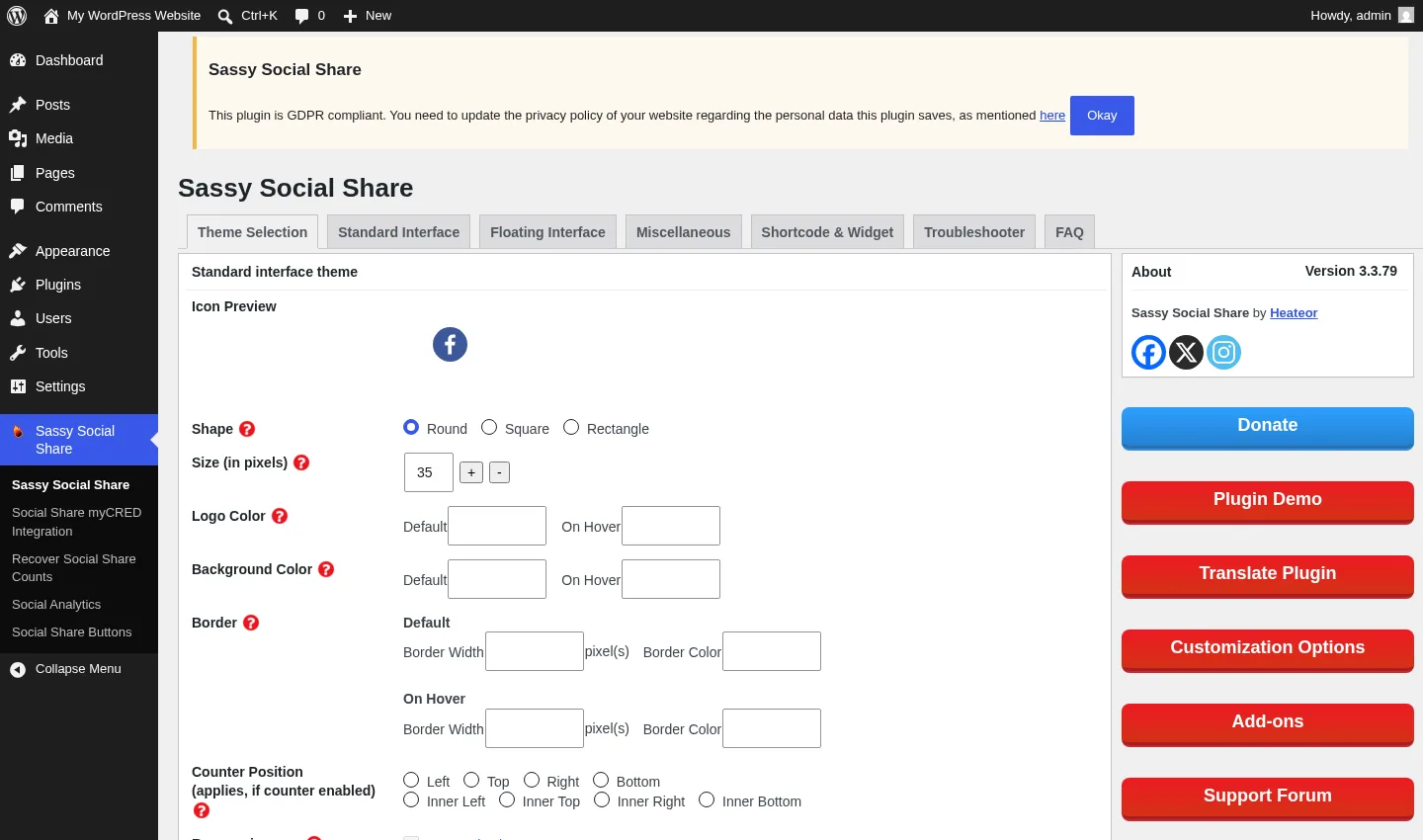
The Theme Selection tab is where Sassy Social Share most clearly out-customizes AddToAny and almost every other free competitor. For both the Standard interface and the Floating bar, you get independent control over:
- Shape — Round, Square, or Rectangle (default Round for Standard, Square for Floating).
- Size in pixels (default 35 px for Standard, 40 px for Floating).
- Logo color — Default and on-Hover hex pickers.
- Background color — Default and on-Hover hex pickers.
- Border — Default width and color, plus on-Hover width and color (four independent inputs).
- Counter position — eight placement modes (Left, Top, Right, Bottom, Inner Left, Inner Top, Inner Right, Inner Bottom).
Every one of these knobs sits in the free version. If you've ever wanted to make your share buttons match a custom brand palette exactly — same hover color as your CTA, same border radius as your card components, monochrome-on-light-background instead of brand-color disks — Sassy Social Share gives you the controls to do it without writing CSS.
5. No middle layer, no cookies — the privacy posture
The architectural choice that most defines Sassy Social Share is its "No Middle Layer" stance, and it's verifiable in the rendered DOM. When a visitor clicks the Facebook icon, the link goes straight to facebook.com/sharer/sharer.php. The X icon goes to twitter.com/intent/tweet. Reddit, LinkedIn, Mastodon, WhatsApp, and Mix all hit their official sharing endpoints directly. There is no heateor.com/share?to=... redirector in the chain.
In the same testing session, I checked the browser cookie jar after loading the demo post in a fresh incognito session and confirmed the plugin sets zero cookies on the visitor's domain — not from heateor.com, not from any third party. All JavaScript and CSS assets are served from the publisher's own origin. For an EU site that wants to keep its cookie banner short and its data-flow story clean, that posture is hard to beat.
Sassy Social Share Ease of Use / UI & UX
The plugin sits in a middle band on the ease-of-use spectrum — easy to install, easy to get a working share row, but the settings page is denser than AddToAny's and rewards a careful read-through before you start clicking checkboxes.
1. UI / UX
The admin lives under its own top-level "Sassy Social Share" menu in the WP sidebar, with seven horizontal tabs across the top: Theme Selection (default landing tab), Standard Interface, Floating Interface, Miscellaneous, Shortcode & Widget, Troubleshooter, and FAQ. Every tab uses native WordPress form controls — checkboxes, radios, number inputs, hex pickers — and a persistent right-rail sidebar promotes the vendor's Donate, Plugin Demo, Translate Plugin, Customization Options, Add-ons, and Support Forum buttons on every page. The sidebar takes roughly a quarter of the admin column and isn't dismissible.
2. Setup
After install and activate, the plugin shows a one-line GDPR admin notice that you dismiss with an "Okay" button. From there, the default share row appears at the top of every post immediately. No service account, no API key, no signup, no welcome wizard. Most publishers won't open the settings page at all for the first week — the defaults are already publish-ready.
3. Drag-and-drop service picker
The Standard and Floating tabs both use the same two-region drag-and-drop picker: a top "Selected Services" row that mirrors what renders on the frontend, and a wider "Available Services" grid below it with ~95 tiles. You drag a service from the grid into the row to add it, drag inside the row to reorder, and drag back to remove. The picker re-renders the live preview as you drop. It's a more visual interaction than AddToAny's modal-style picker, and once you understand the pattern, building a custom button set takes seconds.
4. Settings density and "(Unlock)" labels
The Miscellaneous tab is where the dense layout shows up most clearly. Several free-tier features (Share Count Cache, Bitly URL shortener, Native sharing toggle, JS-when-needed, AMP, Custom CSS, Export/Import configuration) sit alongside paywalled sections labeled "(Unlock)" — Share Counts for Facebook/X, Custom Text to Share, Email Share Customization, Custom Icon URL, the Click-to-Tweet shortcode, and the Total Shares feature. The "(Unlock)" labels are honest about what's gated, but seeing six of them on one tab gives the page a busier feel than AddToAny's minimalist Settings → AddToAny page.
5. Learning curve
If you only want share buttons at the top of posts: zero learning curve — the defaults work the day you install. If you want a custom-styled floating bar with bespoke hover colors and counter positions, expect 20–30 minutes for the first careful pass through Theme Selection and Floating Interface together. The 7-tab layout is more to navigate than AddToAny's two tabs, but once you've found a feature, the underlying control is straightforward.
Sassy Social Share Performance
Sassy Social Share is one of the lighter plugins in this category, and the architectural choices show on the frontend.
1. Script loading footprint
The plugin enqueues a single sassy-social-share.js from your own WordPress install and inlines its CSS via wp_add_inline_style, so there's no separate CSS request. A "JS when needed" toggle in the Miscellaneous tab defers the JS until the share buttons are actually in the viewport. There's no third-party CDN call, no heateor.com redirector, and no external tracking pixel. Pinterest's native pin-on-click is the only off-domain asset and it only loads after the visitor clicks the Pinterest button.
2. Frontend rendering
On the test post, the inline share row rendered immediately at the top of post content with the "Spread the love" caption above it, and the vertical floating bar docked to the left edge of the viewport at the same time. The DOM was clean — one .heateor_sss_sharing_container for the horizontal row, one .heateor_sss_vertical_sharing for the floating bar, and a third horizontal container at the [Sassy_Social_Share] shortcode position when present. Each icon is an inline SVG, so there's no extra image request per icon.
3. Stability across themes
148 versions over 10 years on WordPress.org is a strong stability signal, and the most-praised pattern in the reviews is "install and forget" behavior on default and FSE themes. The notable exception in the changelog is v3.3.58 in February 2024, where a release briefly broke the frontend layout on some sites — patched the next day in v3.3.59. The current 3.3.79 line is clean.
4. AMP compatibility
The Miscellaneous tab has a dedicated AMP toggle that swaps the rendered markup for an AMP-compatible variant on pages served through an AMP plugin. The vendor explicitly markets AMP compatibility, and the toggle is in the free tier — many competitors gate AMP behind paid tiers, so it's a useful inclusion.
5. No-cookie / no-middle-layer architecture
The single biggest performance and privacy claim in the plugin's positioning is "no middle layer, no cookies, all assets on your origin," and it holds up under inspection. For sites that already have a tight cookie consent flow, that means Sassy Social Share doesn't add a new line to your cookie banner the way some share-button plugins do.
Sassy Social Share Support, Documentation & Learning Resources
Support is split between WordPress.org community channels and (historically) Heateor's own knowledge base and email support, with the important caveat that the vendor channels are currently unreachable.
The primary day-to-day support channel is the WordPress.org plugin support forum, where Heateor's support handle replies. The plugin description promises "24/7 quickest support", but the WordPress.org API currently reports 1 of 3 recent threads resolved (33%) — that's below the category leaders. AddToAny, for comparison, is currently sitting at 4/4 (100%) on recent threads. The vendor's own support.heateor.com knowledge base, the [email protected] email channel, and the Customization Options portal that the plugin admin keeps linking to are all unreachable as of mid-2026 because Heateor's brand domain is currently parked at GoDaddy. Practically, that means you should expect WordPress.org community forum support to be your primary channel and shouldn't count on a direct vendor email reply landing today.
Documentation comes through three surfaces. The in-WP FAQ tab inside the plugin admin covers the most common buyer questions — OG image issues, Facebook share count zero, disabling sharing per post, customizing icon colors, using the [Sassy_Social_Share] shortcode, exporting and importing settings, and recovering counts after an HTTPS migration. The WordPress.org listing page itself is unusually detailed (the description is essentially a long-form feature list). The Troubleshooter tab inside the admin links to Facebook's debugger and LinkedIn's post inspector for fixing share-preview issues — useful for non-technical buyers who don't know those tools exist. Video tutorials are not officially published; most YouTube walkthroughs are third-party.
Sassy Social Share User Reviews & Reputation
I reviewed Sassy Social Share's full public reputation footprint on WordPress.org — all 520 ratings, the star distribution, and a sample of the most recent 5-star and 1-star reviews — and the picture is consistent.
The overall impression is strongly positive with a noticeable but specific 1-star tail. Across 10 years and 100,000+ active installs, Sassy Social Share holds a 4.8 / 5 average from 520 reviews, with 90.2% (469) at 5 stars and 4.4% (23) at 1 star. The middle ratings are almost empty: only 6 reviews sit at 3 stars or below 5 stars but above 1. That J-shape tells you buyers either love it (the overwhelming majority) or hit a hard failure (the small but vocal 4.4%). Sassy Social Share's 4.8 is the highest average rating in the WP share-button category — slightly ahead of AddToAny's 4.7.
The most praised strengths repeat across reviews. The defaults "just work" on the day you install, with no configuration needed for a working share row. The depth of free customization — shape, color, hover, border, counter position — gets called out specifically by design-conscious bloggers. The "no middle layer, no cookies" privacy posture draws praise from EU-targeted publishers. Active maintenance and frequent feature adds (Bluesky, Threads, Micro.blog, Raindrop.io in 2024, and the AI cluster in 2025) are noted by reviewers who care about modern-network coverage. Heateor's historical support reputation — before the brand domain went offline — was strong enough to earn featured testimonials from StreetCloud, Carfanaticsforum.com, FCLawyers.com.au, and Santangelo Ingenieria.
The most criticized weaknesses are more specific than category-typical complaints. A cluster of 1-star reviews lines up against the 2024 security-patch cadence — five XSS fixes and one open-redirect fix shipped between February 2024 and June 2025. Each one was patched quickly, and the current 3.3.79 line is clean, but security-conscious buyers who run regular vulnerability scans noticed the cadence. A second cluster traces to the v3.3.58 February 2024 layout-breaking regression that was fixed the next day. Some reviewers cite the busy admin UX — seven tabs, paid-add-on submenu items, persistent right-rail upsell column — as "naggy." And a smaller share of reviewers were caught by surprise when they discovered that accurate Facebook and X share counters are paywalled behind Pro/Premium, even though the labels in admin say "(Unlock)" clearly.
The vendor-site parking is recent enough that it hasn't materially shifted the rating yet, but I'd expect a fresh cluster of low ratings in the months ahead from buyers who try to upgrade to Pro or reach the vendor for support and discover the dead end.
Sassy Social Share Pricing & Value
Sassy Social Share's pricing has a clean free-tier story and a complicated paid-tier story right now.
- Free WordPress.org plugin — $0. No signup, no account, no API key, no email collection. Includes ~95 share networks plus the AI cluster, Standard inline buttons, Floating vertical sidebar, horizontal mobile bar, the Follow Icons shortcode and widget for ~35 follow destinations, full theme customization (shape, size, hover colors, border, counter position), per-icon share counts for Buffer, Reddit, Pinterest, Odnoklassniki, Fintel, and Vkontakte, Bitly URL shortener integration, AMP, custom CSS, footer-script box, language override, export/import settings, and the GDPR-compliant no-cookies posture.
- Sassy Social Share Pro — historically $11.99/yr single site, $33.99/yr for five sites, $99.99/yr unlimited. Adds accurate Facebook and X share counters, customizable Open Graph meta per post, responsive standard icons that auto-resize, multiple share-bar instances, share-icons-in-layover-popup, share-counts-per-page admin reporting, Click-to-Tweet shortcode, "Pin button on hover" for Pinterest, custom icon URLs, custom email share subject/body, and Snapchat/Goodreads/Minds icons. Currently not purchasable.
- Sassy Social Share Premium — historically $33.99/yr single site, $69.99/yr for five sites, $199.99/yr unlimited. Includes everything in Pro plus the Social Sharing Analytics add-on (Google Analytics integration), Social Share myCRED Integration, Recover Social Share Counts (count recovery after HTTPS or domain migration), themes and animations for icons, ACF Pro field values in Open Graph tags, and Truth Social / Naver / Band icons. Currently not purchasable.
The free version genuinely covers ~95% of typical buyer use cases — it's not a feature-limited demo. The reasons to upgrade in normal times are accurate Facebook/X counters, Click-to-Tweet, Pinterest pin-on-hover, multiple share-bar instances, GA-based Social Analytics, and the myCRED reward integration. The Pro tier at $11.99/yr single-site is among the cheapest paid tiers in the category — meaningfully below Hubbub Pro's $99/yr and Shareaholic Professional's $96/yr, and even below Social Warfare Pro's one-time $29 single-site fee on a per-year basis.
Heateor's billing model was annual USD via PayPal (with credit/debit guest checkout), with each license granting one year of automatic updates and one year of email support. There is no advertised money-back guarantee in the archived store pages. There is no free trial separate from the WP.org plugin itself.
The critical buying advice for 2026: do not pay for the Pro or Premium edition right now. The vendor's brand website heateor.com is currently parked at GoDaddy, the purchase pages all redirect to a parking lander, the support knowledge base returns empty responses, and there is no working purchase flow even via the archived Wayback links. Existing Pro/Premium customers should keep their current builds; don't click any "Renew" link until the vendor confirms its site is operational again. The free plugin keeps working independently of the brand-site status because Sassy Social Share's architecture has no server dependencies on Heateor's infrastructure.
Sassy Social Share Pros and Cons
Here is a balanced view of where Sassy Social Share stands out and where the gaps actually matter.
Pros
- The deepest free customization in the category: Shape (Round/Square/Rectangle), size in pixels, default and hover logo colors, default and hover background colors, default and hover border width and color, plus eight counter-position modes — all in the free tier. AddToAny and most other free plugins gate at least one of these dimensions behind a paid version.
- AI-platform share buttons (ChatGPT, Grok, Perplexity, Google AI, Claude): Added in v3.3.78 (August 2025) with language-aware summarization in v3.3.79. Sassy Social Share is one of the very first WordPress share-button plugins to ship native AI-cluster icons, which is a real differentiator for AI-adjacent publishers in 2026.
- No middle layer, no cookies, all assets on your origin: Share clicks go straight to each network's official
sharer.php-style endpoint, the plugin sets zero cookies on the visitor's browser, and every script/style is served from your own WordPress install. For GDPR-conscious EU/UK publishers, this is a stronger privacy posture than AddToAny'saddtoany.comredirector pattern. - Highest WP.org rating in the category: 4.8 stars from 520 reviews — slightly ahead of AddToAny's 4.7. The plugin has shipped 148 releases over 10 years (≈15 per year), with active feature additions through 2025.
Cons
- Vendor's brand website is currently parked: As of mid-2026,
heateor.comredirects to a GoDaddy parking lander, the Pro/Premium purchase flow is offline, and the vendor support knowledge base is unreachable. The free WP.org plugin keeps working, but you should not pay for the paid tiers right now. - Five XSS fixes plus one open-redirect fix shipped between February 2024 and June 2025: All patched promptly and the current version is clean, but the security-fix cadence was higher in the same window than AddToAny's zero incidents. Security-sensitive sites should keep auto-updates on and stay on the latest version.
- Busy admin UI with persistent upsell column: Seven top-level tabs, five paid-add-on submenu items, a permanent GDPR notice until dismissed, and a right-rail sidebar with six vendor CTAs (Donate, Plugin Demo, Translate Plugin, Customization Options, Add-ons, Support Forum) on every admin page. AddToAny's two-tab layout feels materially cleaner side-by-side.
- Several features paywalled behind unreachable Pro/Premium: Accurate Facebook and X share counts, Click-to-Tweet shortcode, Pinterest pin-on-hover, multiple share-bar instances, GA-based analytics, custom icon URLs, custom email share subject/body, and the Total Shares counter all sit behind a paid tier you can't currently buy.
Who Should Use Sassy Social Share?
Sassy Social Share fits specific WordPress publishers very well, and there are clear cases where AddToAny or another competitor is a better starting point.
Who Should Use It
- Customization-heavy publishers: If you want share buttons that match your brand exactly — specific hover color, custom border radius, monochrome-on-light treatment, eight-position counter placement — Sassy Social Share gives you the deepest free design controls in the category. AddToAny will leave you reaching for custom CSS.
- AI-adjacent content publishers: If your readers are likely to want to "save this article to my AI" — research, technical content, longform analysis, product comparisons, ML/data content — the native ChatGPT, Grok, Perplexity, Google AI, and Claude buttons in v3.3.78+ are uniquely useful and not yet matched by AddToAny or other competitors.
- EU/GDPR-conscious publishers: The "no middle layer, no cookies, all assets on your own origin" posture is verifiable in the rendered DOM and is a cleaner story for your privacy policy than plugins that route share clicks through a third-party redirector. Pair it with a tight cookie banner and you've got one of the tightest GDPR postures available.
- Bloggers, news sites, magazines, and small WooCommerce stores: If you want a feature-dense free share-button plugin with ~95 networks and modern-platform support (Bluesky, Threads, Mastodon, the AI cluster), and you're comfortable with a slightly busier admin UI than AddToAny's, Sassy Social Share is a strong day-one choice.
Who Should Skip It
- Anyone who wants to auto-publish posts to their own social accounts: That's FS Poster territory — Sassy Social Share is visitor-facing share buttons, not publisher-side auto-posting.
- Buyers who need vendor accountability and a working purchase flow: With Heateor's brand site currently parked, the paid tiers aren't purchasable and the vendor support knowledge base is offline. AddToAny is the safer pick if you require a vendor with an active sales process today.
- Security-sensitive enterprise sites: The XSS-patch cadence between February 2024 and June 2025 (five fixes plus one open-redirect fix) is higher than AddToAny's zero incidents in the same window. The patches were prompt and the current line is clean, but for banking, healthcare, government, or other high-compliance environments, AddToAny carries less risk by reputation.
- Buyers who want a clean minimalist admin UI: Seven tabs, persistent upsell sidebar, and multiple "(Unlock)" labels in the free tier — if a tidy, decisions-already-made admin matters to you, AddToAny will feel materially calmer.
Best Sassy Social Share Alternatives
If Sassy Social Share doesn't quite fit, here are the alternatives I'd realistically consider — chosen because they map to a specific shortcoming above, not because they're popular by themselves. For the full ranked comparison, see our best WordPress social share buttons plugins roundup.
- AddToAny Share Buttons: The #1 plugin in the WP.org share-button category — 300,000+ active installs, 4.7 stars from 1,113 reviews, 19 years on WP.org under the same maintainer, no paid tier ever sold, zero XSS incidents in the same 24-month window, and a clean two-tab admin. The default recommendation when vendor accountability and a minimalist UX matter more than icon-level customization depth. See the full AddToAny Share Buttons review for the head-to-head case.
- Hubbub Lite: 30,000+ active installs at 4.7 stars from 172 reviews — the privacy-clean self-contained option from NerdPress, with in-WP click analytics built into the plugin admin and the best Pinterest UX in the category. Direct share endpoints, no third-party CDN, and no tracking cookies. Default install exposes only seven networks; unlocking the rest requires a free email registration with NerdPress. Pick it when an in-WP click analytics dashboard matters more than Sassy Social Share's network breadth and AI cluster. See the full Hubbub Lite review for the head-to-head case.
- Shareaholic: A heavier analytics-and-content-recommendations platform built on top of share buttons. Bundles related-posts widgets, referrer analytics, and click reporting into one plugin. Free, with paid analytics plans from $5–$15/mo equivalent. Worth a look if "share buttons plus related-posts plus analytics" as a single bundle is what you want. See the full Shareaholic review for the trade-offs.
- Social Warfare: 20,000+ active installs at 3.3 stars from 186 reviews. The one freemium plugin in the category with a built-in Click-to-Tweet box and a class-leading Pinterest Pro workflow (per-post custom Pin images, Image Hover Pin Button, Rich Pins), sold as a one-time $29 single-site Pro license instead of an annual subscription. Maintenance has clearly slowed and the free tier is narrower than Sassy Social Share's, so pick it deliberately for the Pinterest workflow or Click-to-Tweet rather than as a general-purpose default. See the full Social Warfare review for the trade-offs.
- ShareThis Share Buttons: 10,000+ active installs at 3.5 stars from 26 reviews — a cross-CMS architectural option, with one hosted dashboard that drives the same button design across WordPress, Shopify, Wix, React, Cloudflare, and raw HTML. A bundled TCF v2 Consent Management Platform sits in the same admin, useful for EU publishers who don't already run a dedicated CMP. Buttons only render after you pair the plugin with a free ShareThis property ID. See the full ShareThis Share Buttons review for the cross-CMS comparison.
If you also need to auto-publish your WordPress posts to your own social accounts — a separate problem from share buttons — pair Sassy Social Share with FS Poster. They're complementary tools and many sites install both.
Final Verdict: Is Sassy Social Share Worth It?
Yes, with one caveat. For the right buyer — a publisher who values deep free icon customization, modern-network coverage including the AI cluster, and a no-middle-layer / no-cookie privacy posture — the free Sassy Social Share plugin is one of the strongest share-button choices on WordPress.org in 2026. It's lightweight, feature-dense, actively maintained (v3.3.79 shipped September 2025), and the WP.org rating of 4.8 stars from 520 reviews is the highest in the category. The free tier is genuinely the whole product for typical use cases.
The honest caveat is that Heateor's brand website is currently parked, so the Pro and Premium tiers aren't purchasable and vendor email support isn't reachable today. If you can live with the free version on its own merits — and you almost certainly can — Sassy Social Share is still a great install. If you specifically need vendor accountability, an active sales process, or a minimalist admin UI, AddToAny is the safer default. Install Sassy Social Share, dismiss the GDPR notice, accept the defaults for a week, then come back to tune Theme Selection and Floating Interface if your design taste calls for more.
Sassy Social Share FAQ
Is Sassy Social Share really free? Yes — the WordPress.org plugin is fully free with no signup, no API key, and no nag-screen blocking core features. The "(Unlock)" labels in the admin point to historically paid Pro and Premium tiers, but those tiers cover edge-case features (Facebook/X share counts, Click-to-Tweet, multiple bar instances, GA-based analytics, custom icon URLs) that ~95% of buyers don't need.
Can I buy Sassy Social Share Pro or Premium in 2026?
Not right now. Heateor's brand website heateor.com is currently parked at GoDaddy and the entire purchase flow is offline. Existing Pro/Premium customers can keep their installed builds, but new purchases and renewals aren't possible today. Treat the free version as the practical product until the vendor site returns.
Does Sassy Social Share support Bluesky, Mastodon, Threads, and the AI platforms? Yes. Bluesky, Threads, Micro.blog, and Raindrop.io were added in v3.3.66 (August 2024), and ChatGPT, Grok, Perplexity, Google AI, and Claude were added in v3.3.78 (August 2025). All are available through the drag-and-drop service picker and the universal "More" popup. Mastodon ships in the default eight-icon row out of the box.
Why don't Facebook share counts work in the free version? Facebook deprecated public counter API access in 2017, so accurate counters now require a private API workaround that Heateor packages into the Pro and Premium tiers — currently labeled "(Unlock)" in the free admin. AddToAny doesn't ship any Facebook-counter workaround at all because of the same Facebook restriction. This is industry-wide, not specific to Sassy Social Share.
What are the best Sassy Social Share alternatives? AddToAny Share Buttons for a bigger install base, cleaner admin UX, and a vendor with an active sales process today. Hubbub Lite for a privacy-clean self-contained plugin with in-WP click analytics. Shareaholic if you want share buttons bundled with related-posts widgets and click analytics. Social Warfare for the Pinterest Pro workflow and built-in Click-to-Tweet on a one-time license. ShareThis Share Buttons for centralized cross-CMS button management with a bundled TCF v2 consent banner. If your need is auto-publishing to your own social accounts rather than share buttons, the right tool is FS Poster — and it pairs naturally with Sassy Social Share.
Write once. Post to 26 networks.
- 26 social networks
- Schedule & auto-repost
- Runs inside wp-admin


