


Can Shareaholic really replace five separate plugins — share buttons, related posts, follow buttons, analytics, and ad monetization — with one install, or am I trading simplicity for vendor lock-in I can't see yet? Will the free tier actually carry a blog, or does the value only land once I commit to the $96-a-year Professional plan? Those are the two questions I hear from publishers comparing Shareaholic to AddToAny, Sassy Social Share, or Hubbub Lite in 2026, and they're the right ones to ask before you click Install.
This Shareaholic review is the result of a full hands-on evaluation. I installed the current 9.7.13 release straight from WordPress.org, walked the full admin experience, looked at what the plugin actually puts on each page, and ran the frontend with and without an active Shareaholic account so I could see exactly when buttons appear and when they don't. To frame the buying decision, I cross-checked everything against the vendor's pricing and product pages, the WordPress.org plugin listing, and the WP.org rating distribution, recent activity, and a representative sample of positive and critical reviews. Below is what I'd tell a friend before they install it.
What Is Shareaholic?
Shareaholic is a free WordPress plugin from Shareaholic, Inc. — a US audience-engagement and content-marketing company founded in Cambridge, Massachusetts in 2009. It first appeared on WordPress.org in January 2012, currently sits at version 9.7.13, and has 10,000+ active installs with a 4.4-star rating from 1,051 reviews — one of the most-reviewed plugins in its category.
It's built for mid-size content publishers and bloggers who want a single plugin instead of five or six — share buttons, follow buttons, related-content recommendations, a branded URL shortener, hosted content analytics, and optional native-ad monetization all running off one Shareaholic Cloud dashboard that can also drive Shopify, Wix, Weebly, Squarespace, BigCommerce, and Drupal sites the same publisher owns. The WordPress plugin itself is intentionally minimal: a small bit of code that hands off to the hosted Shareaholic Cloud platform, which is where the buttons, related-posts widget, ad placements, and analytics actually render at page load.
One important clarification up front: Shareaholic is passive visitor share buttons, not an auto-publisher. It does not push your posts to your own social accounts. If that's what you need, you want FS Poster or a similar publishing tool — and the two work well side by side.
Shareaholic Review Quick Verdict
Shareaholic is a credible all-in-one toolkit for publishers who genuinely want share buttons plus related content plus ad monetization in one plugin, but the mandatory Cloud account, 18-month release gap, and revenue-share monetization model make AddToAny or Sassy Social Share the safer default for buyers who only need share buttons.
| Criteria | Verdict |
|---|---|
| Best for | Mid-size publishers who want share buttons + related content + native-ad monetization bundled in one plugin and Cloud dashboard |
| Starting price | $0 (free WP.org plugin); free Shareaholic Cloud account required for buttons to render |
| Free plan / trial | Yes — fully free, but practically gated on a free Shareaholic Cloud account; no paid-tier trial |
| Update frequency | ~14 releases/ |
| Most valuable features | All-in-one toolkit (share + follow + related + analytics + shortener + ads), Share Buttons for Images Pin It overlay, Cloud-side related-content engine, ~95 networks with Bluesky/ |
| UI/ |
6/ |
| Feature richness score | 9/ |
| Product performance | 6/ |
| Product rating | 4.4/ |
Shareaholic Features & Functionality
Shareaholic has the broadest feature surface in the WordPress share-button category, which is also its main reason to exist next to focused alternatives. I reviewed every app the plugin exposes during testing, and below are the most important findings.
1. All-in-one toolkit driven by a hosted Cloud dashboard
This is the feature that genuinely sets Shareaholic apart in the category. The plugin bundles share buttons, follow buttons, related-content recommendations, a Pinterest-aware in-image share overlay, a branded URL shortener, GA4-integrated content analytics, and a set of native-ad monetization products into one install. Once you click the "Get Started" button in the welcome modal — which both accepts Shareaholic's terms of service and quietly registers a Cloud Site Profile for your site — the configuration for all of those apps lives inside a single hosted dashboard. That same dashboard can also drive non-WordPress properties on Shopify, Wix, Weebly, Squarespace, BigCommerce, and Drupal.
The trade-off is that the plugin itself is a thin connector. Everything visible on your published pages — the buttons, the related-posts widget, the ad placements, the analytics — is loaded from Shareaholic's hosted platform at page load. For a single-WordPress publisher this is overhead. For an agency or multi-platform publisher running Shareaholic on several properties, the centralized dashboard is the reason to choose it over a self-contained alternative.
2. In-Page Code Blocks: clear placement matrix for share buttons and related content
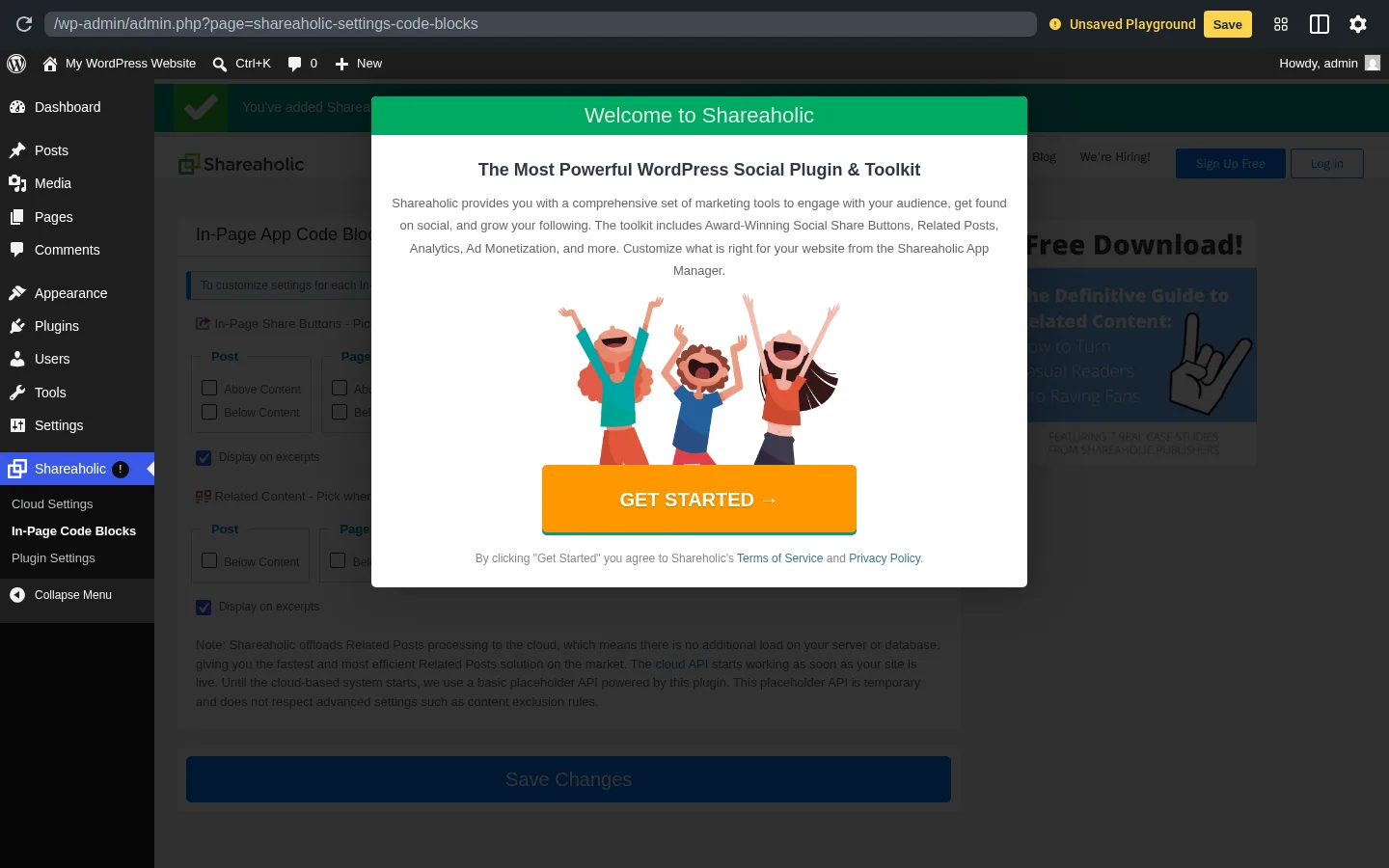
The WordPress side of the plugin is intentionally minimal but well-organized. The In-Page Code Blocks admin page exposes a tidy Post / Page / Index / Category matrix for Share Buttons, with separate "Above content" and "Below content" toggles for each page type, plus a global "Display on excerpts" checkbox. Related Content uses the same matrix but with Below-content only — there is no above-content option for recommendations. A "Save Changes" button persists the choices in one place.
A small but useful explanatory note on the same page warns that until the cloud-based system fully starts, the plugin falls back to a basic local placeholder for related-posts, and that this placeholder does not respect advanced exclusion rules. This is the kind of honest in-product disclosure that other Cloud-gated plugins skip, and it correctly sets expectations for buyers who toggle Related Content on before their Cloud profile has had time to index their content.
3. Share Buttons for Images: Pinterest-aware in-image overlay
The Share Buttons for Images app adds small Pin It / Share overlays on images inside post content, triggered on hover. It's well-executed and uncommon in the category — AddToAny, Sassy Social Share, and Hubbub Lite all leave image-level sharing to dedicated Pinterest plugins. For image-heavy or Pinterest-focused publishers — recipe sites, design blogs, e-commerce product pages — this single feature can be the reason to pick Shareaholic over a more focused alternative. I wasn't able to fully reproduce it during testing because the feature only paints once Shareaholic's hosted platform is reachable, and the vendor screenshot below — used here for illustration — shows the rendered behavior on a recipe-style image. The configuration controls live inside the Cloud dashboard rather than the WordPress admin.
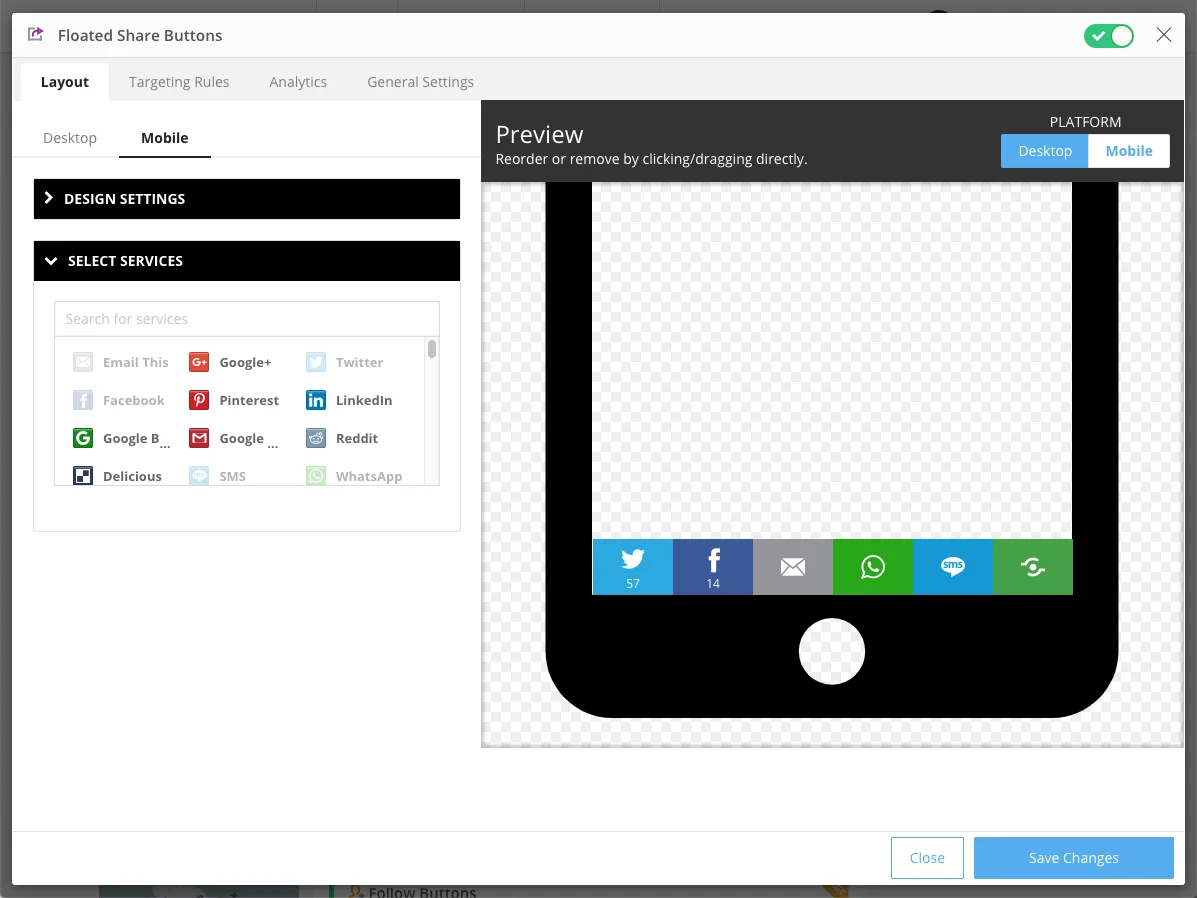 Image: official Shareaholic vendor screenshot illustrating Share Buttons for Images on a recipe-style post.
4. Modern network coverage and a Cloud-side recommendation engine
The marketing page advertises 95 social network integrations, which is competitive with AddToAny's ~95 and slightly below Sassy Social Share's 110. Facebook, X (Twitter), LinkedIn, WhatsApp, Pinterest, Reddit, Telegram, Tumblr, Threads, Bluesky, Mastodon, WeChat, Microsoft Teams, Discord, and Copy Link with QR Code are all default-supported. Bluesky was added in late 2024, Threads picked up desktop and mobile sharing in early 2024, and Mastodon shipped in 2023 — modern-network coverage is current despite the maintenance slowdown.
The related-content engine is the part most publishers underestimate. Because related-posts processing runs in Shareaholic Cloud rather than against the WordPress database, the plugin doesn't add the expensive cross-join queries that plugins like YARPP or Contextual Related Posts can introduce on large sites. The trade-off is the runtime dependency on Shareaholic's platform — if it's slow or blocked, the related-posts widget doesn't render. For sites already paying the load tax for share buttons, getting related content "for free" off the same connection is a real architectural advantage.
5. Native-ad monetization: a revenue-share, not a tool
Shareaholic's monetization apps — Promoted Content, Anchor Ads, Outstream Video Ads, Native In-Feed Ads, and Auto Affiliatize Links — are part of the same plugin and configured through the same Cloud dashboard, which is genuinely unusual in the category. They are also revenue-share offerings: Shareaholic takes a percentage of impressions, clicks, or affiliate commissions earned through the placements. That changes the commercial relationship in a way that's worth pricing alongside the $96/year Pro tier, not separately from it.
I didn't run the monetization apps end-to-end — they require a Cloud account in good standing with completed ad-network onboarding, which isn't realistic from a free-tier test. Auto Affiliatize specifically rewrites outbound links to use Shareaholic's 35,000+ retailer partnerships, which is genuinely useful for sites without their own affiliate infrastructure but has been the most-cited source of historical 1-star complaints (more on that below). Treat the monetization apps as a separate product decision rather than an automatic part of installing the plugin.
Shareaholic Ease of Use / UI & UX
The plugin sits in the lower half of the ease-of-use band in this category — install is straightforward and the In-Page Code Blocks matrix is genuinely clear, but the mandatory Cloud-account modal and the embedded Cloud Settings page make it less obvious than AddToAny or Sassy Social Share.
1. UI / UX
The plugin adds a top-level "Shareaholic" menu in the WP sidebar with a red exclamation badge that stays until you complete the Cloud Site Profile setup. Three sub-pages live underneath: Cloud Settings (default, loads the hosted dashboard inside the admin), In-Page Code Blocks (the WordPress placement matrix), and Plugin Settings (server connectivity, Site Profile ID, Cloud sync status, share-count options). Once a valid Site Profile exists, a fourth orange "Upgrade to Premium" item appears at the bottom of the sub-menu. The split between local WordPress controls and the hosted dashboard takes a beat to internalize, but the in-WP surface is small and the placement matrix is easy to scan.
2. Setup and the mandatory welcome modal
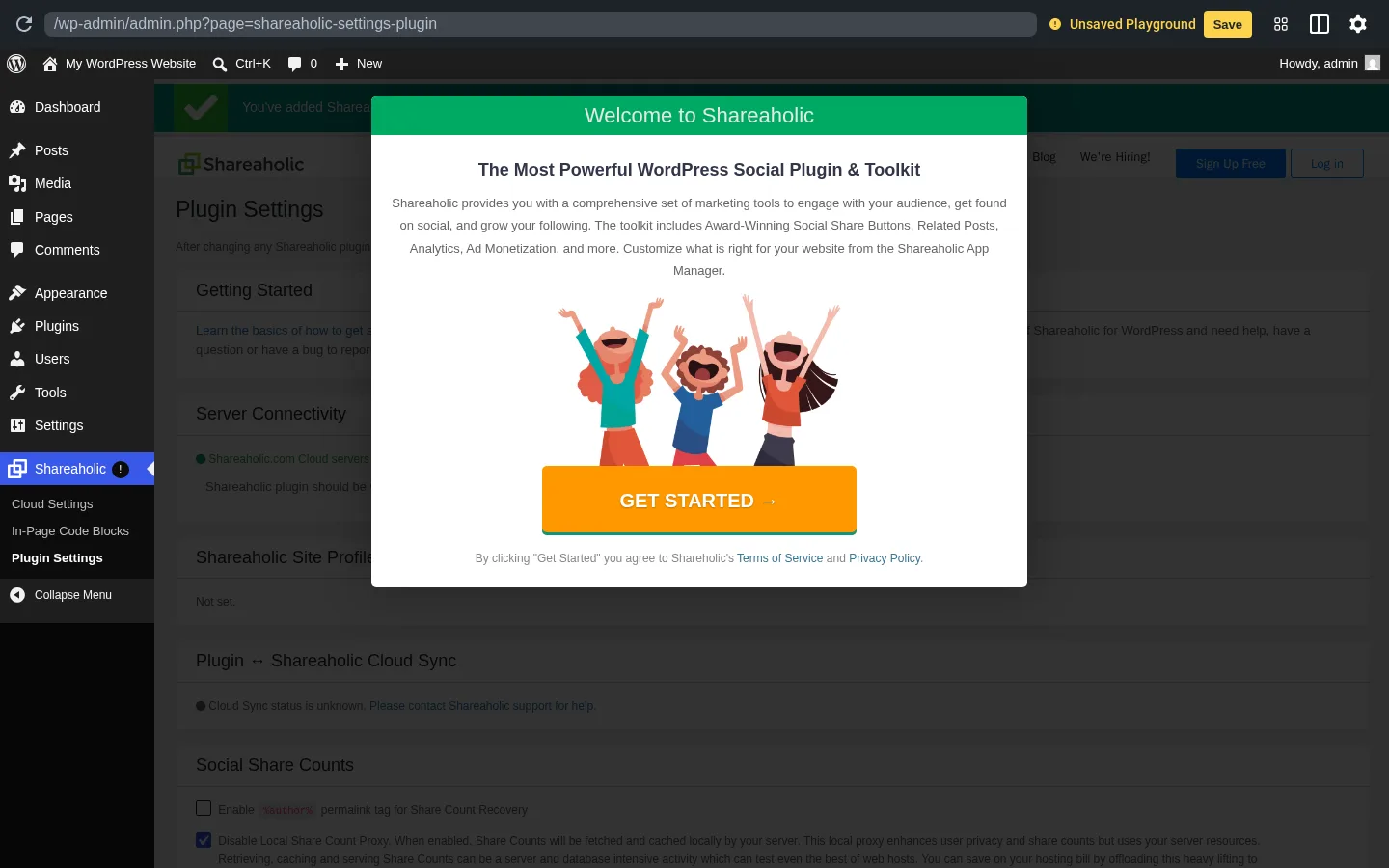
After activation, WordPress redirects to a Shareaholic admin page where a full-screen welcome takeover modal appears, headlined "Welcome to Shareaholic — The Most Powerful WordPress Social Plugin & Toolkit," with a single orange GET STARTED → call-to-action and a fine-print line that explains the click also accepts Shareaholic's Terms of Service and Privacy Policy. That click is more consequential than it looks. In one action it accepts the terms and registers your WordPress site with Shareaholic Cloud — and only after that does the plugin start rendering anything on the frontend. Without the click, no buttons appear at all.
For privacy-conscious admins this gate is actually helpful — you can install without leaking anything until you make a deliberate choice. For everyone else it's a moment of friction that AddToAny and Sassy Social Share don't have, and it consistently appears in negative reviews from buyers who expected an install-and-forget plugin.
3. Settings density and the "Connect Shareaholic Account" trap
The In-Page Code Blocks page is tidy. The Plugin Settings page is denser — server connectivity status, the Site Profile ID display, a Cloud sync indicator, share-count options, fields for an optional Facebook App ID and secret if you want official Facebook share counts, plus an advanced area with a permalink toggle, a share-counts API disable switch, and a "Reset Plugin" link. Most publishers won't need any of it after the first session.
One subtle gotcha worth flagging: a "Connect Shareaholic Account" button on Plugin Settings opens the vendor signup page in a new tab. That step is separate from the initial Get Started click. Get Started auto-creates a Site Profile anchored to your install; Connect Account links that Site Profile to a real user-owned Shareaholic Cloud account that can be transferred between dashboards, accessed from multiple devices, and shared with teammates. Most buyers assume the Get Started click did both. It didn't.
4. Embedded Cloud Settings dashboard
The Cloud Settings sub-page hosts the Shareaholic dashboard directly inside the WordPress admin. That dashboard is where network selection, icon shape and size, sticky-bar layout, Promoted Content placements, and ad units are configured. On a strict admin security policy, an aggressive content blocker, or an admin connection that can't reach Shareaholic's servers, the embedded dashboard simply won't load and the page will be blank. In low-resource environments it can also feel heavy on first load — a real failure mode worth knowing about even if most production hosts won't hit it.
5. Learning curve
If you just want share buttons at the bottom of posts and you're willing to create a Shareaholic Cloud account, plan on 20–30 minutes for the first end-to-end pass: install, activate, accept the welcome modal, walk the Cloud Settings configurator to pick networks and an icon style, return to the In-Page Code Blocks page to toggle placement, and visit a post to confirm. If you don't want a Cloud account, Shareaholic isn't the right plugin and you'll be frustrated within the first ten minutes. AddToAny is the better answer for that buyer.
Shareaholic Performance
Shareaholic is fundamentally a third-party-hosted plugin, and the performance picture reflects the architecture more than any individual implementation choice.
1. Single hosted script on Cloudflare
The frontend footprint Shareaholic actually adds to each page is small — a hint to prefetch the hosted script and a single async loader. The vendor moved its assets onto Cloudflare's premium CDN in late 2023, and the listing cites a Kinsta third-party benchmark of "14 milliseconds" added to page load. That number is plausible on a fast connection and a warm cache; on cold loads or constrained networks, the runtime cost of the script then painting buttons, related-posts, and any active ad placements is meaningfully higher.
2. No fallback when the platform is unreachable
This is the single most-important performance and reliability caveat in this review. If Shareaholic's hosted platform is unreachable — a corporate firewall rule, an EU visitor who declined consent, a strict ad-blocker, a temporary outage, or any of the dozens of ways a third-party host can fail — the share buttons simply do not render. There is no static fallback and no graceful degradation. I confirmed this in testing by blocking the Shareaholic host and visiting a post: the page loaded normally but with no share UI of any kind. AddToAny and Hubbub Lite both serve their core icons locally, so even a CDN failure leaves a working share row in place.
3. Admin-side connectivity checks
Every time you open the Plugin Settings page, Shareaholic makes a couple of outbound checks back to its servers to populate the green or red "Server Connectivity" indicators. On a site with poor outbound DNS, behind a strict corporate firewall, or hosted in a region with high latency to Shareaholic's API, those checks can make the admin perceptibly slow. There is no toggle to skip them.
4. Bundle behavior on first paint vs. interaction
The hosted script loads asynchronously, which is the right default and avoids blocking the rest of the page from rendering. That said, the script is also the thing that paints the share buttons, the related-content widget, and any active ad placements, so there's an inherent visible delay between the body content appearing and the share UI appearing. On a default-configured Free-tier install with only share buttons, the delay is fine. With Related Content, Share Buttons for Images, and Promoted Content all active, you should expect a noticeable layout shift unless you reserve space in your theme.
5. Cadence and the staleness warning
The plugin has shipped roughly 194 releases over 14 years on WordPress.org, but cadence has dropped sharply: nine releases in 2021, four in 2022 and 2023, one in 2024 (version 9.7.13 on 2024-11-05), and zero releases in 2025 or through May 2026. The WP.org listing currently displays the yellow "This plugin hasn't been tested with the latest 3 major releases of WordPress" warning banner, last "Tested up to: 6.7.5." The most recent security-relevant fix was a publicly-disclosed Broken Access Control patch in version 9.7.12 in February 2024 — existing installs on 9.7.11 or below should update immediately. None of this means the plugin is broken on current WordPress, but it is the single biggest signal new buyers should weigh.
Shareaholic Support, Documentation & Learning Resources
Support runs through three surfaces with uneven quality. Day-to-day questions go to the WordPress.org plugin support forum, where the vendor replies under the shareaholic corporate handle, and to the dedicated support center at support.shareaholic.com with category-organized articles for the WordPress plugin, share-count proxy, GA4 integration, monetization options, and Share Count Recovery. A live-chat widget is also embedded on the Shareaholic admin pages for in-product support, which is unusual in the category.
Average response time isn't published, and the historical pattern is informative: older support threads I sampled from 2017–2021 show the vendor replied within a week or two; newer threads from 2024 onward generally show no vendor reply. That trend matters more than any single snapshot. Anchored against the public rating context, support quality reads as mixed: the 4.4-star average across 1,051 reviews is solid mid-tier, but unresponsive support is one of the consistent themes in the 1-star tail of the reviews I read, including from paying Pro users.
Documentation is reasonably thorough for the WordPress plugin's setup and the share-count proxy, lighter for the Cloud dashboard, and partial for the monetization apps — which makes sense given those apps depend on ad-network onboarding that isn't fully self-serve. There is no in-WP help wizard or guided tour beyond the welcome modal. Video tutorials aren't officially published; the third-party walkthroughs on YouTube cover the basics rather than the integration with the Cloud dashboard. For a buyer who wants confident, fast answers, the documentation is workable but you'll spend more time poking around the Cloud dashboard than reading docs.
Shareaholic User Reviews & Reputation
To understand how Shareaholic is actually received in the wild, I reviewed the WP.org rating distribution, the recent 12 months of activity, and a representative sample of positive and critical reviews — including a meaningful chunk of the 1-star tail. The picture is unusually polarized.
The overall impression is strong-but-divided: across 14 years and 10,000+ active installs, Shareaholic holds a 4.4 / 5 average from 1,051 reviews, with 76.2% (801) at 5 stars and 11.4% (120) at 1 star per the WP.org listing. The 1-star share is meaningfully higher than the better-rated peers in the same category — AddToAny (4.7 / 5 from 1,113 reviews), Sassy Social Share (4.8 / 5 from 520 reviews), and Hubbub Lite (4.7 / 5 from 172 reviews) all sit closer to the top of the rating distribution — but Shareaholic still sits well above the closest architectural twin, ShareThis (3.5 / 5 from 26 reviews). With 1,051 reviews on a 10,000-install plugin, the absolute review count is also among the largest in this bracket and likely reflects both Shareaholic's 14-year tenure and the in-admin review-prompt notice. The recent 12 months of activity that I sampled lean positive — short 5-star "just works," "easy to use," "grateful for its functionality" notes — and the sample I read didn't surface new 1-star activity, which can read either as stabilization or as engaged users having moved on.
The most praised strengths in the 5-star sample I read repeat in clear patterns. "It just works" and "I don't have to monitor or update it" show up often, which is meaningful praise for a plugin that hasn't shipped a release in 18 months — current installs appear to be continuing to function. The all-in-one bundle is cited as a real time-saver versus juggling separate plugins. Multilingual admin support (19 languages) shows up in non-English reviews. And the brand pedigree itself — Cambridge, MA, founded 2009, MIT and Mozilla awards on the About page — gets mentioned in older reviews.
The most criticized weaknesses in the 1-star sample cluster into five clear themes. The biggest is ads inserted by default — multiple reviewers allege native ad placements or Promoted Content appeared on their site without explicit consent. The vendor's standard response is that Promoted Content can be disabled in the Cloud dashboard, but the complaint pattern is consistent enough in the sample to warrant disclosure in any recommendation. The second is affiliate-link hijacking by the Auto Affiliatize Links feature, which is sold as a monetization tool but has been called "still hijacks your affiliate links" by reviewers who didn't realize they'd opted into it. The third is support unresponsiveness — recurring complaints across years, including from paying Pro users ("No support," "awful support, even in pro account," "No Customer Service"). The fourth is performance and slowness, mostly from older reviews; the Cloudflare migration in late 2023 and recent 5-star "doesn't slow my site" notes suggest this has improved. The fifth is plugin stopped working, often tied to Site Profile issues or temporary Cloud-side problems.
These themes are not random crashes — they read as a consistent narrative across the sample about Shareaholic's monetization model and support quality. If you recommend the plugin, name the trade-offs out loud.
Shareaholic Pricing & Value
Shareaholic's pricing is the cleanest in the bundled-toolkit category and a more honest set of fine-print caveats than most.
- Forever Free — $0/mo. Includes Share Buttons, Follow Buttons, Related Content, Cookie Consent Prompt, browser extension, basic ad monetization opt-in, unlimited pageviews, drag-and-drop Cloud configurator, pre-built templates, 30-day analytics storage, Google Analytics and GA4 integration, basic Buffer and Bitly integrations, and standard email support. The WordPress plugin itself is GPLv2 and stays free regardless of tier.
- Professional — $10/mo monthly OR $96/yr annual ($8/mo equivalent, 20% off). Adds the Advanced Share Count API, Share Count Recovery (preserves counts when URLs change or you migrate to HTTPS), advanced Twitter/WhatsApp/SMS/Email integrations, advanced Bitly with custom branded domain, official Facebook share counts via the vendor's authenticated key, custom icon upload, advanced Related Content with a larger content corpus, branded URL shortener with pixel tracking, 60-day analytics storage, CSV export, advanced targeting rules (Exit Detection, Idle Time), removal of Shareaholic branding, free installation assistance, and priority support.
- Team — $39/mo monthly OR $375/yr annual ($31/mo equivalent, 20% off). Adds 5 team-member seats, role-based access controls (Admin / Editor / Viewer), 90-day analytics storage, advanced custom integrations, content-promotion campaign management, and a public Analytics API.
- Enterprise — Custom (contact sales). Adds custom development, custom reports and APIs, AWS S3 data feeds of analytics, staging-environment support, professional services, a dedicated success manager, phone support, invoice and PO payment, and custom SLAs.
The Free tier genuinely covers the full share-button feature surface for a typical WordPress blog. The Pro tier earns its $96/year almost entirely if you need Share Count Recovery — preserving share counts across URL changes or an HTTPS migration is the single narrowest, most-defensible commercial niche in the category, and Sassy Social Share and AddToAny don't offer it. For everyone else, the Pro tier is a comfort upgrade rather than a necessity, and the Team tier really only makes sense for agencies running multiple Shareaholic-driven properties through one dashboard.
The honest caveats around price are worth pricing alongside the headline numbers. First, billing is per site. The vendor's own disclosure on the plans page reads "Each site has separate billing subscription on different plans," which means an agency with 10 client sites needs 10 Pro subscriptions — $96 × 10 = $960/yr to fully recover share counts everywhere. Second, there is no paid-tier trial. The Free tier is the trial; there's no 14-day or 30-day money-back guarantee disclosed on the public plans page, and the refund policy itself isn't published, so I'd email sales before committing to an annual plan upfront. Third, the monetization apps are a revenue-share. Promoted Content, Anchor Ads, Outstream Video Ads, and Auto Affiliatize Links earn revenue, but Shareaholic takes a percentage. That's a separate commercial relationship from the $96/year, not a discount on it.
Shareaholic Pros and Cons
Here is a balanced view of where Shareaholic stands out and where the gaps actually matter.
Pros
- All-in-one toolkit driven by one Cloud dashboard: Share buttons, follow buttons, related content, branded URL shortener, GA4 analytics, and native-ad monetization in one plugin and one hosted admin. Cross-platform too — the same dashboard can drive Shopify, Wix, Weebly, Squarespace, BigCommerce, and Drupal properties. No competitor in the WordPress share-button category matches that breadth.
- Share Buttons for Images and a Cloud-side related-content engine: The in-image Pin It overlay is genuinely well-executed and rare in the category, and the related-posts engine runs in the Cloud rather than against your WordPress database — useful for content-heavy sites where YARPP-style local processing gets expensive. Both features come "free" off the same single hosted script.
- Modern network coverage and Share Count Recovery on Pro: Around 95 networks including Bluesky (added in late 2024), Threads, Mastodon, WhatsApp, Telegram, WeChat, Microsoft Teams, Discord, and Copy Link with QR Code. The Pro tier's Share Count Recovery is one of very few options in the category for preserving share counts across a URL change or HTTPS migration, which is a real and narrow commercial niche.
- Strong brand pedigree and high review volume: 14 years on WordPress.org, Cambridge MA headquarters, MIT and Mozilla awards on the About page, WP Engine and Kinsta endorsements, and 1,051 reviews on a 10,000-install plugin — among the deepest review histories in the comparable bracket, which means buyers have plenty of third-party experiences to skim before committing.
Cons
- Mandatory Cloud account and 18 months without a release: The plugin doesn't render anything on the frontend until you click "Get Started" in the welcome modal, which accepts terms of service and auto-registers your site with Shareaholic Cloud. And the last release was version 9.7.13 on 2024-11-05 — the WP.org listing currently displays the yellow "hasn't been tested with the last 3 major releases of WordPress" banner, and a publicly-disclosed Broken Access Control fix in 9.7.12 (Feb 2024) means installs on 9.7.11 or below should update immediately. The plugin still works on current WordPress in my testing, but the maintenance signal is the single biggest reason to be cautious about long-term commitment.
- No fallback when the hosted platform is unreachable, and a heavy frontend disclosure surface: If Shareaholic's CDN is blocked or down, the share buttons silently disappear — no static fallback, no graceful degradation. The hosted script also includes a configuration block that, for logged-in admin visitors, identifies the admin's email and username and exposes the post's publish timestamp down to the second along with the author name and category. For privacy-sensitive sites, that disclosure surface is meaningful next to AddToAny's or Hubbub Lite's quieter footprints.
- Polarized 1-star history centered on monetization and support: 11.4% of reviews are 1-star — the second-highest in the comparable bracket — and the themes are consistent rather than random: ads or Promoted Content appearing without explicit consent, Auto Affiliatize rewriting publisher-owned affiliate links, support not responding even on paying Pro accounts. Recent reviews are quieter, but the historical pattern is worth disclosing.
- Revenue-share monetization and per-site billing: Promoted Content, Anchor Ads, Outstream Video Ads, and Auto Affiliatize Links are revenue-share — Shareaholic takes a cut of impressions, clicks, or commissions. And every Pro subscription is per-site, so a 10-site agency pays $960/yr for full Share Count Recovery coverage. Neither is a deal-breaker, but both change the math against fully-free alternatives like AddToAny or one-time-fee paid share-button plugins such as Social Warfare Pro ($29 single-site).
Who Should Use Shareaholic?
Shareaholic fits a specific shape of publisher very well, and there are clear cases where AddToAny, Sassy Social Share, Hubbub Lite, or even a paid one-time-fee option like Social Warfare Pro is the better starting point.
Who Should Use It
- Mid-size publishers who want the bundle in one plugin: If you'd otherwise be installing separate plugins for share buttons, related posts, native-ad monetization, and basic analytics, Shareaholic genuinely consolidates that stack. The Cloud dashboard, GA4 integration, and Pinterest-aware in-image overlay are real time savers when they all live in one admin.
- Pinterest-heavy or image-heavy sites: The Share Buttons for Images feature is one of the strongest in the category, and competitors don't really replicate it. Recipe blogs, design publications, e-commerce product pages, and travel sites get a meaningful UX win from in-image Pin It / Share overlays that match the rest of the share-button design.
- Publishers who specifically need Share Count Recovery: If you're migrating to HTTPS, changing your URL structure, or consolidating taxonomies, the Pro tier's Share Count Recovery service is one of very few options in the category for preserving the social proof you've already accumulated. At $96/year for a single site, it's narrowly priced for exactly that job.
- Multi-platform publishers already on the Shareaholic Cloud: If you run Shareaholic on Shopify, Wix, Weebly, Squarespace, BigCommerce, or Drupal and want one centralized dashboard to also drive WordPress, this plugin is the obvious choice. Cross-platform dashboard consolidation is the second-strongest reason Shareaholic exists for a WordPress buyer after the all-in-one bundle.
Who Should Skip It
- Anyone who wants a true install-and-forget plugin: AddToAny renders ~95 networks immediately on install with no account, no Cloud profile, and no welcome modal. Sassy Social Share renders ~100 the same way. If "open the box and it works" is your standard, the Shareaholic Get Started modal will feel like friction within the first ten minutes.
- Privacy-first or Core-Web-Vitals-critical sites: The configuration block in the hosted script discloses logged-in admin contact details and full publish-timestamp metadata, and the runtime dependency on Shareaholic's CDN adds a third-party host to every page. Hubbub Lite (self-contained, privacy-positioned) and AddToAny (lazy-loaded universal menu, no data sale) are cleaner choices for these buyers.
- Buyers who can't accept revenue-share monetization or per-site billing: If the idea of Shareaholic taking a cut of native-ad impressions, click revenue, or affiliate commissions doesn't fit your business model, and if you'd rather pay a one-time fee per site (Social Warfare Pro at $29 single-site) than $96/yr per site for Shareaholic Pro, this is a financial mismatch.
- Anyone who wants to auto-publish posts to their own social accounts: That's FS Poster territory. Shareaholic is visitor-facing share buttons, not publisher-side auto-posting, and the two solve different problems.
Best Shareaholic Alternatives
If Shareaholic doesn't quite fit, here are the alternatives I'd realistically consider — chosen because they map to a specific shortcoming above, not because they're popular by themselves. For the full ranked comparison, see our best WordPress social share buttons plugins roundup.
- AddToAny Share Buttons: The category default — 300,000+ active installs, 4.7 stars from 1,113 reviews, no paid tier ever sold, ~95 networks, lazy-loaded universal menu, vertical and horizontal mobile sticky bars, and a privacy posture that doesn't sell visitor data. Pick it when "install and forget with no vendor account" matters more than the all-in-one toolkit. See the full AddToAny Share Buttons review for the head-to-head case.
- Sassy Social Share: The broadest network list in the category and the strongest free design customization, with no Cloud account, no third-party CDN dependency, and no monetization push. 4.8 stars from 520 reviews on 100,000+ installs. Pick it when network breadth and privacy posture matter more than Shareaholic's bundled related-content and ads. One caveat if you're considering the paid Sassy add-ons: the Heateor vendor site is currently offline as of mid-2026, which means paid editions aren't reliably purchasable right now — the free version is the safe recommendation today. See the full Sassy Social Share review for where it edges out Shareaholic on network breadth.
- Hubbub Lite Social Sharing: The privacy-clean self-contained option from NerdPress. 4.7 stars from 172 reviews on 30,000+ installs, with in-WP click analytics built into the plugin admin and the best Pinterest UX outside of Shareaholic's own Share Buttons for Images. Worth knowing that the default install exposes only seven networks; unlocking the rest requires a free email registration with NerdPress. Pick it when self-hosted assets and no third-party CDN are non-negotiable. See the full Hubbub Lite review for the privacy-clean side-by-side.
- ShareThis Share Buttons: The closest architectural twin — also a Cloud-gated third-party-hosted plugin, but with a bundled TCF v2 Consent Management Platform and fresher 2025–2026 release cadence. 3.5 stars from 26 reviews on 10,000+ installs. Pick it when you specifically need an in-plugin TCF v2 consent banner or want a Cloud-gated plugin that's actively shipping releases. See the full ShareThis Share Buttons review for the architectural twin comparison.
- Social Warfare: 20,000+ active installs at 3.3 stars from 186 reviews — the Pinterest-leaning freemium plugin in the category, with per-post custom Pin images, the Image Hover Pin Button, and Rich Pins on a one-time $29 single-site Pro license rather than Shareaholic Pro's $96/yr recurring. Also bundles a Click-to-Tweet quote-box feature. Self-hosted assets and no Cloud account, but maintenance has clearly slowed and the free tier is the narrowest in the comparable bracket. Pick it deliberately for the Pinterest workflow rather than as a general-purpose Shareaholic replacement. See the full Social Warfare review for the trade-offs.
If your need is auto-publishing your WordPress posts to your own social accounts rather than visitor share buttons — a separate problem entirely — the right tool is FS Poster. Shareaholic and FS Poster solve different problems, and many sites install both: Shareaholic for the visitor-facing share row and related-content widget, FS Poster for the publisher-facing auto-distribution to brand-owned accounts.
Final Verdict: Is Shareaholic Worth It?
Yes, for a specific buyer. Shareaholic is genuinely worth installing when you actively want share buttons plus related content plus optional native-ad monetization in one plugin and one Cloud dashboard, when you're a Pinterest-heavy or image-heavy publisher who'd benefit from Share Buttons for Images, or when you specifically need Share Count Recovery for an HTTPS migration or URL restructure. The Free tier covers the core feature surface for most blogs; the Pro tier earns its $96/year almost entirely on Share Count Recovery and the advanced Related Content corpus, and the all-in-one toolkit really does save time over juggling five plugins.
The honest caveat is the maintenance signal. Eighteen months without a release, the WP.org "not tested with the last 3 major releases" yellow banner, a publicly-fixed Broken Access Control vulnerability in February 2024, and a polarized 1-star history concentrated on the monetization model and unresponsive support all mean Shareaholic is a deliberate choice in 2026, not the obvious one. If you're a single-WordPress-site publisher who just wants share buttons at the bottom of posts and you don't need related content or ad monetization, install AddToAny or Sassy Social Share and move on. If you want the toolkit and can accept the trade-offs, Shareaholic still earns its keep.
Shareaholic FAQ
Is there a free version of Shareaholic? Yes — the WordPress plugin is GPLv2-licensed and $0 to install, and the Forever Free Cloud account required to render buttons is also $0. The Free tier covers Share Buttons, Follow Buttons, Related Content, Cookie Consent Prompt, basic Content Analytics, browser extension, unlimited pageviews, 30-day analytics storage, and GA4 integration. The Pro tier at $96/year unlocks Share Count Recovery, advanced GA4, custom icons, branded URL shortener, and 60-day analytics storage. There is no paid-tier trial; the Free tier itself is the trial.
Do I really need a Shareaholic account to use the plugin? Yes in practice. The plugin includes a mandatory full-screen welcome modal on first activation, and no buttons render on the frontend until you click "Get Started" — that single click both accepts the terms of service and registers your site with Shareaholic Cloud. A separate "Connect Shareaholic Account" button on Plugin Settings is what links that auto-created Site Profile to a user-owned Cloud account you can access from multiple devices.
Does Shareaholic support Bluesky, Mastodon, and Threads? Yes. Bluesky was added in late 2024, Threads picked up desktop and mobile sharing in early 2024, and Mastodon shipped in 2023. Microsoft Teams, WeChat, Discord, WhatsApp, Telegram, and Copy Link with QR Code are also default-supported. Instagram and TikTok are only available as Follow buttons — both networks block third-party share dialogs at the API level, which is an industry-wide limitation rather than something specific to Shareaholic.
Is Shareaholic still maintained in 2026? The plugin still works on current WordPress in my testing, but the maintenance signal is mixed. The last release was version 9.7.13 on November 5, 2024 — 18 months before this review — and the WP.org listing currently displays the "not tested with the last 3 major releases of WordPress" yellow warning banner. The last security-relevant fix was a publicly-disclosed Broken Access Control patch in 9.7.12 in February 2024. Existing installs on 9.7.11 or below should update to 9.7.13 immediately. New buyers should weigh the staleness alongside the strong feature set rather than treating it as fatal.
What are the best Shareaholic alternatives? AddToAny Share Buttons for an install-and-forget plugin with no account, ~95 networks, and a clean privacy posture. Sassy Social Share for the broadest network library and the deepest free design customization. Hubbub Lite for a privacy-clean self-contained plugin with in-WP click analytics. ShareThis Share Buttons for the closest Cloud-gated architectural twin with fresher releases and a bundled TCF v2 consent banner. Social Warfare for the Pinterest Pro workflow and built-in Click-to-Tweet on a one-time license. If you need to auto-publish posts to your own social accounts rather than show visitor share buttons, pair Shareaholic with FS Poster — they're complementary tools.
Write once. Post to 26 networks.
- 26 social networks
- Schedule & auto-repost
- Runs inside wp-admin


