


Can WP Social Ninja really replace the three or four separate plugins I'm running for Instagram feeds, Google reviews and a WhatsApp chat button — or is the "all-in-one" promise going to fall apart the moment I actually need to style the feed? And which WP Social Ninja plan is the right one — is the Single Site license at $44/yr enough, or am I going to hit the Pro wall on day one because the free tier is too narrow?
If you've stared at the WP Social Ninja pricing page for ten minutes wondering whether the free version covers your Instagram feed, whether Single Site is enough for one website, or whether you should just stick with Smash Balloon and a separate reviews plugin — you're not alone. To clean that up, I installed WP Social Ninja 4.2.1 on a dedicated test WordPress site, connected a real Instagram Business account, built a feed end-to-end through the Quick Builder wizard, rendered it on a published WordPress page at desktop and mobile, walked through all 14 admin screens, opened every Connection and Style accordion to map exactly what is free and what is Pro, and cross-checked the product against 30,000+ active WordPress installs and the 69 public reviews on WordPress.org. This WP Social Ninja review distills what I found into a clear buying recommendation.
What Is WP Social Ninja?
WP Social Ninja — officially "WP Social Ninja – Embed Social Feeds, User Reviews & Chat Widgets" on WordPress.org — is an all-in-one social proof plugin for WordPress, built by WPManageNinja LLC (Newark, Delaware, USA — the same vendor behind Fluent Forms, FluentCRM, FluentCart, FluentSupport and Ninja Tables, led by CEO Shahjahan Jewel and lead developer Mahmudul Hasan Arif). It is sold as a freemium product: the free plugin ships through WordPress.org under the legacy slug wp-social-reviews, and a paid Pro license unlocks the rest of the features in-place — no second plugin to install.
It is best for small businesses, agencies, hospitality, restaurants, lifestyle brands and WooCommerce stores that want a single license covering social feeds, business reviews, chat widgets, notification popups and testimonials — instead of stacking three or four single-purpose plugins.
The problem it solves is bundling. Most WordPress sites end up with one plugin for Instagram, one for Google reviews, one for WhatsApp chat and maybe one for FOMO popups. WP Social Ninja collapses all of that into one admin UI: 5 social feed networks (Instagram, Facebook, YouTube, TikTok, X), 10+ business review sources (Google Business Profile, Facebook, Yelp, Tripadvisor, Airbnb, Booking.com, AliExpress, Amazon, WooCommerce, FluentCart, Fluent Forms, Judge.me import), 15+ chat-widget channels (WhatsApp, Messenger, Telegram, SMS, Microsoft Teams, Instagram DM, LinkedIn, Slack, WeChat, Snapchat, Viber, Phone, Email, X, Fluent Forms), plus notification popups and a testimonial slider.
One thing to keep straight before you buy: WP Social Ninja is display-only / inbound. It pulls social content INTO your WordPress site. It does not publish outbound posts to social networks — that is the opposite half of the problem and the job of FS Poster. The two products pair perfectly; they don't compete.
WP Social Ninja Review Quick Verdict
WP Social Ninja is the strongest credible breadth play in the WordPress social-proof niche — one license, one admin UI for feeds, reviews, chat, popups and testimonials. The catch: each module is "good enough" rather than best-in-class, and the free tier is intentionally narrow.
| Criteria | Verdict |
|---|---|
| Best for | Small businesses, agencies, hospitality, restaurants, WooCommerce stores and WPManageNinja-ecosystem users wanting one license for feeds + reviews + chat + popups + testimonials |
| Starting price | Free on WordPress.org; paid Single Site from $89 / yr regular ($44 / yr at the current 50% sitewide promo) |
| Free plan / trial | Yes — free plugin on WordPress.org; 14-day money-back guarantee on all paid plans (no free trial of Pro) |
| Update frequency | Roughly monthly minor releases; latest version 4.2.1 shipped 24 April 2026 |
| Most valuable features | All-in-one breadth (feeds + reviews + chat + popups + testimonials), 10+ review sources, 15+ chat-widget channels (Pro), native review form builder for FluentCart / WooCommerce / Custom (Pro v4.2), GDPR-first image storage, page-builder support across Elementor / Gutenberg / Beaver / Oxygen |
| UI/ |
8/ |
| Feature richness score | 9/ |
| Product performance | 7/ |
| Product rating | 4.8★ from 69 reviews on WordPress.org (64 × 5★ / 1 × 4★ / 1 × 3★ / 0 × 2★ / 3 × 1★); 30,000+ active installs |
WP Social Ninja Features & Functionality
For an all-in-one plugin, WP Social Ninja's feature surface is unusually wide — I tested v4.2.1 on the free tier on my test WordPress site, walked the admin screens for every module, and below are the most important findings.
1. Five-network social feed builder with a real-time live preview
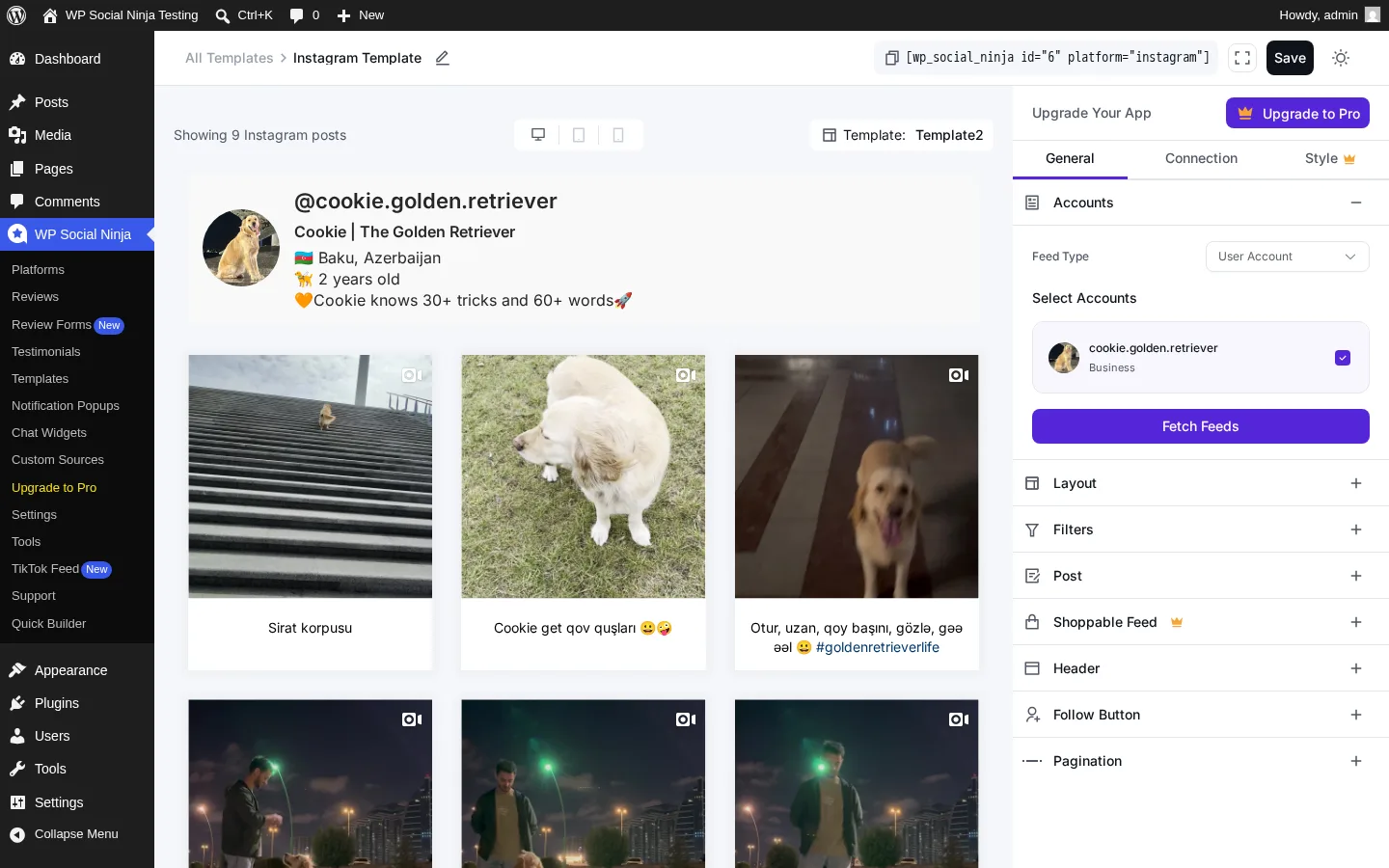
The feed builder is the heart of the plugin — and the one place where the free tier actually delivers a working product end-to-end. It covers Instagram, Facebook, YouTube, TikTok and X (Twitter) under one editor. Each connected account gets a template with a three-tab editor (General / Connection / Style), a live preview pane and a one-line shortcode you can drop into any block or page builder. The Connection tab exposes eight accordions — Accounts, Layout, Filters, Post, Shoppable Feed, Header, Follow Button and Pagination — so you can tune the feed without ever leaving the live preview.
The Quick Builder wizard makes first-run setup almost frictionless. A four-step flow walks you from category (Social Feeds / Business Reviews / Chat Widgets / Notification Popups) through platform selection, account connection and template choice — and at every step the preview reflects what the final embed will look like.
In testing, I went from "open WordPress admin" to a 9-post live Instagram grid in the editor in under three minutes, and the front-end embed rendered cleanly the first time at both desktop (1440px) and mobile (414px) viewports.
2. 10+ business review sources, including free Google Business Profile reviews
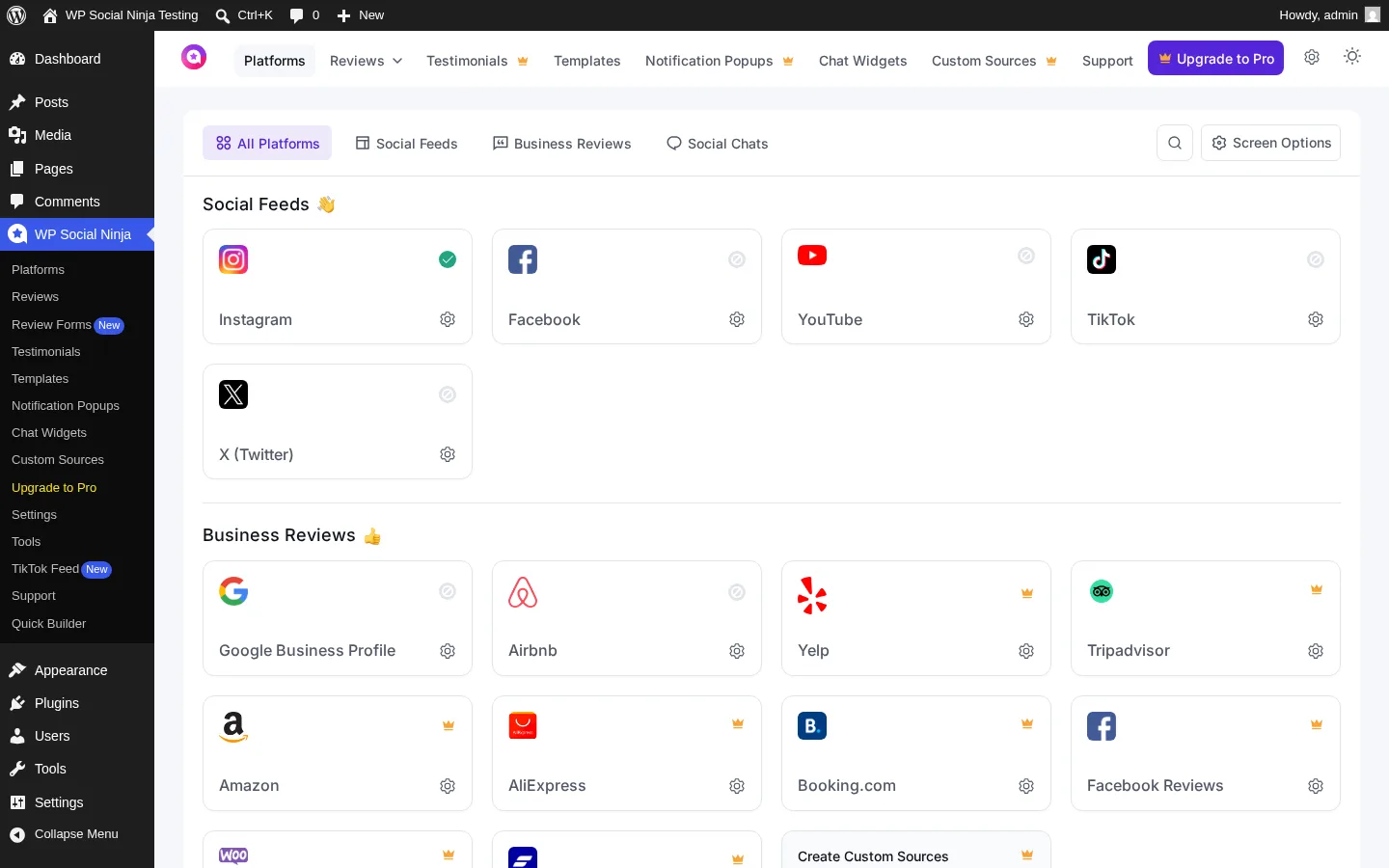
WP Social Ninja's Reviews module is the single biggest reason to pick it over a feed-only specialist like Smash Balloon or Spotlight. The free tier already includes Google Business Profile reviews (up to 200 locations, with schema snippet output for SEO) and Airbnb reviews. Upgrade to Pro and you unlock eight more sources — Facebook, Yelp, Tripadvisor, Amazon, AliExpress, Booking.com, WooCommerce, FluentCart, Fluent Forms — plus a Judge.me migration import if you're switching from WooCommerce's most popular review plugin.
Pro adds the moderation depth too: filter by rating, combine reviews from multiple business accounts into a single feed, sort by rating, an AI summarizer that produces a short overview of all reviews on the template (v3.18), a verified reviewer badge (v3.19) and intelligent auto-publish rules that gate incoming reviews by rating, length or keywords (v4.1).
In testing, the Reviews screen at free tier was an empty state with the right CTAs in place. End-to-end verification of Google and Airbnb reviews fell outside this test scope because it depends on connecting a real business account, but the connection paths are clearly documented in the plugin and the Pro moderation controls are all visible in the admin once you switch to a connected source.
3. 15+ chat-widget channels — the deepest catalog in the WordPress chat-button niche
The Chat Widgets module is the second reason to take WP Social Ninja seriously as an all-in-one buy. The free tier covers WhatsApp / WhatsApp Business, Messenger and Telegram with the full configuration depth — multiple accounts per widget, custom welcome messages, business hours, per-page include/exclude rules, custom bubble styling and prefilled messages.
Pro extends the catalog to 15+ channels, adding Instagram Page Chat, Instagram DM, SMS (v3.17), Microsoft Teams (v3.17), LinkedIn, Snapchat, WeChat, Slack, Viber, Phone, Email, X (Twitter) and a Fluent Forms in-widget option. The Skype channel was removed in v3.17 after Microsoft discontinued the integration — that's an honest deprecation, not a feature gap.
This is wider than Joinchat, Click-to-Chat or Chaty cover, and importantly it's bundled with the same license that already gave you the feeds and reviews modules.
In testing, I created a new chat widget from the Chat Widgets screen and reached the "Add New Channel" step. The free channel options (WhatsApp / Messenger / Telegram) are clearly documented in the plugin's help hub; the Pro channels show up as gated options inside the channel picker.
4. Native review form builder for FluentCart, WooCommerce and Custom Sources (Pro v4.2)
The April 2026 v4.2 release added something most WordPress review plugins still don't have — a native review form builder that drops directly into FluentCart product pages, WooCommerce product pages or a Custom Source embedded via shortcode. The form supports rating fields, photo uploads, async multi-select for product picking and server-side search, and WP Social Ninja replaces the default WooCommerce review fields with its own form once the integration is active.
For WooCommerce stores, this is the feature that removes the need to run a second review-collection plugin like Site Reviews or Geminilabs. The same v4.2 update also synced FluentCart products into WP Social Ninja, so the FluentCart-native reviews flow is finally first-class.
This is a Pro-only feature, so end-to-end use of the form builder falls outside what a free-tier test can verify — but the Review Forms (New) menu entry is visible in the sidebar, and the v4.2 release notes plus the help hub walk through the exact setup steps. WooCommerce stores planning to upgrade should treat this as the headline value of any Pro tier.
5. Notification popups, testimonial slider and Custom Sources — three modules bundled (Pro)
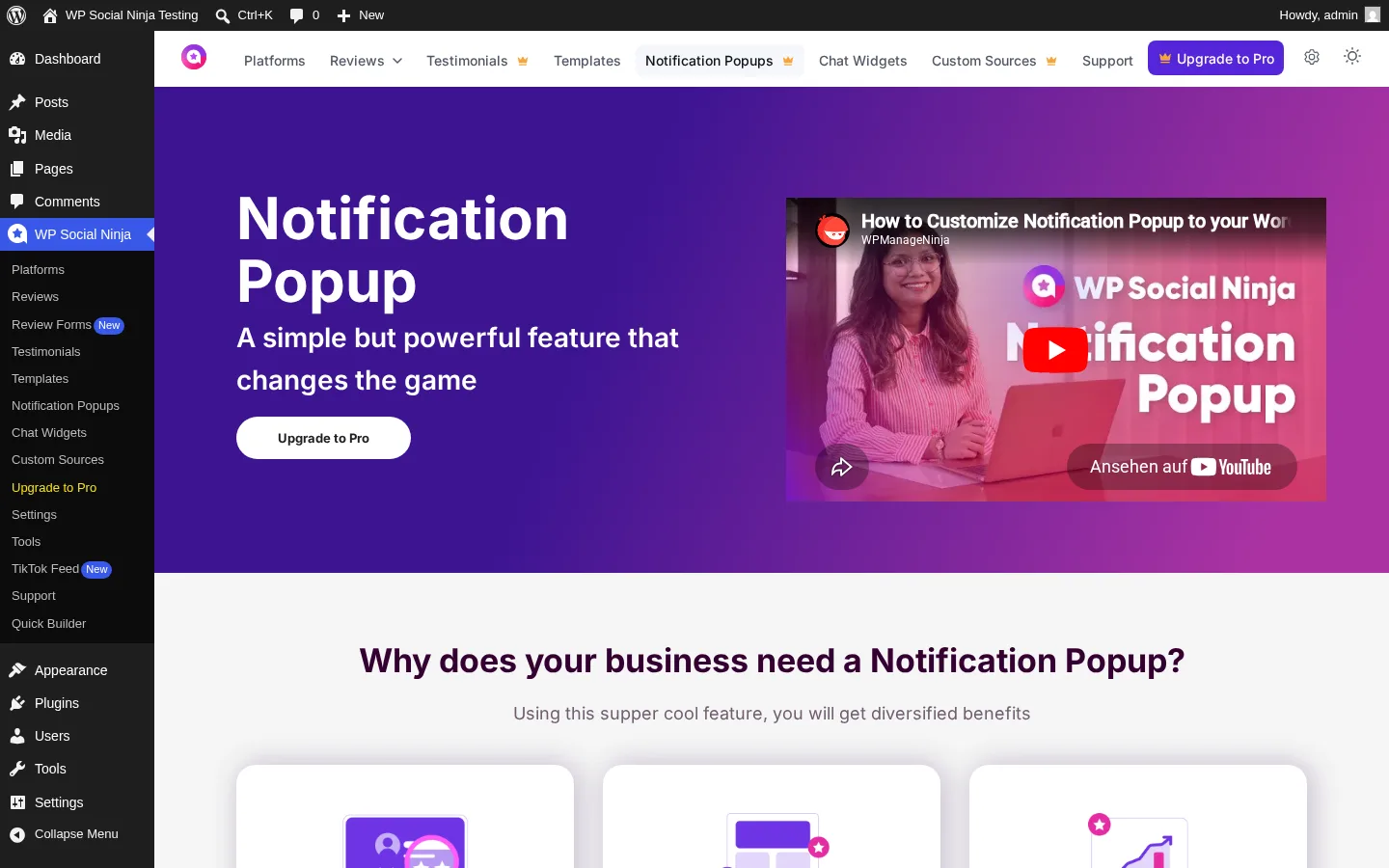
Three more modules ride in on the same license — but be aware that at the free tier each of these is a marketing page with an "Upgrade to Pro" CTA, not a working builder. Notification Popups show real-time review-rating popups that pull from Google / Facebook / Amazon / Booking / Custom / Fluent Forms sources, with AI platform detection (v3.19). Testimonials is a slider with author name, image, title and rating fields, with Fluent Forms collection built in. Custom Sources lets you build reviews feeds from any platform — useful for review aggregation that Trustindex-style SaaS widgets normally charge for.
If you're paying for Pro anyway, getting TrustPulse-class notification popups plus a testimonials slider plus a custom-source builder bundled in is real value — but if you only need one of these (and not the feeds, reviews and chat modules), a specialist like TrustPulse, Strong Testimonials or NotificationX will be a better fit on its own.
In testing, I confirmed all three modules sit behind a hard upsell wall at free tier. The screens load instantly and the marketing copy is explicit — no builder, no preview, no "limited free" tier within these modules.
6. GDPR-first image storage, page builder integrations and shortcode embedding
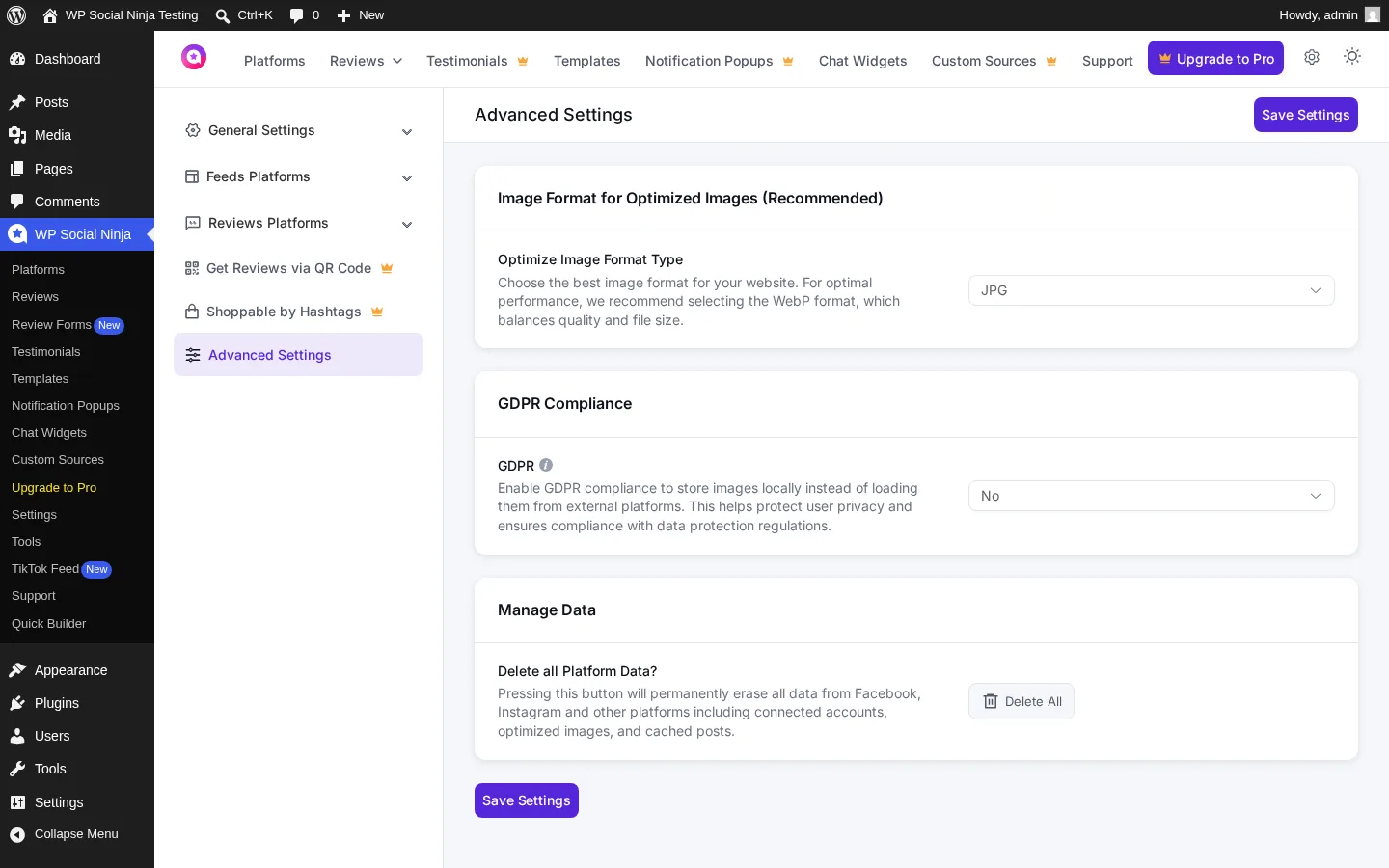
For an inbound social plugin, GDPR posture matters more than buyers usually appreciate — every Instagram thumbnail you display normally calls back to a Meta CDN, which leaks Referer headers. WP Social Ninja ships a GDPR Compliance toggle that stores images locally on your own server, a per-platform reset and a one-click "Delete All Platform Data" button that wipes connected accounts, optimized images and cached posts together. The image format selector lets you choose JPG or WebP (recommended), and the auto-sync cron keeps the cached content fresh.
Embed paths are flexible. Every saved template gets a unique shortcode like [wp_social_ninja id="6" platform="instagram"] that drops into Gutenberg, Elementor, Beaver Builder or Oxygen. Each builder also gets a dedicated widget. WPML and multilingual sites get explicit support (v3.10 fix), and WP-CLI commands shipped in v4.2.1 for agency / managed-host deployments.
In testing, I pasted the shortcode into a Gutenberg page on my test WordPress site; the published page loaded successfully, the feed rendered as a clean grid of normal images and the layout inherited the active theme's typography without conflicts.
WP Social Ninja Ease of Use / UI & UX
For a plugin that wraps five different modules under one license, WP Social Ninja's admin is more cohesive than I expected. Here are the usability categories that matter most.
1. UI / UX
The admin UI was completely rebuilt in v4.0 (November 2025), and it shows. Clean typography, consistent iconography, a Screen Options dropdown that lets you hide whole platform sections, and a left navigation that groups every module — Platforms, Reviews, Review Forms (New), Testimonials, Templates, Notification Popups, Chat Widgets, Custom Sources, Settings, Tools, TikTok Feed, Support, Quick Builder — into a single WP Social Ninja menu. Dark mode for the admin dashboard ships in the free tier, and the rebuilt editor renders changes to a live preview within roughly one second.
2. Setup
Setup is fast for any one module. Pick a category from Quick Builder, pick a platform, connect via OAuth or Access Token, choose a template — and you're inside the editor with a live preview. I went from plugin activation to a published front-end Instagram feed in under five minutes. Where setup gets slower is when you connect multiple platforms in sequence — each one is a separate OAuth handshake, and platforms with more cautious APIs (Facebook Pages, Booking.com) need extra business-account approvals.
3. Editor workflow speed
Every change in the editor applies to the live preview within roughly one second — template swaps, header toggles, follow-button text, caption trim. The Save button keeps the same shortcode ID across edits, so your existing embeds keep working. The friction I hit was the "Create Template" modal opening with an empty body on first click — the Quick Builder is the more reliable entry point for creating new templates from scratch.
4. Learning curve
There is almost no learning curve for the free flow. The Quick Builder surfaces every choice you need to make, the templates take care of visual decisions, and the right-sidebar accordion grouping (Accounts / Layout / Filters / Post / Header / Follow Button / Pagination) is logically ordered. Reviews and chat widgets each get their own dedicated screens with the same editor language, so once you know one module you know all of them.
5. Friction points
Two things stand out. First, the Pro upsell footprint is heavy. The Style tab's six accordions are all locked, the Layout panel's Carousel and Masonry tiles are inert (no upsell modal opens — they just don't respond), and Notification Popups, Testimonials and Custom Sources are entire upsell pages at free tier. Buyers who expected at least colour or typography control at free will be frustrated. Second, the plugin slug on WordPress.org is still wp-social-reviews (the original 2020 brand was "WP Social Reviews" before the rename to WP Social Ninja in 2021). If a user searches WordPress for "WP Social Ninja" and the search returns nothing, the slug is the cause — minor recognition friction.
WP Social Ninja Performance
WP Social Ninja is server-rendered (no iframes), so performance lives in two places — the admin editor and the front-end embed. Here's what I observed.
1. Editor load time
The feed editor takes roughly 7–10 seconds to open the first time and 3–5 seconds on subsequent re-opens. That's slightly slower than a static admin page, but expected for a modern single-page editor that pulls live preview content from the Instagram API on every refresh.
2. Live preview responsiveness
Every template, layout, header toggle and caption-trim change updates the live preview within roughly one second. There is no save-and-reload loop — Save just persists what you already see in the preview. Switching templates (Template 1 → Template 2) reflows cleanly with no broken thumbnails.
3. Front-end render
The published embed loaded successfully on my test WordPress site, with posts rendering as normal images (not iframes), the feed inheriting the active theme's typography, and the mobile view reflowing tightly without any horizontal scroll. The local image storage option (GDPR toggle) keeps every thumbnail on your own domain — better for SEO and Core Web Vitals than the iframe-based aggregator widgets it competes with.
4. Stability
I walked every admin screen — Platforms, Reviews, Templates, Notification Popups, Chat Widgets, Custom Sources, Settings, Tools, Testimonials, Quick Builder — without a single error or broken page during a full wizard → editor → save → embed → render cycle.
5. API resilience under Meta churn
WP Social Ninja depends on a lot of external APIs (Meta, Google, YouTube, TikTok, Airbnb), and the changelog is unusually honest about the churn — v3.20.1 published an explicit "Airbnb review integration is temporarily unavailable due to changes in the external API" notice rather than letting users discover it themselves. The plugin sends email alerts when API connections break (v3.10 / v3.14 for IG/FB/TikTok), and the team has shipped reactive patches every release cycle. One honest gap: in-admin outage warnings inside wp-admin would still be a nice addition — right now the alerts are email-only.
WP Social Ninja Support, Documentation & Learning Resources
Support is delivered through the WPManageNinja ticketing portal at wpmanageninja.com/support-tickets/, with priority email support included for one year on every Pro purchase. There is also a dedicated WP Social Ninja community space on community.wpmanageninja.com for peer-to-peer questions.
Average response time is not formally published, but recent WordPress.org reviewers consistently cite fast turnarounds — davemgraham (April 2026) says he "received a response within a few minutes", and several other 5-star reviews echo the same speed signal.
Support quality on the modal case is genuinely strong — with a 4.8★ average across 69 reviews, WP Social Ninja sits firmly in the "good support" band for this category. The honest caveat is that the 3 × 1-star reviews concentrate on support timelines for complex Pro features, especially Facebook Events Feed — bcvanwijk (December 2025) reports two unresolved weeks on a Pro Facebook Events ticket. If you're planning to lean heavily on the Facebook Events module or a niche Pro integration, set expectations accordingly.
Documentation is centralized at docs.wpsocialninja.com with sections for Getting Started, Feeds, Reviews, Chat Widgets, Notifications, Testimonials, Custom Sources, Troubleshooting and a full Changelog. The docs are current and screenshot-heavy. WPManageNinja also sponsors WordCamps and meetups annually, the free plugin source lives openly on GitHub (WPManageNinja/wp-social-reviews) and WP Social Ninja participates in Patchstack's vulnerability disclosure program — three trust signals most WordPress vendors don't bother with.
WP Social Ninja User Reviews & Reputation
WP Social Ninja's public reputation lives almost entirely on WordPress.org, where the plugin has 30,000+ active installs and a 4.8★ rating across 69 reviews. Before writing this section, I read every recent review thread and the sentiment patterns are clear.
Overall impression: Buyers who use WP Social Ninja overwhelmingly love it. The 5-star share is heavy at 92.8% (64 of 69 reviews) and the praise themes are consistent — breadth value, support responsiveness, the Google Reviews module quality and effortless multi-platform setup. The tail is small but concentrated: 4.3% of reviews are 1-star, and they all cluster on one specific Pro module — Facebook Events Feed.
Most praised strengths:
- Breadth value. Reviewers explicitly call out that one plugin replaces multiple separate plugins.
flu5kywrites "Now I don't need a live chat free plugin and the Smash Balloon Instagram plugin" — exactly the buying logic WP Social Ninja markets. - Support responsiveness. Multiple 2025–2026 reviewers mention receiving help within a few minutes (
davemgraham,matc,Vassos Hadjivassiliou). - Google Reviews module quality.
curtmantle(March 2026) confirms the multi-location flow works smoothly even with multiple Google Business Profiles — "easy to set up, even with multiple Google Business Profiles". - Effortless multi-platform setup.
Vassos Hadjivassiliou(December 2025) calls embedding reviews from multiple platforms "effortless and seamless". - Active maintenance and granular detail.
matc(December 2025) flags that the recent UI rebuild "made things a lot clearer with much finer detail available" — the v4.0 admin rebuild landing well.
Most criticized weaknesses:
- Support timelines on complex Pro features.
bcvanwijk(15 December 2025) paid for Pro specifically for the Facebook Events Feed and reports two unresolved weeks of back-and-forth — "extremely incapable of communicating clearly about the issue". The changelog shows multiple Facebook Events fixes through 2025–2026, so this is a known volatile module rather than a one-off bug. - API outage visibility inside wp-admin. The single 4-star review (
miragemusil, January 2026, in Czech) flags that when an API breaks, users only discover the failure when they visit the front-end of their site — the email alerts do exist but in-admin warnings would be welcome. - Older 1-star reviews about Instagram API breakages mostly predate the v3.15 Business Basic API migration and the v4.0 admin rebuild; recent reviews show that pattern has largely been resolved.
WP Social Ninja Pricing & Value
WP Social Ninja is sold as a freemium product with three paid tiers, all billed annually. A flat 50% sitewide promotional discount is currently active across the website (verified on the day of testing), with both regular and discounted prices shown publicly on the pricing page. There is no monthly billing option. All prices below are in USD, verified against the official wpsocialninja.com/price/ pricing page.
- Free (WordPress.org) — Grid layout only, 2 Instagram templates, free Google Business Profile reviews (up to 200 locations) and Airbnb reviews, 3 chat-widget channels (WhatsApp / Messenger / Telegram), Quick Builder wizard, GDPR Compliance toggle, image format choice (JPG / WebP), schema snippet output for reviews and feeds, page-builder support (Elementor / Gutenberg / Beaver / Oxygen), WPML compatibility, Auto Sync, WP-CLI commands and dark mode admin. Free support is the WordPress.org plugin forum.
- Single Site License — $89 / yr regular, currently $44 / yr at the 50% promo (1 site, billed annually). Everything in Free, plus all 5 networks at full depth (Instagram hashtag / tagged feeds, Facebook Album, Facebook Events Feed, YouTube playlists and live streams, TikTok multi-account, shoppable Instagram feed), all 8 extra review sources (Facebook / Yelp / Tripadvisor / Amazon / AliExpress / Booking.com / WooCommerce / FluentCart / Fluent Forms / Custom / Judge.me import), 12 extra chat-widget channels, Notification Popups module, Testimonials module, Custom Sources module, the entire Style tab (6 accordions of colour / typography / border / padding / hover control), Carousel and Masonry layouts, Load More pagination, popup lightbox, multi-account combine and the native review form builder for FluentCart / WooCommerce / Custom Sources (v4.2). Priority email support for one year.
- Agency License — $299 / yr regular, currently $149 / yr at the 50% promo (25 sites, billed annually). Identical features to Single Site — only the site count changes. This is the strongest value tier on a per-site basis (~$6 per site per year at the promo price).
- Unlimited License — $499 / yr regular, currently $249 / yr at the 50% promo (unlimited sites, billed annually). Identical features, unlimited site activations. Right tier for SaaS / multi-tenant / WPMU networks where you stop counting sites.
All paid plans share the same feature set — only the site count changes between Single, Agency and Unlimited. Every plan auto-renews annually and is backed by a 14-day money-back guarantee (shorter than Spotlight's 30-day window — flag this if you want extended buyer protection). Accepted payment methods are Visa / Mastercard / American Express / Discover via Stripe, plus PayPal, with VAT applied at checkout where applicable. There is no lifetime license publicly sold as of 2026 — earlier lifetime customers are honoured, but new buyers are annual-only. The lifetime checkout that the URL wp-social-ninja-lifetime-deal/ used to host now redirects into the annual pricing table.
Value verdict: Free is the right starting point only if you specifically need a single Instagram feed in Grid layout plus Google Reviews and WhatsApp chat — and you don't care about styling. The Single Site tier at $44/yr promo (or $89/yr regular) is the right buy for one small business or one creator site that wants the full feature set on one website. The Agency tier at $149/yr promo for 25 sites is the strongest pure value proposition — at the promo rate it works out to under $6 per site per year, which is hard to beat in this category. The Unlimited tier at $249/yr promo is for large agencies or SaaS networks that don't want to count sites at all.
WP Social Ninja Pros and Cons
After hands-on testing and cross-checking the public reputation, here's how the trade-offs shake out.
Pros
- True all-in-one breadth on one license. Feeds + reviews + chat + popups + testimonials under one Pro license. For a small business currently running Smash Balloon + a Google Reviews plugin + Click-to-Chat + TrustPulse, one Single Site license can replace all four.
- 15+ chat-widget channels (Pro). The deepest catalog in the WordPress chat-button niche — wider than Joinchat, Click-to-Chat or Chaty cover for the same money.
- 10+ business review sources with native form builder (Pro v4.2). Free Google Business Profile and Airbnb out of the box, plus eight more Pro sources, a Judge.me migration import and native review forms that replace the default WooCommerce review fields.
- GDPR-first and Core Web Vitals friendly. Local image storage toggle, JPG / WebP choice, a one-click "Delete All Platform Data" button and server-rendered embeds — better SEO than SaaS aggregator iframes.
- Active maintenance with honest changelog. Roughly monthly releases, last update 2026-04-24, and the team explicitly posts API outage notices instead of letting users discover them.
- Strong WPManageNinja ecosystem integration. Native hooks for Fluent Forms, FluentCRM and FluentCart — meaningful if you're already on the WPManageNinja stack.
Cons
- The free tier is intentionally narrow. Grid layout only, 2 templates, the entire Style tab is Pro-locked (no free colour / typography / border / padding control), no Load More pagination, no lightbox popup, no Carousel or Masonry, only 3 chat channels, only 2 review sources. Buyers expecting at least free styling will be frustrated.
- Each module is good enough, not best-in-class. If you need the deepest Instagram feed, Smash Balloon or Spotlight will deliver more polish. If you need 100+ review sources, Trustindex's SaaS widget will cover more. WP Social Ninja's value is bundling, not specialist depth.
- No lifetime license publicly sold. Annual-only — and the 14-day refund window is shorter than Spotlight's 30 days.
- Support timelines stretch on niche Pro features. Facebook Events Feed is the documented pain point; the changelog confirms repeated patches over 2025–2026.
Who Should Use WP Social Ninja?
WP Social Ninja is an easy "yes" for a specific kind of buyer — and a clear "skip" for another.
Who Should Use It
- Small businesses, agencies, hospitality and restaurants that want one plugin to cover feeds, reviews and chat instead of stacking three separate plugins. Single Site at $44/yr promo or Agency at $149/yr promo is the right tier.
- WooCommerce stores wanting native review collection. The v4.2 native review form builder for FluentCart / WooCommerce removes the need for a second review-collection plugin.
- Local businesses depending on Google Business Profile. Free Google reviews with schema snippet output for SEO is a real value driver — and multi-location support is confirmed in the most recent buyer reviews.
- WPManageNinja-ecosystem users already on Fluent Forms / FluentCRM / FluentCart / FluentBooking — WP Social Ninja shares branding, design language and integration hooks with the rest of the stack.
Who Should Skip It
- Single-Instagram-deep buyers. If you only need a polished Instagram gallery with deep design control, Smash Balloon Instagram Feed or Spotlight Social Media Feeds deliver more polish — Spotlight in particular has a more generous free Instagram tier with custom CSS, 9 templates and 4 layouts.
- Buyers chasing the deepest review source coverage. Trustindex's SaaS widget supports 100+ sources — WP Social Ninja tops out at around 10. If platform breadth matters more than self-hosted SEO, the SaaS path wins.
- Anyone who needs outbound publishing. WP Social Ninja is inbound display only. If you want to publish WordPress posts out to Instagram, Facebook, X, Threads, Bluesky, LinkedIn and Pinterest, pair it with FS Poster — the two solve opposite halves of the same problem.
- Lifetime-license buyers. WP Social Ninja sells annual only. If lifetime is a hard requirement, look at FS Poster's lifetime tiers or other vendors that still ship lifetime licenses.
Best WP Social Ninja Alternatives
WP Social Ninja sits at a different angle than its closest peers — the alternatives split by which angle of "social proof" you're prioritizing. For the full ranked comparison across every credible feed plugin I tested in this category, see my best WordPress social media feed plugins roundup.
- Smash Balloon (per-network plugins or All Access Bundle): The category leader for Instagram feed depth, with the most polished free tier in the WordPress Instagram-feed niche. The All Access Bundle at $299 / yr intro ($598 / yr renewal) covers unlimited sites and all seven plugins — Instagram, Facebook, YouTube, X, TikTok, Reviews and Social Wall — broader feed coverage than WP Social Ninja, but without chat widgets, notification popups or testimonials. Pick Smash Balloon if you need best-in-class per-network feed depth and don't need chat or popups. Read the full Smash Balloon review.
- Spotlight Social Media Feeds: Instagram-only specialist with arguably the most polished free Instagram tier in the niche (9 templates, 4 layouts, custom CSS), a 30-day money-back guarantee, and Promotions automation in Pro from $59 / yr Essentials. Pick Spotlight if you only need Instagram and want the strongest free-tier styling control. Read the full SpotlightWP review.
- Easy Social Feed: A budget multi-network alternative (30,000+ installs, 4.6★ from 500 reviews) covering Facebook, Instagram, YouTube and X from one plugin with a $89 / yr COMBO bundle and a $259 one-time Lifetime tier — materially cheaper than WP Social Ninja if you only need feeds (not reviews, chat or popups). Read the full Easy Social Feed review.
- Instagram Feed Gallery (QuadLayers): The cheapest credible Instagram-only WordPress feed plugin in the niche (80,000+ installs, 4.5★ from 301 reviews) and the only one with publicly priced per-plugin Lifetime tiers from $99 one-time. Best for single-Instagram-account buyers who only want Instagram display and prefer a one-time payment. Read the full Instagram Feed Gallery review.
- WPZOOM Social Feed Widget & Block: A lightweight Instagram-only plugin (60,000+ installs, 4.3★) with off-by-default asset loading, AJAX initial load and server-side image caching to your own WordPress uploads. Starter from $49 / yr. Best for performance-first single-Instagram-account sites that don't need WP Social Ninja's reviews / chat / popups stack. Read the full WPZOOM Social Feed review.
Final Verdict: Is WP Social Ninja Worth It?
Yes — if you need one plugin to cover feeds, reviews, chat and popups instead of stacking three or four separate plugins, WP Social Ninja is worth it. The Single Site tier at $44/yr promo (or $89/yr regular) is the right buy for one website, and the Agency tier at $149/yr promo for 25 sites is the strongest pure value in this category. The biggest caveat is honest: each module is "good enough" rather than best-in-class — if you only need the deepest Instagram feed, Smash Balloon or Spotlight will deliver more polish, and Trustindex covers more review sources. WP Social Ninja's edge is bundling. And remember it only displays inbound content — pair it with FS Poster if you also need to publish WordPress posts outbound to your social networks.
WP Social Ninja FAQ
Is there a free version of WP Social Ninja?
Yes — the free plugin on WordPress.org gives you a Grid-layout Instagram / Facebook / YouTube / TikTok / X feed builder, free Google Business Profile reviews (up to 200 locations) with schema snippet output, free Airbnb reviews, free WhatsApp / Messenger / Telegram chat widgets, GDPR-compliant local image storage and the Quick Builder wizard. Carousel and Masonry layouts, the entire Style tab, the lightbox popup, Load More pagination, Notification Popups, Testimonials, Custom Sources, the native review form builder and 12 additional chat channels all require a paid Pro plan.
Is WP Social Ninja beginner-friendly?
Yes — the Quick Builder wizard walks you through category, platform, account connection and template choice in four steps, the editor's live preview reflects every change within roughly one second, and the v4.0 admin rebuild is one of the cleaner WordPress plugin UIs in this category. Most users can publish a working Instagram feed within five minutes of activation.
Does WP Social Ninja support Google Reviews on a free plan?
Yes — Google Business Profile reviews are part of the free tier (up to 200 locations) with schema snippet output for SEO, plus Airbnb reviews. The other 8+ review sources (Facebook, Yelp, Tripadvisor, Amazon, AliExpress, Booking.com, WooCommerce, FluentCart, Fluent Forms, Judge.me import) require a paid Pro plan.
Is WP Social Ninja worth it for an Instagram-only site?
It depends on your priorities. The free tier renders a working Instagram feed in Grid layout, but you don't get colour / typography / border control, Carousel or Masonry layouts, the lightbox popup, multi-account combine, hashtag feeds or shoppable feeds without upgrading. If you only care about Instagram and want the deepest free styling, Spotlight Social Media Feeds is the stronger free-tier choice. If you also want Google reviews and WhatsApp chat bundled, WP Social Ninja wins.
What are the best WP Social Ninja alternatives?
For Instagram-only depth, Smash Balloon Instagram Feed Pro and Spotlight Social Media Feeds are the strongest alternatives. For multi-network feed coverage in a single paid bundle, the Smash Balloon All Access Bundle covers more feed networks. For the cheapest "all four mainstream networks" Pro license, Easy Social Feed. For a one-time Lifetime payment on Instagram-only display, Instagram Feed Gallery (QuadLayers). For the lightest Instagram-only footprint, WPZOOM Social Feed Widget & Block. For the full WordPress-social-media stack, pair WP Social Ninja (inbound display) with FS Poster (outbound publishing) — the two solve opposite halves of the same problem.
Write once. Post to 26 networks.
- 26 social networks
- Schedule & auto-repost
- Runs inside wp-admin


