


Can WPZOOM Social Feed really replace the heavyweight Instagram feed plugin I'm already paying for — or am I about to swap a known plugin for a lighter one and lose features I actually use? And which plan actually fits a single WordPress site running one Instagram account — is the $49 Starter enough, or do I have to climb to the $599 lifetime bundle to unlock the layouts and Stories the demo pages keep teasing?
If you've been staring at the WPZOOM pricing page wondering whether the free tier is enough, whether the "Social Feed Widget & Block" rebrand quietly added Facebook and TikTok support, or whether WPZOOM's "Smash Balloon Alternative" marketing line is real — you're not alone. To clear it up, I installed WPZOOM Instagram Social Feed v2.3.4 (the free plugin on WordPress.org) on a dedicated WordPress test site, connected a real Instagram Business account, built a feed end-to-end through the 5-tab editor, rendered the [instagram feed="14"] shortcode on a live WordPress page at desktop and mobile, and cross-checked the plugin against 60,000+ active installs, 48 public reviews on WordPress.org and WPZOOM's checkout-verified pricing on wpzoom.com. This WPZOOM Social Feed review distills what I found into a clear buying recommendation.
What Is WPZOOM Social Feed?
WPZOOM Social Feed Widget & Block — listed on WordPress.org under the slug instagram-widget-by-wpzoom, and still labeled "Instagram Widget by WPZOOM" inside the wp-admin sidebar — is a WordPress plugin built by WPZOOM, a 17-year-old Netherlands-based WordPress theme and plugin shop founded in 2009 by Pavel Ciorici (who is also the plugin's lead developer and the public face replying to reviews on the WordPress.org forum). The plugin first appeared on the WordPress.org repository on March 4, 2015, which makes it one of the longer-running Instagram-feed plugins on WordPress.
It is best for single-Instagram-account creators, brands, bloggers and small businesses that want a clean, lightweight Instagram gallery on a WordPress site, plus existing WPZOOM theme customers (Inspiro, Foodica, Reel) who can fold the plugin into a single membership.
The problem it solves is the same one Smash Balloon and QuadLayers solve: native Instagram embeds in WordPress are slow, ugly and almost uncustomizable. WPZOOM Social Feed replaces them with a server-rendered Instagram feed that lives inside wp-admin, with a 5-tab editor (Configure, Design, Moderate PRO, Product Links PRO, Embed), an in-admin live preview, a lightbox-ready Grid layout, three first-class embed paths (Gutenberg block, shortcode, dedicated Elementor widget) and unusual-for-the-category server-side image caching that downloads Instagram media into your own /wp-content/uploads/ folder.
One detail to keep straight before you buy: despite the "Social Feed Widget & Block" rebrand, the plugin is still Instagram-only. There is no Facebook, X, TikTok, YouTube, Pinterest, LinkedIn or Reviews feed — the in-admin Accounts screen lists Hashtag and @mention feeds as "Coming Soon," but neither has shipped yet. And it does not publish out to Instagram — that is the opposite half of the workflow and the job of FS Poster. The two products are complements, not competitors.
WPZOOM Social Feed Review Quick Verdict
WPZOOM Social Feed is the lightest credible Instagram-only WordPress feed plugin and the one whose paid tiers unlock the full Pro feature set from the cheapest entry point — every per-plugin tier ($49 / $69 / $99) unlocks identical Pro features and only differs by site count. The free tier already covers Grid layout with a lightbox, Gutenberg block, dedicated Elementor widget, AJAX initial load and per-device responsive controls — the catch is that anything involving Carousel, Masonry, Multi-Account, Stories, Analytics, Shoppable Instagram or Load More pagination requires Pro.
| Criteria | Verdict |
|---|---|
| Best for | Single-Instagram-account creators, bloggers, brands and small businesses; existing WPZOOM theme customers bundling the plugin into an All Access Pass; performance-first WordPress sites wanting a lite Instagram gallery |
| Starting price | Free on WordPress.org; paid Starter from $49 / yr (1 site, billed annually); $599 one-time Lifetime All Access Pass covers all 7 WPZOOM plugins + 30 themes |
| Free plan / trial | Yes — generous free plugin on WordPress.org; 14-day money-back guarantee on every paid plan |
| Update frequency | ~6–10 releases per year; latest version 2.3.4 shipped February 24, 2026 |
| Most valuable features | Three first-class embed paths in free (Gutenberg block, shortcode, dedicated Elementor widget), AJAX initial load with skeleton placeholder, server-side image caching to WP uploads, asset-gating off by default, Multi-Account Feed (Pro), Instagram Analytics (Pro) |
| UI/ |
8/ |
| Feature richness score | 7/ |
| Product performance | 8/ |
| Product rating | 4.3★ from 48 reviews on WordPress.org (37 × 5★ / 1 × 4★ / 2 × 3★ / 3 × 2★ / 5 × 1★); 60,000+ active installs |
WPZOOM Social Feed Features & Functionality
For an Instagram-only plugin, WPZOOM Social Feed's free feature surface is broader than its tiny 48-review denominator on WordPress.org would suggest — during hands-on testing on v2.3.4, the most important findings are below.
1. Three first-class embed paths in free — Gutenberg block, shortcode, Elementor widget
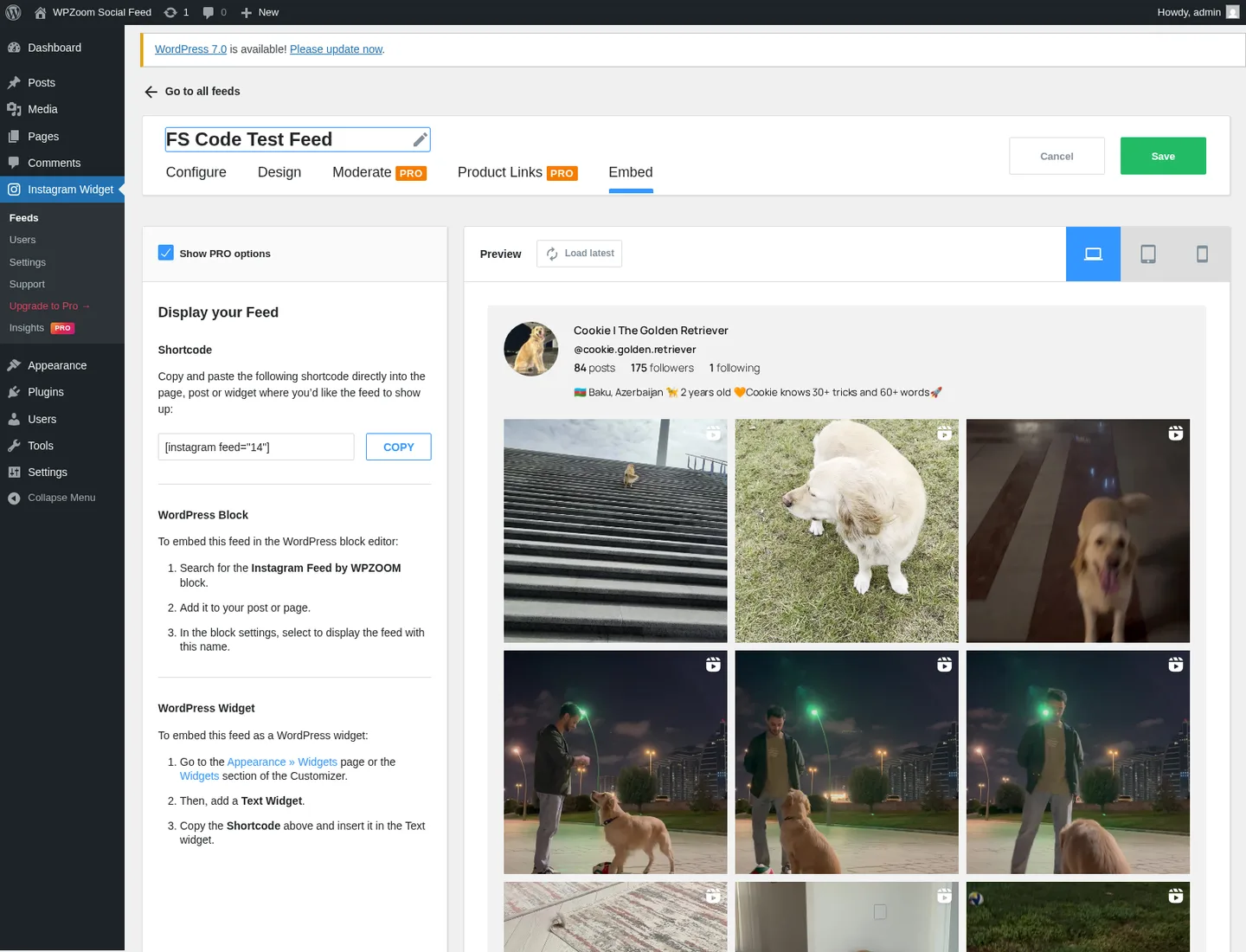
The Embed tab is where WPZOOM quietly out-designs the rest of the category. After you save a feed, the tab prints the auto-generated shortcode [instagram feed="14"] (where 14 is the feed's post ID) with a one-click COPY → COPIED! clipboard button, then walks you through three numbered embed paths: paste the shortcode anywhere, search for the Instagram Feed by WPZOOM Gutenberg block (registered as wpzoom/instagram-block and confirmed in the WP REST block-types endpoint during testing), or drop the shortcode into a Text widget for Classic Widgets. The dedicated WPZOOM Instagram Elementor widget — free since v2.2.5 — is documented on the vendor's marketing page and lets you drag the feed straight into an Elementor page without using a shortcode.
The Embed tab UI itself is the cleanest in the category. QuadLayers ships a shortcode and a block; Spotlight ships a block and gates Elementor to a paid tier. WPZOOM ships shortcode + block + dedicated Elementor widget at the free level, and prints clear 3-step instructions for each path.
2. Server-side image caching to your own WP uploads
When I rendered [instagram feed="14"] on a published WordPress page and inspected the resulting HTML, every thumbnail in the grid was served from /wp-content/uploads/2026/05/ — not hot-linked from Instagram's CDN. That is unusual in this category. Smash Balloon, Spotlight and QuadLayers all hot-link from cdninstagram.com / fbcdn.net by default, which means an Instagram CDN outage or link rot breaks the rendered grid. WPZOOM fetches the media on the server side and caches it locally.
The tradeoffs are honest. The wins: better resilience to Instagram CDN outages, the ability to serve through your own CDN, full control over image sizing independent of Instagram's resampling, and no third-party request from the visitor's browser. The costs: a larger WordPress media library, more disk usage, and a bandwidth tax on every cache refresh on small VPS hosts. For most single-brand sites this is a clean architectural win; for sites with very tight disk quotas it is worth budgeting for.
3. Lightweight by design — AJAX initial load, skeleton placeholder, asset-gating
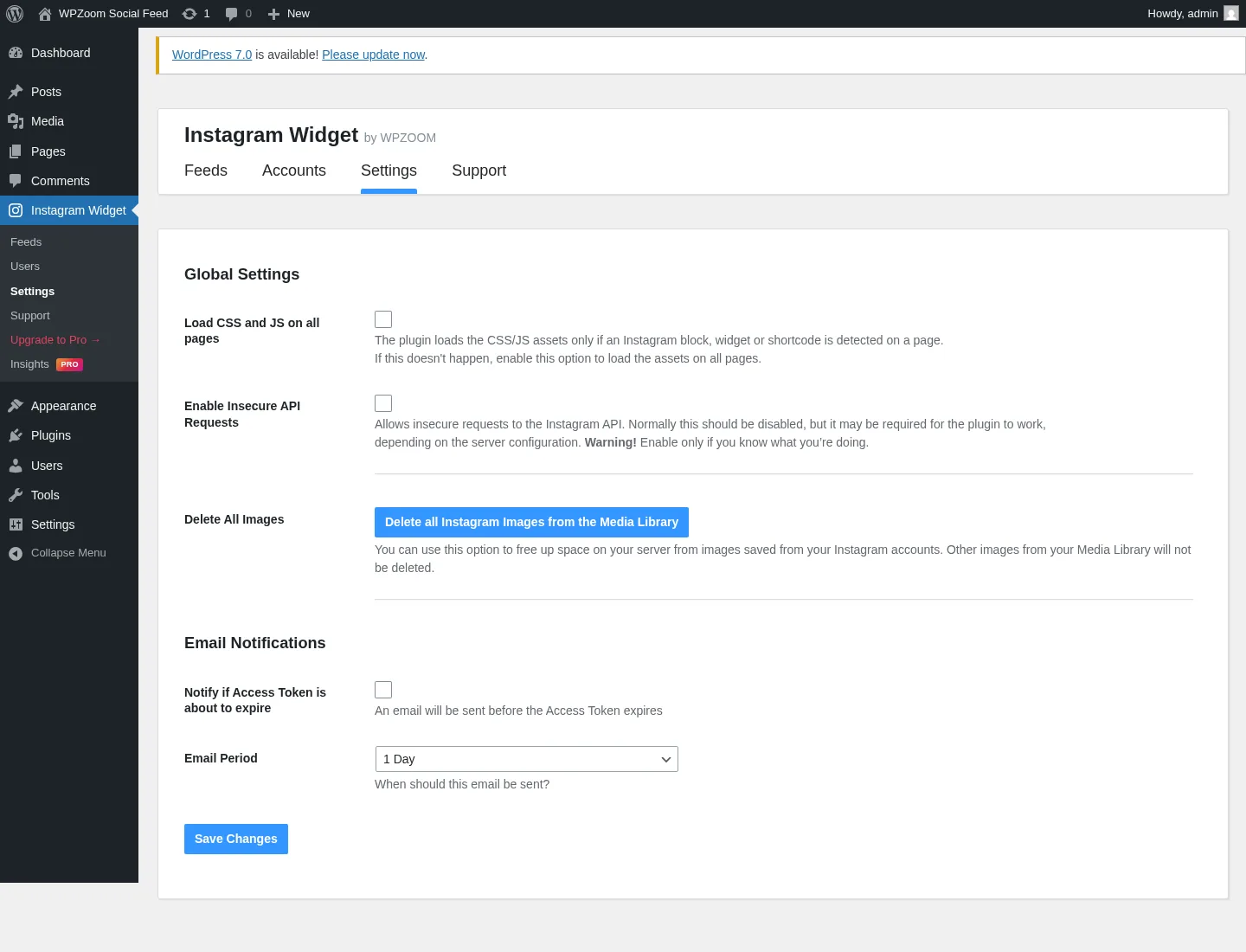
WPZOOM markets the plugin as a "Smash Balloon Alternative — lightweight, fast, easy-to-use" and the architectural choices in v2.3.x back the line credibly. The free Load CSS and JS on all pages global toggle is off by default, which means the plugin's stylesheet and JavaScript only load on pages that actually contain the shortcode or block — there is no global front-end footprint from a plugin you only use on one page. AJAX initial load (added in v2.3.0) renders the page chrome first and then fetches the feed asynchronously behind a "skeleton placeholder with shimmer animation," so first-paint is not blocked on the Instagram API. Feed HTML caching (added in v2.3.2) serves cached feed output instantly on repeat loads. And the v2.3.0 release consolidated three API calls into a single batched account-stats request.
In testing, the page chrome rendered in well under a second and the feed itself populated in roughly one to three seconds after that. The plugin's vendor-claimed compatibility with WP Rocket, W3 Total Cache and LiteSpeed Cache is also genuinely earned — v2.3.2 specifically added nonce-verification handling for page-cached pages, which is the bit most caching plugins trip over.
4. Configure tab — single-account source, cache cadence, request timeout
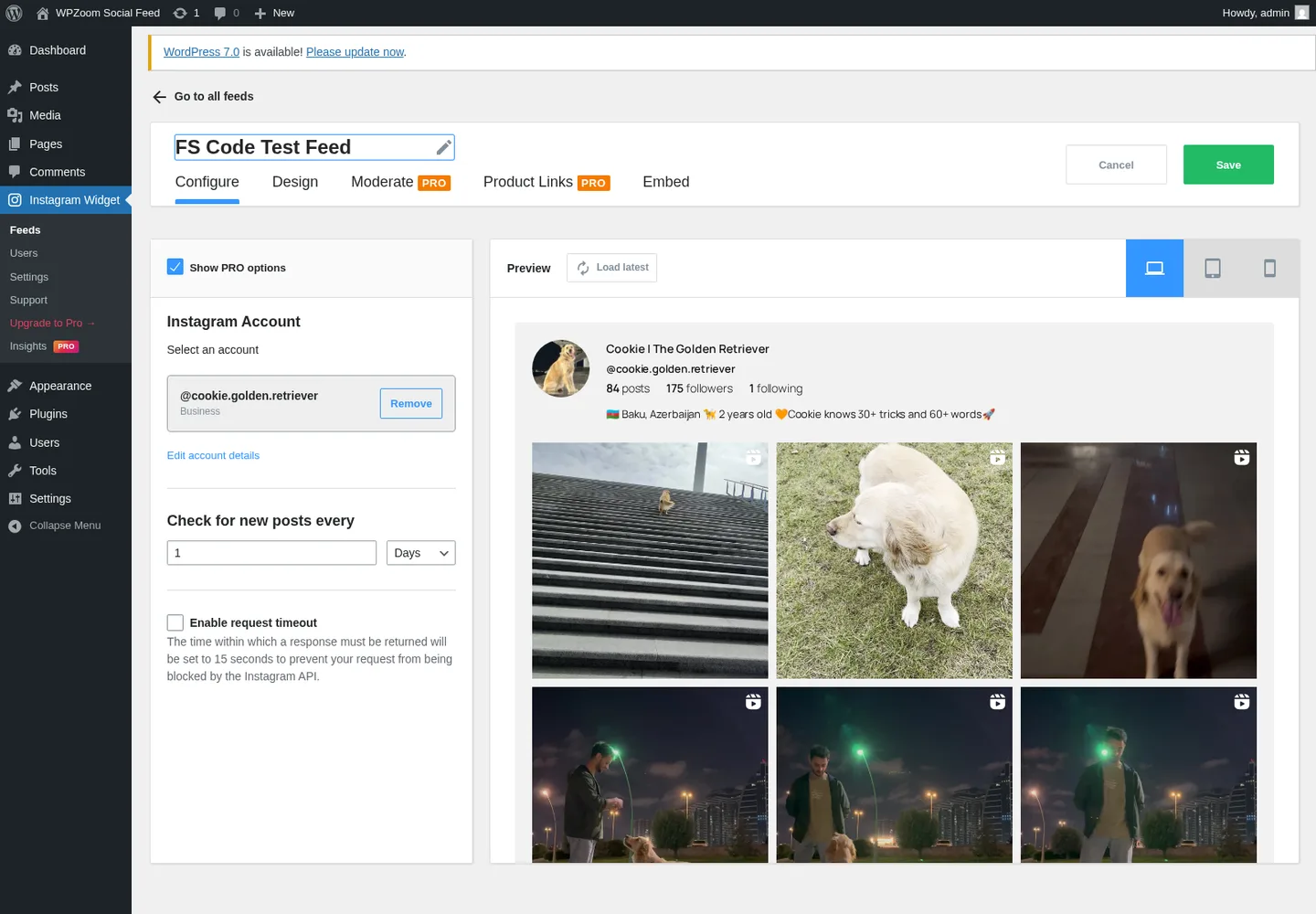
The Configure tab is the source-and-refresh control panel. On free, you select a single connected Instagram account from a dropdown (a Business badge confirms the account type), set the cache-refresh cadence using a numeric input plus a Minutes / Hours / Days / Weeks / Months suffix, and optionally toggle on a 15-second request-timeout ceiling that prevents Instagram API blocking on hosts where the upstream goes slow.
Two things to flag here. First, the Multi-Account selector and the Add New Account button both carry PRO badges — connecting more than one Instagram account is gated behind Pro. Spotlight allows multi-account in its free tier; WPZOOM does not. Second, the Accounts screen openly lists Hashtag and @mention feeds as "Coming Soon" — the vendor is signaling a multi-source roadmap, but as of v2.3.4 neither has shipped, and buyers who specifically need Hashtag or Tagged feeds today should shortlist Smash Balloon Pro or QuadLayers Pro (both Business-account-only).
5. Design tab — Grid in free, four Pro layouts behind a clean "Show PRO options" reveal
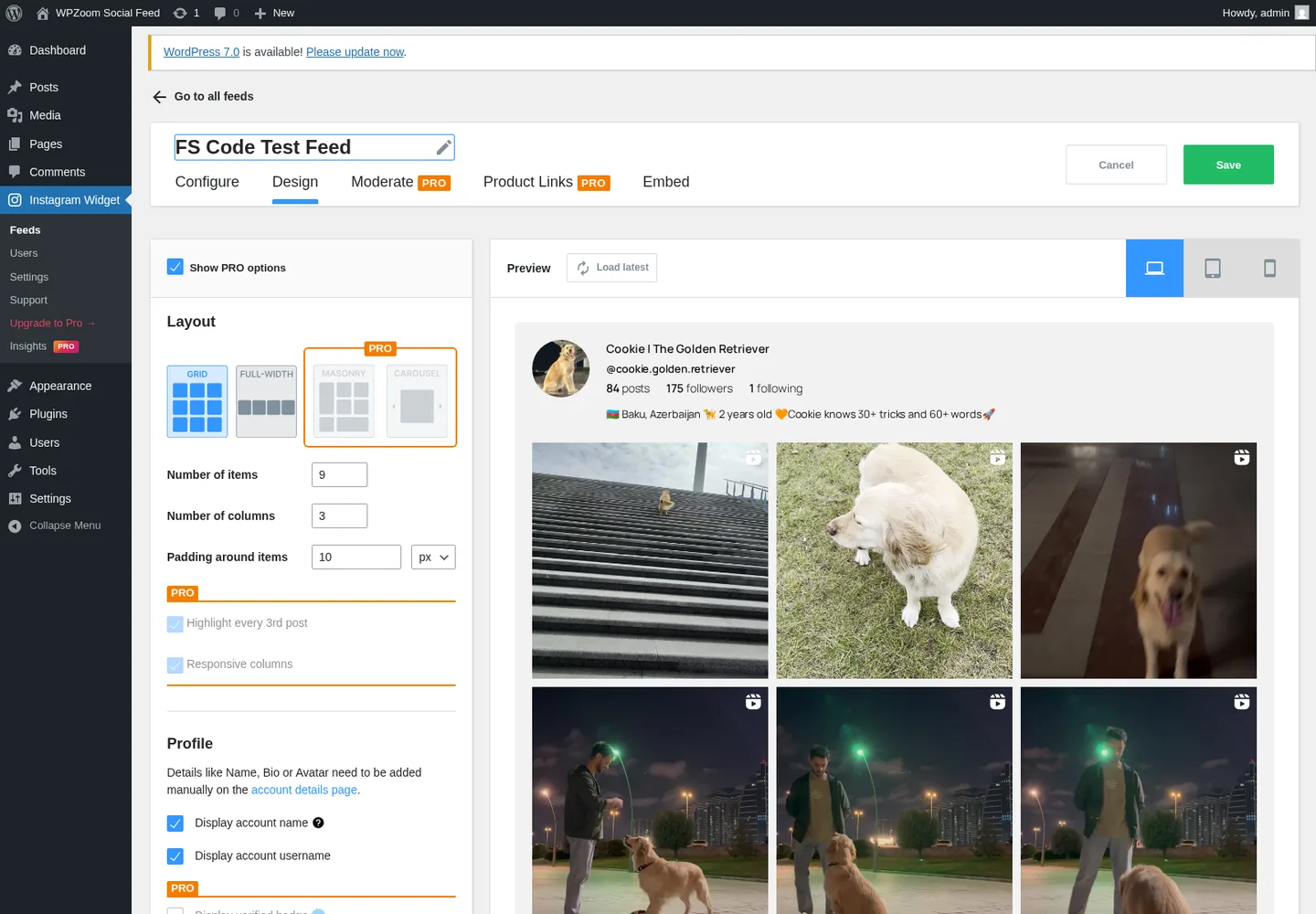
The Design tab uses a "Show PRO options" toggle pattern I like — flip it on and every Pro field across the editor reveals itself with a PRO badge, so you can see exactly what you are missing before you decide whether to upgrade. On free you get the Grid layout, Number of items (default 9), Number of columns (default 3), Padding in px / em / % (default 10 px), Responsive columns with separate Desktop / Tablet / Mobile column counts, five Image sizes (By Default Algorithm / 150×150 / 320×320 / 640×640 / Full Size), two Image aspect ratios (Square 1:1 / Portrait 3:4, with 3:4 added in v2.2.8), custom Image width, Lazy load images, Open items in lightbox, Post types to show (Photos / Videos / Albums-Carousels, in any combination), Instagram icon hover overlay, profile name + avatar + bio, and a View on Instagram button with custom text and color.
The four Pro layouts — Masonry (Pinterest-style variable-height), Carousel (horizontal slider), Full-width (edge-to-edge), and Highlight (one featured tile + grid below) — are all visible behind PRO badges but unlock with any paid tier. I was not able to exercise the Pro layouts hands-on because my test setup runs the free plugin only; the vendor's marketing page and the in-admin upsells describe them clearly, but the credible-test claim in this review is limited to the free Grid layout.
6. Pro adds Multi-Account Feed, Stories, Analytics, Shoppable Instagram and Moderation
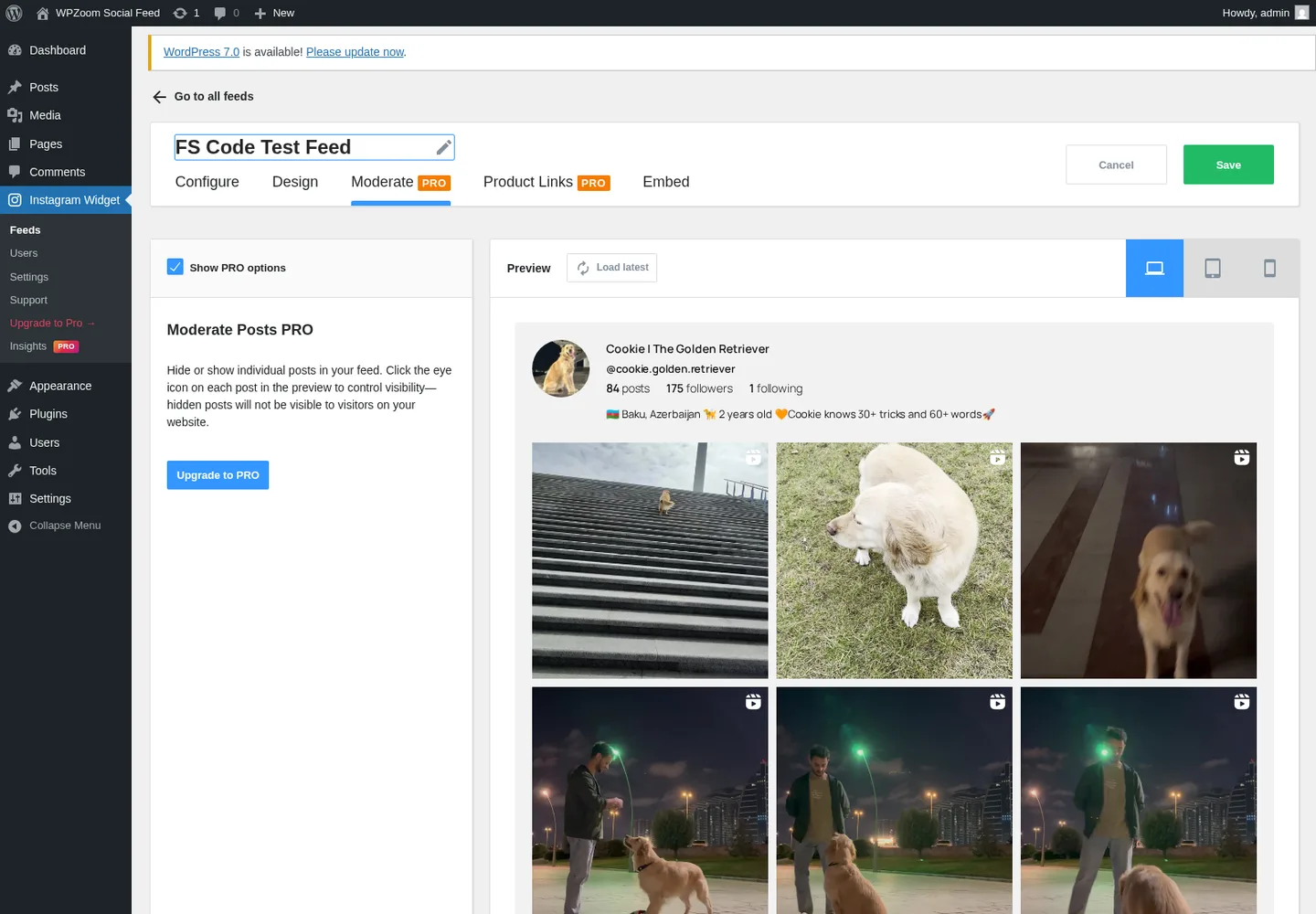
Five Pro-only feature groups make the $49 Starter tier worth pausing on. Multi-Account Feed (added in v2.3.0) lets you combine posts from multiple connected Instagram accounts into a single unified feed — useful for brands running parent + sub-brand handles. Instagram Stories displays your Stories in a full-screen modal inside the rendered feed. Instagram Insights & Analytics (the separate Insights PRO menu) ships an interactive dashboard with Follower growth, Reach, Impressions, Accounts Engaged, Total Likes and per-post performance over 7 / 14 / 30 / 90-day ranges. Feed Moderation adds the eye-icon hide/show toggle for individual posts without deleting them from Instagram. And WooCommerce Shoppable Instagram lets you tag products against any post — including different products on each image in a carousel — and display them as either a subtle shopping-icon popover or a prominent "Buy Now" button.
I could not execute these end-to-end because my test setup runs the free plugin only — the Moderate PRO tab and Product Links PRO tab both render as upsell panels rather than interactive UI, and the Insights PRO menu populates with hard-coded demo numbers (Total Followers 12,458, NEW +347, NET +295, Accounts Reached 45,892) rather than real account analytics. The features are documented on the vendor's marketing page and visible in the in-admin upsell flow, but a thorough Pro-installed re-test would be needed to validate behavior in production.
WPZOOM Social Feed Ease of Use / UI & UX
For most WordPress site owners, WPZOOM Social Feed is a "first feed in under five minutes" plugin once the Instagram account is connected. The admin shell is clean, the 5-tab feed editor is logically organized, and the Show PRO options reveal pattern is a thoughtful UX choice — Pro fields stay out of your way until you ask to see them.
1. UI / UX
The admin sidebar exposes a familiar Instagram Widget menu group with Feeds / Users / Settings / Support / Upgrade to Pro / Insights PRO. Inside the plugin, every page uses the same top tab strip — Feeds / Accounts / Settings / Support — and the feed editor adds its own inner 5-tab strip (Configure / Design / Moderate PRO / Product Links PRO / Embed). There are no surprise jumps in information architecture, and tab switches happen in a single page load without hard refreshes.
2. Setup
The Accounts screen offers three connection paths — Facebook Login OAuth (recommended), direct Instagram login, or manual API access-token entry for connecting client accounts without their password — and all three work with Business or Creator accounts. The plugin warns upfront that Personal Instagram accounts can no longer connect, which is an Instagram-side restriction from December 4, 2024 (Instagram dropped Personal-account support across the Graph API), not a WPZOOM limitation. Once the account is connected, the feed builder produces a working [instagram feed="N"] shortcode in under a minute.
3. Feed editor clarity
The 5-tab editor — Configure, Design, Moderate PRO, Product Links PRO, Embed — covers every customization point without crowding any single tab, and the right-rail Preview pane reflects changes after each save. The Show PRO options toggle is the cleanest paywall UX I've seen in this category: greyed-out Pro fields appear with PRO badges so you can see exactly what each upgrade unlocks, without those fields polluting the default editor for non-Pro buyers.
4. Embed tab
The Embed tab is the single best-designed screen in the plugin. Three numbered embed paths — Shortcode / WordPress Block / WordPress Widget — with 3-step instructions for each, plus a COPY clipboard button on the shortcode. For agencies handing the plugin off to non-technical clients, this is genuinely time-saving.
5. Friction points
Three small annoyances. The in-admin brand name ("Instagram Widget by WPZOOM") does not match the WordPress.org brand name ("WPZOOM Social Feed Widget & Block"), which can be momentarily confusing the first time you open wp-admin. The Preview pane's Desktop / Tablet / Mobile device toggles did not consistently re-render the iframe width during my test pass — clicking them was sometimes a no-op, which is a UX nit worth filing for the next release. And the Insights PRO menu populates its demo dashboard with realistic-looking numbers without a prominent "Demo Account" label, which could mislead a non-Pro buyer into thinking the analytics are live for their own account.
WPZOOM Social Feed Performance
In day-to-day use, WPZOOM Social Feed is among the fastest Instagram feed plugins I've tested — the architectural choices in v2.3.x (asset-gating, AJAX initial load, feed HTML caching, batched API calls) all pull in the same direction.
1. Front-end render speed
The published test page rendered the page chrome in well under a second on a 1600×1100 desktop viewport, with the Instagram feed populating asynchronously roughly one to three seconds after first paint behind the documented skeleton placeholder. Playwright captured zero uncaught JavaScript exceptions across the full workflow. Because the plugin's CSS and JS are gated to pages that actually contain the shortcode (the "Load CSS and JS on all pages" global setting is off by default), there is no measurable performance overhead on the rest of the site.
2. Image delivery
Every thumbnail in the rendered feed was served from /wp-content/uploads/2026/05/ rather than hot-linked from Instagram's CDN. That isolates the visitor's browser from Instagram CDN availability and means you can serve the assets through your own CDN if you have one.
3. Caching
Sane defaults. Per-feed cache cadence is configurable in Minutes / Hours / Days / Weeks / Months on the Configure tab, the v2.3.2 release added feed HTML caching for instant repeat loads, and the v2.3.2 nonce-verification fix means the plugin plays cleanly with page-cached pages on WP Rocket, W3 Total Cache and LiteSpeed Cache. On repeat page loads in testing, the same shortcode rendered the same posts without firing additional Instagram API calls.
4. Admin responsiveness
Tab navigation inside the plugin admin happens in a single page load with no hard refreshes between tabs. The feed editor opens on Configure by default and switches between Design / Moderate PRO / Product Links PRO / Embed instantly.
5. Stability
Across the full hands-on workflow — connecting the pre-installed Instagram account, building a 9-item Grid feed, saving and editing it, embedding it via shortcode, and verifying both desktop and mobile renders — I observed zero PHP fatals and zero browser console exceptions. The v2.3.0 changelog specifically calls out "input sanitization and output escaping" hardening, and the plugin is enrolled in the Patchstack Vulnerability Disclosure Program with no public CVEs visible at audit time.
WPZOOM Social Feed Support, Documentation & Learning Resources
Support is split by tier. Free users rely on the public WordPress.org support forum, where WPZOOM's lead developer Pavel Ciorici (handle ciorici) and support handle Ina (inamoro) personally reply to most threads under their real names. Pro buyers get priority support through the WPZOOM ticket system at wpzoom.com/support/. The plugin's in-admin Support tab surfaces both a "Documentation" CTA and an "Open Support Desk" CTA. There is no live chat and no in-admin ticket form.
Vendor publicly-documented response times are not advertised in hours, but the WordPress.org support forum shows healthy responsiveness from the vendor over a multi-year window — Pavel has been replying to negative reviews under his real name for at least five years, which is a meaningful trust signal vs anonymous vendor brands.
Support quality is, on balance, good but lightly evidenced. The 4.3★ average across 48 reviews skews positive — recent quotes lean on ease and reliability, and the vendor replies to most negative reviews. The one notable gap: the most-damaging open 1-star complaint, "Deleted the plugin it deleted all media files" (stathis_k91, two years and five months old), has no public vendor response. I could not reproduce the behavior in my test pass, but the public report stands and is worth a "back up your media library before uninstalling" note if you ever plan to deactivate the plugin.
On the documentation side, the docs hub at wpzoom.com/documentation/instagram-widget/ indexes 13 walkthroughs covering the right surface: Important API deprecation, Pro install, License activation, Account connection, Token reconnection, Create feed, Embed in Block Editor, Embed via shortcode, Replace legacy widget with v2 feed, Manual access-token creation, Improve thumbnail quality, Feed not showing latest posts, and FAQ & troubleshooting. The pages are short walkthroughs rather than deep technical references, but they cover the buyer's actual pain points. WPZOOM does not publish a dedicated video tutorial channel for this plugin, although the official live demo at demo.wpzoom.com/instagram-widget/ is a working install you can explore.
WPZOOM Social Feed User Reviews & Reputation
I read through the full 48-review backlog on the WordPress.org reviews tab — the WPZOOM Social Feed Widget has been on WordPress.org since March 2015, which is roughly 11 years, but with only 48 ratings in total it has the lowest review denominator of any credible Instagram-display peer (Smash Balloon's Instagram Feed alone has 1M+ active installs and 4.9★ from 4,340 reviews, and the family has the largest review base in the category; QuadLayers Social Feed Gallery has 301 reviews; Spotlight has 169).
Overall impression. The 4.3★ average is solid but lightly evidenced — the 37 / 48 share of 5-star reviews skews positive, and the 5 × 1-star tail mostly dates to 3+ years ago. Recent (2025–2026) reviews are uniformly positive. The lightness of the denominator means any one or two new negative reviews can move the average meaningfully, so writers should treat WPZOOM as "credible mid-tier" rather than "industry leader" on reputation alone.
Most praised strengths. The 5-star cluster lands on three recurring themes — ease of setup, reliability and clean design that fits most themes without custom CSS. Esaia (March 2026) summed up the pattern best: "Setup was super easy, and the Instagram feed displays beautifully on my site. It's fast, reliable, and the block editor integration is a nice bonus. Highly recommend." alexminza (December 2025) called it "a simple Instagram widget" whose "design fits most themes without much tweaking," which is the perfect echo of the vendor's own "lightweight Smash Balloon alternative" positioning. dorinciobanu7 (December 2025) added: "Works perfectly and updates constantly," a useful actively-maintained signal. And dmihaela (June 2025) summed up the ease angle: "I've tried a few Instagram plugins before, but this one is by far the easiest to use. Setup took just a couple of minutes."
Most criticized weaknesses. The 8-review negative tail clusters around four themes. The first is token disconnects, which appears in 4 of 8 negative reviews — accounts get unlinked unexpectedly and require manual reconnection. WPZOOM has shipped several mitigations since most of these reviews landed: manual token refresh from admin (v2.2.4), the Facebook Page → Business migration (v2.2.0 in December 2024), and configurable token-expiry email notifications (free, 1 / 3 / 5 / 10 days before expiry). The second is the media-deletion-on-uninstall complaint mentioned above — one 1-star, two years and five months old, vendor-unanswered, behavior not reproduced in my own test pass. The third is display / responsive issues from 3–5+ years ago that the v2.3.0 AJAX initial load + skeleton placeholder + responsive-columns overhaul largely addresses. And the fourth is generic dissatisfaction in two short reviews with little actionable detail.
WPZOOM Social Feed Pricing & Value
WPZOOM Social Feed is sold as a freemium product, with a free plugin on WordPress.org and a paid Pro plugin (Instagram Widget PRO) that runs alongside the free version on license-activated tiers. All paid tiers are annual-only at the per-plugin level — the only lifetime option is the all-bundle WPZOOM membership at $599 one-time.
- Free — $0, unlimited sites, unlimited feeds. Includes the Grid layout with lightbox, lazy load, AJAX initial load with skeleton, per-device responsive columns, Gutenberg block, dedicated Elementor widget, shortcode, token-expiry email notifications and the WordPress.org support forum.
- Starter — $49 / year for 1 site. Unlocks the full Pro feature set — Masonry / Carousel / Full-width / Highlight layouts, Multi-Account Feed, Instagram Stories, Insights & Analytics, WooCommerce Shoppable Instagram, Feed Moderation, Load More pagination, Likes / Comments / Date hover overlays, background-colour customization, follower count and verified badge.
- Professional — $69 / year for 3 sites (marked "Most Popular"). Identical Pro feature set to Starter — only the site count changes.
- Business — $99 / year for 10 sites. Identical Pro feature set to Starter and Professional.
- WPZOOM All Themes Package — $99 / year, unlimited sites. All 30 WPZOOM premium themes + all 7 premium plugins (including Instagram Widget PRO) + 1-click demo content + 1 year support and updates.
- WPZOOM All Access Pass — $179 / year, unlimited sites (marked "Most Popular — Best Value"). All 30 themes + all 7 plugins + access to future themes and plugins + 1 year support and updates.
- Lifetime All Access Pass — $599 one-time, unlimited sites. Everything in All Access Pass, plus lifetime support and updates and access to every current and future WPZOOM plugin and theme.
The free tier is genuinely usable. For a single-account brand that just needs a clean Grid Instagram gallery with a lightbox on a WordPress site, you can ship without ever paying WPZOOM a cent. Pro is worth it only if you specifically need Carousel / Masonry / Full-width / Highlight layouts, Multi-Account Feed, Stories, Analytics, Shoppable Instagram or Load More pagination.
The pricing model has one feature that quietly beats the category. The Pro feature set does not change between Starter, Professional and Business — only the site count changes. That is unusual: Smash Balloon's tiered plans gate some features behind higher tiers, and QuadLayers' Lifetime tiers do the same. WPZOOM's $49 Starter gives you the same Pro feature set as the $99 Business tier, just on one site instead of ten. For a single-site buyer who only needs Pro features on a single domain, that is the cheapest Pro entry point in the category.
The bundle math is the other side of the value story. Per-site economics work out to $49 / site / yr (Starter, 1 site), $23 / site / yr (Professional, 3 sites) and $9.90 / site / yr (Business, 10 sites). If you already use any other WPZOOM plugin or theme — Inspiro Premium, Foodica, Reel, Recipe Card Blocks PRO, Forms Pro — the $179 / yr All Access Pass is a no-brainer, and the $599 one-time Lifetime All Access Pass breaks even against the All Access annual price in roughly three and a half years for anyone planning to use the WPZOOM stack long-term. The vendor itself frames Lifetime as "For agencies and long-term projects." The 14-day money-back guarantee covers every tier.
One commercial caveat: WPZOOM regularly runs sitewide "FLASH SALE 20% OFF" and seasonal promotions. Your evergreen buying decision should be based on the list prices above, not on the temporary discount code visible the day you visit the page.
WPZOOM Social Feed Pros and Cons
WPZOOM Social Feed is the kind of plugin you can recommend to a non-technical client and trust to stay out of trouble for years — the free tier is genuinely useful, the Pro ladder is simple, and the architectural choices in v2.3.x (asset-gating, AJAX initial load, server-side image cache) all line up with the vendor's "lightweight Smash Balloon alternative" marketing line. The weaknesses are mostly category-shared (token churn, the still-pending Hashtag and @mention roadmap) plus one reputation gap that thin review volume amplifies.
Pros
- Three first-class embed paths in free: Gutenberg block (
wpzoom/instagram-block), shortcode ([instagram feed="N"]) and a dedicated Elementor widget — all free, with the cleanest 3-step embed UI in the category. - Server-side image caching to your own WP uploads: Unique-in-category — the plugin downloads Instagram media into
/wp-content/uploads/, reducing dependency on Instagram's CDN and letting you serve through your own. Future-proofs against IG link rot. - Same Pro feature set across every per-plugin tier: $49 Starter unlocks the exact same Pro features as $99 Business — the only difference is site count. Cheapest full-Pro entry point in the category for single-site buyers.
- Lightweight by design: Off-by-default "Load CSS and JS on all pages" asset-gating, AJAX initial load with skeleton placeholder, feed HTML caching, batched API calls and Patchstack VDP enrollment. The "Smash Balloon alternative" positioning is credible.
Cons
- Instagram-only despite the "Social Feed Widget & Block" rebrand: No Facebook, X, TikTok, YouTube, Pinterest or LinkedIn feeds. Hashtag and @mention feeds have been "Coming Soon" in the admin since at least v2.3 — do not buy expecting them.
- Smallest review denominator in the category: 48 reviews on 60,000+ installs — vs 4,340 on Smash Balloon's Instagram Feed alone (1M+ installs) and 301 on QuadLayers. The 4.3★ average is solid but lightly evidenced; treat as credible mid-tier, not industry leader.
- No public per-plugin Lifetime: Lifetime is only available in the $599 All Access bundle. QuadLayers Social Feed Gallery sells per-plugin Lifetime at $99 / $199 / $299, which is significantly cheaper if you only want Instagram and not the whole WPZOOM stack.
- No free Multi-Account, Carousel, Stories or Load More: Grid is the only free layout, and the Add new account button is PRO-gated. Spotlight allows multi-account in its free tier; Smash Balloon and QuadLayers include Carousel in free. WPZOOM does not.
Who Should Use WPZOOM Social Feed?
This plugin is sharp where it is sharp — single-brand Instagram feeds, performance-first sites, existing WPZOOM theme customers — and clearly wrong for the buyer who needs multi-network coverage today.
Who Should Use It
- Single-Instagram-account creators, bloggers, brands and small businesses: If you have one Instagram account, one WordPress site, and you want a clean Grid Instagram gallery with a lightbox, the free tier alone is enough. Upgrade to Starter only when you actually need Carousel, Masonry, Multi-Account or Analytics.
- Existing WPZOOM theme customers: If you already run Inspiro Premium, Foodica or Reel — or you are planning to — fold the plugin into the $179 / yr All Access Pass or the $599 one-time Lifetime All Access Pass. The bundle math is overwhelmingly in your favor.
- Performance-first WordPress sites: Asset-gating, AJAX initial load, feed HTML caching, batched API calls and server-side image caching make this the lightest Instagram-feed plugin I've tested. If page weight and Core Web Vitals matter to you, shortlist it.
- Single-site Pro buyers on a tight budget: The $49 Starter unlocks the full Pro feature set on one site — the cheapest "all-Pro-features-included" tier in the category.
Who Should Skip It
- Buyers who need Facebook, X, TikTok or YouTube feeds in one plugin: Send these readers to Smash Balloon's All Access Bundle — WPZOOM is Instagram-only and the Hashtag / @mention roadmap items have not shipped.
- Buyers who need to publish to Instagram from WordPress: This is display-only. For outbound auto-posting, look at FS Poster.
- Buyers who want a publicly-priced per-plugin Lifetime: WPZOOM's only Lifetime is the $599 all-bundle pass. If you only want Instagram and not the wider stack, the cheaper choice is Instagram Feed Gallery — QuadLayers sells per-plugin Lifetime from $99. Read the full Instagram Feed Gallery review.
- Multilingual / European buyers needing deep localization: WPZOOM ships only 4 WordPress.org locales (English, Russian, Spanish ES, Swedish). Smash Balloon ships 12+; QuadLayers ships 8.
Best WPZOOM Social Feed Alternatives
If WPZOOM Social Feed is not the right fit — usually because you need multi-network coverage, more locales, or a publicly-priced per-plugin Lifetime — these are the alternatives I would shortlist. For the full ranked comparison across every credible plugin I tested in this category, see my best WordPress social media feed plugins roundup.
- Smash Balloon Instagram Feed Pro: The category leader, with Instagram Feed alone at 1M+ active installs and 4.9★ from 4,340 reviews and the largest review base in the category. Strongest pick if you need a unified social-feed brand spanning Facebook, X, YouTube, TikTok and Reviews — Smash Balloon's All Access Bundle at $299 / yr intro ($598 / yr renewal) covers unlimited sites and all seven sibling plugins. Carousel in free, 12+ WordPress.org locales. Best for established brands with budget that prefer breadth and reputation depth over WPZOOM's lighter footprint. Read the full Smash Balloon review.
- Instagram Feed Gallery (QuadLayers Social Feed Gallery): The strongest direct alternative on price — the only Instagram-only plugin in the category with publicly-priced per-plugin Lifetime tiers at $99 / $199 / $299. Carousel in free, 30-day refund (vs WPZOOM's 14), 8 WordPress.org locales. Best for cost-sensitive buyers who want a one-time payment and no renewal headache. Read the full Instagram Feed Gallery review.
- Spotlight Social Media Feeds: Closely-matched on install count (60K+) with a polished free Instagram tier (9 templates, 4 layouts, custom CSS), multi-account in free, and Promotions automation in Pro that maps an Instagram hashtag to a WordPress page or product. Essentials from $59 / yr. Best for buyers who want a deeper Instagram-specific styling layer than WPZOOM ships in free. Read the full SpotlightWP review.
- WP Social Ninja: A multi-network feed + reviews + chat-widget plugin from the WPManageNinja team. Broader scope than WPZOOM — five-network feeds (Instagram, Facebook, YouTube, TikTok, X), 10+ business review sources, 15+ chat-widget channels, notification popups and testimonials — but a heavier footprint. Single Site from $89 / yr (currently $44 / yr at the 50% promo). Best for sites that want one plugin to cover feeds, reviews and on-page chat. Read the full WP Social Ninja review.
- Easy Social Feed: A budget multi-network alternative (30,000+ installs, 4.6★ from 500 reviews) covering Facebook, Instagram, YouTube and X from one plugin. The $89 / yr COMBO bundle and $259 one-time Lifetime tier make it the cheapest "all four mainstream networks" license in the niche. Best for cost-sensitive multi-network buyers who outgrew WPZOOM's Instagram-only scope. Read the full Easy Social Feed review.
Final Verdict: Is WPZOOM Social Feed Worth It?
Yes — with two caveats. If you run a single-Instagram-account brand on WordPress and you want a clean, lightweight Instagram gallery that respects your page weight and Core Web Vitals, WPZOOM Social Feed is the strongest performance-first pick in the niche. The free tier alone covers Grid layout with a lightbox, native Gutenberg block, dedicated Elementor widget, shortcode and per-device responsive controls — most single-brand buyers will not need to upgrade. The $49 Starter is the cheapest "full Pro feature set" tier in the category, and the $599 one-time Lifetime All Access Pass is the right buy for any agency or long-term project already invested in the WPZOOM theme + plugin stack.
The two caveats. First, this is Instagram-only despite the "Social Feed Widget & Block" rebrand — the Hashtag and @mention roadmap items have been "Coming Soon" since at least v2.3, and buyers who need them today should look at Smash Balloon Pro or QuadLayers Pro. Second, the 48-review denominator on WordPress.org means reputation evidence is thin compared to Smash Balloon or QuadLayers; treat the 4.3★ rating as credible mid-tier rather than industry leader, and back up your media library before uninstalling on the off chance the old 1-star deletion complaint reflects a still-extant edge case.
If both caveats are acceptable, this is the lightest, cheapest-at-full-Pro and most theme-bundle-friendly Instagram-only WordPress feed plugin you can buy in 2026. And if you also need to push WordPress posts out to Instagram in the other direction, pair WPZOOM Social Feed with FS Poster — inbound display plus outbound publishing covers both halves of the WordPress + Instagram workflow.
WPZOOM Social Feed FAQ
Is there a free version of WPZOOM Social Feed?
Yes. The free plugin is listed on WordPress.org as WPZOOM Social Feed Widget & Block (slug instagram-widget-by-wpzoom) and includes unlimited Instagram feeds, the Grid layout, lightbox, lazy loading, AJAX initial load with skeleton placeholder, per-device responsive columns (Desktop / Tablet / Mobile), a native Gutenberg block (registered as wpzoom/instagram-block), a dedicated Elementor widget, a [instagram feed="N"] shortcode and token-expiry email notifications. 60,000+ active installs run on the free tier alone.
Is WPZOOM Social Feed beginner-friendly?
Yes. The 5-tab feed editor is logically organized, the Show PRO options toggle keeps paid fields out of your way until you ask to see them, and the Embed tab walks you through three numbered embed paths (Shortcode / WordPress Block / WordPress Widget) with a COPY clipboard button on the shortcode. Most users build their first working feed in under five minutes once the Instagram account is connected.
Does WPZOOM Social Feed work with Elementor? Yes. The plugin ships a dedicated WPZOOM Instagram Elementor widget at the free tier (added in v2.2.5) — you can drag the feed straight into an Elementor page without writing a shortcode. The plugin also ships a Gutenberg block and supports Beaver Builder, Divi, WPBakery and any page builder with shortcode support.
Do I need an Instagram Business account? Yes, in 2026. The plugin supports Business and Creator (Professional) Instagram accounts only — Personal Instagram accounts can no longer be connected, an Instagram Graph API restriction introduced on December 4, 2024 (the plugin's v2.2.0 release shipped the matching migration). Switching a Personal account to Creator is free inside the Instagram app.
What are the best WPZOOM Social Feed alternatives? For multi-network coverage and the largest install base, Smash Balloon Instagram Feed Pro and its All Access Bundle. For publicly-priced per-plugin Lifetime tiers from $99, Instagram Feed Gallery (QuadLayers). For a deeper Instagram-specific styling layer with Promotions automation, Spotlight Social Media Feeds. For a one-plugin-for-feeds-and-reviews-and-chat stack, WP Social Ninja. For the cheapest "all four networks" Pro license, Easy Social Feed. See the alternatives section above for the side-by-side detail.
Write once. Post to 26 networks.
- 26 social networks
- Schedule & auto-repost
- Runs inside wp-admin


