


Can Instagram Feed Gallery actually replace the slow, tracking-heavy Instagram embed code I've been pasting into WordPress for years — or am I about to spend money on a plugin whose free version already does the job? And which QuadLayers plan actually fits a single-brand WordPress site — is the $49 Personal Annual enough, or is the one-time $99 Lifetime the smarter buy?
If you've stared at the QuadLayers pricing page wondering whether the free tier is too limited, whether Smash Balloon is the safer pick, or whether the "Social Feed Gallery" rebrand secretly bought you Facebook and TikTok support too — you're not alone. To clear that up, I installed the free Social Feed Gallery v5.0.5 and Social Feed Gallery PRO v4.4.5 on a dedicated WordPress test site, connected a real Instagram Business account, built a feed end-to-end through the 9-tab feed builder, cycled it through all four layouts (Gallery, Carousel, Masonry, Highlight), rendered the [insta-gallery id="0"] shortcode on a live WordPress page at desktop and mobile, and cross-checked the product against 80,000+ active installs and 301 public reviews on WordPress.org. This Instagram Feed Gallery review distills what I found into a clear buying recommendation.
What Is Instagram Feed Gallery?
Instagram Feed Gallery — now officially listed on WordPress.org as Social Feed Gallery (slug insta-gallery) — is a WordPress plugin built by QuadLayers, an 11-year-old Uruguay-based plugin shop led by founder Francisco Mastromarino. The plugin was renamed in August 2019 after WordPress.org's trademark policy forced QuadLayers to drop "Instagram" from the title, but the legacy name still lives on the vendor's product URL quadlayers.com/products/instagram-feed-gallery/ and is the more common search term — which is why most buyers still call it "Instagram Feed Gallery."
It is best for single-Instagram-account brands, creators, hospitality and lifestyle businesses, photographers and small agencies that want a clean Instagram gallery on their WordPress site without paying Smash Balloon-tier prices.
The problem it solves is simple: dropping Instagram's native embed into a WordPress page is slow, ugly and offers almost no design control. Instagram Feed Gallery replaces that with a server-rendered, theme-friendly Instagram feed that lives inside wp-admin, with a 9-tab feed builder, in-admin live preview, lightbox with profile and engagement counts and three embed paths (shortcode, Gutenberg block, Elementor block).
One detail to keep straight before you buy: despite the "Social Feed Gallery" rebrand, the plugin is still Instagram-only. There is no Facebook, X, TikTok, YouTube, Pinterest, LinkedIn or Reviews feed. It also does not publish out to Instagram — that is the opposite half of the problem and the job of FS Poster. The two products are complements, not competitors.
Instagram Feed Gallery Review Quick Verdict
Instagram Feed Gallery is the cheapest credible Instagram-only WordPress feed plugin and the only one in the niche that publishes a transparent Lifetime license. The free tier already covers Gallery and Carousel layouts, native Gutenberg and Elementor blocks and a lightbox with profile, likes and comments — the catch is that anything involving Stories, Tagged posts or public Hashtag feeds needs both Pro and an Instagram Business account.
| Criteria | Verdict |
|---|---|
| Best for | Single-Instagram-account brands, hospitality/ |
| Starting price | Free on WordPress.org; paid Personal Annual from $49 / yr (1 site, billed annually) or $99 one-time Lifetime |
| Free plan / trial | Yes — generous free plugin on WordPress.org; 30-day money-back guarantee on all paid plans |
| Update frequency | ~10–20 releases per year; latest version 5.0.5 shipped April 2026 |
| Most valuable features | One-click Instagram token (no Facebook App required), Gallery + Carousel free layouts, Masonry + Highlight Pro layouts, lightbox with profile and engagement counts, per-device responsive controls, native Gutenberg + Elementor blocks free |
| UI/ |
8/ |
| Feature richness score | 7/ |
| Product performance | 7/ |
| Product rating | 4.5★ from 301 reviews on WordPress.org (248 × 5★ / 11 × 4★ / 8 × 3★ / 4 × 2★ / 30 × 1★); 80,000+ active installs |
Instagram Feed Gallery Features & Functionality
For an Instagram-only plugin, Instagram Feed Gallery's feature surface is surprisingly broad — I tested the free 5.0.5 and Pro 4.4.5 builds side-by-side in my WordPress test environment on the Personal Annual license, and below are the most important findings.
1. One-click Instagram token connection (no Facebook App required)
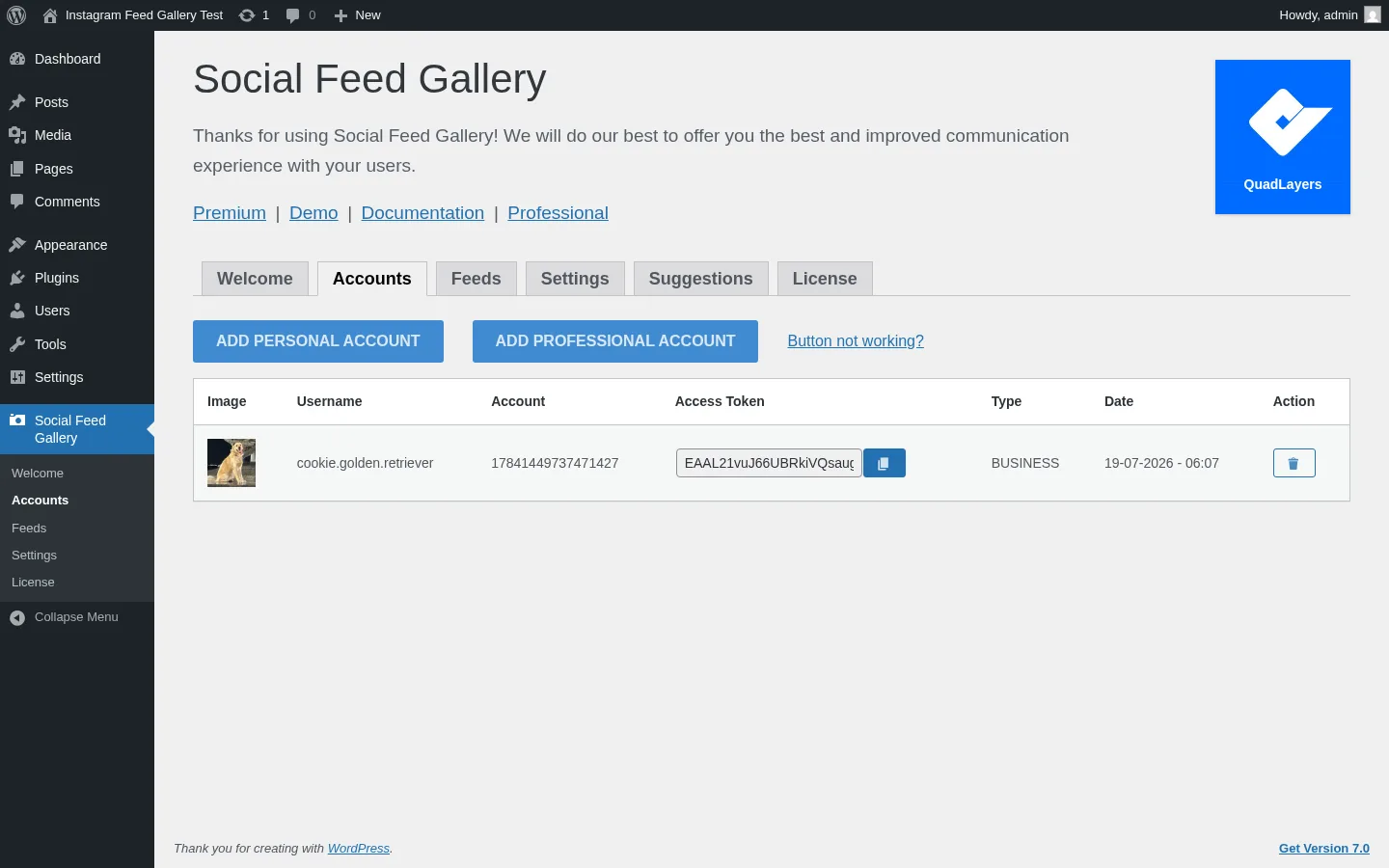
The Accounts tab is where Instagram Feed Gallery's headline differentiator lives. Two prominent buttons — Add Personal Account and Add Professional Account — kick off the OAuth flow directly against Instagram, with no requirement to create a Facebook Developer App first. A subtle "Button not working?" link gives you a manual-token fallback when an ad blocker swallows the OAuth popup.
In testing, the pre-connected cookie.golden.retriever account rendered with avatar, handle, account ID, copy-to-clipboard token field, BUSINESS type chip and a token-expiry date — and the same screen also exposes the token expiry email-notification setting from the global Settings tab. For buyers who remember Smash Balloon's older Facebook App requirement, this is a meaningful reduction in setup friction.
2. Four layouts in one plugin — Gallery, Carousel, Masonry and Highlight
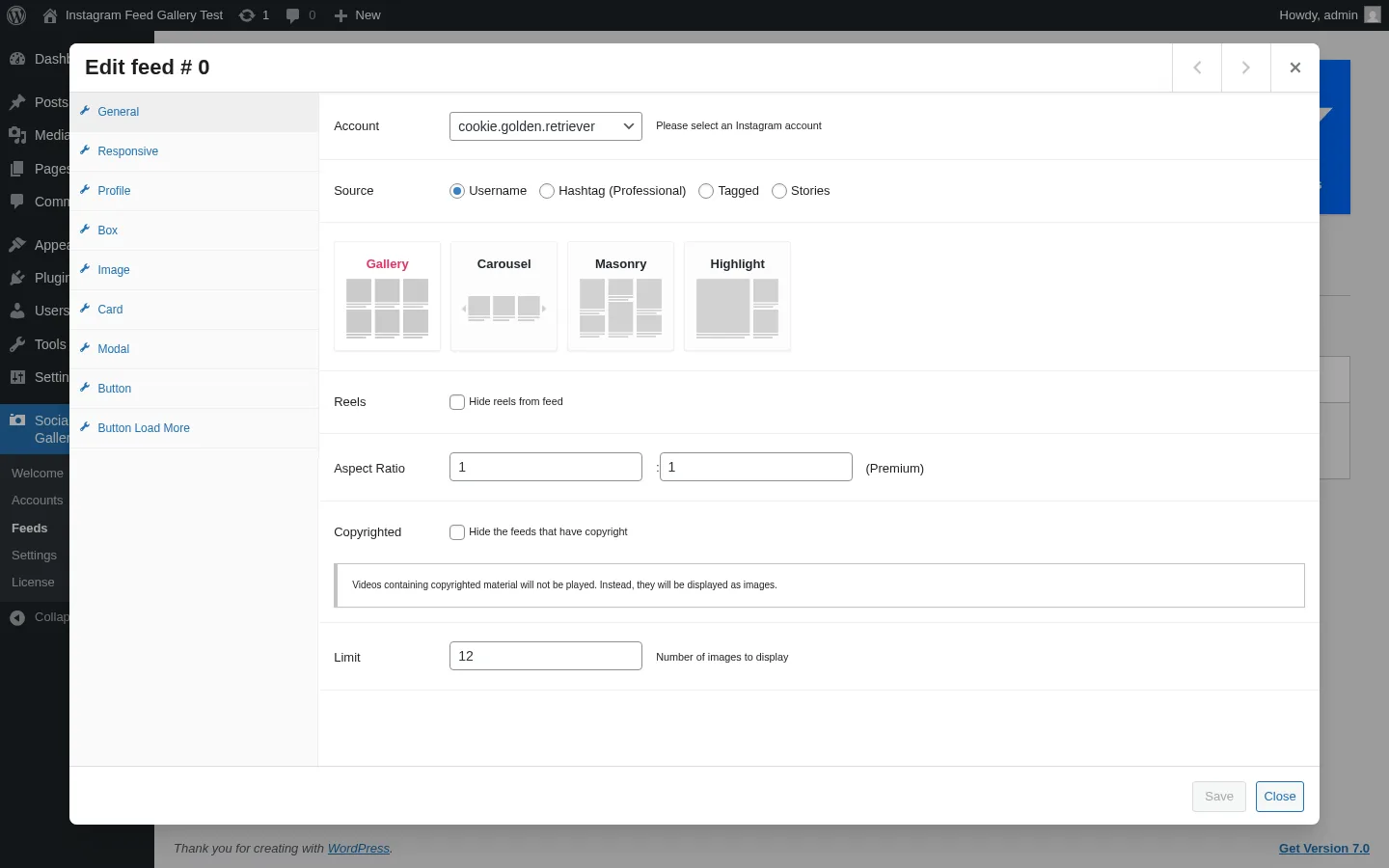
The General tab inside the feed builder modal exposes four layout tiles. Gallery (uniform grid) and Carousel (a Swiper.js horizontal slider with navigation arrows and optional pagination dots) are free. Masonry (Pinterest-style variable-height grid) and Highlight (one large featured tile + a smaller grid below) are labeled Premium and unlock with any paid tier.
In testing, I cycled the same @cookie.golden.retriever feed through all four layouts inside the admin Preview Feed modal, which renders the feed live using the same shortcode pipeline as the front-end. Gallery rendered a clean 3×4 grid of 12 real posts with like and comment counts visible on hover. Carousel slid cleanly with arrow navigation. Masonry honored variable post heights without column collapse. Highlight is the most demanding — its featured tile took 10–15 seconds to fully load in one of two preview attempts (it works, but it is the slowest layout in the plugin).
That free Carousel is worth pausing on. Smash Balloon gates Carousel behind Pro, so anyone who specifically wants a sliding Instagram feed on a budget gets it here for $0.
3. In-admin live preview that uses real Instagram data
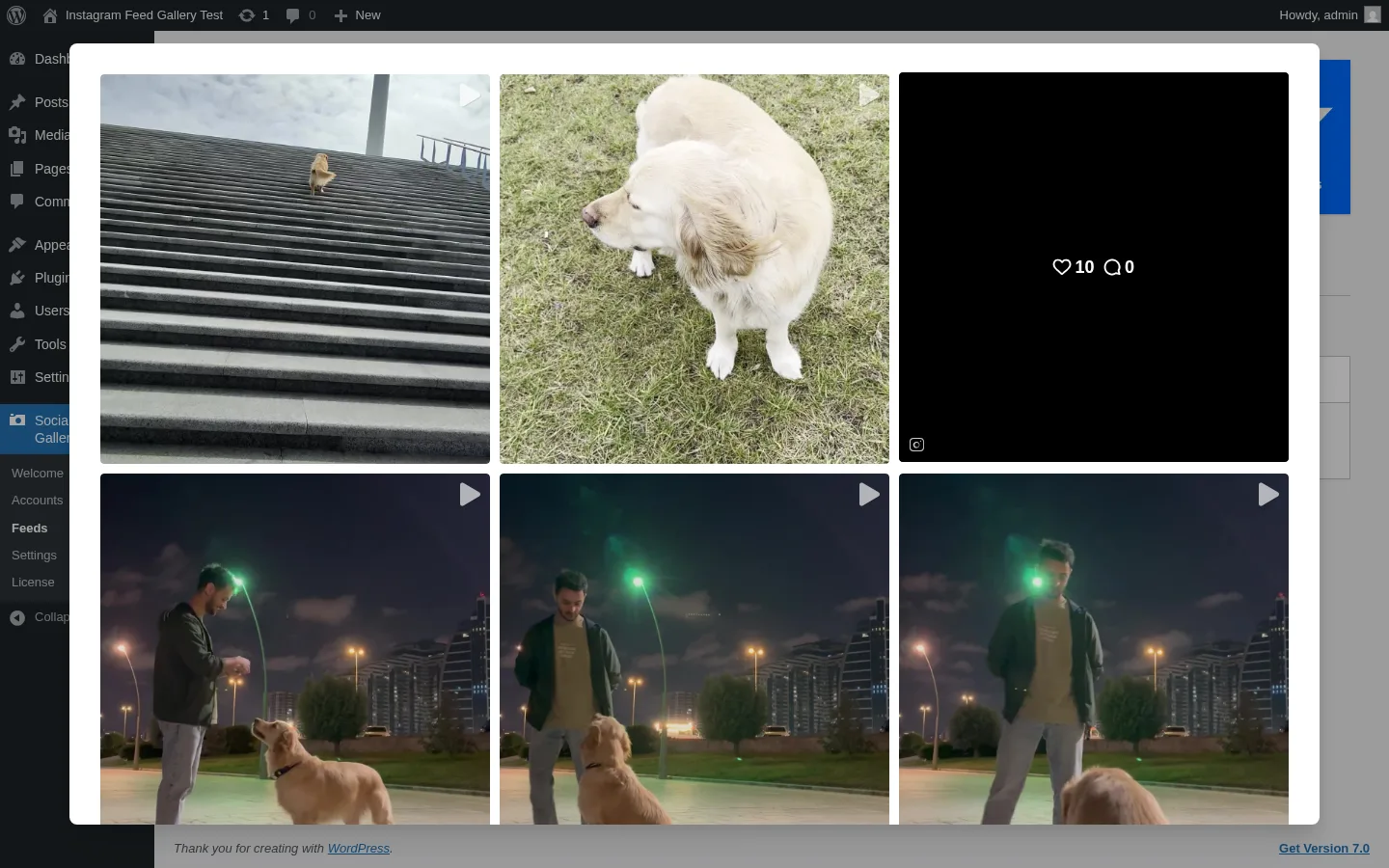
Each row in the Feeds list has a Preview Feed action that opens an admin-side modal and renders the feed live, using the same client-side feed component as the front-end shortcode. There is no need to publish a draft page just to QA a design change — every save reflects on the next preview.
In testing, this was the single best developer-experience win in the plugin. After tweaking Card-tab padding, Modal-tab sidebar alignment or per-device columns in the Responsive tab, I could click Preview Feed and see the change against real Instagram media inside roughly three to five seconds. For agencies QA-ing visuals for a client without touching the live site, this saves a lot of cycles.
4. Lightbox with profile header, captions, engagement counts and post navigation
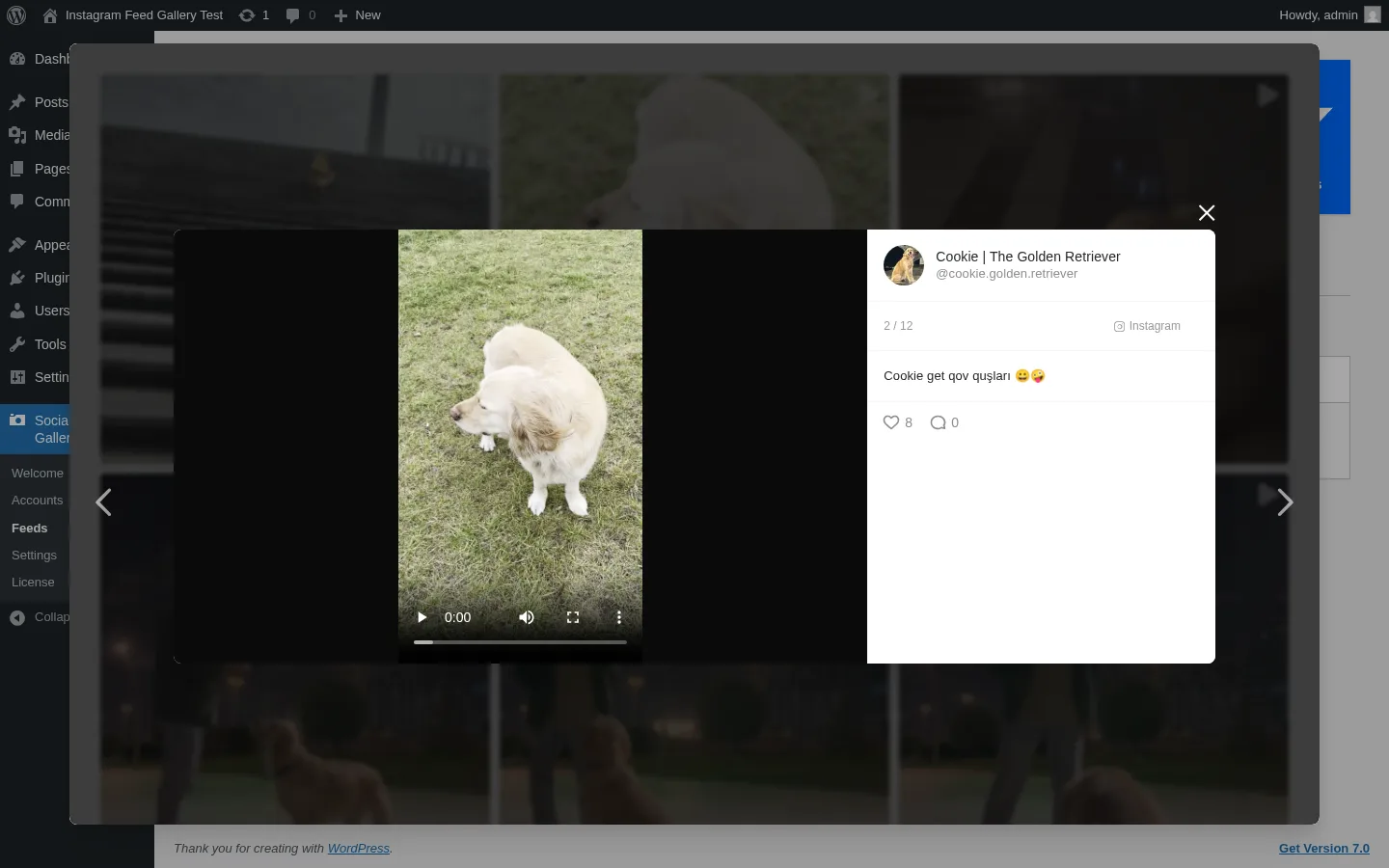
Clicking any thumbnail opens the plugin's .instagram-gallery-modal overlay. The sidebar carries a profile header (avatar + display name + @handle), a position counter (e.g. 2 / 12), the caption with native emoji rendering, like and comment counts, and an Instagram button that links straight to the original post. Left/right arrows step through the feed without closing the modal.
In version 4.7.8 (early 2025), QuadLayers moved the profile display, likes count, comments count and description fields from Pro to free. That means the lightbox is now genuinely engagement-rich at the free tier — the only remaining Pro upgrade inside the modal is the Comments list (the full threaded comment view), which also requires a Business Instagram account to fetch.
5. Per-device responsive controls with custom breakpoints
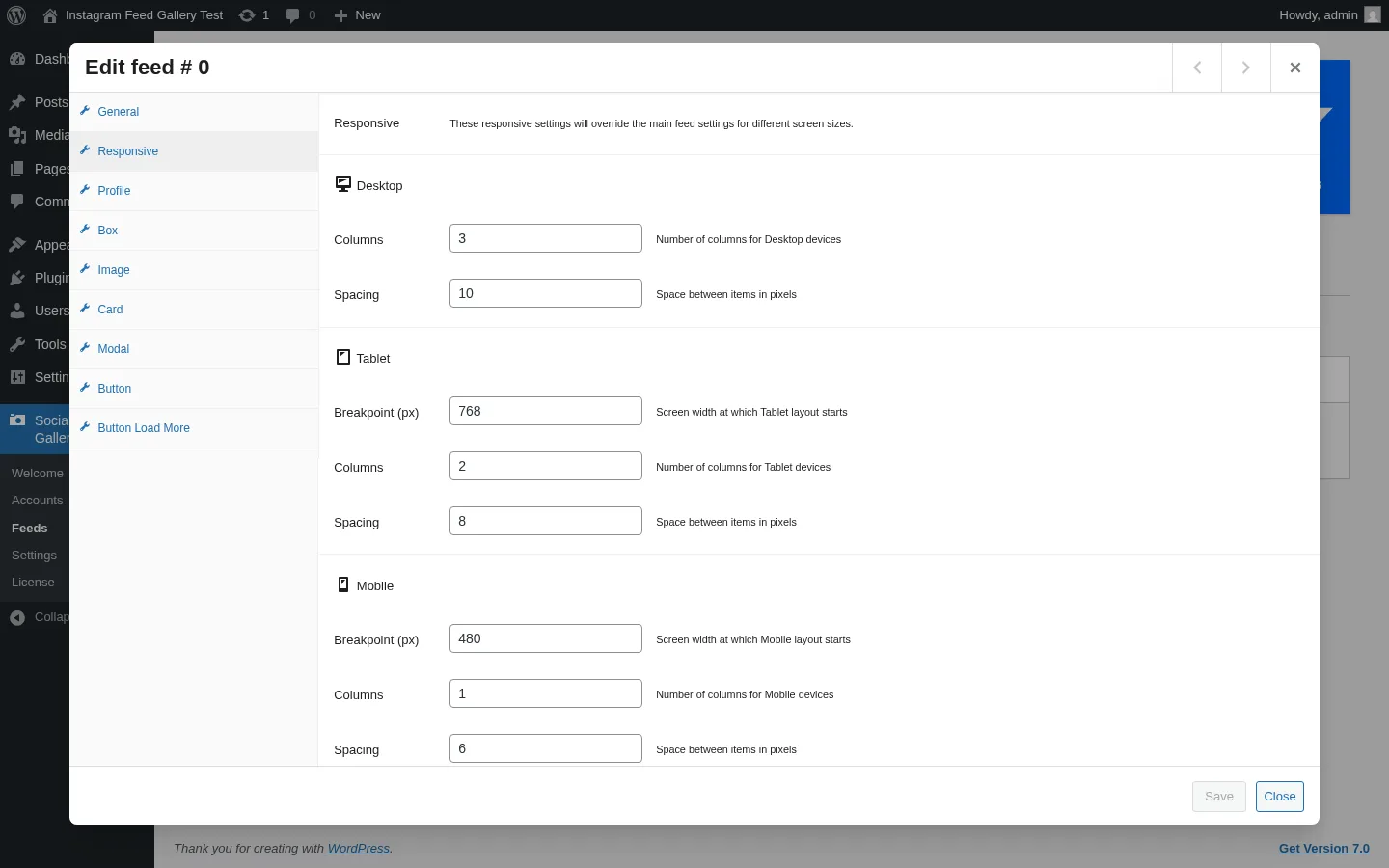
The Responsive tab lets you change column count and spacing per device — and the breakpoint pixel value at which Tablet and Mobile kick in. Defaults are sensible (Desktop 3 cols / 10 px spacing, Tablet 2 cols / 8 px from 768 px down, Mobile 1 col / 6 px from 480 px down), but you can override every value without writing CSS.
In testing, I confirmed end-to-end that these settings persist all the way to the live front-end. The same Sample Page with [insta-gallery id="0"] rendered as a 3-column desktop grid at 1440 px and collapsed cleanly to a 1-column stack on an iPhone 13 viewport. That is more granular than competitors that only give you Desktop/Tablet/Phone preview toggles without letting you edit the actual breakpoint.
6. Three embed paths — shortcode, Gutenberg block and native Elementor block
After saving a feed, the Feeds table shows the auto-generated shortcode [insta-gallery id="0"] with a one-click copy button. Note the zero-indexed ID — the first feed is always id="0", not id="1". That is a minor cognitive surprise compared to most WordPress plugins, so write it down somewhere.
Alongside the shortcode, the plugin ships a native Gutenberg block (registered as Qligg Box) and, since v4.7.8, a native Elementor block/widget — both included at the free tier. Spotlight only ships a Gutenberg block at the free tier and gates its Elementor support to the paid Essentials plan, so a free native Elementor widget is a quiet but real differentiator if you build pages in Elementor.
Instagram Feed Gallery Ease of Use / UI & UX
For most WordPress site owners, Instagram Feed Gallery is a "first feed in under five minutes" plugin. The admin shell is clean, the feed builder modal is well-organized into nine logical tabs, and the in-admin Preview Feed removes the publish-and-reload loop that other Instagram plugins force on you.
1. UI / UX
The admin shell is a familiar six-tab layout — Welcome, Accounts, Feeds, Settings, Suggestions, License — with no surprise jumps in information architecture. The feed builder is a Gutenberg-style modal with a left-rail of nine sub-tabs, which makes long sessions easy to scan.
2. Setup
One-click Instagram token + a pre-built Welcome screen with Premium / Demo / Documentation / Professional CTAs gets you onboarded fast. The biggest source of friction here is not the plugin itself — it is Instagram requiring a Business account if you want Stories, Tagged or public Hashtag feeds, which is an Instagram-side limitation, not a QuadLayers choice.
3. Feed builder clarity
Nine sub-tabs (General, Responsive, Profile, Box, Image, Card, Modal, Button, Button Load More) cover every customization point cleanly. The only slight friction is that some Pro toggles (e.g. multi-account dropdown, Comments list in the modal) are visible at the free tier but only function with Pro active, which can be confusing until you check the License tab.
4. In-admin Preview
The Preview Feed modal is the single best developer experience in this category. Tweak a value, click Preview, see real Instagram media render in three to five seconds. For agencies QA-ing client work, that is genuinely time-saving.
5. Friction points
Two small annoyances. The Highlight layout can spin for 10–15 seconds before its featured tile finishes loading, which is functional but slow. And the in-admin Suggestions tab is an aggressive cross-sell of the wider QuadLayers portfolio (WhatsApp Chat, Direct Checkout, Checkout Manager, Invoice Manager and more); some 1-star reviewers find it pushy.
Instagram Feed Gallery Performance
In day-to-day use, Instagram Feed Gallery is fast where it matters (front-end render, admin navigation, caching) and slow only in one specific corner (the Highlight layout's first paint). The plugin also enqueues its frontend JS and CSS conditionally — only on pages that actually contain an [insta-gallery] shortcode — so there is no global performance overhead on the rest of the site.
1. Front-end render speed
The published Sample Page rendered the saved feed in well under three seconds on a 1440×900 desktop viewport, with a 70.8 KB page weight. Playwright reported zero JavaScript errors across the full desktop and mobile render. The plugin's qligg-frontend-js and React bundle load only on pages that need them.
2. Admin responsiveness
Tab navigation between Welcome, Accounts, Feeds, Settings, Suggestions and License is instant after the first paint. The feed builder modal opens in roughly three seconds.
3. In-admin preview render
Gallery and Carousel preview renders complete in three to five seconds. Masonry takes six to eight seconds because of the variable-height layout pass. Highlight is the slowest at 10–15 seconds — functional, but the only layout where the spinner is genuinely noticeable.
4. Caching
Sane defaults out of the box. The plugin caches user media for six hours and Instagram Stories for one hour, with a per-feed manual flush button on the Feeds list and a global Cache Expiration override in Settings. The plugin is also compatible with WP Rocket, W3 Total Cache and WP Super Cache.
5. Stability
Across the full hands-on workflow — six admin tabs, nine sub-tabs in the feed builder, four layout cycles, lightbox navigation through 12 posts, settings save and license activation — I observed zero PHP fatals and zero browser console exceptions.
Instagram Feed Gallery Support, Documentation & Learning Resources
Support is offered through the QuadLayers ticket system (Premium plugin only — the free plugin uses the public WordPress.org support forum) plus a community Facebook group linked from the in-product Welcome tab. QuadLayers' own homepage advertises "real engineers respond in under 6 hours" and "24/7 support," and the WordPress.org support meta shows 3 of 4 threads resolved in the most recent two-month window — both healthy signals.
Support quality is, on balance, mixed. The plugin's 4.5★ average reflects a strong base of positive Pro support experiences — Peter Brauneis (March 2026) wrote: "Helpful and great support. I always liked the plugin. When it comes to support. I only can recommend these guys." But the WordPress.org review feed also contains a recurring 1-star cluster from paid Pro buyers reporting much longer waits — "Paid the pro version, but no support – ignored for nearly 2 months" (thomasgcom). The vendor replies to virtually every public review, signed by Matías Mastromarino (son of QuadLayers' CEO), which is itself a positive trust signal — but I would set expectations around "good when it lands, occasionally slow under load" rather than the homepage's blanket sub-6-hour promise.
On the documentation side, the docs hub at quadlayers.com/documentation/instagram-feed-gallery/ indexes the right sections (Installation, Activation, Welcome, Account, Feeds, Shortcode, Settings, API for Tokens / Business / Tag, FAQ, App Privacy), but the index itself is shallow — most pages are short walkthroughs rather than deep technical references. QuadLayers does not publish a dedicated video tutorial channel for this plugin, although the official Demo page is itself a working live install you can explore.
Instagram Feed Gallery User Reviews & Reputation
I read through the most-recent page of the 301-review backlog on the WordPress.org reviews tab (roughly the last 30 review threads) plus the most-recent page of the support forum to map the real-world reputation picture.
Overall impression. The 4.5★ average from 301 reviews skews heavily positive — 248 of 301 ratings are 5-star, with 5 reviews landing in the last 30 days as of mid-2026, which signals healthy review velocity over an 80,000-install base.
Most praised strengths. The two consistent positive themes are simplicity and free-tier usefulness. Italian reviewer clan2asd (March 2026) called it "semplice ed intuitiva" (simple and intuitive). leandrik (April 2026) added: "I just installed it and even the free version looks good, thanks." GeorgiaG gave it "high marks for being the easiest plugin for Instagram to set up," and simon0809455 wrote, in a direct shot at Smash Balloon's free offering: "Better than Instagram Feed." The visual output quality also gets called out repeatedly — bettinaf praised the "clearest feed pictures" and kazuyk (April 2026) called it "a convenient and beautiful Instagram feed plugin. I prefer it to other similar plugins."
Most criticized weaknesses. Three negative clusters dominate the 1-star tail. The first is token / "does not work after connecting" — keithflick (February 2026) wrote: "It does not work even after connecting account... The plugin does not detect this and does not update. Literally nothing happens." This is a category-wide problem caused by Instagram Graph API changes, and QuadLayers has shipped multiple token-handling patches (v4.5.1, v4.5.3, v4.6.2, v4.9.5, v4.9.9), but it remains the most visible negative pattern. The second is Pro support response time, with several paid buyers reporting multi-week or multi-month ticket waits despite the under-6-hours homepage promise. The third is in-admin friction — the deactivation feedback modal and the Suggestions cross-sell tab both attract complaints from buyers who find them pushy. These are real but minor in the broader rating context.
Instagram Feed Gallery Pricing & Value
Instagram Feed Gallery is sold as a freemium product, with a free plugin on WordPress.org and a paid Pro plugin (Social Feed Gallery PRO) that runs alongside the free version. Both must be active for Premium features to unlock. QuadLayers publishes both Annual and Lifetime price tiers — and the Lifetime option is genuinely uncommon in this niche.
- Free — $0, 1 site. Includes Gallery and Carousel layouts, native Gutenberg + Elementor blocks, lightbox with profile, likes, comments and description (free since v4.7.8), per-device responsive controls and the in-admin Preview Feed modal.
- Personal Annual — $49 / year for 1 site. Adds Masonry and Highlight layouts, Load More pagination, Aspect Ratio control, Box-mode color customization, profile branding overrides, public Hashtag / Tagged / Stories feeds (Instagram Business account required) and multiple Instagram accounts.
- Agency Annual — $99 / year for 5 sites. Same features, 5-site activation.
- Developer Annual — $149 / year for unlimited sites. Same features, unlimited activations.
- Personal Lifetime — $99 one-time for 1 site. Same Pro features with lifetime support and lifetime updates.
- Agency Lifetime — $199 one-time for 5 sites.
- Developer Lifetime — $299 one-time for unlimited sites.
The free tier is unusually usable — most cost-sensitive buyers will get a perfectly respectable Instagram gallery without ever upgrading. Pro is worth it only if you genuinely need Masonry or Highlight layouts, multiple connected accounts, or Hashtag / Tagged / Stories sources (which also require an Instagram Business account on Instagram's side — QuadLayers cannot bypass that requirement).
The Lifetime tier is the real headline. At every level, Lifetime pays for itself in roughly two years versus the matching Annual plan — and Smash Balloon does not sell a Lifetime tier at all for Instagram Feed Pro, while Spotlight Social Media Feeds shows a Lifetime toggle in its in-product UI without publicly pricing it. For a long-term WordPress site, the $99 Personal Lifetime is the cheapest credible "buy once, never renew" Instagram-feed plugin in the niche. Pro support is included with every paid plan; the 30-day money-back guarantee on the QuadLayers product page is unconditional ("for any reason"). There is no monthly billing — Annual or Lifetime only.
One commercial caveat: QuadLayers shows a SAVE20 20%-off promo code in a popup on the product page. Treat it as marketing-channel pricing, not stable list pricing — your evergreen buying decision should be based on the list prices above, not on the temporary discount.
Instagram Feed Gallery Pros and Cons
Instagram Feed Gallery is the kind of plugin you can recommend to a non-technical client and still feel good about a year later — the free tier is genuinely usable, the Pro tier is fairly priced, and the Lifetime option is unique in the niche. The weaknesses are mostly category-shared (token churn, in-admin upsells) rather than dealbreakers.
Pros
- One-click Instagram token, no Facebook App required: Add Personal Account / Add Professional Account buttons kick off OAuth directly, with a manual-token escape hatch when ad blockers swallow the popup. Lowest setup friction in the category.
- Genuinely usable free tier: Gallery and Carousel layouts, native Gutenberg and Elementor blocks, lightbox with profile/likes/comments/description and per-device responsive controls are all free. Most single-account brands never need to upgrade.
- Only publicly-priced Lifetime license in the niche: $99 / $199 / $299 one-time tiers beat both Smash Balloon (no Lifetime) and Spotlight (Lifetime not publicly priced) on long-term TCO.
- In-admin live Preview Feed: Real Instagram media renders inside an admin modal without publishing a draft page. Significant DX win for agencies and freelancers.
Cons
- Instagram-only despite the "Social Feed Gallery" rebrand: No Facebook, X, TikTok, YouTube, Pinterest or LinkedIn feeds. Buyers who need a multi-network social wall should look at Smash Balloon's All Access bundle.
- Highlight layout is the slowest to render: First-paint spinner can sit for 10–15 seconds before the featured tile finishes loading. Functional, but the only meaningful UX nit in the plugin.
- Pro support response time is inconsistent: QuadLayers advertises sub-6-hour responses; the WordPress.org review tail contains paid buyers reporting multi-week waits. Set expectations accordingly.
- In-admin Suggestions tab is an aggressive cross-sell: The full QuadLayers portfolio (WhatsApp Chat, Checkout Manager, Direct Checkout, Invoice Manager) is promoted inside wp-admin. Some 1-star reviewers flag this as pushy.
Who Should Use Instagram Feed Gallery?
This plugin is sharp where it is sharp — single-brand Instagram feeds, agencies on a budget, Lifetime-license buyers — and clearly wrong for the buyer who needs multi-network publishing. Match the use case before you spend.
Who Should Use It
- Single-Instagram-account brands, creators and small businesses: Hospitality, food, lifestyle, photography portfolios and real-estate sites that want a clean Instagram gallery on WordPress without paying Smash Balloon-tier list prices.
- Cost-sensitive agencies: $99/yr for 5 sites (Agency Annual) or $199 lifetime is materially cheaper than Spotlight Pro's $99/yr per-site and Smash Balloon Plus's $198 list per 5 sites.
- Lifetime-license buyers: Anyone who wants a one-time payment and no renewal headache — the $99 Personal Lifetime is the cheapest credible Instagram-feed plugin you can buy once and own forever.
- Existing QuadLayers customers: Brands already running QuadLayers' WhatsApp Chat, Direct Checkout or Checkout Manager will already trust the vendor and licensing system.
Who Should Skip It
- Buyers who also need Facebook, X, TikTok or YouTube feeds in one plugin: Send these readers to Smash Balloon's All Access Bundle — Instagram Feed Gallery is Instagram-only and not adding networks.
- Buyers who need to publish to Instagram from WordPress: This is display-only. For outbound publishing, look at FS Poster.
- Buyers who need free Stories, Tagged or public Hashtag feeds without a Business Instagram account: All three require Pro and an Instagram Business / Professional account — an Instagram-side limit no plugin can bypass.
- Buyers who want a built-in Link in Bio page, Shoppable feeds or Instagram analytics: Recommend Spotlight Pro or Agency instead. Instagram Feed Gallery does not ship any of these.
Best Instagram Feed Gallery Alternatives
If Instagram Feed Gallery is not the right fit — usually because the buyer needs multi-network coverage or features like shoppable feeds and Link in Bio — these are the alternatives I would put on the shortlist. For the full ranked comparison across every credible plugin I tested in this category, see my best WordPress social media feed plugins roundup.
- Smash Balloon Instagram Feed Pro: The market leader at 1M+ installs and 4.9★. Strongest pick if you need Facebook, X, YouTube, TikTok and Reviews feeds in the same family — the All Access Bundle at $299 / yr intro ($598 / yr renewal) covers unlimited sites and all seven plugins for one annual price. Best for established brands with budget that prefer breadth over Lifetime pricing. Read the full Smash Balloon review for the side-by-side detail.
- Spotlight Social Media Feeds: Closely-matched #2/#3 by install count, polished editor, deeper layout library (9 templates × 4 layouts) and one genuinely differentiated Pro feature — the Promotions automation that maps an Instagram hashtag to a WordPress page or product. Essentials from $59 / yr. Best for buyers who specifically want Link in Bio, Shoppable feeds or Promotions automation. Read the full SpotlightWP review.
- WP Social Ninja: An all-in-one social proof plugin covering five-network feeds, 10+ business review sources, 15+ chat-widget channels, notification popups and testimonials under one Pro license. Single Site from $89 / yr (currently $44 / yr at the 50% promo). Best for sites that want to consolidate feeds, reviews and chat into one bundle. Read the full WP Social Ninja review.
- WPZOOM Social Feed Widget & Block: A lightweight Instagram-only plugin from WPZOOM, mainly relevant for buyers already running a WPZOOM premium theme or anyone who values asset-gating, AJAX initial load and server-side image caching. Starter from $49 / yr; the $599 one-time Lifetime All Access Pass bundles every WPZOOM plugin and theme. Read the full WPZOOM Social Feed review.
- Easy Social Feed: Multi-network (Instagram, Facebook, YouTube, X) display plugin with 30,000+ installs and a 500-review history (4.6★). A reasonable budget alternative if you want more than Instagram without paying Smash Balloon prices — the $89 / yr COMBO bundle and $259 one-time Lifetime are the cheapest "all four networks" tiers in the niche. Read the full Easy Social Feed review.
Final Verdict: Is Instagram Feed Gallery Worth It?
Yes — with two caveats. If you run a single-Instagram-account brand or portfolio on WordPress and you want a clean, customizable Instagram gallery without paying Smash Balloon list prices, Instagram Feed Gallery is the strongest value pick in the niche. The free tier alone covers Gallery and Carousel layouts, native Gutenberg and Elementor blocks, a lightbox with profile and engagement counts, and per-device responsive controls — most buyers genuinely will not need to upgrade. The $99 Personal Lifetime is the cheapest credible "buy once" option in the WordPress Instagram-feed market.
The two caveats. First, anything Stories / Tagged / Hashtag-related needs both Pro and an Instagram Business account — set expectations clearly before you buy. Second, expect occasional token-refresh hiccups when Instagram changes its Graph API, and budget time accordingly; that is a category-wide issue, not a QuadLayers-specific bug, but it is real. If you can live with both, this is the best Lifetime-priced Instagram-only WordPress feed plugin you can buy in 2026.
And if you also need to push WordPress posts out to Instagram in the other direction, pair Instagram Feed Gallery with FS Poster — inbound display plus outbound publishing covers both halves of the WordPress + Instagram workflow.
Instagram Feed Gallery FAQ
Is there a free version of Instagram Feed Gallery?
Yes. The free plugin is listed on WordPress.org as Social Feed Gallery (slug insta-gallery) and includes Gallery and Carousel layouts, native Gutenberg and Elementor blocks, lightbox with profile and engagement counts, per-device responsive controls and the in-admin Preview Feed modal. 80,000+ active installs run on the free tier alone.
Is Instagram Feed Gallery beginner-friendly? Yes. The one-click Instagram token flow does not require creating a Facebook Developer App, the 9-tab feed builder is logically organized, and the in-admin Preview Feed modal removes the publish-and-reload loop that other Instagram plugins force on you. Most users build their first feed in under five minutes.
Does Instagram Feed Gallery work with Elementor? Yes. Since version 4.7.8, the plugin ships a native Elementor block/widget at the free tier. You can drag the feed straight into an Elementor page without using a shortcode. The plugin also ships a native Gutenberg block (registered as "Qligg Box") and supports the legacy Classic Widget area.
Do I need an Instagram Business account? Only for certain features. Personal Instagram accounts work fine for the default Username source (the connected account's own media). Public Hashtag feeds, Tagged feeds and Stories feeds all require an Instagram Professional / Business account and a Pro license — this is an Instagram Graph API requirement, not a plugin choice.
What are the best Instagram Feed Gallery alternatives? For multi-network coverage, Smash Balloon Instagram Feed Pro and its All Access Bundle. For deeper Instagram-specific tooling like Link in Bio, Shoppable feeds and hashtag-to-page Promotions automation, Spotlight Social Media Feeds. For a budget multi-network alternative with a long review history, Easy Social Feed. See the alternatives section above for the side-by-side detail.
Write once. Post to 26 networks.
- 26 social networks
- Schedule & auto-repost
- Runs inside wp-admin


