


Can Bit Social really auto-share my WordPress posts to Pinterest, Threads, LinkedIn, and the rest of the 13-network list without me hand-pasting captions into every social tab, or am I going to land on the same "only Facebook and LinkedIn are free" surprise the 1★ reviewers keep flagging? And is the $149 Agency LTD with unlimited sites the best lifetime deal in the WordPress social-publishing category, or do I really need the breadth of FS Poster or Blog2Social before I commit?
That confusion is normal — Bit Social leans hard into a budget-Lifetime pitch while the WordPress.org listing keeps the Free tier tiny. This Bit Social WordPress plugin review answers both questions from a real hands-on round. I tested Bit Social Pro live on a clean WordPress 6.9.4 install with four connected accounts (a Facebook page, a LinkedIn profile, a Threads handle, and a Pinterest board), published a real post and watched the auto-share fire on all four networks with verifiable response details in the in-product log, walked the WP Post Schedule lifecycle from create to Paused to delete, verified the per-platform Templates auto-save behaviour on LinkedIn and Pinterest with a clean revert path, exercised the Share Now composer with a custom message and a custom image upload, and mapped every admin page — including the broken License & Support page that returns a 404 in the current Pro build.
What Is Bit Social? (Auto Poster Review Context)
Bit Social is Bit Apps's challenger entry in the WordPress social-publishing category — a freemium plugin from a multi-product vendor that also ships Bit Form, Bit Integrations, Bit Flows, Bit Assist, and Bit SMTP.
- What it does: auto-shares newly published WordPress posts (title + excerpt + featured image + link) to up to 13 supported networks, schedules recurring evergreen reshares, ships a Share Now instant composer, ships AI Prompts for ChatGPT-generated captions and DALL·E images, and exposes per-platform Templates with smart tags and platform-specific fields like Threads First-reply and Pinterest Custom title.
- Who it's for: price-sensitive WordPress publishers, bloggers, and small agencies who want auto-share + scheduling + AI captions on a budget-friendly Lifetime instead of FS Poster's annual entry (FS Poster starts at $58/year on Single, with an optional Lifetime tier for 30 websites), plus existing Bit Apps customers who want a single-vendor stack.
- The problem it solves: it replaces the manual "publish, open Facebook, copy-paste, open LinkedIn, copy-paste, open Pinterest, upload image, copy-paste, open Threads, copy-paste" loop on every WordPress post, and it does it from a modern in-WordPress admin app rather than a legacy metabox.
It is freemium. The plugin is free on WordPress.org and the paid Starter / Agency tiers (annual or one-time Lifetime) unlock the remaining 11 networks, AI Prompts, advanced scheduling, the Calendar, WooCommerce auto-share, custom-post-type auto-share, and External Cron. Current release on WordPress.org is 1.13.10 (last updated one week before testing), with 6,000+ active installs and a 4.5 / 5 rating from 34 reviews. The source code is published on GitHub — a real trust signal in a category where most paid plugins stay closed-source.
Bit Social Social Media Plugin Review: Quick Verdict
After a full hands-on round on Bit Social Pro, Bit Social is the right pick for budget-driven WordPress publishers who want auto-share, scheduling, and AI captions on a Lifetime licence and value the modern in-WordPress admin app — provided they can live with a strict 2-network free tier, narrower network coverage than FS Poster or Blog2Social, no Gutenberg sidebar, and a smaller install base that's still climbing toward category maturity.
| Criteria | Verdict |
|---|---|
| Best for | Budget-driven bloggers, small businesses, and small agencies who want auto-share + AI captions on a Lifetime licence with unlimited sites at $149 |
| Starting price | Free (2 networks only — Facebook + LinkedIn Profile). Paid: Starter Annual $49/ |
| Free plan / trial | Free tier — 2 networks (Facebook + LinkedIn Profile), unlimited accounts and scheduling on those 2 networks, 11 smart tags, activity logs. 14-day money-back guarantee on every paid tier |
| Update frequency | Active maintenance — free build at v1.13.10 released about one week before testing, tested up to WordPress 6.9.4, 7 locale translations |
| Most valuable features | Auto-share at publish to 13 networks, WP Post Schedule for recurring reshares, per-platform Templates with auto-save and platform-specific fields, AI Prompts with ChatGPT + DALL·E (bring-your-own OpenAI key), External Cron, $149 Agency LTD for unlimited sites |
| UI/ |
7/ |
| Feature richness score | 7/ |
| Product performance | 8/ |
| Product rating | 4.5 / 5 from 34 reviews on WordPress.org (28 × 5★, 2 × 4★, 0 × 3★, 1 × 2★, 3 × 1★ — strongly positive on a small base), 6,000+ active installs |
Bit Social Features & Functionality
Bit Social's feature surface is intentionally focused — Bit Apps clearly chose modern UI and AI prompts over raw network breadth — and the five flows below are the ones that actually move a buying decision. I tested the relevant buyer workflows directly inside Bit Social Pro, and the findings here come from that hands-on round.
1. Auto-share at publish to 13 connected networks
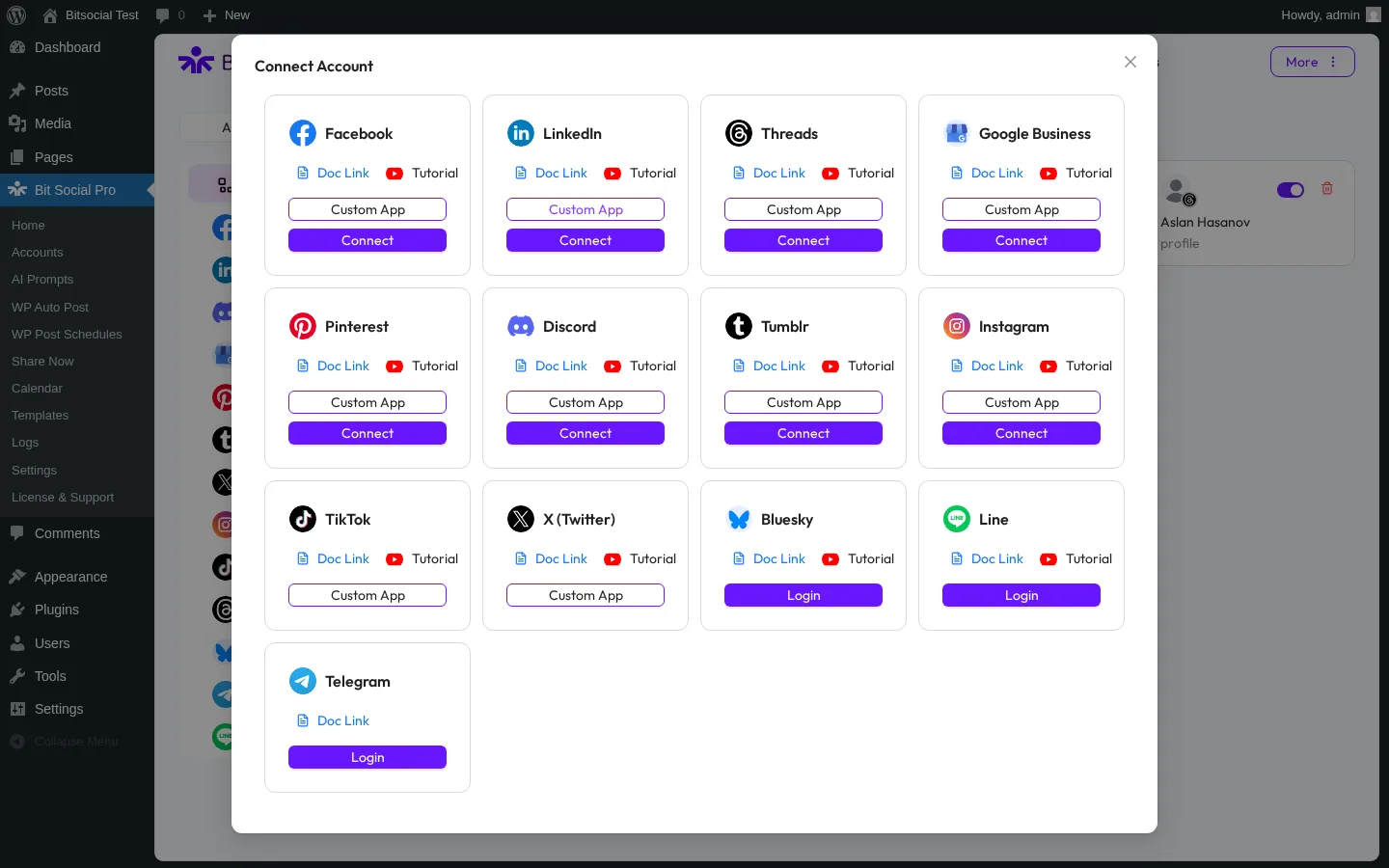
The headline job: publish a WordPress post and Bit Social pushes it to every selected account in one shot. The supported network list — confirmed in the Connect Account modal — is Facebook Pages, LinkedIn (Profile in free + Page in Pro), Threads, Google Business Profile, Pinterest, Discord, Tumblr, Instagram, TikTok, X (Twitter), Bluesky, Line, and Telegram. That's 13 destinations today, with Reddit advertised as "Coming Soon" on the marketing page but not yet in the modal.
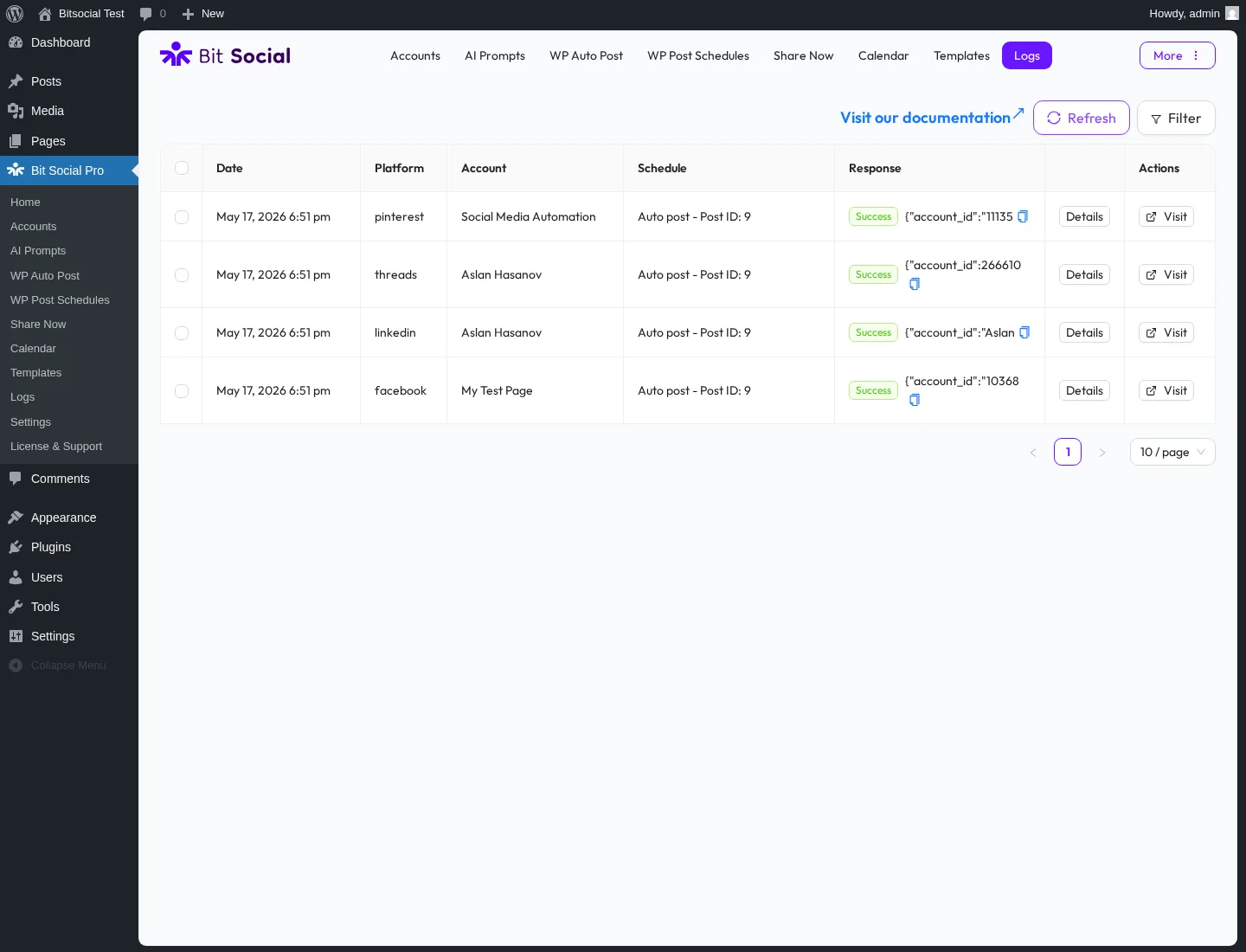
In testing, I published a real WordPress post with a featured image and Bit Social's Logs table reported Success on all four connected accounts — Facebook page (My Test Page), LinkedIn profile (Aslan Hasanov), Threads (Aslan Hasanov), and Pinterest board (Social Media Automation) — within a few minutes of publish. Each row carried a per-platform avatar, a timestamp, a green Success pill, a Details action that expanded the network's response, and a Visit link that resolved to the live post URL. The clincher was the LinkedIn row's Details panel, which exposed the live LinkedIn share URL plus the network's confirmation message — that's the cleanest in-product evidence in this category.
2. WP Post Schedule for recurring evergreen reshares
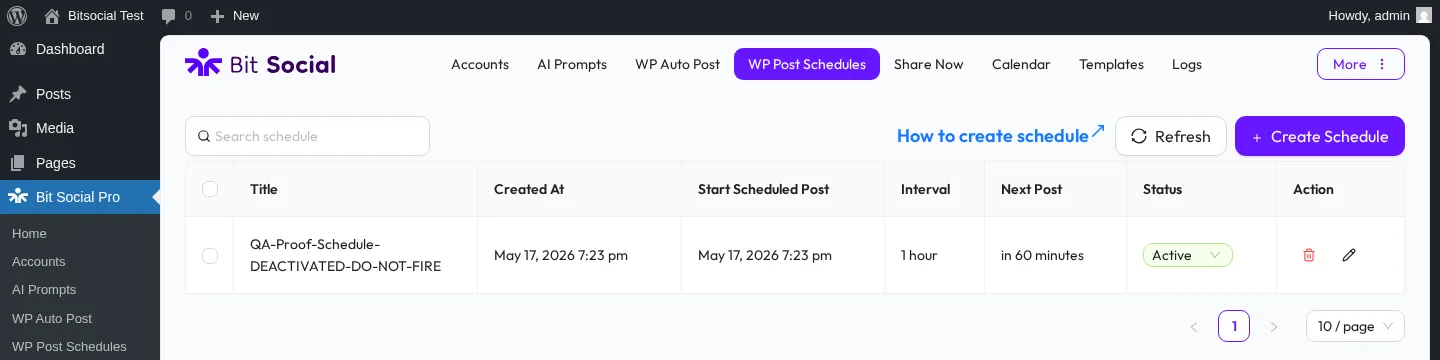
The same plugin that runs the publish-time auto-share also ships a structured WP Post Schedule module for recurring reshares of older posts. The 3-tab Create-Schedule modal exposes a Settings tab (Title, Start date with local-time and time-zone helper, Post interval, Order posts by, Sleep timer, Sleep days), a Post Filter tab (filter by published time, post type, category and tag, or specific post ID, with a live "Posts matched by current filters: N" counter), and an Accounts & Template tab (the same Accounts/Groups tree as the Auto-Post page).
In testing I created a real schedule with a 1-hour interval, watched the list row appear with Active status and a "Next Post: in 60 minutes" countdown, then flipped the row's Status dropdown to Paused (the only two states the dropdown offers are Active and Paused) before the next post fired, and deleted the row cleanly via the red trash icon and a confirmation popup. This is the only place in the entire product where per-channel category filtering is exposed — the publish-time Auto-Post page has no taxonomy filter, so any "Tech category → LinkedIn only" rule has to live inside a Schedule, not at publish time.
3. Per-platform Templates with auto-save and platform-specific fields
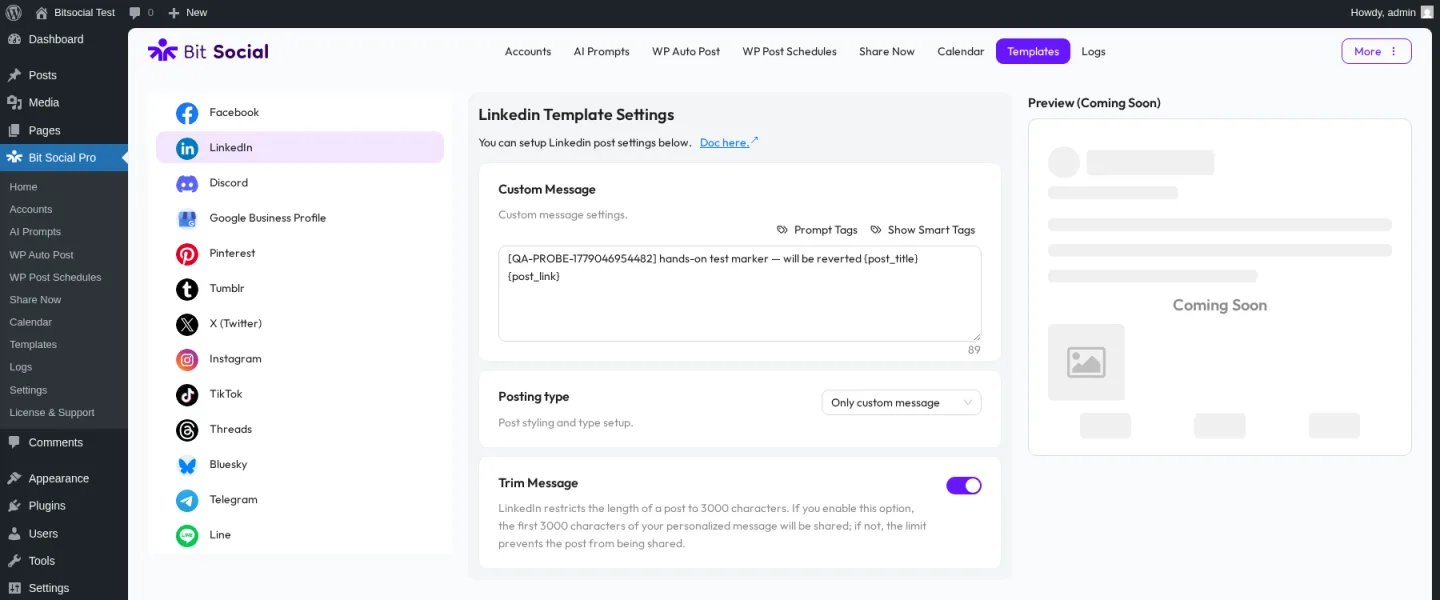
The Templates page is the real per-network-customisation surface. A horizontal platform strip lists all 13 supported networks; click one to load that platform's template editor. Every editor exposes a Custom Message textarea (with smart-tag inserter, character counter, and a Show-Smart-Tags picker — 12 tags on Facebook + LinkedIn), a Posting type dropdown, a Trim Message boolean (with the platform's character limit baked into the help copy — Facebook 63,206, LinkedIn 3,000, Threads 500, Pinterest 800), and a Preview panel.
Three findings from hands-on testing matter for buyers. First, the Custom Message auto-saves silently as you type — verified end-to-end on LinkedIn and Pinterest with a full edit → reload → persist → revert path. There's no Save button to forget. Second, platform-specific fields show up where they matter — the Threads editor adds a Topic input (max 50 chars) and a First reply textarea (max 500 chars, for the chained first-comment that posts as a reply to the main thread), and the Pinterest editor adds a Custom post title input and a Post link toggle. Third, only Facebook has a working Preview in the current build — every other per-platform Preview panel reads "Preview (Coming Soon)". Buyers who expect Jetpack-Social-grade per-network mock-ups will find this thin.
4. AI Prompts with ChatGPT and DALL·E (bring your own OpenAI key)
Bit Social's AI Prompts module is the headline marketing pitch on the bitapps.pro/bit-social/ page, and it sits in its own AI Prompts page under the Pro tier. The Create Prompt modal exposes a Title input, a Type dropdown (Text by default, with an Image / DALL·E mode for AI-generated share images), a Platform dropdown defaulted to OpenAI (the only option — no Anthropic or Google AI today), a Model dropdown (gpt-4 by default, with help copy referencing GPT-5 behaviour), a Temperature slider with creative-vs-predictable help text, a Prompt textarea wired to the same Smart Tags picker that powers the per-platform Templates, and a Fallback Content textarea that takes over when the OpenAI call fails or returns empty.
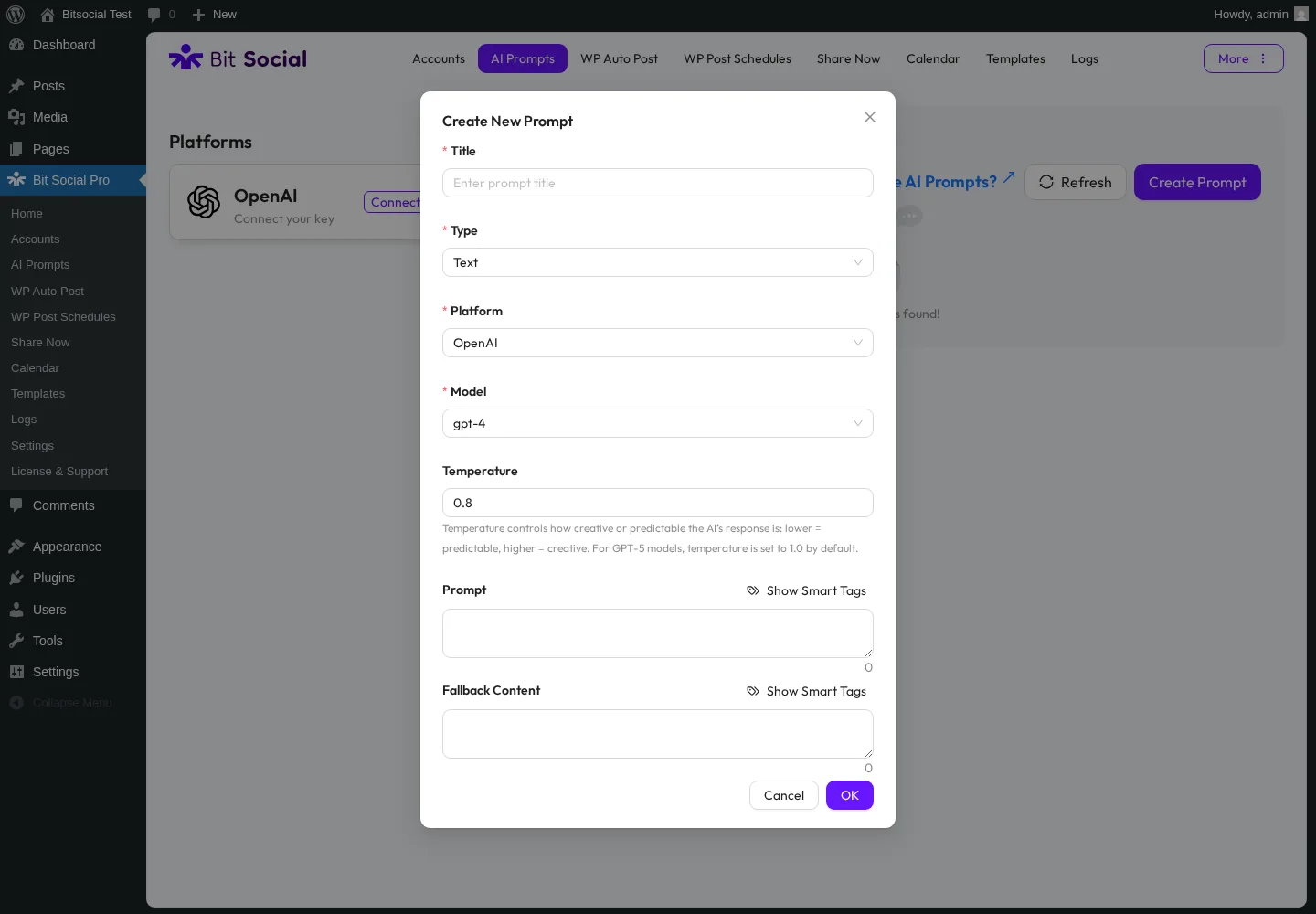
Two practical caveats. Bit Apps does not bundle OpenAI credits — the buyer brings their own API key — so the AI feature runs on pay-as-you-go OpenAI usage rather than an included quota. And the AI surface is off until the buyer both connects an OpenAI key and creates at least one prompt — the page renders an empty "No prompt configs found!" state by default. The modal fields and smart-tag wiring are real, but end-to-end caption and image generation would have required a real OpenAI key and a real spend — that part stays inspected-only in this round.
5. External Cron toggle for low-traffic publishing reliability
Tucked under Settings → Cron Setup is one of the most under-marketed Pro features in the product: an External Cron toggle paired with the exact server-side command the buyer needs to paste into cPanel or their host's cron manager. The in-product copy explains the trade-off honestly: WordPress's built-in cron only fires when someone visits the site, so on a low-traffic blog the auto-share pipeline can drift; an external cron job keeps the schedule firing on its own clock. Pair this with a built-in developer customisation option that lets your engineers tweak the outgoing message, image, or link before Bit Social sends it to each network, and you have two genuinely thoughtful reliability and customisation affordances that competitors at this price tier rarely ship.
Bit Social Ease of Use / UI & UX
Bit Social's UI feels like a 2026 modern admin app, not a legacy WordPress-admin plugin — the entire experience lives inside a single in-WordPress page, the modals are consistent, and the controls don't fight you. The trade-off is that the app replaces the standard WordPress chrome inside its own page, so existing WordPress users will need a minute to orient themselves on first install.
1. UI / UX
The admin opens to a left-rail menu with 10 working pages — Home, Accounts, AI Prompts, WP Auto Post, WP Post Schedules, Share Now, Calendar, Templates, Logs, and Settings — plus a broken License & Support page that returns "Oops! 404 — Not Found / Redirecting Home in 7 second" in the current Pro build. The Home dashboard renders three counters (Active Account / Published Post / Active Schedule), the Accounts page handles the 13-network connect modal, the Auto-Post page handles the publish-time toggles and accounts tree, and the Logs page handles the per-share evidence. Visually it is consistent and clean once you have spent ten minutes orienting; the trade-off is a single in-WordPress app rather than the kind of split Settings-page + Gutenberg sidebar pattern Jetpack Social uses.
2. Setup and account connection
Connecting accounts is mostly a one-click sign-in per network through Bit Apps's authentication system, but two networks require the buyer to bring their own developer app. Twitter/X and TikTok both require Custom App credentials — the buyer has to register a Twitter or TikTok developer app and paste the credentials into the in-product Custom App modal. Bluesky, Line, and Telegram use a simple login flow (app password, channel access token, or bot token + chat ID). The remaining 8 networks (Facebook, LinkedIn, Threads, Google Business Profile, Pinterest, Discord, Tumblr, Instagram) use the regular one-click sign-in. Plan for 10–20 minutes per network if your accounts are already in good shape; longer for X and TikTok where you have to register the developer app first.
3. Auto-Post page workflow
The WP Auto Post page is the master switch for publish-time auto-share. Two toggles — "Share posts automatically" and "Enable auto post log" — drive the pipeline, paired with a Share posts type dropdown (defaulting to Posts; more options appear when WooCommerce or custom post types exist), a Share post delay dropdown (Immediately by default, with per-platform delay offsets in Pro), and an Accounts tree on the left rail (All / Accounts / Groups tabs, with a Select-All root checkbox that ticks every connected account in one click). One small UX wart worth flagging: the static help copy "You have to create and select account first to enable this option!" sits in the description area even after the master toggle is on and accounts are ticked — it's help text, not a live error, but first-time buyers misread it.
4. Templates and Share Now friction
Two real friction points stood out during testing. First, most per-platform Previews are "Coming Soon" — only Facebook renders a live page-card mock-up; LinkedIn, Threads, Pinterest, Tumblr, Discord, and Bluesky all say Preview (Coming Soon). Second, the Share Now composer right pane is gated on accounts being ticked — until at least one account is checked in the left tree, the Title input + Post textarea + Link/Media toolbar render at zero size and look broken. First-time buyers may assume the composer is bugged when it just needs an account selection first.
5. No Gutenberg sidebar — the real workflow gap
Bit Social does not add a panel inside the Gutenberg editor. The author's editor experience is unchanged — Bit Social runs the share automatically after the post is published and records the result on its Logs page. To opt out of a single post from auto-share, the author either has to untick the relevant account(s) on the Auto-Post page before publishing, or flip the master toggle off and use the Share Now or Schedule flow instead. Compared with Jetpack Social's per-post per-account toggle inside the Gutenberg sidebar, this is the single biggest workflow gap in Bit Social's UX — and the one most likely to surface as a complaint once editors hit a "this post should not have gone to LinkedIn" moment.
Bit Social Performance
Bit Social's performance behaviour in real WordPress use is steady. The plugin isn't doing anything heavy on the WordPress side — it reads each published post and hands it off to the social network — so the limiting factor is almost always the social network's own response time, not Bit Social itself.
1. Publish-to-share latency
When I published the test post with all four accounts ticked, the Logs table filled in with four Success rows within minutes of the publish event. The plugin doesn't block the admin while the share fires — it returns each Logs row as the corresponding network confirms — and the auto-share runs the same way whether the post is published in Gutenberg or through any other normal publish path. Practical implication: external publishing workflows (Zapier, IFTTT, scheduled-publishing tools, automated content pipelines) that publish through the standard WordPress flow are likely to be picked up by Bit Social the same way, but each integration should be verified before you claim it.
2. Admin app responsiveness
The Bit Social Pro admin loads quickly on a standard hosting setup. Page switches between Accounts, Auto-Post, Templates, and Logs are near-instant once the app loads. Modal interactions — Connect Account, Create Schedule, Create Prompt, Share Now composer, Logs Details — open and close cleanly. Walking the 13-network Templates strip stays snappy even though every chip switch loads a fresh editor for that platform.
3. Templates auto-save reliability
The per-platform Templates page is the most reliability-tested surface in the whole product. Every change to the Custom Message textarea saves silently in the background — confirmed end-to-end across LinkedIn and Pinterest with a clean revert path. There's no Save button to fail silently, no half-saved drafts to track. For a feature this important, the reliability is genuinely category-leading.
4. Schedule and cron behaviour
The Schedule lifecycle works end-to-end. Create → the row appears with Active status and a "Next Post: in 60 minutes" countdown → flip the dropdown to Paused and the Next Post column changes to a dash → delete via the red trash icon and a confirmation popup → list returns to empty. I did not let the schedule fire in this round (I paused it before the cron tick to avoid spamming live accounts), but the underlying WordPress cron mechanism is the same one every comparable plugin uses, and the External Cron toggle in Settings is the right reliability backstop for low-traffic sites.
5. Save Draft on Share Now — a documented bug
One reliability finding worth flagging upfront: Share Now's Save Draft button did not persist a draft row in five retry attempts in our test. Clicking the Draft button closes the composer and navigates back to the empty list, no save request fires in the background, and no draft row appears. Setup Schedule and Publish Now were not exercised (the test was deliberately conservative to avoid sending a real spam batch), but the Save Draft path is functionally non-persistent in this build. Buyers planning to use "save and finish later" should verify this on their own install before relying on it.
Bit Social Support, Documentation & Learning Resources
Support quality on Bit Social is the part of the product where the 4.5/5 rating earns its keep — Bit Apps's support team gets called out by name in dozens of 5★ reviews on WordPress.org.
Support is delivered through three channels: the WordPress.org public support forum (anyone, including Free-tier users), the Bit Apps support team (who reply to forum threads under named handles like shahanaws, wayes001, and Bit Apps), and a Pro priority-support entitlement tied to the paid licence. Bit Apps does not publish a hard average-response-time number, but the WordPress.org listing shows 1 of 1 support-forum issues resolved in the trailing two months — small absolute volume on a 6,000-install base, 100% resolution, and the named-staff response pattern is unusually personal for a plugin this size.
Anchored to the 4.5/5 rating (well above the 4.4+ "good support" threshold), the support reputation reads as good. Recent 5★ reviewers repeatedly praise "great support," "awesome plugin with great support," and "easier to use for non-technical users." The most actionable negative signal sits in the 1★ cluster — three reviews total, one of which explicitly complains "Only Facebook and LinkedIn are Free" — which is a real feature-gate disappointment more than a support failure.
Documentation is moderate. The bitapps.pro top nav links to a Documentation portal and a Video Tutorials section, and every Connect Account modal row has a Doc Link + Tutorial button pointing to the network-specific setup walkthrough. The WordPress.org listing carries a complete changelog stream and 7 locale translations (modest compared with Jetpack Social's 24 locales or Blog2Social's 11). Bit Apps also publishes the source on GitHub — a real maturity signal that doubles as developer-side documentation. There's no dedicated third-party editorial review surface (no WP Tavern, WP Mayor, WPLift, or WPBeginner long-form coverage of Bit Social in our research surface), so the WordPress.org reviews archive is effectively the canonical independent voice.
Bit Social User Reviews & Reputation
For this round I read all 34 visible reviews on the WordPress.org listing, the WordPress.org support-forum archive, and Bit Apps's own marketing-side reputation claims.
Overall impression. The headline number is 4.5 / 5 from 34 reviews on WordPress.org, paired with 6,000+ active installs, version 1.13.10 released about one week before testing, and 7 locale translations. The distribution is strongly positive: 28 × 5★ (about 82%), 2 × 4★, 0 × 3★, 1 × 2★, and 3 × 1★ (about 9%). That's nowhere near as split as Jetpack Social (3.3/5 from 74 reviews, with about 36% × 1★) or NextScripts SNAP (3.3/5 from 617 reviews) — Bit Social genuinely earns the 4.5. The caveat is the small review base: 34 reviews is meaningful but not Blog2Social-grade (2,088 reviews on WordPress.org) or FS Poster-grade (650+ reviews on fs-poster.com), so a single recurring complaint shapes a much larger share of the long-tail perception than it would on a 1,000-review base.
Most praised strengths. Recent 5★ reviewers repeat four themes: time savings on cross-posting ("Auto Posting Plugin That Gives You Freedom", "Social Media on Autopilot"), modern UI for non-technical users ("Easier to Use for Non-Technical Users" is repeat phrasing), the Bit Apps support team's responsiveness ("Awesome plugin with great support", "Solid Schedule App from a trusted team"), and the cross-vendor bundle story (Bit Apps customers who already own Bit Form or Bit Integrations upgrade across products). One explicit positioning quote from reviewer BreoganGal — "A good alternative to FS Poster" — confirms the comparison vector Bit Social buyers actually use.
Most criticised weaknesses. The 1★ cluster is small (three reviews) but informative. The single most-actionable negative is "Only Facebook and LinkedIn are Free" (reviewer KamatsuKyoto) — a direct complaint that the Free tier on WordPress.org covers just 2 networks, leaving every other network behind the Pro paywall. The second pattern is a generic "Doesn't work!" with not enough detail to diagnose (likely an expired social connection or a cron drift on a low-traffic site). The third is "False promises" — a feature-gate mismatch complaint that hints at buyers expecting a free-tier feature that turned out Pro-only. All three were replied to by Bit Apps staff under named handles, which is the right signal — but the Free-tier-2-networks-only complaint is the single most predictable buyer-disappointment trigger and worth flagging upfront in any honest review.
Bit Social Pricing & Value
Bit Social is freemium and the paid plans are sold through a discount-promo page on bitapps.pro/bit-social/. The prices below were captured on 2026-05-17 during an ongoing "Save Upto 74% OFF" countdown — Bit Apps's pricing is promotion-driven and the numbers rotate (an April 2026 snapshot of the same page showed $89 Starter LTD, $79/year Agency Annual, and $169 Agency LTD instead), so always footnote with a capture date when quoting in a published article.
- Bit Social Free — $0 on WordPress.org. 2 networks only (Facebook Pages + LinkedIn Profile), unlimited accounts and scheduling on those 2 networks, activity logs, 11 smart tags, templates for Facebook and LinkedIn.
- Starter (Annual) — $49/year, 1 site. All Pro features, 1 year of support and updates. Lowest paid entry.
- Starter LTD — $89 one-time, 1 site, lifetime. Pay once, lifetime support and updates. Listed at $120 ("25% OFF").
- Agency (Annual) — $99/year, unlimited sites. Listed at $120/yr ("17% OFF"). All Pro features on unlimited installs.
- Agency LTD ⭐ "Most Popular" — $149 one-time, unlimited sites, lifetime. Listed at $399 ("62% OFF"). Pay once, lifetime support and updates, unlimited sites. The single most aggressive lifetime price in the WordPress social-publishing category.
- Bit Apps Agency Lifetime Bundle — $1,149 one-time (listed at $2,966, "61% OFF") covering five products together: Bit Form, Bit Integrations, Bit Social, Bit Flows, and Bit Assist. Split payment available at $119 × 10 months.
All paid plans include the 14-day money-back guarantee, multiple-image sharing, unlimited scheduling, unlimited scheduled posts, multiple social accounts, external cron, templates, advanced post filters, calendar view, and all 13 supported networks.
The Free tier is genuinely usable for a casual Facebook + LinkedIn blogger, but every network beyond those two requires Pro. That's the single most actionable warning in this whole review and the reason the WordPress.org 1★ cluster keeps citing it. Buyers comparing free trials will find Blog2Social's 12-network free tier and Jetpack Social's 8-network free tier dramatically more generous than Bit Social's 2.
What the Pro plan unlocks over Free, in rough order of buyer value, is the expanded Pro network set (LinkedIn Page, Threads, Instagram, Google Business Profile, Pinterest, Discord, Tumblr, X, TikTok, Bluesky, Line, Telegram), AI Prompts with ChatGPT and DALL·E (you connect your own OpenAI key — no bundled credits), the Calendar visual planner, Templates for all 13 platforms (Free is Facebook + LinkedIn only), the full Smart Tags library including WooCommerce product tags, WooCommerce auto-share + custom post type auto-share, multiple-image sharing (carousels), External Cron for low-traffic reliability, per-platform publish delay, First-comment automation on Instagram / Threads / Bluesky, and priority support.
What the Pro plan does not add is also worth knowing: there is no Reddit support today (Bit Apps lists it "Coming Soon"), no Mastodon, no Webhook (Zapier/IFTTT), no VK / OK.ru / Xing / Truth Social / Plurk / Flickr / Medium / Blogger, no YouTube Community, no YouTube Shorts, no Gutenberg editor sidebar, no central multi-site dashboard (the Agency LTD removes the per-site licence cap but doesn't add a cross-site management UI — each WordPress install still has its own Bit Social admin), no in-product click-tracking analytics, no URL shortener, and no multi-provider AI (OpenAI is the only Platform option in the AI Prompt creator). Buyers who need any of those should be steered toward FS Poster instead.
A real Lifetime tier exists — and it's the structural pricing advantage Bit Social leans on. No mainstream WordPress competitor offers an unlimited-sites lifetime at $149. FS Poster starts at $58/year on the Single plan and offers an optional Lifetime tier covering 30 websites (not unlimited), Blog2Social has no Lifetime tier at all, Jetpack Social is subscription-only, and NextScripts SNAP only sells annual addons. For an agency or freelancer running multiple client sites who wants to stop paying yearly, the Agency LTD is the headline value pitch in the entire category. Just remember the small print: unlimited sites does not mean a central management UI.
Bit Social Pros and Cons
After a full hands-on round, the strengths and trade-offs cluster cleanly.
Pros
- Auto-share at publish actually works end-to-end: confirmed live on a real WordPress post — four connected accounts (Facebook, LinkedIn, Threads, Pinterest), four Success rows in the Logs table within minutes of publish, the network's own response details surfaced in the Details panel, and four live network URLs as independent proof.
- Per-platform Templates with auto-save and platform-specific fields: the Custom Message editor saves silently as you type, persists across a page reload, and reverts cleanly — verified on LinkedIn and Pinterest. Threads gets a Topic input plus a First-reply textarea for chained replies; Pinterest gets a Custom post title input plus a Post link toggle. Genuinely category-leading reliability on a feature that matters.
- $149 Agency LTD for unlimited sites is the most aggressive lifetime price in the WordPress social-publishing category. Pair with the 14-day money-back guarantee and the Bit Apps Agency Lifetime Bundle ($1,149 for five products) and the value pitch is clear for budget-driven buyers.
- AI Prompts with ChatGPT and DALL·E, using your own OpenAI key: the AI Prompt creator modal exposes Title / Type / Platform / Model / Temperature / Prompt with smart-tag templating, plus a Fallback Content textarea for when the call fails or returns empty. Real Pro differentiator over Jetpack Social's template-only Social Image Generator.
Cons
- Free tier is only 2 networks (Facebook + LinkedIn Profile): the single most-cited 1★ complaint on WordPress.org and the most predictable buyer-disappointment trigger. Every other network — Threads, Pinterest, Instagram, X, TikTok, Bluesky, Line, Telegram, Discord, Tumblr, Google Business Profile, LinkedIn Page — is Pro-only.
- Network coverage is narrower than the category leaders: 13 networks vs FS Poster's 26 (including the newly added YouTube Shorts destination) and Blog2Social's 25 on Business. Bit Social does not support Reddit (listed "Coming Soon"), Mastodon, Webhook (Zapier/IFTTT), VK, OK.ru, Xing, Truth Social, Plurk, Flickr, Medium, Blogger, WordPress.com / peer-WP, YouTube Community, or YouTube Shorts. Twitter/X and TikTok require the buyer's own Custom App credentials.
- No Gutenberg sidebar and several visible build gaps: to opt-out a single post from auto-share, the author has to leave the editor and visit the Auto-Post page first. Most per-platform Previews say "Coming Soon", the License & Support page returns a 404 in the current Pro build, the Home dashboard "Published Post" counter did not increment after four successful auto-shares, the Calendar does not visually overlay existing scheduled events, and the Share Now Save Draft button did not persist a draft row in five retry attempts in our test.
- Small-N install base and no central agency dashboard: 6,000+ active installs on WordPress.org vs Blog2Social's 50,000+ and FS Poster's 50K+ active installs / 25K+ paid customers on fs-poster.com. The Agency LTD removes the per-site licence cap but adds no cross-site management UI, so multi-client agencies still log into each WordPress install separately.
Who Should Use Bit Social?
Bit Social is the right buy for buyers whose job-to-be-done lines up with one of these patterns — and the wrong tool for several others.
Who Should Use It
- Budget-driven publishers and small agencies who want a Lifetime licence under $200: the $149 Agency LTD for unlimited sites is the most aggressive lifetime price in the WordPress social-publishing category. Pair with the 14-day money-back guarantee and you have a low-risk path to never paying yearly again.
- Existing Bit Apps customers who already use Bit Form, Bit Integrations, or Bit Flows: the Bit Apps Agency Lifetime Bundle ($1,149 for five products) makes the per-product cost of Bit Social trivial inside an existing relationship, and the same UI patterns + support team carry across products.
- AI-curious buyers who already have an OpenAI API key: Bit Social's AI Prompts module with ChatGPT-driven captions and DALL·E images, smart-tag templating, and Fallback Content is a real Pro differentiator and one of the cheapest in-WordPress paths to AI captioning today. Just remember Bit Apps doesn't bundle credits.
- Publishers whose distribution mix is Threads + Bluesky + Pinterest + Twitter + LinkedIn: Bit Social covers all five on a single licence, which is more than Jetpack Social can do (no Pinterest, no Twitter) and roughly on par with Blog2Social's paid tiers without the X add-on tax.
Who Should Skip It
- Buyers who need Reddit, Mastodon, Webhook (Zapier/IFTTT), VK, OK.ru, Xing, Medium, or Blogger: none of those are in Bit Social's 13-network list today. Reddit is announced as "Coming Soon" on the marketing page but not yet in the Connect modal. FS Poster is the right destination for these buyers.
- Agencies running multiple client sites who need a central cross-site dashboard: the Agency LTD removes the licence cap but does not add a multi-site management UI. Each WordPress install still has its own Bit Social admin. A real agency platform is a better fit.
- WooCommerce stores that need product-aware auto-share with per-channel taxonomy routing inside Auto-Post: Bit Social's Auto-Post page has no per-channel category filter — taxonomy filtering exists only inside the WP Post Schedule module. Buyers who want "Tech category → LinkedIn only" rules at publish time will hit a wall.
- Buyers who expect a Gutenberg sidebar, in-product click-tracking analytics, a URL shortener, multi-LLM AI (Anthropic/Gemini), or a per-share engagement dashboard: none of those ship in Bit Social today. Jetpack Social handles the Gutenberg sidebar; FS Poster handles click tracking and the URL shortener.
Best Bit Social Alternatives
Several WordPress social-publishing plugins compete with Bit Social directly. Pick the alternative whose job-to-be-done lines up with yours before you compare sticker prices. For a dedicated shortlist, see our Bit Social alternatives guide.
- FS Poster: the strongest WordPress-native alternative for buyers who outgrow Bit Social on either network coverage or workflow depth. FS Poster starts at $58/year on the Single plan (renews at $65/year) and covers 26 networks (vs Bit Social's 13) including Reddit, Mastodon, Webhook (Zapier/IFTTT/custom URL), VK, OK.ru, Xing, Truth Social, Plurk, Flickr, Medium, Blogger, WordPress.com / peer-WP, YouTube Community, and the newly added YouTube Shorts, plus a Gutenberg sidebar with per-post per-account toggles, per-channel category filters inside the Auto-Post page, a WP Posts-list bulk action, click-tracking analytics, a built-in URL shortener, and 50K+ active installs / 25K+ paid customers on fs-poster.com. An optional Lifetime tier covers 30 websites (not unlimited) for long-term/multi-site buyers — pricing sits above Bit Social, but the network breadth and the agency workflow depth are meaningfully ahead. See the FS Poster review for the full hands-on walkthrough, or read FS Poster vs Bit Social for the direct comparison.
- Blog2Social: the most popular freemium WordPress auto-poster — 25 networks on the Business tier, an in-WordPress drag-and-drop calendar, per-network image customisation on Free, Best Time Manager presets, and a recurring evergreen Re-Share planner. 4.5 / 5 from 2,088 reviews on WordPress.org with 50,000+ active installs. Pick Blog2Social over Bit Social when you want a generous free tier with 12 networks instead of 2 and can live with annual-only billing (no Lifetime tier). See the Blog2Social review for the testing notes.
- Jetpack Social: the right pick for solo WordPress bloggers who already trust the Automattic brand, only need 2–4 mainstream networks, and value a Gutenberg-native sidebar flow. 8 supported networks (Facebook Pages, Instagram Business, Threads, LinkedIn, Bluesky, Nextdoor, Tumblr, Mastodon), a Free tier with unlimited shares since September 2024, and a €59.40 first-year annual intro plan (€4.95/mo equivalent, renewing at €107.40/yr). Pick Jetpack Social over Bit Social when the editor-sidebar experience matters more than network breadth. See the Jetpack Social review for the testing notes.
- NextScripts SNAP: a long-running technical plugin with around 30 listed network destinations (24 Free + 6 Premium API addon-only), including unusual networks like VK, OK.ru, weibo, Plurk, LiveJournal, MailChimp, Medium, and XING that no other competitor covers. Wins for technical buyers who need oddball networks and are OK with a legacy WordPress-admin metabox UI. The trade-off is a 3.3 / 5 rating from 617 reviews on WordPress.org and no Lifetime tier — the cheapest annual is the Autopost Bundle at $69.95/yr. See the NextScripts SNAP review for the full hands-on walkthrough.
If you're shopping the whole category before you decide, the WordPress plugins for auto-sharing posts roundup pulls every option above into a single comparison frame.
Final Verdict: Is Bit Social Worth It?
For budget-driven WordPress publishers, small agencies that want a Lifetime + unlimited-sites licence under $200, existing Bit Apps customers, and AI-curious buyers who already have an OpenAI API key, Bit Social Pro is the right install in 2026. The auto-share pipeline is genuinely solid, the per-platform Templates auto-save model is category-leading, the AI Prompts module ships real ChatGPT and DALL·E capability when you connect your own OpenAI key, and the $149 Agency LTD is the most aggressive lifetime price in the WordPress social-publishing category.
For multi-network publishers who need Reddit, Mastodon, Webhook, or VK/OK.ru-class networks, agencies that need a central cross-site dashboard, WooCommerce stores that need per-channel taxonomy routing inside Auto-Post, editors who want a Gutenberg sidebar, and buyers who want click-tracking analytics inside the plugin, the honest answer is no — shortlist FS Poster instead. The Free tier is also a real trap if you arrive on WordPress.org expecting Blog2Social-style breadth: Bit Social Free is two networks only, every other network is Pro, and that's the single most predictable buyer-disappointment trigger in the entire product. Test against the 14-day money-back guarantee before you commit to the Lifetime ceiling.
Bit Social FAQ
Is there a free version of Bit Social? Yes — Bit Social is listed on WordPress.org and the Free tier covers auto-share + scheduling + activity logs + the Share Now composer + templates for Facebook and LinkedIn + 11 smart tags. The single biggest Free-tier limitation is that it supports only 2 networks (Facebook Pages + LinkedIn Profile) — every other network in the 13-network list requires a paid Pro plan. That's the most-cited 1★ complaint on WordPress.org and worth knowing before you install.
Does Bit Social support Pinterest, Twitter/X, TikTok, and Threads? All four are supported on the Pro tier (none of them are on Free). Pinterest, Threads, Instagram, Discord, Tumblr, Google Business Profile, and LinkedIn Pages use Bit Apps's standard one-click sign-in from the in-product modal. Twitter/X and TikTok require the buyer's own Custom App credentials — you have to register a Twitter or TikTok developer app and paste the credentials in. Bluesky, Line, and Telegram use a simple login flow (app password, channel access token, or bot token + chat ID). Reddit is listed "Coming Soon" on the bitapps.pro marketing page and is not yet in the Connect Account modal.
Is Bit Social beginner-friendly? Mostly yes. The Bit Social Pro admin is a modern in-WordPress app — cleaner than the legacy metabox plugins like NextScripts SNAP — and the WordPress.org reviews repeatedly call it "easier to use for non-technical users." The friction sits on three fronts: the Free tier is only 2 networks (a real misalignment with the marketing page's "12+ platforms" copy), there's no Gutenberg sidebar so per-post opt-outs require leaving the editor, and the License & Support page returns a 404 in the current Pro build. Plan an hour to orient on a fresh install, and manage your licence at bitapps.pro/account rather than in-product.
What does the paid Bit Social plan actually unlock over Free? The expanded Pro network set (LinkedIn Page, Threads, Instagram, Google Business Profile, Pinterest, Discord, Tumblr, X, TikTok, Bluesky, Line, Telegram), AI Prompts with ChatGPT and DALL·E (you connect your own OpenAI key), the Calendar visual planner, Templates for all 13 platforms (Free is Facebook + LinkedIn only), the full smart-tag library including WooCommerce product tags, WooCommerce + custom post type auto-share, multiple-image sharing for carousels, External Cron for low-traffic publishing reliability, per-platform publish delay, First-comment automation on Instagram / Threads / Bluesky, account Groups, and priority support. Pricing snapshot (captured 2026-05-17): Starter Annual $49/yr, Starter LTD $89 one-time, Agency Annual $99/yr, Agency LTD $149 one-time (unlimited sites, "Most Popular"), Bit Apps Agency Lifetime Bundle $1,149 one-time for five products.
What are the best Bit Social alternatives? The closest competitors are FS Poster (starts at $58/year on the Single plan, with an optional Lifetime tier covering 30 websites; 26 networks including Reddit, Mastodon, Webhook, and YouTube Shorts; Gutenberg sidebar; per-channel category filter inside Auto-Post; click-tracking analytics; 50K+ active installs / 25K+ paid customers on fs-poster.com), Blog2Social (25 networks on Business tier, 12 networks on Free, in-WordPress calendar, 4.5/5 from 2,088 reviews, 50,000+ active installs on WordPress.org), Jetpack Social (8 networks, Automattic brand trust, Gutenberg-native sidebar, free tier with unlimited shares since September 2024), and NextScripts SNAP (~30 listed networks including VK and OK.ru, technical metabox UI, annual-only addons). Pick the alternative whose job-to-be-done matches yours — the alternatives section above has the full triage.
Write once. Post to 26 networks.
- 26 social networks
- Schedule & auto-repost
- Runs inside wp-admin


