


Can NextScripts SNAP still auto-share my WordPress posts to Facebook, Twitter, and a long tail of regional networks like ok.ru, VK, and weibo in 2026 — or is the 3.3 / 5 rating from 617 reviews on WordPress.org the real warning sign? And is the free version enough to do the job, or do I really need to stack three or four paid addons on top before SNAP behaves like a modern auto-poster?
That confusion is normal — SNAP has been around since 2012, the WordPress.org listing shows 30,000+ active installs alongside a strongly split love-it-or-hate-it review pattern, and the paid features are spread across five separate annual subscriptions on a different vendor site. This NextScripts SNAP WordPress plugin review answers both questions from a buyer-focused hands-on perspective. I installed SNAP v4.4.7 on a clean WordPress test site, connected a Facebook page, published a real post with a featured image, and verified that SNAP shared it successfully when the post went live. From there, I reviewed the main account setup, posting, recycling, templating, pricing, support, and reputation signals that matter before you choose it over a simpler alternative.
What Is NextScripts SNAP? (Auto Poster Review Context)
NextScripts: Social Networks Auto-Poster (SNAP) is the long-running WordPress auto-poster from NextScripts Corp — a freemium plugin first published on WordPress.org in March 2012 that lives in its own top-level SNAP|AutoPoster admin menu rather than the Gutenberg sidebar.
- What it does: auto-shares every new WordPress post (and pages, custom post types, and WooCommerce products) to 30 social-network destinations at publish time, plus optional recycling of older content via a built-in Reposter and a standalone Quick Post composer that lets you push messages to social without writing a WordPress post first.
- Who it's for: technical site owners, developers, and publishers who need oddball or regional networks like ok.ru, VK.com, weibo, XING, LiveJournal, Plurk, Telegram, MailChimp, vBulletin, or WordPress-to-WordPress cross-posting — and who are willing to register their own Facebook, Twitter, LinkedIn, and Pinterest developer apps to keep every share fully white-labelled.
- The problem it solves: it replaces a per-channel SaaS subscription stack (Buffer, Hootsuite, Sprout Social) with a one-time WordPress install whose flagship differentiator is 100% white-label posting — every share is attributed to your own brand, with no "shared via NextScripts" footer.
It is freemium. The base plugin is free on WordPress.org and covers 24 of the 30 supported networks with 1 account per network. Premium features ship as five separate annually-billed addons sold off-site at nextscripts.net (Multi Account, Premium API, Multi User, Scheduled & Delayed Posting, Proxies), with two bundles compressing total cost. The current release is v4.4.7 (a security-only release shipped on 26 February 2026), with 30,000+ active installs and a 3.3 / 5 rating from 617 reviews on WordPress.org.
NextScripts SNAP Social Media Plugin Review: Quick Verdict
After hands-on testing on v4.4.7, NextScripts SNAP is the right pick for technical site owners and publishers who need its unrivalled long-tail network coverage (ok.ru, VK, weibo, Plurk, MailChimp, XING, LiveJournal, vBulletin, WP-to-WP) and a fully white-labelled posting flow — provided they can survive the heavy DIY developer-app setup, the 30-day Facebook token expiry, and the fragmented annual-addon pricing.
| Criteria | Verdict |
|---|---|
| Best for | Technical site owners, developers, and publishers who need oddball / regional networks (ok.ru, VK, weibo, Plurk, MailChimp, XING, LiveJournal, vBulletin, WP-to-WP) and want 100% white-label posts |
| Starting price | Free (24 networks, 1 account per network, no scheduling). Paid: $14.95/ |
| Free plan / trial | Generous Free tier — 24 networks, 1 account per network, full Reposter rule builder, filters, 11 URL shorteners, Open Graph injection, 15+ replacement tags. No paid-tier free trial |
| Update frequency | Security-only releases recently — v4.4.7 in Feb 2026 ended a 20-month gap after the 4.4.4–4.4.6 security stream in mid-2024. No feature releases since v4.3.30 in July 2022 |
| Most valuable features | Auto-share on publish, 30 supported networks, white-label developer-app posting, free Reposter recycler, 11 URL shorteners, 15+ replacement tags with "spin" syntax, Quick Post composer, comments import from Twitter and Facebook |
| UI/ |
5/ |
| Feature richness score | 9/ |
| Product performance | 7/ |
| Product rating | 3.3 / 5 from 617 reviews on WordPress.org (309 × 5★, 29 × 4★, 22 × 3★, 26 × 2★, 231 × 1★ — strongly bimodal), 30,000+ active installs |
NextScripts SNAP Features & Functionality
SNAP's feature surface is the deepest in the WordPress auto-poster category — fourteen years of release history have piled up — and the five flows below are the ones that actually move a buying decision. I focused on the five buyer-relevant workflows I tested directly on v4.4.7.
1. Auto-share on publish to 30 social-network destinations
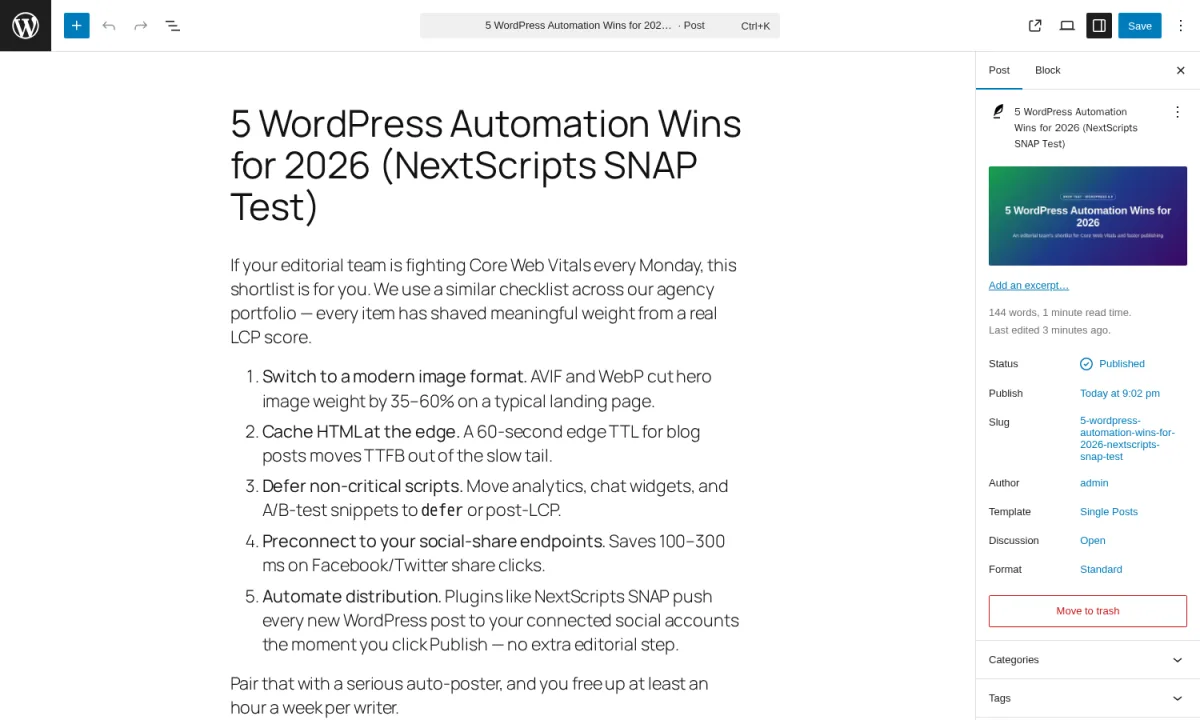
The flagship feature works. I published a real WordPress post with a featured image attached and watched SNAP auto-share it to my connected Facebook page at the moment WordPress made the post live. The editor-side SNAP panel confirmed the original publish time and the successful autopost, and I verified the resulting Facebook share separately. SNAP's in-product Add-Account dropdown lists 30 supported destinations: Facebook (profile, page, group), Twitter, LinkedIn, Tumblr, Blogger, Pinterest, Reddit, Instagram, Telegram, Flickr, Flipboard, Google Business Profile, Line, LiveJournal, MailChimp, Medium, ok.ru, Plurk, Scoop.It, SETT, XING, VK.com, weibo, Diigo, Instapaper, deviantART, vBulletin, WordPress-to-WordPress, YouTube, and Yo. 24 of those 30 networks work on the free version; the remaining 6 (Pinterest, Reddit, Flipboard, Google Business Profile, Scoop.It, YouTube — plus LinkedIn Company pages and Groups) require the $49.95/yr Premium API addon.
2. White-label posting from your own developer apps
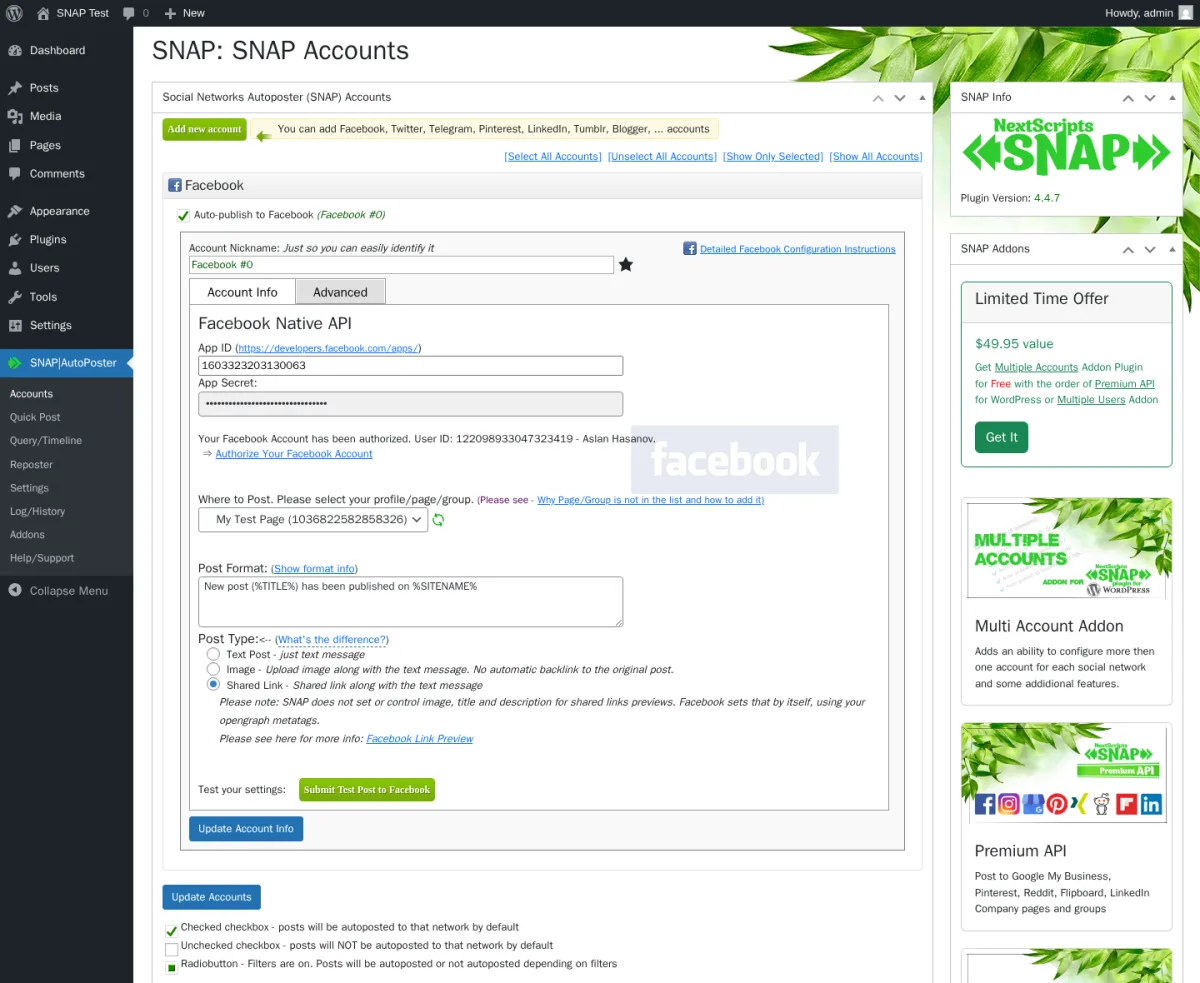
SNAP's biggest differentiator versus every other plugin in this category is that every share is attributed to your own brand, with no "shared via NextScripts" footer on the posted content. The trade-off is that you register your own developer apps on Facebook, Twitter, LinkedIn, and so on. When I expanded the Facebook row on the Accounts page I saw the full configuration depth: App ID and App Secret fields, a confirmation line for the connected Facebook user, the Pages dropdown for picking which page to share to, a "Submit Test Post to Facebook" button, and an explicit in-product warning that Facebook tokens expire every 30 days. The 30-day expiry is the single most important caveat to know about — you need to re-authorise the Facebook connection roughly once a month, or the shares stop firing quietly in the background. Jetpack Social, Blog2Social, and SchedulePress use their own vendor-side connections for a simpler one-click setup, but you lose the white-label angle.
3. Reposter — free recycler with deep rule control
![SNAP Reposter 'Add New Reposter Action' modal showing the Title and Options, Schedule, Network Selection, and What to Post sections plus the Save Reposter button, with a [Pro Only] badge on the Schedule 'When finished' control](https://www.fs-poster.com/storage/posts/NpJMgxF3M82wtZSuB2BgnVO7QqxwuT3XEmnofNPd.webp)
The Reposter is genuinely free and surprisingly deep. I opened the "Add new Reposter Action" form and walked through all five sections: a Title and Options panel with an activation toggle and a posting order (Old to New, New to Old, or Random — Random is paid-only); a Schedule panel where you set how often to repost (every N days, hours, or minutes) with an option to randomise the exact timing; a Network Selection panel where you pick which connected accounts the rule fires to; a What to Post panel with filters for categories, tags, post types, post formats, dates, author include/exclude, and an exact-post picker; and a Status panel for activating the rule. A small note below the What to Post panel mentions that "SNAP Pro version can also filter by Custom Fields, Custom Taxonomies, and Searches" — those three filters plus the Random posting order and the advanced day-of-week / hour-of-day windows all sit behind the $14.95/yr Scheduled & Delayed Posting addon. Even with those carve-outs, the Reposter is one of the richest free recyclers in the WordPress-plugin segment.
4. Message templating with 15+ replacement tags and "spin" syntax
SNAP's per-network message templating is feature-dense. The default template I saw out of the box was "New post (%TITLE%) has been published on %SITENAME%", and the per-post panel tooltip exposes the full replacement-tag library — over 15 tags covering the post title, URL, shortened URL, featured image, excerpt, full text, tags, categories, tags-as-hashtags, categories-as-hashtags, author name, site name, post date, post time, a per-post custom URL, and several author-specific tags. The plugin also supports {a|b|c} "spin" syntax for per-post message variation (a feature it has carried since 2014), plus a separate URL-parameter system you can use for UTM tagging. Eleven URL shorteners ship in-box (is.gd as the default, plus the WordPress built-in shortener, bit.ly, YOURLS, Rebrandly, Go2Ln, u.to, x.co, clk.im, po.st, and adf.ly), with a global toggle that swaps every full URL for its shortened version.
5. Quick Post composer and comments import
The Quick Post page lets me push a one-off message to any connected social account without creating a WordPress post first. The form has a message textarea, a title field, a post type picker (Text, Link, or Image), URL or image-URL fields, a network selector, and a publish option (Immediately or Schedule to a future time). It is the right surface for promo posts, event reminders, and manual shares between regular publishes. SNAP also supports an unusual feature in the category: auto-import comments from Twitter and Facebook back into WordPress comments — the plugin reads the comments people leave on the social shares SNAP created and writes them as native WordPress comments. None of the major competitors offer this. Combined with the Open Graph settings (which control how your share unfurls on Facebook and LinkedIn cards), SNAP's "engine" surface is remarkably wide for a free version.
NextScripts SNAP Ease of Use / UI & UX
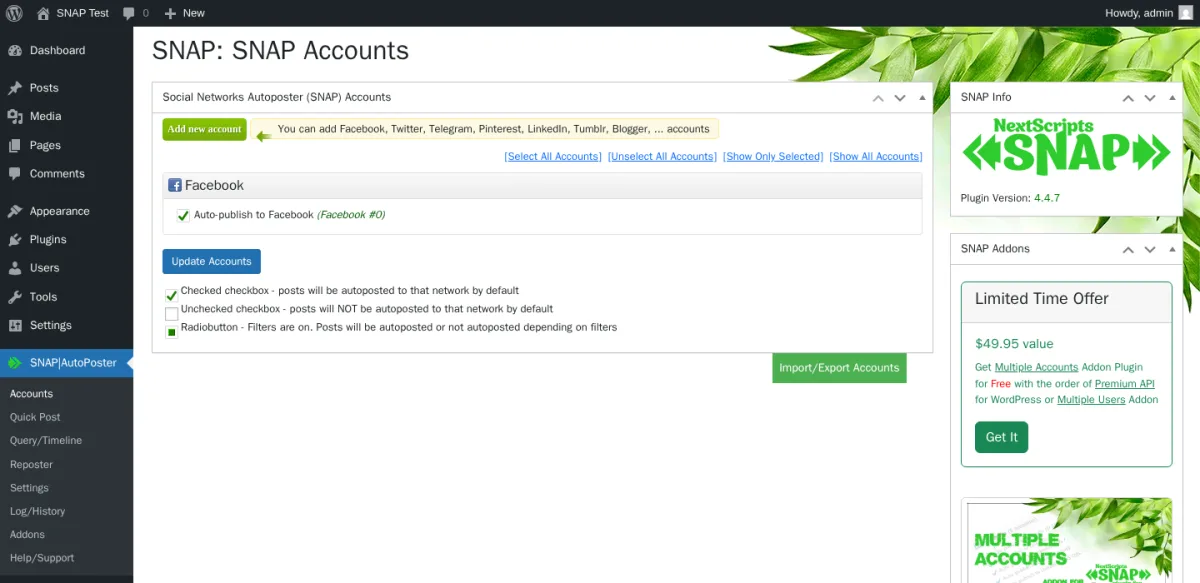
SNAP's admin in v4.4.7 is unmistakably mid-2010s — a classic-WordPress meta-box interface bolted onto a top-level admin menu with 7 sub-pages, with permanent upsell panels in the right sidebar of every screen. Feature density is high, surface polish is low.
1. UI / UX
The plugin opens to a top-level "SNAP | AutoPoster" menu with eight sub-pages — Accounts, Quick Post, Query/Timeline, Reposter, Settings, Log/History, Addons, and Help/Support — and every page uses a classic WordPress layout rather than a modern dashboard. There is no Gutenberg sidebar widget and no in-WordPress drag-and-drop calendar (Blog2Social has one, SchedulePress has one). Each admin page also carries four permanent right-sidebar panels: a SNAP Info box with the version, a SNAP Addons box with a permanent "Limited Time Offer — $49.95 value" cross-sell banner, a Support box, and an Instructions box with setup links for each of the 30 networks. For long-time WordPress admins this layout will feel familiar; for buyers used to modern SaaS UIs it will feel dated.
2. Setup and per-network account connection
Connecting accounts is the heaviest setup of any plugin in this category. SNAP makes you register your own developer app on Facebook, copy two pieces of credential info into the SNAP Facebook row, authorise the connection, then pick the target page or group. The same kind of flow repeats for Twitter, LinkedIn, Pinterest, and the other 26 networks SNAP supports. Plan for 30–60 minutes per network when things go smoothly, and longer for networks where Facebook or LinkedIn has changed the developer-portal layout since SNAP last refreshed its setup guides. This is intentional positioning — the official FAQ frames it as "There is a major difference between SNAP and other auto-posting plugins. Plugin MUST use an 'App' to make posts. We believe that it's well worth to spend your time setting it up, instead of doing free advertisement for somebody else." For technical buyers, that's a feature. For non-technical buyers, it's a wall.
3. Per-post share workflow
Once you publish a WordPress post the workflow is straightforward: every post's edit screen shows a SNAP panel below the editor — a classic WordPress panel, not a Gutenberg sidebar widget. Inside the panel sit one row per connected social account, each with a Post Now button to re-fire the share, a Reset button to clear SNAP's record of the post, a per-network message-format textarea with the full replacement-tag tooltip, an image-size picker for the share, a URL picker for the link the share should use, a Set Time date and time picker for manual scheduling, and a current-time display. It is dense but well-organised. Buyers used to Jetpack Social's clean Gutenberg sidebar will notice the context switch.
4. Friction points
Three real friction points stood out during testing. First, the activity Log only records errors and background events on the default Publish-Immediately mode — successful autoposts do not write entries to the Log/History page, so per-share success proof lives only on the per-post panel under the editor. You cannot use the Log as a unified "what went out today" view. Second, scheduling is mostly paid — the per-post panel shows a Set Time date picker on the free version, but the reliable delayed firing is the $14.95/yr Scheduled & Delayed Posting addon. Third, the destructive admin actions on the Help/Support page have no confirmation dialog — the page itself labels them "Some evil buttons: Don't click unless you know what are you doing", and the Delete all SNAP Data button is a one-click factory reset that wipes every plugin option and every post-level SNAP record. Worth flagging to anyone building a getting-started tutorial.
5. Learning curve
For a first-time user, the learning curve sits firmly in the intermediate-to-advanced bracket. The Help/Support page links to per-network setup guides on the NextScripts site; an in-product System Tests panel checks PHP version, memory limit, WordPress cron status, last cron run time, and SSL — useful for diagnosing why a share failed. Realistically, plan 1–2 hours just to register your first Facebook developer app, complete the connection, push a test post, and walk every Settings tab. Adding a second network adds another hour. The pay-off is feature depth no other free plugin in the category can match.
NextScripts SNAP Performance
SNAP's performance in real WordPress use is steady. The plugin is not doing anything heavy on the WordPress side — it reads from the standard posts table and posts to each social network's API at publish time — so the limiting factor is almost always the network's own response time.
1. Share-fire latency
When I published my test post with the SNAP Facebook account enabled, the share fired at the exact moment WordPress made the post live — the panel showed the original publish timestamp and the autoposted timestamp on the same minute. SNAP's default posting mode is Publish Immediately, which sends the share at the same time WordPress publishes the post. Two other posting modes are available in Settings: a recommended Use WP Cron mode that queues the share to fire shortly after publish so the editor returns to you faster, and a Limit Autoposting Speed mode that caps how many shares can fire per day, hour, or minute. For a live editorial workflow on managed WordPress hosting, Use WP Cron is the safer pick.
2. Admin app responsiveness
The SNAP admin loads quickly on a standard hosting setup. The Accounts page, the dense Settings page, the Reposter rule form, and the per-post panel all render comfortably in well under a second. The product's weight is mainly visual — feature-dense panels — not computational. The in-product System Tests panel reported memory usage well inside normal WordPress operating range on my test install. You should not need a larger PHP memory limit just to run SNAP.
3. Featured-image and Open Graph propagation
SNAP attaches the WordPress featured image to the share automatically when the per-account post type is set to Image Post, and the plugin's Open Graph settings drive how each share unfurls on Facebook, LinkedIn, and Twitter cards. The Settings page exposes three Open Graph behaviours (Add / Add only when necessary / Off), a default backup image URL for posts that have no featured image of their own, an author Facebook URL field, and a Verify Featured Image toggle that checks the image before posting. My test post unfurled correctly on Facebook with the featured image picked up as the card image.
4. Scheduled-fire reliability
I did not run a multi-day delayed-fire test on the test install. The Set Time picker in the per-post panel writes a future date into the post, and the Reposter recycler uses the same WordPress-cron mechanism that every comparable plugin in this category relies on. The actual reliable delayed dispatch is gated behind the $14.95/yr Scheduled & Delayed Posting addon. The SNAP Query / Timeline page is the right place to see what shares are queued up and waiting to fire.
5. Stability and security cadence
SNAP receives consistent security patches. The plugin is enrolled in the Patchstack vulnerability disclosure programme, and v4.4.7 in February 2026 patched two security issues; the 2024 security stream of point releases patched four more. The honest read cuts both ways: SNAP ships timely fixes when issues are disclosed, but the plugin has had at least seven security advisories since 2021 — the highest cadence in this category. Buyers on shared hosting should run a monthly vulnerability scan regardless of which auto-poster they pick.
NextScripts SNAP Support, Documentation & Learning Resources
Support is the part of SNAP where the bimodal 3.3 / 5 rating hurts most.
Support is delivered through two routes: an off-site ticket form on nextscripts.com (linked from the Help/Support page inside the plugin) and the WordPress.org support forum. There is no live chat, no in-product chat widget, and no published response-time guarantee. The WordPress.org support-forum widget shows 0 of 1 issues resolved in the trailing two months — extremely thin support throughput by any category benchmark. Recent 1★ reviewers describe support tickets opened for three weeks with no replies, and longer-tenured complaints flag a 2-year stretch between 2020 and 2022 in which support effectively froze.
Anchored to the 3.3 / 5 rating, the support reputation reads as weak. Most 1★ reviews specifically cite either an unanswered ticket on a paid premium addon or a plugin behaviour that broke after Facebook, LinkedIn, or Pinterest changed something on their side and could not be resolved through support. The honest read is that post-2022 NextScripts ships occasional security patches but its support throughput is the lowest in the WordPress auto-poster segment, and the "Versions 4.5 and 5.0 are coming soon…" copy on the WordPress.org listing has been stale since July 2022.
Documentation is mixed. The official setup-instruction archive covers each of the 30 networks with step-by-step screenshots, but a recurring 1★ complaint is that those screenshots are out of date — Facebook and LinkedIn have changed their developer-portal layouts multiple times since the guides were last refreshed, so buyers running through the docs end up saying the on-screen pages look completely different. The WordPress.org listing is in English by default with only a Russian translation contributed by the community — a thin localisation footprint compared with Blog2Social's 11-locale set. The in-product Help/Support page surfaces a System Tests diagnostics panel, a Patchstack security-disclosure note, FAQ links, and the 7 destructive admin actions, which is more than most peers expose.
NextScripts SNAP User Reviews & Reputation
For reputation, I checked the full WordPress.org star breakdown, a 12-month sweep of recent 1★ and 5★ reviews, the Patchstack security-disclosure history, and the WordPress.org support-forum activity widget. The headline is unavoidable: 3.3 / 5 from 617 reviews is the lowest average rating in the WordPress auto-poster category I have benchmarked.
Overall impression. The distribution is strongly bimodal: 309 × 5★ (about 50%), 29 × 4★, 22 × 3★, 26 × 2★, and 231 × 1★ (about 37%). The 5★ tail is built on a decade of long-time users who installed SNAP between 2013 and 2020 and still rely on it for the white-label angle plus the long-tail networks. The 1★ tail is the loudest in the category — bigger by ratio than Blog2Social (1★ ≈ 8%), Jetpack Social, or Bit Social. 30,000+ active installs, fourteen years of release history, and consistent Patchstack-disclosed security fixes back up the install count, but the 3.3 / 5 average is a real warning sign, not a mid-pack signal.
Most praised strengths. Recent 5★ reviewers repeat four themes: the breadth of supported networks ("ok.ru, VK, weibo, LiveJournal, Plurk — nothing else covers them"), the white-label posting flow ("no 'shared via NextScripts' footer, every post is attributed to my brand"), the generosity of the Free tier ("24 networks free with no upsell blocker"), and the Quick Post plus Reposter combo for editorial workflows. A representative 5★ review from mshfyi (2023-09-04) reads: "Very useful plugin. Automatically shares newly published posts to my social media accounts. Works fine for Twitter (X), Facebook and VK. Some networks require premium addons, but just a few. Other than that — best plugin ever."
Most criticised weaknesses. The 1★ cluster is dominated by four recurring patterns. First, abandoned support — a 1★ reviewer in 2024 wrote "0 support. (Premium version) — Purchased the premium version. Support ticket has been open for over 3 weeks. No replies", and the WordPress.org 0-of-1-resolved widget independently confirms low throughput. Second, connections breaking after Facebook, LinkedIn, and Pinterest change their developer portals — a 1★ reviewer in 2023 wrote that "SNAP's How-to guides continue to fall out of date with screenshots of pages that look completely different and missing important details and info required for proceeding." In my own testing Facebook fired end-to-end on a current install, so the truth is nuanced: SNAP works when you finish the developer-app setup and your connections are fresh, but shares stop firing quietly when Facebook or LinkedIn change something on their side and SNAP's docs lag. Third, long development dormancy — the gap between July 2022 and February 2026 contained no feature releases, only security patches, and the "Versions 4.5 and 5.0 are coming soon…" copy on the WordPress.org listing has been stale for nearly four years. Fourth, per-network setup complexity — registering developer apps on Facebook, LinkedIn, Pinterest, and so on is genuinely involved, and the plugin's own FAQ defends this as a deliberate trade-off rather than a defect.
NextScripts SNAP Pricing & Value
NextScripts SNAP is freemium and every paid feature ships as a separate addon, sold off-site at nextscripts.net (not the .com domain) and billed annually only. There is no monthly plan, no Lifetime tier, and no published free trial for the paid addons.
- Base plugin — $0. Free on WordPress.org, fully white-label, auto-posts to 24 of the 30 supported networks with 1 account per network, plus the full Reposter recycler, autoposting filters, hashtag rules, 11 URL shorteners, Open Graph injection, 15+ message-replacement tags, the Quick Post composer, the per-post sharing panel, and Twitter/Facebook comments import.
- Multi Account Addon — $49.95 / year. Unlocks unlimited accounts per network (multiple Facebook Pages, LinkedIn profiles, Twitter handles, etc.) plus additional comment-import scopes.
- Premium API — $49.95 / year. Unlocks the 6 paywall-gated networks: Pinterest, Reddit, Flipboard, Google Business Profile, Scoop.It, YouTube, plus LinkedIn Company pages and Groups. This is the most-bought addon — without it the plugin can't post to Pinterest or Reddit at all.
- Multi User Addon — $149.95 / year. Enables per-WordPress-user social accounts (multiple authors connecting their own profiles) and WordPress Multisite network support.
- Scheduled & Delayed Posting — $14.95 / year. Adds per-network exact-time scheduling, delayed posting, the Random reposter mode, advanced day-of-week / hour-of-day reposter windows, and Custom Field / Custom Taxonomy / Search filters.
- Proxies Addon — $14.95 / year. Adds HTTP / HTTPS / SOCKS5 proxy configuration for outbound posts, useful for buyers whose origin IP is blocked on Telegram, Reddit, Pinterest, LiveJournal, or Blogger.
- Autopost bundle — $69.95 / year (~46% off the $129.80 a-la-carte list). Premium API + Multi Account + Scheduled & Delayed + Proxies in a single subscription. The highest-leverage bundle for most buyers.
- All-Access Pass — $249.95 / year (~31% off the $359.65 list). Every current and future addon, including the announced Content Importer and Video tools.
The Free tier is genuinely usable for a casual blogger who wants to push posts to Facebook, Twitter, LinkedIn (profile), Tumblr, Medium, Telegram, VK, ok.ru, weibo, or any of the other 24 free networks at one account per network. The single biggest workflow trap is that multiple accounts per network is paid — connecting two Facebook Pages or two LinkedIn profiles requires the $49.95/yr Multi Account addon. Pinterest, Reddit, and YouTube are also paid — they sit behind the $49.95/yr Premium API addon.
The biggest commercial pitfalls to know about before you commit: pricing is fragmented across five separate annual subscriptions, scheduling is paid, multiple accounts is paid, Pinterest is paid, there is no Lifetime tier (every dollar recurs), there is no monthly billing (every addon is a full year up-front), addons are bought from the separate nextscripts.net storefront with a license key entered back into the WordPress dashboard, and no public refund-policy URL is linked from the plugin description — buyers should contact NextScripts support before purchase if they need a confirmed money-back window. The permanent "Limited Time Offer — $49.95 value — Get Multi Account Addon for free with the order of Premium API or Multi Users Addon" banner in the plugin admin sidebar is not a time-limited deal — it has been visible across the entire SNAP 4.4.x release line since October 2022. Treat it as the standard cross-sell.
NextScripts SNAP Pros and Cons
After hands-on testing, the strengths and trade-offs cluster cleanly.
Pros
- Unrivalled long-tail network coverage: 30 supported destinations, including the only WordPress-plugin support for ok.ru, VK, weibo, XING, LiveJournal, Plurk, MailChimp campaigns, Scoop.It, SETT, vBulletin, and WordPress-to-WordPress cross-posting. No other plugin in the category covers this long tail on a single licence.
- 100% white-label posting from your own developer apps: every share is attributed to your brand with no "shared via NextScripts" footer on the posted content. This is SNAP's flagship moat against Jetpack Social, Blog2Social, and SchedulePress, which all use their own vendor-managed connections.
- Generous Free tier that includes the full engine: 24 networks free with 1 account per network, the full Reposter rule builder, autoposting filters (categories, tags, post types, post formats, authors), 11 URL shorteners, Open Graph injection, 15+ replacement tags, "spin" syntax for per-post template variation, the Quick Post composer, and the auto-import-comments-from-Twitter-and-Facebook feature. None of those features are paywalled on Free.
- Auto-share on publish actually fires on a current install: my live test on a fresh WordPress install running SNAP v4.4.7 produced a real Facebook page post at the moment WordPress made the test post live. The flagship feature works when your developer-app tokens are fresh.
Cons
- 3.3 / 5 average rating from 617 reviews on WordPress.org: the lowest in the WordPress auto-poster category I have benchmarked, with a strongly bimodal 37% 1-star tail dominated by abandoned-support complaints and broken-social-API reports from 2023–2024. Pair that with 0 of 1 support-forum issues resolved in the trailing two months and the support throughput signal is honest and concerning.
- Heavy DIY per-network setup: every connector makes you register your own developer app on Facebook, Twitter, LinkedIn, Pinterest, and the other 26 networks — plan 30–60 minutes per network when things go smoothly. Facebook connections also need to be re-authorised every 30 days or the shares stop firing quietly. Non-technical buyers will find this hostile.
- Pricing is fragmented across 5 annual addons with no Lifetime tier: most buyers will want Premium API + Multi Account + Scheduled & Delayed Posting, which lists at $114.85/yr a-la-carte. The Autopost bundle at $69.95/yr only fixes this if you also want Proxies, and no Lifetime tier exists at any price.
- No in-WordPress calendar, no Gutenberg sidebar widget, and successful autoposts don't write to the Log: the admin is unmistakably mid-2010s — classic WordPress meta-boxes, no calendar surface, no sidebar widget, and the Log/History page is error-and-cron-only on the default Publish-Immediately cadence. Buyers used to a modern editorial workflow tool will feel the friction immediately.
Who Should Use NextScripts SNAP?
NextScripts SNAP is the right buy for buyers whose job-to-be-done lines up with one of these patterns — and the wrong tool for several others.
Who Should Use It
- Technical site owners and developers who need oddball or regional networks: ok.ru, VK, weibo, XING, LiveJournal, Plurk, MailChimp campaigns, Diigo, Instapaper, Scoop.It, Telegram, Line, Medium publications, deviantART, vBulletin, or WordPress-to-WordPress cross-posting — SNAP is the only major plugin that covers this long tail on a single licence.
- Publishers who want 100% white-label posts attributed to their own brand: SNAP's developer-app posting flow gives you complete attribution control — every share is your brand, with no vendor footer. For buyers building a serious editorial brand, this is the only WordPress-plugin choice that delivers it cleanly.
- Cost-sensitive technical bloggers who can run on Free indefinitely: 24 networks, the full Reposter, filters, URL shorteners, OG tags, and the replacement-tag library are all genuinely usable on Free with 1 account per network. Graduate to a paid addon only when you specifically need Pinterest, Reddit, multiple accounts per network, or reliable scheduling.
- WooCommerce stores that want auto-share of new products: SNAP officially supports WooCommerce auto-share through the same publish event used for regular posts, with full custom-post-type filtering. Buyers running a Woo catalogue can push every new product to their connected social accounts on the Free tier.
Who Should Skip It
- Non-technical buyers who expect a one-click connection flow: SNAP's per-network setup is intentionally heavy — registering your own developer apps on Facebook, Twitter, LinkedIn, Pinterest, and 26 other networks is not a 2026-era one-click experience. If that's the expectation, Jetpack Social or Blog2Social are better picks.
- Editorial teams who want an in-WordPress drag-and-drop calendar and AI message templating: SNAP has no calendar surface and no AI assistant. Blog2Social and SchedulePress are built around calendar-first workflows.
- Buyers who want a Lifetime licence and predictable pricing: every paid feature on SNAP is an annual subscription, fragmented across five addons. Buyers comparing to FS Poster — which starts at $58/year on the Single plan and offers an optional Lifetime tier covering 30 websites with no addon stacking — will find SNAP more expensive after year three on any meaningful upgrade path.
- Buyers who expect responsive vendor support: the 0 of 1 support-forum-resolved widget on WordPress.org is the canonical warning sign. If support response time matters to your operation, SNAP is the wrong pick.
Best NextScripts SNAP Alternatives
Several WordPress social-publishing plugins compete with SNAP directly. Pick the alternative whose job-to-be-done lines up with yours before you compare sticker prices.
- FS Poster: the strongest WordPress-native alternative for buyers who want Pinterest / Reddit / Telegram / Google Business Profile included in the base plan, want a modern admin UI, or run a WooCommerce store. FS Poster starts at $58/year on the Single plan (renews at $65/year) and covers 26 networks on a single licence (including the newly added YouTube Shorts destination alongside X, Pinterest, Telegram, Reddit, and Google Business Profile — all in the base price, no addon stacking), ships a real Calendar plus a recurring Planner, has a one-click bulk action on the WordPress Posts list, is WooCommerce-native, and offers an optional Lifetime tier covering 30 websites for long-term/multi-site buyers. Pick FS Poster over SNAP when you want simpler pricing, no addon tax, or a friendlier setup for non-technical users. See the FS Poster review for the full hands-on walkthrough, or read FS Poster vs NextScripts SNAP for the direct comparison.
- Blog2Social: the right pick for editorial teams who want an in-WordPress drag-and-drop calendar, Best Time Manager presets, AI Post Templates, and per-network captions on every plan including Free. Blog2Social covers up to 25 networks on the Business tier with a meaningful Free tier (12 networks, 1 account per network) and an in-product calendar that SNAP simply does not match. Pick Blog2Social over SNAP when calendar workflow is the deciding factor. See the Blog2Social review for the testing notes.
- Jetpack Social: the right pick for solo bloggers who already trust the Automattic brand, only need 3–5 mainstream networks (Facebook, Instagram Business, LinkedIn, Tumblr, Mastodon), and value a Gutenberg-native sidebar flow. Jetpack Social's free tier and €59.40/year intro paid plan (€4.95/month equivalent, billed yearly for the first year) are the lowest-friction onboarding in the category. Pick Jetpack Social over SNAP when simplicity is the feature, not white-label posting. See the Jetpack Social review for the testing notes.
- SchedulePress: the right pick for editorial publishers who want a drag-and-drop FullCalendar editorial calendar, missed-schedule recovery, and a Lifetime Unlimited licence at $299. SchedulePress focuses on the mainstream 8 networks (Facebook, X, LinkedIn, Pinterest, Instagram, Medium, Threads, Google Business Profile) and a calendar-first publishing surface. Pick SchedulePress over SNAP when editorial-calendar workflow plus a Lifetime tier is the priority. See the SchedulePress review for the testing notes.
If you are shopping the whole category before you decide, the WordPress social media automation plugins roundup pulls every option above into a single comparison frame, and the NextScripts SNAP alternatives page has the full shortlist with deeper triage on each candidate.
Final Verdict: Is NextScripts SNAP Worth It?
For technical site owners and publishers who need its unrivalled long-tail network coverage — ok.ru, VK, weibo, Plurk, MailChimp, XING, LiveJournal, vBulletin, WordPress-to-WordPress — and a fully white-labelled posting flow, NextScripts SNAP is the right install in 2026. The free base plugin is genuinely usable for 24 networks at one account per network, the auto-share on publish actually fires on a current WordPress install, the Reposter recycler is one of the deepest free rule builders in the category, and the developer-app posting model that powers the white-label angle is a real moat against every vendor-managed competitor in the segment.
For non-technical buyers who expect a one-click connection flow, editorial teams who need an in-WordPress calendar or AI message templating, agencies that want a Lifetime licence with predictable flat pricing, or any buyer who needs responsive vendor support, the honest answer is no — shortlist FS Poster, Blog2Social, or SchedulePress instead. The biggest caveat to flag is the 3.3 / 5 rating from 617 reviews with a 37% 1-star tail paired with 0 of 1 support-forum issues resolved in the trailing two months — both signals are real and both deserve weight in any buying decision.
NextScripts SNAP FAQ
Is there a free version of NextScripts SNAP?
Yes. SNAP is freemium, listed on WordPress.org, and the Free tier covers 24 of the 30 supported networks with 1 account per network — Facebook (profile, page, group), Twitter, LinkedIn (profile), Tumblr, Blogger, Instagram (Business / Creator), Telegram, Flickr, Line, LiveJournal, MailChimp, Medium, ok.ru, Plurk, SETT, XING, VK, weibo, Diigo, Instapaper, deviantART, vBulletin, WordPress-to-WordPress, and Yo. Free also includes the full Reposter rule builder, autoposting filters, 11 URL shorteners, Open Graph injection, the Quick Post composer, the 15+ replacement-tag library with {a|b|c} "spin" syntax, and the auto-import-comments-from-Twitter-and-Facebook feature. The biggest Free-tier limitations are that multiple accounts per network, Pinterest / Reddit / YouTube / Flipboard / Google Business Profile / Scoop.It / LinkedIn Company pages, and reliable scheduled / delayed dispatch are all paid addons.
Does NextScripts SNAP support Pinterest, Reddit, and Google Business Profile? All three are supported, but all three require the $49.95/yr Premium API addon. The Free base plugin can post to Facebook, Twitter, LinkedIn (profile), Instagram, Telegram, Medium, ok.ru, VK, weibo, MailChimp, and 14 other free networks, but Pinterest, Reddit, Flipboard, Google Business Profile, Scoop.It, YouTube, and LinkedIn Company pages plus Groups all sit behind the Premium API paywall. There is no path to Pinterest auto-pinning on the Free tier.
Is NextScripts SNAP beginner-friendly? No. SNAP is the most technically involved auto-poster in the WordPress-plugin segment by design — you register your own developer app on Facebook, Twitter, LinkedIn, Pinterest, and every other connected network. Plan 30–60 minutes per network when things go smoothly, and longer when Facebook or LinkedIn has changed their developer-portal layout since SNAP's setup guides were last refreshed. Facebook connections also need to be re-authorised roughly once a month, or the shares stop firing quietly in the background. For non-technical buyers who expect a one-click connection flow, Jetpack Social or Blog2Social are better fits.
What does NextScripts SNAP pricing actually look like in total? SNAP is freemium with five separate annual addons: Multi Account ($49.95/yr — unlimited accounts per network), Premium API ($49.95/yr — Pinterest, Reddit, Flipboard, Google Business Profile, Scoop.It, YouTube, LinkedIn Company pages), Multi User ($149.95/yr — per-WP-user accounts plus Multisite), Scheduled & Delayed Posting ($14.95/yr — exact-time scheduling plus Custom Field / Custom Taxonomy / Search filters plus Random reposter mode), and Proxies ($14.95/yr). The Autopost bundle at $69.95/yr packages Premium API + Multi Account + Scheduled & Delayed + Proxies for about 46% off the a-la-carte price. The All-Access Pass at $249.95/yr covers every current and future addon. There is no Lifetime tier, no monthly billing, and no paid-tier free trial. Addons are bought from nextscripts.net (a separate domain from the main nextscripts.com site) with a license key entered back into the WordPress dashboard.
What are the best NextScripts SNAP alternatives? The closest competitors are FS Poster (starts at $58/year on the Single plan, with an optional Lifetime tier covering 30 websites; 26 networks on a single licence including YouTube Shorts, with X / Pinterest / Reddit / Telegram / Google Business Profile included in the base plan, WooCommerce-native, modern admin UI), Blog2Social (in-WordPress drag-and-drop calendar, Best Time Manager presets, AI Post Templates, 4.5 / 5 from 2,088 reviews on WordPress.org), Jetpack Social (Automattic brand trust, Gutenberg-native sidebar, simple one-click connections, €59.40/year intro paid plan — €4.95/month equivalent, billed yearly for the first year), and SchedulePress (drag-and-drop editorial calendar, missed-schedule recovery, Lifetime Unlimited at $299). Pick the alternative whose job-to-be-done matches yours — the alternatives section above has the full triage.
Write once. Post to 26 networks.
- 26 social networks
- Schedule & auto-repost
- Runs inside wp-admin


