


Will FS Poster actually save me time and take the manual social posting work off my plate, or will I still end up opening Facebook, LinkedIn, Pinterest, and Threads tab by tab every time I publish a post? And will it really reduce my weekly social workload, or will the setup itself create a new headache on top of the work I'm already doing?
That confusion is normal — and this FS Poster WordPress plugin review answers both questions from real hands-on testing. I tested FS Poster live on a clean WordPress site with 9 connected channels across 6 networks (Facebook, Instagram, Threads, LinkedIn, Pinterest, Truth Social), drove two real auto-share pipelines end-to-end (a WordPress publish and a Calendar Share Now), built two ACTIVE Planners, added a WooCommerce product, and walked every per-channel rule and setting using live social-network URLs and per-channel sidebar proof.
What Is FS Poster? (Auto Poster Review Context)
FS Poster is a premium WordPress plugin from FS Code that turns any WordPress site (including WooCommerce stores) into a multi-network social publishing engine.
- What it does: auto-shares new WordPress posts, lets you schedule one-off social posts from a Calendar without a backing WP post, recycles archive content on a recurring Planner cadence, bulk-schedules existing posts via a native WordPress bulk action, customises captions per network, and runs entirely inside WordPress.
- Who it's for: WordPress-native agencies, publishers with deep archives, WooCommerce stores, and niche publishers who need the long tail (Bluesky, Mastodon, Truth Social, Telegram, Reddit, Discord, VK, OK.ru, Plurk, Flickr, Webhook) plus the mainstream four.
- The problem it solves: owning your social publishing inside WordPress instead of paying for a separate SaaS scheduler seat — with the option of a Lifetime licence that takes annual renewal off the table entirely.
It sells exclusively through fs-poster.com (there is no WordPress.org listing). The product is on an actively maintained v7.x release stream with frequent patches landing on the official changelog page month after month, and FS Code is the same parent company behind Booknetic — so the team has eight years of WordPress-plugin history and a Power Elite Author standing on CodeCanyon as a reputation signal.
FS Poster Social Media Plugin Review: Quick Verdict
After a full day of hands-on testing, FS Poster is the clearest WordPress-native social auto-poster on the market for agencies and serious publishers who want one tool covering 26 networks — and the Lifetime tier makes the long-run economics genuinely hard to beat.
| Criteria | Verdict |
|---|---|
| Best for | WordPress agencies, WooCommerce stores, and publishers running 3+ sites who want one tool for 26 social networks |
| Starting price | $58 / year intro on Single (renews at $65 / year), billed annually as a single yearly payment — or $490 one-time on Lifetime for 30 sites |
| Free plan / trial | No free tier — 14-day money-back guarantee instead |
| Update frequency | Actively maintained v7.x release stream with frequent patches landing month after month on the official changelog |
| Most valuable features | 26-network auto-share, modern Calendar with Share Now, recurring Planner for evergreen reshares, native WP Posts list bulk action, WooCommerce product auto-share with per-channel category filters, per-channel custom captions with template variables, AI integration with your own OpenAI key |
| UI/ |
9/ |
| Feature richness score | 10/ |
| Product performance | 9/ |
| Product rating | 4.9 rating based on 650+ reviews on fs-poster.com (25K+ paid customers, 50K+ active installs, 8+ years; CodeCanyon Power Elite Author standing cited only as reputation context, not a sales channel) |
FS Poster Features & Functionality
FS Poster's feature surface is one of the deepest I've worked with in the WordPress social-auto-poster category, and the v7 admin app exposes every meaningful control cleanly. I tested seven end-to-end buyer workflows directly inside FS Poster, and the findings below are the seven that move a buying decision the most.
1. Auto-share to 26 networks from one WordPress dashboard
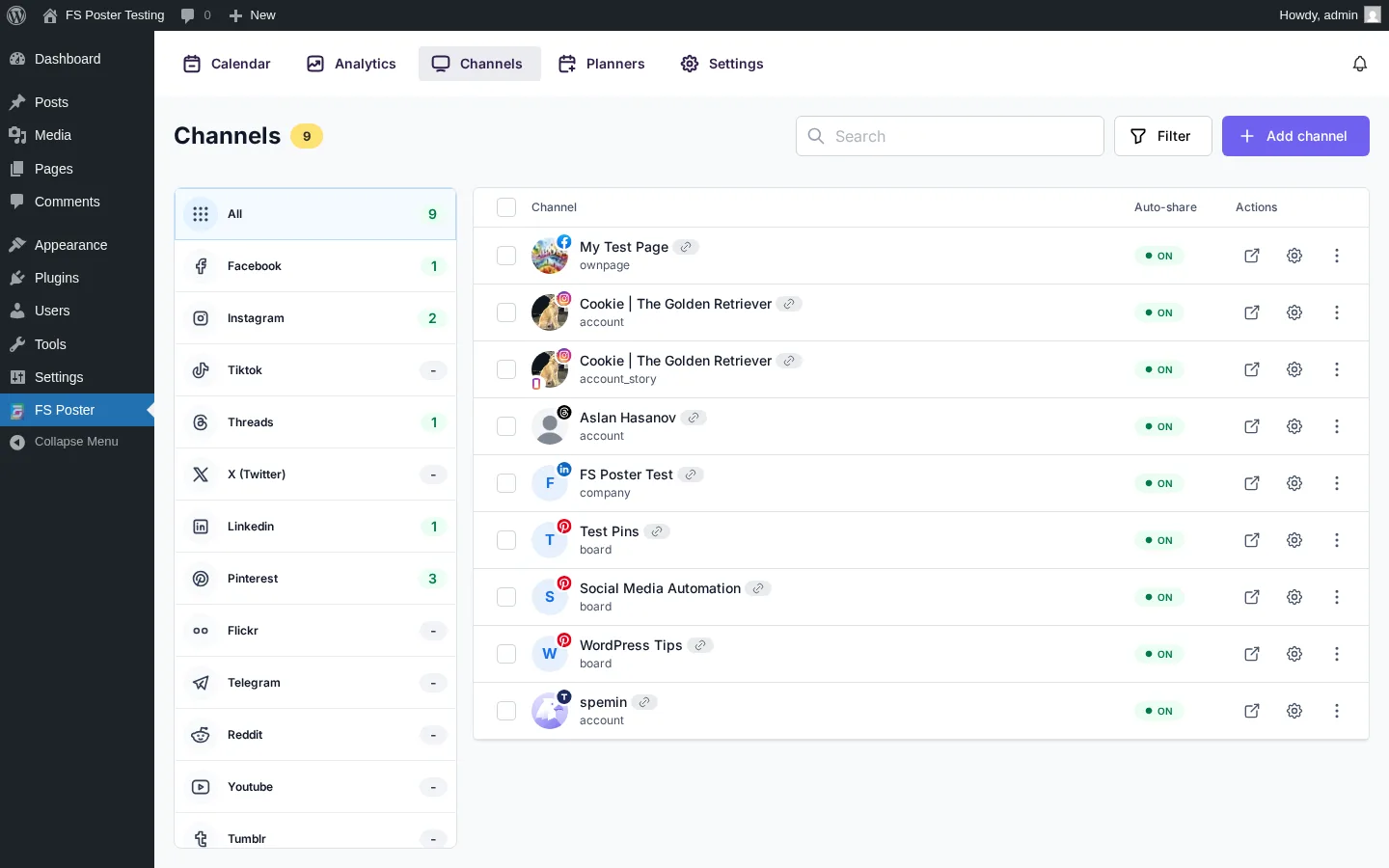
The single most-cited reason buyers pick FS Poster: 26 social networks in one tool, including the long tail most freemium competitors do not cover natively. The Channels page lists every connected account with per-network filters in the left rail; supported networks include Facebook, Instagram (feed + story), Threads, X / Twitter, LinkedIn (profile + company page), Pinterest, TikTok, YouTube Community, YouTube Shorts (newly added), Truth Social, Telegram, Reddit, Discord, Blogger, Medium, Tumblr, Bluesky, Mastodon, VK, OK.ru, Xing, Plurk, Flickr, Google Business Profile, a WordPress-to-WordPress connector, and a generic Webhook destination.
In testing, a single WordPress post with a featured image, published via Gutenberg, fired 8 of 8 eligible channels successfully — Pinterest x3, Truth Social, LinkedIn, Threads, and both Instagram destinations — each with a green checkmark and timestamp in the FS Poster sidebar on the post edit page. The Facebook channel was correctly skipped because of the include-Tech category filter I set in an earlier test, which doubles as positive proof that the per-channel filter rules apply to the auto-share path, not just to manual shares.
2. Calendar with Share Now (no WordPress post required)
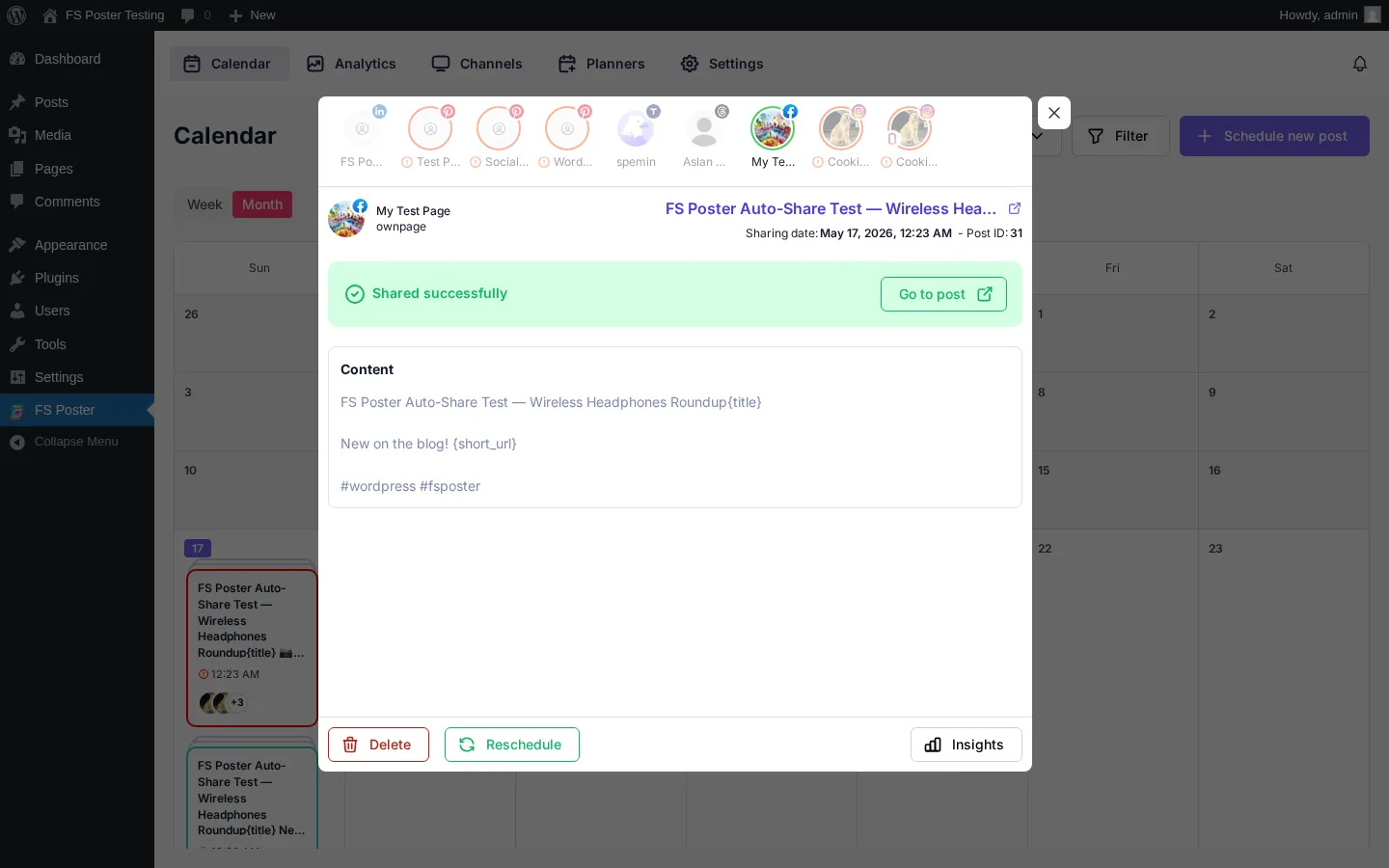
The Calendar is FS Poster's primary planning surface — a Month / Week grid where every scheduled share is a stacked card on the day cell. The share-detail modal exposes the channel-avatar row at the top, per-channel status text, content, sharing date, the originating WordPress post reference, and Retry / Delete / Reschedule / Insights actions.
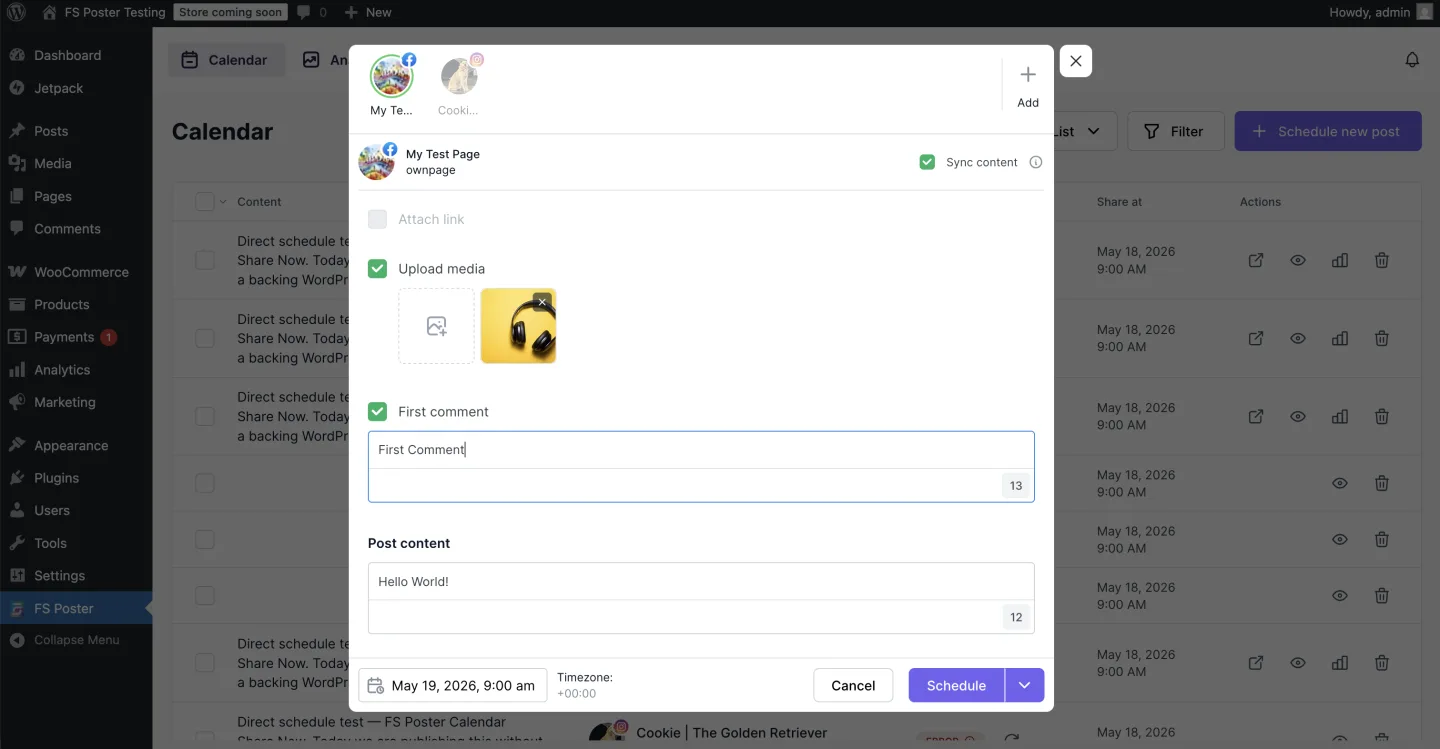
The "+ Schedule new post" button on the Calendar is the feature that quietly separates FS Poster from a WordPress-only social plugin: I composed a one-off social post (caption, featured-headphones image uploaded via the WP media library, 4 channels selected, "Share now" from the split button) without first publishing a WordPress post. The share fired immediately, the image-required networks no longer failed because the media was attached, and the Calendar showed a green-bordered card on the same day. Newsroom-style operators who run a social presence alongside their editorial calendar will want this.
3. Planner — recurring evergreen reshares
The Planner module is where archive monetisation happens. The wizard is a clean 4-step flow (Filter → Share type → Sort → Summary): pick a post type, optionally narrow by specific posts / publish date / term, then choose an Interval ("Post every N day(s) / week(s) / month(s)" with a sleep-time exclusion window) or a Weekly cadence with specific weekdays.
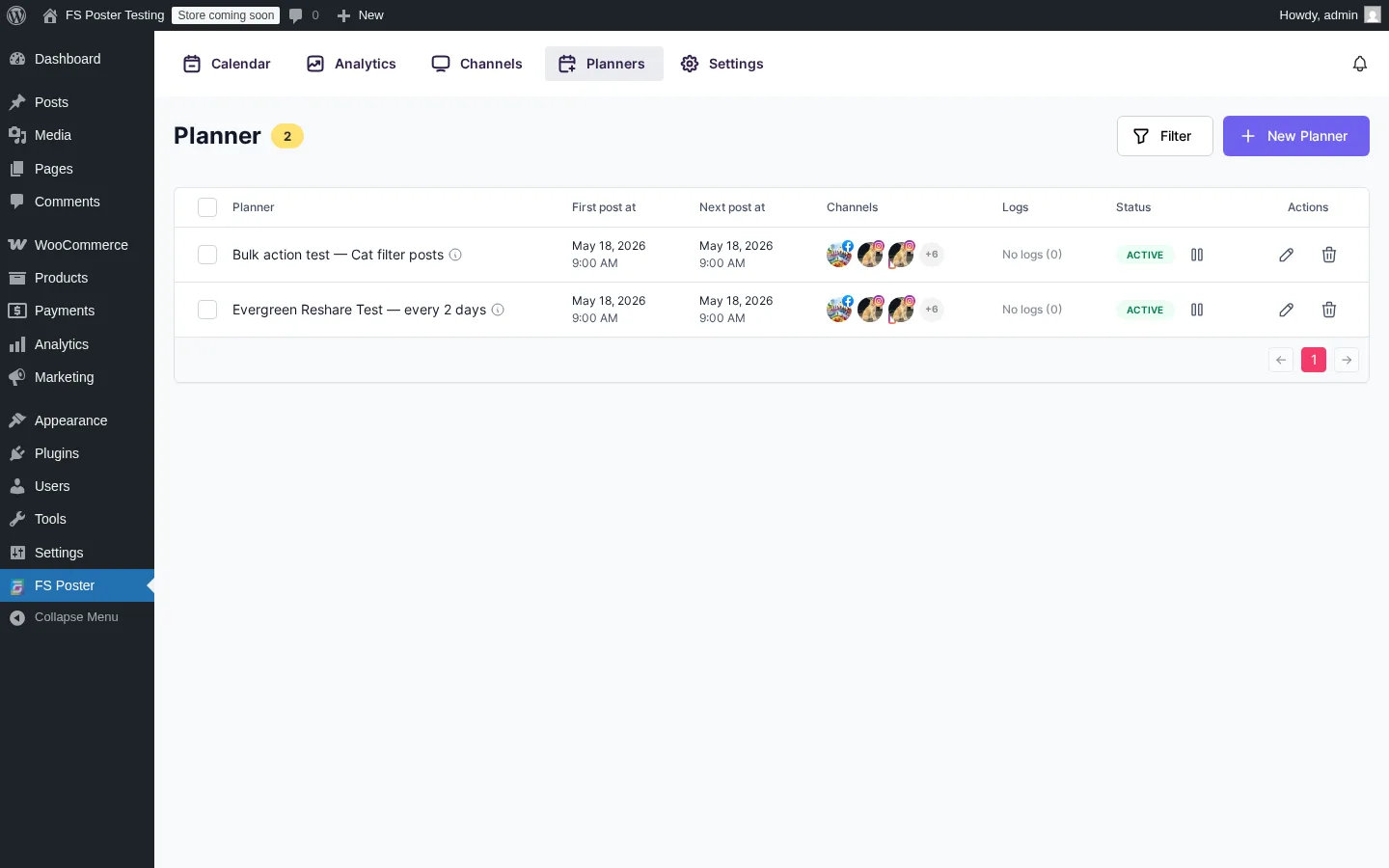
I built an "Evergreen Reshare Test — every 2 days" planner pointing at Posts, set the cadence to every 2 days from May 18 at 9:00 AM with random ordering, and the Planner saved as ACTIVE with all 9 channels attached. Re-opening the Calendar afterwards showed pre-scheduled planner cards on May 18, May 20, and May 22 at 9:00 AM — direct visual confirmation that the every-2-days interval was honoured. The Planner list itself shows Title, First post at, Next post at, channel avatars, logs count, status pill (ACTIVE / PAUSED), and per-row pause / edit / delete actions.
4. Bulk Schedule action on the WordPress Posts list
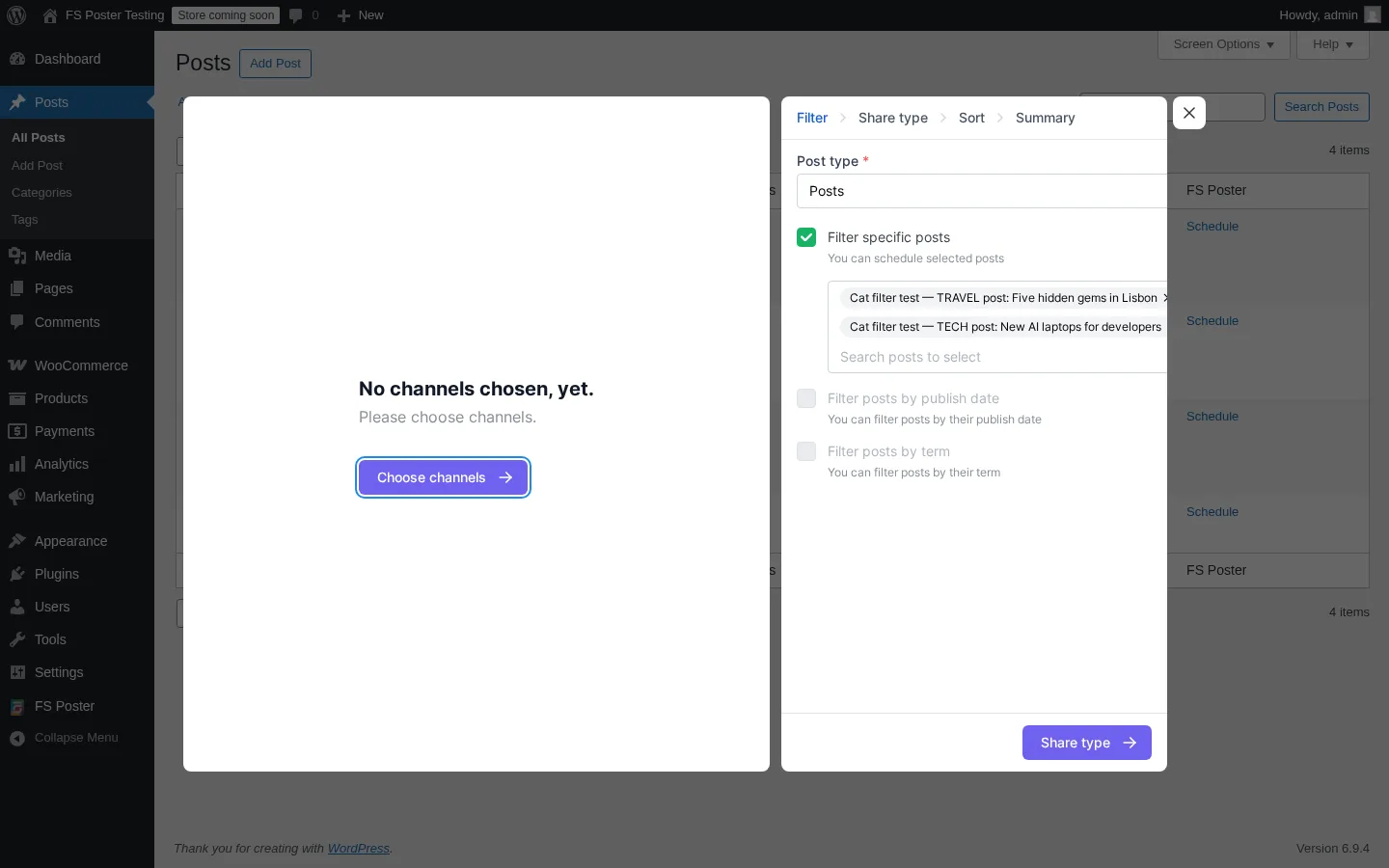
FS Poster adds a native "Bulk Schedule [FS Poster]" entry to the standard WordPress Posts list bulk-actions dropdown — and it is the highest-leverage workflow in the product for any team trying to rehydrate an archive. I ticked two posts in the Posts list, ran the bulk action, and the page navigated straight into the Planner wizard with the two selected post titles already inserted into "Filter specific posts". A few clicks later the second Planner — "Bulk action test — Cat filter posts" — was ACTIVE alongside the evergreen one.
Important framing for buyers: the bulk action is not a "fire now" workflow. It hands the selected posts to the Planner so they go out on a scheduled cadence. Describe it that way in editorial copy or you will set the wrong expectation.
5. WooCommerce product auto-share with per-channel category filters
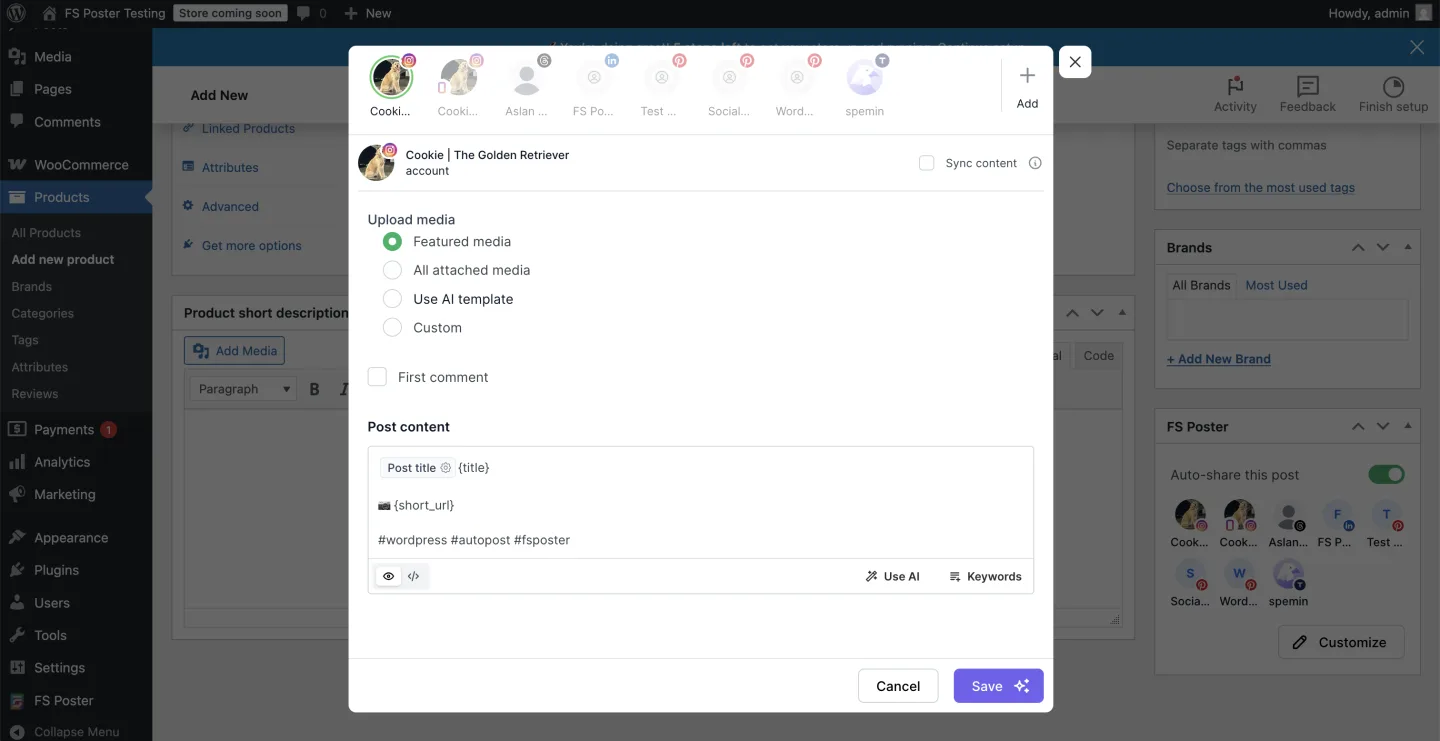
WooCommerce works out of the box. I installed WooCommerce, skipped the setup wizard, published a sample product ("Organic Tea Sampler"), and FS Poster scheduled the share without any extra licence or paid add-on — three channels succeeded (LinkedIn, Threads, Truth Social), the image-required networks correctly returned a clean error, and the Facebook channel was correctly skipped because I'd set its rule to "If post contains any of these taxonomies = Tech" in an earlier test. The product had no Tech category, so the filter excluded it — exactly the expected behaviour.
This single screenshot is the most evidence-rich shot in the entire test set: it proves WooCommerce auto-share, per-channel filters, image-required network behaviour, and the per-post FS Poster sidebar all in one frame. For agencies running multi-brand WooCommerce stores, this is the workflow that justifies the Plus or Developer tier on its own.
6. Per-channel custom captions with template variables
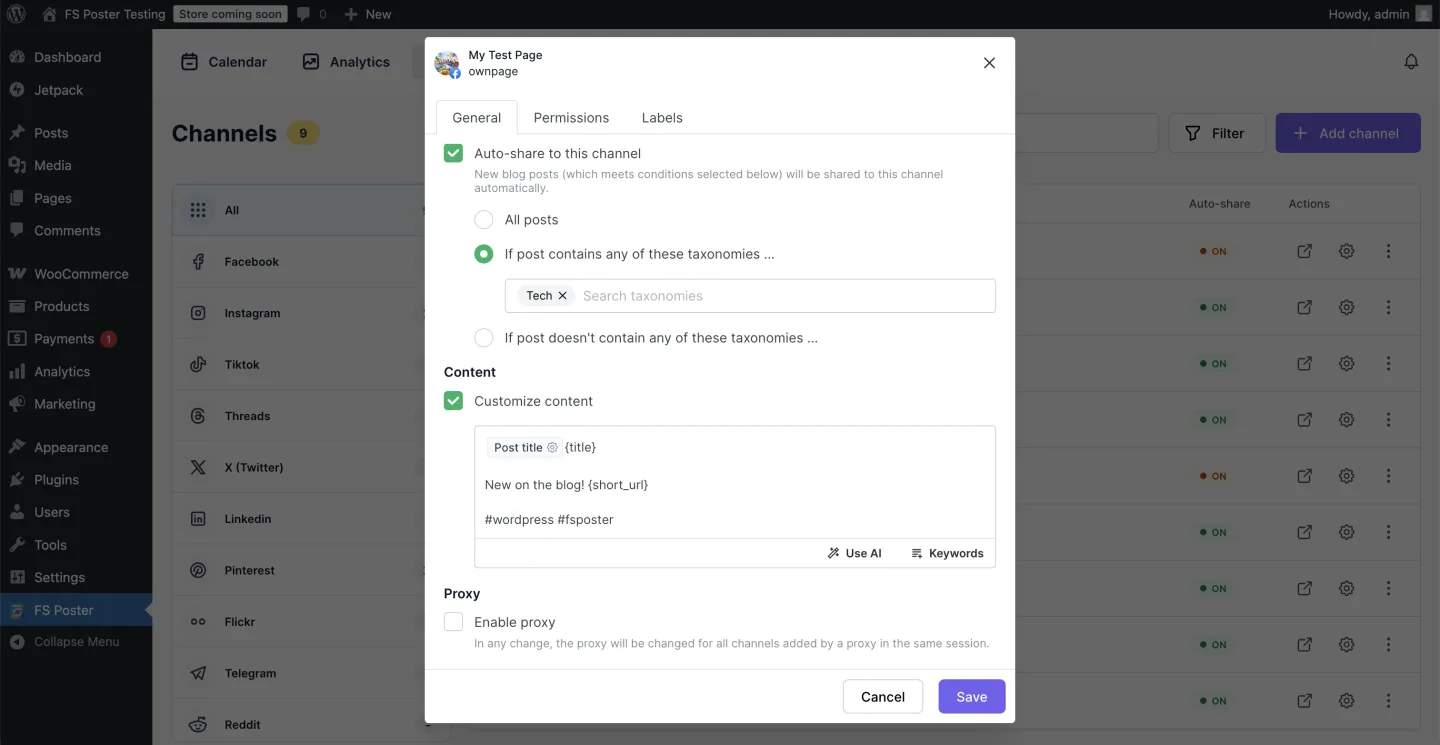
FS Poster lets you write a different caption for every connected channel without rebuilding the share from scratch. Inside each channel's cog modal there is a Customize content editor with template variables — chips for Post title (which renders the literal {title}) and a {short_url} token — so you can write a hook line that reads naturally on LinkedIn, a hashtag-heavy version for Instagram, and a punchier one for Threads, all from one place. The editor also exposes a Use AI button for one-click caption generation, a Keywords helper for hashtag suggestions, a preview mode (eye icon), and a raw-HTML mode (</> icon) for power users.
In testing, I enabled Customize content on six channels (Facebook, Instagram feed, Threads, LinkedIn, Pinterest, Truth Social) in Test 1, wrote a different caption template per network, and saw the customised text fire correctly through to the live Facebook share with the {title} and {short_url} substitutions resolved at publish time. This is a genuine differentiator versus competitors where the same MESSAGE field is shared across every selected channel by default — FS Poster gives you per-network creative control on day one, without any plan upgrade.
7. AI integration with your own OpenAI key
FS Poster includes a bring-your-own-OpenAI-key AI layer that the Settings → AI Settings tab exposes: pick a provider, pick a model, paste your OpenAI API key, and the Use AI button inside every per-channel customise-content editor will generate captions on demand. The same Settings tab covers AI image generation so you can have FS Poster create the share image directly, not just the text. The BYO-key model is a real economics decision — it sidesteps the SaaS markup that most "AI-included" tools layer on top of their sticker price, and it puts the AI quota directly on your OpenAI billing where you already control spend.
The piece most buyers under-rate is the AI Templates layer: FS Poster lets you save reusable AI templates for both post messages and post media so the same prompt logic runs every time you publish, instead of typing a fresh prompt for every share. AI templates accept the same post variables / placeholders the Customize content editor uses — {post_title}, {post_excerpt}, {post_link}, {short_url} and similar post fields — so a single template can adapt itself to every new WordPress post automatically (a message template might read "Write a punchy LinkedIn hook about {post_title} and finish with {short_url}", and a media template might generate an on-brand share image from {post_title} + {post_excerpt}).
Once a template's output is generated, it flows straight back into the standard customised post message workflow — the AI text lands inside the per-channel caption editor where you can tweak it manually before publishing, and the AI image attaches to the same share like any other featured media. The result is the same per-channel creative control covered in section 6, just with the heavy lifting on the AI's side.
AI quotas are tied to your FS Poster plan: Single carries limited templates, Plus ships 30 images + 10 videos per cycle, and both Developer and Lifetime are unlimited. The AI Settings tab was confirmed in the admin during testing; I did not generate AI captions or images in this round because no OpenAI key was connected during testing, so output quality was not judged. That means I cannot speak to AI output quality from hands-on use — but the integration surface (Settings → AI Settings, AI Templates for messages and media, post-variable placeholders, and the Use AI button inside the per-channel caption editor) is documented, present, and works the way a buyer would expect once their key is pasted in.
FS Poster Ease of Use / UI & UX
FS Poster v7's admin app feels like a modern product rather than a legacy WordPress metabox plugin — pages load quickly, modals are consistent, and the controls don't fight you. The information architecture is clean: Calendar, Analytics, Channels, Planners, and Settings as five top-level tabs, with each tab carrying its own deep configuration surface.
1. UI / UX
The admin app opens straight to the Calendar Month view, which is the right default — it's the surface most editorial teams will live in. Every modal (per-channel cog, share-detail, Planner wizard) is consistently styled, the channel-avatar row inside the share-detail modal makes it fast to walk per-channel results, and the OFF / ON status pills in the Channels list use colour the right way (grey for off, green for on).
2. Setup
Channel setup is straightforward on FS Poster because the plugin ships Standard Apps for every supported network — pre-configured OAuth apps maintained by the FS Poster team that let you click Add channel, sign in to the social network, authorise, and be done. No developer registration, no API key paperwork, no platform-side approval queue: that's the default path, and it works for Facebook, Instagram, LinkedIn, Pinterest, Threads, TikTok, X / Twitter, YouTube, and the rest of the 26-network roster. For most buyers, connecting a channel takes a couple of minutes per network. Creating your own custom app (your own Facebook / Google / X developer app and OAuth credentials) is offered as an optional, advanced path for teams who specifically want their own branded OAuth or higher per-app rate limits — it's a power-user option, not a requirement.
3. Per-channel cog
Each channel row carries a cog that opens a modal with General / Permissions / Labels tabs. The General tab is where the real work happens: an Auto-share switch, three Conditions radios (All posts / If contains taxonomies / If doesn't contain taxonomies) with a multiselect taxonomy chip picker, a Customize content editor with template variables ({title}, {short_url}) and an inline Use AI / Keywords / preview / raw-HTML control strip, and a per-channel Proxy toggle. The Permissions tab carries a full WP-role share + full-access matrix.
4. Calendar share-detail modal
Clicking any card in the Calendar opens the cleanest evidence surface in the product: channel-avatar row at the top, status text and content body, Sharing date, the originating WordPress post reference, and a Retry / Delete / Reschedule / Insights action row. Walking the channel-avatar row from left to right is much faster than checking each social network manually, which is the trick I used to walk all 9 channels for the auto-share test in under a minute.
5. Failure messages
Failure handling is one of the small details that separates a polished product from a rough one. Instagram and Pinterest both surface platform-side errors verbatim — "Couldn't share: An image/video is required to share a post on Instagram." and "Couldn't share: An image is required to pin on board." — with a single Retry button next to the message. The plugin owns the bad case instead of hiding it, which makes the first-run experience much less frustrating.
FS Poster Performance
FS Poster's performance behaviour in real WordPress use is the second area I paid close attention to during testing.
1. Auto-share queue responsiveness
When I published the first test post, the auto-share schedule appeared in the Calendar immediately, time-stamped 12:23 AM with a +3 overflow badge for the 9 channels stacked behind the card. The same pattern held for a second test post — the FS Poster sidebar on the post edit page rendered all 8 eligible channels with green checkmarks and timestamps in the 02:20–02:21 window after WP cron fired. There's no perceptible lag between WordPress publish and FS Poster picking the share up.
2. Admin app responsiveness
The v7 admin app loads fast and stays responsive across the Calendar, Channels, Planners, and Settings tabs. Walking the channel-avatar row inside the share-detail modal is instantaneous between channels. The Channels page with 9 connected channels and per-network filters in the left rail had no visible scrolling lag.
3. WP cron vs server cron
This is the one performance caveat every buyer should know up front, and the plugin warns about it in Settings → General with a "Configure cron jobs (Recommended)" toggle. Use a real server cron for predictable scheduling. WordPress's pseudo-cron only fires when somebody visits the site, so on a low-traffic blog scheduled shares can drift late. This is platform behaviour, not a plugin defect, but it is the single most common reason "my share fired late" complaints surface in support threads. Switching to a proper server cron via your hosting provider takes 5 minutes and removes the unpredictability completely.
4. Failure recovery
When a network-side share fails — typically because Instagram or Pinterest requires a featured image that wasn't attached — the per-share modal exposes a Retry button. Attach the missing media on the WP side, click Retry, and the share fires again without rebuilding the schedule. That kind of in-place recovery is the difference between an evening of frustration and a minute of cleanup on busy publish days.
FS Poster Support, Documentation & Learning Resources
Support is offered through fs-poster.com directly via the standard FS Code ticketing / email path, an official Discord community for live discussion, and the historical CodeCanyon comment thread where FS Poster has been responding to buyers for 8+ years (Power Elite Author standing on Envato — the platform's highest seller-status tier).
Support sentiment, anchored to the 4.9 rating across 650+ reviews on fs-poster.com (so well above the 4.4+ "good support" threshold), reads as fast and responsive — buyers repeatedly call out quick replies on CodeCanyon comment threads and Discord. Average ticket response is not published as a hard number, but the public conversation pattern is "same-day to next-day" rather than "wait a week".
Documentation is genuinely deep. The main documentation index at fs-poster.com/documentation covers the getting-started flow, server / WP requirements, the v7 launch, the changelog stream, the Planner concept, AI integration setup (BYO OpenAI key), and the cron-job setup walkthrough. Beyond the core docs, every supported network has its own per-network setup guide on the FS Poster blog — Facebook, Instagram, LinkedIn, Threads, Pinterest, Truth Social, Twitter / X, TikTok, Telegram, Discord, Reddit, Blogger, Medium, Tumblr, VK, OK.ru, Xing, YouTube Community, Mastodon, Bluesky, Plurk, Flickr, the WordPress-to-WordPress connector, and the Webhook destination all have a dedicated tutorial. Video tutorials live on the official YouTube channel, and the Discord community acts as a live peer-support layer alongside the formal channels.
FS Poster User Reviews & Reputation
Across the public review surfaces — fs-poster.com on-site ratings, CodeCanyon comment threads (the historical review surface; not a sales channel for writer-facing content), YouTube tutorial comments, and WordPress community channels — buyers and operators consistently say the same things about FS Poster.
Overall impression: the rating distribution and review pattern are strongly positive. The headline figure on fs-poster.com is a 4.9 rating based on 650+ reviews, paired with 25K+ paid customers, 50K+ active installs under FS Poster's canonical brand-guideline wording, 200,000+ scheduled shares processed per month, and 8+ years of operation history with continuous v7.x updates. CodeCanyon's Power Elite Author badge — the highest seller-status tier on Envato — corroborates the cumulative sales + responsive-support pattern.
Most praised strengths. The same handful of themes surface across every public surface: breadth of networks (the 26-network coverage including the long tail of Bluesky, Mastodon, Truth Social, Threads, Telegram, Reddit, Discord, VK, Plurk, and Webhook is the single most-praised feature), the Lifetime pricing tier as the most-celebrated economics decision for serious users, the modern v7 admin UI ("finally a WordPress plugin that doesn't look like 2014"), the Calendar plus Planner combo ("evergreen posts run themselves"), WooCommerce support out of the box without a separate paid add-on, the bring-your-own-AI-key model that sidesteps the SaaS markup most "AI-included" tools add, support responsiveness on CodeCanyon comments, and depth of per-network documentation.
Most criticised weaknesses. The recurring negative themes are equally consistent: no free version / no public WordPress.org listing is the single biggest objection ("wanted to try it but no free tier" comes up constantly when buyers compare with Blog2Social or Jetpack Social); annual plans renew at full price after the introductory year and some buyers feel the intro-vs-renewal gap is communicated late; AI features require the buyer's own OpenAI key (which surprises buyers who expect a flat "AI included" experience); image-required networks like Instagram and Pinterest fail without a featured image (platform behaviour, not a plugin defect — but new users sometimes blame the plugin); and the $490 Lifetime price is a tough impulse purchase even though the long-run economics work out. Power users who opt into the custom-app path (rather than FS Poster's default Standard Apps) also occasionally surface forum threads about Facebook / Google / X developer-app paperwork — that's a self-selected advanced flow, not the default buyer experience.
FS Poster Pricing & Value
FS Poster is sold exclusively through fs-poster.com — the official pricing page is the canonical source of truth and the numbers below were verified live on the pricing page during this round. The three Subscription plans are billed annually as a single yearly payment (the pricing page does not offer a monthly billing tier), and the Lifetime plan is a one-time payment.
- Single — $58 / year intro (renews at $65 / year), 1 site, 6 months of support. Annual subscription, billed once per year (~$4.83 / month equivalent if you average the introductory $58 across 12 months — but the real charge is one yearly payment of $58).
- Plus — $109 / year intro (renews at $195 / year), 3 sites, 12 months of support. Annual subscription, billed once per year (~$9.08 / month equivalent on the introductory $109 — the real charge is one yearly payment of $109).
- Developer — $229 / year intro (renews at $449 / year), 15 sites, 12 months of support. Annual subscription, billed once per year (~$19.08 / month equivalent on the introductory $229 — the real charge is one yearly payment of $229).
- Lifetime — $490 one-time intro (regular $890 one-time), 30 websites, 12 months of support included. Lifetime licence — one-time payment, plugin updates included for life.
There is no free tier and no free trial — FS Poster is not on WordPress.org and there is no community / lite version. The plugin team's answer to that is the 14-day money-back guarantee quoted on the pricing page: install, evaluate, and request a full refund within 14 days if the plugin doesn't fit. The live demo on fs-poster.com is the no-commitment alternative for buyers who want to look before they install.
A few feature and usage differences between plans matter when you compare tiers. Network coverage, connected-channel count, schedule count, watermarking, multisite, RTL, translations, and staging licence are universal across all four plans — every tier ships the full 26-network roster including the newly added YouTube Shorts destination. The differences sit on three axes: number of websites (1 / 3 / 15 / 30), support window length (6 months on Single, 12 months on Plus / Developer / Lifetime), and AI templates (limited on Single, 30 images + 10 videos on Plus, unlimited on Developer and Lifetime). AI quotas matter only if you actually use the AI generation flow — which still requires the buyer's own OpenAI key.
The Lifetime tier deserves a separate paragraph because it's the headline value play. $490 one-time for 30 websites with 12 months of support and lifetime updates breaks even against the Developer renewal at $449 / year for 15 sites almost immediately and stays "free" afterwards apart from the optional yearly support renewal. For long-tenured users, serial site builders, or partner studios planning to use FS Poster across many client sites for several years, the Lifetime tier is the best long-run economics decision in the WordPress social-auto-poster category — Blog2Social, Jetpack Social, Bit Social, and NextScripts SNAP all charge on an annual basis, with no comparable lifetime licence.
Support is included on every plan for the support-window length above. A 14-day money-back guarantee applies to every plan — including the Lifetime tier — so the "no free tier" objection has a real out. Renewal pricing is the full price, not the intro price, on every annual plan (this is explicit on the pricing page: "Special introductory pricing, all renewals are at full price"). VAT is excluded from the listed prices.
FS Poster Pros and Cons
After a full day of hands-on testing, the strengths and trade-offs cluster cleanly.
Pros
- 26-network coverage in a single WordPress plugin: every meaningful WordPress-side competitor I tested in the same cluster (Blog2Social, Jetpack Social, Bit Social, NextScripts SNAP) covers a smaller native network set or charges per-network add-ons on top. FS Poster ships every network universally on every plan.
- Lifetime tier at $490 one-time for 30 websites: the only meaningful Lifetime licence in the category. Breaks even against the Developer annual renewal almost immediately and removes recurring billing entirely.
- Modern v7 admin experience: the admin app inside WordPress genuinely feels like a 2026 product rather than a legacy metabox plugin. Calendar plus Planner plus the share-detail modal is the cleanest visual workflow in the category.
- WooCommerce works out of the box: install Woo, publish a product, and FS Poster schedules the share without any extra licence or paid add-on. Per-channel category filters apply to products too, so per-product / per-category routing is one cog-modal away.
Cons
- No free tier and no public WordPress.org listing: the single biggest objection in the category. The 14-day money-back guarantee plus the live demo on fs-poster.com partly answer it, but buyers who insist on "free to start" will pick Blog2Social or Jetpack Social first.
- Annual plans renew at full price after the intro year: the intro pricing is competitive, but the full annual renewal jumps from $58 to $65 / year on Single, $109 to $195 / year on Plus, and $229 to $449 / year on Developer (each billed once per year, not monthly). Always model the renewal cost as the full annual total, not the sticker, when comparing to a Lifetime competitor or a flat annual SaaS.
- Optional custom-app path adds complexity for power users: FS Poster's Standard Apps cover every network out of the box, so most buyers can connect a channel in a couple of minutes. The optional custom-app path (your own Facebook / Google / X developer app) is offered for teams that specifically want branded OAuth or higher per-app rate limits — it's well-documented but expects more hands-on configuration than the default Standard App flow.
- AI features require the buyer's own OpenAI key: per-channel AI caption generation and AI image generation run on the buyer's OpenAI billing, not bundled inside the FS Poster sticker. Useful to flag in budget conversations so AI cost is modelled separately.
Who Should Use FS Poster?
FS Poster is the right buy for buyers whose job-to-be-done lines up with one of these patterns.
Who Should Use It
- WordPress agencies and freelancers running 3+ client sites: the Plus tier ($109 / year intro, $195 / year renewal, 3 sites) and the Developer tier ($229 / year intro, $449 / year renewal, 15 sites) are the right buys — both billed annually as a single yearly payment. Per-site cost is meaningfully lower than buying multiple Single licences, and the Lifetime tier ($490 one-time, 30 sites) is the long-run winner for any agency planning to use FS Poster for several years.
- Publishers with deep archives who want evergreen reshares on autopilot: the Planner is built for exactly this job — pick a post type, set an interval (e.g. every 2 days at 9:00 AM), and FS Poster recycles the archive across every connected channel without manual touch.
- WooCommerce stores promoting products on social: product auto-share works out of the box once WooCommerce is active. Per-channel category filters make per-collection or per-tag routing one cog-modal away — no separate Woo-social add-on, no extra licence.
- Niche publishers needing the long tail of networks: Bluesky, Mastodon, Truth Social, Threads, Telegram, Reddit, Discord, VK, OK.ru, Plurk, Flickr, Webhook, Google Business Profile — FS Poster covers them natively in the same Channels page where it covers the mainstream four.
Who Should Skip It
- Solo casual posters who only post to 1–2 mainstream networks and need a free tier first: Blog2Social Free (12 networks, manual share) or Jetpack Social (mainstream-only, auto-share-on-publish in Free) are the lower-friction first installs. FS Poster's 14-day money-back guarantee is the closest equivalent but it still requires a paid checkout.
- Teams that need full SaaS collaboration workflows: FS Poster is publishing-first, not approval-first. Multi-user inboxes, formal post-approval queues, social listening, and brand-monitoring workflows are not what the plugin is designed for. Buffer or Hootsuite are the right tools for that pattern.
- Sites that mainly want on-site share buttons or social login: FS Poster intentionally does not offer front-end share buttons, follow buttons, or social-login widgets. A buyer whose primary requirement is on-site social UX (share counts under articles, click-to-tweet, social-login) is shopping for SocialSnap, not FS Poster.
- Buyers who refuse a checkout flow without a free tier: there's no free version and no free trial. The 14-day money-back guarantee is the only refund path. Buyers who insist on free-to-start should look at Blog2Social Free first.
Best FS Poster Alternatives
Several WordPress social-auto-poster plugins compete with FS Poster directly. Pick the alternative that matches your job-to-be-done before you compare sticker prices.
- Blog2Social: the most popular freemium WordPress auto-poster — broad network support, a real in-WordPress calendar, an evergreen Re-Share Posts planner, and the highest-volume WordPress.org trust signal in the category (4.5 / 5 from 2,088 reviews). Blog2Social wins on the meaningful Free tier (12 networks, manual share) and the German-market preference; FS Poster wins on Lifetime pricing, X / Twitter included in the base licence, and a single-licence-per-site model versus Blog2Social's Free / Smart / Pro / Business stack plus X and Video add-ons. See the Blog2Social review for the hands-on walkthrough, or read FS Poster vs Blog2Social if a direct comparison is what you need.
- Jetpack Social: Automattic's WordPress-publishing-first plugin, built around a Gutenberg sidebar and an unlimited-shares Free tier on its small set of mainstream networks. Jetpack Social wins on brand trust (same company behind WordPress.com, WooCommerce, Tumblr, Akismet) and on auto-share-on-publish in Free; FS Poster wins on network breadth (26 vs roughly 8), an actual in-WordPress Calendar, recurring Planner reshares, BYO AI, and the Lifetime tier. See the Jetpack Social review for the testing notes, or read FS Poster vs Jetpack Social for the direct side-by-side.
- Bit Social: a newer, low-cost, AI-first WordPress auto-poster challenger from Bit Apps. Bit Social wins on entry-level price and on a friendlier first-run for small bloggers; FS Poster wins on maturity (8+ years, 25K+ paid customers, 50K+ active installs per fs-poster.com), bigger network roster, multisite story, and the Lifetime tier. See the Bit Social review for the hands-on walkthrough, or read FS Poster vs Bit Social for the head-to-head.
- NextScripts SNAP: the longest-running WordPress auto-poster on the market, with a broad on-paper network roster but a mid-2010s admin UX and a lot of developer-app paperwork on the buyer's side for most networks. SNAP wins on raw network count for power users who don't mind the configuration overhead; FS Poster wins on a modern v7 admin, Standard Apps that connect every supported network in a couple of clicks, an actual Calendar plus Planner workflow, and the Lifetime tier. See the NextScripts SNAP review for the full hands-on walkthrough, or read FS Poster vs NextScripts SNAP for the direct comparison.
- SchedulePress: an editorial-calendar-first WordPress scheduler with social sharing on 8 networks, a low annual entry price, and a Lifetime Unlimited option. SchedulePress wins when the main job is editorial planning plus light social distribution; FS Poster wins on the deeper 26-network roster, richer auto-share controls, Planner reshares, WooCommerce proof, and social-publishing depth. See the SchedulePress review for the full review, or read FS Poster vs SchedulePress for the direct comparison.
- Revive Old Posts: a pure evergreen-content recycling plugin built for keeping older posts moving through social channels. Revive Old Posts wins when your only priority is archive resharing; FS Poster wins when you need new-post auto-share, one-off Calendar posts, per-network customization, broad channel coverage, WooCommerce support, and an all-in-one WordPress social publishing workflow. See the Revive Old Posts review for the testing notes, or read FS Poster vs Revive Old Posts for the head-to-head.
If you're comparing FS Poster against auto-posters only, the best WordPress social media auto-posting plugins roundup pulls every direct alternative above into a single frame. If you also want to compare FS Poster against other categories, such as feed plugins and share-button plugins, start with our broader guide to the best WordPress social media plugins.
Final Verdict: Is FS Poster Worth It?
For WordPress agencies, WooCommerce stores, and publishers running 3+ sites with a long-tail network list, FS Poster is the easy answer in this category. The combination of 26 networks (including the newly added YouTube Shorts destination), a modern v7 admin experience, a real Calendar plus Planner workflow, the WordPress Posts list bulk-schedule action, and the $490 one-time Lifetime tier for 30 websites is genuinely hard to beat — and the Lifetime tier in particular makes the long-run economics meaningfully better than any annual-only competitor in the category.
For solo bloggers who only need 1–2 mainstream networks or specifically require a free tier before committing, the honest answer is not FS Poster — start with Blog2Social Free or Jetpack Social and graduate later. For everybody else, the Plus tier at $109 / year intro, $195 / year renewal across 3 sites — billed annually as a single yearly payment — is the sweet spot, the 14-day money-back guarantee is the safety net for first-time buyers, and the only real caveat is to switch to a real server cron in Settings → General before you trust the scheduler with your publishing calendar. Test it for two weeks; if it's not the right fit, refund.
FS Poster FAQ
Is there a free version of FS Poster? No. FS Poster is not on WordPress.org and there is no free tier or free trial — the plugin is sold through fs-poster.com only. The closest substitute is the 14-day money-back guarantee that applies to every plan including the Lifetime tier, plus the live demo on fs-poster.com for a no-commitment look at the admin app before you buy.
Is FS Poster beginner-friendly? Yes. The v7 admin app is one of the cleanest in the category and channel setup is quick because FS Poster ships Standard Apps for every supported network — pre-configured OAuth apps maintained by the FS Poster team. Click Add channel, sign in to the social network, authorise, and you're done; no developer registration is required by default. Creating your own custom app is an optional advanced path for teams who specifically want branded OAuth or higher per-app rate limits, but it's never the default route.
Does FS Poster work with WooCommerce? Yes — out of the box. Install WooCommerce, activate it, publish a product, and FS Poster schedules the share to every connected channel without any extra licence or paid add-on. Per-channel category filters apply to products too, so per-product or per-category routing is one cog-modal away.
Does FS Poster support YouTube Shorts? Yes. YouTube Shorts is the newly added destination on the FS Poster network roster and takes the total to 26 supported networks. It's universal across every plan — Single, Plus, Developer, and Lifetime all get the full 26-network list.
What are the best FS Poster alternatives? The closest competitors are Blog2Social, Jetpack Social, Bit Social, NextScripts SNAP, SchedulePress, and Revive Old Posts. Blog2Social and Jetpack Social are stronger free-tier options, Bit Social is a newer low-cost challenger, NextScripts SNAP is the long-running power-user option, SchedulePress is more editorial-calendar-first, and Revive Old Posts is focused on evergreen resharing. Pick the alternative whose job-to-be-done lines up with yours — see the alternatives section above for the full triage.
Write once. Post to 26 networks.
- 26 social networks
- Schedule & auto-repost
- Runs inside wp-admin


