


Will Revive Old Posts actually keep my WordPress archive resharing to Facebook, LinkedIn, and Tumblr on autopilot, or will I still be opening each network every week to manually queue old posts? And is the Starter plan at $99/year enough, or will I hit a paywall the moment I try to schedule per-account days and times?
That confusion is normal — and this Revive Old Posts WordPress plugin review answers both questions from a real hands-on round. I tested Revive Social v9.3.5 (Free) together with the Pro Add-on v3.3.2 on a clean WordPress 6.9.4 install, connected three live accounts (a Facebook page, a LinkedIn profile, and a Tumblr blog), created a test post, started the sharing engine, manually triggered the scheduler, and watched the in-product Sharing Logs fire with real SUCCESS and ERROR rows. I also walked through every one of the six in-product tabs, audited the public pricing page, read 60+ of the 557 WordPress.org reviews across both the 5★ and 1★ filters, and cross-checked the docs portal article by article. The findings below are based on hands-on testing, screenshots, pricing checks, public reviews, and the official docs.
What Is Revive Old Posts? (Auto Poster Review Context)
Revive Old Posts is the long-running WordPress evergreen-reshare plugin from Themeisle, now branded as Revive Social but still installed under the historical WordPress.org slug tweet-old-post.
- What it does: auto-shares brand-new WordPress posts to connected social accounts on publish, and recycles older posts on a recurring "every X hours" schedule so the archive keeps showing up in your followers' feeds.
- Who it's for: solo bloggers, lifestyle and niche publishers, non-profits, and WooCommerce stores with a deep evergreen archive they want resharing on autopilot — not agencies running 5+ client sites and not visual-first teams that need a branded image generator.
- The problem it solves: it removes the manual "open Facebook, find an old post URL, write a fresh caption, repeat for LinkedIn and Tumblr, every week, forever" loop on a content archive that's already paid for.
It is freemium: the Free plugin on WordPress.org connects two networks (Facebook Pages and X/Twitter), and a separately-installed Pro Add-on sold from revive.social unlocks LinkedIn, Tumblr, Mastodon, Instagram Business, Bluesky, Telegram, Google Business Profile, VK, and Zapier-routed networks across three annual tiers. The plugin has been on WordPress.org since December 7, 2009, ships current version 9.3.5, and shows 20,000+ active installs and 4 / 5 stars from 557 reviews as of 2026-05-18.
Revive Old Posts Social Media Plugin Review: Quick Verdict
After a full hands-on round on Revive Social v9.3.5 + Pro Add-on v3.3.2, Revive Old Posts is the right install for bloggers whose main job is resurfacing a deep evergreen archive with minimal setup — but the two-network ceiling on Free, the Starter-to-Business upgrade wall around Custom Schedule, the absence of a Lifetime tier, and a LinkedIn API failure we hit during testing are all reasons to shortlist a few alternatives before committing to a multi-year renewal.
| Criteria | Verdict |
|---|---|
| Best for | Solo bloggers, lifestyle publishers, non-profits, and small WooCommerce stores who want a recurring evergreen-reshare engine on 1–3 mainstream networks |
| Starting price | Free on WordPress.org (Facebook Pages + X/ |
| Free plan / trial | Real Free plugin on WordPress.org — no trial of the Pro Add-on; 30-day money-back guarantee on paid plans |
| Update frequency | Current 9.3.5 released ~2 months before testing; actively maintained since December 2009 with recent Bluesky, Mastodon, and WP-Cron rewrites |
| Most valuable features | Evergreen recycle ("share every X hours" with min/ |
| UI/ |
7/ |
| Feature richness score | 6.5/ |
| Product performance | 7.5/ |
| Product rating | 4 / 5 from 557 reviews on WordPress.org (365 × 5★, 50 × 4★, 23 × 3★, 21 × 2★, 98 × 1★), 20,000+ active installs; third-party SaaS reviewers score it closer to 6.5/ |
Revive Old Posts Features & Functionality
Revive Old Posts keeps its feature surface intentionally narrow around the evergreen-reshare job — Themeisle clearly chose depth on recycling over breadth on networks — and the five flows below are the ones that actually drive a buying decision. I exercised every one of them on a test WordPress install running v9.3.5 + Pro Add-on v3.3.2, and the findings come straight from those tests.
1. Recurring "share every X hours" evergreen engine
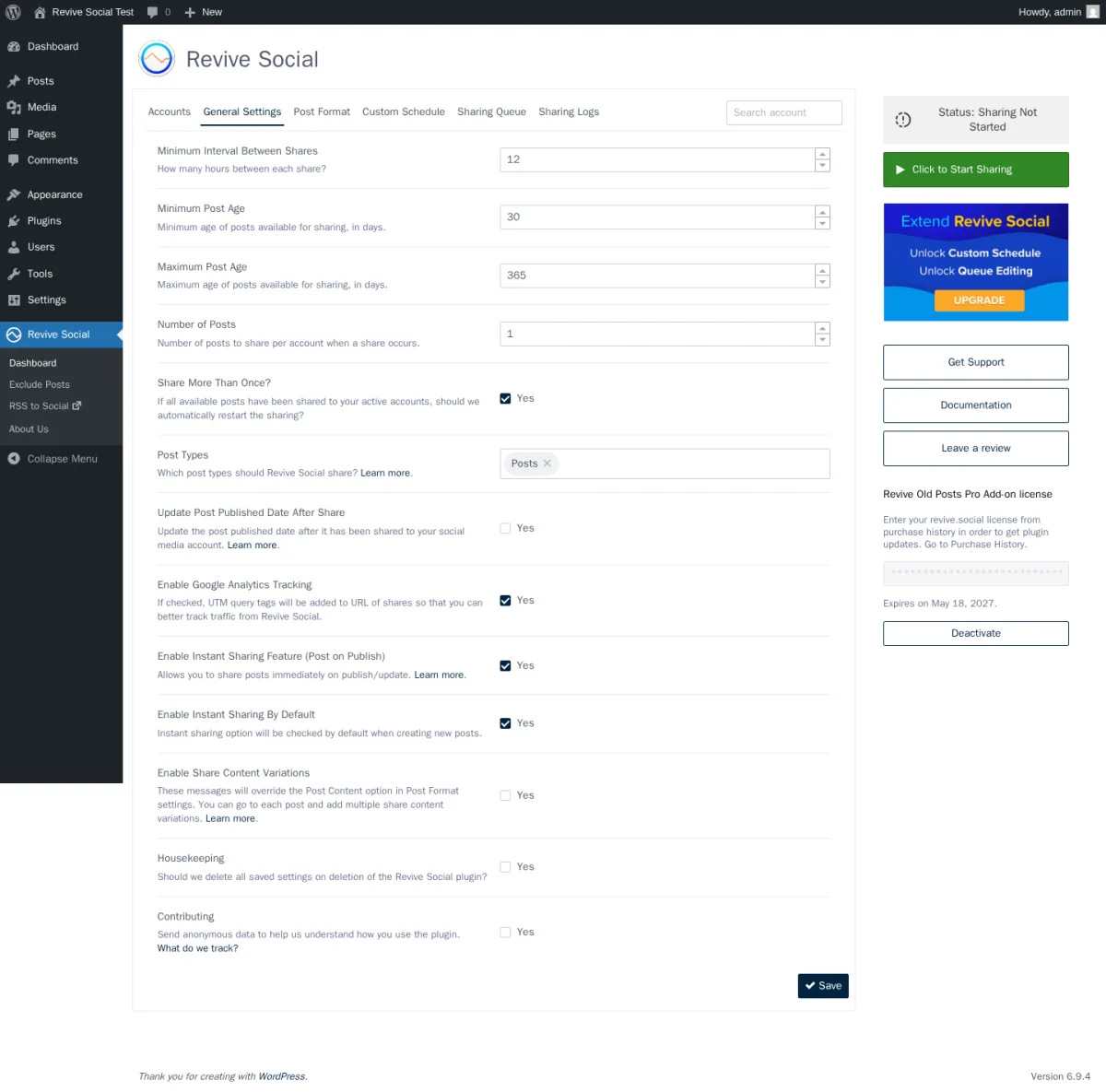
The headline job: pick an interval, pick a min/max post age, pick how many posts per cycle, click Start Sharing, and Revive Old Posts pulls eligible posts from your archive and queues them across every connected account on a rolling timer. The defaults are sensible — 12 hours between shares, only posts older than 30 days and younger than 365 days, one post per cycle.
In testing, I changed the defaults to a 0.1-hour interval, a zero-day minimum post age, and three posts per cycle so the new test post would become eligible immediately. The save succeeded, but the Sharing Logs immediately wrote "Lowest allowed value for 'Minimum Interval Between Shares' is 0.5 hours. Choosing a lower interval is available in the Pro version." On the Starter tier the engine quietly clamps the floor at half an hour. With three posts per cycle and three connected accounts, the queue then populated 12 staggered entries across the two test posts. The recurring engine is the core of the product, and it works exactly as advertised.
2. Per-account Post Format with magic tags, hashtags, and UTM tracking
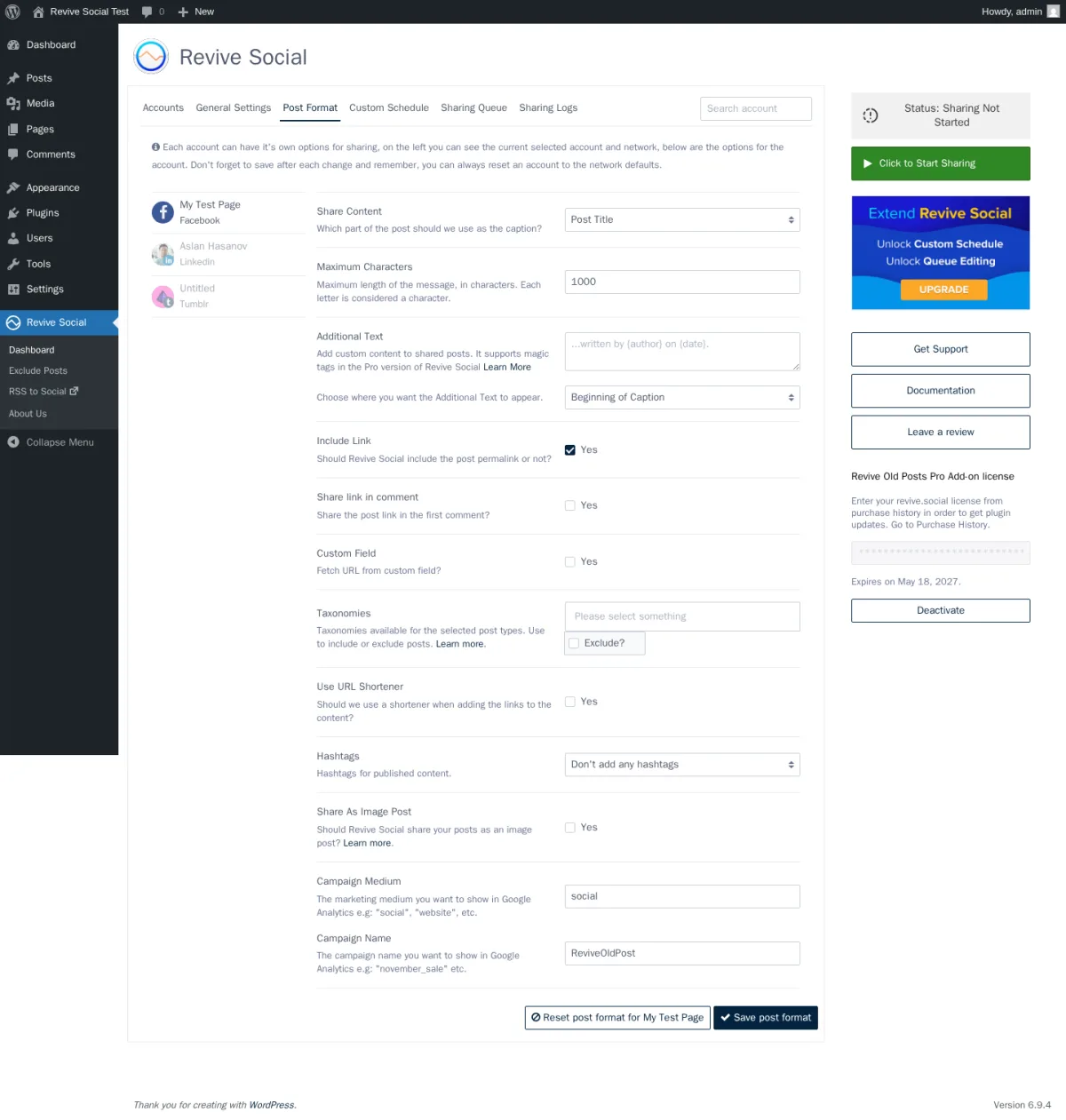
The Post Format tab is where Revive's per-account setup genuinely pays off. Each connected account gets its own copy of every setting — switch accounts in the left rail and the form reloads with that account's saved configuration. Share Content can be Post Title, Post Content, Post Title & Content, Post Excerpt, Custom Field, or Custom Content; Additional Text supports magic tags ({title}, {permalink}, {categories}) on the Pro tier; Hashtags can pull from categories, tags, or a custom field; URL Shortener supports bit.ly, is.gd, rviv.ly, Google Firebase, rebrandly, and native WP shortlinks.
The two fields nobody else surfaces this cleanly are Campaign Medium and Campaign Name — the UTM parameters that get appended to every share URL so Google Analytics can later attribute referral traffic back to the social channel that delivered it. This is the analytics path Revive Social leads with: there's no in-product dashboard, just UTM tags plus your existing GA setup. For publishers whose KPI is "more social referral traffic to existing posts", that's the right call.
3. Sharing Queue and Sharing Logs that show what each network returns
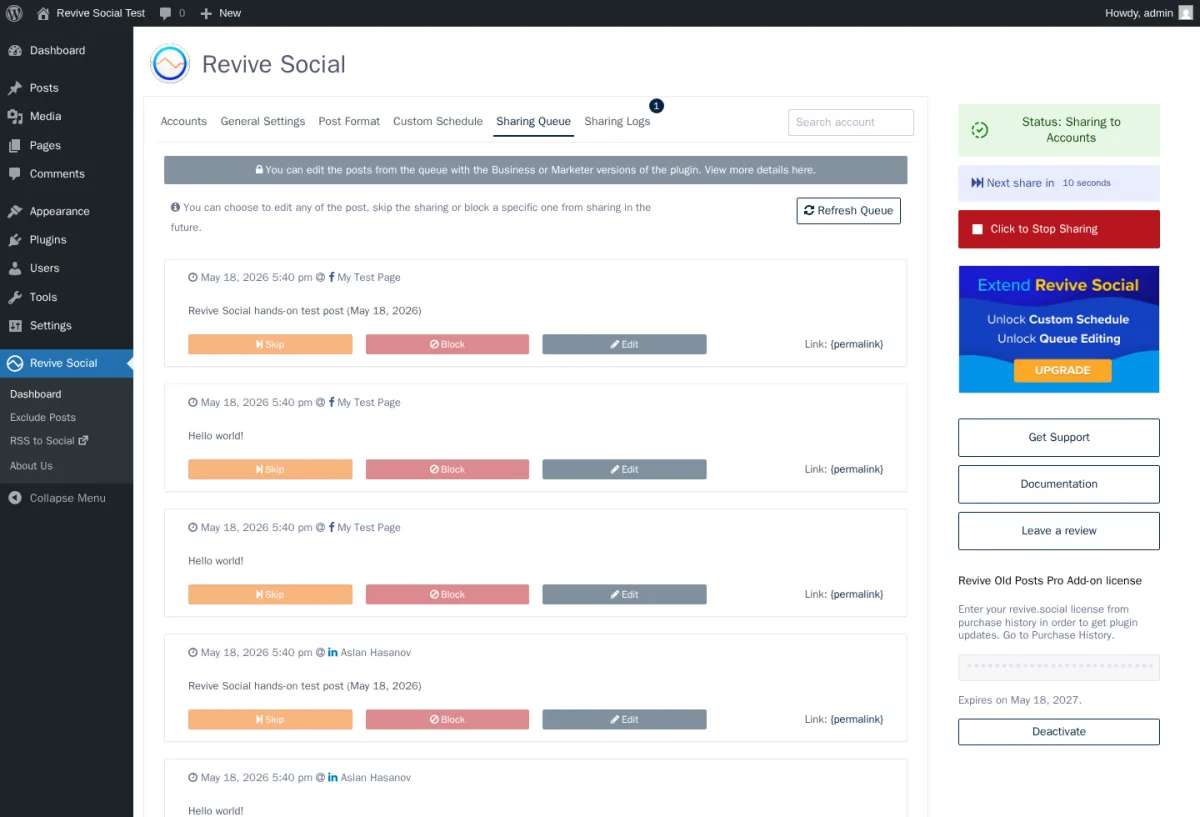
The Sharing Queue is the second-best diagnostic surface in the plugin. After I clicked Start Sharing, the queue populated 12 entries within seconds: timestamp, account name with network icon, post title, and per-row Skip / Block / Edit actions. Edit is gated to Business+ (a banner above the queue says "You can edit the posts from the queue with the Business or Marketer versions of the plugin"), but Skip and Block work on every tier.
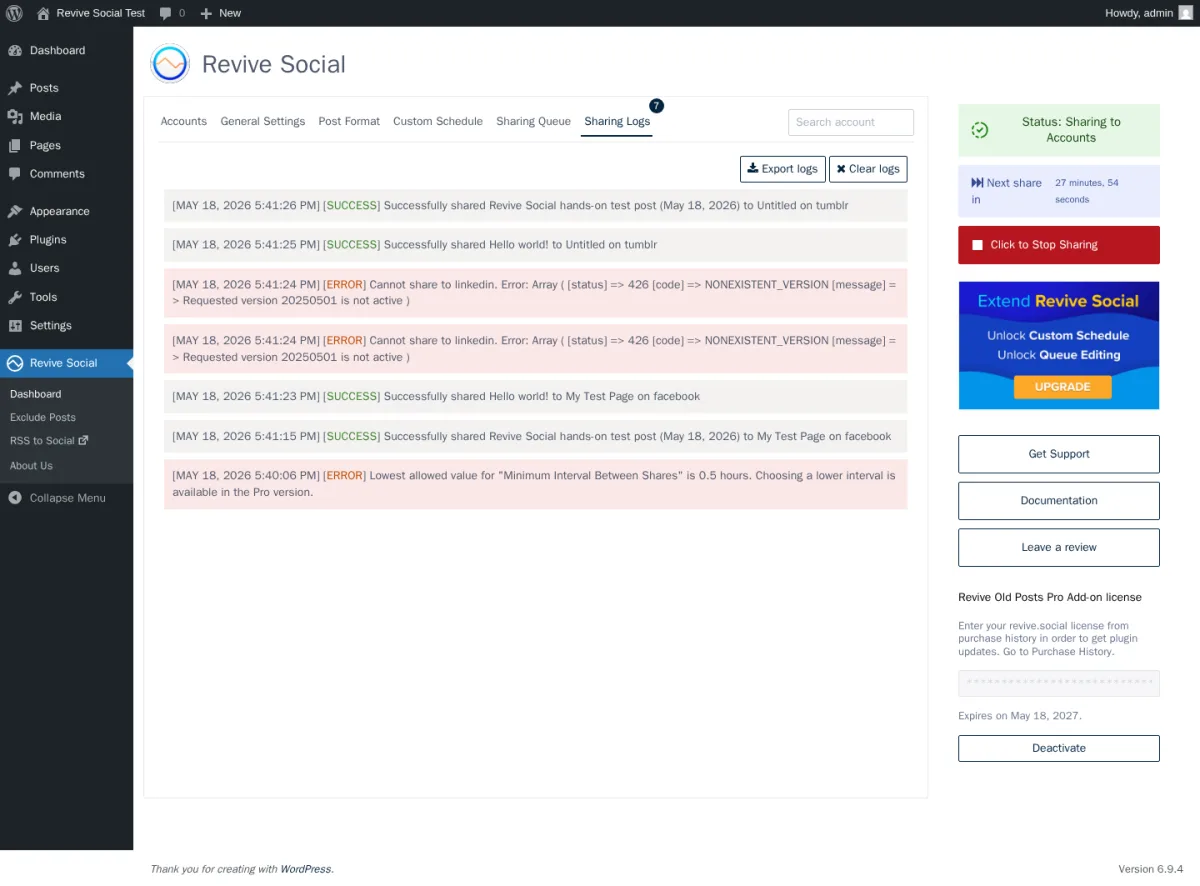
The best diagnostic surface is the Sharing Logs. I manually triggered the scheduler, waited a few seconds, and reopened the logs to find four SUCCESS rows (Facebook and Tumblr both delivered on both posts) and two ERROR rows (LinkedIn failed with a clear, plain-language error message inline explaining that the connector was using a retired LinkedIn API version). The older 1★ complaint that "useless logs, so if it's not working, good luck" no longer matches what you see today — the current log format prints a readable explanation from each social network in plain English, including a clear reason for the failure. For a $99/year plugin, that level of troubleshooting detail is unusually generous.
4. Exclude Posts page and taxonomy filters
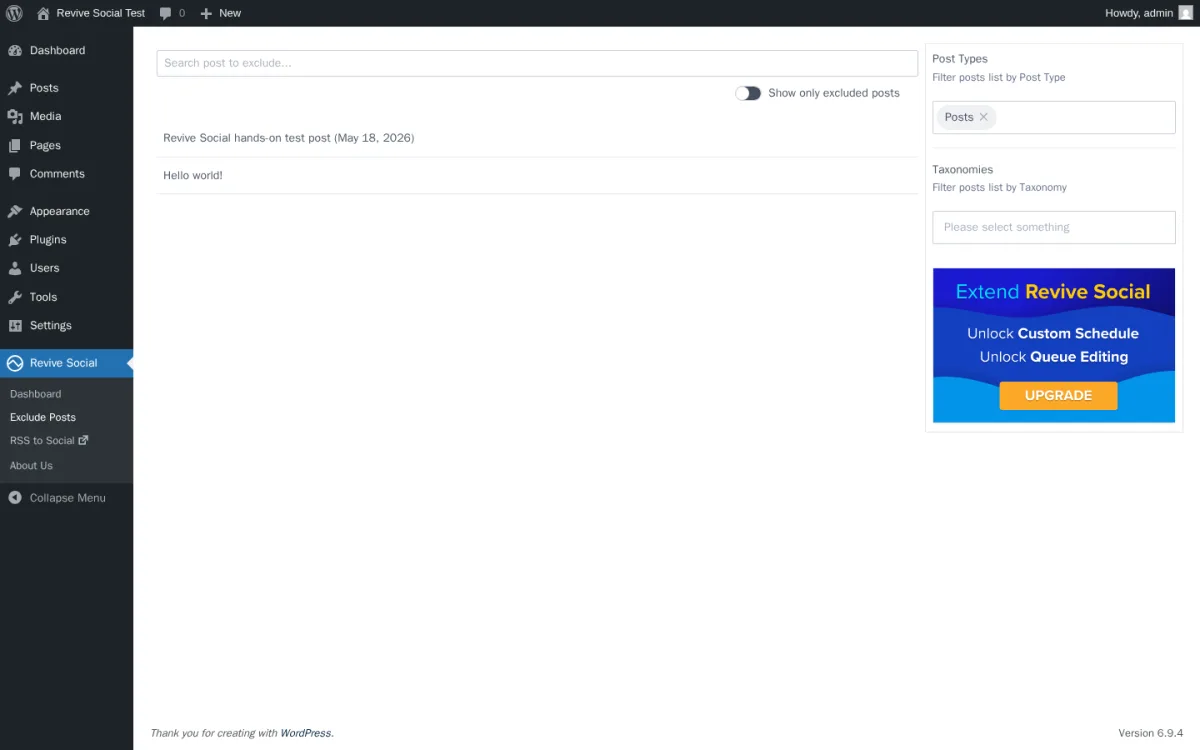
Per-post inclusion and exclusion lives on its own admin page rather than in the WordPress post editor — there's no Revive Social sidebar in Gutenberg by default. The Exclude Posts page surfaces three controls (filter by Post Type, filter by Taxonomy, show-only-excluded toggle) and a list of every post on the site with a per-row exclude switch. Site-wide exclusion is available on every tier; per-account exclusion is the Business+ upgrade.
The Post Format tab also exposes a Taxonomies include/exclude block on every account, so you can keep, say, your evergreen "Recipes" category in rotation while excluding your time-sensitive "News" category. The Free tier applies that filter globally; the Business+ tier scopes it per connected account so you can route different categories to different channels.
5. Custom Schedule, queue editing, and the Business+ upgrade wall
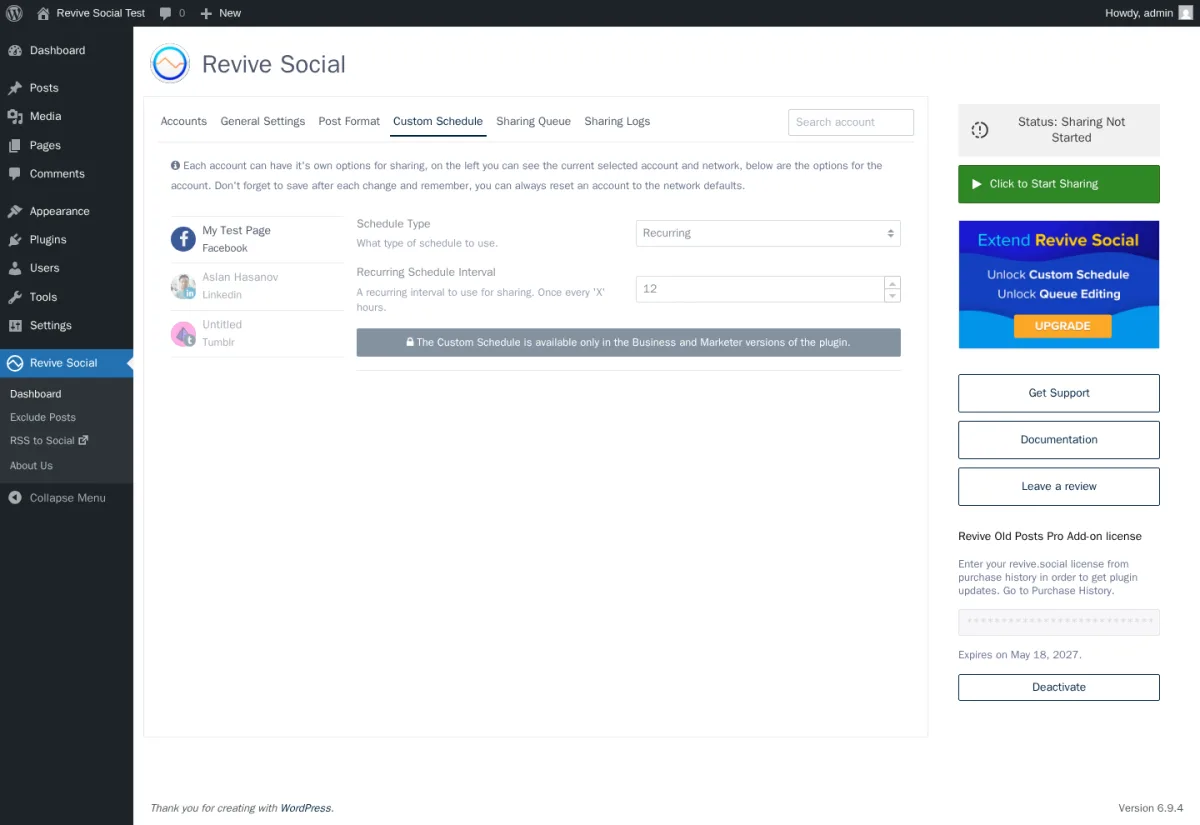
The Custom Schedule tab is what separates Starter from Business. On a Starter / Personal license, the tab renders the schedule type selector (Recurring vs Fixed) and a Recurring Schedule Interval field — and then surfaces the banner "The Custom Schedule is available only in the Business and Marketer versions of the plugin." In other words: even with a paid Pro Add-on installed and an active license key, you cannot schedule per-account fixed days and times unless you're on the $199/year Business plan or higher.
This is the single most-complained-about upsell in the 1★ reviews — buyers who pay $99 for Starter expecting per-account day-time scheduling and then hit the wall. The same wall applies to queue editing (Edit buttons are rendered on every row but are non-functional under the same banner), per-account taxonomy exclusion, and the "share every X hours" floor (which is 0.5 hours on Starter and tighter on Business). If your buying intent is "recycle Facebook and X/Twitter", Starter is fine. If it is "schedule LinkedIn Company Page posts at 8:30am Tuesday and Thursday only", you need Business.
Revive Old Posts Ease of Use / UI & UX
The Revive Old Posts interface feels like a competent recent-generation WordPress admin — clean dashboard, six tabs in a single panel, a right-rail status widget — but it doesn't quite match the polish of newer entrants. The trade-off is that the whole product lives across two locations (the main dashboard and the Exclude Posts page), and per-post controls live outside the WordPress editor.
1. UI / UX
The Revive Social dashboard opens to six tabs (Accounts, General Settings, Post Format, Custom Schedule, Sharing Queue, Sharing Logs) and a right-rail panel that shows live status with a per-second countdown to the next share plus the license expiry date. It's a single scroll per tab, visually consistent with the rest of WordPress admin, and the Start / Stop Sharing button sits in the same widget on every tab. Once you've connected accounts and saved a Post Format per account, day-to-day use is mostly opening Sharing Logs to confirm nothing has broken.
2. Setup
Setup is straightforward when accounts are clean. Connect Facebook Pages, X/Twitter, or Tumblr through their respective OAuth flows; the Pro Add-on layers in LinkedIn, Mastodon, and Business+ networks once your license key is activated. The friction is on the platform side: the "Add more accounts" button on the Starter tier opens an "Upgrade to PRO" upsell modal rather than a network picker, so adding a fourth channel requires either a higher tier or removing one of the three you already have. Plan for 10–15 minutes per network if your accounts are already in good shape.
3. Tab navigation and per-account settings
The per-account model on the Post Format tab is the single best UX choice in the product — switch accounts in the left rail and the form reloads with that account's settings. Save and Reset are also per-account. That's better than a global one-caption-fits-all model and matches the per-channel composer in FS Poster. The trade-off is that there's no per-post composer inside the WordPress editor: if you want to customise a single post's share text for one account, you have to edit the Additional Text field in Post Format, and that change then applies to every share for that account.
4. Status widget and license panel honesty
The right-rail widget cycles between "Sharing Not Started" and "Status: Sharing to Accounts" with a live per-second countdown to the next share — useful proof that the engine is actually ticking. Below the status widget sits the license-renewal panel: it shows the exact expiry date (in our test it read "Expires on May 18, 2027.") and a Deactivate button. No surprise renewals, no obscured expiry — small detail, but it's the right call.
5. Friction points worth knowing
Three things will trip first-time users. First, the minimum share interval clamps at 0.5 hours on Starter — set a tighter interval and the engine quietly rejects it and writes the error to the logs. Second, the per-post controls live on the Exclude Posts admin page rather than in the editor sidebar, so anyone used to Jetpack Social or FS Poster will look for an editor panel that isn't there. Third, the "RSS to Social" item in the admin menu is an outbound upsell link to a separate add-on (Revive Network), not an in-product RSS dashboard — clicking it opens revive.social in a new tab.
Revive Old Posts Performance
In real WordPress use, Revive Old Posts feels steady — the plugin runs lightly on the WordPress side, and the limiting factor is almost always the social network's own API or your server's WP-Cron configuration.
1. Publish-to-share latency
After I created a test post and clicked Start Sharing, the queue populated within seconds and the first SUCCESS row hit the Sharing Logs within 8 seconds of triggering the scheduler manually. Facebook and Tumblr both delivered on both test posts. If you see drift, it's almost always your WordPress site relying on the built-in pseudo-cron rather than a real server-side cron job — set up a proper cron and the timing improves predictably.
2. Engine stability across multiple cycles
With three posts per cycle and three connected accounts, the queue staggered 12 entries across two scheduled cycles (5:40pm and 6:10pm in our test) without double-firing any of them. Clicking Stop Sharing flipped the status back to "Sharing Not Started" and left no orphan queue rows behind. The engine behaves predictably, which is exactly what you want from something that's supposed to keep running for years.
3. WP-Cron reliance
This is the honest weakness. Revive Old Posts uses WordPress's WP-Cron to trigger every share — and a faulty WP-Cron is the documented #1 reason buyers report "Revive Social not posting" (Themeisle has a dedicated docs article on the troubleshooting flow). The WordPress.org 1★ reviews that say "didn't work basically the whole time" are almost always a misconfigured cron rather than a Revive defect, but the plugin is at the mercy of your server's cron setup.
4. LinkedIn auto-share is currently broken on Pro Add-on v3.3.2
The biggest finding from this test cycle: LinkedIn auto-share failed end-to-end. The Sharing Logs surfaced a clear error explaining that the connector is using a retired LinkedIn API version, so every share attempt is rejected by LinkedIn. Until Themeisle ships a patched Pro Add-on that points at the current LinkedIn API version, LinkedIn shares will continue to fail — buyers should verify LinkedIn on their own install before relying on it. There's a small silver lining — the log made it obvious what was wrong, so you know exactly what to report to support — but the share itself does not work today.
Revive Old Posts Support, Documentation & Learning Resources
Support and learning resources on Revive Old Posts split cleanly between two channels: the public WordPress.org forum (free) and email support tied to a paid Pro license. There's no live chat or phone option on the public surfaces, and there's no published SLA tier breakdown on the pricing page.
The public support-forum resolution rate in the trailing two months is 3 of 3 issues resolved — small sample, but a 100% close rate is the right signal. Average response time isn't published as a hard number, but the visible patterns in 5★ reviews repeatedly mention "prompt support," "tech support very reactive," and "fast and helpful support." With a 4 / 5 WordPress.org rating and a 3 of 3 recent forum resolution rate, support reads as not bad but mixed — the 4 / 5 sits in the 3.5–4.4 mixed-support band rather than the 4.4+ "good support" band, so I wouldn't oversell it. Paid customers describe quick, useful replies, and the older 1★ reviews ("Plugin Stopped Working, and Support Non-Existent") track to versions from 2018–2020 rather than current behaviour, so newer buyers will likely have a better experience than the worst legacy complaints suggest.
Documentation is genuinely good. The docs portal at docs.revive.social carries clear articles on the WP-Cron troubleshooting flow, the Custom Schedule feature, Free vs Pro tier differences, Zapier integration, magic tags, custom UTM tags, media library sharing, WooCommerce custom-post-type sharing, and WPML / Polylang multilingual routing. The WordPress.org listing carries the standard support and changelog stream. There's no dedicated video-tutorial channel for Revive Social specifically, but the in-product help links and the article-per-feature structure of docs.revive.social cover most setup questions without a video.
Revive Old Posts User Reviews & Reputation
I read 60+ of the 557 visible reviews on the WordPress.org listing across both the 5★ and 1★ filters, plus third-party reviews from WPBeginner, isItWP, MH Themes, and SaaSScout. WordPress.org is the dominant trust surface — there's no G2, Capterra, or Trustpilot listing as of 2026-05-18.
Overall impression. The rating distribution is informative on its own. The headline is 4 / 5 stars from 557 reviews: 365 × 5★ (66%), 50 × 4★, 23 × 3★, 21 × 2★, and 98 × 1★ (17.6%). That's a healthier shape than the stark 5★/1★ split you see on some competitors, but the 1★ minority is still loud enough to be worth taking seriously. Third-party SaaS reviewers like SaaSScout score Revive closer to 6.45 / 10 — a meaningful gap versus the WordPress.org 4 / 5 (= 8 / 10). Both numbers are worth keeping in mind before you commit.
Most praised strengths. Recent 5★ reviewers repeat the same themes: "just works," "saves me so much time," "easy to set up and use immediately" (this in Indonesian, German, Spanish, Portuguese, and Arabic — the plugin has real non-English usage), "if you really want traffic to your blog, this is a must have," and "the support goes more than fast — problems are solved faster than you can look from the right to the left." The recurring evergreen-recycle engine and the responsive support drive most of the positive feedback. Pro subscribers describe the plugin as "working so far as described," which is the right outcome to want from a $99/year subscription.
Most criticised weaknesses. The 1★ cohort clusters on five patterns. First and largest: sharing silently does not happen ("Didn't work basically the whole time," "Never worked") — almost always a WP-Cron configuration issue. Second: OAuth connections drop on Facebook, LinkedIn, and X/Twitter after API changes, which is an industry-wide pattern rather than a Revive-specific defect. Third: upgrade-wall sticker shock when buyers pay for Starter and discover they need the $199 Business plan to actually use Custom Schedule. Fourth: the Free tier feels too thin for anyone expecting LinkedIn or Instagram without paying — Free only covers Facebook Pages and X/Twitter. Fifth: older "plugin is dead" complaints from 2018–2019 that no longer match current maintenance (the changelog shows multiple 2024–2026 releases). Both the praise and the complaints are worth knowing before you commit to a renewal.
Revive Old Posts Pricing & Value
Revive Old Posts is freemium and the paid tiers are sold through the public revive.social pricing page — the numbers below are verified directly from the official Revive Old Posts plan page on 2026-05-18. All paid plans are billed annually and include one year of updates and support; there is no Lifetime tier and no monthly billing.
- Free — $0 on WordPress.org. Facebook Pages and X/Twitter auto-share, recurring "share every X hours" engine, min/max post age filter, posts per cycle, UTM tagging, URL shorteners (bit.ly, is.gd, rviv.ly, Google Firebase, rebrandly, native WP shortlinks), common hashtags from categories or tags, and the per-post Exclude Posts page. Unlimited sites.
- Starter — $99/year intro (renews at $129/year, the struck-through "Was" price). 1 site. Adds LinkedIn Profiles, Tumblr, Mastodon, plus Share Variations, magic tags, media library auto-share, share-as-image-post, share-link-in-first-comment, WP Auto-Republish, custom post types, WPML / Polylang / TranslatePress per-language account routing, and 30+ extra networks via a Zapier webhook.
- Business — $199/year intro (renews at $259/year). 3 sites. Adds Instagram Business, LinkedIn Company Pages, Bluesky, Telegram, Google Business Profile (the source pages still label this connector by its legacy name Google My Business), and VK Profiles + Communities — plus the per-account Custom Schedule (fixed days × times in 24-hour format), queue editing, per-account taxonomy filters, and a tighter share-interval floor.
- Marketer — $399/year intro (renews at $529/year). Unlimited sites. Same feature set as Business with the 3-site cap removed.
The Free tier covers the core flow for the two biggest networks — Facebook Pages and X/Twitter — and a real evergreen-recycle engine with UTM tracking. For solo bloggers whose social presence is Facebook + Twitter only, Free is genuinely enough. The single biggest practical limitation on Free is the two-network ceiling, which is the moment most paid upgrades happen.
The Starter→Business jump is where pricing gets uncomfortable. The Starter plan at $99/year reads like a cheap upgrade until you discover that Custom Schedule, queue editing, per-account taxonomy filters, Instagram, LinkedIn Company Pages, Bluesky, Telegram, Google Business Profile, and VK all require the Business plan or higher. Anyone who pays $99 for Starter expecting Instagram or per-account day-and-time scheduling will hit a locked tab on day one. If those features matter, budget for Business ($199/year intro / $259/year renewal) from the start. The Marketer plan only differs from Business by removing the 3-site cap; it does not add any extra features.
Every paid plan includes a 30-day money-back guarantee, no questions asked, and the Pro license carries one year of updates and support before renewal. Pro installs as a separate plugin that runs alongside the WP.org Free plugin rather than replacing it. The affiliate-program page lists a different, lower set of prices ($75 / $149 / $299) that does not match the public pricing card — for any buying decision, treat the official Revive Old Posts pricing page on revive.social as the source of truth.
Revive Old Posts Pros and Cons
After a full hands-on round, the strengths and trade-offs settle cleanly into a short list you can use to make the call.
Pros
- End-to-end auto-share to Facebook and Tumblr works: confirmed on a fresh WordPress post, with two SUCCESS rows per network appearing in the Sharing Logs within 8 seconds of manually triggering the scheduler.
- Evergreen recycle engine is purpose-built and battle-tested: 16+ years of iteration since December 2009, sensible defaults (12-hour interval, 30-day min post age, 365-day max post age), and per-account scoping that lets the Post Format tab apply different settings per connected channel.
- Sharing Logs that actually help when something breaks: the in-product log shows the exact response from each social network in plain text (including the full LinkedIn error message in our test) — better than most $99/year plugins ship, and a meaningful improvement over the older "useless logs" complaints from earlier versions.
- Honest licensing and pricing UX: the license-renewal panel shows the exact expiry date with a Deactivate button, the Pro Add-on installs as a separate plugin file you can disable, and the 30-day money-back guarantee is explicit on the pricing card.
Cons
- LinkedIn auto-share is currently broken on Pro Add-on v3.3.2: every share attempt fails because the plugin is calling a retired LinkedIn API version. Until Themeisle ships a fix that points at the current LinkedIn API version, LinkedIn shares will fail with the same error.
- Free tier is genuinely thin — only two networks: Facebook Pages and X/Twitter, full stop. Buyers expecting LinkedIn, Tumblr, or Instagram on Free will need a paid Pro tier from day one.
- Starter→Business upgrade wall hits exactly where buyers expect it not to: Custom Schedule, queue editing, per-account taxonomy filters, Instagram, LinkedIn Company Pages, Bluesky, Telegram, and Google Business Profile all require the Business plan or higher. The $99 Starter plan does not unlock per-account day-time scheduling.
- No Pinterest, TikTok, YouTube, Reddit, Discord, Threads, or Webhook direct connectors: Zapier webhook is the only path to those networks, which is a separate subscription and a manual workflow. No agency multi-site console and no in-product analytics dashboard beyond UTM-tagged Google Analytics.
Who Should Use Revive Old Posts?
Revive Old Posts is the right tool for buyers whose primary job-to-be-done is recycling an existing WordPress archive on a few mainstream networks — and the wrong tool for several common buying intents.
Who Should Use It
- Solo bloggers and lifestyle publishers with a deep evergreen archive: if you have 100+ posts that are still relevant a year after publishing and your KPI is "keep getting social referral traffic from older content," the recurring engine plus UTM tagging is exactly the right shape.
- WooCommerce stores that want category-aware product reshares: custom-post-type support on the Pro tier lets you recycle WooCommerce products with category-based filters, with the Business+ tier unlocking per-account category routing.
- Non-profits and educational sites that re-promote older campaigns: the "share every X hours" engine + per-account hashtag rules + URL shortener + UTM tags is a low-touch way to keep older news, fundraisers, or course pages cycling without manual work.
- One- to three-site operators who don't mind annual renewal: a single Business license at $199/year covers three sites with the full feature set; bigger publishers can upgrade to Marketer for $399/year on unlimited sites.
Who Should Skip It
- Agencies running 5+ client sites who want a centralised multi-site console: the Marketer plan only removes the 3-site cap; there's no agency dashboard, no per-client billing flow, and no shared account pool. A 30-website Lifetime alternative is meaningfully better economics here.
- Publishers who need Pinterest, TikTok, YouTube, Reddit, Discord, Threads, or Webhook coverage: Revive Old Posts does not cover any of those natively. Zapier is the only path, which is a separate subscription, a manual setup step, and a recurring cost on top of Revive's annual renewal.
- Buyers shopping for a Lifetime license to lock the cost in: Revive Old Posts has no Lifetime tier; every paid plan is an ongoing annual subscription that renews at the full "Was" price.
- Visual-first teams that need a branded share-image generator or a content calendar: there's no equivalent of Jetpack Social's Image Generator and no drag-and-drop calendar — the workflow is per-account text+image with featured-image propagation, not a visual planner.
Best Revive Old Posts Alternatives
Several WordPress social-publishing plugins compete with Revive Old Posts directly. Pick the alternative whose job-to-be-done lines up with yours before you compare sticker prices.
- FS Poster: the strongest WordPress-native alternative for buyers who outgrow Revive on either network coverage or licensing model. It starts at $58/year on the Single plan and covers 26 networks (vs Revive's roughly 10 direct connectors), including Pinterest, TikTok, YouTube, YouTube Shorts, Reddit, Discord, Threads, Webhook, Truth Social, VK, OK.ru, and Google Business Profile. You also get a real Calendar, a recurring Planner for evergreen reshares, a WordPress Posts-list bulk action, WooCommerce-aware auto-share, and an optional Lifetime tier for agency/multi-site economics. Pick FS Poster over Revive when you need wider networks, included automation depth, or a long-term licence path. See the FS Poster review for the full hands-on walkthrough, or read FS Poster vs Revive Old Posts if a direct comparison is what you need.
- Blog2Social: the highest-rated WordPress freemium social plugin — 12 networks on Free, up to 25 networks on the Business tier, per-network image customisation on Free, an in-WordPress calendar with drag-and-drop reschedule, Best Time Manager presets, and 4.5 / 5 from 2,088 reviews on WordPress.org. Pick Blog2Social over Revive when you want broader networks in Free and a real calendar workflow, and don't mind monthly-billed-yearly pricing. See the Blog2Social review for the full hands-on walkthrough.
- NextScripts SNAP: a long-running technical plugin covering 30 destinations including unusual networks like VK, OK.ru, weibo, Plurk, LiveJournal, MailChimp, and Medium that no other competitor reaches, plus 100% white-label posting through your own developer apps. Pick SNAP over Revive when you need oddball / regional networks on the cheap and are OK with an older-style WordPress admin UI. See the NextScripts SNAP review for the hands-on walkthrough.
- Jetpack Social: Automattic's stripped-down social plugin — 8 networks (Facebook, Instagram, Threads, LinkedIn, Bluesky, Nextdoor, Tumblr, Mastodon), free with Jetpack, cleanest Gutenberg sidebar UX in the category. Pick Jetpack Social over Revive when you're already paying for Jetpack and don't need a recurring evergreen-reshare engine — Jetpack Social does not recycle archives. See the Jetpack Social review for the testing notes.
For the full shortlist with deeper triage on each option, see the Revive Old Posts alternatives page. If you are shopping the whole category, the guide to auto post WordPress content to social media pulls every option above into a single comparison frame.
Final Verdict: Is Revive Old Posts Worth It?
For solo bloggers, lifestyle publishers, non-profits, and small WooCommerce stores whose primary job is resurfacing a deep evergreen archive on 1–3 mainstream networks, Revive Old Posts is a fair install in 2026 — the Free tier genuinely covers Facebook Pages and X/Twitter, the Starter plan at $99/year adds LinkedIn Profiles, Tumblr, and Mastodon, and the recycle engine is the most battle-tested in the category after 16+ years of iteration.
For agencies running multiple client sites, anyone who needs Pinterest, TikTok, YouTube, Reddit, Discord, Threads, Telegram, Instagram, or Google Business Profile coverage on the cheap, anyone who wants a Lifetime license to lock the cost in, and anyone who needs per-account day-time scheduling without paying $199/year, the honest answer is no — shortlist FS Poster instead. The biggest caveat for any 2026 buyer is the live LinkedIn API failure on Pro Add-on v3.3.2 — until Themeisle ships a fix for the LinkedIn API version, LinkedIn auto-share is broken. The 30-day money-back guarantee is the right safety net for first-time paid buyers, and the Free tier on WordPress.org is a real trial of the recycle engine before you spend a cent.
Revive Old Posts FAQ
Is there a free version of Revive Old Posts?
Yes. The Free plugin is on WordPress.org (listed under the legacy slug tweet-old-post) and covers Facebook Pages and X/Twitter auto-share, the recurring "share every X hours" recycle engine, min/max post age filters, posts per cycle, UTM tagging, URL shorteners (bit.ly, is.gd, rviv.ly, Google Firebase, rebrandly, native WP shortlinks), common-hashtag automation, and the per-post Exclude Posts page. Free works on unlimited sites. There is no free trial of the paid Pro Add-on — the Free plugin is the trial.
Is Revive Old Posts beginner-friendly? Mostly yes. The dashboard is a single panel with six tabs, the General Settings defaults (12-hour interval, 30-day min post age, one post per cycle) are sensible, and the per-account Post Format tab is one of the cleaner UX patterns in the WordPress social-publishing category. Two friction points trip first-time users: the per-post controls live on a separate Exclude Posts admin page rather than in the WordPress editor sidebar, and the minimum share interval clamps at 0.5 hours on the Starter tier even when a paid Pro license is active.
Does Revive Old Posts support Pinterest, TikTok, or Instagram? Instagram Business is supported on the Business plan and higher. Pinterest, TikTok, YouTube, Reddit, Discord, and Threads are not directly supported on any tier — they can be reached only through the Zapier webhook integration on the Pro Add-on, which requires a separate Zapier subscription and a manual workflow setup. If those networks matter to you, an alternative like FS Poster covers them natively.
What does the paid Revive Social Pro plan actually unlock? Three things on top of Free, scaling by tier. Starter ($99/year) adds LinkedIn Profiles, Tumblr, Mastodon, custom post types, Share Variations, magic tags, media library auto-share, share-as-image-post, share-link-in-first-comment, WP Auto-Republish, WPML / Polylang / TranslatePress routing, and 30+ extra networks via Zapier. Business ($199/year) adds Instagram Business, LinkedIn Company Pages, Bluesky, Telegram, Google Business Profile, VK, plus the per-account Custom Schedule (fixed days × times), queue editing, per-account taxonomy filters, and a tighter share-interval floor. Marketer ($399/year) removes the 3-site cap with no extra features versus Business.
What are the best Revive Old Posts alternatives? FS Poster is the strongest alternative — 26 networks, a Lifetime tier covering 30 sites, a real Calendar plus a recurring Planner, WooCommerce-aware auto-share, and a bulk action on the WordPress Posts list. Other options worth shortlisting are Blog2Social (12 free networks, 25 on Business, in-WordPress calendar, 4.5 / 5 from 2,088 reviews), NextScripts SNAP (30 destinations including VK, OK.ru, weibo, MailChimp, and Medium), and Jetpack Social (8 mainstream networks, native Gutenberg sidebar, free with Jetpack — but no recurring evergreen-recycle engine). Pick the alternative whose job-to-be-done matches yours; the alternatives section above has the full triage.
Write once. Post to 26 networks.
- 26 social networks
- Schedule & auto-repost
- Runs inside wp-admin


