


Which WordPress social media auto-posting plugin should I choose if I want my posts to reach Facebook, LinkedIn, Threads, and the rest of my channels without me opening every social tab every time I publish? And which one actually gives me the right mix of features, usability, pricing, support, and long-term reliability — not just the longest network list on a marketing page? If you also want to compare auto-posters with feed tools and share-button plugins, start with our broader WordPress social media plugin guide. For Instagram-specific tools, the Instagram plugins for WordPress roundup goes deeper on feed, auto poster, and giveaway options.
I spent the last two weeks answering both questions the hard way. I installed each of the seven plugins in this comparison on a real WordPress install (FS Poster, Blog2Social, Jetpack Social, Bit Social, SchedulePress, NextScripts SNAP, and Revive Old Posts), connected real social accounts, and worked through the auto-share, scheduling, calendar, and per-channel customisation flows hands-on. The connected-account mix and the depth of the auto-share verification varied by product: FS Poster, Blog2Social, Jetpack Social, and Bit Social verified end-to-end auto-share to multiple connected channels (Facebook Page, LinkedIn, Threads, and in the broader products Pinterest and Truth Social) with live social-network URLs as proof; NextScripts SNAP confirmed live auto-share to a connected Facebook page with the live Facebook post URL captured; Revive Old Posts confirmed end-to-end shares to Facebook and Tumblr alongside a real LinkedIn connector failure (disclosed honestly in its product entry below); and SchedulePress's per-network template save flow worked as expected, but the share-fire attribution stayed inconclusive from the anonymous viewer side and is called out openly in its entry. Alongside the hands-on tests I checked the public rating and review patterns on WordPress.org and the vendor surfaces for every product, and read a representative mix of recent positive and critical reviews for each plugin to understand what current buyers actually say about it.
The ranking below is what I would actually recommend to a real WordPress buyer in 2026, anchored to network coverage, ease of setup, pricing reality, hands-on auto-share results, and the small details (per-channel filters, evergreen reshares, AI captions, click tracking) that separate a tool you keep from one you uninstall a month later.
How I Ranked These Plugins
I did not pick the order by intuition. Each plugin was scored across five evaluation dimensions, then the top of the list was checked against the actual primary search intent — "my WordPress posts should auto-share to every network that matters, without me hand-pasting captions after every publish" — to make sure the ranking matched the buyer, not just the spreadsheet.
The five dimensions were tested feature richness and core-workflow coverage, UI/UX and ease of use observations on a real WordPress install, product performance and stability across multiple share cycles, paid starting price compared with what each tier actually unlocks, and public rating plus review-count reputation patterns on WordPress.org and the vendor's own surfaces. I also weighed two qualitative axes: support, documentation, and learning resources observed while using each product, and fit for the primary auto-posting buyer use case (publish a WordPress post → it appears on every connected channel without manual work).
The list is built from hands-on testing on a real WordPress install, the finalised review findings for every plugin, pricing checks across each vendor's public pricing page, public review signals on WordPress.org and the vendor sites, and the network-coverage matrices I built per product. It is not a re-summary of vendor marketing pages.
Quick Comparison: Top 3 WordPress Social Media Auto Poster Plugins
| Criteria | #1 FS Poster | #2 Jetpack Social | #3 SchedulePress |
|---|---|---|---|
Best for |
WordPress agencies, WooCommerce stores, and publishers running 3+ sites who want one tool for 26 social networks |
Solo bloggers and small businesses who only need 2–4 mainstream networks and value the Automattic brand |
Editorial teams, multi-author WordPress blogs, and price-sensitive publishers who need a drag-and-drop calendar plus 8-network auto-share |
Starting price |
$58/ |
€59.40 first year, then €107.40/ |
$39/ |
Feature richness |
10/ |
6/ |
7/ |
Ease of use |
9/ |
8/ |
8/ |
Performance |
9/ |
8/ |
7/ |
Rating |
4.9/ |
3.3/ |
4.6/ |
Best reason to choose |
26-network coverage on one licence with a real Lifetime tier that removes annual renewal entirely |
Native Gutenberg-sidebar workflow from Automattic with auto-share-on-publish for free |
Deepest editorial-scheduling stack in the category (drag-and-drop calendar, Auto Scheduler, Missed Schedule Handler) at the cheapest annual price |
Main drawback |
No free tier and no public WordPress.org listing; only a 14-day money-back guarantee |
Only 8 networks, no Pinterest / X / TikTok / Reddit / Discord / Telegram, and a strongly bimodal review pattern |
Only 8 networks, no in-product Activity Log for end-to-end auto-share verification, and share-fire attribution stayed inconclusive in testing |
The 7 Best WordPress Social Media Auto-Posting Plugins
1. FS Poster
Best for: WordPress agencies, WooCommerce stores, and publishers running 3+ sites who want one tool for 26 social networks
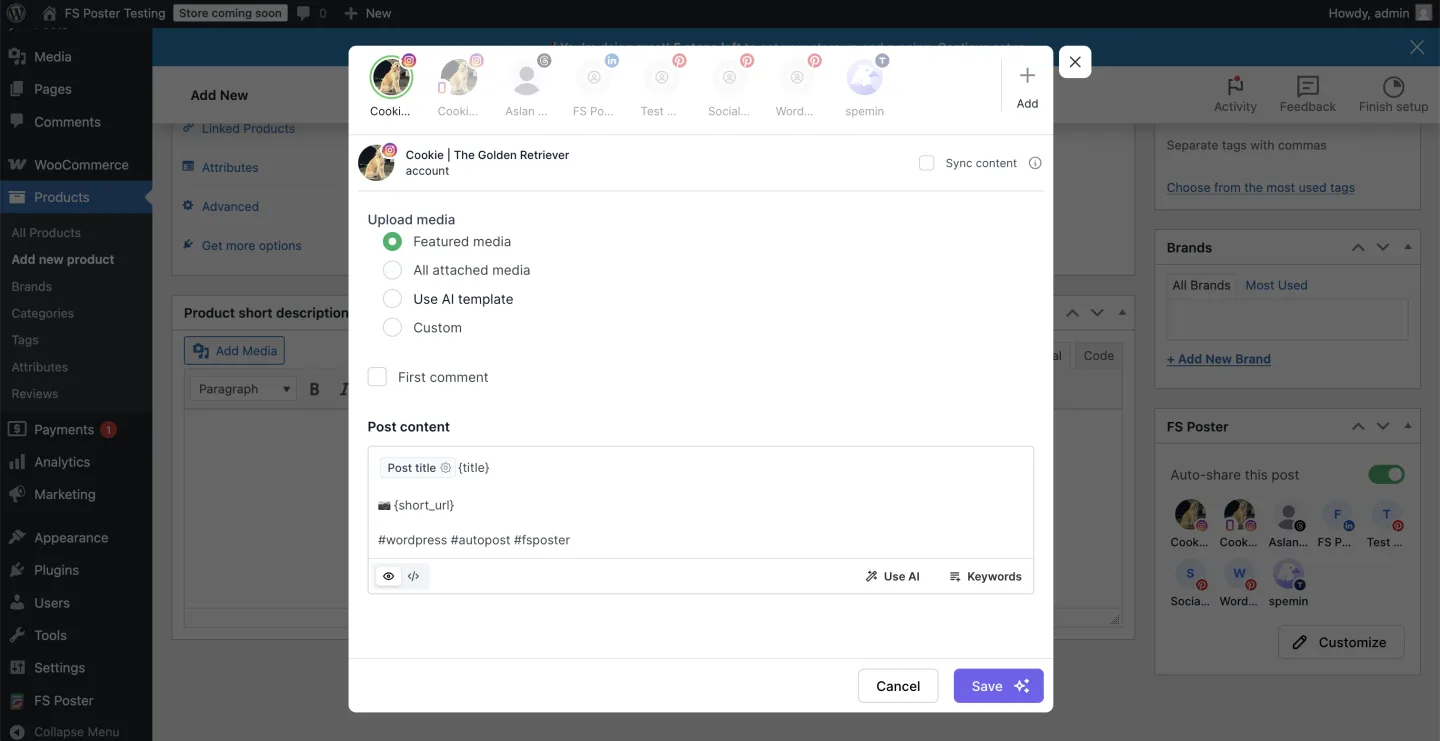
FS Poster is the WordPress-native social auto-poster I keep recommending to agencies and serious publishers because it is the only plugin in this comparison that ships a 26-network roster, a modern v7 admin app, a real Calendar plus a recurring Planner for evergreen reshares, a WordPress Posts-list bulk action, and an optional Lifetime tier for 30 websites for long-term/multi-site buyers — all in the base licence. In testing, a single WordPress post fired 8 of 8 eligible connected channels successfully (Pinterest, Truth Social, LinkedIn, Threads, and both Instagram destinations), with Facebook correctly skipped by the per-channel category filter I had set in an earlier test. The same Calendar surface lets you compose one-off social posts without first publishing a WordPress post.
Why it ranks here:
- 26-network coverage on a single licence (including the newly added YouTube Shorts destination) is the broadest WordPress-native roster in the category, beating Blog2Social's 25 on Business, NextScripts SNAP's 30 only when you stack the Premium API addon, and every other product on this list.
- Hands-on auto-share verified end-to-end with 8 of 8 eligible channels succeeding on a real WordPress publish, per-channel category filtering correctly skipping a non-Tech post on the Facebook channel, and a live Calendar Share Now flow firing without a backing WordPress post.
- An optional Lifetime tier covering 30 websites — the only meaningful lifetime licence in the WordPress auto-poster category — is available as a long-term/multi-site path that removes annual renewal entirely.
Key features:
- Auto-share to 26 networks from one WordPress dashboard, including Facebook, Instagram, Threads, X/Twitter, LinkedIn, Pinterest, TikTok, YouTube Community, YouTube Shorts, Truth Social, Telegram, Reddit, Discord, Bluesky, Mastodon, VK, OK.ru, Xing, Plurk, Flickr, Google Business Profile, a WordPress-to-WordPress connector, and a generic Webhook destination
- Modern Calendar with Share Now flow that lets you push a one-off social post (with featured image and per-network caption) without first publishing a WordPress post
- Recurring Planner module for evergreen reshares with a 4-step wizard (Filter → Share type → Sort → Summary) and a sleep-time exclusion window
- Native "Bulk Schedule [FS Poster]" entry in the WordPress Posts list bulk-actions dropdown for hydrating an archive in a few clicks
- Per-channel custom captions with template variables (
{title},{short_url}) and a Use AI button that runs on your own OpenAI key - WooCommerce auto-share works out of the box with per-channel category filters that route products by collection or tag
Pricing: Starts at $58/year intro on Single (renews at $65/year, 1 site). Plus runs $109/year intro / $195/year renewal (3 sites) and Developer runs $229/year intro / $449/year renewal (15 sites). For long-term/multi-site buyers there is also an optional one-time Lifetime tier covering 30 websites with 12 months of support and lifetime updates. There is no free tier — the answer to that is a 14-day money-back guarantee that applies to every plan including Lifetime. Every plan ships the full 26-network roster.
Best for: WordPress agencies, WooCommerce stores, and publishers running 3+ sites who want one tool for 26 social networks
Main drawback: No free tier and no public WordPress.org listing — the 14-day money-back guarantee and the live demo on fs-poster.com partly answer it, but buyers who insist on "free to start" will pick a freemium plugin first.
Full review: FS Poster review
2. Jetpack Social
Best for: Solo bloggers and small businesses who only need 2–4 mainstream networks and value the Automattic brand
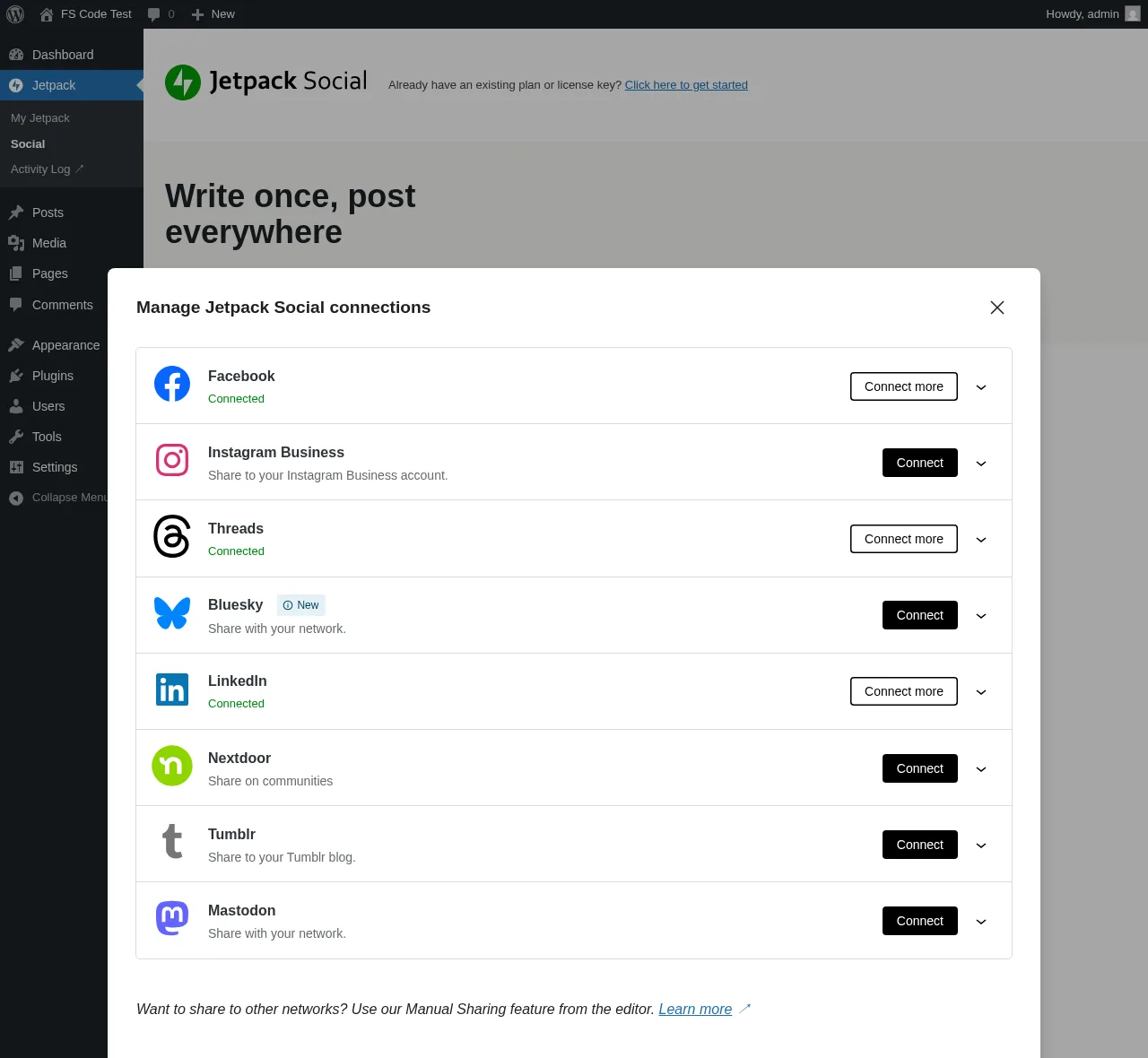
Jetpack Social is Automattic's stripped-down WordPress publishing plugin and the easiest auto-share install in this comparison — same company behind WordPress.com, WooCommerce, Tumblr, and Akismet, native Gutenberg-sidebar workflow, no separate admin area to learn. In testing, a real WordPress post with a featured image auto-shared cleanly to all 3 connected accounts (Facebook Page, LinkedIn profile, Threads) within roughly two minutes of publish, with the Sharing Activity dialog showing per-row green Shared status pills and View ↗ links to the live social-network URLs. Scheduling a re-share for the next morning took four clicks from the editor sidebar. The Free tier has had unlimited shares since September 2024 — any review citing the old 30-share-per-month cap is stale.
Why it ranks here:
- The Automattic brand and the native Gutenberg-sidebar workflow are the cleanest "no separate scheduler to learn" combination on this list, and the in-editor experience genuinely feels native rather than bolted on.
- Auto-share verified end-to-end on the test post with 3 of 3 connected accounts succeeding inside two minutes, and the Sharing Activity dialog is the single cleanest in-product evidence surface in the category.
- The Free tier is genuinely usable with unlimited shares across 8 networks, scheduling, content recycling, multi-network link preview, and campaign tracking tags on shared links — for solo bloggers publishing to a small handful of mainstream networks, Free is enough.
Key features:
- Auto-share at publish to 8 supported networks: Facebook Pages, Instagram Business, Threads, LinkedIn, Bluesky, Nextdoor, Tumblr, and Mastodon
- Native Gutenberg sidebar with per-account toggles, a shared caption box, link preview across nine surfaces, and the Sharing Activity dialog
- Schedule a re-share or recycle existing posts from the same sidebar with a clean Hours/Minutes + monthly-calendar popover
- Manual Sharing buttons in the editor for networks Jetpack Social doesn't natively support (X, WhatsApp, copy link)
- Featured image is propagated automatically to the share — LinkedIn rendered the WordPress featured image inline in our test
- Append UTM parameters to shared URLs toggle on the admin page for downstream analytics attribution
Pricing: Free tier (8 networks, unlimited shares). Paid Social plan: €59.40 first year, then €107.40/year on renewal — billed annually as a single yearly payment (about €4.95/mo intro and €8.95/mo renewal equivalents; approximately $66/year intro and $120/year renewal in USD). A 2-year prepay option appears at the cart for €133.44 total over 24 months. The Jetpack Growth bundle (Social + Stats + Newsletter + monetisation tools) is €107.40 first year, €227.40/year on renewal. No Lifetime tier. A 14-day money-back guarantee applies to annual plans. The cart is IP-geolocated for currency.
Best for: Solo bloggers and small businesses who only need 2–4 mainstream networks and value the Automattic brand
Main drawback: Only 8 supported networks — no Pinterest, X/Twitter, TikTok, YouTube, Reddit, Discord, Telegram, or Google Business Profile — and the WordPress.org rating is a strongly bimodal 3.3/5 (53% × 5★ vs 36% × 1★) with most 1★ reviews about social accounts that won't stay connected.
Full review: Jetpack Social review
3. SchedulePress
Best for: Editorial teams, multi-author WordPress blogs, and price-sensitive publishers who need a drag-and-drop calendar plus 8-network auto-share
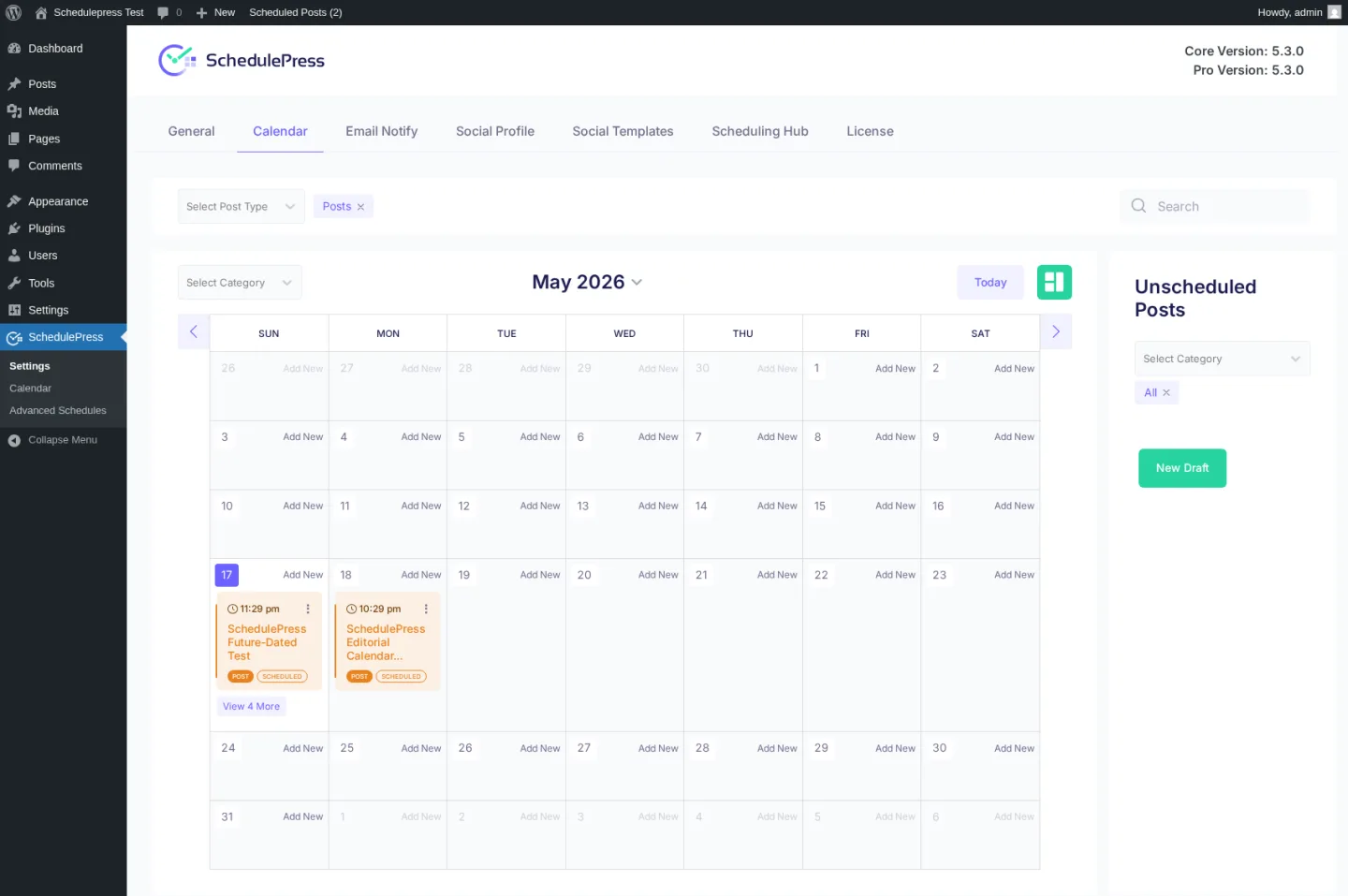
SchedulePress is WPDeveloper's editorial-calendar-first WordPress plugin — formerly "WP Scheduled Posts", rebranded in 2024 — that has expanded into eight-network auto-social-sharing. It is the only plugin on this list whose primary surface is a drag-and-drop calendar planner of every scheduled, published, and draft WordPress post, with an Auto Scheduler weekday × time × post-count matrix and a Manual Scheduler explicit per-day time-slot queue layered on top. In testing, the per-post Schedule And Share modal saved the per-network custom templates correctly and recorded the right list of target networks, though end-to-end share-fire attribution to a specific Pinterest pin was inconclusive from the anonymous viewer side. The cheapest annual entry in this whole comparison sits here at $39/year, and the Lifetime Unlimited at $299 is the second-cheapest one-time deal in the category.
Why it ranks here:
- 4.6/5 from 198 reviews on WordPress.org with 10,000+ active installs and same-day point releases on both the Free and Pro channels makes SchedulePress a credible WPDeveloper-portfolio pick alongside Essential Addons for Elementor, NotificationX, BetterDocs, BetterLinks, and Templately.
- The drag-and-drop editorial calendar plus the Auto Scheduler queue plus the Manual Scheduler queue plus the Missed Schedule Handler plus the unique Advanced Schedule (schedule an update to an already-published post) is the deepest editorial-scheduling stack in the WordPress-plugin category.
- The $39/year Individual annual plan is the cheapest annual entry in the WordPress social-publishing category, and the free WP.org build covers 7 of 8 networks (only Google Business Profile is gated to Pro) — unusually generous compared with Bit Social's 2-network Free or Jetpack Social's single-shared-caption Free.
Key features:
- Auto-share to 8 supported networks: Facebook, Twitter (X), LinkedIn (Profile + Page), Pinterest, Instagram, Medium, Threads, and Google Business Profile (Pro)
- Drag-and-drop editorial calendar planner that renders every scheduled, published, and draft post with the time, title, type badge (post / page / custom post type), and status badge
- Pro Scheduling Hub with three parallel sub-tabs: Auto Scheduler (weekday × time × count matrix), Manual Scheduler (per-day explicit time slots), and Missed Schedule Handler (recovers WP-cron-missed schedules)
- Advanced Schedule for scheduling an update to an already-published post without unpublishing it — unique to SchedulePress
- Per-post Schedule And Share modal with Add Social Message editor, smart tags (
{title},{content},{url},{tags}), and relative date/time offsets ("share 1 week after publication") - Multi-author email-alert tooling with 5 transactional notification toggles for editorial teams
Pricing (promo snapshot, captured 2026-05-17): Free tier on WordPress.org (7 of 8 networks unlocked, full calendar, per-platform templates, multi-author tooling). Paid: Individual $39/year (1 site), Business $112/year (unlimited sites), Lifetime Unlimited $299 one-time (unlimited sites, lifetime support and updates), and the WPDeveloper Agency Bundle Lifetime at $749 one-time for 10+ plugins. All paid plans include a 14-day money-back guarantee. Pricing is promotion-driven; the page runs a rotating Spring Special countdown.
Best for: Editorial teams, multi-author WordPress blogs, and price-sensitive publishers who need a drag-and-drop calendar plus 8-network auto-share
Main drawback: Only 8 networks — no Reddit, Bluesky, TikTok, Discord, Tumblr, Mastodon, VK, or webhook dispatch — no in-product Activity Log panel to verify auto-share dispatch end-to-end, and in my own test the per-network template save flow worked but the share-fire attribution to a specific Pinterest pin or LinkedIn post stayed inconclusive from the anonymous viewer side. Validate end-to-end on your own connected accounts before relying on auto-share for production. Twitter is still labelled "Twitter" everywhere; the X rebrand has not landed in the SchedulePress UI.
Full review: SchedulePress review
4. Bit Social
Best for: Budget-driven bloggers and small agencies who want auto-share + AI captions on a Lifetime licence with unlimited sites at $149
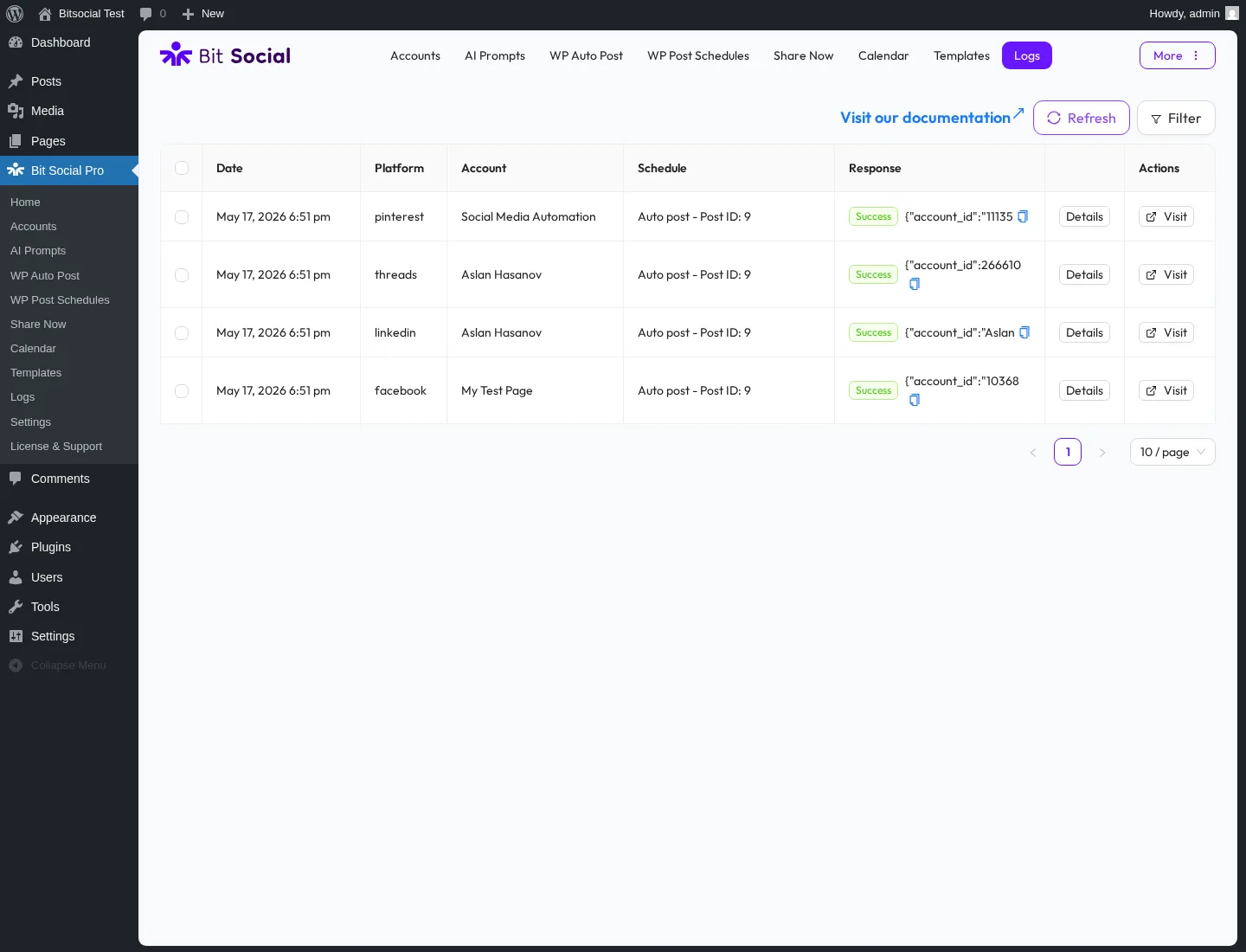
Bit Social is Bit Apps's challenger in the WordPress social-publishing category — a modern WordPress admin interface, 13 networks on Pro, AI Prompts driven by ChatGPT and DALL·E (you bring your own OpenAI key), and the most aggressive lifetime price in the entire category at $149 one-time for unlimited sites. In testing, a single WordPress post auto-shared to all 4 connected accounts (Facebook Page, LinkedIn, Threads, Pinterest) with Success rows in the in-product Logs table, each row exposing a Details panel with the detailed per-share success information and a Visit link to the live post URL. The per-platform Templates page is the most reliability-tested surface in the entire product — Custom Message auto-saves silently as you type and persists across reload.
Why it ranks here:
- The $149 Agency LTD for unlimited sites is the cheapest lifetime price in the WordPress social-publishing category and the structural pricing advantage Bit Social leans on.
- Hands-on auto-share verified end-to-end with 4 of 4 connected accounts succeeding, and the Logs table's per-row Details panel is the cleanest in-product evidence surface I tested across the seven plugins.
- AI Prompts with ChatGPT-driven captions, DALL·E images, smart-tag templating, and a Fallback Content textarea make Bit Social a real Pro differentiator over Jetpack Social's template-only Social Image Generator.
Key features:
- Auto-share to 13 networks on Pro: Facebook Pages, LinkedIn (Profile in Free + Page in Pro), Threads, Google Business Profile, Pinterest, Discord, Tumblr, Instagram, TikTok, X (Twitter), Bluesky, Line, and Telegram
- WP Post Schedule module with a 3-tab Create modal for recurring evergreen reshares, including a live "Posts matched by current filters: N" counter and per-row Active/Paused status
- Per-platform Templates with platform-specific fields (Threads gets a Topic input and a First-reply textarea, Pinterest gets a Custom title and a Post link toggle) and silent auto-save on every keystroke
- AI Prompts with OpenAI integration, Temperature slider, smart-tag templating, and Fallback Content for when the call fails or returns empty
- External Cron toggle in Settings paired with the exact server-side command for cPanel — a real reliability backstop for low-traffic sites
- Open-source on GitHub, which is genuinely rare for paid plugins in this category
Pricing (promo snapshot, captured 2026-05-17): Free tier on WordPress.org (2 networks only — Facebook + LinkedIn Profile). Paid: Starter Annual $49/year (1 site), Starter LTD $89 one-time (1 site, lifetime), Agency Annual $99/year (unlimited sites), Agency LTD ⭐ $149 one-time (unlimited sites, lifetime, marked "Most Popular"), Bit Apps Agency Lifetime Bundle $1,149 one-time for 5 products. Every paid plan includes a 14-day money-back guarantee. Bit Apps's pricing page runs a permanent discount countdown — quote with a capture date.
Best for: Budget-driven bloggers and small agencies who want auto-share + AI captions on a Lifetime licence with unlimited sites at $149
Main drawback: The Free tier is only 2 networks (Facebook + LinkedIn Profile), every other network is Pro-only, and the build still has visible gaps — the License & Support page returns a 404, most per-platform Previews say "Coming Soon", and the Share Now Save Draft button did not persist a draft row in our test.
Full review: Bit Social review
5. Blog2Social
Best for: Bloggers who want a freemium starting point with an in-WordPress calendar and are comfortable with separate add-on pricing for X/Twitter and video posting
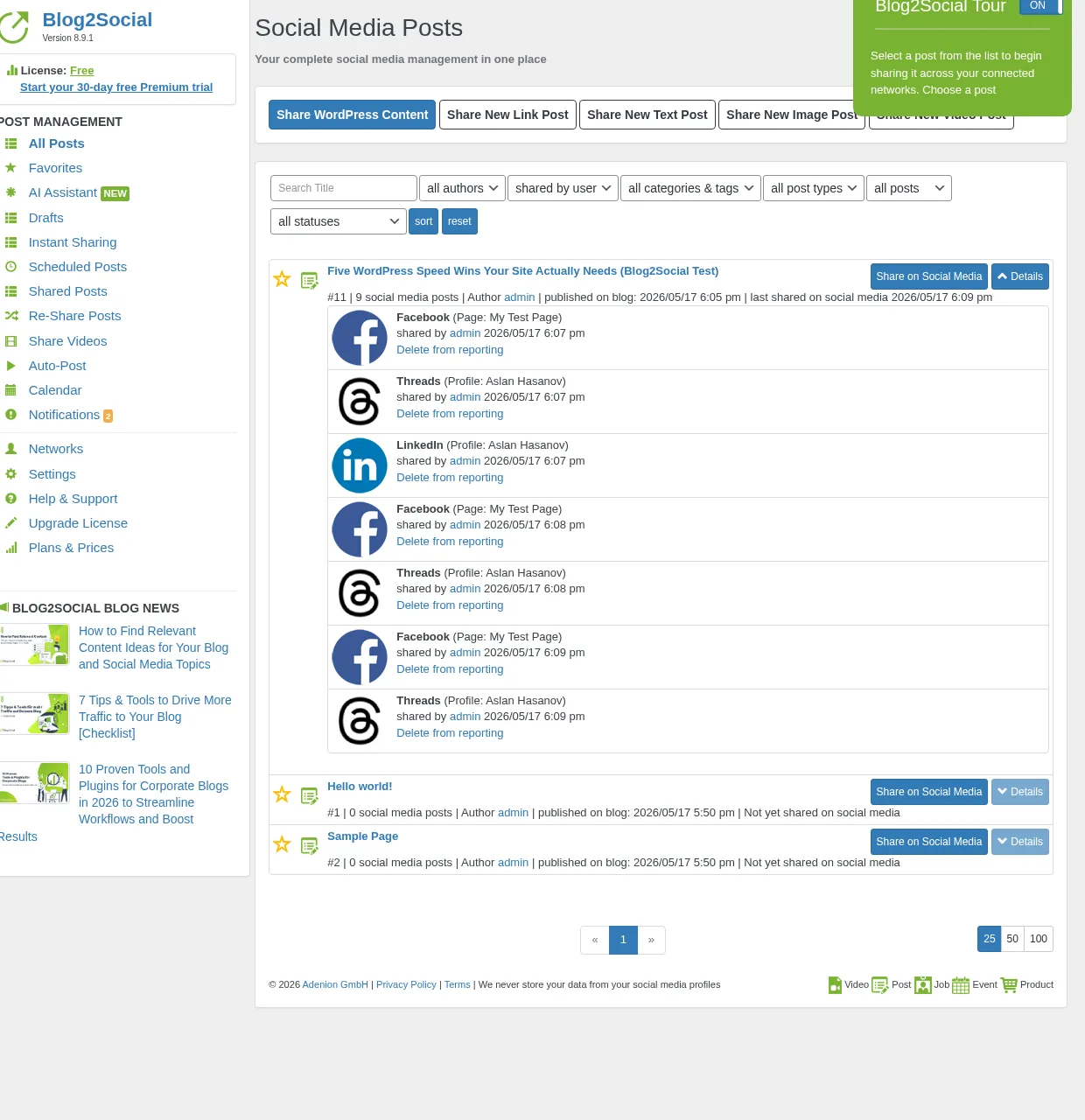
Blog2Social is one of the older WordPress social media plugins in this space, built by Adenion and maintained for years before most modern automation-first tools existed. It may still work for users who want a familiar freemium tool with a built-in calendar and per-network captions on the Free tier, but the product feels more dated when placed alongside newer plugins built around automation-first workflows. Innovation and development pace feel slower compared with what newer entrants deliver. In testing, the manual Share Now flow confirmed 3 successful shares across Facebook, LinkedIn, and Threads — but auto-share on publish is not a Free-tier feature. Once you need real auto-share, broader network coverage, X/Twitter support, or video posting, the setup quickly moves into paid tiers and separate add-ons.
Why it ranks here:
- The Free tier covers 12 networks with manual sharing, per-network captions, a drag-and-drop calendar, and a 30-day Premium-Pro trial that auto-downgrades to Free — a usable starting point for casual bloggers who want zero upfront cost.
- The in-WordPress calendar and Best Time Manager presets are well-built for editorial planning, and the evergreen Re-Share Posts rule builder covers include/exclude by post type, dates, categories, and authors.
- With 50,000+ active installs and 2,088 reviews on WordPress.org it has an established user base, though the product's development pace and overall feel have not kept up with newer automation-first alternatives.
Key features:
- 25 supported networks on the Business tier (24 standalone in the in-product Networks page plus Tumblr/Torial), covering Facebook, LinkedIn (Profile + Page), Instagram Business, Threads, Bluesky, TikTok, Pinterest, Reddit, Medium, Mastodon, Discord, Telegram, Google Business Profile, Xing, VK, Tumblr, Blogger, Flickr, and more
- In-WordPress drag-and-drop social media calendar with Share-WordPress-Content, Share New Link/Text/Image/Video Post, and per-day stacked share entries
- Best Time Manager presets exposed on every network row even on Free (e.g. Facebook 09:00–11:00, LinkedIn 09:00–12:00, Pinterest 11:00–14:00 & 19:00–22:00)
- Recurring Re-Share Posts evergreen planner with 5–100 posts per cycle, oldest-first toggle, include/exclude on post type, dates, categories, authors, image-only and share-cap toggles
- Per-network AI Post Templates with tone + writing-style switches plus the Assistini AI assistant on Free
- First Comment automation for 10 networks (Facebook plus Flickr, Reddit, VK, YouTube, Vimeo, Mastodon, Discord, Threads, and Band)
Pricing: Free tier (12 networks, manual share only — auto-share on publish requires a paid plan). Paid tiers, all billed yearly with no monthly option and no Lifetime tier: Smart €72.00/year at checkout (16 networks, 3 accounts per network, 2 users, 2 sites, auto-share on publish unlocked), Pro €118.80/year at checkout (24 networks, 5 accounts per network, 5 users, 5 sites), Business €299.88/year at checkout (25 networks, 15 accounts per network, 10 users, 10 sites). X (Twitter) is always a separate monthly subscription per the Adenion vendor page ($14.99–$59.99/month depending on post volume), stacked on top of any annual plan. Video Posting is a separate $69/year add-on. The pricing matrix scales across networks, accounts, users, and websites plus add-ons, making total cost harder to predict than flat-rate competitors.
Best for: Bloggers who want a freemium starting point with an in-WordPress calendar and are comfortable with separate add-on pricing for X/Twitter and video posting
Main drawback: Auto-share on publish is a paid-tier feature only. X/Twitter support is always a separate monthly subscription stacked on top of annual plan pricing. Video Posting is a separate annual add-on. No Lifetime tier. The product feels more dated than modern automation-first tools, and for buyers who want cleaner pricing, stronger automation, and a more modern WordPress-first workflow, FS Poster is the better fit.
Full review: Blog2Social review
6. NextScripts SNAP
Best for: Technical site owners and publishers who need long-tail or regional networks (ok.ru, VK, weibo, Plurk, MailChimp, XING, LiveJournal) and want 100% white-label posts
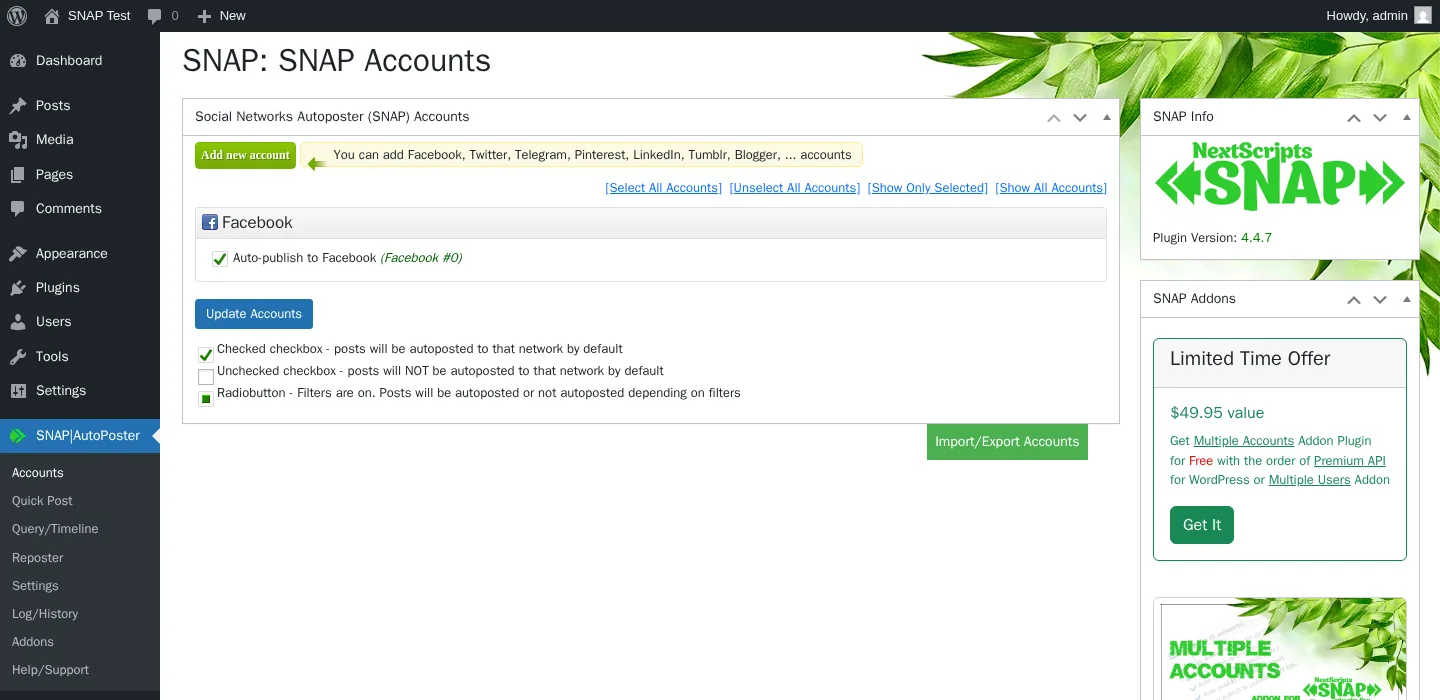
NextScripts SNAP is the long-running WordPress auto-poster from NextScripts Corp — first published on WordPress.org in March 2012 and the workhorse choice when a buyer needs networks no other plugin reaches. In testing, a real WordPress post auto-shared cleanly to a connected Facebook Page at the moment WordPress fired its publish hook, with the per-post SNAP metabox confirming the autopost timestamp and the live Facebook post URL. The 30-network roster is broader than any other plugin in this comparison and includes the only WordPress-plugin support for ok.ru, VK.com, weibo, XING, LiveJournal, Plurk, MailChimp campaigns, Scoop.It, SETT, vBulletin, and WordPress-to-WordPress cross-posting. The flagship differentiator is 100% white-label posting through your own developer apps — every share is attributed to your brand, with no "shared via NextScripts" footer.
Why it ranks here:
- 30 supported network destinations including the only WordPress-plugin support for ok.ru, VK, weibo, XING, LiveJournal, Plurk, MailChimp, vBulletin, and WordPress-to-WordPress cross-posting — for buyers who need those, SNAP is the only candidate.
- The Free tier is generous — 24 of 30 networks free with 1 account per network, plus the full Reposter rule builder, autoposting filters, 11 URL shorteners, Open Graph injection, 15+ replacement tags with
{a|b|c}"spin" syntax, the Quick Post composer, and the auto-import-comments-from-Twitter-and-Facebook feature. - White-label posting through the buyer's own developer apps is a real moat against every vendor-managed competitor — for serious editorial brands, this is the only WordPress-plugin choice that delivers full attribution control cleanly.
Key features:
- 30 listed network destinations: Facebook (profile/page/group), Twitter, LinkedIn, Tumblr, Blogger, Pinterest, Reddit, Instagram, Telegram, Flickr, Flipboard, Google Business Profile, Line, LiveJournal, MailChimp, Medium, ok.ru, Plurk, Scoop.It, SETT, XING, VK.com, weibo, Diigo, Instapaper, deviantART, vBulletin, WordPress-to-WordPress, YouTube channel feed, and Yo
- Free recycler (Reposter) with deep rule control: post-type, category, tag, author, post-format, exact-post-picker, date filters, and a frequency-in-days/hours/minutes setting
- 15+ replacement tags including unusual options like
%AUTHORTWHANDLE%,%POSTDATE%,%HCATS%, plus{a|b|c}"spin" syntax for per-post template variation (since 2014) - 11 URL shorteners built in: is.gd (default), WordPress built-in, bit.ly, YOURLS self-hosted, Rebrandly, Go2Ln, u.to, x.co, clk.im, po.st, adf.ly
- Quick Post composer for pushing one-off social posts without a backing WordPress post
- Auto-import comments from Twitter and Facebook back into WordPress comments — unique in the category
Pricing: Base plugin $0 on WordPress.org (24 networks free, 1 account per network). Paid add-ons, all annual-billed only with no Lifetime tier and no monthly billing: Multi Account $49.95/year, Premium API $49.95/year (unlocks Pinterest, Reddit, Flipboard, GBP, Scoop.It, YouTube, LinkedIn Company pages), Multi User $149.95/year (per-WP-user accounts + Multisite), Scheduled & Delayed Posting $14.95/year, Proxies $14.95/year. Autopost bundle $69.95/year packages Premium API + Multi Account + Scheduled & Delayed + Proxies. All-Access Pass $249.95/year covers every current and future addon.
Best for: Technical site owners and publishers who need long-tail or regional networks (ok.ru, VK, weibo, Plurk, MailChimp, XING, LiveJournal) and want 100% white-label posts
Main drawback: 3.3/5 average rating from 617 reviews on WordPress.org with a 37% 1-star tail, 0 of 1 support-forum issues resolved in the trailing two months, no in-WordPress calendar, no Gutenberg sidebar widget, heavy DIY developer-app setup per network, and Facebook tokens that expire every 30 days.
Full review: NextScripts SNAP review
7. Revive Old Posts
Best for: Solo bloggers, lifestyle publishers, non-profits, and small WooCommerce stores who want a recurring evergreen-reshare engine on 1–3 mainstream networks
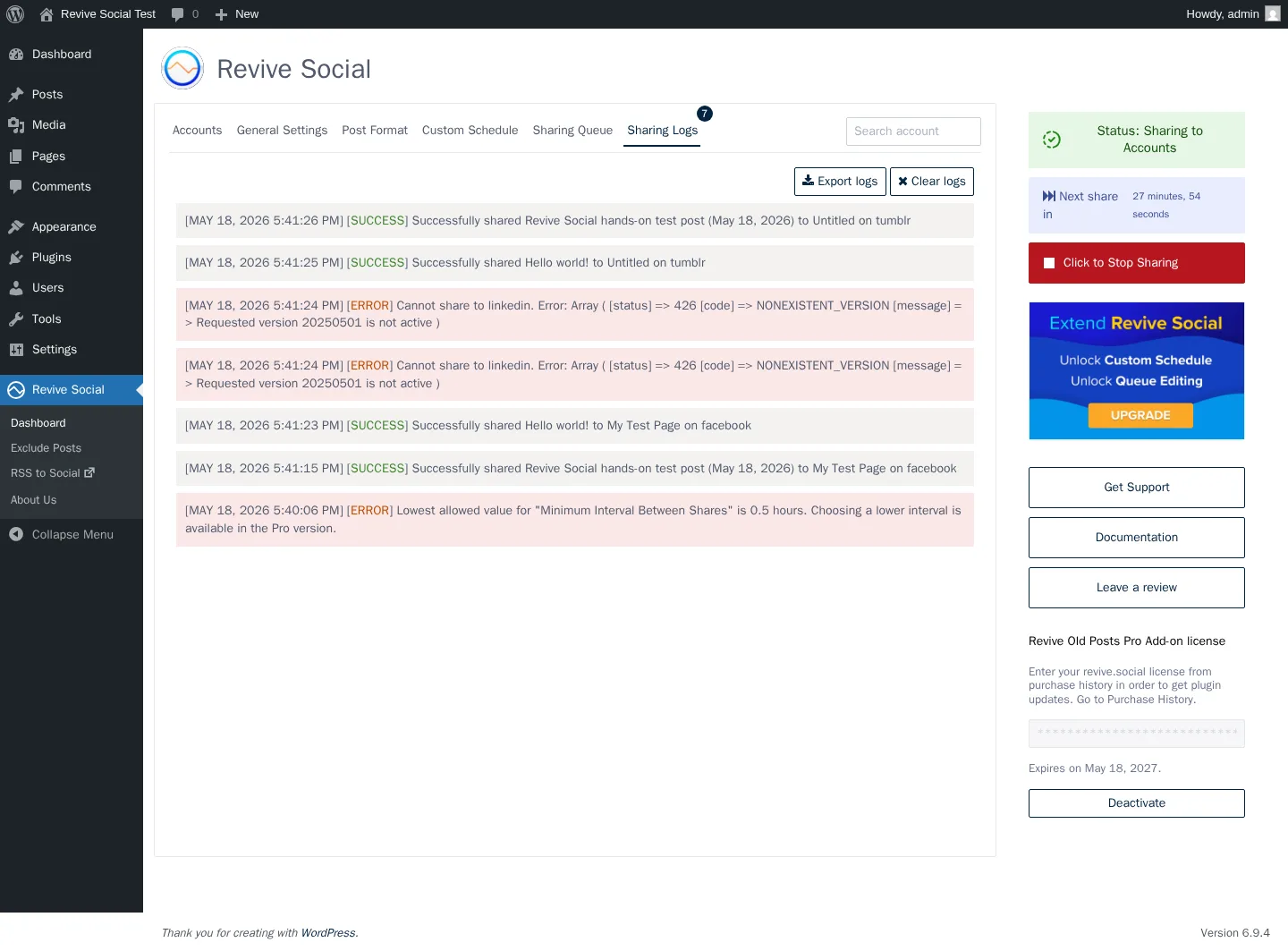
Revive Old Posts is Themeisle's long-running WordPress evergreen-reshare plugin — now branded as Revive Social but still installed under the historical WordPress.org slug tweet-old-post. It is the most narrowly-focused plugin on this list: the entire product is built around resurfacing a deep evergreen archive on a recurring "share every X hours" schedule, with sensible defaults (12-hour interval, 30-day minimum post age, 365-day maximum post age, 1 post per cycle). In testing, the recurring engine fired 4 successful share rows on Facebook and Tumblr within 8 seconds of manually triggering the scheduler — proof the recycle engine works exactly as advertised. The flip side: LinkedIn auto-share failed end-to-end because the current Pro Add-on connector is using an outdated LinkedIn API version that LinkedIn has retired. Disclose that honestly until Themeisle ships a fix that points the connector at the current LinkedIn API version.
Why it ranks here:
- 16+ years of evergreen-recycle iteration since December 2009 — the original WordPress evergreen-reshare plugin and still maintained, with 20,000+ active installs and 4/5 from 557 reviews on WordPress.org.
- Sharing Logs surface a real per-network success or failure message in plain text (including a clear LinkedIn-side error description in my test) — the older "useless logs" 1★ complaint no longer matches today's product.
- Per-account Post Format tab is genuinely flexible (Share Content modes, Additional Text with magic tags, Hashtags from categories/tags/custom fields, URL Shortener, Campaign Medium + Campaign Name UTM fields, Share As Image Post) and applies per connected account rather than globally.
Key features:
- Recurring "share every X hours" evergreen engine with min/max post age filters and posts-per-cycle control
- Per-account Post Format tab with magic tags, hashtags from categories/tags/custom fields, image-post option, and UTM Campaign Medium + Campaign Name fields
- Sharing Queue with 12+ staggered entries per cycle and per-row Skip / Block / Edit actions (Edit gated to Business+)
- Sharing Logs that print the real per-network success or failure message in plain text — diagnostic-grade troubleshooting
- Per-post Exclude Posts admin page with per-post exclude switches, post-type filter, and taxonomy filter
- 30+ extra networks via a Zapier webhook on the Pro Add-on (Pinterest, TikTok, YouTube, Reddit, Discord, Threads, and others not natively supported)
Pricing: Free on WordPress.org (Facebook Pages + X/Twitter only). Pro Add-on tiers, all annual-billed only with no Lifetime tier: Starter $99/year intro (renews at $129/year, 1 site, adds LinkedIn Profiles, Tumblr, Mastodon, Share Variations, magic tags, custom post types, 30+ Zapier networks), Business $199/year intro (renews at $259/year, 3 sites, adds Instagram Business, LinkedIn Company Pages, Bluesky, Telegram, Google Business Profile, VK, plus the per-account Custom Schedule and queue editing), Marketer $399/year intro (renews at $529/year, Unlimited sites, same feature set as Business). 30-day money-back guarantee on every paid tier.
Best for: Solo bloggers, lifestyle publishers, non-profits, and small WooCommerce stores who want a recurring evergreen-reshare engine on 1–3 mainstream networks
Main drawback: LinkedIn auto-share is currently broken because the Pro Add-on connector is using an outdated LinkedIn API version — until Themeisle ships a fix that points the connector at the current LinkedIn API version. The Free tier is only 2 networks, and the Starter→Business upgrade wall at $99→$199/year locks per-account Custom Schedule, queue editing, Instagram, Bluesky, Telegram, Google Business Profile, and VK behind the higher tier.
Full review: Revive Old Posts review
How to Choose the Right WordPress Social Media Scheduler Plugins
The seven plugins above cover very different buyer profiles and price points, so a short decision guide is more useful here than a generic "what to look for" paragraph.
- Choose FS Poster if you run 3+ sites, manage a WooCommerce store, need the long tail of networks (Bluesky, Mastodon, Truth Social, Telegram, Reddit, Discord, Webhook), or want a starting price of $58/year on the Single plan with an optional Lifetime tier covering 30 websites for long-term/multi-site buyers.
- Choose Jetpack Social if you are a solo blogger publishing to 2–4 mainstream networks, already trust the Automattic brand, or value the native Gutenberg-sidebar workflow over network breadth.
- Choose SchedulePress if your primary need is a drag-and-drop WordPress editorial calendar, you publish daily with a multi-author team, you keep hitting WordPress's missed-schedule problem on a low-traffic site, or you want the cheapest annual entry in the entire category at $39/year.
- Choose Bit Social if you want auto-share + AI captions on a lifetime licence under $200, you already have an OpenAI API key, your distribution mix is Threads + Bluesky + Pinterest + Twitter + LinkedIn, or you are already in the Bit Apps ecosystem.
- Choose Blog2Social if you specifically want a freemium starting point with an in-WordPress calendar and per-network captions on the Free tier, and you are comfortable with a separate monthly add-on for X/Twitter and an additional fee for video posting.
- Choose NextScripts SNAP if you are a technical buyer who specifically needs ok.ru, VK, weibo, XING, LiveJournal, Plurk, MailChimp, vBulletin, or WordPress-to-WordPress cross-posting, and you are willing to register your own developer apps to keep every share fully white-labelled.
- Choose Revive Old Posts if your KPI is "more social referral traffic from existing posts" and your distribution mix is Facebook Pages + X/Twitter (plus Tumblr or LinkedIn Profile on Starter); for that narrow recycle-first job, the engine is the most battle-tested in the category.
WordPress Social Media Auto-Posting Plugin FAQ
Which is the best WordPress plugin for auto-posting to social media in 2026? FS Poster is the best overall WordPress social media auto-posting plugin in 2026 for agencies, WooCommerce stores, and publishers running 3+ sites: it starts at $58/year on the Single plan and ships 26-network coverage on a single licence (including the newly added YouTube Shorts destination), a real Calendar plus a recurring Planner, a WordPress Posts-list bulk action, and an optional Lifetime tier covering 30 websites for long-term/multi-site buyers. For solo bloggers who value a native Gutenberg-sidebar workflow, Jetpack Social is the lowest-friction install. For solo bloggers who specifically need a free tier first, Blog2Social offers 12 networks on Free and an in-WordPress calendar, though note that auto-share on publish requires a paid plan and X/Twitter is always a separate monthly add-on.
What is the cheapest WordPress social media auto-posting plugin with a Lifetime licence? Three plugins in this category ship a Lifetime tier. Bit Social sells the cheapest unlimited-sites Lifetime at $149 one-time on its Agency LTD plan (promotional price, captured 2026-05-17). SchedulePress is next at $299 one-time on its Lifetime Unlimited plan. FS Poster starts at $58/year on Single and offers the highest-priced Lifetime tier of the three at $490 one-time for 30 websites, but covers 26 networks vs Bit Social's 13 and SchedulePress's 8; its Lifetime is an optional long-term/multi-site path rather than the primary price. Blog2Social, Jetpack Social, NextScripts SNAP, and Revive Old Posts do not offer a Lifetime tier; every paid plan on those four is an annual subscription.
Which WordPress social media auto poster plugins support the most networks? FS Poster covers 26 networks on a single licence including the newly added YouTube Shorts destination, no per-network add-ons required. Blog2Social covers 25 networks on the Business tier (24 standalone in the in-product Networks page plus the Tumblr/Torial canonical-backlink). NextScripts SNAP technically lists 30 network destinations, but 6 of those (Pinterest, Reddit, Flipboard, Google Business Profile, Scoop.It, YouTube, plus LinkedIn Company pages) require the $49.95/year Premium API add-on; the Free base plugin covers 24 networks at 1 account per network. Bit Social covers 13 networks, SchedulePress covers 8, Jetpack Social covers 8, and Revive Old Posts covers roughly 10 direct connectors plus 30+ via a Zapier webhook.
Can I auto-post to Pinterest, TikTok, Reddit, and Threads from WordPress? Yes, but the plugin choice matters. FS Poster covers Pinterest, TikTok, Reddit, Threads, Discord, Telegram, Bluesky, Mastodon, Truth Social, VK, and YouTube Shorts in the base licence. Blog2Social covers Pinterest (Smart-tier €72/year at checkout), TikTok (Pro-tier €118.80/year), Threads, Reddit, Discord, Mastodon, and Telegram (Business-tier €299.88/year), with X (Twitter) always sold as a separate monthly add-on. Bit Social covers Threads, Pinterest, X/Twitter, TikTok, Bluesky, Line, Telegram, and Discord on Pro tier. Jetpack Social does not support Pinterest, TikTok, or Reddit. X/Twitter was permanently removed after the 2023 API changes. SchedulePress does not support Reddit, Bluesky, TikTok, or Discord.
Do I need a WordPress auto-posting plugin or a SaaS scheduler like Buffer or Hootsuite? A WordPress auto-posting plugin is the right choice when your publishing workflow lives inside WordPress (Gutenberg, the WP admin, a WooCommerce store, an editorial calendar), when you want to avoid paying for a separate SaaS seat, and when you want a one-time or annual plugin licence rather than a monthly per-user SaaS bill. A SaaS scheduler is the right choice when you publish content that does not start as a WordPress post (Instagram Stories, TikTok videos, Twitter threads written natively), when you need a real approval/collaboration workflow with multi-user inboxes, when social listening or brand-monitoring matters more than publishing, or when you publish from outside WordPress most of the time. For most WordPress-first publishers in 2026, a WordPress plugin like FS Poster is the cheaper and tighter-integrated path.
What is a WordPress auto poster plugin?
A WordPress auto poster plugin connects your WordPress site to your social profiles so new posts, products, or selected older content can be shared automatically instead of copied into each network by hand. The best fit depends on your network mix, whether you need evergreen reshares, and how much control you want over per-channel captions.
What should a WordPress auto post to social media plugin include?
A good WordPress auto post to social media plugin should include reliable publish triggers, per-network account controls, custom message templates, scheduling or calendar options, image handling, and clear logs so you can confirm that posts actually reached the intended channels.
Final Verdict
After two weeks of hands-on testing across all seven plugins, FS Poster is the WordPress social media auto-posting plugin I would recommend to most serious buyers in 2026. The combination of broad 26-network coverage on a single licence (including the newly added YouTube Shorts destination), a modern admin experience, a real Calendar plus a recurring Planner workflow, the WordPress Posts list bulk-schedule action, WooCommerce auto-share with per-channel category filters, and the Lifetime tier that removes annual renewal entirely is what put it at the top of the ranking. The hands-on tests reinforced what the rating numbers and active-install counts already suggest: it behaved like a finished, well-supported product rather than a feature surface bolted onto a legacy plugin.
That said, FS Poster is not the right buy for everyone. If you are a solo blogger who only needs two or three mainstream networks and value a native Gutenberg-sidebar workflow, Jetpack Social is the simplest install. If your priority is a deep editorial calendar with multi-author tooling at the cheapest annual price in the category, SchedulePress is purpose-built for that. If you specifically need a freemium starting point with an in-WordPress calendar, Blog2Social offers 12 networks on Free, but keep in mind that auto-share on publish requires a paid plan and X/Twitter comes as a separate monthly add-on; for buyers who want cleaner pricing and stronger automation, FS Poster is the better fit.
The safest way to pick the right plugin is to match your buying decision to four things in this order: your workflow fit (publish-and-forget for solo bloggers, calendar-first for editorial teams, archive-recycle-first for evergreen publishers, agency multi-site for freelancers), your hands-on usability on a real install (every freemium plugin on this list has a free trial path, and FS Poster carries a 14-day money-back guarantee), the realistic price across the next three years (annual renewal vs. Lifetime, plus any add-ons the vendor stacks on top), and the support and reputation signals on WordPress.org or the vendor's own surfaces. Use the ranked list above as a shortlist, install one or two candidates on a real WordPress site, run an auto-share to your own connected accounts, and commit to the plugin that quietly does the job the way you want it done.
Write once. Post to 26 networks.
- 26 social networks
- Schedule & auto-repost
- Runs inside wp-admin


