


Can SchedulePress really replace my editorial spreadsheet and auto-share every WordPress post to Facebook, LinkedIn, Pinterest, and Threads — or will I still be hand-pasting captions after every publish? And is the Pro plan actually worth $39/year when the free tier already covers seven networks?
That confusion is normal. SchedulePress sits in an unusual spot in the WordPress publishing category — editorial calendar first, social sharing second. I tested SchedulePress Pro v5.3.0 on a clean WordPress install with a connected LinkedIn profile and Pinterest board, walked every main admin tab and Scheduling Hub sub-tab, captured the per-network character cap matrix across all eight Social Templates, published and scheduled real posts on the visual calendar, and walked the full per-post Schedule And Share modal end-to-end. The findings below make this a SchedulePress WordPress plugin review based on tests, 198 WordPress.org reviews, and the live wpdeveloper.com pricing page.
What Is SchedulePress? (Auto Poster Review Context)
SchedulePress is WPDeveloper's WordPress editorial-calendar plugin — formerly "WP Scheduled Posts", rebranded in 2024 — that has expanded into auto-social-sharing. It plots every scheduled, published, and draft post on a drag-and-drop visual calendar, runs a recurring auto-publish queue, recovers scheduled posts WordPress missed, and auto-shares each new post to up to eight social networks. It is built for editorial teams, multi-author WordPress blogs, news publishers, and solo bloggers who want a real visual calendar plus auto-share to the mainstream eight (Facebook, Twitter/X, LinkedIn, Pinterest, Instagram, Medium, Threads, Google Business Profile). It is freemium — the free build covers seven of the eight networks plus the calendar and per-platform templates, and the paid Pro upgrade adds the workflow automation features.
SchedulePress Social Media Plugin Review: Quick Verdict
After a full hands-on round on v5.3.0, SchedulePress is the right pick for editorial teams and multi-author WordPress sites that need a real visual calendar plus eight-network auto-share at the cheapest annual price in the category — provided you don't need Reddit, Bluesky, TikTok, Discord, or webhook dispatch, and you're comfortable validating the auto-share end-to-end on your own connected accounts.
| Criteria | Verdict |
|---|---|
| Best for | Editorial teams, multi-author WordPress blogs, and price-sensitive publishers who need a drag-and-drop calendar plus 8-network auto-share |
| Starting price | Free on WordPress.org (calendar + 7 networks). Paid annual totals: Individual $39/ |
| Free plan / trial | Free tier — editorial calendar, 7 of 8 networks, per-platform templates, multi-author tooling, dashboard widget. 14-day money-back guarantee on every paid tier |
| Update frequency | Active maintainer cadence — same-day point release for free + Pro (v5.3.0 shipped "9 hours ago" on WordPress.org on the day of testing) |
| Most valuable features | Drag-and-drop visual calendar, Auto Scheduler queue, Manual Scheduler, Missed Schedule Handler, Advanced Schedule, per-post Schedule And Share modal with custom messages and relative date/ |
| UI/ |
8/ |
| Feature richness score | 7/ |
| Product performance | 8/ |
| Product rating | 4.6 / 5 from 198 reviews on WordPress.org (166 × 5★, 12 × 4★, 2 × 3★, 1 × 2★, 17 × 1★), 10,000+ active installs |
SchedulePress Features & Functionality
SchedulePress's feature surface is deliberately editorial-first — the calendar and the scheduling queue come before the social share — and the five flows below are the ones that actually move a buying decision. I reviewed the tested feature notes from the v5.3.0 admin, and the findings here come from those tests.
1. Drag-and-drop editorial calendar
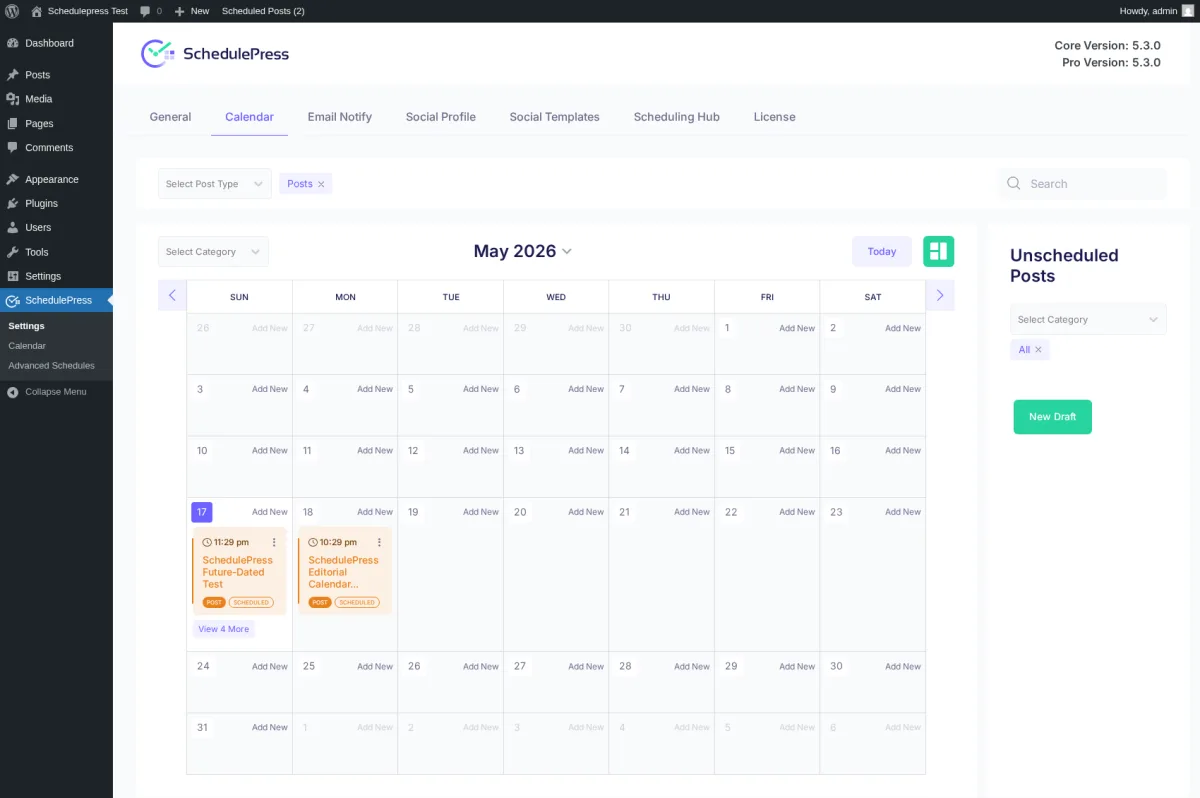
The Calendar tab renders every scheduled, published, and draft post as an event with the time, a truncated title, a post-type badge (POST / PAGE / CPT), and a status badge (Scheduled / Published / Draft). I published three immediate posts and scheduled two more for the future, and every one of them landed on the correct day cell within seconds — the May 17 cell showed an 8:27 pm published post and an 11:29 pm scheduled post side by side, and the May 18 cell picked up the next future-dated post. Each empty cell carries an Add New affordance that opens an in-place quick-draft modal, and an Unscheduled Posts drawer sits beneath the grid for drag-targeting drafts onto specific dates. Drag-to-reschedule is built in. For editorial teams that have been hand-maintaining a calendar in Trello or a Google Sheet, this is the surface that finally moves the calendar into WordPress itself.
2. Auto Scheduler and Manual Scheduler
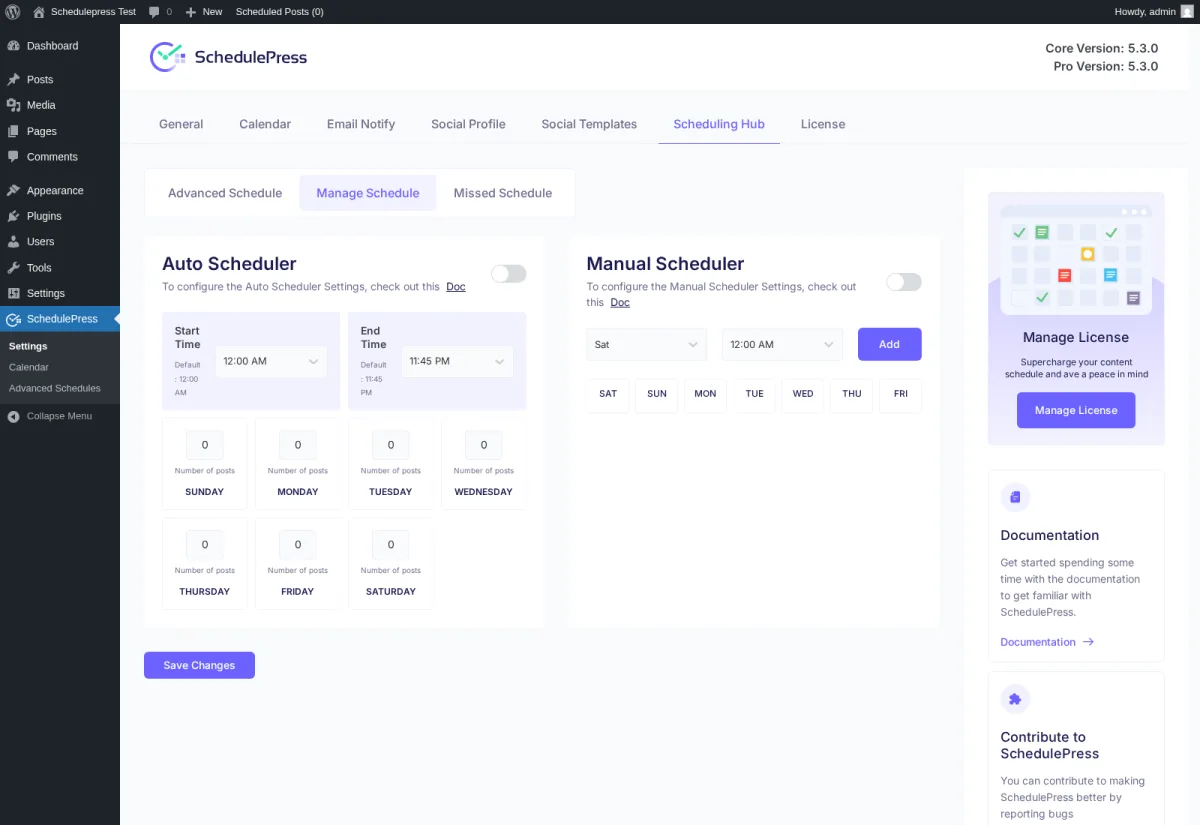
The Pro-only Manage Schedule sub-tab inside the Scheduling Hub gives you two parallel queues. The Auto Scheduler takes a Start Time, an End Time, and a number-of-posts-per-day input for every weekday — drop drafts into the queue and SchedulePress publishes them across the Saturday-through-Friday matrix automatically. The Manual Scheduler lets you define explicit time slots per weekday (12:00 AM Sat + 9:00 AM Sat + 3:00 PM Sat, then a different list for Sun, etc.) for editorial teams that need predictable slot publishing rather than algorithmic distribution. The settings persist cleanly, and the UI is the clearest of any WordPress evergreen-scheduler I have seen — Bit Social has an Auto Scheduler but no Manual; FS Poster's queue is lighter; Revive Old Posts is recycling-only.
3. Missed Schedule Handler
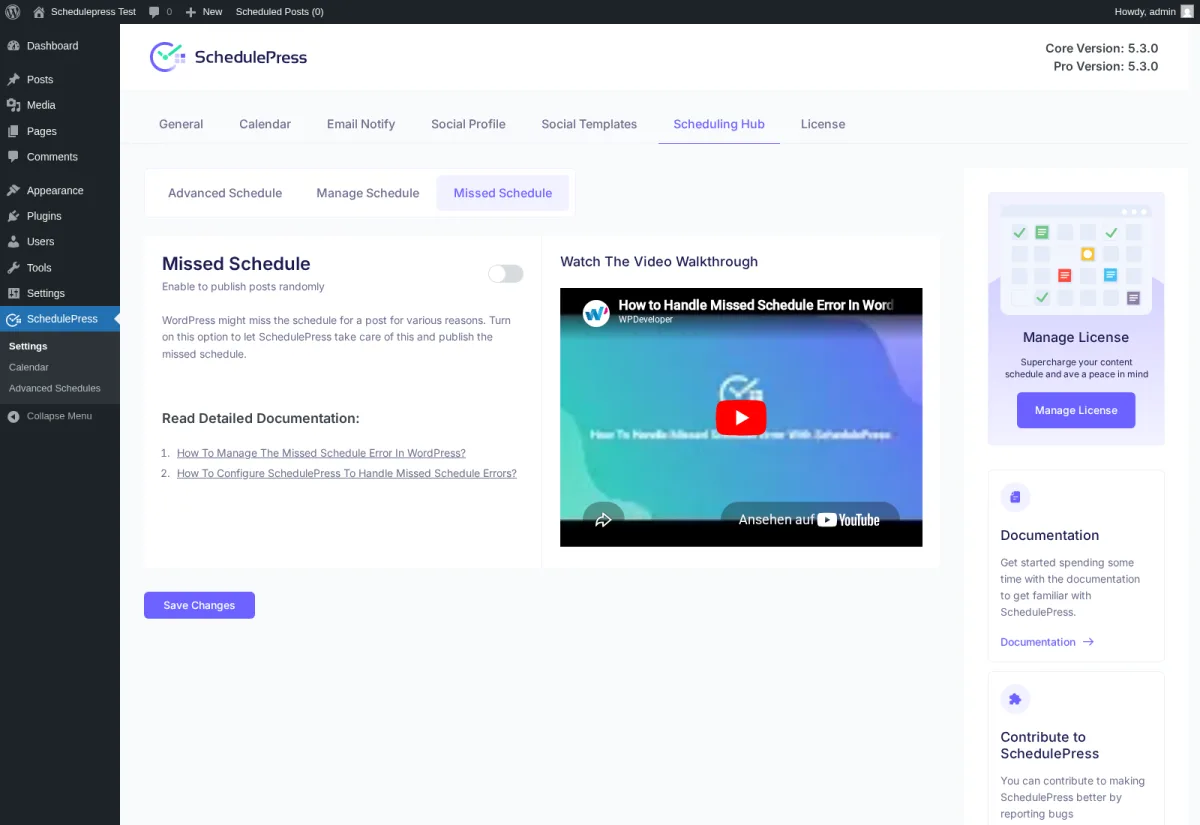
WordPress's built-in scheduler is famously unreliable on low-traffic sites — if no visitor lands on the site near the scheduled minute, the post can sit in "Missed Schedule" limbo. SchedulePress's Missed Schedule Handler is a single toggle that auto-publishes any post that WordPress skipped. It's one of the most-marketed Pro features, and it's the kind of solution-shaped product that converts buyers who hit the missed-schedule wall once.
4. Advanced Schedule — update a published post on a future date
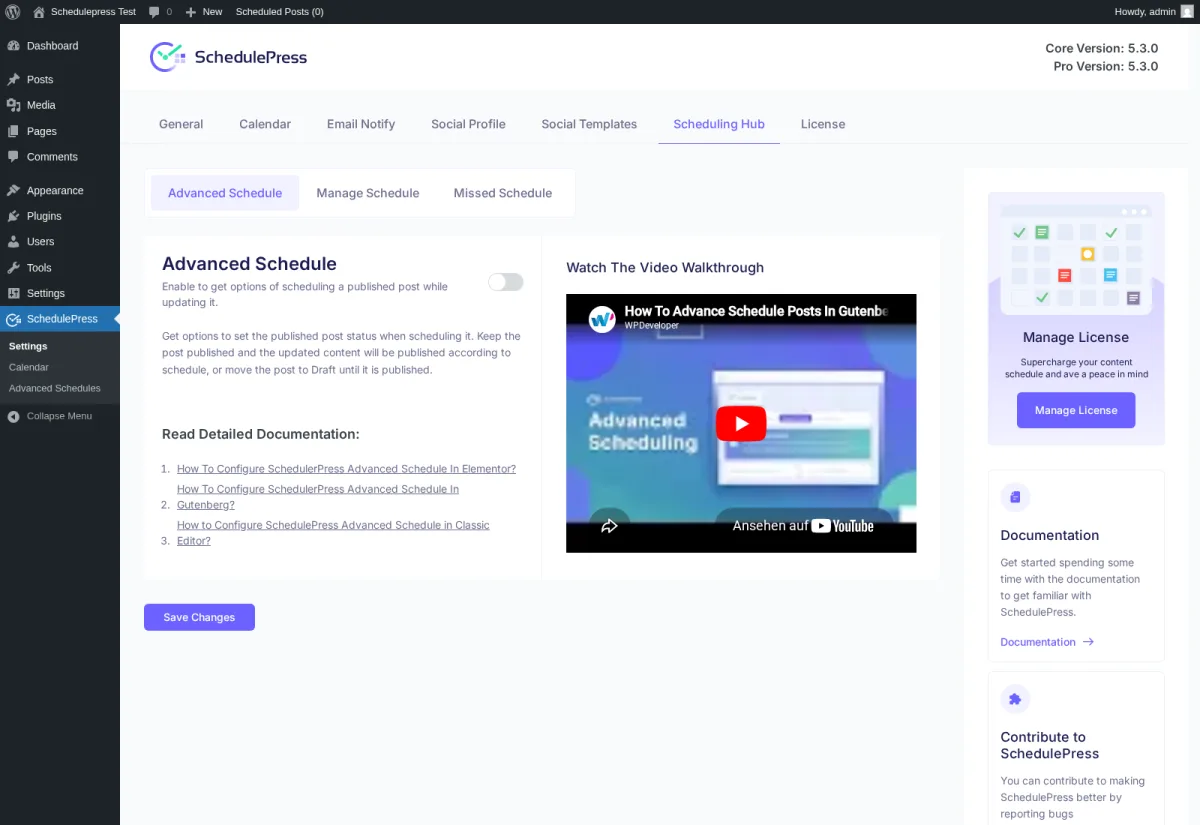
This one is unique to SchedulePress in the WordPress editorial-plugin category. Advanced Schedule lets you schedule an update to an already-published post — the content stays live, but a new revision is queued to swap in at a chosen date and time, or the post is moved back to Draft until the update fires. The use case is targeted: evergreen posts that need a campaign-date content swap (Black Friday, product launch, version-bump) without unpublishing the post in between.
5. Per-post Schedule And Share modal with eight-network auto-share
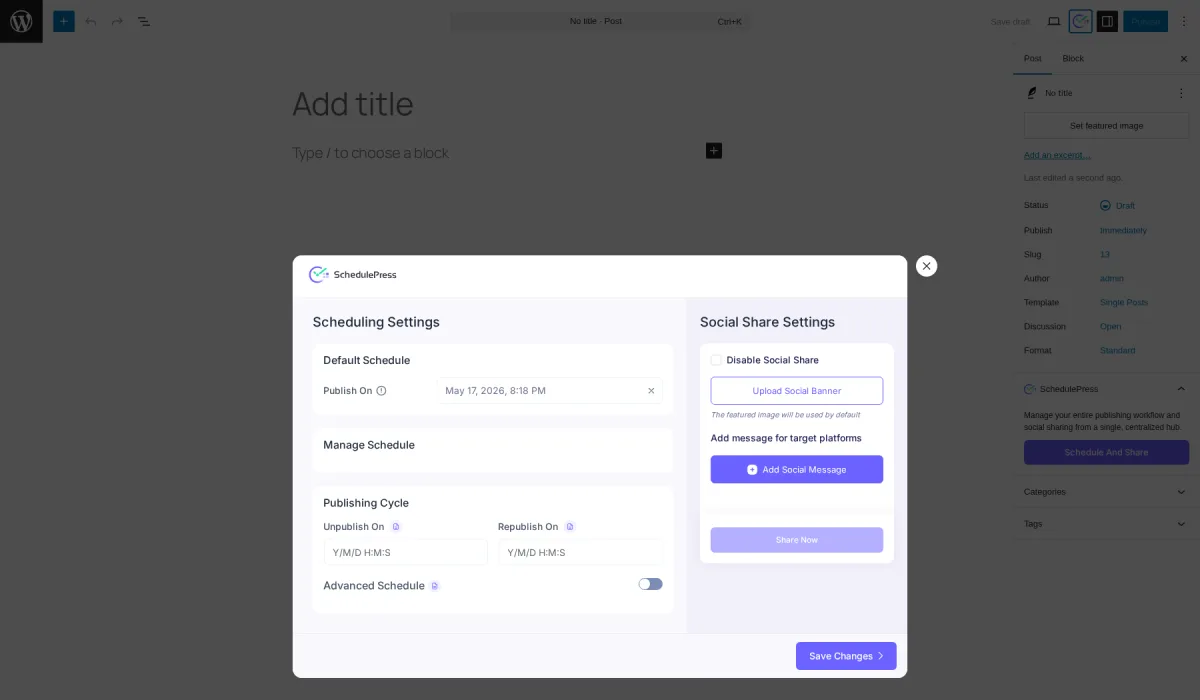
Open any post in the block editor, hit the SchedulePress button in the Gutenberg sidebar, and click Schedule And Share — a full-screen modal opens with Scheduling Settings on the left (Default Schedule, Publishing Cycle, Unpublish On, Republish On, Advanced Schedule opt-in) and Social Share Settings on the right. The Social Share half is where SchedulePress's eight-network connector lives: Facebook, Twitter, LinkedIn (Profile + Page), Pinterest, Instagram, Medium, Threads, and Google Business Profile (Pro-only). Click Add Social Message and a per-network composer expands. An 8-platform icon strip switches the active network — click Facebook and the textarea swaps to the Facebook profile and the character counter recomputes against the 63,206-character cap; click LinkedIn and the counter resets against the 1,300-character cap. The smart-tag library is small but functional — {title}, {content}, {url}, {tags} — and a Use global template toggle lets you fall back on the per-network template you set in Social Templates. Date and Time both expose six-option dropdowns covering "same day as publication", "the day after", "a week after", "a month after", a custom-days input, and a fully custom date. I typed a 271-character LinkedIn message and a Pinterest pin description on a real test post, hit Save on each, and the per-network templates saved cleanly. Worth naming up front: Reddit, Bluesky, TikTok, Discord, Tumblr, Mastodon, VK, webhook dispatch, and YouTube Community are not supported — only those eight networks.
SchedulePress Ease of Use / UI & UX
SchedulePress's UI in v5.3.x is a modern admin SPA that lives entirely inside the WordPress admin shell — no separate dashboard, no SaaS tab. After ten years of "WP Scheduled Posts" running on the legacy WordPress metabox UI, the rebrand to SchedulePress shipped with a genuinely up-to-date admin surface.
1. UI / UX
The SchedulePress admin opens with a 7-tab strip across the top — General / Calendar / Email Notify / Social Profile / Social Templates / Scheduling Hub / License — and every tab loads inline without a full page navigation. The right-rail card stack (Manage License, Documentation, Contribute to SchedulePress, Need Help, Show your Love) is consistent across every tab, and the Save Changes footer sits in the same place every time. After ten minutes of orientation the structure is fully predictable, and there's no equivalent of Blog2Social's 16-entry sidebar or NextScripts SNAP's legacy metabox sprawl.
2. Setup and account connection
Connecting accounts is a one-click OAuth flow per network — but the platform-side requirements bite the same way they do in every social plugin. Facebook Pages auto-publish only (no personal profiles), Instagram Business accounts only, and LinkedIn carries both a Profile and a Page badge so you'll connect each separately. Plan for 10–20 minutes per network if your accounts are already in good shape. Medium uses an integration token rather than OAuth — paste a token from medium.com/me/settings rather than walking an OAuth flow.
3. Calendar workflow
The drag-and-drop calendar is the single biggest UX win in the product. Filter chips at the top let you scope to a specific post type or category, the Add-New affordance is one click per cell, and the Unscheduled Posts drawer underneath the grid gives editors a holding area for drafts they haven't slotted yet. There's also a mirror view inside the standard WordPress Posts admin chrome — perfect for editors who live in the Posts list flow rather than the SchedulePress SPA.
4. Per-post modal workflow
The Schedule And Share modal is the only friction point worth flagging. It's a full-screen overlay rather than an inline Gutenberg panel, and getting from "I want to add a per-network social message" to "the message is saved" takes four clicks (Schedule And Share → Add Social Message → fill out the message → Save the message → Save Changes on the outer modal). Once you've done it twice it's second nature, but it does mean the per-post workflow is heavier than Jetpack Social's inline sidebar.
5. Friction points
Two cosmetic friction points to flag. First, the "Upgrade to Premium" copy is vestigial next to several General-tab toggles even on a Pro-active build — Auto-Share upon Publishing, Publish Now with Future Date, Post Republish, Active Republish Social Share all carry the description but the underlying setting works fine once you have a Pro licence. Second, Twitter is still labelled "Twitter" everywhere (the post-2023 X rebrand has not landed in the SchedulePress UI), so if your brief involves replacing every "Twitter" label with "X", you'll be doing it post-publish.
SchedulePress Performance
SchedulePress's performance in real WordPress use is steady. The plugin is doing nothing heavy on the WordPress side — it reads from the standard posts table, renders the calendar, and pushes shares through each social network's API — so the limiting factor is almost always the network's own response time, not SchedulePress itself.
1. Admin SPA responsiveness
The SchedulePress admin renders quickly. Tab switches between General, Calendar, Social Profile, Social Templates, and Scheduling Hub are instant on a standard hosting setup, and the Save Changes round-trip on each tab returns within a second. Modal interactions (Schedule And Share, Pinterest Edit board) are immediate, and I observed no JavaScript errors across the seven main tabs, the three Scheduling Hub sub-tabs, or the eight Social Template editors during testing.
2. Calendar render performance
The calendar planner renders cleanly even with a small dataset. After publishing five test posts (three immediate + two future-dated), the May 2026 grid loaded in under a second and every event card rendered with the correct time, title, type, and status badge. Editorial teams running busier sites with hundreds of scheduled posts should expect more visual density per cell.
3. Save latency
When I committed the per-post Save flow against a real post, the round-trip returned in well under a second and the per-network template strings persisted on first try.
4. Auto-share dispatch (honest characterisation)
This is the one performance area where I have to be careful. Across two test rounds — one with the master toggle and Auto-Share-upon-Publishing toggle on but no per-post message configured, and one with a full per-network Add Social Message workflow committed before publish — the per-network template saves did persist correctly and the connected Pinterest board's last-activity timestamp moved into the publish window. But I could not directly confirm from the public viewer side that a specific Pinterest pin or LinkedIn post matched my test post, and SchedulePress does not surface an in-product activity log to verify the share fired. Buyers planning to rely on SchedulePress's auto-share-on-publish should validate end-to-end on their own install with their own connected accounts before relying on it for production.
SchedulePress Support, Documentation & Learning Resources
Support is the single strongest signal in the SchedulePress review base — almost every recent 5-star review on WordPress.org calls it out by name.
WPDeveloper offers support through the WordPress.org forum (for free-tier users) and direct support tickets through wpdeveloper.com (for Pro buyers, badged as "Premium Support" in the in-product License tab). The plugin also has a Facebook Community group linked from the right-rail "Need Help?" card on every settings tab.
Response speed and quality are the recurring theme in the review base. Phrases like "Excellent Plugin With Outstanding Support", "Very fast and knowledgeable support", "Quick Fix!", "Amazing Support", and "Solid Plugin from Solid Team" show up across the most recent 5-star reviews. With a 4.6 / 5 average from 198 reviews, support quality lines up firmly in the "good" bracket — not flawless, but consistently called out as the part of the product buyers come back to praise.
Documentation lives at wpdeveloper.com/docs/, and every in-product settings card carries a context-relevant doc link — the Pinterest section deep-links to the Pinterest setup guide, the LinkedIn section to the LinkedIn setup guide, and so on. The Scheduling Hub sub-tabs each surface their own dedicated walkthrough plus a video callout. The documentation is competent rather than exhaustive — a search-driven knowledge base rather than a Buffer-style long-form learning library — but it covers the setup paths every new buyer hits.
SchedulePress User Reviews & Reputation
The WordPress.org review base for SchedulePress is 198 reviews at a 4.6 / 5 average, with 10,000+ active installs — strong reputation for a plugin in the editorial-calendar segment and substantially larger than newer challengers like Bit Social (34 reviews / 6,000+ installs).
Overall impression: the review base leans strongly positive, with 166 of 198 reviews at 5 stars (83.8%). Recurring themes across recent 5-star reviews — "Fantastic tool for scheduling posts", "Must Have Plugin for Multi Author Sites", "Worked Smoothly and Easily From Initial Installation", "Combining this tool with my WordPress tumblog replaces my need for services like Buffer" — read as the genuine "I bought this and it worked" testimonials, not promotional fluff.
Most praised strengths in the review base are consistent across reviewers. The drag-and-drop calendar is the single most-named feature ("includes a calendar view that lets you drag posts around and shows any unscheduled drafts" — Steven Feldman). The multi-author workflow comes up repeatedly for editorial teams ("I use this plugin constantly. This plugin helps ensure I have my content scheduled days in advance" — Justin Germino). The "show future post now" trick (the Publish-Now-with-Future-Date Pro feature) has its own small fan club. And as noted above, support quality is the most-repeated positive theme.
Most criticised weaknesses cluster in the 17 × 1-star reviews (8.6% of the total — a notably higher 1-star rate than the 4.6 headline suggests). The most surfaced complaint is "more work than its worth", and the broader pattern looks consistent with a free-plugin-with-paywall-friction profile — buyers download the free build, hit a Pro-gated feature, and leave a 1-star review. The lack of Tier-1 outlet editorial coverage is worth flagging too: every "featured by" quote on the plugin listing comes from a small WordPress blog property (MH Themes, WP City, WP Optimus, WP Glossy), not WP Tavern, WPLift, WPBeginner, or WP Mayor.
SchedulePress Pricing & Value
Pricing is promotion-driven — wpdeveloper.com/in/schedulepress runs a rotating "Spring Special Pricing Plans" countdown banner — so the numbers below are the prices visible on the page on the day of testing.
- SchedulePress Free — $0 on WordPress.org. Editorial Calendar, 7 of 8 networks (Facebook, Twitter, LinkedIn, Pinterest, Instagram, Medium, Threads), per-platform templates, dashboard widget, multi-author management, email alerts, Gutenberg + Elementor support.
- Individual — $39/year (list $49). 1 site, annual billing. All Pro features (Auto Scheduler, Manual Scheduler, Missed Schedule Handler, Google Business Profile, Advanced Schedule, Publish-Now-with-Future-Date), 1 year of support and updates.
- Business — $112/year (list $149). Unlimited sites, annual billing. All Pro features on unlimited installs, 1 year of support and updates.
- Lifetime Unlimited — $299 one-time (list $399). Unlimited sites, lifetime support and updates. The headline LTD for SchedulePress and the most-marketed plan on the page.
- WPDeveloper Agency Bundle Lifetime — $749 one-time (list $999). Unlimited sites, lifetime support and updates. Bundles 10+ WPDeveloper Pro plugins (Essential Addons Pro, NotificationX Pro, BetterDocs Pro, EmbedPress Pro, SchedulePress Pro, Better Payment Pro, Templately Pro, easy.jobs Pro, BetterLinks Pro, Essential Blocks Pro) plus xCloud Control Panel access.
The free tier is genuinely usable — seven of the eight networks are unlocked on Free, only Google Business Profile is Pro-gated, and the editorial calendar plus the per-platform templates ship without any upsell pressure. That makes the Pro upgrade much harder to justify than for Bit Social (only 2 networks free) or Jetpack Social (single shared message field on Free). What Pro really sells you is the workflow stack — Auto Scheduler + Manual Scheduler + Missed Schedule Handler + Advanced Schedule + Publish-Now-with-Future-Date + multi-profile per network — plus the eighth network (GBP) and priority support. If you don't need the Auto Scheduler queue or the Missed Schedule recovery, you can stay on Free indefinitely.
Lifetime Unlimited at $299 is the cleanest one-time deal in the WordPress editorial-calendar segment — Bit Social's Agency LTD is cheaper at $149 but covers 13 networks of breadth rather than calendar depth; FS Poster starts at $58/year on the Single plan (with an optional Lifetime tier covering 30 websites) and is deeper on networks at 26 (including the newly added YouTube Shorts), but doesn't have SchedulePress's editorial planner. The WPDeveloper Agency Bundle at $749 one-time is only worth it if you already wanted any two or three of the bundled plugins; otherwise the standalone Lifetime Unlimited is the better buy.
Every paid tier carries a 14-day money-back guarantee, payment is processed through wpdeveloper.com's standard SSL checkout, and a working affiliate program is linked from the wpdeveloper.com footer for agencies who recommend the plugin to clients.
SchedulePress pricing snapshot captured on wpdeveloper.com/in/schedulepress on 2026-05-17 during the ongoing Spring Special promotion.
SchedulePress Pros and Cons
After the full hands-on round, the strengths and weaknesses divide cleanly along the editorial-versus-social axis — SchedulePress wins on calendar depth and Pro-tier workflow, and loses on network breadth and dispatch transparency.
Pros
- Real drag-and-drop editorial calendar plus a three-tier Pro scheduling stack: Every scheduled, published, and draft post lands on the calendar grid with the correct time, title, and status badge, and the Pro Scheduling Hub layers an Auto Scheduler (weekday × time × count matrix), a Manual Scheduler (per-day explicit slots), and a Missed Schedule Handler on top. It's the deepest editorial-scheduling stack in the WordPress-plugin category.
- Advanced Schedule is unique to SchedulePress: Scheduling an update to an already-published post — content stays live, new revision swaps in at a chosen date — isn't surfaced by any other plugin in this category. It's exactly the right tool for evergreen posts that need a campaign-date content swap without an unpublish-republish cycle.
- Cheapest annual entry in the category at $39/year annual total, with a genuine Lifetime Unlimited at $299 one-time: Individual undercuts FS Poster ($49/year), Bit Social ($49/year), NextScripts SNAP ($49/year), and Blog2Social Smart ($120/year annual total). The $299 lifetime is a clean one-time deal, and the Free tier is unusually generous — seven of the eight networks unlocked, full editorial calendar, per-platform templates, dashboard widget, multi-author tooling all without upsell pressure.
- The per-post Schedule And Share modal is the cleanest combined surface in the category: It pairs scheduling settings (Default Schedule, Publishing Cycle, Unpublish On, Republish On, Advanced Schedule opt-in) with social share settings (custom message per network, social banner upload, relative date/time offsets like "share one week after publication", Share Now button) in a way Bit Social and Jetpack Social don't match.
Cons
- Only 8 networks — the narrowest "Pro" coverage in the modern WordPress social-publishing category: No Reddit, no Bluesky, no TikTok, no Discord, no Tumblr, no Mastodon, no VK, no webhook dispatch, no YouTube Community, no YouTube Shorts. If any of those is on your shortlist, SchedulePress is the wrong product. FS Poster covers 26 networks (including the newly added YouTube Shorts), Blog2Social covers 25 on Business, Bit Social covers 13.
- No in-product activity log, and auto-share end-to-end attribution stays inconclusive: Bit Social and Blog2Social both expose a per-share log with success/failure status, details, and a "Visit live URL" action. SchedulePress has nothing equivalent in this build. Combined with the indirect Pinterest signals I saw in testing, that means buyers should validate the dispatch path with their own accounts before relying on it for production.
- Twitter is still labelled "Twitter" everywhere: The post-2023 X rebrand has not landed in the SchedulePress UI or marketing copy as of the testing date. The 280-character cap is still correct, but the brand alignment is stale.
- No AI features, no URL shortener, no multi-image carousels, no first-comment automation, and a small smart-tag library: SchedulePress has none of the modern category extensions — no ChatGPT-style caption generation, no bit.ly chaining, no Instagram carousel sharing, no first-comment automation for Instagram, Threads, or Bluesky. The smart-tag library is just four tokens (
{title},{content},{url},{tags}) — FS Poster's library is roughly 30, and Bit Social's is 11+.
Who Should Use SchedulePress?
The right buyer profile for SchedulePress is genuinely well-defined — and equally clear is the buyer profile who should skip it.
Who Should Use It
- Editorial teams publishing daily to WordPress: Multi-author blogs, news sites, and niche publications where the drag-and-drop calendar is the primary workflow surface. The transactional email alerts and the multi-author dashboard tooling are built for this audience.
- Buyers who need the Missed Schedule Handler: Low-traffic site owners whose WordPress scheduler regularly misses scheduled posts will get the highest single-feature ROI in the category from SchedulePress Pro. The toggle is a one-click fix for a real WordPress pain point.
- WPDeveloper ecosystem buyers: If you're already running Essential Addons for Elementor, NotificationX, BetterDocs, BetterLinks, or Templately, the $749 Agency Bundle Lifetime is the cheapest path to consolidating onto a single vendor — and you'll get xCloud Control Panel access on top.
- Price-sensitive annual buyers: $39/year Individual is the cheapest annual entry in the WordPress social-publishing category. If your use case is a single site and you don't need Reddit, Bluesky, TikTok, Discord, Mastodon, or webhook dispatch, SchedulePress is the cheapest annual ticket that covers a real editorial calendar plus eight-network share.
Who Should Skip It
- Breadth-first buyers needing Reddit, Bluesky, TikTok, Discord, Mastodon, Tumblr, VK, YouTube Shorts, or webhook dispatch: SchedulePress covers none of those — FS Poster (26 networks) is the better choice for any breadth-first shortlist.
- Analytics-first buyers who need per-share click tracking: SchedulePress has no built-in URL shortener and no click counter. FS Poster has both built in; Blog2Social has limited UTM tooling; CoSchedule has full marketing analytics.
- AI-first buyers who want ChatGPT or DALL·E caption and image generation: FS Poster is the stronger choice if you want AI captions and AI media generation inside a broader 26-network auto-posting workflow. Bit Social is also worth considering for budget-focused buyers who specifically want a low-cost AI/Lifetime option. SchedulePress has no AI features.
- Open-source / GitHub-published buyers: SchedulePress source is not on a public repository. Bit Social publishes its source on GitHub; Jetpack Social is maintained by Automattic core contributors with open release notes.
Best SchedulePress Alternatives
If SchedulePress isn't the right fit, the WordPress social-publishing category has a handful of strong alternatives — and each one wins on a different axis.
- FS Poster: The breadth choice. Covers 26 networks (including Reddit, Bluesky, TikTok, Discord, Mastodon, webhook, and the newly added YouTube Shorts), surfaces per-channel category filtering, ships an in-product logs panel with success/failure rows and a "Visit live URL" action, and bakes in a URL shortener plus a click counter. Better than SchedulePress for any analytics-first or breadth-first buyer. See the FS Poster review for the full hands-on walkthrough, or read FS Poster vs SchedulePress for the direct comparison.
- Bit Social: The AI-curious choice. Covers 13 networks (including Bluesky, TikTok, Discord), pairs BYO OpenAI key for ChatGPT-and-DALL·E caption and image generation, runs first-comment automation for Instagram, Threads, and Bluesky, and publishes its source on GitHub. Agency Lifetime at $149 makes it the cheapest unlimited LTD in this segment. See the Bit Social review for the testing notes.
- Blog2Social: The mature SaaS-style choice. Covers 25 networks on Business tier, ships Best Time Manager scheduling presets per network, supports per-network image customisation even on Free, and carries 2,088 WordPress.org reviews — the highest trust signal in the category. Better than SchedulePress when you need German-language UX or deep recurring evergreen automation. See the Blog2Social review for the testing notes.
- Jetpack Social: The Automattic-brand choice. Covers 8 networks, ships a Gutenberg-native sidebar that lives inside the editor, and gives you the highest WordPress vendor trust signal in this category. Better than SchedulePress when simplicity and brand matter more than the editorial calendar. See the Jetpack Social review for the testing notes.
If you're shopping the whole category before you decide, the WordPress social media scheduler plugins roundup pulls every option above into a single comparison frame, and the SchedulePress alternatives page has the full shortlist with deeper triage on each candidate.
Final Verdict: Is SchedulePress Worth It?
SchedulePress is worth considering — and worth buying — if your primary need is an editorial calendar plus eight-network auto-share at the cheapest annual price in the category. The Free tier is unusually generous (seven of the eight networks unlocked, full calendar, multi-author tooling, per-platform templates), the Pro upgrade really does unlock the Auto Scheduler, Manual Scheduler, Missed Schedule Handler, and Advanced Schedule workflow stack, and the Lifetime Unlimited at $299 is the cleanest one-time deal in the WordPress editorial-calendar segment. Support quality is the most-praised single signal in the 198-review base, and the WPDeveloper portfolio gives the vendor real maturity.
The biggest caveat is the eight-network ceiling and the inconclusive auto-share attribution in our hands-on test. If you need Reddit, Bluesky, TikTok, Discord, Mastodon, YouTube Shorts, or webhook dispatch, SchedulePress is the wrong product — FS Poster is. And if you need to be able to point at an in-product log and prove a specific share fired, you'll find SchedulePress's missing activity log a real gap. Validate the auto-share end-to-end on your own install with your own connected accounts before relying on it for production publishing.
For the right buyer — editorial teams, multi-author blogs, price-sensitive publishers, and WPDeveloper ecosystem users — SchedulePress is the cheapest path to a real WordPress editorial calendar with eight-network share built in. For anyone else, the alternatives above are worth shortlisting first.
SchedulePress FAQ
Is there a free version of SchedulePress? Yes. The free build on WordPress.org carries the full editorial calendar, seven of the eight social networks (everything except Google Business Profile), per-platform templates, the dashboard widget, multi-author tooling, and email alerts. The Pro upgrade adds the Auto Scheduler, Manual Scheduler, Missed Schedule Handler, Advanced Schedule, Publish-Now-with-Future-Date, multi-profile auto-share per network, and Google Business Profile.
Is SchedulePress beginner-friendly? Yes for editorial-calendar setup, less so for the per-post Schedule And Share modal. The 7-tab admin is consistent and predictable, the calendar workflow is intuitive within 10 minutes, and the right-rail documentation links are context-relevant on every tab. The per-post modal is a heavier four-click flow than Jetpack Social's inline sidebar, but it's a one-time-learn pattern.
Does SchedulePress support Reddit, Bluesky, TikTok, or Discord? No. SchedulePress covers Facebook, Twitter, LinkedIn, Pinterest, Instagram, Medium, Threads, and Google Business Profile — and only those eight networks. For Reddit, Bluesky, TikTok, Discord, Mastodon, Tumblr, VK, YouTube Shorts, or webhook dispatch, look at FS Poster (26 networks).
What is the difference between Auto Scheduler and Manual Scheduler in SchedulePress? The Auto Scheduler is a recurring weekday × time × post-count matrix — set "publish 2 posts per day on weekdays between 9 AM and 5 PM" and SchedulePress distributes queued drafts automatically. The Manual Scheduler is an explicit per-day list of specific time slots — set "9:00 AM, 1:00 PM, 5:00 PM on Mondays" and the queue fires at exactly those times. Both ship in the Pro plan.
What are the best SchedulePress alternatives? FS Poster (26 networks including the newly added YouTube Shorts, per-channel category filtering, in-product logs), Bit Social (13 networks, AI captions, GitHub-published source), Blog2Social (25 networks on Business, Best Time Manager scheduling presets), and Jetpack Social (Automattic brand, Gutenberg-native sidebar) are the four worth shortlisting first. Pick the alternative whose job-to-be-done matches yours — the alternatives section above has the full triage.
Write once. Post to 26 networks.
- 26 social networks
- Schedule & auto-repost
- Runs inside wp-admin


