


FS Poster and SchedulePress both help WordPress sites publish on a schedule and push new posts to social — but they come at the problem from opposite ends. FS Poster is a social-publishing-first plugin from FS Code that ships every feature on every plan, including a one-time Lifetime tier. SchedulePress (WPDeveloper, formerly "WP Scheduled Posts") is an editorial-calendar-first plugin that has expanded into auto-social-sharing on 8 networks, with a free tier on WordPress.org and a $39/yr entry-level paid plan.
I installed and tested both plugins on a WordPress site, then cross-checked the official pricing pages, public review data on WordPress.org, and the in-product admin screens of each plugin. This FS Poster SchedulePress comparison also covers SchedulePress vs FS Poster, FS Poster or SchedulePress buying logic, FS Poster vs SchedulePress pricing, FS Poster vs SchedulePress features, and when FS Poster is an alternative to SchedulePress or SchedulePress is an alternative to FS Poster. Below is the practical breakdown of features, pricing, ease of use, limitations, and who should pick which.
FS Poster vs SchedulePress: Quick Verdict
Choose FS Poster if you need to reach more than 8 social networks, want a single licence that covers X (Twitter), Reddit, Bluesky, TikTok, Discord, Mastodon, Telegram, and a webhook destination, run a WooCommerce store, or value a one-time Lifetime tier with a per-share Activity Log to confirm dispatches landed. Choose SchedulePress if your primary workflow is the WordPress editorial calendar, you publish from a multi-author team, you specifically need to schedule an update to an already-published post without unpublishing it, or you want the cheapest annual entry point in the WordPress social-publishing category.
Overall winner: FS Poster — broader network coverage, transparent end-to-end auto-share with an in-product Activity Log, WooCommerce-native automation, AI captions plus AI image generation included, and an optional Lifetime tier covering 30 websites for long-term/multi-site buyers. SchedulePress wins decisively only on editorial-calendar depth and the annual entry-price slot.
Quick Comparison Table
| Category | FS Poster | SchedulePress |
|---|---|---|
| Starting price | $58 / yr intro on Single (renews at $65 / yr) | $0 Free; paid from $39 / yr Individual (promo) |
| Free plan | No free plan; 14-day money-back guarantee | ✅ Free on WordPress.org — 7 of 8 networks |
| Lifetime option | ✅ $490 one-time intro — 30 websites | ✅ $299 one-time — unlimited sites |
| Supported networks | 26 on every plan (incl. YouTube Shorts) | 8 total (Pro adds Google Business Profile) |
| Calendar / planner | ✅ Modern Calendar + recurring Planner + Bulk Schedule | ✅ Drag-and-drop calendar + Auto + Manual + Missed Schedule + Advanced Schedule |
| Auto-share on publish | ✅ Panel on the edit screen shows green checkmark + timestamp per channel | ⚠️ Social-message settings save correctly, but no in-product Activity Log to confirm the exact share landed |
| In-product Activity Log | ✅ Calendar share-detail modal with Retry + Insights | ❌ Not offered |
| Evergreen reshare | ✅ Planner with Interval / Weekly cadence | ⚠️ Auto Scheduler queue, but no archive-recycle module |
| WooCommerce / custom post types | ✅ Native — Product auto-share + per-channel filters | ⚠️ Not WooCommerce-aware |
| AI captions / AI images | ✅ BYO OpenAI key — captions + images on every plan | ❌ No AI features |
| Public rating | 4.9 / 5 from 650+ reviews on fs-poster.com (vendor surface; not on WordPress.org) | 4.6 / 5 from 198 reviews on WordPress.org |
| Best for | Agencies, WooCommerce stores, multi-network publishers | Editorial teams, multi-author blogs, low-traffic sites with missed wp-cron schedules |
Prices checked in May 2026.
FS Poster Overview
FS Poster is a premium WordPress plugin from FS Code that turns any WordPress site — including WooCommerce stores — into a multi-network social publishing engine. It auto-shares new posts to 26 networks, lets you schedule one-off social posts directly from a Calendar without a backing WordPress post, recycles archive content with a recurring Planner, bulk-schedules existing posts via a native WordPress Posts-list action, customises captions per network with template variables, and integrates AI for both captions and share images on a bring-your-own-OpenAI-key basis. It is sold exclusively through fs-poster.com with Single, Plus, Developer, and Lifetime tiers and a 14-day money-back guarantee. There is no free version.
For the standalone testing notes behind this side of the comparison, read the FS Poster review.
SchedulePress Overview
SchedulePress is WPDeveloper's editorial-calendar-first plugin (renamed from "WP Scheduled Posts" in 2024). Its core is a drag-and-drop calendar planner of every WordPress post, layered with an Auto Scheduler queue, a Manual Scheduler, a Missed Schedule Handler that recovers wp-cron-missed posts, and a unique Advanced Schedule mode that schedules an update to an already-published post without unpublishing it. Social sharing was added on top: 8 networks (Facebook, Twitter, LinkedIn, Pinterest, Instagram, Medium, Threads, Google Business Profile) with per-network Social Templates, a Schedule And Share modal in the Gutenberg sidebar, and an Add Social Message composer with {title} {content} {url} {tags} smart tags plus relative date/time offsets. The free WordPress.org build covers 7 of the 8 networks (only Google Business Profile is Pro-gated). Pro at $39/yr Individual, $112/yr Business unlimited sites, or $299 Lifetime unlimited adds Auto Scheduler, Manual Scheduler, Missed Schedule Handler, Advanced Schedule, GBP, and priority support.
For the standalone testing notes behind this side of the comparison, read the SchedulePress review.
Pricing & Plans
| Plan | FS Poster | SchedulePress |
|---|---|---|
| Free | No free plan; 14-day money-back guarantee | ✅ WordPress.org — 7 of 8 networks, full editorial calendar, per-platform templates |
| Cheapest paid (intro) | $58 / yr Single — 1 site, 6 mo support | $39 / yr Individual (promo, $49 list) — 1 site |
| Mid tier | $109 / yr Plus — 3 sites, 12 mo support | $112 / yr Business (promo, $149 list) — unlimited sites |
| Top tier | $229 / yr Developer — 15 sites, 12 mo support | — |
| Lifetime | $490 one-time intro ($890 regular) — 30 websites, 12 mo support | $299 one-time (promo, $399 list) — unlimited sites |
| Bundle | — | $749 one-time WPDeveloper Agency Bundle — 10+ plugins, unlimited sites |
| Refund / trial | 14-day money-back guarantee | 14-day money-back guarantee |
| Renewal note | Intro prices renew at full price (Single → $65, Plus → $195, Developer → $449) | Promo prices renew at the same headline figure on annual plans |
| AI features | ✅ Captions + images on every plan (BYO OpenAI key) | ❌ Not offered |
The headline pricing story is more interesting than the network grid suggests. SchedulePress is the cheapest annual entry in the WordPress social-publishing category at $39/yr and offers a $299 Lifetime that covers unlimited sites, undercutting FS Poster Lifetime ($490 one-time / 30 websites) on raw dollar count. For a buyer who only needs the 8 networks SchedulePress supports and lives inside the WordPress editorial calendar, this is a real value play.
FS Poster's compensating story is what you get for the licence. Every FS Poster plan ships the full 26-network roster, unlimited connected channels, unlimited schedules, AI captions, AI image generation, watermarking, multisite, RTL, translations, and a staging licence. The Lifetime tier is $490 one-time for 30 websites with 12 months of support included and lifetime updates after that. Plus is the sweet spot for 2–3 site operators at $109 intro / $195 renewal. Single at $58 intro / $65 renewal is cheaper than SchedulePress Lifetime on year one only — and once you cross the 1-year horizon, FS Poster Lifetime breaks even against any annual ladder.
The other axis to consider is the WPDeveloper Agency Bundle Lifetime at $749 one-time. That bundle includes SchedulePress alongside Essential Addons for Elementor, NotificationX, BetterDocs, BetterLinks, Templately, and the rest of the WPDeveloper portfolio. If you already use Essential Addons or NotificationX, the bundle math is genuinely competitive — but you are paying for breadth across product categories, not deeper social-publishing capability inside SchedulePress.
Winner: SchedulePress — for any buyer whose scope fits inside 8 networks and the editorial-calendar workflow, the $39/yr Individual and $299 Lifetime Unlimited are the cheaper options. FS Poster's pricing wins on value per licence (26 networks, AI, WooCommerce, webhook), but on raw dollar count SchedulePress is the lower entry. If you need a Lifetime tier with all 26 networks plus AI plus WooCommerce, FS Poster is still the only path.
Network Coverage
| Coverage detail | FS Poster | SchedulePress |
|---|---|---|
| Headline count | 26 networks on every plan | 8 networks total (Pro adds Google Business Profile) |
| Mainstream four (Facebook, LinkedIn, Instagram, X / Twitter) | ✅ All included on every plan | ✅ All included — Twitter still labelled "Twitter" in the admin UI |
| Threads | ✅ Included | ✅ Included |
| ✅ Included | ✅ Included | |
| Medium | ✅ Included | ✅ Included |
| Google Business Profile | ✅ Included | ⚠️ Pro-tier only |
| Bluesky | ✅ Included | ❌ Not supported |
| Mastodon | ✅ Included | ❌ Not supported |
| TikTok | ✅ Included | ❌ Not supported |
| ✅ Included | ❌ Not supported | |
| Discord | ✅ Included | ❌ Not supported |
| Telegram | ✅ Included | ❌ Not supported |
| Truth Social | ✅ Included | ❌ Not supported |
| VK, OK.ru, Tumblr, Plurk, Flickr, Xing, Blogger | ✅ All included | ❌ None supported |
| YouTube Shorts | ✅ Newly added destination on every plan | ❌ Not supported |
| Webhook (Zapier / IFTTT / custom HTTP) | ✅ Native | ❌ Not offered |
| WordPress-to-WordPress connector | ✅ Native | ❌ Not offered |
This is the single most decisive category in the entire comparison. FS Poster covers all 26 networks on every plan — including the mainstream four (Facebook, LinkedIn, Instagram, X / Twitter), the modern long tail (Bluesky, Mastodon, Threads, Truth Social), the messaging-style destinations (Telegram, Discord), the community-driven destinations (Reddit, VK, OK.ru, Tumblr), the blogging-adjacent destinations (Medium, Blogger, Plurk, Flickr, Xing), Google Business Profile, and the publish-anywhere destinations (Webhook for Zapier / IFTTT / custom HTTP, plus a WordPress-to-WordPress connector). YouTube Shorts is the newly supported destination, added on top of the existing 25.
SchedulePress supports 8 networks: Facebook, Twitter, LinkedIn (Profile + Page), Pinterest, Instagram, Medium, Threads, Google Business Profile. The free WordPress.org build covers 7 of the 8 (only GBP is Pro-gated). That is a usable shortlist for editorial teams whose distribution is mainstream-only — Facebook, LinkedIn, Threads, Pinterest, Instagram, plus a Medium cross-post and a Twitter share. But every modern destination that's not on that list is simply unavailable: no Bluesky, no Mastodon, no TikTok, no Reddit, no Discord, no Telegram, no VK, no Tumblr, no webhook, no YouTube Shorts. There is no add-on path to extend the roster.
Worth flagging: in the SchedulePress admin UI as of 2026-05-17, Twitter is still labelled "Twitter" — the X rebrand has not landed in the plugin's copy. The 280-character cap is still correct, but the brand alignment is stale for anyone writing modern social-media copy.
Winner: FS Poster — 26 networks vs 8 is not a close call. Even within the 8 SchedulePress destinations, FS Poster covers all of them on every plan. If a buyer needs any single destination outside SchedulePress's shortlist — Bluesky, Mastodon, TikTok, Reddit, Discord, Telegram, Tumblr, VK, OK.ru, Webhook, or YouTube Shorts — SchedulePress simply does not solve their problem.
Auto-Posting Workflow
| Auto-posting detail | FS Poster | SchedulePress |
|---|---|---|
| Auto-share on WordPress publish | ✅ Default on every plan; per-channel cog modal | ⚠️ "Auto-Share upon Publishing" general toggle (Pro); per-post Add Social Message workflow saves templates correctly, but no in-product log to confirm the share landed |
| Per-channel auto-share toggle | ✅ One cog modal per channel | ✅ Master toggle + per-profile toggle in Social Profile tab |
| Per-channel category filters | ✅ Include / does not contain filters per channel | ❌ Not offered |
| Per-post override | ✅ FS Poster panel on the edit screen | ✅ Schedule And Share modal in the Gutenberg sidebar |
| WordPress Posts-list bulk action | ✅ Native "Bulk Schedule [FS Poster]" | ❌ Not offered |
| Manual share to non-WP content (links, text, images, videos) | ✅ Via Calendar Share Now | ❌ The Calendar quick-draft modal is minimal — Title + Content + Time + Date + Save; no featured-image picker |
| Custom post type / WooCommerce auto-share | ✅ Multi-select in Settings → General; Woo products auto-share out of the box | ⚠️ "WooCommerce compatible" per marketing copy, but no WooCommerce-aware admin surface inside the plugin |
| Share Now button (per post) | ✅ Schedule / Share now from one button | ⚠️ Present, but with no in-product log to confirm the share fired |
| In-product Activity Log / Share History | ✅ Calendar share-detail modal + per-post sidebar | ❌ Not offered |
This is the category where the two products' design priorities most obviously diverge. FS Poster's default behaviour after install is auto-share on publish, included from the cheapest plan upward. When I published a post with a featured image attached, the FS Poster panel on the edit screen filled in green checkmarks with timestamps for every eligible connected channel within the cron window. No manual click, no per-post override, no Pro-tier upgrade. The Facebook channel was correctly skipped because a category filter I had set on it earlier excluded the post, which doubles as positive proof that per-channel filters apply to the auto-share path itself.
SchedulePress's equivalent is more layered and, in practice, less transparent end-to-end. The plugin exposes a master "Auto-Share upon Publishing" toggle in the General tab, a per-profile master toggle in Social Profile, and a per-post Schedule And Share modal in the Gutenberg sidebar. Turning on the global toggles by themselves did not produce a visible share on the connected Pinterest board or LinkedIn feed; I had to walk the full Schedule And Share → Add Social Message → per-network custom message → Save → Publish flow on the post to commit a per-network template. The settings saved correctly, and the connected Pinterest board's last-activity timestamp moved into the publish window — consistent with a recent share — but SchedulePress did not provide an Activity Log to confirm the exact share inside the plugin. For buyers, the practical outcome is: SchedulePress likely does fire the share, but you have to open the connected social account itself to verify. That's a real trust gap on any day when something doesn't behave as expected.
FS Poster's compensating workflow strength is the WP Posts-list bulk action. Selecting any subset of WordPress posts in the standard Posts admin list reveals a "Bulk Schedule [FS Poster]" entry in the bulk-actions dropdown that drops you into the Planner wizard with those posts pre-filtered. This is unique in the WordPress-plugin category and is the single highest-leverage workflow for rehydrating an archive. SchedulePress does not expose a Posts-list bulk-share action.
Winner: FS Poster — auto-share on publish is included from the cheapest plan, the per-share dispatch is observable in real time via the FS Poster panel on the edit screen and the Calendar share-detail modal, per-channel category filters route shares without per-post overrides, and the WP Posts-list bulk action is unique. SchedulePress's auto-share path requires a per-post Add Social Message configuration, and even after that the end-to-end attribution is not transparent inside the plugin.
Scheduling, Calendar & Planner
| Scheduling detail | FS Poster | SchedulePress |
|---|---|---|
| In-WordPress calendar | ✅ Modern Month / Week / List views | ✅ Drag-and-drop calendar with type badge (POST / PAGE / CPT) + status badge (Scheduled / Published / Draft) |
| Drag-and-drop reschedule | ✅ Included | ✅ Included |
| Recurring evergreen planner | ✅ 4-step Planner wizard (Filter → Share type → Sort → Summary) | ❌ No archive-recycle module |
| Auto Scheduler queue | ⚠️ Lighter — Planner covers the recurring case | ✅ Weekday × time × post-count matrix (Pro) |
| Manual Scheduler | ⚠️ Calendar Share Now flow | ✅ Per-day explicit time slots (Pro) |
| Missed Schedule Handler | ❌ Not offered | ✅ Recovers wp-cron-missed posts (Pro) |
| Advanced Schedule (schedule an update to a published post) | ❌ Not offered | ✅ Unique to SchedulePress (Pro) |
| Sleep-time exclusion | ✅ Inside Planner Interval step | ❌ Not offered |
| Per-share Insights button | ✅ Inside Calendar share-detail modal | ❌ Not offered |
| Editorial Calendar (under WP Posts-list) | ❌ | ✅ Calendar mirror inside the standard WP Posts admin |
This is the category where SchedulePress most clearly earns its name. The drag-and-drop calendar planner is genuinely well-built: every scheduled and published post renders as a draggable event card with a type badge (POST / PAGE / CPT) and a status badge (Scheduled / Published / Draft) layered on top of a clean time + truncated-title preview. When I scheduled posts a few hours and a full day ahead, both rendered immediately on the matching cells in the Calendar grid. The Editorial Calendar also has a mirror view inside the standard WordPress Posts list, which is the right default for editors who live in that flow.
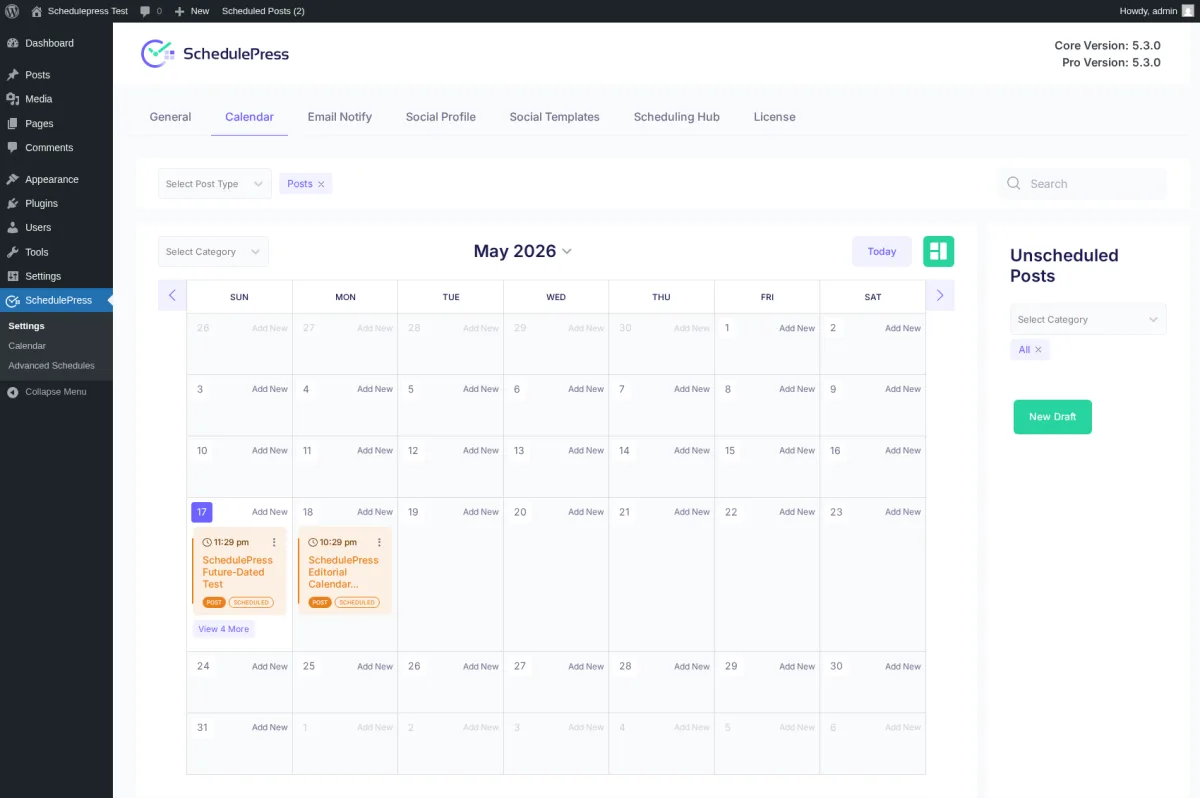
On top of the calendar, SchedulePress stacks a real scheduling hub with three sub-tabs:
- Auto Scheduler — a weekday × time × post-count matrix that auto-publishes queued posts on a schedule. Drop drafts into the queue, let SchedulePress decide when to publish each one based on the matrix.
- Manual Scheduler — explicit per-day time slots for buyers who want full control rather than a matrix.
- Missed Schedule Handler — a single toggle that recovers wp-core-missed schedules. Real solution to a real problem on low-traffic sites where wp-cron doesn't fire often enough.
SchedulePress is also the only plugin in this comparison with Advanced Schedule — the ability to schedule an update to an already-published post without unpublishing it. You stage the update as a separate draft, set a future date, and at the scheduled time SchedulePress overwrites the published post's content. This is a genuinely useful feature for marketing teams that need to swap an evergreen post's content at a campaign date.
FS Poster's compensating strength is the Planner, which solves a different problem: recurring evergreen reshares. The 4-step wizard (Filter → Share type → Sort → Summary) lets you build a recurring schedule that recycles archive posts on a cadence (every N days/weeks, with sleep-time exclusion windows). When I set up an evergreen reshare on a 2-day cadence from a morning start time, the Calendar populated the next three pre-scheduled planner cards on the matching future dates within seconds. SchedulePress's Auto Scheduler queues new posts; FS Poster's Planner recycles existing posts. They are not the same feature.
FS Poster's Calendar also exposes a per-share Insights button inside the share-detail modal — a feature SchedulePress does not offer at all.
Winner: SchedulePress — Auto Scheduler queue, Manual Scheduler, Missed Schedule Handler, and Advanced Schedule together form the deepest scheduling-queue UX in the WordPress editorial-plugin category. FS Poster wins on the recurring evergreen Planner and the per-share Insights surface, but for buyers whose primary job-to-be-done is editorial scheduling rather than social distribution, SchedulePress is the better-fit plugin.
Content Customization
| Customization detail | FS Poster | SchedulePress |
|---|---|---|
| Per-network captions | ✅ Customize content editor per channel (every plan) | ✅ Per-network Social Template editor (every plan, including Free) |
| Template variables / placeholders | ✅ {title}, {short_, {post_, {post_, plus AI Templates that reuse the same variables |
⚠️ 4 smart tags only: {title} {content} {url} {tags} |
| AI caption generation | ✅ BYO OpenAI key — Use AI button in every per-channel editor | ❌ Not offered |
| AI image generation | ✅ Built-in via BYO OpenAI key | ❌ Not offered |
| First Comment automation | ✅ Included where the network supports it | ❌ Not offered |
| Per-network image swap | ✅ Featured media per channel | ⚠️ Single Custom Social Banner field (one image for all networks, not per-network) |
| Share as Instagram Story | ✅ Included | ❌ Not offered |
| Multi-image carousel | ✅ Featured media + per-channel media | ❌ Only the featured image is posted |
| Relative date / time offsets ("share 1 week after publication") | ❌ | ✅ 6-option date offset + 6-option time offset in Add Social Message |
| URL shortener | ✅ {short_ variable + per-share |
❌ Not offered |
| Hashtag helper | ✅ Keywords button inside content editor | ❌ Not offered |
| Raw HTML mode | ✅ Toggle in editor | ❌ |
FS Poster's per-network content editor inside each channel's cog modal is the richer surface. Every editor exposes template-variable chips for Post title (rendered as {title}) and {short_url}, a Use AI button for one-click caption generation, a Keywords helper for hashtag suggestions, a preview mode (eye icon), and a raw-HTML mode (</>) for power users. I enabled Customize content on Facebook, Instagram, Threads, LinkedIn, Pinterest, and Truth Social, wrote a different template per network, and the customised text fired correctly through to the live Facebook share with the {title} and {short_url} placeholders resolved at publish time. FS Poster also ships AI image generation on every plan (BYO OpenAI key) and First Comment automation where the destination network supports it.
SchedulePress's per-network Social Template editor is functional and clean — 8 platforms each with their own custom message field, character cap (Facebook 63,206 / X 280 / LinkedIn 1,300 / Pinterest 500 / Instagram 2,100 / Medium 45,000 / Threads 480 / Google Business 1,500), and the smart-tag library. But the smart-tag library is only 4 tags: {title} {content} {url} {tags}. There is no {short_url}, no {post_excerpt}, no {author_name}, no {featured_image_alt}, no {wc_product_price}. Buyers who run WooCommerce shares or per-author bylines have nothing to substitute beyond title / content / URL / tags. The Add Social Message composer adds a per-post override on top of the global Social Template, with the relative date/time offsets ("share 1 week after publication") being a genuinely nice editorial-team feature that FS Poster does not offer.
SchedulePress does not ship AI caption generation, AI image generation, First Comment automation, Instagram Story sharing, multi-image carousels, or a URL shortener. The category is moving fast on AI; SchedulePress has not.
Winner: FS Poster — broader template-variable library, AI captions + AI image generation on every plan, First Comment automation, per-network image swap, and Instagram Story sharing. SchedulePress's competitive advantage here is the relative date/time offset dropdowns in Add Social Message — useful for editorial teams that want to scatter shares over weeks — but the missing AI surfaces and 4-tag smart-tag library are real ceilings.
WooCommerce & Custom Post Types
| WooCommerce detail | FS Poster | SchedulePress |
|---|---|---|
| WooCommerce-aware automation | ✅ Native — Product appears in Allowed post types | ⚠️ "WooCommerce compatible" per marketing copy, with no WooCommerce-aware admin surface inside the plugin |
| Per-product social config | ✅ FS Poster panel on the Product edit screen | ❌ No WooCommerce-specific surface |
| Per-channel category routing on products | ✅ Same per-channel rules apply to products | ❌ Not offered |
| Custom post type multi-select | ✅ Settings → General | ⚠️ No per-CPT picker in the plugin settings |
| WooCommerce product price / variation smart tags | ❌ Not exposed | ❌ Not exposed |
| Bulk action on Posts / Products list | ✅ "Bulk Schedule [FS Poster]" | ❌ Not offered |
WooCommerce is the category where FS Poster genuinely separates itself. I installed WooCommerce, skipped the setup wizard, and published a product — and FS Poster scheduled the share to every eligible connected channel without any extra licence, paid add-on, or configuration step beyond the default. The FS Poster panel on the product edit screen rendered per-channel status pills with timestamps and deep-links to the live social posts, and the Facebook channel was correctly skipped because a category filter on that channel excluded the product — positive proof that per-channel filters apply to the product workflow itself.
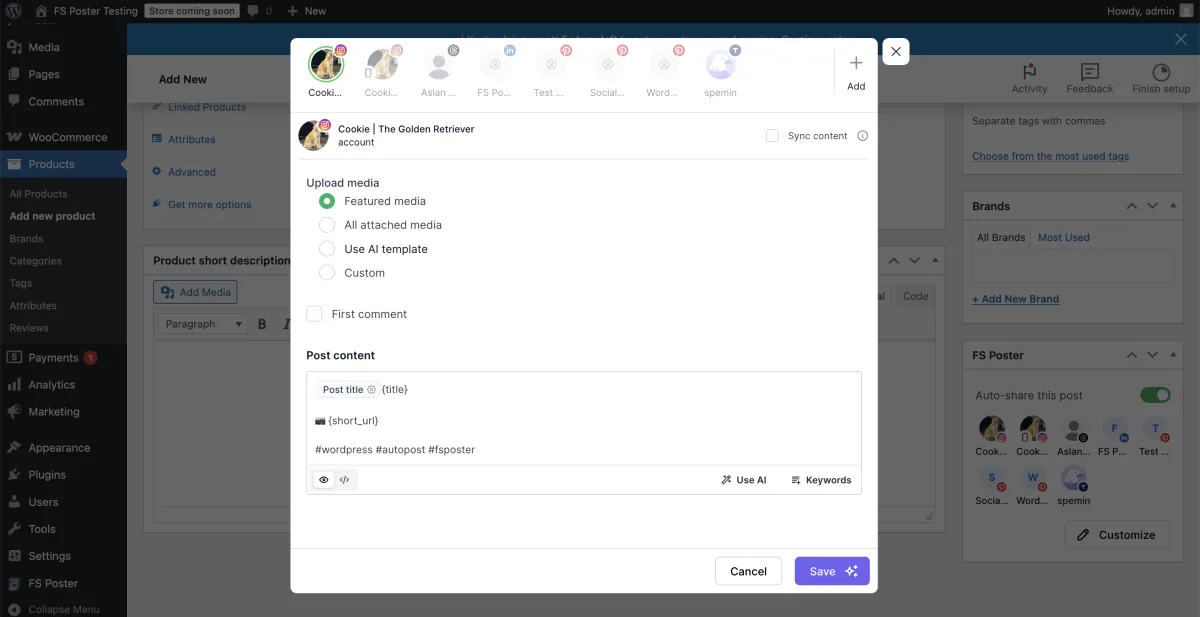
SchedulePress lists "WooCommerce compatible" in its marketing copy, and a five-star WordPress.org reviewer ("Even working for different e-commerce plugins") corroborates that products do go out. But there is no WooCommerce-aware automation surface inside SchedulePress: no per-product social config inside the product editor, no per-channel category routing for products, no Posts-list bulk action, and no WooCommerce-specific smart tags. For a buyer running a multi-brand WooCommerce store, the practical impact is that every product has to be walked through the per-post Schedule And Share modal manually, with no per-collection or per-tag routing to lean on.
Winner: FS Poster — WooCommerce products auto-share out of the box, per-channel category filters apply to products, and the WP Posts / Products list bulk action is unique. For agencies running multi-brand WooCommerce stores, this is the workflow that justifies the Plus or Developer tier on its own.
Ease of Use / UI & UX
| UI / UX detail | FS Poster | SchedulePress |
|---|---|---|
| Admin app style | Modern WordPress admin interface | Clean admin dashboard |
| Default landing surface | Calendar Month view | Settings tab landing (General / Calendar / Email Notify / Social Profile / Social Templates / Scheduling Hub / License) |
| Per-channel cog modal | ✅ General / Permissions / Labels tabs | ✅ Per-network Social Profile row with Connect / Master toggle / Per-profile toggle |
| On-post panel | ✅ FS Poster panel on the edit screen, showing per-channel status with timestamps | ✅ Schedule And Share modal in the Gutenberg sidebar with Scheduling Settings + Social Share Settings |
| Editorial Calendar inside WP Posts list | ❌ | ✅ Calendar mirror inside the standard WP Posts admin |
| Bulk action on Posts list | ✅ | ❌ |
| Setup friction | No free trial; AI requires own OpenAI key | "Upgrade to Premium" labels next to several General-tab toggles even on Pro builds; Twitter still labelled "Twitter" |
Both plugins ship modern WordPress admin interfaces. FS Poster's v7 admin opens to the Calendar Month view, which is the right default for social-publishing-first buyers. Every modal (per-channel cog, share-detail, Planner wizard) is consistently styled, the channel-avatar row inside the share-detail modal makes it fast to walk per-channel results left-to-right, and the OFF / ON status pills in the Channels list use colour the right way. Channel setup is a one-click OAuth flow because FS Poster ships Standard Apps (pre-configured OAuth apps maintained by the FS Poster team) for every supported network.
SchedulePress's admin lives at WP Admin → SchedulePress → Settings with seven top-level tabs: General, Calendar, Email Notify, Social Profile, Social Templates, Scheduling Hub, License. Each tab is clean, persists state across reloads, and the layout is easy to scan. The seven-tab architecture is appropriate for an editorial-calendar plugin that has expanded into social — but for a buyer whose primary need is social distribution, it requires more orienting than FS Poster's five-tab top-level layout. Two friction points stand out: the "Upgrade to Premium" copy is vestigial next to several General-tab toggles (Auto-Share upon Publishing, Publish Now with Future Date, Post Republish) even on Pro-active builds — the toggles work fine and persist state, but the cosmetic label suggests the buyer should pay more, which is confusing. And Twitter is still labelled "Twitter" everywhere in the admin UI; the X rebrand has not landed.
SchedulePress's compensating UX strength is the Editorial Calendar mirror inside the standard WordPress Posts list, which renders the same calendar planner without leaving the Posts admin screen — perfect for editors who live in that flow. FS Poster does not offer this surface; the FS Poster Calendar is its own top-level tab.
Winner: FS Poster — five-tab top-level layout is easier to orient, the per-channel cog modal is more compact than walking a seven-tab settings page, and the absence of "Upgrade to Premium" cosmetic gating on a paid build is a small but real polish win. SchedulePress wins on the Editorial Calendar inside the Posts list — a workflow that's genuinely better for editors but irrelevant for buyers who do not live in the Posts list flow.
Logs, Reliability & Troubleshooting
| Reliability detail | FS Poster | SchedulePress |
|---|---|---|
| In-product Activity Log / Share History | ✅ Calendar share-detail modal + per-post sidebar | ❌ Not offered |
| Retry on failed share | ✅ Retry button inside the share modal | ❌ No in-product retry surface |
| Clear failure message | ✅ Exact reason (e.g. "An image / video is required to share a post on Instagram.") | ⚠️ Failures fall to the connected social account — no in-product log |
| Per-share Insights | ✅ Insights button in modal | ❌ |
| Sharing Debugger / Troubleshooting Tool | ❌ Not offered | ❌ Not offered |
| Missed Schedule recovery | ⚠️ Server-cron recommendation in Settings → General | ✅ Missed Schedule Handler (Pro) |
| WP cron vs server cron | ⚠️ Server cron recommended ("Configure cron jobs (Recommended)" toggle) | ⚠️ Same WP-cron pattern as every comparable plugin |
This is the category where SchedulePress's missing in-product Activity Log is most visible. FS Poster's Calendar share-detail modal is the cleanest single evidence surface in the WordPress-plugin category — channel-avatar row at the top, per-channel status text, content body, sharing date, post reference, and a Retry / Delete / Reschedule / Insights action row. When a network-side share fails (typically because Instagram or Pinterest requires a featured image that wasn't attached), the modal exposes a Retry button and the exact error message ("An image / video is required to share a post on Instagram." / "An image is required to pin on board."). Attach the missing media on the WP side, click Retry, and the share fires again.
SchedulePress has no equivalent. There is no Activity Log tab, no per-share history list, no failure-with-Retry surface. If a buyer's auto-share doesn't fire — or fires but the team can't see whether it landed on Pinterest, LinkedIn, or Threads — there is no in-product way to investigate beyond opening the connected social account directly. The Add Social Message workflow saves per-network templates correctly, and connected account activity may indicate that a share happened, but SchedulePress does not provide an Activity Log to confirm the exact share inside the plugin. The practical buyer impact: SchedulePress's share may work, but you have to log into each connected social account to verify — and on the day something actually breaks, that's the same place you'll have to start your debugging.
SchedulePress's compensating reliability strength is the Missed Schedule Handler — a single Pro-tier toggle that recovers wp-core-missed schedules. WP cron only fires when somebody visits the site, so on low-traffic blogs scheduled WordPress posts can drift late. The Missed Schedule Handler is a real solution to a real problem, and FS Poster does not solve it (although FS Poster does surface a "Configure cron jobs (Recommended)" toggle in Settings → General that nudges buyers to install a real server-cron). FS Poster's logging is post-share rather than pre-publish, so the failure modes do not overlap.
Winner: FS Poster — in-product Activity Log with Retry + Insights is the single most valuable reliability surface a WordPress social-publishing plugin can ship. SchedulePress wins on the Missed Schedule Handler for the narrow case of wp-cron-missed schedules, but a plugin that can't tell you whether your share landed is a tougher trust ask than one that can.
Support, Docs & Reputation
| Support / reputation detail | FS Poster | SchedulePress |
|---|---|---|
| Public rating | 4.9 / 5 from 650+ reviews on fs-poster.com (vendor surface; FS Poster is not on WordPress.org) | 4.6 / 5 from 198 reviews on WordPress.org |
| Active installs / paid customers | 50K+ active installs / 25K+ paid customers (fs-poster.com brand wording) | 10,000+ active installs (WordPress.org) |
| Review distribution | Strongly positive — most-praised: 26-network breadth, Lifetime tier, modern v7 UI, WooCommerce-native | 166 × 5★ / 12 × 4★ / 2 × 3★ / 1 × 2★ / 17 × 1★ — 1★ cluster at 8.6 % is higher than the 4.6 average implies |
| Support channels | Email / ticket via fs-poster.com, Discord community | In-product Help & Support, WPDeveloper ticket portal, WordPress.org forum |
| Locales | 7 | 5 |
| Years in market | 8+ years on the market | 10+ years (renamed from "WP Scheduled Posts" in 2024) |
| Release cadence | Frequent v7.x patches | Same-day point releases for free + Pro (current v5.3.0) |
| GitHub source | ❌ Not public | ❌ Not public |
| Notable reputation pattern | Strongly positive — buyers cite 26-network breadth, Lifetime economics, and WooCommerce automation | Strongest praise on "Excellent support" (named individually) + "Drag-and-drop calendar" + "Multi-author management" |
| Vendor portfolio | FS Code (parent of Booknetic; FS Poster is the social-publishing line) | WPDeveloper (6M+ users across Essential Addons for Elementor, NotificationX, BetterDocs, BetterLinks, Templately) |
Both plugins have credible reputations in their respective surfaces. FS Poster's headline figure is 4.9 / 5 from 650+ reviews on fs-poster.com, paired with 25K+ paid customers and 50K+ active installs. FS Poster is not on WordPress.org — the plugin is sold through fs-poster.com — so the rating and review counts come from FS Poster's own surfaces rather than a WordPress.org plugin listing. Eight-plus years of responsive support and active maintenance back up the numbers.
SchedulePress's headline figure is 4.6 / 5 from 198 reviews on WordPress.org with 10,000+ active installs. The 5★ majority is overwhelming (166 of 198, about 84 %), but the 1★ cluster sits at 17 reviews (8.6 % of the total) — higher than the 4.6 average implies, worth checking before writing an honest review piece. The single most-recurring positive theme across reviews is "Excellent support" — multiple buyers cite WPDeveloper's support team by name, which is unusually strong evidence of human, named support. Steven Feldman's testimonial calls out the drag-and-drop calendar specifically; Justin Germino calls out the multi-author management; Antuale calls out the unique "show future post now" Pro feature. The WPDeveloper portfolio (6M+ users across Essential Addons for Elementor, NotificationX, BetterDocs, BetterLinks, Templately) is a real vendor-maturity signal — SchedulePress is not a one-product company.
Both plugins ship monthly-or-better release cadences with no public GitHub source. SchedulePress's most recent point release (v5.3.0) was tagged the same day on both the WordPress.org repo and the Pro channel, which is the right signal for an active maintainer.
Winner: Tie — SchedulePress wins on WordPress.org listing legitimacy and the named-support reputation pattern. FS Poster wins on absolute rating, paid-customer count, and the higher network-breadth + WooCommerce-native reputation hook. For first-time discovery, SchedulePress's WordPress.org listing is the more visible single signal; for buyer trust once you've shortlisted both, FS Poster's 4.9-star rating and paid-customer base set a higher bar.
FS Poster vs SchedulePress Scorecard
| Category | Winner | Why |
|---|---|---|
| Pricing & Plans | SchedulePress | $39/ |
| Network Coverage | FS Poster | 26 networks vs 8 — every modern destination (Bluesky, Mastodon, TikTok, Reddit, Discord, Telegram, Webhook, YouTube Shorts) is FS Poster only |
| Auto-Posting Workflow | FS Poster | Auto-share on publish out of the box, per-channel category filters, in-product Activity Log, WP Posts-list bulk action |
| Scheduling, Calendar & Planner | SchedulePress | Auto Scheduler queue + Manual Scheduler + Missed Schedule Handler + unique Advanced Schedule (schedule an update to a published post) |
| Content Customization | FS Poster | AI captions + AI image generation, broader template variables, First Comment, Instagram Story, multi-image carousel |
| WooCommerce & Custom Post Types | FS Poster | WooCommerce-native automation out of the box, per-channel filters apply to products |
| Ease of Use / UI & UX | FS Poster | Five-tab layout, clean per-channel cog modal, no vestigial "Upgrade to Premium" labels on paid builds |
| Logs, Reliability & Troubleshooting | FS Poster | In-product Activity Log with Retry + Insights — SchedulePress has no equivalent |
| Support, Docs & Reputation | Tie | SchedulePress wins on WordPress.org listing + named-support pattern; FS Poster wins on absolute rating + paid-customer count |
| Overall | FS Poster | Six category wins, two SchedulePress wins, one tie — broader networks, transparent dispatch, WooCommerce automation, AI, and an Activity Log decide it for buyers whose primary need is social distribution |
Who Should Choose FS Poster?
Choose FS Poster if:
- You need to reach more than 8 social networks — especially Bluesky, Mastodon, TikTok, Reddit, Discord, Telegram, Truth Social, Tumblr, VK, OK.ru, YouTube Shorts, or a webhook destination.
- You want auto-share on publish that's transparent end-to-end — a per-channel FS Poster panel on the edit screen with green checkmarks, timestamps, and deep links to the live social posts.
- You run a WooCommerce store and want product auto-share with per-channel category filters out of the box.
- You want AI captions and AI image generation included on every plan (BYO OpenAI key).
- You manage 3+ WordPress sites for clients or your own brands and want predictable per-site licensing without per-user or per-account multipliers.
- You need the WP Posts-list bulk action to rehydrate an archive in one move.
- You want a Lifetime tier with the full 26-network roster ($490 one-time, 30 websites).
Who Should Choose SchedulePress?
Choose SchedulePress if:
- Your primary workflow is the WordPress editorial calendar rather than social distribution.
- You publish from a multi-author team and need the multi-author + email-notify tooling.
- You specifically need Advanced Schedule — the ability to schedule an update to an already-published post without unpublishing it. This is unique to SchedulePress.
- You run a low-traffic blog where wp-cron drops scheduled posts, and the Missed Schedule Handler is a one-toggle solution.
- You only need the 8 mainstream networks (Facebook, Twitter, LinkedIn, Pinterest, Instagram, Medium, Threads, Google Business Profile).
- You want the cheapest annual entry in the category ($39/yr Individual) or a Lifetime Unlimited tier under $300 ($299 one-time).
- You are already a WPDeveloper customer (Essential Addons for Elementor, NotificationX, BetterDocs, BetterLinks, Templately) and the $749 Agency Bundle Lifetime makes the portfolio math compelling.
Alternatives to Both
If neither FS Poster nor SchedulePress is the right fit, three other WordPress social plugins are worth shortlisting. For a SchedulePress-specific shortlist, see the SchedulePress alternatives page.
- Blog2Social — Adenion's German-built freemium plugin with a genuinely usable Free tier (12 networks, 1 account per network), per-network captions, Best Time Manager presets, and a drag-and-drop calendar from day one. Best for editorial teams who want to try before they buy and value per-network AI Post Templates. Read the Blog2Social review for the full walkthrough.
- Jetpack Social — Automattic's WordPress-publishing-first plugin with a Gutenberg-native sidebar and a usable Free tier on roughly 8 mainstream networks. Best for solo bloggers who already trust the Automattic stack and only need Facebook + LinkedIn + Threads + a couple of others. Read the Jetpack Social review.
- Revive Old Posts (Revive Social) — built specifically for evergreen recycling of archive content. Best when your only job-to-be-done is "keep republishing my archive forever" and you do not need day-one auto-share, AI, or an editorial calendar. Read the Revive Old Posts review.
If you are still shopping the whole category, the WordPress social media scheduler plugins roundup pulls every option above into a single comparison frame.
FS Poster vs SchedulePress FAQ
Is FS Poster better than SchedulePress?
For most social-publishing-first buyers, yes. FS Poster wins six of nine head-to-head categories outright, mainly because it ships 26 networks vs SchedulePress's 8, an in-product Activity Log that SchedulePress doesn't offer, WooCommerce-native automation, AI captions plus AI image generation, and per-channel category filters. SchedulePress wins two categories — editorial-calendar depth (Auto Scheduler + Manual Scheduler + Missed Schedule Handler + Advanced Schedule) and entry-level pricing ($39/yr Individual and $299 Lifetime Unlimited) — and the Support, Docs & Reputation category is a tie.
Which is cheaper: FS Poster or SchedulePress?
SchedulePress, on raw dollar count. SchedulePress Free ($0 on WordPress.org) covers 7 of its 8 networks, the editorial calendar, and per-platform Social Templates with no upgrade pressure. SchedulePress Individual is $39/yr (promo) for one site, and SchedulePress Lifetime Unlimited is $299 one-time for unlimited sites. FS Poster has no free tier — Single is $58 intro / $65 renewal for one site, Plus is $109 intro / $195 renewal for 3 sites, Developer is $229 intro / $449 renewal for 15 sites, and Lifetime is $490 one-time for 30 websites. FS Poster's value-per-dollar story is broader networks + AI + WooCommerce + Activity Log; SchedulePress's is the lower entry price.
Which tool supports more social networks?
FS Poster, by a wide margin. FS Poster ships 26 networks on every plan — including X (Twitter), Threads, Bluesky, Mastodon, Truth Social, TikTok, Reddit, Discord, Telegram, VK, OK.ru, Tumblr, Plurk, Flickr, Xing, Blogger, Medium, Google Business Profile, the newly added YouTube Shorts destination, plus a Webhook destination and a WordPress-to-WordPress connector. SchedulePress ships 8 networks total: Facebook, Twitter (still branded "Twitter"), LinkedIn (Profile + Page), Pinterest, Instagram, Medium, Threads, and Google Business Profile (Pro-only). If you need any single destination outside that shortlist, SchedulePress does not solve your problem.
Which tool is better for WooCommerce?
FS Poster, decisively. WooCommerce products auto-share to every connected channel once Woo is active — no extra licence, no paid add-on. The FS Poster panel on the product edit screen shows per-channel status with timestamps and deep links to the live social posts, and per-channel category filters apply to products. SchedulePress is "WooCommerce compatible" per its marketing page but has no WooCommerce-aware automation surface inside the plugin — there is no per-product social config, no per-channel category routing for products, and no Posts-list bulk action.
Does SchedulePress have an Activity Log to confirm shares?
No. SchedulePress does not ship an in-product Activity Log or Share History panel. If a buyer's auto-share doesn't fire — or fires but the team can't see whether it landed — there is no in-product way to investigate beyond opening the connected social account directly. FS Poster's Calendar share-detail modal exposes per-channel status, exact error messages, a Retry button, and an Insights surface for every share attempt — a meaningful trust gap between the two products.
Which tool is better for the editorial calendar?
SchedulePress. The drag-and-drop calendar planner is the deepest editorial-calendar surface in the WordPress-plugin category, layered with an Auto Scheduler queue (weekday × time × post-count matrix), a Manual Scheduler (per-day explicit time slots), a Missed Schedule Handler that recovers wp-cron-missed posts, and a unique Advanced Schedule mode that schedules an update to an already-published post. FS Poster's Calendar is well-built for social-publishing-first workflows but does not match SchedulePress on editorial-scheduling depth.
Which tool is easier for beginners?
Both are modern admin SPAs, but the easier-to-try is SchedulePress thanks to the WordPress.org Free tier (7 of 8 networks, full editorial calendar, per-platform Social Templates, no credit card required). FS Poster is easier to use day-to-day once you commit — five top-level tabs vs SchedulePress's seven, no vestigial "Upgrade to Premium" cosmetic labels on a paid build, and a one-click OAuth flow via FS Poster's Standard Apps. The 14-day money-back guarantee on FS Poster is the equivalent risk-free evaluation path if you cannot install SchedulePress Free first.
Final Verdict
FS Poster wins this comparison for any buyer whose primary need is social distribution. The 26-network roster on every plan, the auto-share on publish with an in-product Activity Log, the per-channel category filters, the WooCommerce-native automation, the AI captions + AI image generation, the WP Posts-list bulk action, and the $490 one-time Lifetime tier covering 30 websites add up to a meaningfully deeper social-publishing toolkit than SchedulePress's 8 networks and template-first workflow. For agencies, WooCommerce stores, multi-network publishers, and anyone who needs a destination outside SchedulePress's shortlist, FS Poster is the easy call — start with the FS Poster review and shortlist the Plus or Lifetime tier based on your site count.
The honest exception is the editorial-team buyer. If your primary job-to-be-done is the WordPress editorial calendar — drag-and-drop scheduling, an Auto Scheduler queue, a Manual Scheduler, recovery from wp-cron-missed schedules, and the unique ability to schedule an update to an already-published post — SchedulePress is genuinely the better-fit plugin, and the $39/yr Individual / $299 Lifetime Unlimited pricing is the cheapest entry point in the category. Read the SchedulePress review for the full walkthrough — or browse the SchedulePress alternatives shortlist if you have already decided that the 8-network ceiling and missing Activity Log rule it out for your distribution mix.
Write once. Post to 26 networks.
- 26 social networks
- Schedule & auto-repost
- Runs inside wp-admin


