


FS Poster and Jetpack Social both auto-share WordPress posts to social networks, but they target very different buyers. FS Poster is FS Code's premium WordPress-native plugin that ships 26 networks, a recurring Planner, WooCommerce automation, and a one-time Lifetime tier — every feature on every plan. Jetpack Social is Automattic's stripped-down Gutenberg-sidebar plugin that covers 8 mainstream networks, has a genuinely usable Free tier, and leans on the Jetpack brand and a tight WordPress-editor workflow.
I tested both plugins side by side on a clean WordPress install, walked the Jetpack/Automattic secure checkout to verify pricing in real time, cross-checked FS Poster's official pricing page, exercised the in-product admin screens of each plugin, and read the public review data from WordPress.org and fs-poster.com. This FS Poster Jetpack Social comparison also covers Jetpack Social vs FS Poster, FS Poster or Jetpack Social buying logic, FS Poster vs Jetpack Social pricing, FS Poster vs Jetpack Social features, and when FS Poster is an alternative to Jetpack Social or Jetpack Social is an alternative to FS Poster. Below is the practical breakdown of features, pricing, ease of use, limitations, and who should pick which.
FS Poster vs Jetpack Social: Quick Verdict
Choose FS Poster if you need more than the eight mainstream networks (especially Pinterest, X/Twitter, TikTok, Reddit, Telegram, Discord, or a webhook destination), run a WooCommerce store, manage 3+ WordPress sites, or want a one-time Lifetime licence that takes annual renewal off the table. Choose Jetpack Social if you only publish to Facebook, LinkedIn, Threads, and a handful of other mainstream networks, want a genuinely free entry point with no credit card, value the Automattic brand, or prefer the Gutenberg-sidebar workflow over a separate admin app.
Overall winner: FS Poster — broader network coverage, deeper automation (recurring Planner, WP Posts-list bulk action, WooCommerce auto-share, per-channel category filters), AI captions plus AI image generation, and an optional Lifetime tier covering 30 websites that Jetpack Social cannot match at any price.
Quick Comparison Table
| Category | FS Poster | Jetpack Social |
|---|---|---|
| Starting price | $58 / yr intro on Single (renews at $65 / yr) | €0 Free; paid from €59.40 / yr first year (€4.95 / mo equivalent), then €107.40 / yr renewal (€8.95 / mo equivalent) |
| Free plan | No free plan; 14-day money-back guarantee | ✅ Free — 8 networks, unlimited shares (since Sept 2024) |
| Lifetime option | ✅ $490 one-time intro for 30 websites | ❌ Annual / 2-year subscription only |
| Supported networks | 26 on every plan (incl. YouTube Shorts) | 8 (Facebook Pages, Instagram Business, Threads, LinkedIn, Bluesky, Nextdoor, Tumblr, Mastodon) |
| X (Twitter) | ✅ Included on every plan | ❌ Permanently removed (post-2023 API deprecation) |
| Pinterest / TikTok / YouTube / Reddit / Telegram / Discord | ✅ All included | ❌ None supported |
| Calendar / planner | ✅ Modern Calendar + recurring Planner on every plan | ⚠️ Schedule one re-share at a time per post |
| Recurring evergreen reshare | ✅ Planner with Interval / Weekly cadence + sleep-time exclusion | ❌ Not offered |
| WP Posts-list bulk action | ✅ Native "Bulk Schedule [FS Poster]" | ❌ Not offered |
| WooCommerce auto-share | ✅ Native — product auto-share + per-channel filters | ❌ No WooCommerce-aware logic |
| Per-channel category filter | ✅ Include / exclude by taxonomy | ❌ Per-account toggle per post only |
| Per-account custom caption | ✅ Included on every plan | ⚠️ Paid-only — Free shares one message across all accounts |
| AI captions / AI images | ✅ BYO OpenAI key — captions and images | ❌ No AI captions; Social Image Generator is template-based, paid |
| Public rating | 4.9 / 5 from 650+ reviews on fs-poster.com (vendor surface; not on WordPress.org) | 3.3 / 5 from 74 reviews on WordPress.org |
| Best for | Agencies, WooCommerce stores, multi-network publishers | Solo bloggers on Jetpack who only need mainstream networks |
Prices checked in May 2026.
FS Poster Overview
FS Poster is a premium WordPress plugin from FS Code that turns any WordPress site — including WooCommerce stores — into a multi-network social publishing engine. It auto-shares new posts to 26 networks, lets you schedule one-off social posts directly from a Calendar (with no backing WordPress post required), recycles archive content with a recurring Planner, bulk-schedules existing posts via a native WordPress Posts-list action, customises captions per network with template variables, and integrates AI for both captions and share images on a bring-your-own-OpenAI-key basis. It is sold exclusively through fs-poster.com with Single, Plus, Developer, and Lifetime tiers and a 14-day money-back guarantee. There is no free version.
For the standalone testing notes behind this side of the comparison, read the FS Poster review.
Jetpack Social Overview
Jetpack Social is Automattic's stripped-down social-publishing plugin for WordPress, built by the same company behind WordPress.com, WooCommerce, and Tumblr. It lives in the Gutenberg editor sidebar and pushes a new WordPress post (title + excerpt + featured image + link) to 8 mainstream networks — Facebook Pages, Instagram Business, Threads, LinkedIn, Bluesky, Nextdoor, Tumblr, Mastodon — on publish, with optional manual re-share and per-post scheduling. The Free tier covers auto-share, scheduling, content recycling, link previews, UTM-on-share, and a Social Notes beta. The Social paid plan (€59.40 / year for the first year, equivalent to €4.95 / month; €107.40 / year on renewal, equivalent to €8.95 / month; checkout-verified in EUR) layers on per-account custom captions, per-account custom images/videos, the Social Image Generator for branded share images, and priority support. There is no Lifetime tier, no per-channel category filter, no recurring evergreen planner, and no WooCommerce-aware automation.
For the standalone testing notes behind this side of the comparison, read the Jetpack Social review.
Head-to-Head Comparison
Pricing & Plans
| Plan | FS Poster | Jetpack Social |
|---|---|---|
| Free | No free plan; 14-day money-back guarantee | ✅ Unlimited shares, 8 networks |
| Cheapest paid (intro) | $58 / yr Single — 1 site, 6 mo support | €59.40 / yr Social first year (€4.95 / mo equivalent; ~$59) |
| Mid tier | $109 / yr Plus — 3 sites, 12 mo support | — (no mid tier; Growth bundle is €107.40 / yr intro / €227.40 / yr renewal, shown as monthly equivalents at checkout) |
| Top tier | $229 / yr Developer — 15 sites, 12 mo support | — |
| Lifetime | $490 one-time intro ($890 regular) — 30 websites, 12 mo support | ❌ Not offered |
| Renewal | Intro prices renew at full price (Single → $65, Plus → $195, Developer → $449) | €107.40 / yr on renewal (€8.95 / mo equivalent) |
| Multi-year | ❌ Annual only | ✅ 2-year prepay €133.44 total at checkout |
| Refund | 14-day money-back guarantee | 14-day money-back guarantee on yearly plans |
FS Poster's pricing axis is the simplest in this category. You pay per site, and every plan ships the full 26-network roster, unlimited connected channels, unlimited schedules, AI integration, watermarking, WP multisite, and a staging licence. The only differences between tiers are the number of websites (1 / 3 / 15 / 30), the support window (6 months on Single, 12 months on the rest), and AI template quotas. The Lifetime tier ($490 one-time for 30 sites) breaks even against the Developer renewal at $449 / year within twelve months and stays "free" forever afterwards apart from the optional yearly support renewal.
Jetpack Social's pricing axis is binary: Free or Social paid. The Free tier is genuinely usable — auto-share at publish, scheduling, per-post re-share, manual sharing buttons, multi-network link preview, UTM parameters, Social Notes beta, and (since September 2024) unlimited shares. The paid Social plan layers on per-account custom captions, per-account custom images/videos, the Social Image Generator (template-based branded share images), and priority support. We verified the checkout cart at €59.40 for the first year and €107.40 on renewal in EUR, with a 2-year prepay option at €133.44 total. There is no Lifetime tier and no agency multi-site licensing on the standard plan — every WordPress install runs its own Jetpack Social subscription.
The economic comparison turns on two questions. If a buyer never upgrades past the Free tier, Jetpack Social is unbeatable on price — €0 indefinitely with unlimited shares to 8 networks. If a buyer needs more than the eight mainstream networks (Pinterest, X/Twitter, TikTok, YouTube, Reddit, Telegram, Discord, VK, Truth Social, Webhook), or runs more than one WordPress install, FS Poster is meaningfully cheaper over any multi-year horizon — and the Lifetime tier breaks the comparison entirely after year two.
Winner: FS Poster — for any paid buyer who needs more than 8 networks or more than one site. The Lifetime tier has no equivalent on the Jetpack side. Jetpack Social wins only if the Free tier is the destination, not a stepping stone.
Network Coverage
| Coverage detail | FS Poster | Jetpack Social |
|---|---|---|
| Headline count | 26 networks on every plan | 8 networks on every plan |
| ✅ Pages, Groups, Profile contexts | ✅ Pages only (no personal profiles — Meta restriction) | |
| ✅ Feed + Story + Reels coverage | ✅ Business / Creator only (must be linked to a Page) | |
| Threads, Bluesky, Mastodon | ✅ All included | ✅ All included |
| ✅ Profile + Company Page | ✅ Profile + Company Page | |
| Tumblr, Nextdoor | ✅ Both included | ✅ Both included |
| X (Twitter) | ✅ Included on every plan | ❌ Permanently removed |
| ✅ Included | ❌ Not supported | |
| TikTok | ✅ Included | ❌ Not supported |
| YouTube Community + YouTube Shorts | ✅ Both supported (Shorts is the newly added destination) | ❌ Not supported |
| ✅ Included | ❌ Not supported | |
| Telegram, Discord | ✅ Both included | ❌ Neither supported |
| VK, OK.ru, Xing, Plurk, Flickr | ✅ All included | ❌ None supported |
| Truth Social | ✅ Included | ❌ Not supported |
| Google Business Profile | ✅ Included | ❌ Not supported |
| Blogger, Medium | ✅ Both included | ❌ Neither supported |
| WordPress-to-WordPress connector | ✅ Native | ❌ Not offered |
| Webhook destination (Zapier / IFTTT / custom HTTP) | ✅ Native | ❌ Not offered |
This is the single largest gap between the two products. FS Poster covers all 8 networks Jetpack Social supports — plus 18 more. The 8 networks Jetpack Social offers in its Connect-an-account modal are Facebook Pages, Instagram Business, Threads, LinkedIn, Bluesky, Nextdoor, Tumblr, and Mastodon. Everything else — Pinterest, X/Twitter, TikTok, YouTube Community, YouTube Shorts, Reddit, Discord, Telegram, VK, OK.ru, Xing, Truth Social, Plurk, Flickr, Google Business Profile, Blogger, Medium, the WordPress-to-WordPress connector, and the Webhook (Zapier / IFTTT / custom HTTP) destination — is not supported and is not on the roadmap.
The most consequential gaps are the mainstream four (Pinterest, X/Twitter, TikTok, YouTube). Twitter/X is permanently removed from Jetpack Social — Automattic deprecated the connector after X's 2023 API changes, and old tutorials showing an X toggle in the editor are outdated. The Jetpack Social marketing copy explicitly recommends using the Manual Sharing buttons (X intent, WhatsApp, Facebook sharer, Copy link) for unsupported networks, which is honest but means every share to one of those destinations is a manual click in a new tab. FS Poster ships X (Twitter) auto-share on every plan, and adds the newly supported YouTube Shorts destination alongside the existing roster.
Jetpack Social's compensating strength is that its 8 networks are the most-used mainstream destinations — and the link preview surface inside the editor sidebar shows realistic mock-ups for 9 platforms (Google, X, Facebook, Threads, LinkedIn, Nextdoor, Tumblr, Mastodon, Bluesky). For a solo blogger publishing primarily to Facebook + LinkedIn + Threads, the 8-network ceiling is enough.
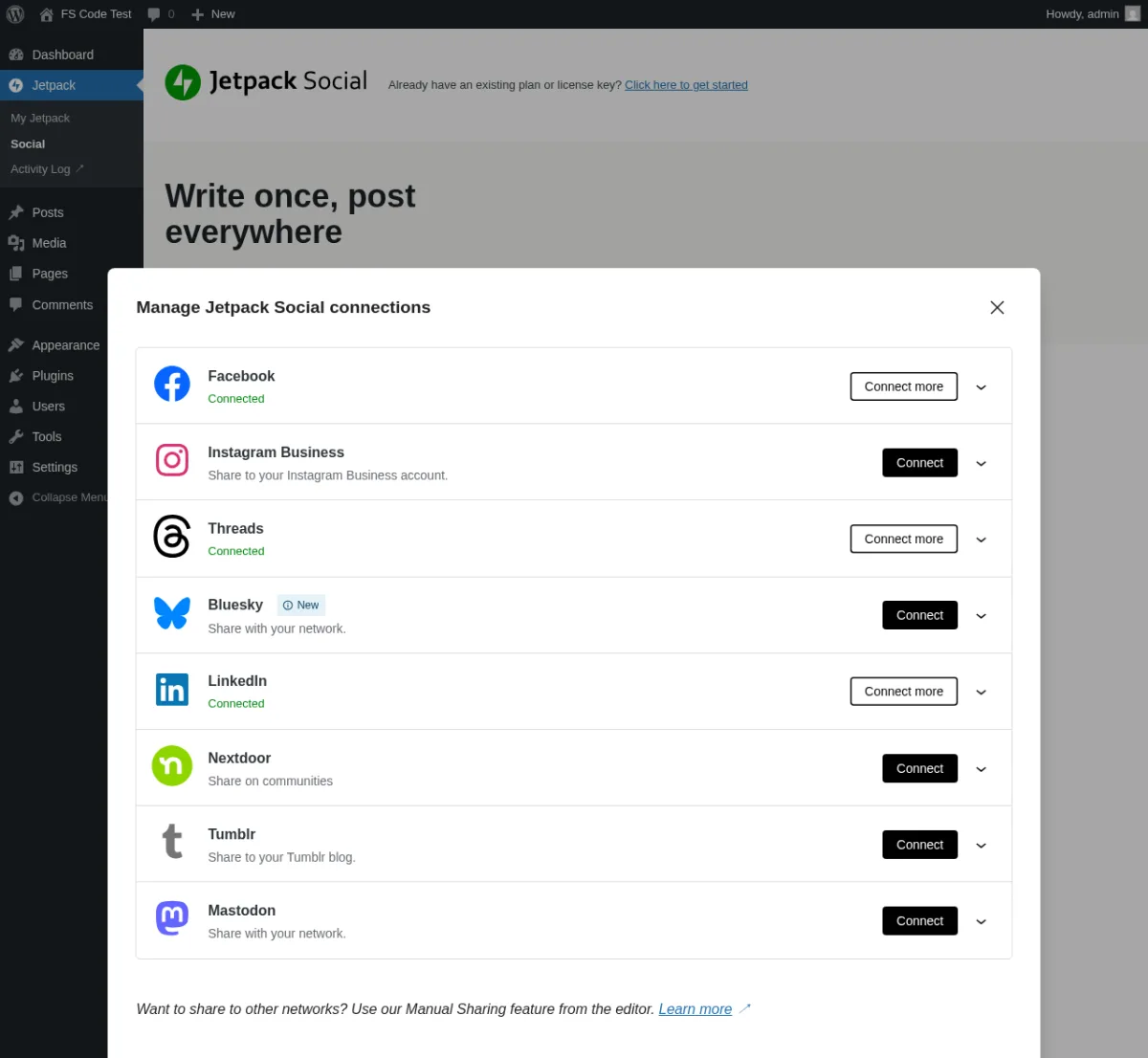
Winner: FS Poster — 26 networks on every plan vs Jetpack Social's 8. The only context where Jetpack Social's ceiling is not a problem is a publisher whose audience lives entirely on the eight networks Jetpack supports.
Auto-Posting Workflow
| Auto-posting detail | FS Poster | Jetpack Social |
|---|---|---|
| Auto-share on WordPress publish | ✅ Default on every plan | ✅ Default on Free + paid (master toggle + per-account toggles) |
| Per-channel auto-share toggle | ✅ Persistent — one cog modal per channel | ⚠️ Per-post toggles in editor sidebar (default OFF on a fresh draft — you must opt in per post) |
| Per-channel category / taxonomy filter | ✅ Include / exclude rules per channel | ❌ Not offered |
| WP Posts-list bulk action | ✅ Native "Bulk Schedule [FS Poster]" | ❌ Not offered |
| Manual share to non-WP content (links, text, images, videos) | ✅ Via Calendar Share Now | ❌ Not offered (post-tied workflow only) |
| Manual share buttons for unsupported networks | ❌ Not needed (26 networks covered) | ✅ Native X / WhatsApp / Facebook / Copy link buttons |
| Custom post-type support | ✅ Multi-select in Settings → General | ⚠️ Default is Posts only; CPTs are not auto-detected |
| REST API publish triggers auto-share | ✅ Yes | ✅ Yes (verify per external integration) |
The two plugins have very different default behaviours. FS Poster's auto-share is persistent per-channel: flip the cog modal for each channel ON once and every subsequent WordPress publish fires the share without further intervention. When I published a new post with a featured image attached, FS Poster's post-edit-screen sidebar filled with green checkmarks across every eligible connected channel within the WP-cron firing window — and a Facebook channel I'd previously restricted to the Tech category was correctly skipped on an uncategorised post, which doubles as positive proof that per-channel taxonomy filters apply to the auto-share path itself.
Jetpack Social's auto-share is per-post: each connected account has its own toggle in the Gutenberg editor sidebar, and those toggles default to OFF on a fresh draft. Publishing a post without flipping the toggles produces zero shares — a friction point you'll feel on every single post until muscle memory kicks in. Once flipped ON, however, the auto-share fires cleanly: when I published a new post (with a featured image), Jetpack Social auto-shared it to my 3 connected accounts (Facebook page, LinkedIn profile, Threads handle) within ~2 minutes, with the Sharing Activity dialog showing Shared ✓ rows and live "View ↗" links to each social post. The buyer trade-off is consent and friction: every post needs per-account toggle decisions in the editor.
The single biggest workflow capability FS Poster adds is the WP Posts-list bulk action. Selecting one or more posts on the standard WordPress Posts list and choosing "Bulk Schedule [FS Poster]" drops you into the Planner wizard with those posts pre-filtered — the highest-leverage workflow in either product for rehydrating an archive in a single move. Jetpack Social offers no equivalent: every post is scheduled or re-shared individually from its own editor.
Jetpack Social's compensating strength is the Manual Sharing strip in the editor sidebar: X intent, WhatsApp share, Facebook sharer, and Copy link are surfaced as honest one-click affordances for networks Jetpack Social cannot auto-post to. It is not automation — every click opens a native share dialog in a new tab — but it is an honest UX for the 18-network gap. FS Poster does not ship this strip because its own auto-share roster already covers those destinations.
Winner: FS Poster — auto-share is persistent per-channel rather than per-post-toggle, the WP Posts-list bulk action is unique in the category, and per-channel category filters give you real targeting rules. Jetpack Social wins on simplicity (everything lives in the Gutenberg sidebar) and on the Manual Sharing strip for unsupported networks.
Scheduling, Calendar & Planner
| Scheduling detail | FS Poster | Jetpack Social |
|---|---|---|
| In-WordPress calendar | ✅ Modern Month / Week / List views | ❌ No dedicated calendar — Sharing Activity dialog only |
| Drag-and-drop reschedule | ✅ Included | ❌ Not offered |
| Recurring evergreen planner | ✅ 4-step Planner wizard (Filter → Share type → Sort → Summary) | ❌ Not offered |
| Schedule one-off re-share of a published post | ✅ Calendar Share Now + Planner | ✅ Schedule popover inside Preview-and-share modal |
| Schedule a calendar post without a WP post | ✅ "+ Schedule new post" wizard | ❌ Post-tied scheduling only |
| Sleep-time exclusion windows | ✅ Inside Planner Interval step | ❌ Not offered |
| Per-share Insights button | ✅ Inside Calendar share-detail modal | ❌ Not offered |
| Schedule limits | Unlimited on every plan | Unlimited on Free + paid (no documented cap) |
| Share log / activity dialog | ✅ Calendar share-detail modal + per-post sidebar | ✅ Sharing Activity dialog (All / Shared / Scheduled tabs) |
Scheduling is the category where FS Poster genuinely separates itself. Its Calendar is a real calendar — Month / Week / List views, click any day's stacked cards to open the share-detail modal, walk the channel-avatar row at the top of the modal to inspect per-channel results left-to-right. I built an evergreen-reshare Planner with the cadence set to every 2 days starting tomorrow at 9:00 AM, and the Calendar populated pre-scheduled planner cards on the right future-day cells within seconds — direct visual confirmation that the cadence was honoured. I then provisioned a second Planner by selecting posts on the WP Posts list and choosing "Bulk Schedule [FS Poster]"; that planner showed ACTIVE in the Planner list immediately.
Jetpack Social's scheduling is per-post and per-account, one shot at a time. The Schedule action lives inside the Preview-and-share modal: click Schedule → pick a date and time in the popover (Day / Month / Year + 24-hour Hours / Minutes inputs) → Confirm. When I scheduled a re-share of a published post for the next morning across my 3 connected accounts, the Sharing Activity dialog confirmed three new rows with Status Scheduled and per-row Delete actions. The flow works cleanly — but there is no recurring evergreen reshare planner, no calendar visualisation, no drag-and-drop reschedule, and no way to schedule a post that doesn't yet exist as a WordPress post. Every re-share is opened, scheduled, confirmed, and tracked one at a time.
The Planner gap is decisive for archive-recycling buyers. A publisher with a 300-post archive who wants to keep their evergreen content circulating across multiple networks on a 5-day cadence cannot do that in Jetpack Social — they would need to open every post individually and schedule a one-shot re-share, with no recurring rule. FS Poster's Planner builds that rule once and runs it forever.
Winner: FS Poster — Calendar + recurring Planner + sleep-time exclusion + drag-and-drop reschedule are all included from the cheapest plan upward. Jetpack Social's per-post scheduling works for the simple case but does not scale to archive recycling.
Content Customization
| Customization detail | FS Poster | Jetpack Social |
|---|---|---|
| Per-network captions | ✅ Customize content editor per channel (every plan) | ⚠️ Paid-only — Free shares one MESSAGE field across all selected accounts |
| Per-account custom image / video | ✅ Featured media per channel | ⚠️ Paid-only (Organic Content Sharing) |
| Template variables / placeholders | ✅ {title}, {short_, {post_, {post_, plus AI Templates |
❌ Not offered (single shared message field) |
| AI caption generation | ✅ BYO OpenAI key — Use AI button in every per-channel editor | ❌ Not offered |
| AI image generation | ✅ Built-in via BYO OpenAI key | ❌ Not offered |
| Template-based branded share images | ❌ (uses featured image or per-channel media) | ✅ Social Image Generator (paid) |
| First Comment | ✅ Included where the network supports it | ❌ Not offered |
| Per-channel proxy | ✅ Included | ❌ Not offered |
| Per-channel watermarking | ✅ Included | ❌ Not offered |
| Hashtag / Keywords helper | ✅ Keywords button inside content editor | ❌ Not offered |
| Raw HTML mode | ✅ Toggle in editor | ❌ Not offered |
| MESSAGE character counter | ✅ Per network | ✅ 3000-character counter (shared field) |
| Multi-network link preview | ❌ (per-channel preview is per-channel only) | ✅ Single-modal preview across 9 platforms |
Jetpack Social's most surprising limitation on the Free tier is that the MESSAGE textarea inside the Preview-and-share modal is a single field shared across every selected account. Typing a custom caption on the Facebook tab persists to the LinkedIn tab and the Threads tab — there is no way to write a different caption per network until you upgrade to the Social paid plan. The Upgrade-now upsell card inside the modal is honest about this: "Customize images and messages for each account for better engagement." The same paid gate applies to per-account custom images and videos (Organic Content Sharing) and the Social Image Generator (template-based branded share images).
FS Poster's per-channel content editor is included from the cheapest plan. Each channel's cog modal exposes its own caption textarea with template-variable chips ({title}, {short_url}, {post_excerpt}, {post_link}), a Use AI button for one-click caption generation, a Keywords helper for hashtag suggestions, a preview mode, and a raw-HTML mode for power users. When I customised captions across six channels (Facebook, Instagram feed, Threads, LinkedIn, Pinterest, Truth Social) with a different template per network, the customised text fired correctly through to the live Facebook share with {title} and {short_url} substitutions resolved at publish time.
The biggest delta is AI. FS Poster ships AI captions and AI image generation on every plan (you bring your own OpenAI API key — AI is not "bundled" in the sense of an included OpenAI subscription, but the buttons, templates, and per-channel hooks are all included). Jetpack Social ships no AI captions and only a template-based Social Image Generator (not an LLM — pick a template, optional custom header text, and a font; SIG renders a branded share image). For editorial teams who want a single button that drafts a LinkedIn caption, a Threads caption, and a Pinterest caption from one post, FS Poster is the only tool of the two that delivers it.
Jetpack Social's compensating strength is the Link preview subsection in the editor sidebar — a single button that renders mock-ups for 9 platforms (Google, X, Facebook, Threads, LinkedIn, Nextdoor, Tumblr, Mastodon, Bluesky) at once. FS Poster's per-channel preview lives inside each per-channel editor instead.
Winner: FS Poster — per-network captions, per-network media, AI captions, AI image generation, first comment, proxy, and watermarking are all included on every plan. Jetpack Social paywalls per-account customisation entirely on the Free tier and never offers AI captions.
WooCommerce & Custom Post Types
| WooCommerce detail | FS Poster | Jetpack Social |
|---|---|---|
| WooCommerce-aware automation | ✅ Native — Product appears in Allowed post types | ❌ No WooCommerce-aware logic |
| Per-product social config | ✅ FS Poster sidebar on Product edit screen | ❌ Not offered |
| Per-channel category routing on products | ✅ Same per-channel rules apply to products | ❌ Not offered |
| Custom post type multi-select | ✅ Settings → General | ⚠️ Default is Posts only; CPTs not auto-detected |
| Bulk action on Posts / Products list | ✅ "Bulk Schedule [FS Poster]" | ❌ Not offered |
| Product image required for image-only networks (IG, Pinterest) | ✅ Surfaces clean retryable error | ⚠️ N/ |
WooCommerce is the category where the gap is widest. I installed WooCommerce, skipped the setup wizard, published a sample product, and FS Poster scheduled the share to every eligible connected channel without any extra licence or paid add-on. The FS Poster sidebar on the product edit page rendered per-channel status pills with timestamps and deep-links to the live social posts — and the Facebook channel I'd previously restricted to the Tech category was correctly skipped on the uncategorised product, exactly the expected behaviour. This single screen proves three things at once: WooCommerce auto-share works, per-channel filters apply to products, and image-required networks (Instagram, Pinterest) surface clean retryable errors when the product has no featured image.
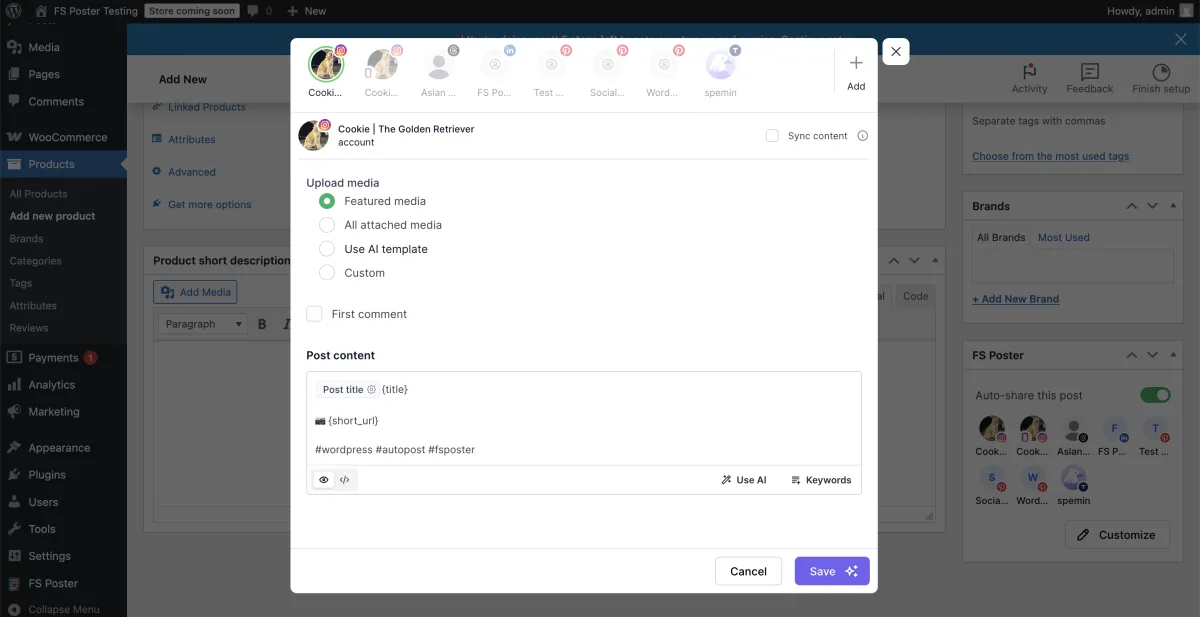
Jetpack Social offers nothing here. Products are not auto-detected as a shareable post type (the default Allowed Post Types is just standard Posts), there is no per-product social configuration UI inside the Woo product editor, no per-channel category routing for products, and no Posts-list bulk action. A buyer running a WooCommerce store who wants Jetpack Social to share new products would need to open each product individually, manually trigger a Preview-and-share, and walk the per-account toggles for every product — every time. The fact that Jetpack and WooCommerce are both Automattic products does not change this: WooCommerce-aware behaviour is simply not in scope for Jetpack Social.
Winner: FS Poster — decisive. For any WooCommerce store, FS Poster is the only one of the two products that does the job. The Plus tier ($109 intro / $195 renewal, 3 sites) covers this workflow on its own.
Ease of Use / UI & UX
| UI / UX detail | FS Poster | Jetpack Social |
|---|---|---|
| Admin app style | Modern WordPress admin dashboard | Modern Gutenberg-native sidebar + classic WP-admin settings page |
| Default landing surface | Calendar Month view | WP Admin → Jetpack → Social landing page |
| Per-channel cog modal | ✅ General / Permissions / Labels tabs | ❌ Per-account toggle in editor sidebar only |
| Native Gutenberg sidebar widget | ⚠️ No — FS Poster ships a post / product edit-screen panel instead | ✅ Yes — every post has a Jetpack Social Gutenberg sidebar panel |
| Bulk action on Posts list | ✅ | ❌ |
| Setup time on a fresh WordPress install | ~5–10 minutes (connect channels via Standard Apps OAuth) | ~2–3 minutes (Jetpack already connected; toggle accounts via WordPress.com) |
| Friction points | No free trial; AI requires own OpenAI key | Free shares one message field across accounts; per-account toggles default OFF on fresh drafts |
The two plugins occupy opposite ends of the UX spectrum. Jetpack Social's strength is everything lives in the Gutenberg editor sidebar. Click the Jetpack icon in the top-right of any post and you get the Jetpack Social panel: per-account toggles, a Preview-and-customize button, a MESSAGE textarea, a View sharing activity link, and a multi-network Link preview button. There is no separate admin app to learn — the share workflow is one click away from the publish button. For solo bloggers who live in the editor, this is genuinely the lightest social-publishing flow on WordPress.
FS Poster's strength is a full social-publishing admin app inside WordPress. The modern admin dashboard opens to the Calendar Month view and exposes five top-level tabs (Calendar / Analytics / Channels / Planners / Settings). Every modal — per-channel cog, share-detail, Planner wizard — is consistently styled, the channel-avatar row inside the share-detail modal makes it fast to walk per-channel results left-to-right, and the OFF / ON status pills in the Channels list use colour the right way. Channel setup is a one-click OAuth flow because FS Poster ships Standard Apps (pre-configured OAuth apps maintained by the FS Poster team) for the supported networks. Configuring your own developer app under Settings → Apps (for Instagram, TikTok, X/Twitter, or YouTube, if you want your own quota or branding) is an optional advanced path — not a requirement to connect those networks.
The single biggest UX gotcha on Jetpack Social is that per-account toggles default to OFF on a fresh draft. Publishing a fresh post without flipping the toggles produces zero shares — and that's a real, repeating friction for any publisher who expects "auto-share" to mean "fires automatically on every publish". The behaviour is consistent (the toggles act as explicit per-post consent), but it means every published post needs a deliberate "yes, share this to my Facebook page, LinkedIn profile, Threads handle" click in the sidebar. FS Poster's persistent per-channel auto-share toggle removes that friction once the channels are configured.
Neither product offers a settled middle ground. FS Poster does not ship a Jetpack-style native Gutenberg sidebar widget — instead it surfaces a post / product edit-screen panel (the FS Poster sidebar on the post or product edit screen) that shows per-channel share status, timestamps, deep-links to live posts, and a Schedule button alongside the main FS Poster admin app. Jetpack Social does not ship an FS-Poster-style Calendar or recurring Planner admin surface. Choose the architecture that fits how your team works.
Winner: Tie — Jetpack Social wins on the lightest workflow for solo bloggers and the Gutenberg-native UX. FS Poster wins on the depth of the admin app, persistent per-channel auto-share, and the WP Posts-list bulk action. For one-person blogs, Jetpack Social's sidebar is easier; for agencies, FS Poster's admin app is more productive.
Logs, Reliability & Troubleshooting
| Reliability detail | FS Poster | Jetpack Social |
|---|---|---|
| Per-share log inside the plugin | ✅ Calendar share-detail modal + per-post sidebar | ✅ Sharing Activity dialog (All / Shared / Scheduled tabs) |
| Retry on failed share | ✅ Retry button in share modal | ⚠️ Manual re-share via Preview-and-share |
| Clear failure message | ✅ Exact reason (e.g. "An image / video is required to share a post on Instagram.") | ⚠️ Per-row status, less granular per-error context |
| Per-share Insights | ✅ Insights button in modal | ❌ Not offered |
| Per-account View ↗ link to live social URL | ✅ "Go to post" in share modal | ✅ View ↗ link in Sharing Activity dialog |
| Per-account Delete action on scheduled shares | ✅ In Calendar | ✅ In Sharing Activity dialog |
| OAuth-reconnection complaints | Minimal — 4.9 / 5 vendor rating | ⚠️ Most-cited 1★ pattern on WordPress.org (Facebook / Instagram reconnects) |
| WP cron vs server cron | ⚠️ Server cron recommended (Settings → General "Configure cron jobs") | ⚠️ Same WP-cron pattern as every comparable plugin |
Both plugins log every share attempt inside the admin, and both expose a per-account View ↗ link to the live social URL after a successful share. Jetpack Social's Sharing Activity dialog is the cleanest in-product evidence surface on the Jetpack side: a single modal with three tabs (All / Shared / Scheduled), columns for Account (with avatar + network icon), Time (relative — "a minute ago" / "a day from now"), Status (Shared green pill / Scheduled blue pill), and Actions (View ↗ for shared rows / Delete for scheduled rows). When I published a new post, the dialog showed three Shared ✓ rows within ~2 minutes, with live links to the Facebook page-post, the LinkedIn share, and the Threads post.
FS Poster's equivalent is the Calendar share-detail modal — open by clicking any share card in the Calendar. The modal shows the post title, channel-avatar row at the top, per-channel status text, post content body, sharing date, and a Retry / Delete / Reschedule / Insights action row. When a network-side share fails (typically because Instagram or Pinterest requires a featured image that wasn't attached), the modal exposes the exact error message ("An image / video is required to share a post on Instagram." / "An image is required to pin on board.") and a Retry button that re-attempts the share without rebuilding the schedule. Attach the missing media on the WP side, click Retry, and the share fires again.
The single largest reliability concern on Jetpack Social is the OAuth-reconnection pattern documented across WordPress.org reviews. The 1★ cohort on the WordPress.org reviews page is concentrated on connections silently disconnecting from Facebook and Instagram — "It will not stay connected to my social media accounts… As soon as I check the settings and reconnect everything, by the time I reload the saved draft of my post, it has disconnected again." The plugin's 3.3 / 5 rating from 74 reviews is partly driven by this complaint pattern. FS Poster's vendor-surface 4.9 / 5 rating from 650+ reviews on fs-poster.com does not show the same OAuth-reconnection cluster, though every social-publishing plugin on WordPress eventually has to deal with Meta's token rotation policy.
Both plugins recommend running a real server cron rather than WordPress's pseudo-cron. WP cron only fires when somebody visits the site, so on low-traffic blogs scheduled shares can drift late. FS Poster surfaces a "Configure cron jobs (Recommended)" toggle in Settings → General to make the recommendation explicit; Jetpack Social does not flag it as prominently but is subject to the same WordPress-platform behaviour.
Winner: FS Poster — the in-place Retry button on failed shares, the per-share Insights button, and a more granular per-error message are real workflow wins. Jetpack Social's Sharing Activity dialog is genuinely good and the View ↗ link to live URLs is the cleanest single proof point, but the OAuth-reconnection complaint pattern on WordPress.org is the single most-cited weakness.
Support, Docs & Reputation
| Support / reputation detail | FS Poster | Jetpack Social |
|---|---|---|
| Public rating | 4.9 / 5 from 650+ reviews on fs-poster.com (vendor surface; FS Poster is not on WordPress.org) | 3.3 / 5 from 74 reviews on WordPress.org |
| Distribution | Strongly positive | Bimodal — ~53% 5★ vs ~36% 1★ |
| Active installs / paid customers | 50K+ active installs / 25K+ paid customers (public fs-poster.com messaging) | 30,000+ active installs (WordPress.org) |
| Support channels | Email / ticket via fs-poster.com, Discord community | WordPress.org support forum (Free), Automattic Happiness Engineers (paid priority support) |
| Locales | 7 | 24 |
| Years in market | 8+ years of FS Code WordPress-plugin history | 4+ years (first published May 31, 2022) |
| Current version | v7.x release stream (frequent patches) | v8.0.1 (2026-02-19) |
| Brand framing | FS Code (parent: Booknetic) | Automattic (the company behind WordPress.com, WooCommerce, Tumblr) |
| Most-cited positive | 26-network breadth, Lifetime tier, modern v7 UI, WooCommerce-native | "Works so easily out of the box," Automattic brand trust, free tier reach |
| Most-cited complaint | No free tier; annual prices renew at full price | OAuth-reconnection (FB / IG), 8-network ceiling, loss of Twitter/ |
This is a category where the headline numbers tell two very different stories. FS Poster's headline figure is 4.9 / 5 from 650+ reviews on fs-poster.com, paired with 25K+ paid customers and 50K+ active installs from FS Poster's public product messaging. FS Poster is not on WordPress.org — the plugin is sold exclusively through fs-poster.com — so the rating and review counts come from FS Poster's own vendor surfaces rather than a WordPress.org plugin listing. FS Code has eight-plus years of cumulative WordPress-plugin history behind the product, which corroborates the rating with real longevity.
Jetpack Social's headline figure is 3.3 / 5 from 74 reviews on WordPress.org, with a strongly bimodal distribution: 39 × 5★, 1 × 4★, 5 × 3★, 2 × 2★, 27 × 1★. The 5★ cohort praises the Free tier and the "works so easily out of the box" experience. The 1★ cohort is concentrated on three patterns: (1) connections silently disconnecting from Facebook and Instagram and forcing repeated OAuth re-auth; (2) the platform-side restriction that prevents personal Facebook profiles and personal Instagram accounts from connecting (a Meta restriction reviewers blame Jetpack for); and (3) historical 1★ reviews posted when the 30-share monthly cap was introduced in October 2022 — those reviews stay live even though the cap was reversed in September 2024. Read the WordPress.org reviews and the 3.3 / 5 number makes more sense than it looks at first glance.
Jetpack Social's compensating strengths on the reputation side are brand trust (Automattic is the company behind WordPress.com, WooCommerce, Tumblr, and Akismet) and locale coverage (24 translations vs FS Poster's 7). Solo bloggers who already use Jetpack Stats, Jetpack Backup, or Jetpack Security have an existing trust relationship and a single billing identity through their WordPress.com account.
Winner: FS Poster — on absolute rating (4.9 vs 3.3), distribution shape, paid-customer count, and the reputation reliability of the install base. Jetpack Social wins on brand trust and locale coverage. For cold-traffic SERP trust, Jetpack Social's WordPress.org listing is the more visible signal; for hands-on buyer reputation, FS Poster's vendor surface is the higher bar.
FS Poster vs Jetpack Social Scorecard
| Category | Winner | Why |
|---|---|---|
| Pricing & Plans | FS Poster | Lifetime tier $490 one-time for 30 sites; Jetpack Social paid is €59.40 / yr first year and €107.40 / yr renewal, with no Lifetime and tier-gated per-account customisation |
| Network Coverage | FS Poster | 26 networks on every plan vs Jetpack Social's 8; X / Pinterest / TikTok / Reddit / Telegram all FS Poster-exclusive |
| Auto-Posting Workflow | FS Poster | Persistent per-channel auto-share, per-channel category filters, WP Posts-list bulk action |
| Scheduling, Calendar & Planner | FS Poster | Modern calendar + recurring evergreen Planner + sleep-time exclusion vs Jetpack Social's per-post one-shot schedule |
| Content Customization | FS Poster | Per-network captions, per-network media, AI captions, AI image generation — all included on every plan |
| WooCommerce & Custom Post Types | FS Poster | Native WooCommerce auto-share + per-channel filters; Jetpack Social offers nothing here |
| Ease of Use / UI & UX | Tie | Jetpack Social wins the Gutenberg-sidebar lightness; FS Poster wins admin-app depth and persistent toggles |
| Logs, Reliability & Troubleshooting | FS Poster | In-place Retry, per-share Insights, granular error messages; Jetpack Social carries an OAuth-reconnection complaint pattern |
| Support, Docs & Reputation | FS Poster | 4.9 / 5 from 650+ reviews vs Jetpack Social's 3.3 / 5 from 74 reviews on WordPress.org |
| Overall | FS Poster | Eight clear category wins, one tie, no Jetpack Social wins on its own. Network breadth, Lifetime economics, WooCommerce automation, and Planner depth decide it |
Who Should Choose FS Poster?
Choose FS Poster if:
- You publish to more than the eight mainstream networks Jetpack Social supports — especially Pinterest, X (Twitter), TikTok, YouTube, Reddit, Telegram, Discord, VK, Truth Social, or a custom webhook destination.
- You run a WooCommerce store and want product auto-share with per-channel category filters out of the box.
- You manage 3+ WordPress sites for clients or your own brands and want predictable per-site licensing.
- You want the only Lifetime tier in the category — $490 one-time covering 30 websites with 12 months of support and lifetime updates.
- You want persistent per-channel auto-share rather than per-post toggles you have to flip in the editor for every publish.
- You want a recurring evergreen reshare Planner that runs forever without rebuilding individual schedules.
- You need AI captions and AI image generation included on every plan (on a bring-your-own-OpenAI-key basis).
- You are happy without a free tier in exchange for a 14-day money-back guarantee and a public live demo.
Who Should Choose Jetpack Social?
Choose Jetpack Social if:
- You publish only to the eight mainstream networks Jetpack Social supports (Facebook Pages, Instagram Business, Threads, LinkedIn, Bluesky, Nextdoor, Tumblr, Mastodon).
- You want a genuinely free entry point with no credit card — unlimited shares to 8 networks since September 2024.
- You are already paying for Jetpack Stats / Backup / Security and want a single billing relationship with Automattic.
- You prefer the Gutenberg-sidebar workflow — every share controlled from inside the post editor, no separate admin app.
- You value the Automattic brand for trust, locale coverage (24 translations), and the support relationship through Happiness Engineers (paid tier).
- You only need per-post one-shot scheduling, not recurring evergreen reshares.
- You can live without per-account custom captions on Free — or you are willing to pay €59.40 / year for the first year (€4.95 / month equivalent) for the Social plan to unlock per-account customisation and the Social Image Generator.
Alternatives to Both
If neither FS Poster nor Jetpack Social is the right fit, three other WordPress social plugins are worth shortlisting. For a Jetpack Social-specific shortlist, see the Jetpack Social alternatives page.
- Blog2Social — Adenion GmbH's freemium plugin with a real free tier (12 networks), per-network captions on every plan, a drag-and-drop calendar, and Best Time Manager presets visible from Free. Best for editorial teams who want breadth without committing to a Lifetime tier. Read the Blog2Social review for the full walkthrough, or read the FS Poster vs Blog2Social comparison for the direct side-by-side.
- Revive Old Posts (Revive Social) — purpose-built for evergreen recycling of archive content. Best when your only job-to-be-done is "keep republishing my archive forever" and you do not need day-one auto-share, AI, or a manual share surface. Read the Revive Old Posts review for the testing notes.
- NextScripts SNAP — 30 listed network destinations (24 free + 6 Premium-only) including unusual ones like VK, OK.ru, weibo, Plurk, LiveJournal, MailChimp, Medium, and XING. Best for technical buyers needing oddball networks on a budget. Read the NextScripts SNAP review for the testing notes.
If you are still shopping the whole category, the best WordPress social media auto-posting plugins roundup pulls every option above into a single comparison frame.
FS Poster vs Jetpack Social FAQ
Is FS Poster better than Jetpack Social?
For most paid buyers, yes — and it is not particularly close. FS Poster wins eight of nine head-to-head categories outright and ties the remaining one, mainly because it covers 18 networks Jetpack Social does not (including X / Pinterest / TikTok / YouTube / Reddit / Telegram / Discord), ships a recurring evergreen Planner that Jetpack Social does not offer at all, automates WooCommerce out of the box, and tops it with the only Lifetime tier in the category. Jetpack Social wins decisively only when the buyer publishes solely to Facebook + LinkedIn + Threads (or a similar mainstream subset) and values the Free tier above everything else.
Which is cheaper: FS Poster or Jetpack Social?
It depends on your time horizon and network needs. Jetpack Social is cheaper if you stay on Free (€0 indefinitely with unlimited shares to 8 networks since September 2024). FS Poster is cheaper for any paid buyer modelling more than two years of use because the Lifetime tier ($490 one-time for 30 websites) beats Jetpack Social's Social paid plan (€59.40 / year first year, then €107.40 / year renewal) within five years on a single site, and the Plus tier ($109 intro / $195 renewal across 3 sites) is competitive against Jetpack Social's paid plan on a single site once X / Pinterest / TikTok / WooCommerce automation are on your requirements list.
Which tool supports more social networks?
FS Poster, by a wide margin. FS Poster ships 26 networks on every plan including X (Twitter), Pinterest, TikTok, YouTube Community, YouTube Shorts, Reddit, Telegram, Discord, VK, OK.ru, Xing, Truth Social, Plurk, Flickr, Google Business Profile, Blogger, Medium, a WordPress-to-WordPress connector, and a webhook destination. Jetpack Social ships 8 networks (Facebook Pages, Instagram Business, Threads, LinkedIn, Bluesky, Nextdoor, Tumblr, Mastodon). Twitter/X was permanently removed from Jetpack Social after Automattic deprecated the connector post-2023.
Why did Jetpack Social remove Twitter/X?
Automattic deprecated the Jetpack Social Twitter/X connector after X's 2023 API changes, and the network is permanently absent from Jetpack Social's Connect-an-account modal as of v8.0.1. Old tutorials and third-party review articles that show an X toggle in the Jetpack Social sidebar are out of date. If you need WordPress-to-X auto-share, FS Poster ships X (Twitter) on every plan.
Which tool is better for WooCommerce?
FS Poster, decisively. WooCommerce products auto-share to every connected channel once Woo is active — no extra licence, no paid add-on. The FS Poster sidebar inside the product edit screen shows per-channel status with timestamps and deep links to the live social posts, and per-channel category filters apply to products too, so per-collection or per-tag routing is one cog-modal away. Jetpack Social offers no WooCommerce-aware automation — products are not auto-detected as a shareable post type, there is no per-product social config in the Woo product editor, and there is no Posts-list bulk action. The fact that Jetpack and WooCommerce are both Automattic products does not change this.
Which tool is better for agencies or multiple sites?
FS Poster. The Plus tier ($109 intro / $195 renewal, 3 sites), Developer tier ($229 intro / $449 renewal, 15 sites), and Lifetime tier ($490 one-time, 30 sites) all use flat per-site licensing. Jetpack Social's paid plan is per-WordPress-install with no agency licensing on the standard tier — a 5-site agency runs 5 separate Jetpack Social subscriptions at €107.40 / year each on renewal (~€537 / yr total) and still gets only 8 networks per site. FS Poster's Developer tier costs less, covers 15 sites, and ships 26 networks per site.
Which tool is easier for beginners?
It depends on what "beginner" means. Jetpack Social is easier to try because the Free tier removes the checkout hurdle entirely — connect 8 networks, publish a post, watch it share. The Gutenberg-sidebar UX is the lightest social-publishing flow on WordPress. FS Poster is easier to use day-to-day once you commit: persistent per-channel auto-share toggles remove the per-post consent friction, the Calendar share-detail modal is the cleanest log surface in the category, and the WP Posts-list bulk action removes a real workflow bottleneck. The 14-day money-back guarantee on FS Poster (including the Lifetime tier) is the equivalent risk-free evaluation path if you cannot evaluate it on Free first.
Final Verdict
FS Poster wins this comparison decisively for any paid buyer with more than the eight mainstream networks on their distribution list — and that is most paid buyers in this category. The 26-network roster (including X / Pinterest / TikTok / YouTube / Reddit / Telegram / Discord that Jetpack Social does not support), the persistent per-channel auto-share, the recurring evergreen Planner, the WP Posts-list bulk action, the WooCommerce-native automation, the AI captions and AI image generation, and the $490 one-time Lifetime tier covering 30 websites add up to a meaningfully more capable product than Jetpack Social at any price tier. Read the FS Poster review for the full walkthrough — or shortlist the Plus or Lifetime tier based on your site count.
The honest exception is the solo blogger publishing only to Facebook, LinkedIn, and Threads (or a similar mainstream subset). If your distribution list lives entirely on the eight networks Jetpack Social supports, you do not need WooCommerce automation, you are already inside the Jetpack ecosystem, and you value the Gutenberg-sidebar workflow over a separate admin app — Jetpack Social Free is genuinely enough and Social paid is reasonably priced at €59.40 / year for the first year (€4.95 / month equivalent). Read the Jetpack Social review for the full walkthrough — or browse the Jetpack Social alternatives shortlist if the 8-network ceiling, the OAuth-reconnection pattern, or the missing recurring Planner already rule it out. Keep the 3.3 / 5 rating from 74 reviews on WordPress.org in mind alongside the Automattic brand strength — the bimodal distribution is real and worth eyes-open going in.
Write once. Post to 26 networks.
- 26 social networks
- Schedule & auto-repost
- Runs inside wp-admin


