


Can Blog2Social really replace my SaaS scheduler and push WordPress posts to 25 networks from a single calendar, or will I still be writing per-network captions by hand after every publish? And is the Smart plan at the checkout-verified €72.00/year enough for a serious editorial workflow, or do I really need Pro at €118.80/year — and then a separate paid add-on for Twitter/X on top?
That confusion is normal — the Blog2Social pricing matrix is genuinely four-dimensional (networks × accounts × users × websites + add-ons). This Blog2Social WordPress plugin review answers both questions from a real hands-on review. I installed Blog2Social on a fresh WordPress site, connected three real social accounts (a Facebook page, a LinkedIn profile, and a Threads handle), published a real post with a featured image, walked the per-post share editor across all three networks, ran multiple share batches, checked the in-product share log, captured live network URLs as independent proof, and mapped every Settings tab, the Networks page, the calendar, the evergreen Re-Share planner, and the Premium license screen.
What Is Blog2Social? (Auto Poster Review Context)
Blog2Social is Adenion GmbH's flagship social-publishing plugin for WordPress — a German-built, freemium tool that lives in its own admin area rather than the Gutenberg sidebar.
- What it does: auto-posts, schedules, manually shares, and recurrently re-shares WordPress content (or freshly-curated third-party links, text, images, and videos) to a deep network set — up to 25 destinations on the Business plan plus X and Video as separate add-ons.
- Who it's for: editorial teams, content marketers, agencies, and publishers who need a real calendar workflow, per-network captions, best-time scheduling, and broad reach beyond the four mainstream networks.
- The problem it solves: it replaces the manual "open Facebook, copy-paste, open LinkedIn, copy-paste, open Threads, copy-paste, schedule with a sticky note" loop, and it does it without forcing you onto a separate SaaS subscription.
It is freemium. The plugin is free on WordPress.org and the paid Smart, Pro, and Business tiers (each billed yearly) unlock more networks, more accounts per network, more users, more websites, and the heavier automation. Current release is v8.9.1, with 50,000+ active installs and a 4.5 / 5 rating from 2,088 reviews on WordPress.org — the highest-volume trust signal in this category. First published in November 2014, with monthly point releases through 2026.
Blog2Social Social Media Plugin Review: Quick Verdict
After a full hands-on review, Blog2Social is the right pick for editorial teams and content marketers who want a real in-WordPress calendar, broad network coverage, and per-network captions on every tier — provided they can stomach a four-dimensional pricing matrix where X (Twitter) and direct video upload are always extra.
| Criteria | Verdict |
|---|---|
| Best for | Editorial teams, content marketers, and agencies who need a calendar, best-time scheduling, and 10+ networks beyond Facebook/ |
| Starting price | Free (manual share to 12 networks, 1 account per network). Paid: Smart €72.00/ |
| Free plan / trial | Free tier — 12 networks, 1 account per network, 1 user, 1 site. 30-day free Premium-Pro trial (auto-downgrades to Free, no manual cancel) |
| Update frequency | Active monthly point releases — the recent v8.9.x line added AI Post Templates and extended First Comment to 9 more networks |
| Most valuable features | Manual Share Now to 12 free networks, per-network captions on Free, drag-and-drop social calendar, Best Time Manager presets, evergreen Re-Share planner, content curation flow, AI Post Templates |
| UI/ |
7/ |
| Feature richness score | 9/ |
| Product performance | 8/ |
| Product rating | 4.5 / 5 from 2,088 reviews on WordPress.org (1,710 × 5★, 124 × 4★, 41 × 3★, 50 × 2★, 163 × 1★ — strongly positive with a small pricing-complaint tail), 50,000+ active installs |
Blog2Social Features & Functionality
Blog2Social's feature surface is among the broadest in the WordPress social-publishing category — Adenion has spent eleven years widening it — and the five flows below are the ones that actually move a buying decision. The findings here come from a hands-on review of the current Blog2Social release.
1. Manual Share Now to 12 networks on Free
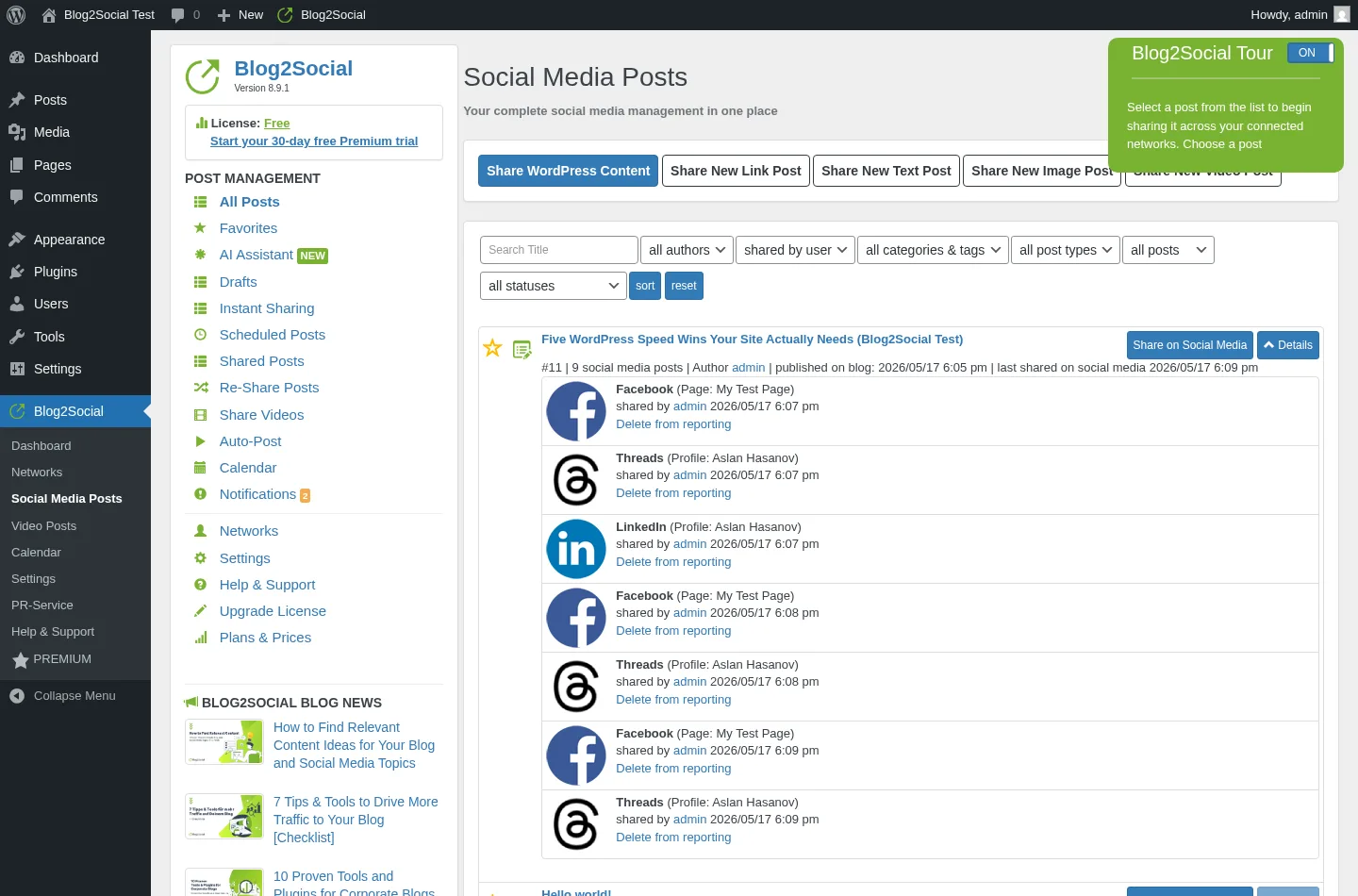
Blog2Social's Free tier is real — not a teaser. After publishing a test post in WordPress, I opened Blog2Social → All Posts, clicked Share on Social Media, and pushed the post to my three connected accounts (Facebook page, LinkedIn profile, Threads) with one click of the green Share button. The in-product share log captured every fire as a separate row with a one-click remove-from-reporting action. Worth flagging up front: Share Now does not de-duplicate, so three Share-Now clicks in a row produced nine share records (3 networks × 3 batches). The Free tier supports 12 networks total with 1 account per network, which is the most generous funnel-top in this segment.
2. Per-network captions, character counters, and post-format selectors
The share editor opens with a separate caption field, character counter, and post-format selector for every connected account — Facebook gives you 891 characters, Threads 500, and LinkedIn 3000 on the same post. Each network row also exposes Insert full-text, Delete text, Improve post with AI, Share as Story, cut and rotate image, Change image, and an inline calendar widget. The "Improve post with AI", First comment, cut and rotate, and Change image buttons are paid-tier gated (their badges read PRO or SMART), but the caption fields, counters, and Insert/Delete shortcuts work on Free. This per-network customisation is a real differentiator versus Jetpack Social, where Free locks you to a single shared message field.
3. In-WordPress social media calendar with drag-and-drop
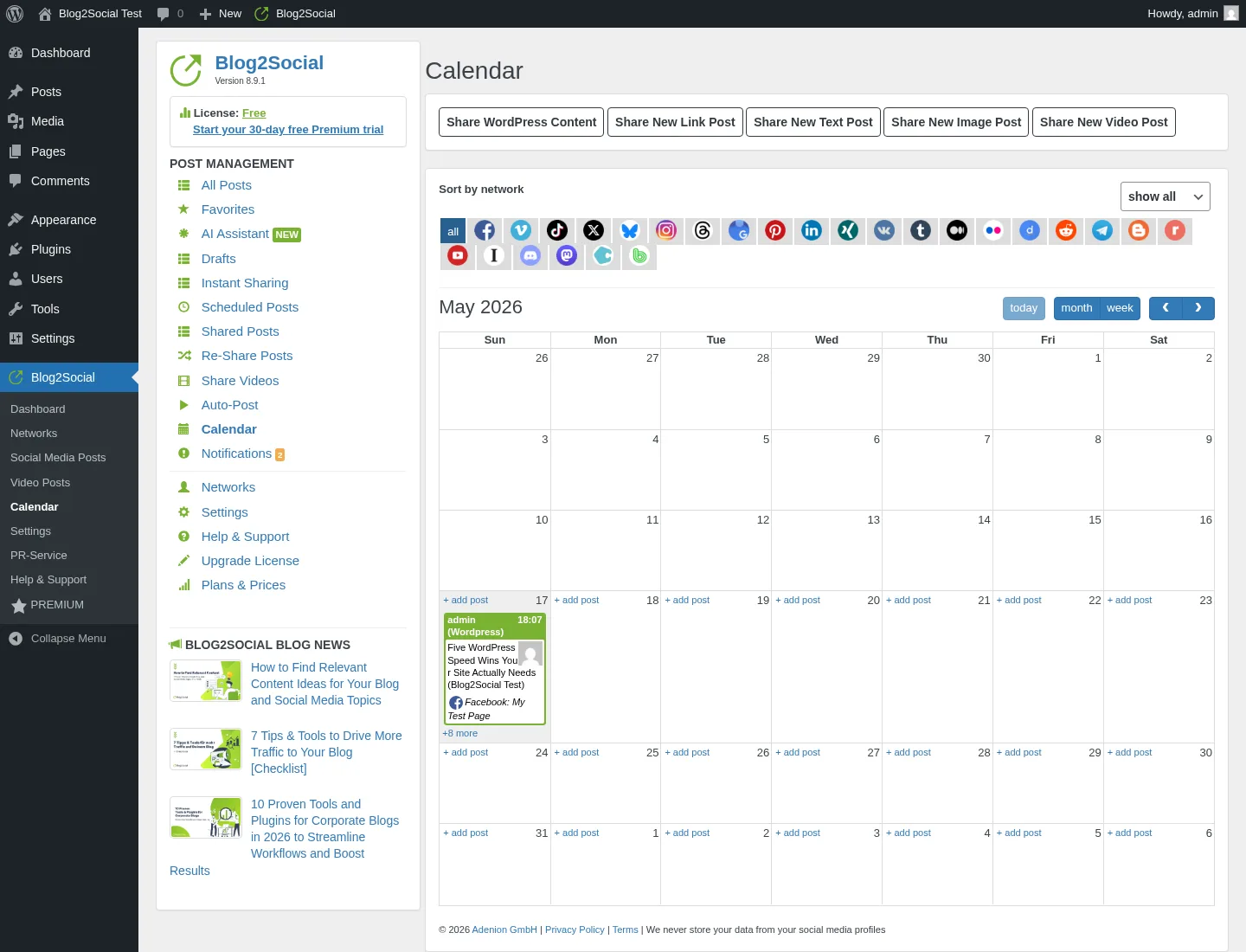
Blog2Social's calendar surface is the cleanest in any WordPress social plugin I have tested. The month grid rendered my test post's share batch as a stacked entry on the publish day, showing the time, the WordPress post title, and a roll-up of every network it fired to — with five top-bar actions (Share WordPress Content, Share New Link Post, Share New Text Post, Share New Image Post, Share New Video Post). The calendar renders on Free; drag-and-drop reschedule is SMART-tier (€72.00/year at the checkout). For editorial teams used to a SaaS calendar like Buffer or SocialPilot, this is the surface that makes Blog2Social feel like a real workflow tool, not a publish-and-forget toggle.
4. Best Time Manager presets per network
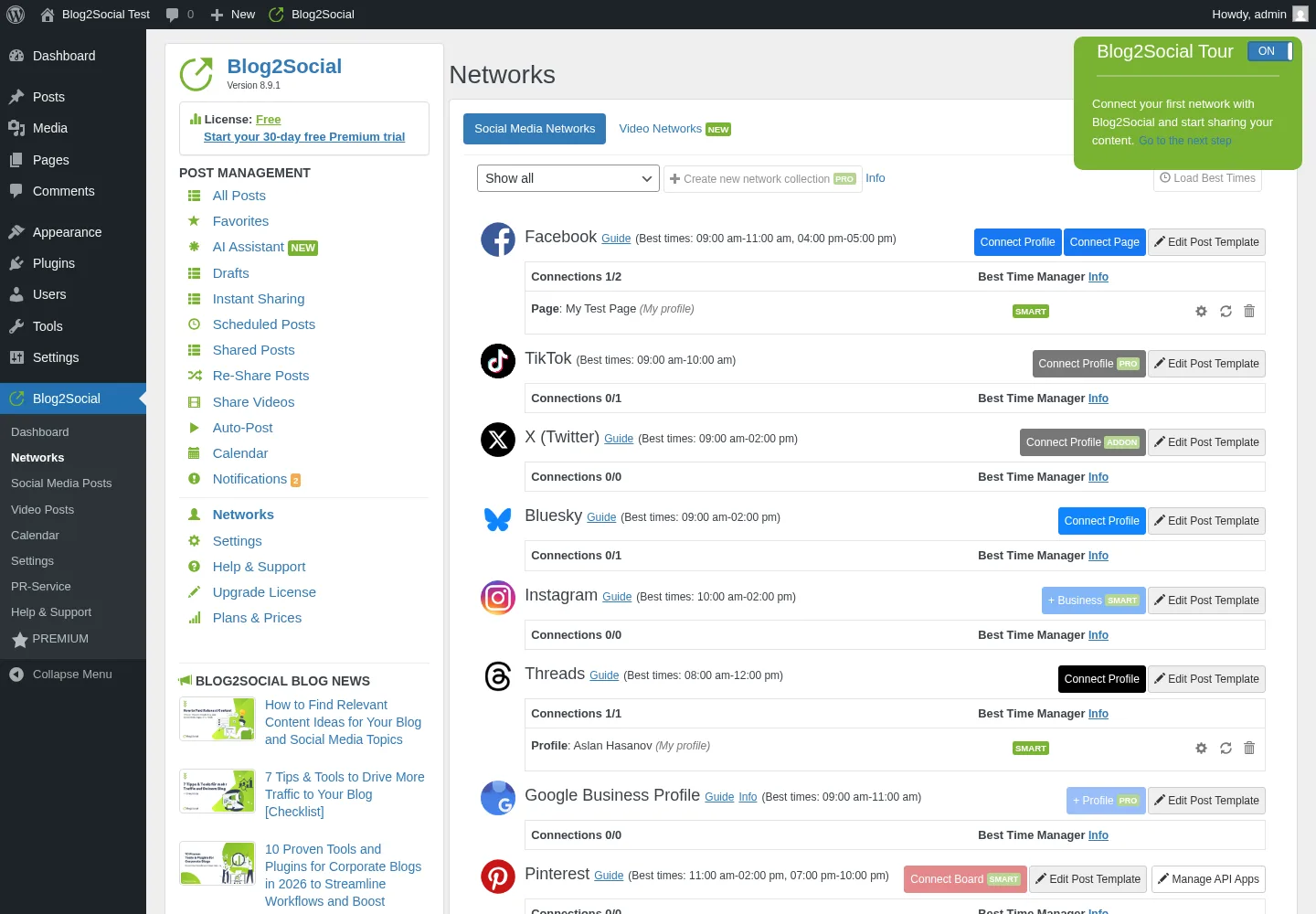
Every row of the Networks page preloads recommended posting windows out of the box — Facebook 09:00–11:00 & 16:00–17:00, LinkedIn 09:00–12:00, Threads 08:00–12:00, Pinterest 11:00–14:00 & 19:00–22:00, Reddit 19:00–21:00, Telegram 13:00–16:00 & 18:00–22:00, X 09:00–14:00 — visible even on Free. The actual one-click "Load Best Times" action on the share editor sits behind the SMART badge, but the per-network tables themselves are public on the Networks page. Editorial teams that have been hand-pasting their schedule into a spreadsheet will recognise this as 60–80% of the value of a paid scheduling tool.
5. Evergreen Re-Share planner with deep rule control
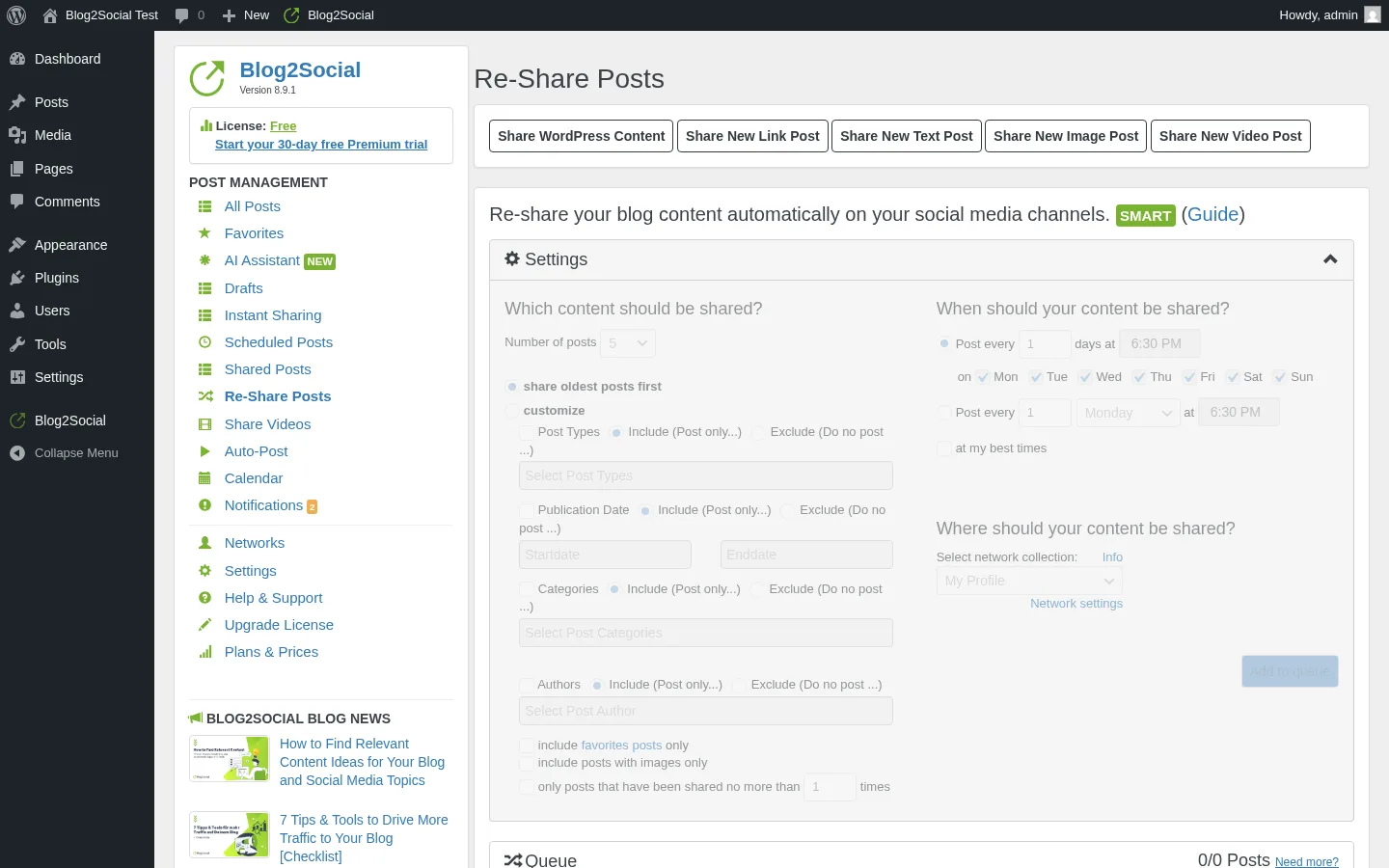
The Re-Share Posts admin renders a rule builder that is genuinely more detailed than the equivalent in Revive Social or FS Poster's Planner: number of posts (5–100), oldest-first toggle, include/exclude on post type, publication date, categories, and authors, favourites-only toggle, image-only toggle, share-cap toggle (no more than X shares per post), frequency in days, time-of-day, and day-of-week checkboxes. Activation is SMART-tier — the rule builder UI is visible on Free but the planner doesn't fire until you upgrade. Combined with the recent AI Post Templates surface (per-network prompt, tone, and writing style), this is the most editorial-friendly archive-recycling workflow in the WordPress-plugin segment.
Blog2Social Ease of Use / UI & UX
Blog2Social's UI is modern and noticeably busier than Jetpack Social's Gutenberg-native sidebar — Adenion has packed eleven years of feature accumulation into a single dedicated admin area, and that breadth comes with friction.
1. UI / UX
The plugin opens to a left "POST MANAGEMENT" sidebar with 16 entries (All Posts, Favorites, AI Assistant NEW, Drafts, Instant Sharing, Scheduled Posts, Shared Posts, Re-Share Posts, Share Videos, Auto-Post, Calendar, Notifications, Networks, Settings, Help & Support, Upgrade License, Plans & Prices). The Networks page, the share editor, and the calendar each render as their own full-page surfaces. Visually it is consistent and clean once you have spent ten minutes orienting; the trade-off is a much higher cognitive load than a single Gutenberg sidebar.
2. Setup and account connection
Connecting accounts is a one-click sign-in flow per network, but the platform-side requirements bite the same way they do in every social plugin — Facebook Pages auto-publish only (no personal profiles), Instagram Business only (no personal IG), and the LinkedIn Page connect sits behind the PRO badge. Plan for 10–20 minutes per network if your accounts are already in good shape. A small detail worth flagging: Pinterest carries a SMART badge in the in-product Networks page even though some stale WordPress.org copy still bullets it under "Free networks." Treat Pinterest as Smart-tier (€72.00/year at the checkout) minimum.
3. Per-post share editor workflow
Once you publish a WordPress post, the workflow is Blog2Social → All Posts → Share on Social Media → the per-post share editor. Inside the editor you see a "3 SOCIAL ACCOUNTS" panel, a Profiles / Pages / Groups filter strip, a row per connected account (with the per-network caption field, post-format selector, character counter, AI button, First Comment button, image controls, and inline calendar widget), the three scheduling radios (Share Now / Schedule for specific dates [SMART] / Schedule Recurrent Post [SMART]), and a final Share + Save-as-Draft footer. It is dense but well-organised. The buttons that sit behind the SMART/PRO/BUSINESS/ADDON badges are visible-but-gated — clicking them on Free triggers an upsell modal rather than failing silently.
4. Friction points
Two real friction points stood out in hands-on use. First, Blog2Social does not auto-share at publish on Free — you have to open the plugin admin and manually click Share on Social Media for every post. Buyers expecting "publish and forget" need at least the Smart tier. Second, there is no Gutenberg sidebar widget and no bulk action on the standard WordPress Posts list — every action lives inside Blog2Social's own admin area. If your editors live in Gutenberg, this means a constant context switch.
5. Learning curve
For a first-time user, the learning curve sits firmly in the "intermediate" bracket. The Help & Support tab carries an in-product Step-by-Step Guide, a NEW Troubleshooting Tool, a NEW Sharing Debugger, and a Request Support button — plus Adenion's blog has a long-form setup walkthrough. Expect to spend an hour exploring before everything clicks, and another hour or two to design your per-network templates if you want to take advantage of the calendar.
Blog2Social Performance
Blog2Social's performance behaviour in real WordPress use is steady. The plugin is not doing anything heavy on the WordPress side — it reads from the standard posts table and pushes through each social network's API — so the limiting factor is almost always the network's own response time, not Blog2Social itself.
1. Share-fire latency
When I clicked the green Share button with all three networks set to Share Now, the in-product share log filled in within roughly one to two minutes per batch. Repeated Share-Now clicks in close succession produced separate log rows for each click — that pattern is only relevant if a user clicks Share Now repeatedly in a short period. The plugin does not block the admin while the share fires; it returns the share log row asynchronously as each network confirms.
2. Admin app responsiveness
The Blog2Social admin area renders quickly on a standard hosting setup. The Networks page (24 rows with logos, plan badges, best-time tables, and per-row action buttons) loaded comfortably under a second; the share editor is the heaviest single page in the product and still renders cleanly. Modal interactions (calendar pop, post-template editor, upgrade upsell) are instantaneous. The product's weight is mainly visual, not computational.
3. Featured-image propagation
Blog2Social attaches the WordPress featured image to the social share automatically — confirmed on the live Threads captures, where each share unfurled with a clean link preview that picked up the featured image and the WordPress Open Graph image tag. The plugin's Social Meta Data tab also lets you override Open Graph and X Card tags per post on Free, which is the cleanest way to guarantee the right card across every network.
4. Schedule and re-share reliability
The Schedule UI writes a future timestamp into the per-network row and surfaces the entry in the Scheduled Posts list and the calendar grid. The same plumbing drives the evergreen Re-Share planner, which runs on the standard WordPress scheduler. I did not run a multi-day wait test for this review — both schedule paths are SMART-tier — but the underlying WordPress scheduling pattern is the same as every comparable plugin, and the Scheduled Posts list provides a clean visual surface for catching any drift.
Blog2Social Support, Documentation & Learning Resources
Support quality is the part of Blog2Social where the 4.5/5 rating earns its keep — the German-side Adenion team gets called out by first name in dozens of 5★ reviews on WordPress.org.
Support is delivered through three channels: an in-product Help & Support tab (with Help & Community forum links, a NEW Troubleshooting Tool, a NEW Sharing Debugger, the Step-by-Step Guide, and a Request Support button), a ticket portal at blog2social.com/en/support, and the WordPress.org support forum. Asking new questions through the in-product Help & Community route requires a free Blog2Social support-community account. Adenion does not publish a hard average-response-time number, but the WordPress.org listing shows 2 of 2 support-forum issues resolved in the trailing two months — small absolute volume, 100% resolution.
Anchored to the 4.5/5 rating (well above the 4.4+ "good support" threshold), the support reputation reads as good. Recent 5★ reviewers repeatedly call out "the support is always quick and professional" and name individual staff members. The one caveat sits in 2026's 3★ reviews: a newly-rolled-out AI chatbot layer for tier-one support is poorly received by long-time users who preferred the original human-first email flow. Frame it as "post-2026 Adenion has added an AI assistant for tier-one support; some long-time users prefer the original human-first flow" rather than a deal-breaker.
Documentation is genuinely deep. The official help portal and FAQ archive cover every Settings tab, the Premium trial flow, the X add-on, the Video add-on, the WebApp distinction, and the per-network sign-in quirks. The WordPress.org listing carries an 11-locale translation set (English, German, French, Spanish — Spain and Chile — Italian, Portuguese-Brazil, Dutch, Russian, Swedish, Korean, Ukrainian), a video introduction, and a full changelog back to v7.0.0. Tutorial videos on Adenion's own YouTube channel and in-product walkthroughs are abundant and current.
Blog2Social User Reviews & Reputation
For this review I read the full WordPress.org star breakdown, a qualitative read of the latest 50 user reviews, and the third-party listicle coverage on WPBeginner, Kinsta, CodeinWP, and WPLift.
Overall impression. The headline is simple: 4.5 / 5 from 2,088 reviews on WordPress.org is the highest-volume trust signal in the WordPress social-plugin category — higher than Jetpack Social (3.3 / 5 from 74 reviews) and higher in review volume than FS Poster's vendor-side count. The distribution is overwhelmingly positive: 1,710 × 5★ (about 82%), 124 × 4★, 41 × 3★, 50 × 2★, and 163 × 1★ (about 8%). 50,000+ active installs, monthly point releases for eleven years, and translations into eleven languages back up the rating.
Most praised strengths. Recent 5★ reviewers repeat four themes: time savings on cross-posting ("Very powerful and productive tool for posting on social media"), customisability and per-network templates ("The plugin is fully customizable. The possibilities is endless"), the calendar and planning workflow, and the Adenion support team itself — German-side support staff get individually named in many 5★ reviews. The "Made in Germany" framing on the homepage matters for EU buyers who care about data residency.
Most criticised weaknesses. The 1★ cluster — 163 reviews, about 8% of the total — is concentrated on three patterns. First, multi-axis pricing complaints: stacking Pro + X add-on + Video add-on adds up fast, and several 1★ reviews describe this as nickel-and-diming. Second, yearly-only billing with no Lifetime tier draws complaints from small bloggers who would prefer monthly. Third, post-update fragility — a handful of 3★ reviews flag inconsistent connector behaviour after social networks change their developer rules (LinkedIn page connect, Pinterest, Facebook page connections) — and the 2026 AI chatbot support layer is starting to show up as a recurring 3★ complaint among long-time users. Pair the brand with both halves of the truth.
Blog2Social Pricing & Value
Blog2Social is freemium and the Smart/Pro/Business plans are billed annually only — there is no monthly plan and no Lifetime tier. The X (Twitter) add-on is the only line that is genuinely sold as a monthly subscription per Adenion's vendor page. The prices below were checked through the official Blog2Social checkout flow on 2026-05-19 at the default user/site count, with no add-ons selected. Adenion may display paid tiers as monthly equivalents on public pricing pages, but the checkout commitment is annual for Smart/Pro/Business and can vary by locale, currency, VAT, or discount state.
- Free — €0. Manual share to 12 networks (Facebook profile + page, LinkedIn profile, Threads, Bluesky, Xing profile, VK profile, Reddit, Torial, Medium, Tumblr, Flickr, Diigo), 1 account per network, 1 user, 1 site, basic AI assistant, calendar visualisation, Open Graph and X Card meta editing, content curation flow, save-as-draft, free Chrome/Firefox extension, and a 30-day Premium-Pro trial.
- Smart — €72.00/year at checkout (≈ €6.00/month equivalent), 2-user base plan. 16 networks, 3 accounts per network, 2 users, 2 sites. Adds Auto-Post at publish, Best Time Manager activation, drag-and-drop calendar reschedule, per-network post templates, Instagram Business, Discord, Blogger, Ravelry, and Band.
- Pro (Bestseller) — €118.80/year at checkout (≈ €9.90/month equivalent). 24 networks, 5 accounts per network, 5 users, 5 sites. Adds Google Business Profile, TikTok, Mastodon, Instapaper, image collections, recurring re-share planner, Facebook and LinkedIn page auto-share, VK pages and communities, Xing Employer Branding, and Medium publication.
- Business — €299.88/year at checkout (≈ €24.99/month equivalent). 25 networks, 15 accounts per network, 10 users, 10 sites. Adds Telegram (channels and groups), Team Management, priority email and phone support, and advanced AI control (per-network prompts, tone, writing style).
- X (Twitter) add-on — always extra, genuine monthly subscription per the Adenion vendor page: $14.99/month for 70 posts/month, $24.99/month for 100 posts/month, or $59.99/month for 250 posts/month. Quoted monthly directly, not annualized.
- Video Posting add-on — always extra, annual at the Blog2Social checkout: $69/year per the vendor public-page label. 12 video networks (YouTube, TikTok, Vimeo, Instagram, Pinterest, Facebook, X, LinkedIn, and others), 250 MB per video, 25 GB per year, with a free 30-day trial.
The Free tier is genuinely usable for a casual blogger, but auto-share on publish is a Smart-tier feature — the single biggest workflow trap to know about before downloading. Free users have to open the plugin and click Share on Social Media for every post.
The biggest plan-to-plan jumps sit at three thresholds. Smart unlocks automation (Auto-Post, Best Time Manager activation, drag-and-drop calendar). Pro unlocks the recurring re-share planner, Google Business Profile, TikTok, Mastodon, and the bulk of the "interesting" networks. Business unlocks Telegram and Team Management — Telegram is the only Business-only network. Multi-axis pricing means a buyer who needs a 6th website on Pro has to jump straight to Business (10 sites). Adding a single user works the same way.
A real Lifetime equivalent does not exist — Adenion's FAQ explicitly states the plugin is sold as a yearly licence with no Lifetime tier. The 30-day free Premium-Pro trial at blog2social.com/en/plugin/wordpress/premium-trial/ is the right risk-free way to evaluate the paid features; it auto-downgrades to Free after 30 days, no manual cancel required. No explicit money-back guarantee is advertised on the pricing page; standard German/EU consumer cancellation rights apply.
One commercial wrinkle to watch: the standalone WebApp at blog2social.com/en/webapp/ is a separate cloud product with separate pricing (Solo $9.99/mo special, Team $39/mo) — do not confuse it with the WordPress-plugin tiers above.
Blog2Social Pros and Cons
After a full hands-on review, the strengths and trade-offs cluster cleanly.
Pros
- Very broad WordPress-native network coverage on a single licence: 25 networks on the Business tier — Facebook, LinkedIn, Instagram Business, Threads, Bluesky, TikTok, Pinterest, Reddit, Medium, Mastodon, Discord, Telegram, Google Business Profile, Xing, VK, Tumblr, Blogger, Flickr, Diigo, Ravelry, Instapaper, HumHub, Band, and more. Among the widest network sets in the WordPress-plugin segment, alongside FS Poster's 26-network coverage.
- Free tier is genuinely usable: manual share to 12 networks with 1 account per network, per-network captions and character counters, calendar visualisation, content curation flow, Open Graph editing, and a free browser extension. Most casual bloggers can run on Free indefinitely.
- In-WordPress social media calendar and Best Time Manager presets: the calendar renders on Free, with the share batch stacked on each day cell. Best-time tables for every network are visible on the Networks page even before you upgrade. This is the cleanest editorial-team workflow in the WordPress-plugin category.
- Highest-volume rating in the category: 4.5 / 5 from 2,088 reviews on WordPress.org. 50,000+ active installs, 11 locale translations, eleven years of monthly point releases, and a named support team that gets called out by first name in dozens of 5★ reviews.
Cons
- Auto-share on publish is paid-tier only: Free users have to open Blog2Social manually and click Share on Social Media for every post. Buyers expecting "publish and forget" need Smart (€72.00/year at checkout) as a minimum. The Auto-Post tab is visible on Free but rule-builder activation is SMART-tier.
- X (Twitter) and Video Posting are always separate paid add-ons: a Pro buyer pays €118.80/year at checkout and then another $14.99–$59.99/month for the X add-on (genuine monthly subscription per the Adenion vendor page). Direct video file upload is a separate annual add-on ($69/year). Pasting a YouTube or Vimeo link is Free, but file upload is not. Many 1★ reviews are about this layering.
- No Lifetime tier and a four-dimensional pricing matrix: every paid plan is annual, no Lifetime is offered, and pricing scales on networks × accounts per network × users × websites + add-ons. A buyer who needs one more website on Pro has to jump straight to Business.
- No Gutenberg sidebar and no Posts-list bulk action: every Blog2Social action lives inside the plugin's own admin area. Editors used to a Gutenberg sidebar (Jetpack Social) or a bulk action on the WordPress Posts list (FS Poster) have to context-switch.
Who Should Use Blog2Social?
Blog2Social is the right buy for buyers whose job-to-be-done lines up with one of these patterns — and the wrong tool for several others.
Who Should Use It
- Editorial teams and content marketers who need a real calendar workflow: the in-WordPress drag-and-drop calendar, the Best Time Manager presets, the recurring Re-Share planner, and the per-network templates make Blog2Social the most editorial-friendly social plugin in the WordPress-native segment.
- Publishers who need broad network coverage beyond the mainstream four: if Pinterest, TikTok, Reddit, Mastodon, Discord, Telegram, Bluesky, VK, or Xing are part of your distribution mix, Blog2Social covers them on a single licence rather than a per-network SaaS stack.
- Cost-sensitive buyers who want to start on Free: 12 networks, 1 account per network, the calendar, the curation flow, the per-network captions, and the browser extension are all genuinely usable on Free. Graduate to a paid plan only when you need scheduling automation.
- Buyers who care about EU data residency and the "Made in Germany" framing: Adenion GmbH is based in Bonn and the homepage leads with the German-built trust signal. For buyers running EU-side compliance, this is a real plus.
Who Should Skip It
- Buyers who want a Lifetime licence: Blog2Social does not offer one — every paid plan is annual. If you would rather pay once and run on the same plugin for years, shortlist a Lifetime-tier alternative instead.
- Buyers who expect Twitter/X to be included in the base plan: X is always a separate monthly subscription per the Adenion vendor page — $14.99–$59.99/month depending on the post-volume tier — on top of the annual Smart, Pro, or Business sticker price. If X is your primary network, Blog2Social will not be the cheapest path.
- WooCommerce stores that need product-aware auto-share: Blog2Social is "WooCommerce compatible" — it can fire on Woo product publish hooks — but it is not WooCommerce-aware in the sense of per-product social configuration or per-channel category routing inside the product editor.
- Agencies running many small client sites who want flat per-site licensing: Blog2Social scales on networks × accounts × users × websites. A flat per-site licence is more predictable for that buyer.
Best Blog2Social Alternatives
Several WordPress social-publishing plugins compete with Blog2Social directly. Pick the alternative whose job-to-be-done lines up with yours before you compare sticker prices. For a dedicated shortlist, see our Blog2Social alternatives guide.
- FS Poster: the strongest WordPress-native alternative for buyers who want X and Video included in the base plan, run a WooCommerce store, or want an optional Lifetime path on top of an annual entry. FS Poster starts at $58/year on the Single plan (renews at $65/year) and covers 26 networks on a single licence (including the newly added YouTube Shorts destination, with X and Video included), ships a real Calendar plus a recurring Planner, has a one-click bulk action on the WordPress Posts list, is WooCommerce-native (per-product social config, per-channel category routing), and offers an optional Lifetime tier covering 30 websites for long-term/multi-site buyers. Pick FS Poster over Blog2Social when you want simpler pricing, no add-on tax, or per-site rather than per-seat licensing. See the FS Poster review for the full review, or read FS Poster vs Blog2Social if a direct head-to-head is what you need.
- Jetpack Social: the right pick for solo bloggers who already trust the Automattic brand, only need 2–4 mainstream networks, and value a Gutenberg-native sidebar flow. Jetpack Social covers 8 networks (Facebook Pages, Instagram Business, Threads, LinkedIn, Bluesky, Nextdoor, Tumblr, Mastodon) with a usable Free tier and a checkout-verified €59.40/year first-year paid plan (€4.95/month equivalent), renewing at €107.40/year (€8.95/month equivalent). Pick Jetpack Social over Blog2Social when simplicity is the feature. See the Jetpack Social review for the full review.
- NextScripts SNAP: a long-running technical plugin with around 30 listed network destinations, including unusual ones like VK, OK.ru, weibo, Plurk, LiveJournal, MailChimp, Medium, and XING that no other competitor covers. SNAP wins for technical buyers who need oddball networks and are happy with a legacy WordPress admin UI. The trade-off is a 3.3 / 5 rating from 617 reviews on WordPress.org — check the split-rating caveat before you commit (very strong positive reviews offset by a visible cluster of complaints). See the NextScripts SNAP review for the full review.
- Bit Social: a budget-friendly AI-first alternative with a Lifetime tier — Starter LTD $89 one-time for 1 site and Agency LTD $149 one-time for unlimited sites. Bit Social covers 13 networks (Facebook, LinkedIn, Threads, Google Business Profile, Pinterest, Discord, Tumblr, Instagram, TikTok, X, Bluesky, Line, Telegram), ships ChatGPT and DALL·E AI prompts on a bring-your-own-OpenAI-key basis, and runs from a clean, modern dashboard inside the WordPress admin. Pick Bit Social over Blog2Social when you want a Lifetime price point and AI captions, and can live with a narrower network set. 4.5 / 5 from 34 reviews on WordPress.org with 6,000+ active installs as of 2026-05-18. See the Bit Social review for the full review.
If you are shopping the whole category before you decide, the WordPress auto poster plugins roundup pulls every option above into a single comparison frame.
Final Verdict: Is Blog2Social Worth It?
For editorial teams, content marketers, and agencies who want a real calendar workflow, broad network coverage beyond the mainstream four, and per-network captions on every plan including Free, Blog2Social is the right install in 2026. The 4.5 / 5 rating from 2,088 reviews on WordPress.org is the highest-volume trust signal in the category, the Free tier is genuinely usable for a casual blogger, and the 30-day free Premium-Pro trial is the right risk-free way to evaluate Smart, Pro, and Business before you commit to an annual subscription.
For buyers who want a Lifetime licence, want X (Twitter) included in the base plan, run a WooCommerce store, or simply need predictable flat per-site pricing rather than a networks × accounts × users × websites matrix, the honest answer is no — shortlist FS Poster instead. The Smart, Pro, and Business plans are fair for what they unlock, but the X add-on stacking ($14.99–$59.99/month on top of an annual Pro plan) and the absence of a Lifetime tier are the two biggest commercial caveats to flag for any buyer.
Blog2Social FAQ
Is there a free version of Blog2Social? Yes. Blog2Social is freemium, listed on WordPress.org, and the Free tier covers manual share to 12 networks with 1 account per network, the in-WordPress calendar, the content curation flow (Share New Link / Text / Image / Video), per-network captions and character counters, Open Graph and X Card meta editing, save-as-draft, the basic AI assistant, and a free Chrome and Firefox extension. The biggest Free-tier limitation is that auto-share on publish is a Smart-tier feature — Free users have to open Blog2Social manually and click Share on Social Media for every post.
Does Blog2Social support Twitter/X, TikTok, and Pinterest? All three are supported, with caveats. X (Twitter) is always a separate paid add-on, sold as a genuine monthly subscription per the Adenion vendor page — $14.99/month for 70 posts/month, $24.99/month for 100 posts/month, or $59.99/month for 250 posts/month, stacked on top of the annual Smart/Pro/Business sticker price. TikTok (photo and video) is Pro-tier (€118.80/year at checkout). Pinterest is Smart-tier (€72.00/year at checkout) minimum — older WordPress.org copy still bullets it under Free, but the in-product Networks page and the pricing page both place it on Smart. Annual paid-tier pricing may display monthly equivalents on the public page and vary by locale, currency, VAT, or discount state.
Is Blog2Social beginner-friendly? Mixed. The interface itself is modern and well-organised, and the Help & Support tab carries an in-product Step-by-Step Guide, a Troubleshooting Tool, and a Sharing Debugger. The friction sits on two fronts: there is no Gutenberg sidebar widget (every action lives inside Blog2Social's own admin area), and the four-dimensional pricing matrix (networks × accounts × users × websites + add-ons) takes ten or twenty minutes to fully wrap your head around. Plan an hour to orient on a fresh install.
What does the paid Blog2Social plan actually unlock over Free? Three things on top of Free, with three tier jumps. Smart (€72.00/year at checkout) unlocks Auto-Post at publish, drag-and-drop calendar reschedule, Best Time Manager activation, per-network post templates, and 4 extra networks (Instagram Business, Discord, Blogger, Ravelry, Band). Pro (€118.80/year at checkout) adds the recurring Re-Share planner, Google Business Profile, TikTok, Mastodon, Instapaper, Medium publication, image collections, First Comment for 10 networks, and the paid per-network image controls. Business (€299.88/year at checkout) adds Telegram (channels and groups) and Team Management. There is no Lifetime tier at any price.
What are the best Blog2Social alternatives? The closest competitors are FS Poster (starts at $58/year on the Single plan, with an optional Lifetime tier covering 30 websites; 26 networks on a single licence including the newly added YouTube Shorts destination, X and Video included in the base plan, WooCommerce-native, WP Posts-list bulk action), Jetpack Social (8 networks, Automattic brand trust, Gutenberg-native sidebar, €59.40/year first-year paid plan and €107.40/year renewal at the checkout), NextScripts SNAP (~30 networks including unusual ones like VK and OK.ru), and Bit Social (13 networks, ChatGPT and DALL·E AI prompts, Lifetime tier from $89 / $149 for unlimited sites). For the full shortlist with side-by-side trade-offs, see Blog2Social alternatives. Pick the alternative whose job-to-be-done matches yours — the alternatives section above has the full triage.
Write once. Post to 26 networks.
- 26 social networks
- Schedule & auto-repost
- Runs inside wp-admin


