


Can Jetpack Social actually push my WordPress posts to every social network I care about, or will I still be hand-copying captions into LinkedIn and Threads after every publish? And is the paid Social plan worth €59.40 billed annually for the first year (about €4.95/mo equivalent) for a tighter caption-and-image flow, or is the free tier already enough for what most bloggers actually need?
That confusion is normal — and this Jetpack Social WordPress plugin review answers both questions from a real hands-on round. I tested Jetpack Social v8.0.1 live on a clean WordPress install with three connected accounts (a Facebook page, a LinkedIn profile, and a Threads handle), published a real post with a featured image, watched the auto-share fire on all three networks, scheduled a re-share for the next morning, and walked every setting on the admin page. The findings below are backed by 60+ screenshots, three live social-network URLs, and a checkout-verified pricing walk through the secure Jetpack/Automattic cart.
What Is Jetpack Social? (Auto Poster Review Context)
Jetpack Social is Automattic's stripped-down social-publishing plugin for WordPress — built by the same company behind WordPress.com, WooCommerce, Tumblr, and Akismet.
- What it does: auto-shares a new WordPress post (title + excerpt + featured image + link) to 8 supported networks the moment you publish, and lets you re-share or schedule additional shares of an already-published post from the same in-editor sidebar.
- Who it's for: solo bloggers, small businesses, and hobbyist publishers who already trust the Jetpack brand and only need to push to 2–4 mainstream channels without managing a separate SaaS scheduler.
- The problem it solves: it removes the manual "open Facebook tab, copy the headline, paste the link, hit share, repeat for LinkedIn, repeat for Threads" loop on every WordPress post — without asking you to leave the WordPress editor.
It is freemium: the plugin is free on WordPress.org and the paid Social upgrade unlocks per-account customisation, custom share images, and the Social Image Generator. Current release is v8.0.1 (February 19, 2026), with 30,000+ active installs on WordPress.org and the plugin actively maintained by Automattic core contributors.
Jetpack Social Social Media Plugin Review: Quick Verdict
After a full hands-on round on the latest 8.0.1 release, Jetpack Social is the right small-batch publishing tool for WordPress bloggers who only need a handful of mainstream networks and value Automattic's brand and a modern in-editor experience — but its 8-network ceiling, single shared caption field on the free tier, and bimodal review pattern mean serious or multi-network publishers should shortlist alternatives.
| Criteria | Verdict |
|---|---|
| Best for | Solo WordPress bloggers and small businesses publishing to 2–4 mainstream networks who value the Automattic brand and an in-editor flow |
| Starting price | Free (unlimited shares on the 8 supported networks). Paid Social plan: €59.40 for the first year, then €107.40/ |
| Free plan / trial | Free tier — no monthly share limit since September 2024. 14-day money-back guarantee on annual paid plans |
| Update frequency | Frequent point releases — current 8.0.1 released February 19, 2026; actively maintained by Automattic core contributors |
| Most valuable features | Auto-share on publish, schedule a re-share, content recycling, Sharing Activity dialog, per-channel link preview, campaign tracking tags on shared links |
| UI/ |
8/ |
| Feature richness score | 6/ |
| Product performance | 8/ |
| Product rating | 3.3 / 5 from 74 reviews on WordPress.org (39 × 5★, 1 × 4★, 5 × 3★, 2 × 2★, 27 × 1★ — strongly bimodal), 30,000+ active installs |
Jetpack Social Features & Functionality
Jetpack Social's feature surface is intentionally narrow — Automattic clearly chose ease over breadth — and the four flows below are the ones that actually move a buying decision. I exercised every one of them on a test WordPress install running v8.0.1, and the findings here come straight from those tests.
1. Auto-share at publish to 8 connected networks
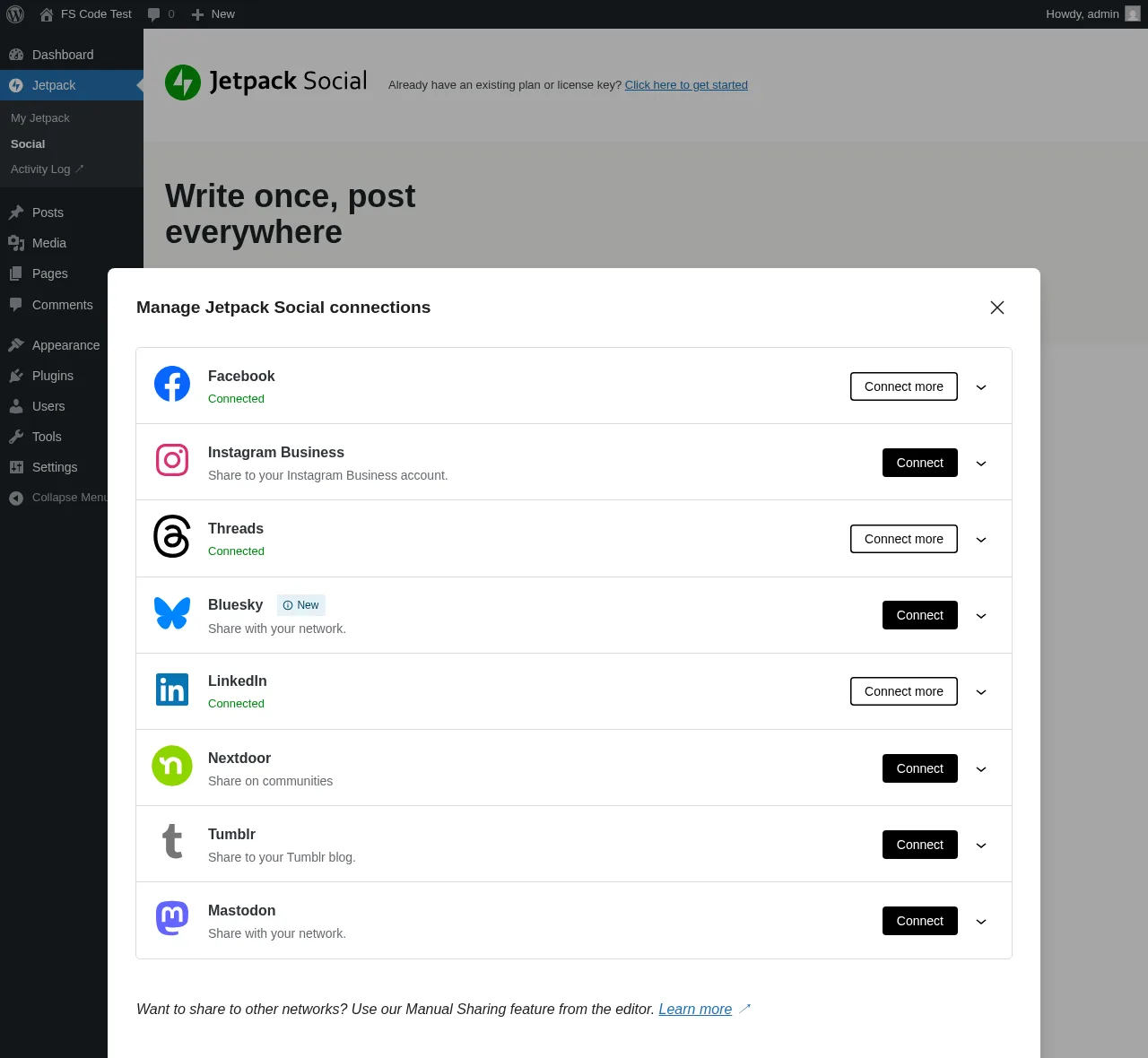
The headline job: publish a WordPress post and Jetpack Social pushes it to every connected account in one go. The supported network list — confirmed in the Connect-an-account modal — is Facebook Pages, Instagram Business, Threads, LinkedIn, Bluesky, Nextdoor, Tumblr, and Mastodon. Eight destinations, no surprises behind a toggle.
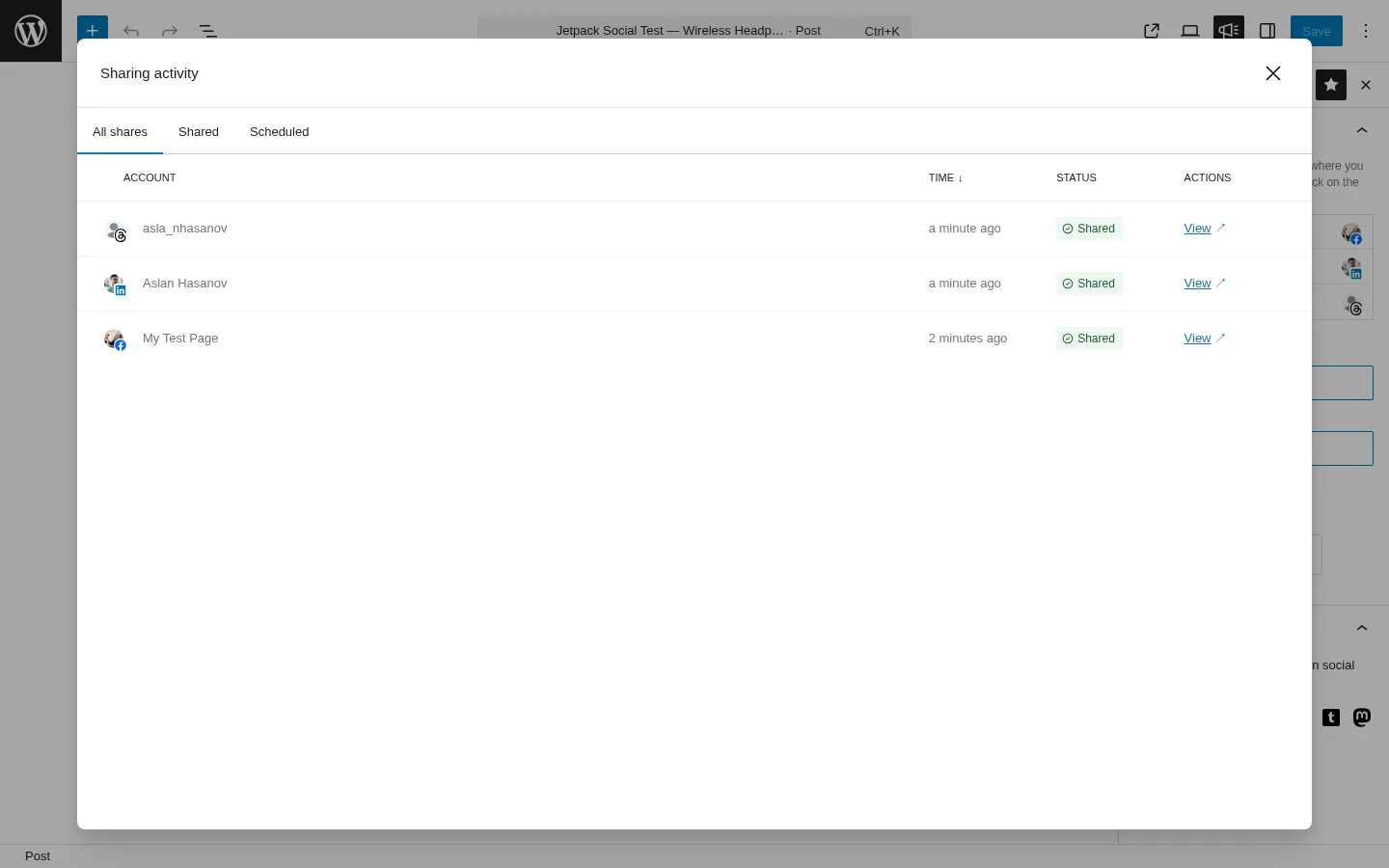
In testing, I published a real post with a featured image, and Jetpack Social's Sharing Activity dialog reported a green Shared confirmation on all three connected accounts — Facebook page, LinkedIn profile, and Threads — within roughly two minutes of publish. Each row in the dialog carries a per-network avatar, a relative timestamp, a green status pill, and a View link that opens the live social-network URL. The auto-share worked exactly as advertised.
2. Re-share and schedule from the same in-editor sidebar
The same sidebar that runs the publish-time auto-share switches into re-share mode once a post is live. Toggle the accounts you want, click Preview and share, then either Share immediately or Schedule for a future date and time. The Schedule popover carries Hours/Minutes inputs (24-hour clock) and a monthly calendar grid.
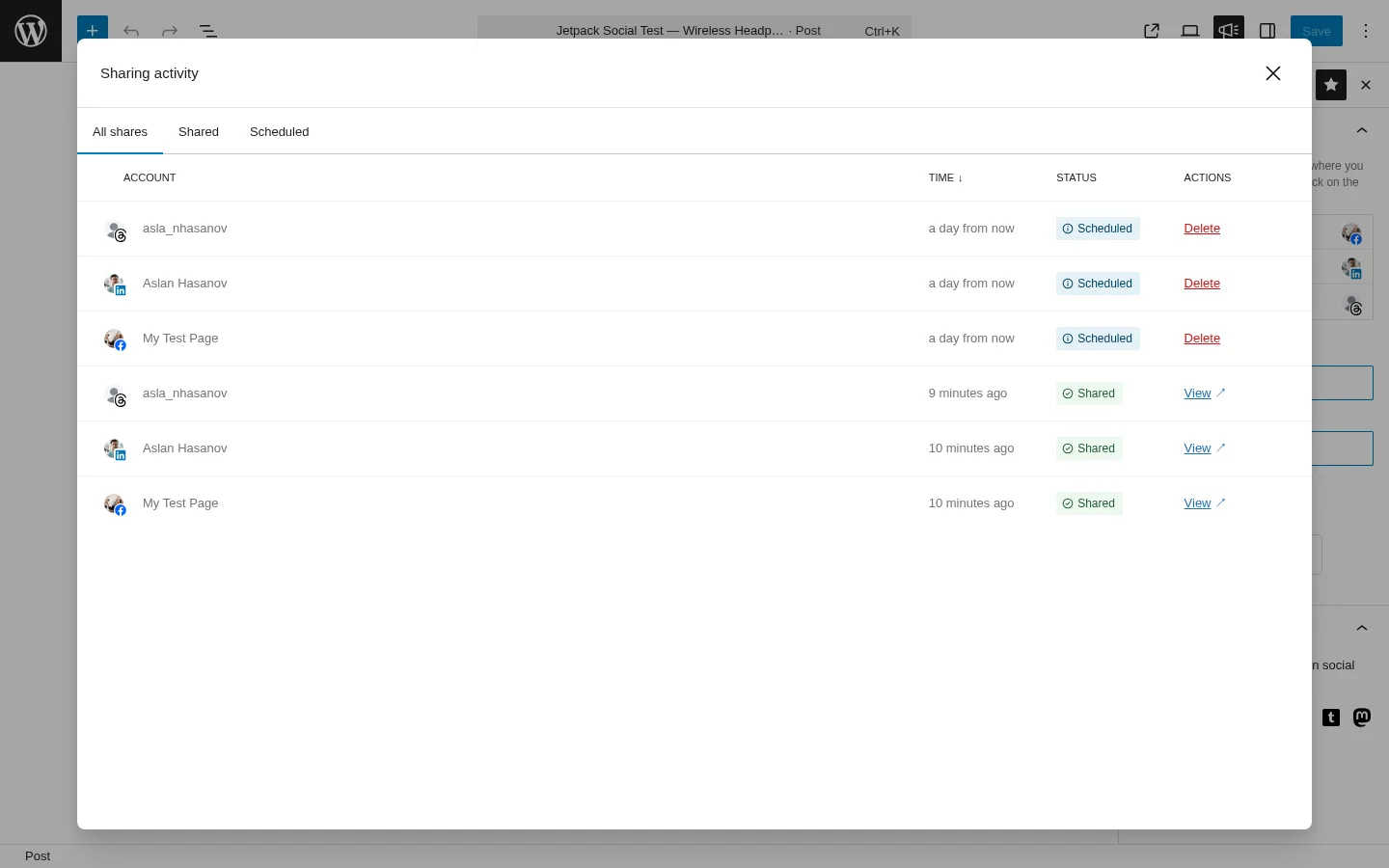
I scheduled all three connected accounts to re-share the same post for the next morning at 09:30 — four clicks from the editor sidebar to the confirmation message. The Sharing Activity dialog then showed six rows: three Shared entries from the original publish, and three Scheduled entries with a per-row Delete action. There's no documented limit on how many re-shares you can stack per post, and the flow behaves identically on the Free and paid tiers.
3. Manual Sharing for networks Jetpack Social doesn't connect to
In the editor sidebar, beneath the auto-share section, Jetpack Social surfaces a MANUAL SHARING strip with direct-share icons for X (Twitter), WhatsApp, Facebook, and a Copy link button. These open the network's native share dialog in a new tab rather than auto-posting through a connected account.
This is the honest answer Automattic gives for the long tail of platforms Jetpack Social doesn't natively support — Pinterest, TikTok, Reddit, Discord, Telegram, VK, Truth Social, and so on. It's not auto-share, and you have to click through, but it's the right touch for a publisher who occasionally needs to drop a link into WhatsApp or push a thread to X (Automattic removed X as a connected network after the 2023 Twitter API changes).
4. Multi-network link preview and campaign tracking tags
The sidebar Link preview section renders mock-ups across nine surfaces — Google search, X, Facebook, Threads, LinkedIn, Nextdoor, Tumblr, Mastodon, Bluesky — so you can sanity-check how the share card will look before clicking Preview. It's a small touch, but it's the only place in the editor where you can see the cross-network share card without leaving WordPress.
On the WordPress admin → Jetpack → Social settings page, the Append UTM parameters to shared URLs toggle adds standard campaign tracking tags to every share, so you can later see in your analytics which social network sent each visit. It's the closest thing Jetpack Social offers to click-tracking — pair it with Jetpack Stats (sold separately, or bundled into Growth) or Google Analytics to actually attribute social traffic. There's no in-plugin analytics dashboard.
5. Per-account customisation and the Social Image Generator (paid only)
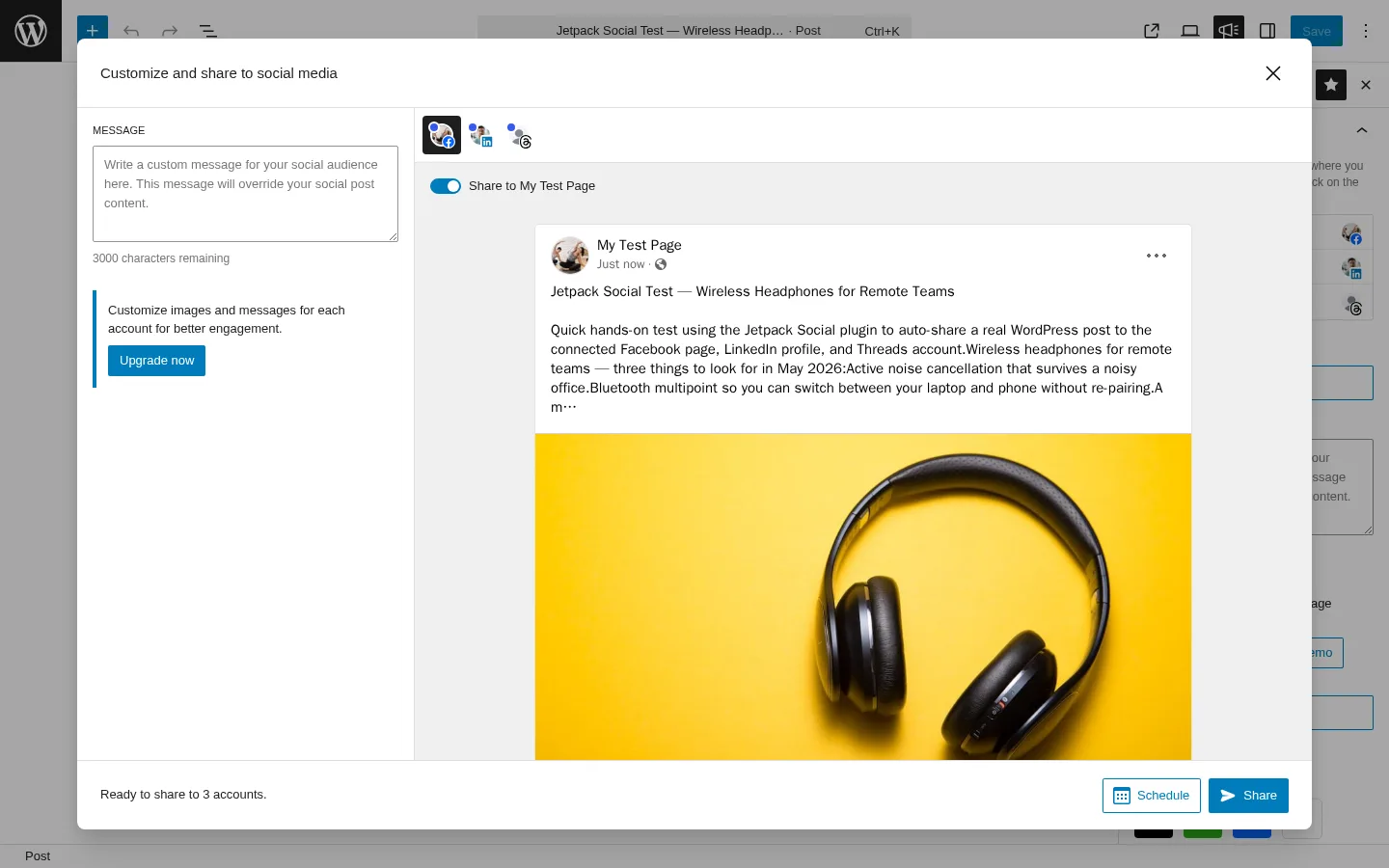
The Preview-and-share modal opens with a per-channel tab strip (Facebook, LinkedIn, Threads in my test) and a single shared caption box on the left. On the Free tier, the caption you type is shared across every selected channel — change it on the Facebook tab and the same text appears on the LinkedIn and Threads tabs.
The paid Social plan unlocks per-account custom captions and per-account custom images or videos, plus the Social Image Generator for auto-branded share images built from pre-made templates. The upgrade card sits inside the same modal: "Customize images and messages for each account for better engagement. Upgrade now." Because I reviewed Jetpack Social on the Free tier, the Social Image Generator controls were locked behind the paid plan and surfaced as an upsell rather than something I could click through — so the assessment of that feature is based on Automattic's official documentation rather than direct use. The Social Image Generator is template-based, not AI-generated, so call it "auto-branded share images" — not "AI-generated images" — in any honest comparison.
Jetpack Social Ease of Use / UI & UX
Jetpack Social's UI feels like a 2026 product, not an older-style WordPress widget — the sidebar is built natively into the WordPress editor, modals look consistent with the rest of the editor, and the controls don't fight you. The trade-off is that the whole product lives across two surfaces (the Jetpack → Social admin page and the in-editor sidebar), so power users will bounce between them more than they probably want to.
1. UI / UX
The admin page opens straight to the master "Automatically share your posts to social networks" toggle, a Connected accounts list, the Connect an account modal, the campaign tracking tags toggle, and the Social Notes (Beta) opt-in. It's a single scroll, visually consistent with the rest of the WordPress admin. The in-editor sidebar mirrors the same controls in a compact form. Once you've seen one of the two surfaces, the other is immediately familiar.
2. Setup
Connecting accounts is a one-click sign-in flow per network — but the platform-side requirements bite. Facebook Pages only (no personal profiles), Instagram Business accounts only (must be linked to a Facebook Page, no personal accounts), and the LinkedIn connector handles both a personal profile and a Company Page. Plan for 10–20 minutes per network if your accounts are already in good shape; longer if you've never set up an Instagram Business account before.
3. Editor sidebar workflow
The sidebar shows a per-account toggle list, an Add-a-new-account link, a Preview-and-customize button, the shared caption box (with a 3,000-character counter), the Manual Sharing icons row, and the multi-network Link preview. Toggles default OFF on a fresh draft, which trips up first-time users — a fresh post will not auto-share until you flip the per-account toggles in the sidebar. Document that for your team or you'll have a "why didn't my post share?" support ticket on day one.
4. Sharing Activity dialog
This is the single cleanest evidence surface in the product. Three tabs (All / Shared / Scheduled), per-row account avatar with the network icon overlay, relative timestamp, status pill, and a per-row View (for Shared) or Delete (for Scheduled) action. When something works or fails, you check this dialog and move on — much faster than walking each social network manually.
5. Preview & Customize modal
A faithful per-channel mock-up. The Facebook tab renders a page-card preview, LinkedIn shows the profile-post layout with a "5 min read" badge, and Threads shows the handle and reshare icons. It's not interactive — you can't click into the preview to edit a specific card — but it sets expectations correctly before you hit Share.
Jetpack Social Performance
Jetpack Social's performance behaviour in real WordPress use is steady. The plugin isn't doing anything heavy on the WordPress side, so the limiting factor is almost always the social network itself.
1. Publish-to-share latency
When I published the test post, the Sharing Activity dialog showed all three accounts as Shared within roughly one to two minutes of publish. There's no perceptible plugin-side queue — the share fires the moment WordPress finishes publishing, and the social network does its part. If you see drift, it's almost always the WordPress scheduler or the social platform's own delay, not Jetpack Social itself.
2. Admin app responsiveness
The Jetpack → Social admin page and the in-editor sidebar both load quickly on a standard hosting setup. Modals (Connect-an-account, Preview-and-customize, Sharing Activity, Schedule popover) open and close instantly. Switching between the per-channel preview tabs inside the Preview-and-customize modal has no visible lag — even when the mock-ups have to render different per-network layouts.
3. Featured image propagation
This is the small detail that quietly separates a polished plugin from a frustrating one. Jetpack Social attaches the WordPress featured image to the social share — confirmed visually on LinkedIn, where the post card rendered the yellow-background headphones image I'd uploaded to the media library exactly as the social post's hero image. LinkedIn reads the featured image straight off the WordPress page, and Threads does the same when it builds the link preview card. No manual upload required.
4. Schedule reliability
The schedule popover saves the future date into the Sharing Activity table the moment you click Confirm, and the dialog shows the row as Scheduled with a relative "a day from now" label and a Delete action. This review did not include waiting 24 hours to watch the scheduled share fire in real time, but Jetpack Social uses the same scheduling system WordPress uses for everything else, so set your site up with a real server-side cron rather than relying on WordPress's built-in scheduler if predictable timing matters.
Jetpack Social Support, Documentation & Learning Resources
Support quality on Jetpack Social is the part of the product where the 3.3/5 rating starts to bite — Free-plan users go through the public WordPress.org support forum, and paid Social-plan customers get priority support from Automattic's Happiness Engineers.
The public support-forum resolution rate in the trailing two months is 6 of 8 issues resolved, which is decent for a free-tier channel. Average response time isn't published as a hard number, but the public conversation pattern on WordPress.org sits in the "a few days" range rather than "same day." Anchored to the 3.3/5 rating (well below the 4.4+ "good support" threshold), I'd describe the support reputation as mixed: paid customers report quick replies, but the Free-tier complaint pattern around social accounts that keep disconnecting — the issue that dominates the 1★ reviews — suggests the volume of those issues outpaces the resolution speed on the public forum.
Documentation is genuinely strong. The official support hub at jetpack.com/support/jetpack-social/ covers feature documentation, scheduling, and the "no limits on how many times you share" copy. The Social Image Generator has its own deep-dive at jetpack.com/support/jetpack-social-image-generator/. The marketing page at jetpack.com/social/ doubles as a feature index, and the WordPress.org listing carries the standard support and changelog stream. There's no dedicated video-tutorial channel for Jetpack Social specifically — Automattic's broader Jetpack YouTube presence covers the suite-level material — and the changelog is terse but consistent (the latest 8.0.1 release lists only two bullets).
Jetpack Social User Reviews & Reputation
For this review, I checked all 74 visible reviews on the WordPress.org listing along with the WordPress.org support-forum archive, the WP Tavern long-form commentary, and the September 2024 Automattic blog post that reversed the historical 30-share-per-month Free-tier cap.
Overall impression. The rating distribution is the single most informative fact about Jetpack Social. The WordPress.org rating is 3.3 / 5 from 74 reviews, but the distribution is strongly bimodal: 39 × 5★ (about 53%), 1 × 4★, 5 × 3★, 2 × 2★, and 27 × 1★ (about 36%). Almost nobody lands in the middle. Pair the brand strength with both halves of the truth — Jetpack Social is "great for the simple case, painful when something breaks."
Most praised strengths. Recent 5★ reviewers repeat the same themes: "works so easily out of the box," "best social plugin ever" (often referencing the Free tier explicitly), "social sharing right from your WordPress post is finally improved" (the per-channel customisation in recent v8.x releases is being noticed), and a real reach uplift — "a lot of people have seen my posts that would never have seen them otherwise." The Automattic brand and the zero-config in-editor experience drive the positive side of the distribution.
Most criticised weaknesses. The 1★ cohort is concentrated on three patterns. First, social accounts that won't stay connected — the single most-cited complaint is connections silently dropping for Facebook and Instagram, particularly on paid accounts: "It will not stay connected to my social media accounts… as soon as I check the settings and reconnect everything, by the time I reload the saved draft of my post, it has disconnected again." Second, personal Facebook and Instagram accounts are not supported — a Meta restriction, not a Jetpack defect, but reviewers blame the plugin. Third, historical 1★ reviews from the October 2022 Free-tier-cap launch and the Twitter/X removal are still live on the listing even though both issues have since been resolved (the 30-share cap was reversed in September 2024; X support is gone but won't return). Roughly a quarter of the 27 × 1★ reviews fall into that "predates the fix" bucket.
Jetpack Social Pricing & Value
Jetpack Social is freemium and the paid Social plan is sold through the secure Jetpack/Automattic cart — the numbers below are checkout-verified in EUR. The cart locked us into EUR pricing based on our country, and we could not force a USD checkout (Automattic picks the currency from your location); USD equivalents are approximate.
- Social Free — €0. Auto-share to all 8 supported networks, scheduling re-shares, content recycling, Manual Sharing, Social Notes Beta, campaign tracking tags on shared links, multi-network link preview. No monthly share limit since September 2024.
- Social paid — 1-year subscription — €59.40 first year (intro discount of €48), €107.40/year on renewal — billed annually as a single yearly payment (about €4.95/mo intro, €8.95/mo renewal equivalents; approximately $66/year intro and $120/year renewal USD). There is no separate monthly billing tier — the Automattic cart only checks out on annual or 2-year terms.
- Social paid — 2-year prepay — €133.44 total over 24 months (intro discount of €38.40 plus an additional ~20% multi-year discount of €42.96 on top), then renews at the regular annual rate.
- Jetpack Growth bundle (Social + Stats + Newsletter + monetisation tools) — €107.40 first year, €227.40/year on renewal — billed annually (about €8.95/mo intro, €18.95/mo renewal equivalents). Save €95.40/year (€7.95/mo equivalent) vs buying Social and Stats individually.
The Free tier covers the core flow — auto-share, scheduling, content recycling, Manual Sharing buttons, multi-network link preview, and campaign tracking tags on shared links. The single biggest practical limitation on Free is that the caption box is shared across every selected channel (you can't write a Facebook-specific caption that's different from your LinkedIn one without upgrading), and image-side branding is whatever your featured image happens to be.
The paid plan unlocks four things on top of Free: per-account custom captions, per-account custom images or videos (Organic Content Sharing), the Social Image Generator for auto-branded share images built from pre-made templates, and priority support from Automattic. No additional networks ship with the paid tier — it's still the same 8 destinations. There is no Lifetime tier for Jetpack Social; every paid plan is an ongoing annual or 2-year subscription. The cart shows a 14-day money-back guarantee on the annual and 2-year plans Jetpack Social actually checks out on. VAT is excluded from the listed prices.
One commercial wrinkle worth flagging: the cloud.jetpack.com/pricing FAQ still says "We currently do not offer multi-year subscriptions or discounts for Jetpack products," but the real Social and Growth carts both show a 2-year prepay option with a multi-year discount. The FAQ is stale — always cite the cart, not the FAQ, if a buyer asks about 2-year pricing. And the buyer's billing identity is a free WordPress.com account, not a separate Jetpack-only account.
Jetpack Social Pros and Cons
After a full hands-on round, the strengths and trade-offs cluster cleanly.
Pros
- Auto-share on publish actually works: confirmed end-to-end on the test post — three connected accounts, three successful shares, three live URLs surfaced in the Sharing Activity dialog within two minutes of publish.
- Modern in-editor experience: the in-editor sidebar feels native to the WordPress editor and doesn't look like an older-style WordPress widget. The Sharing Activity dialog is the single cleanest "did it work?" surface in the WordPress social-publishing category.
- Free tier is genuinely usable: unlimited shares since September 2024, all 8 supported networks, scheduling and content recycling included, and campaign tracking tags on shared links. For most solo bloggers, the Free tier is enough on its own.
- Automattic brand and continued maintenance: same parent company as WordPress.com, WooCommerce, Tumblr, and Akismet — frequent point releases on the v8.x stream, 30,000+ active installs, and recent platform additions (Threads, Bluesky, Nextdoor) show the product is being actively shaped.
Cons
- Only 8 supported networks: no Pinterest, X/Twitter, TikTok, YouTube, Reddit, Discord, Telegram, VK, OK.ru, Xing, Truth Social, Plurk, Flickr, Webhook, or Google Business Profile. If your audience lives on any of those, Jetpack Social can't reach them natively.
- Per-account custom caption and per-account custom image are paid-only: the single caption box is shared across every selected channel on Free, which is the biggest non-obvious limitation versus FS Poster or Blog2Social. Upgrading to the paid plan is the only way to write a LinkedIn-specific caption that differs from the Facebook one.
- Bimodal 3.3/5 rating on WordPress.org: roughly 53% × 5★ vs 36% × 1★. The 1★ cluster centres on accounts that won't stay connected (Facebook and Instagram dropping silently) and historical 1★ reviews from the 2022 Free-cap launch and the Twitter/X removal. Pair the brand with both halves of the truth.
- No agency, multi-site, bulk, or evergreen-reshare workflows: there's no per-channel category filter, no recurring planner for archive recycling, no WordPress Posts-list bulk action, no WooCommerce-aware auto-share, and no multi-site licensing. Each WordPress install runs its own copy of Jetpack Social.
Who Should Use Jetpack Social?
Jetpack Social is the right buy for buyers whose job-to-be-done lines up with one of these patterns — and the wrong tool for several others.
Who Should Use It
- Solo bloggers and small businesses publishing to 2–4 mainstream networks: if your stack is Facebook + LinkedIn + Threads (or some subset), Jetpack Social Free does the job without a SaaS subscription.
- Buyers already paying for Jetpack (Stats, Security, or Growth): the Social paid plan is almost free as part of an existing Jetpack relationship, and the Growth bundle's annual price is competitive once you're already buying Stats and Newsletter tools.
- Less-technical WordPress users who trust the Automattic brand: same company as WordPress.com and WooCommerce. The brand familiarity and the "no separate SaaS subscription" pitch matter a lot to this buyer.
- Single-site WordPress installs where simplicity is the feature: one plugin, one settings page, one in-editor sidebar. No multi-site management, no agency dashboard, no learning curve beyond the Connect-an-account modal.
Who Should Skip It
- Agencies or freelancers running 3+ client sites: there's no multi-site licensing on the standard plan, no central dashboard, and per-site costs add up fast. A 30-website Lifetime alternative is meaningfully better economics here.
- Publishers who need Pinterest, X/Twitter, TikTok, YouTube, Reddit, Discord, Telegram, Webhook, Truth Social, VK, OK.ru, or Google Business Profile: Jetpack Social doesn't cover any of those natively. Manual Sharing buttons let you push individually, but it's not auto-share.
- WooCommerce stores that want per-product auto-share with per-category routing rules: products aren't auto-detected as shareable and there's no per-product social configuration UI inside the Woo product editor.
- Buyers who want a recurring evergreen-reshare planner, a WordPress Posts-list bulk action, or AI caption generation: Jetpack Social schedules one re-share at a time per account per post, schedules post-by-post (no bulk), and has no AI-powered features (the Social Image Generator is template-based, not AI-generated).
Best Jetpack Social Alternatives
Several WordPress social-publishing plugins compete with Jetpack Social directly. Pick the alternative whose job-to-be-done lines up with yours before you compare sticker prices. For a dedicated shortlist, see our Jetpack Social alternatives guide.
- FS Poster: the strongest WordPress-native alternative for buyers who outgrow Jetpack Social on either network coverage or workflow depth. It starts at $58/year on the Single plan (renews at $65/year) and covers 26 networks (vs Jetpack's 8) including Pinterest, X/Twitter, TikTok, YouTube, Reddit, Discord, Telegram, Webhook, Truth Social, VK, OK.ru, and Google Business Profile, plus a real Calendar, a recurring Planner for evergreen reshares, a WordPress Posts-list bulk action, WooCommerce auto-share with per-channel category filters, and an optional Lifetime tier covering 30 websites for long-term/multi-site buyers. FS Poster wins for agencies, multi-network publishers, and WooCommerce stores. See the FS Poster review for the full hands-on walkthrough, or read FS Poster vs Jetpack Social if a direct comparison is what you need.
- Blog2Social: the most popular freemium WordPress auto-poster — 25 networks on the Business tier (12 on Free), an in-WordPress calendar, per-network image customisation in the free tier, best-time-to-post scheduling, and 4.5 / 5 from 2,088 reviews on WordPress.org. Pick Blog2Social over Jetpack Social when you want a free tier and more than 4 networks and are willing to live with a heavier UI. See the Blog2Social review for the testing notes.
- Bit Social: a newer, low-cost, AI-first WordPress auto-poster challenger covering 13 networks. Bit Social wins for cost-sensitive buyers who want AI caption generation on a budget — the starting paid tier is meaningfully cheaper than Jetpack Social's paid annual plan, and AI captions are available out of the box rather than gated behind a separate Image Generator add-on. See the Bit Social review for the hands-on walkthrough.
- NextScripts SNAP: a long-running technical plugin covering ~30 network destinations (24 on Free, 6 more via a paid Premium add-on), including unusual networks like VK, OK.ru, weibo, Plurk, LiveJournal, MailChimp, Medium, and XING that no other competitor reaches. SNAP wins for technical buyers who need oddball networks and are OK with an older-style WordPress admin UI. See the NextScripts SNAP review for the full breakdown.
If you're shopping the whole category before you decide, the social media scheduler plugins for WordPress roundup pulls every option above into a single comparison frame.
Final Verdict: Is Jetpack Social Worth It?
For solo bloggers and small businesses who publish to 2–4 mainstream networks and want a zero-config in-editor flow from a brand they already trust, Jetpack Social is the right install. The Free tier handles auto-share on publish, scheduling, content recycling, manual sharing, multi-network link preview, and campaign tracking tags on shared links without asking for a credit card — and that covers most casual WordPress publishing needs in 2026.
For agencies, multi-network publishers, WooCommerce-heavy stores, anyone who needs Pinterest, X/Twitter, TikTok, YouTube, Reddit, Discord, Telegram, or Webhook coverage, and anyone who wants per-channel category filters or a recurring evergreen-reshare planner, the honest answer is no — shortlist FS Poster instead. The paid Social plan at €59.40 for the first year and €107.40/year on renewal (about €4.95/mo intro and €8.95/mo renewal) is a fair price for what it adds — per-account customisation and the Social Image Generator — but it doesn't fix the 8-network ceiling and there's no Lifetime tier to lock the cost in. The 14-day money-back guarantee on annual plans is the right safety net for first-time paid buyers.
Jetpack Social FAQ
Is there a free version of Jetpack Social? Yes. Jetpack Social is freemium, listed on WordPress.org, and the Free tier covers auto-share to all 8 supported networks, scheduling, content recycling, Manual Sharing buttons, the multi-network link preview, and campaign tracking tags on shared links. The 30-share-per-month Free cap from 2022 was reversed in September 2024 — Free is unlimited shares again, so any review citing "30/month" as the current limit is stale.
Does Jetpack Social support Twitter/X, Pinterest, or TikTok? No. Twitter/X was permanently removed after the 2023 Twitter API changes, and Pinterest, TikTok, YouTube, Reddit, Discord, Telegram, VK, OK.ru, Xing, Truth Social, Plurk, Flickr, Webhook, and Google Business Profile are not supported. The 8 currently supported networks are Facebook Pages, Instagram Business, Threads, LinkedIn, Bluesky, Nextdoor, Tumblr, and Mastodon. For unsupported networks, Jetpack Social offers Manual Sharing buttons in the editor.
Is Jetpack Social beginner-friendly? Yes — for the simple case. The in-editor sidebar and the master toggle on the Jetpack → Social admin page make the first install easy. The friction sits on the platform side: Facebook Pages only (no personal profiles), Instagram Business accounts only (must be linked to a Facebook Page), and per-account toggles default OFF on a fresh draft — so a brand-new post won't auto-share until you flip the toggles in the sidebar.
What does the paid Jetpack Social plan actually unlock? Four things on top of Free: per-account custom captions (write a LinkedIn-specific caption that differs from the Facebook one), per-account custom images or videos (Organic Content Sharing), the Social Image Generator for auto-branded share images built from pre-made templates, and priority support from Automattic's Happiness Engineers. No additional networks — it's still the same 8 destinations as Free. The annual paid Social plan is €59.40 for the first year, then €107.40/year on renewal; monthly equivalents are secondary because the checkout is annual.
What are the best Jetpack Social alternatives? The closest competitors are the FS Poster review (26 networks, Lifetime tier, real Calendar plus recurring Planner, WooCommerce, WordPress Posts-list bulk action), the Blog2Social review (25 networks on Business, free tier with per-network image customisation, in-WordPress calendar), the Bit Social review (AI captions on a budget, lower-cost paid tier), and the NextScripts SNAP review (~30 networks including unusual ones like VK and OK.ru). Pick the alternative whose job-to-be-done matches yours — the alternatives section above has the full triage.
Write once. Post to 26 networks.
- 26 social networks
- Schedule & auto-repost
- Runs inside wp-admin


