


FS Poster and Bit Social both auto-share new WordPress posts to a stack of social networks, but they sit on opposite ends of the category. FS Poster is the mature WordPress-native plugin from FS Code with 26 networks on every plan and a one-time Lifetime tier. Bit Social is Bit Apps's newer, aggressively-priced challenger with 13 networks, AI prompts, and an unlimited-sites Lifetime licence at $149.
I tested both plugins on clean WordPress sites and compared them against the official pricing pages, public review data, and each plugin's in-product admin experience. This FS Poster Bit Social comparison also covers Bit Social vs FS Poster, FS Poster or Bit Social buying logic, FS Poster vs Bit Social pricing, FS Poster vs Bit Social features, and when FS Poster is an alternative to Bit Social or Bit Social is an alternative to FS Poster. Below is the practical breakdown of features, pricing, ease of use, limitations, and who should pick which.
FS Poster vs Bit Social: Quick Verdict
Choose FS Poster if you need broader network coverage (26 vs 13), Reddit, Mastodon, Webhook, Truth Social, Blogger, Medium, or a WordPress-to-WordPress destination, a per-channel category filter that applies at auto-publish, native WooCommerce automation with a panel on the product edit screen, AI image generation, or a WordPress Posts-list bulk action for rehydrating an archive. Choose Bit Social if your priority is the cheapest unlimited-sites Lifetime in the category ($149 one-time), you only need the mainstream networks Bit Social covers, you want ChatGPT-driven AI prompts and DALL·E image generation on a bring-your-own-OpenAI-key basis, or you are already invested in the Bit Apps ecosystem (Bit Form / Bit Integrations / Bit Flows).
Overall winner: FS Poster — twice the network roster, a per-channel filter that applies to auto-share at publish time, WooCommerce-native automation, AI image generation, and the deeper install base (50K+ active installs / 25K+ paid customers on fs-poster.com vs Bit Social's 6,000+ active installs on WordPress.org).
Quick Comparison Table
| Category | FS Poster | Bit Social |
|---|---|---|
| Starting price | $58 / yr intro on Single (renews at $65 / yr) | $0 Free (2 networks); $49 / yr Starter Annual |
| Free plan | No free plan; 14-day money-back guarantee | ✅ Free — but only 2 networks (Facebook + LinkedIn Profile) |
| Lifetime option | ✅ $490 one-time for 30 websites | ✅ $89 Starter LTD (1 site); $149 Agency LTD (unlimited sites) |
| Supported networks | 26 on every plan (incl. YouTube Shorts) | 13 on Pro (Reddit listed as "Coming Soon") |
| Calendar / planner | ✅ Modern Calendar + recurring Planner | ⚠️ Calendar is a schedule-creation entry-point only — does not overlay existing schedules |
| Webhook destination | ✅ Native | ❌ Not offered |
| Mastodon / Truth Social / VK / Plurk / Flickr / Blogger / Medium / Xing | ✅ All included | ❌ None of them supported |
| ✅ Included | ❌ "Coming Soon" | |
| Evergreen reshare | ✅ Planner with Interval / Weekly cadence + sleep-time exclusion | ✅ WP Post Schedule with Active / Paused states |
| WooCommerce / custom post types | ✅ Native — Product auto-share + per-channel filters | ⚠️ Pro-tier; no per-product social config inside the product editor |
| WP Posts list bulk action | ✅ Native "Bulk Schedule [FS Poster]" | ❌ Not offered |
| Per-channel category filter on auto-share | ✅ At auto-publish time | ❌ Only inside WP Post Schedule |
| AI captions | ✅ BYO OpenAI key + AI Templates for messages/ |
✅ AI Prompts (ChatGPT) with smart-tag templating (Pro) |
| AI image generation | ✅ Included via BYO OpenAI key | ✅ DALL·E via BYO OpenAI key (Pro) |
| Public rating | 4.9 / 5 from 650+ reviews on fs-poster.com (vendor surface; not on WordPress.org) | 4.5 / 5 from 34 reviews on WordPress.org |
| Active installs / paid customers | 50K+ active installs / 25K+ paid customers (fs-poster.com) | 6,000+ active installs (WordPress.org) |
| Best for | Agencies, WooCommerce stores, multi-network publishers | Budget buyers wanting an unlimited-sites Lifetime under $200 |
Prices checked in May 2026. Every price in this article is the vendor-displayed annual total or one-time cost — neither fs-poster.com/pricing nor bitapps.pro/bit-social/ shows monthly-equivalent figures for any plan, so no annual-billed-monthly figures are quoted or compared anywhere in this comparison.
FS Poster Overview
FS Poster is a premium WordPress plugin from FS Code that turns any WordPress site — including WooCommerce stores — into a multi-network social publishing engine. It auto-shares new posts to 26 networks, lets you schedule one-off social posts directly from a Calendar (with no backing WordPress post required), recycles archive content with a recurring Planner, bulk-schedules existing posts via a native WordPress Posts-list action, customises captions per network with template variables, and integrates AI for both captions and share images on a bring-your-own-OpenAI-key basis. It is sold exclusively through fs-poster.com with Single, Plus, Developer, and Lifetime tiers and a 14-day money-back guarantee. There is no free version. According to fs-poster.com, the product has 50K+ active installs and 25K+ paid customers.
For the standalone testing notes behind this side of the comparison, read the FS Poster review.
Bit Social Overview
Bit Social is Bit Apps's challenger entry in the WordPress social-publishing category. From a modern admin interface inside WP Admin it auto-shares new posts to 13 networks — Facebook, LinkedIn (Profile in Free + Page in Pro), Threads, Google Business Profile, Pinterest, Discord, Tumblr, Instagram, TikTok, X (Twitter), Bluesky, Line, Telegram — and adds a WP Post Schedule + Calendar for recurring reshares, a Share Now instant composer, per-platform Templates with smart tags, AI Prompts (ChatGPT + DALL·E, BYO OpenAI key), First-comment automation for Instagram / Threads / Bluesky, WooCommerce + custom-post-type auto-share (Pro), and an External Cron toggle. The free tier on WordPress.org is restrictive — only 2 networks (Facebook + LinkedIn Profile) — but the paid tiers are aggressively priced: Starter LTD $89 one-time (1 site) or Agency LTD $149 one-time (unlimited sites). The product has 6,000+ active installs on WordPress.org and a 4.5 / 5 rating from 34 reviews.
For the standalone testing notes behind this side of the comparison, read the Bit Social review.
Pricing & Plans
| Plan | FS Poster | Bit Social |
|---|---|---|
| Free | No free plan; 14-day money-back guarantee | ✅ 2 networks only (Facebook + LinkedIn Profile) |
| Cheapest paid (intro) | $58 / yr Single — 1 site, 6 mo support | $49 / yr Starter Annual — 1 site, 1 yr support |
| Cheapest LTD | $490 one-time Lifetime — 30 websites, 12 mo support included | $89 one-time Starter LTD — 1 site, lifetime support & updates |
| Mid tier | $109 / yr Plus — 3 sites, 12 mo support | $99 / yr Agency Annual — unlimited sites, 1 yr support |
| Top tier | $229 / yr Developer — 15 sites, 12 mo support | $149 one-time Agency LTD — unlimited sites, lifetime support ("Most Popular") |
| Bundle option | ❌ | $1,149 one-time Bit Apps Agency Lifetime Bundle (Bit Form + Bit Integrations + Bit Social + Bit Flows + Bit Assist) |
| Refund / trial | 14-day money-back guarantee | 14-day money-back guarantee on every tier |
| Renewal note | Intro prices renew at full price (Single → $65, Plus → $195, Developer → $449, Lifetime → $890) | Promo countdown active; April 2026 snapshot showed slightly different numbers ($89 LTD Starter, $79 / yr Agency, $169 Agency LTD) |
FS Poster's pricing axis is the simplest in this category — you pay per site, and every plan ships the full 26-network roster, unlimited connected channels, unlimited schedules, AI integration, watermarking, multisite, RTL, translations, and a staging licence. The only differences between tiers are the number of websites (1 / 3 / 15 / 30), the support window (6 months on Single, 12 months on the rest), and AI template quotas. The $490 one-time Lifetime tier breaks even against the Developer renewal at $449 / year within twelve months and stays "free" forever afterwards.
Bit Social's pricing story is built around the $149 Agency LTD with unlimited sites — the single most aggressive lifetime price in the WordPress social-publishing category. A 50-site agency that buys the Agency LTD pays one-third of what a 30-site FS Poster Lifetime buyer pays, on paper. The trade-offs sit on the feature side rather than the licensing side: 13 networks instead of 26, no central multi-site management UI (the unlimited-sites licence only removes the per-site cap — every WordPress install still runs its own Bit Social admin), Pro-tier gating on 11 of 13 networks, and a permanent "Exclusive Discount Deal — Save Upto 74% OFF" countdown that has been active since at least April 2026 with rotating numbers (the FS Code competitor bible captured $89 LTD / $79 yr Agency / $169 Agency LTD in April; on 2026-05-17 the same page showed $89 LTD / $99 yr Agency / $149 Agency LTD).
The Bit Social Free tier is the weakest free tier in the WordPress social-publishing segment — only 2 networks (Facebook + LinkedIn Profile). Blog2Social Free covers 12 networks. Jetpack Social Free covers 8. NextScripts SNAP Free covers 24. Buyers who plan to "try the free version before paying" will find Bit Social's free roster too narrow to actually evaluate.
Winner: Bit Social — on raw lifetime price, $149 for unlimited sites beats $490 for 30 sites. But narrow this to a per-network basis ($149 ÷ 13 = $11.46 per network on Bit Social vs $490 ÷ 26 = $18.85 per network on FS Poster) and the gap closes; widen it to "Lifetime that actually covers Reddit, Mastodon, Truth Social, Webhook, Blogger, Medium, and the WordPress-to-WordPress destination" and FS Poster wins because Bit Social does not offer those at any price.
Network Coverage
| Coverage detail | FS Poster | Bit Social |
|---|---|---|
| Headline count | 26 networks on every plan | 13 networks on Pro |
| Mainstream four (Facebook, LinkedIn, Instagram, X / Twitter) | ✅ All included | ✅ All included (X requires Custom App credentials) |
| Threads, Bluesky | ✅ Included | ✅ Included |
| Mastodon | ✅ Included | ❌ Not supported |
| Truth Social | ✅ Included | ❌ Not supported |
| TikTok | ✅ Included | ⚠️ Pro + buyer's Custom App credentials |
| ✅ Included | ✅ Pro | |
| Telegram | ✅ Included | ✅ Pro |
| ✅ Included | ❌ "Coming Soon" on bitapps.pro/ |
|
| Discord | ✅ Included | ✅ Pro |
| VK, OK.ru | ✅ Included | ❌ Not supported |
| Plurk, Flickr, Xing | ✅ Included | ❌ Not supported |
| Blogger, Medium | ✅ Included | ❌ Not supported |
| Google Business Profile | ✅ Included | ✅ Pro |
| Tumblr | ✅ Included | ✅ Pro |
| YouTube Community / YouTube Shorts | ✅ Included | ❌ Not supported |
| Webhook destination (Zapier / IFTTT / custom HTTP) | ✅ Native | ❌ Not offered |
| WordPress-to-WordPress connector | ✅ Native | ❌ Not offered |
This is the category that decides most buying decisions, and it is the cleanest delta between the two products. FS Poster covers 26 networks on every single plan, including X (Twitter), YouTube Community, YouTube Shorts, the long tail (Bluesky, Mastodon, Truth Social, Telegram, Reddit, Discord, VK, OK.ru, Xing, Plurk, Flickr, Blogger, Medium, Webhook), and a WordPress-to-WordPress connector. There is no per-network upsell. Most channels connect via FS Poster's Standard Apps with a one-click OAuth flow, and buyers can optionally register their own developer app for Instagram, TikTok, X, or YouTube if they want their own quota or branding — but that path is an advanced option, not a requirement to connect those networks.
Bit Social covers 13 networks on the Pro tier — Facebook, LinkedIn (Profile + Page), Threads, Google Business Profile, Pinterest, Discord, Tumblr, Instagram, TikTok, X (Twitter), Bluesky, Line, Telegram. Reddit is listed as "Coming Soon" on bitapps.pro/bit-social/ and is not connectable today. The Connect Account modal does not include Mastodon, Webhook, VK, OK.ru, Xing, Truth Social, Plurk, Flickr, Medium, Blogger, YouTube Community, YouTube Shorts, or a WordPress-to-WordPress destination — all of which FS Poster ships on every plan. Twitter / X and TikTok require buyer-supplied Custom App credentials — Bit Apps's OAuth broker does not cover those two networks, so a buyer who wants to publish to X has to register their own Twitter developer app first. Bluesky / Line / Telegram use a Login flow (app password / channel token / bot token), which is standard for those networks.
The Free tier limitation is the cliff edge. Bit Social Free covers 2 networks: Facebook + LinkedIn Profile. Every other network — including the mainstream Threads, Bluesky, Pinterest, Instagram — requires Pro. The single most-cited 1★ complaint on Bit Social's WordPress.org listing is exactly this gating ("Only Facebook and LinkedIn are Free"). FS Poster has no Free tier at all, so the comparison there is "Bit Social Free = 2 networks" vs "FS Poster paid Single = 26 networks for $58 / yr".
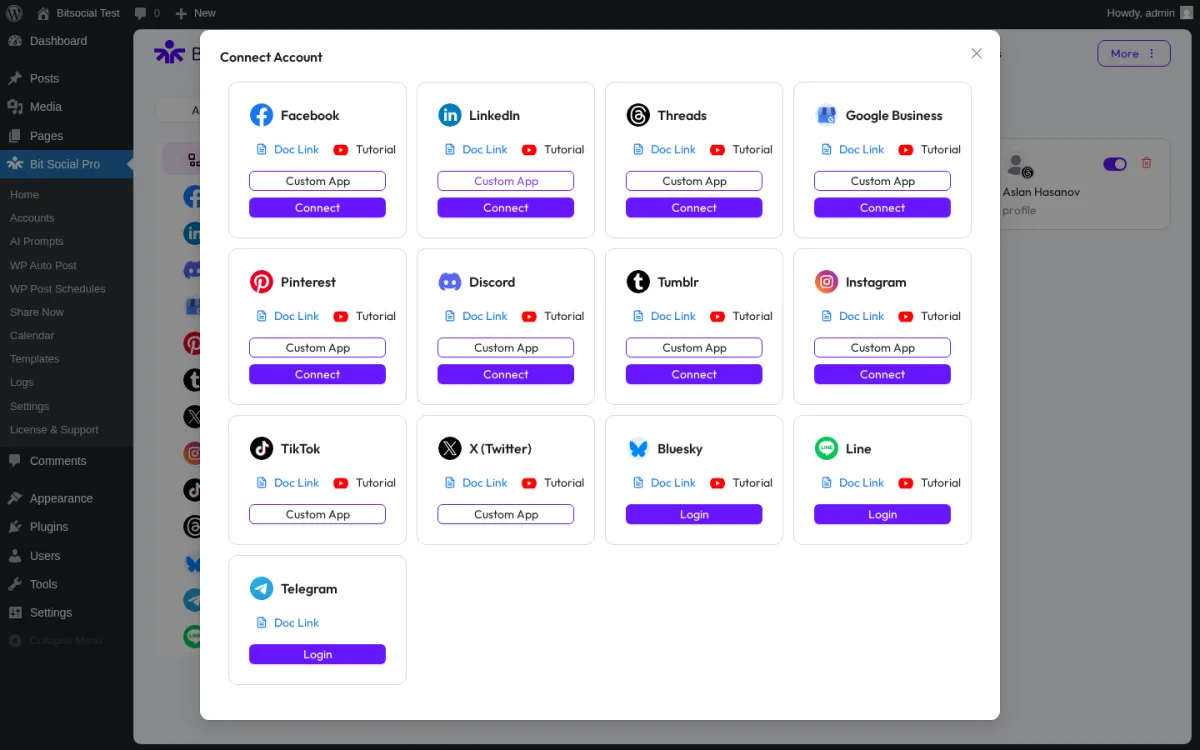
Bit Social's Connect Account modal is the canonical proof of the 13-network roster: Facebook, LinkedIn, Threads, Google Business Profile, Pinterest, Discord, Tumblr, Instagram, TikTok, X (Twitter), Bluesky, Line, Telegram. Reddit is not in the modal — it is listed as "Coming Soon" on bitapps.pro/bit-social/. Mastodon, Truth Social, Webhook, VK, OK.ru, Xing, Plurk, Flickr, Blogger, Medium, YouTube Community, and YouTube Shorts — all of which FS Poster includes on every plan — are not present at any Bit Social tier.
Winner: FS Poster — 26 networks on every plan including the long tail, X and TikTok connectable via Standard Apps (own developer app is an optional advanced path, not a requirement), and the only WordPress social-publishing plugin with a native Webhook destination and a WordPress-to-WordPress connector. Bit Social's 13-network coverage is solid for the price tier, but the missing Reddit, Mastodon, Truth Social, and Webhook destinations are real gaps for any publisher with a multi-network distribution strategy.
Auto-Posting Workflow
| Auto-posting detail | FS Poster | Bit Social |
|---|---|---|
| Auto-share at WordPress publish | ✅ Default on every plan | ✅ Pro (Free is 2 networks only) |
| Per-channel auto-share toggle | ✅ One cog modal per channel | ✅ Per-account ticking inside Auto-Post page |
| Per-channel category routing at auto-publish | ✅ Native — applies to auto-share | ❌ Only inside WP Post Schedule module |
| Custom post type support | ✅ Multi-select in Settings → General | ✅ Pro |
| WooCommerce product auto-share | ✅ Native, no extra licence | ✅ Pro |
| WordPress Posts-list bulk action | ✅ Native "Bulk Schedule [FS Poster]" | ❌ Not offered |
| Gutenberg editor sidebar widget | ❌ (FS Poster panel/ |
❌ |
| Per-post auto-share opt-out | ✅ Per-post toggle | ✅ Per-post toggle |
| REST/ |
✅ | ✅ (verified with a test post) |
Both plugins deliver auto-share at WordPress publish, and both proved it in testing. On FS Poster, when a test post was published from the WordPress editor with a featured image attached, the FS Poster sidebar on the post edit screen filled in a green checkmark and timestamp for every eligible connected channel within seconds of WP cron firing — no manual click required. The Facebook channel was correctly skipped because of the include-Tech category filter set on it earlier, which doubles as positive proof that per-channel filters apply to the auto-share path itself. On Bit Social, a test post was auto-shared to every connected account — Facebook page, LinkedIn profile, Threads handle, Pinterest board — with the Logs table reporting Success for each row and a Visit link to the live network URL.
The single biggest workflow delta is per-channel category routing at auto-publish. FS Poster exposes a per-channel filter (include / exclude categories or tags) on the channel-cog modal, and the filter applies to both the auto-share-on-publish path and the Planner / Calendar paths. Bit Social only exposes taxonomy filtering inside the WP Post Schedule create modal — the Auto-Post page has no per-channel category routing at all. Buyers who want "Tech posts → LinkedIn only" rules at WordPress publish time will be disappointed by Bit Social.
The second delta is the WordPress Posts-list bulk action. FS Poster adds a "Bulk Schedule [FS Poster]" entry to the native WordPress Posts-list bulk-actions dropdown that drops you into the Planner wizard with the selected posts pre-filtered — the highest-leverage workflow in either product for rehydrating an archive. Bit Social does not offer this; selecting old posts in the WordPress Posts list and pushing them into a schedule means walking each post individually or building a WP Post Schedule with a Specific Post by ID filter.
WooCommerce is the third delta. FS Poster recognises Woo products automatically once the Woo plugin is active and shows a per-channel status panel on the product edit screen — no separate licence or paid add-on required. Bit Social's WooCommerce + custom-post-type auto-share is Pro-only and does not surface a per-product social config inside the product editor.
Winner: FS Poster — per-channel category routing at auto-publish, the WP Posts-list bulk action, and the WooCommerce-native panel/sidebar on the product edit screen are unique workflow advantages that Bit Social does not replicate at any price tier.
Scheduling, Calendar & Planner
| Scheduling detail | FS Poster | Bit Social |
|---|---|---|
| In-WordPress calendar | ✅ Modern Month / Week / List views with visible scheduled cards | ⚠️ Calendar grid is a schedule-creation entry-point only — does not visually overlay existing schedules |
| Drag-and-drop reschedule | ✅ Included | ❌ Not observed |
| Schedule split button | ✅ Schedule / Share now from one button | ✅ Share Now / Setup Schedule / Publish Now |
| Recurring evergreen planner | ✅ 4-step Planner wizard (Filter → Share type → Sort → Summary) | ✅ WP Post Schedule with 3-tab create modal (Settings, Post Filter, Accounts & Template) |
| Pause / resume a recurring schedule | ✅ Active / Inactive toggle | ✅ Active / Paused dropdown (per-row) |
| Sleep-time exclusion windows | ✅ Inside Planner Interval step | ✅ Sleep timer + Sleep days inside WP Post Schedule Settings tab |
| Per-share Insights button | ✅ Inside Calendar share-detail modal | ❌ |
| Share Now de-duplication | ✅ Built-in | ⚠️ Draft saving was unreliable in testing |
Both plugins ship an in-WordPress calendar — and on this category there is a real product gap. FS Poster's Calendar is the cleanest single surface in the comparison: clicking any card opens a share-detail view with a channel-avatar row at the top (walk left-to-right through every channel's result), per-channel status text and content, sharing date, and Retry / Delete / Reschedule / Insights buttons. I set up an "every 2 days" recurring Planner, and the Calendar immediately rendered pre-scheduled planner cards on the matching future dates within seconds — direct visual confirmation that the interval was honoured and that the planner-card overlay works as advertised.
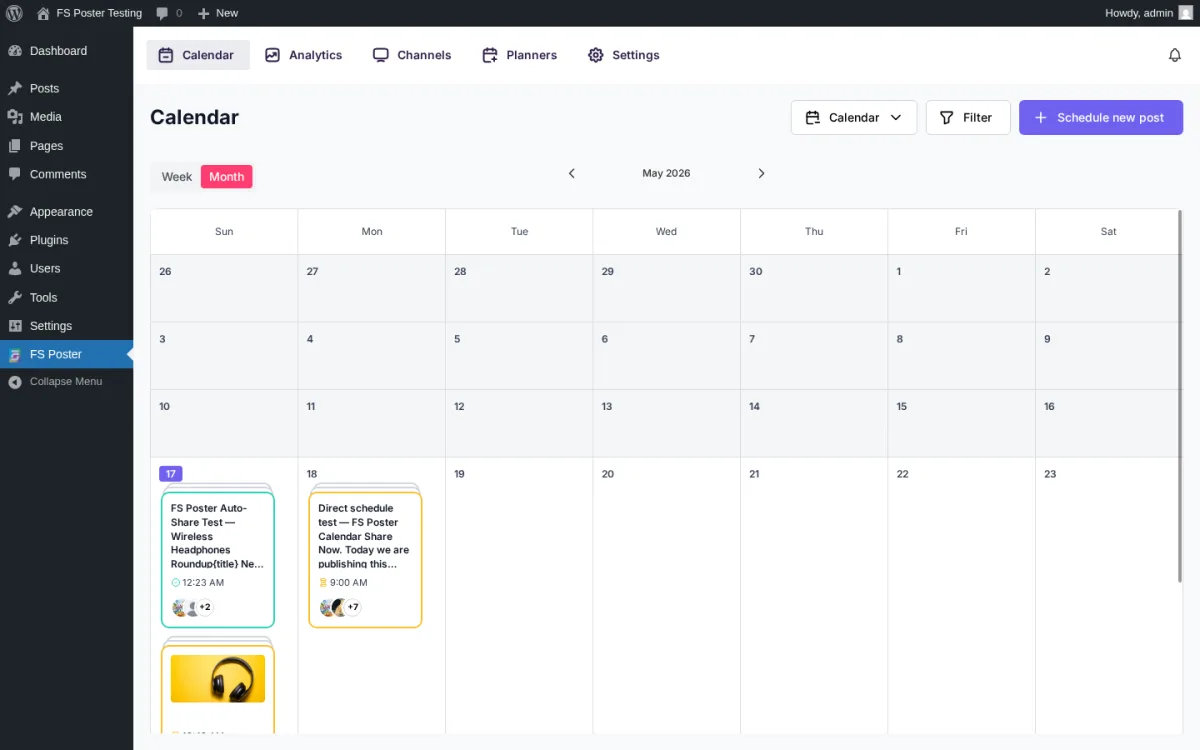
FS Poster's Calendar Month view overlays existing scheduled shares as visible cards — immediate Share Now cards, one-off direct-schedule cards, and recurring planner-driven evergreen reshare cards all render on the same grid. This is the single biggest UX delta against Bit Social, whose Calendar grid kept showing empty "Add schedule" cells in our testing even after we created a real recurring schedule that was clearly active in the WP Post Schedule list.
Bit Social's Calendar is the surprise gap. The Calendar grid in WP Admin → Bit Social Pro → Calendar shows a month view with an "Add schedule" affordance on every cell — but after creating a real recurring schedule with a one-hour interval and a near-term start time, the calendar still rendered only the empty Add-schedule cells. The schedule appeared in the WP Post Schedule list with a green Active status and a near-term Next Post countdown, but the Calendar did not visually overlay the event. The WordPress.org marketing copy "View all scheduled posts in one place" did not match what we saw. Bit Social's Calendar is a schedule-creation entry-point, not a planner of existing schedules. Buying-decision impact: medium if you rely on a visual planner — your schedules still run, but you'll have to manage them from the list view rather than the calendar.
The recurring evergreen planner is closer to par. Bit Social's WP Post Schedule create modal is feature-rich — interval (Minute / Hour / Day / Week), sleep timer + sleep days, post type, category + tag filters, specific post ID, a live "Posts matched by current filters: N" counter, and an Accounts & Template tab. The per-row Status dropdown offers exactly two states (Active / Paused) and the row deletes via an inline confirmation prompt. The 3-tab create modal works end-to-end (we walked it create → row appears → status flips Paused → delete → empty state). FS Poster's Planner has a cleaner 4-step wizard and an explicit Calendar overlay — the same "every 2 days" rule produced visible cards on the matching future dates in the Calendar within seconds. The Bit Social equivalent would produce rows in the schedule list but no Calendar overlay.
Winner: FS Poster — the Calendar actually overlays existing schedules, the Planner cards are visible in the same grid, and the per-share Insights button is unique. Bit Social's WP Post Schedule module is solid as a list, but the Calendar gap is a real product defect compared with FS Poster (and with Blog2Social, which renders scheduled posts on its calendar as drag-and-drop tiles).
Content Customization
| Customization detail | FS Poster | Bit Social |
|---|---|---|
| Per-network captions | ✅ Customize content editor per channel (every plan) | ✅ Per-platform Templates page (every connected platform on Pro) |
| Template variables / smart tags | ✅ {title}, {short_, {post_, {post_ |
✅ 12-tag smart-tag library (post_title, post_link, post_content, excerpt, author, categories, tags, featured_image, site_name, etc.) |
| Auto-save on template edits | ❌ Explicit Save | ✅ Per-keystroke auto-save (no Save button) — verified on multiple platforms with full revert path |
| Live preview mock-up | ⚠️ Single per-channel editor preview | ⚠️ Facebook only — every other platform's Preview tab reads "Coming Soon" |
| AI caption generation | ✅ BYO OpenAI key — Use AI button in every per-channel editor | ✅ AI Prompts modal (Pro) — ChatGPT, gpt-4 model, temperature slider, prompt + fallback textareas with smart tags |
| AI image generation | ✅ Built-in via BYO OpenAI key | ✅ DALL·E via BYO OpenAI key (Pro) |
| Multi-LLM AI (Anthropic / Google / local) | ❌ OpenAI only | ❌ OpenAI only |
| First comment / first reply | ✅ Where the network supports it | ✅ Pro — Instagram, Threads, Bluesky |
| Per-network publish delay | ⚠️ Schedule offsets | ✅ Pro — explicit per-platform publish-delay offsets |
| Per-network image swap | ✅ Featured media per channel | ✅ Pro — multiple-image sharing |
| URL shortener | ✅ Built-in click-tracking shorteners | ❌ Not offered (Pinterest template has a "Post link" toggle but no bit.ly chaining) |
| Hashtag / keywords helper | ✅ Keywords helper inside editor | ⚠️ Smart tags only |
| Raw HTML mode | ✅ Toggle in editor | ❌ |
Both plugins let you write a different caption for every connected channel. The customisation surfaces are different: FS Poster exposes a per-channel Customize content editor inside each channel's cog modal with template-variable chips, a Use AI button, a Keywords helper, a preview mode, and a raw-HTML mode. Bit Social exposes a Templates page with one tab per connected platform — every tab gets a Custom Message textarea, the 12-tag smart-tag library, a Trim Message toggle with per-platform character limits (Facebook 63 206, LinkedIn 3 000, Threads 500, Pinterest 800), and platform-specific extras (Facebook's live mock-up preview, Threads' Topic + First-reply fields, Pinterest's Custom Title + Post Link toggle).
The most distinctive feature on Bit Social's side is per-keystroke auto-save. The Custom Message editor on every platform tab saves silently as you type — no explicit Save button, no save toast, no warn-on-leave dialog. I verified the auto-save end-to-end on multiple platforms: typed a custom caption → navigated to a different page → returned → caption still present → reverted to the original → confirmed clean. This is a genuinely better template-editor UX than FS Poster's explicit-Save model.
The most distinctive feature on FS Poster's side is AI image generation (alongside captions) and the URL shortener with click tracking. Bit Social's AI Prompts modal is well-designed (Title / Type / Platform / Model / Temperature / Prompt + Smart Tags / Fallback content), but no in-product click-tracking analytics aggregate the resulting traffic — Activity Logs prove the share fired and Visit links resolve to the live post, but Bit Social does not aggregate clicks / impressions / engagement in a dedicated analytics tab. FS Poster includes a dedicated Analytics tab and per-share Insights button, with click-tracking shorteners built into the share path. The other Bit Social caveat is that most per-platform Previews read "Coming Soon" — only Facebook renders a live mock-up. LinkedIn, Threads, Pinterest, Tumblr, Discord, Bluesky all show a "Preview (Coming Soon)" placeholder.
Winner: FS Poster — AI captions + AI image generation + URL shortener + click-tracking analytics + Keywords helper on every plan. Bit Social wins specifically on the per-keystroke auto-save UX of the Templates page and the Threads First-reply / Pinterest Custom Title smart fields, but the "Coming Soon" preview gating and missing URL shortener / analytics push the practical winner to FS Poster.
WooCommerce & Custom Post Types
| WooCommerce detail | FS Poster | Bit Social |
|---|---|---|
| WooCommerce-aware automation | ✅ Native — Product appears in Allowed post types | ⚠️ Pro tier — listed by Bit Social; this review did not verify WooCommerce product publishing end-to-end |
| Per-product social config inside the product editor | ✅ FS Poster panel/ |
❌ Not offered |
| Per-channel category routing on products | ✅ Same per-channel rules apply to products | ❌ Only inside WP Post Schedule |
| Custom post type multi-select | ✅ Settings → General | ✅ Pro |
| Bulk action on Posts / Products list | ✅ "Bulk Schedule [FS Poster]" | ❌ Not offered |
| Image-required network errors on Product publish | ✅ Clear per-channel error + Retry button | ⚠️ Surfaced in Logs Details panel; no in-place Retry button |
WooCommerce is the cleanest workflow gap between these two plugins. In FS Poster testing, I installed WooCommerce, published a test product, and FS Poster scheduled the share to every eligible connected channel without any extra licence or paid add-on. The FS Poster panel/sidebar on the product edit screen rendered per-channel status pills with timestamps and deep-links to the live social posts — and the Facebook channel was correctly skipped because its include-Tech filter excluded the un-categorised product. This single screen proves three things at once: WooCommerce auto-share works, per-channel filters apply to products, and image-required networks (Instagram, Pinterest) surface clean retryable errors when the product has no featured image.
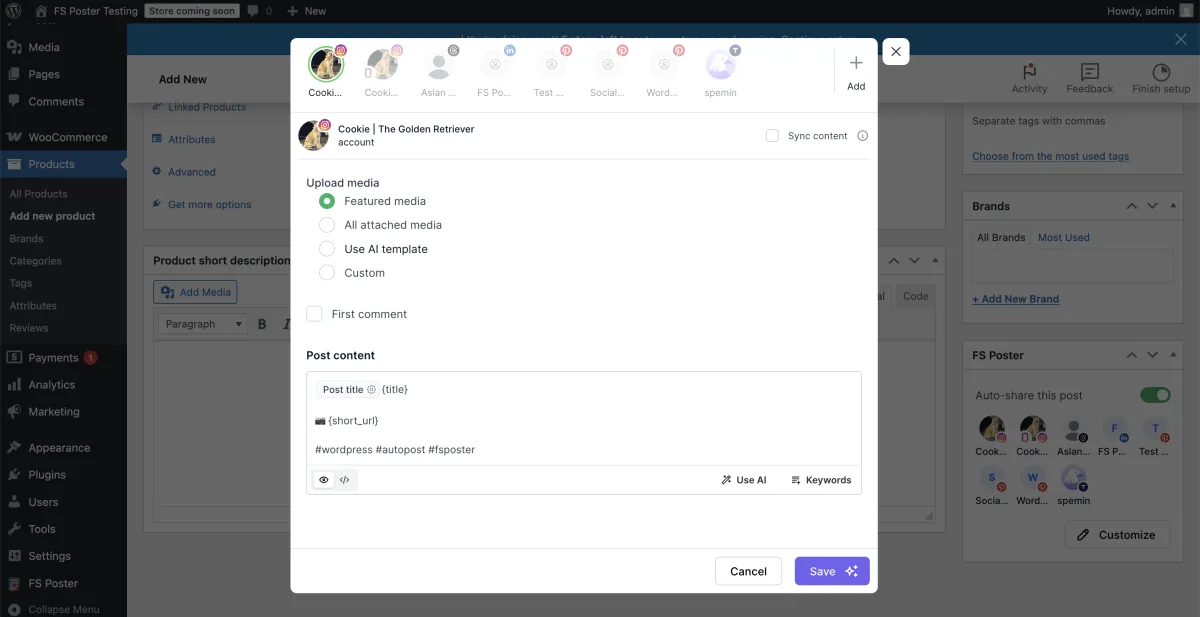
Bit Social lists WooCommerce product auto-share and custom post type auto-share as Pro-tier features. This review did not verify WooCommerce product publishing end-to-end on Bit Social, so the practical product-publish experience is described based on Bit Social's product documentation rather than hands-on verification. The structural gap is clear regardless: Bit Social does not surface a per-product social config inside the product editor (there is no Bit Social sidebar on the Product edit screen), and the per-channel taxonomy routing is only available inside the WP Post Schedule create modal. A buyer running a multi-brand WooCommerce store and wanting "tea products → Pinterest only, gadget products → LinkedIn only" rules would have to build a separate WP Post Schedule for each category — there is no per-channel rule on the Auto-Post page.
Winner: FS Poster — WooCommerce-native automation that works on every plan, a per-product social config panel/sidebar on the product edit screen, per-channel category filters that apply to products at publish time, and the WP Posts / Products list bulk action. For agencies running multi-brand WooCommerce stores, this is the workflow that justifies the FS Poster Plus or Developer tier on its own.
Ease of Use / UI & UX
| UI / UX detail | FS Poster | Bit Social |
|---|---|---|
| Admin app style | Modern v7 admin interface inside WP Admin | Modern admin interface inside WP Admin |
| Default landing surface | Calendar Month view | Home dashboard with 4 tiles (Active Account / Published Post / Active Schedule + tour) |
| Top-level navigation | 5-tab layout (Calendar / Analytics / Channels / Planners / Settings) | 9-entry top nav (Accounts / AI Prompts / WP Auto Post / WP Post Schedules / Share Now / Calendar / Templates / Logs / More) |
| Per-channel cog modal | ✅ General / Permissions / Labels tabs | ⚠️ Per-platform settings are split across Accounts (connect), Auto-Post (toggle on/ |
| Gutenberg sidebar widget | ❌ (FS Poster panel/ |
❌ |
| Bulk action on Posts list | ✅ | ❌ |
| Open-source on GitHub | ❌ Closed-source plugin | ✅ Public on GitHub |
| Friction points | No free trial; AI requires own OpenAI key | Free is 2 networks only; in-product support link needs polish; Home dashboard share counter may not be the source of truth; Share Now drafts were unreliable in testing; most platform Previews show "Coming Soon" |
Both plugins ship modern admin apps. FS Poster's v7 admin app opens to the Calendar Month view, which is the right default for editorial teams. The 5-tab top-level layout (Calendar / Analytics / Channels / Planners / Settings) is the simplest top-level architecture in the category, and the channel-avatar row inside every share-detail modal makes it fast to walk per-channel results left-to-right. Channel setup is a one-click OAuth flow for most networks because FS Poster ships Standard Apps for every supported network; configuring your own developer app for Instagram, TikTok, X, or YouTube is an optional advanced path for buyers who want their own API quota or branding.
Bit Social's admin is a modern interface inside WP Admin with a left-hand sidebar (Accounts, Auto-Post, Templates, Logs, Schedules, etc.). The styling is genuinely modern and the per-keystroke auto-save on the Templates page is delightful. The top-nav has nine entries (Accounts / AI Prompts / WP Auto Post / WP Post Schedules / Share Now / Calendar / Templates / Logs / More) — a couple more clicks deep than FS Poster's 5-tab layout, but still clean.
The honest-review caveats sit mostly on Bit Social's side. A few rough edges are worth knowing before you buy, framed in buyer terms — what works, what doesn't, and whether it changes the buying decision:
- The in-product support link needs polish. You can still manage your licence at bitapps.pro/account, but the License & Support item in the plugin opened a 404 page during testing. Buying-decision impact: low — it's a navigation annoyance, not a blocker for everyday use.
- The Home dashboard share counter may not be the source of truth. The Logs page accurately tracks every share, but the headline Published Post tile did not update after successful auto-shares in testing. Buying-decision impact: low — use the Logs page for share counts. Worth knowing so you don't think auto-share is failing.
- Share Now drafts were unreliable in testing. The Draft action closed the composer without storing anything, across multiple attempts. Buying-decision impact: medium for buyers who plan to compose, save, and finish later — verify on your own install before relying on it. Share Now's publish path itself works.
- The Share Now composer's right pane only appears after you tick at least one connected account on the left. This is a UX surprise on first run — the composer can look broken until you select an account. Buying-decision impact: none once you know the pattern; flag it for new team members.
- Most per-platform Previews still show "Coming Soon". Only Facebook renders a live mock-up; LinkedIn, Threads, Pinterest, Tumblr, Discord, and Bluesky all surface a placeholder. Buying-decision impact: low — your shares still publish correctly; you just don't get a per-network mock-up while editing the template.
None of these are deal-breakers on their own, but together they signal a product still maturing. On the other side of the ledger, Bit Social is open-source on GitHub, which is a real trust signal that FS Poster does not match.
Neither plugin offers a Gutenberg sidebar widget — both live in their own dedicated admin areas.
Winner: FS Poster — the 5-tab top-level layout is easier to orient than Bit Social's 9-entry nav, the WP Posts-list bulk action removes a real friction point, and the Calendar / Channels / share-detail modal trio is genuinely well-designed. Bit Social wins specifically on the per-keystroke Templates auto-save and the open-source GitHub publication, but the cluster of UX rough edges above pushes the practical winner to FS Poster.
Logs, Reliability & Troubleshooting
| Reliability detail | FS Poster | Bit Social |
|---|---|---|
| Per-share log inside the plugin | ✅ Calendar share-detail modal + sidebar on post edit | ✅ Logs page with Filter / Refresh / Pagination |
| Per-share Details payload | ⚠️ Status text + retry button | ✅ Inline Details expansion shows the network's response payload |
| Visit live network URL from log | ✅ Deep-link button | ✅ Visit button per row |
| Retry on failed share | ✅ Retry button in share modal | ⚠️ No in-place Retry — manual re-share via Share Now |
| Clear failure message | ✅ Exact reason (e.g. "An image / video is required to share a post on Instagram.") | ✅ Per-row Success / error pill + Details panel |
| Per-share Insights | ✅ Insights button in modal | ❌ |
| External / server cron toggle | ⚠️ Server cron recommended (Settings → General "Configure cron jobs") | ✅ Explicit External Cron toggle in Settings with cron-job command pre-baked |
Both plugins log every share attempt inside the admin, and both proved their share-success path end-to-end in testing. FS Poster's Calendar share-detail modal is the cleanest single evidence surface — channel-avatar row at the top, per-channel status text, content body, sharing date, and a Retry / Delete / Reschedule / Insights action row. When a network-side share fails (typically because Instagram or Pinterest requires a featured image that wasn't attached), the modal exposes a Retry button and the exact error message ("An image / video is required to share a post on Instagram." / "An image is required to pin on board."). Attach the missing media on the WordPress side, click Retry, and the share fires again.
Bit Social's Logs table is genuinely strong as a per-share evidence surface. Every share row has a Success / error pill, a Schedule label, an inline Details panel showing the network's response, and a Visit link to the live post URL. The trade-off is that Bit Social does not offer an in-place Retry button on failed share rows — to retry a failed share, the buyer has to re-publish or use the Share Now composer. FS Poster's Retry-in-place model is faster for everyday troubleshooting and is the more common buyer workflow.
Bit Social's External Cron toggle is a small but real reliability win. Settings → Cron Setup surfaces a pre-baked cron command and a toggle to disable WP's pseudo-cron in favour of the external one. FS Poster recommends server cron in Settings → General but doesn't ship the toggle as visibly.
Winner: Tie — FS Poster wins on the in-place Retry button, the per-share Insights surface, and the channel-avatar share-detail modal. Bit Social wins on the inline Details payload and the External Cron toggle. Either logging surface is genuinely good — what differs is the trade-off between FS Poster's retry-in-place model and Bit Social's response-payload model.
Support, Docs & Reputation
| Support / reputation detail | FS Poster | Bit Social |
|---|---|---|
| Public rating | 4.9 / 5 from 650+ reviews on fs-poster.com (vendor surface; FS Poster is not on WordPress.org) | 4.5 / 5 from 34 reviews on WordPress.org |
| Active installs / paid customers | 50K+ active installs / 25K+ paid customers (per fs-poster.com) | 6,000+ active installs (per WordPress.org) |
| Open-source on GitHub | ❌ | ✅ Public source |
| Support channels | Email / ticket via fs-poster.com, Discord community | bitapps.pro account portal, WordPress.org forum |
| Locales | 7 | 7 |
| Years in market | 8+ years | Newer challenger; active maintainer cadence — v1.13.10 released "1 week ago" on 2026-05-17 |
| Release cadence | Frequent v7.x patches | Frequent point releases; current free v1.13.10 |
| Notable reputation pattern | Strongly positive — most-praised: 26-network breadth, Lifetime tier, modern v7 UI, WooCommerce-native, 4.9 / 5 from 650+ reviews | 82% × 5★ but only 34 reviews total; 1★ cluster dominated by "Only Facebook and LinkedIn are Free" — the single most predictable buyer-disappointment trigger |
| Brand framing | FS Code (parent: Booknetic) — established multi-product WordPress publisher | Bit Apps (Founder: Abdul Kaioum) — multi-plugin WordPress ecosystem (Bit Form / Bit Integrations / Bit Flows / Bit Assist) |
Both plugins are highly rated in their respective surfaces, but the volume gap is significant. According to fs-poster.com, FS Poster carries a 4.9 / 5 rating from 650+ reviews, 25K+ paid customers, and 50K+ active installs. FS Poster is not on WordPress.org — the plugin is sold exclusively through fs-poster.com — so the rating and review counts come from the vendor's own surfaces rather than a WordPress.org plugin listing. The broader maturity signal is FS Poster's 8+ years in market and larger paid-customer base.
Bit Social's headline figure is 4.5 / 5 from 34 reviews on WordPress.org, with 28 × 5★ / 2 × 4★ / 0 × 3★ / 1 × 2★ / 3 × 1★. The 5★ majority is genuine and consistent ("Easier to Use for Non-Technical Users", "Auto Posting Plugin That Gives You Freedom", "A good alternative to FS Poster"), but the 1★ cluster is dominated by a single recurring complaint — "Only Facebook and LinkedIn are Free" — and the 34-review base is the smallest in the category (compare with Blog2Social's 2,088 reviews on WordPress.org, NextScripts SNAP's 30,000+ active installs and corresponding review volume, and FS Poster's 650+ reviews on fs-poster.com).
Active installs: Bit Social has 6,000+ on WordPress.org (2026-05-18); FS Poster has 50K+ active installs / 25K+ paid customers on fs-poster.com (2026-05-18); FS Poster is not on WordPress.org. The maturity gap is real — Bit Social is a newer challenger with an active maintainer cadence (v1.13.10 released "1 week ago" on 2026-05-17) and an open-source GitHub repository, which earns trust points that FS Poster's closed-source distribution does not.
Winner: FS Poster — 25K+ paid customers, 650+ reviews on the vendor surface vs 34 on WordPress.org, and 8+ years on the market. Bit Social wins specifically on the open-source GitHub publication and the bundled multi-plugin Bit Apps ecosystem story, both genuine trust signals — but the install-base and review-volume gap is the dominant signal for new buyers researching either plugin.
FS Poster vs Bit Social Scorecard
| Category | Winner | Why |
|---|---|---|
| Pricing & Plans | Bit Social | $149 unlimited-sites Agency LTD is the most aggressive lifetime price in the category |
| Network Coverage | FS Poster | 26 networks on every plan vs Bit Social's 13; FS Poster includes Reddit, Mastodon, Webhook, Truth Social, VK, OK.ru, Xing, Plurk, Flickr, Blogger, Medium, YouTube Community, YouTube Shorts, and a WordPress-to-WordPress destination — none of which Bit Social supports |
| Auto-Posting Workflow | FS Poster | Per-channel category routing at auto-publish, WP Posts-list bulk action, and WooCommerce-native panel/ |
| Scheduling, Calendar & Planner | FS Poster | Calendar actually overlays existing schedules; Bit Social's Calendar is a schedule-creation entry-point only |
| Content Customization | FS Poster | AI captions + AI image generation + URL shortener + click-tracking analytics on every plan |
| WooCommerce & Custom Post Types | FS Poster | Native Product auto-share included on every plan, per-channel filters apply to products, panel/ |
| Ease of Use / UI & UX | FS Poster | 5-tab top-level layout, fewer first-run rough edges, and a native WP Posts-list bulk action |
| Logs, Reliability & Troubleshooting | Tie | FS Poster wins in-place Retry + Insights; Bit Social wins inline Details payload + External Cron toggle + GitHub source |
| Support, Docs & Reputation | FS Poster | 25K+ paid customers and 650+ reviews per fs-poster.com vs 34 reviews on WordPress.org; 8+ year track record |
| Overall | FS Poster | Seven category wins, one tie, one Bit Social win (Pricing) — broader network coverage, deeper workflow automation, and the more mature install base decide it for most buyers |
Who Should Choose FS Poster?
Choose FS Poster if:
- You need broader network coverage — Reddit, Mastodon, Truth Social, Webhook, VK, OK.ru, Xing, Plurk, Flickr, Blogger, Medium, YouTube Community, YouTube Shorts, and a WordPress-to-WordPress destination are all included, and Bit Social does not offer any of them.
- You want per-channel category routing at WordPress publish time — "Tech posts → LinkedIn only" rules that apply to auto-share, not just to recurring schedules.
- You run a WooCommerce store and want product auto-share with a per-product panel/sidebar on the product edit screen and per-channel category filters that apply to products.
- You need the WP Posts-list bulk action to rehydrate an archive in one click without rebuilding individual schedules.
- You want AI image generation alongside AI captions, plus a built-in URL shortener with click-tracking analytics.
- You want the deeper install base and review volume — 50K+ active installs / 25K+ paid customers / 650+ reviews / 8+ year track record.
- You are happy paying $490 one-time for a 30-site Lifetime, or $58–$229 / year per tier, in exchange for breadth and maturity.
Who Should Choose Bit Social?
Choose Bit Social if:
- Your budget is the dominant constraint and you want the cheapest unlimited-sites Lifetime in the category at $149 one-time.
- You only need the 13 networks Bit Social covers — Facebook, LinkedIn (Profile + Page), Threads, Google Business Profile, Pinterest, Discord, Tumblr, Instagram, TikTok, X (Twitter), Bluesky, Line, Telegram — and do not need Reddit, Mastodon, Truth Social, Webhook, Blogger, Medium, YouTube, or a WordPress-to-WordPress destination.
- You are already invested in the Bit Apps ecosystem (Bit Form, Bit Integrations, Bit Flows, Bit Assist) and want a single-vendor bundle (the $1,149 Bit Apps Agency Lifetime Bundle covers all five products).
- You value open-source on GitHub as a trust signal.
- You want the inline Details payload + Visit live URL logging surface to verify shares fired without leaving WordPress.
- You prefer per-keystroke auto-save on the Templates page over FS Poster's explicit Save model.
- You can live with the 34-review base on WordPress.org and the maturity-stage rough edges (an in-product support link that needs polish, Home dashboard counts that may require checking Logs, "Coming Soon" previews on most platforms, unreliable Share Now draft saving, and no Calendar overlay of existing schedules).
Alternatives to Both
If neither FS Poster nor Bit Social is the right fit, three other WordPress social plugins are worth shortlisting. For a Bit Social-specific shortlist, see the Bit Social alternatives page.
- Blog2Social — Adenion GmbH's German-built plugin with 25 networks on Business, a genuinely usable Free tier (12 networks, 1 account per network), and the highest review volume in the category (2,088 reviews on WordPress.org). Best for editorial teams that want a real Free tier and "Made in Germany" framing. Read the Blog2Social review for the full walkthrough.
- Jetpack Social — Automattic's WordPress-publishing-first plugin with a Gutenberg-native sidebar and a usable Free tier on roughly 8 mainstream networks. Best for solo bloggers who already trust the Automattic stack and only need Facebook + LinkedIn + Threads + a couple of others. Read the Jetpack Social review for the testing notes.
- Revive Old Posts — Revive Social's purpose-built evergreen recycler. Best when your only job-to-be-done is "keep republishing my archive forever" and you do not need day-one auto-share, AI, or a manual share surface. Read the Revive Old Posts review for the testing notes.
If you are still shopping the whole category, the WordPress plugins for auto-sharing posts roundup pulls every option above into a single comparison frame.
FS Poster vs Bit Social FAQ
Is FS Poster better than Bit Social?
For most buyers, yes. FS Poster wins seven of nine head-to-head categories outright and ties one (Logs, Reliability & Troubleshooting). The only category Bit Social wins decisively is Pricing, on the strength of its $149 unlimited-sites Agency LTD. Everywhere else — network coverage (26 vs 13), auto-posting workflow, WooCommerce automation, content customization (AI image generation + URL shortener), Calendar / Planner overlay, ease of use, and reputation — FS Poster wins on breadth, maturity, or both. Bit Social is the right choice when budget is the dominant constraint and the 13-network roster covers your distribution mix.
Which is cheaper: FS Poster or Bit Social?
Bit Social, on every comparable metric. The cheapest Bit Social paid entry is $49 / year Starter Annual (vs FS Poster's $58 / year Single intro), the cheapest Lifetime is $89 Starter LTD for 1 site (vs FS Poster's $490 Lifetime for 30 sites), and the cheapest unlimited-sites Lifetime is $149 Agency LTD — FS Poster has no unlimited-sites Lifetime equivalent at all. If raw lifetime cost is the only criterion, Bit Social wins outright. But normalise to per-network economics ($149 ÷ 13 = $11.46 per network vs $490 ÷ 26 = $18.85 per network), or add in the missing Reddit / Mastodon / Truth Social / Webhook / Blogger / Medium / YouTube / WordPress-to-WordPress destination / WooCommerce-native automation, and the gap closes.
Which tool supports more social networks?
FS Poster, by a wide margin. FS Poster ships 26 networks on every plan — including X (Twitter), YouTube Community, YouTube Shorts, Threads, Bluesky, Mastodon, Truth Social, Telegram, Reddit, Discord, VK, OK.ru, Xing, Plurk, Flickr, Blogger, Medium, a Webhook destination, and a WordPress-to-WordPress destination. Bit Social ships 13 networks on Pro (Facebook, LinkedIn Profile + Page, Threads, Google Business Profile, Pinterest, Discord, Tumblr, Instagram, TikTok, X, Bluesky, Line, Telegram) and lists Reddit as "Coming Soon" on bitapps.pro/bit-social/. Bit Social does not support Mastodon, Truth Social, Webhook, VK, OK.ru, Xing, Plurk, Flickr, Blogger, Medium, YouTube Community, or YouTube Shorts at any tier.
Which tool is better for WooCommerce?
FS Poster, decisively. WooCommerce products auto-share to every connected channel once Woo is active — no extra licence, no paid add-on, and the FS Poster panel/sidebar on the product edit screen shows per-channel status with timestamps and deep links to the live social posts. Per-channel category filters apply to products too, so per-collection or per-tag routing is one cog-modal away. Bit Social's WooCommerce + custom-post-type auto-share is Pro-only, and the structural workflow gap is bigger than the licence-tier gap: Bit Social does not surface a per-product social config inside the product editor, and the per-channel taxonomy routing is only inside the WP Post Schedule create modal.
Which tool is better for agencies or multiple sites?
It depends on how you weigh price vs feature breadth. Bit Social wins on raw multi-site economics — the $149 Agency LTD gives you unlimited sites for life, vs FS Poster's $490 Lifetime which caps at 30 websites. But the Bit Social Agency LTD only removes the per-site licence cap — it does not add a cross-site management UI; every WordPress install still runs its own Bit Social admin. FS Poster wins on workflow breadth — per-channel category routing at auto-publish, the WP Posts-list bulk action, WooCommerce-native automation, 26-network coverage, and a deeper review volume + install base for cold-traffic SERP trust. For agencies with a 5-network distribution mix and 15+ client sites, Bit Social's pricing is hard to argue with. For agencies serving multi-network publishers or WooCommerce stores, FS Poster's workflow advantages compound across the client base.
Which tool is easier for beginners?
FS Poster. The five-tab top-level layout (Calendar / Analytics / Channels / Planners / Settings) is the simplest top-level architecture in the category, and the auto-share-on-publish path works out of the box on every plan. Bit Social's admin interface is genuinely well-designed, but the UX rough edges — an in-product support link that needs polish, Home dashboard counts that may require checking Logs, unreliable Share Now draft saving, "Coming Soon" previews on most platforms, and the Calendar not overlaying existing schedules — add real first-time-buyer friction that FS Poster does not impose. Bit Social wins specifically on the per-keystroke Templates auto-save, which is a delightful detail; FS Poster wins on every other first-run touchpoint.
Can I bring my own AI key to both plugins?
Yes. Both FS Poster and Bit Social use a bring-your-own-OpenAI-key model — neither plugin bundles OpenAI credits. FS Poster's AI features include both caption generation and AI image generation, available from every per-channel editor and from a dedicated AI Templates surface. Bit Social's AI Prompts modal (Pro tier) covers caption generation via ChatGPT (gpt-4 model, temperature slider, smart-tag-templated prompts + fallback content) and DALL·E image generation, both running on the buyer's OpenAI key. Neither plugin supports multi-LLM (Anthropic / Google / local) today.
What's the catch with Bit Social's $149 unlimited-sites Lifetime?
Three real catches, all worth knowing before purchase. First, it's a promo-driven price under a permanent "Save Upto 74% OFF" countdown — the April 2026 snapshot of the same page showed $169 for the Agency LTD, so the list price rotates. Quote the price with a "captured on" footnote. Second, "unlimited sites" means the licence cap is removed, not that Bit Social adds a central multi-site management UI — every WordPress install still runs its own Bit Social admin. Third, the Pro feature set is real but the rough edges (an in-product support link that needs polish, Home dashboard counts that may require checking Logs, no Calendar overlay of existing schedules, unreliable Share Now draft saving, and "Coming Soon" previews on most platforms) are also real, and a $149 buyer should expect to work around them as they hit the workflow.
Final Verdict
FS Poster wins this comparison for any buyer whose decision is driven by network breadth, workflow automation, WooCommerce, or vendor maturity. Twenty-six networks on every plan vs Bit Social's thirteen, native Webhook + WordPress-to-WordPress destinations Bit Social doesn't offer at any price, per-channel category routing that applies at auto-publish, a WP Posts-list bulk action that rehydrates an archive in one click, a per-product social config panel/sidebar on the product edit screen, AI image generation alongside captions, a built-in URL shortener with click-tracking analytics, and 50K+ active installs / 25K+ paid customers (per fs-poster.com) add up to a clearly more capable product. Start with the FS Poster review and shortlist the Plus or Lifetime tier based on your site count.
The honest exception is the budget-driven buyer. If your priority is the cheapest unlimited-sites Lifetime in the category and you only need the 13 networks Bit Social covers, the $149 Agency LTD is the most aggressive lifetime price in WordPress social-publishing and pairs with a 14-day money-back guarantee, an open-source GitHub repository, an inline Details payload + Visit URL on every share row, and the bundled Bit Apps ecosystem story if you're already on Bit Form / Bit Integrations / Bit Flows. Read the Bit Social review for the full hands-on walkthrough — or browse the Bit Social alternatives shortlist if the network-coverage gap, the maturity-stage rough edges, or the "Coming Soon" Reddit support rule it out.
Write once. Post to 26 networks.
- 26 social networks
- Schedule & auto-repost
- Runs inside wp-admin


