


SchedulePress can be a strong fit for WordPress editorial teams that live in a drag-and-drop calendar, multi-author publishers who want email notifications and a missed-schedule recovery toggle, and price-sensitive buyers who can use a free tier covering 7 of 8 networks. But it is not always the right install — especially if you need an alternative to SchedulePress, a SchedulePress replacement, or SchedulePress competitors for WordPress because you need more than the 8 supported networks, an in-product activity log to confirm shares actually fired, AI-generated captions, a working URL shortener, a webhook destination, or simply a clean post-X-rebrand experience.
I tested each plugin on clean WordPress sites and then compared them against the public pricing pages, the WordPress.org rating and review breakdowns, and each plugin's official feature pages. Below is the short list of tools worth considering and where each one fits best.
Why Look for a SchedulePress Alternative?
SchedulePress earns its 4.6 / 5 rating from 198 reviews and 10,000+ active installs on WordPress.org (as of May 2026). The editorial calendar is genuinely good, the Missed Schedule Handler solves a real low-traffic-site problem, and the Advanced Schedule (schedule an update to an already-published post) is unique to the plugin. The reasons buyers shortlist alternatives in 2026 are concrete, however, and they cluster around five specific gaps.
Only 8 networks — the narrowest "Pro" coverage in this category. SchedulePress supports Facebook, Twitter, LinkedIn (Profile + Page), Pinterest, Instagram, Medium, Threads, and Google Business Profile. There is no Reddit, Bluesky, TikTok, Discord, Tumblr, Mastodon, VK, Webhook, YouTube Community, or Truth Social. Compare with FS Poster (26), Blog2Social (25 on Business), Bit Social (13), or NextScripts SNAP (30 destinations). If your distribution requires any of those missing networks, SchedulePress is a non-starter.
No in-product activity log or share-history panel. Bit Social and Blog2Social both show detailed share logs inside the plugin — every share row reports a Success or Failure status, the response details, and a "Visit live URL" link to the live post. SchedulePress has no equivalent. The Schedule And Share workflow saves the per-network social-message settings correctly, but there is no activity log inside the plugin to confirm whether a specific share actually published — buyers have to open each connected social account and check manually. For a publisher relying on auto-share-on-publish to back a campaign launch, that gap is a real workflow problem.
Twitter is still labeled "Twitter" everywhere — the X rebrand has not landed. Marketing copy, admin labels, the Social Profile tab, the Social Templates editor — all still use the legacy "Twitter" branding in May 2026. The 280-character cap is correct, but the brand alignment is stale for buyers expecting "X" branding and modern v2 API support.
The social-publishing capabilities are notably thin compared with category leaders. No AI-driven caption generation. No URL shortener. No multi-image carousel sharing (only the featured image is posted to each network). No first-comment automation for Instagram, Threads, or Bluesky. No webhook / Zapier / IFTTT dispatcher. Smart-tag library is only 4 tags ({title} {content} {url} {tags}) — the smallest in the category. No per-share click-tracking or engagement analytics.
Free tier already covers 7 of 8 networks — so Pro is mostly a workflow upgrade, not a network upgrade. The only network gated behind Pro is Google Business Profile. The real Pro value is the Auto Scheduler queue + Manual Scheduler + Missed Schedule Handler + Advanced Schedule + Publish-Now-with-Future-Date workflow features. Buyers who want significantly more networks (or AI, analytics, webhooks) will not get them by paying for SchedulePress Pro — they need to switch plugins.
If any of those gaps maps to your situation, the six alternatives below are the ones I would shortlist.
Quick Comparison Table
| Tool | Starting Price | Best For | Strongest Advantage | Main Limitation |
|---|---|---|---|---|
FS Poster |
$58/ |
Network-breadth + agency + WooCommerce buyers |
26 networks, click tracking, X handled, optional Lifetime |
No free tier |
Blog2Social |
Free (12 networks) · €72.00/ |
Editorial teams who want a calendar + AI captions |
25 networks on Business + AI Post Templates + per-network share editor |
Auto-share on publish is paid; X is an add-on |
Bit Social |
Free (2 networks) · $89 LTD / $149 Agency LTD |
AI-curious buyers who want detailed per-share logs |
ChatGPT + DALL·E + detailed share logs + cheapest Lifetime |
Free is only 2 networks |
Jetpack Social |
Free · €59.40 first year / €107.40 renewal (annual) |
Solo bloggers on the Automattic stack |
Gutenberg-native sidebar + 8-network free tier with unlimited shares |
Still only 8 networks; no Twitter/ |
NextScripts SNAP |
Free (24 networks) · $14.95–$249.95/ |
Technical buyers needing VK, ok.ru, weibo, MailChimp |
30 destinations + 100% white-label posts + WP-to-WP cross-posting |
Dated admin UI + DIY developer apps |
Revive Social |
Free · $99–$399/ |
Evergreen archive recycling |
Purpose-built recurring re-share with deep filters |
Free is only 2 networks; LinkedIn currently broken |
Prices checked in May 2026. Free plans, intro pricing, and add-on tiers shift frequently — always re-verify on the vendor pricing page before you buy.
Best SchedulePress Alternatives
1. FS Poster — The 26-network, analytics-first, Lifetime-tier alternative
Starting price: $58/year intro on Single (renews at $65/year), with an optional Lifetime tier for 30 websites.
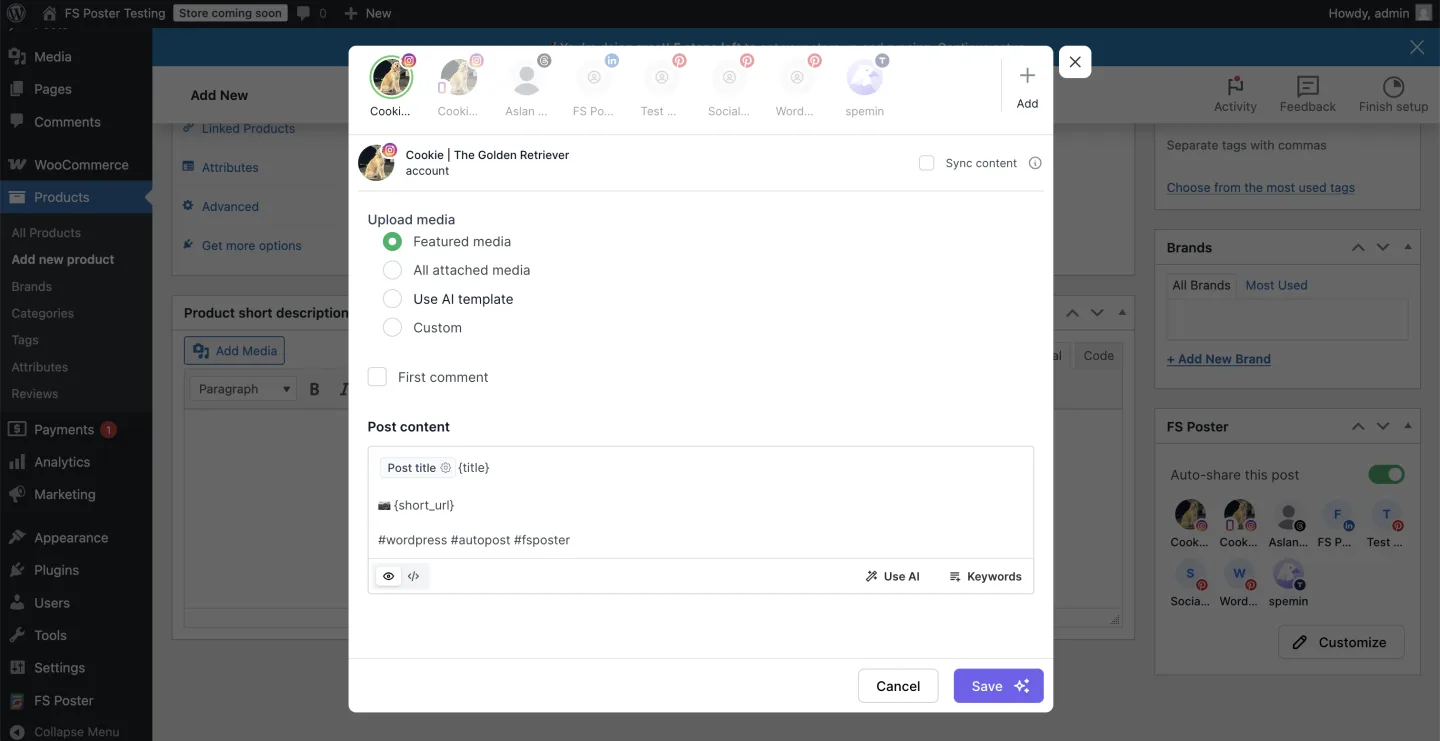
FS Poster is the strongest direct alternative for SchedulePress buyers who outgrow the 8-network ceiling — especially if you need Reddit, Bluesky, TikTok, Discord, Mastodon, VK, Truth Social, Telegram, or a generic Webhook destination. It is a WordPress plugin first — installed and activated inside WP-Admin like SchedulePress — with a clean, modern admin interface, a 26-network channel inventory (including the newly added YouTube Shorts destination), a built-in calendar, a recurring Planner for evergreen reshares, a one-click bulk action on the standard WordPress Posts list, and a native WooCommerce integration so product publishes auto-share without a separate add-on.
Key features:
- 26 social networks covered on every plan (Facebook, X/Twitter, LinkedIn, Instagram, Threads, Pinterest, TikTok, YouTube, YouTube Shorts, Bluesky, Mastodon, Reddit, Telegram, Discord, VK, Google Business Profile, Truth Social, Plurk, Flickr, Webhook, and more)
- Optional Lifetime tier covering 30 websites for long-term/multi-site buyers; updates included for the life of the plugin
- WooCommerce-native — products auto-share once Woo is active, no extra licence
- Per-channel category filters (include/exclude by taxonomy) that correctly skip non-matching posts
- Recurring Planner with sleep-time exclusions and weekday × time matrix
- WP Posts-list bulk action ("Bulk Schedule [FS Poster]") to rehydrate an archive in one click
- AI captions + image generation (bring your own OpenAI key)
- Click tracking + URL shorteners + per-channel proxy + watermarking + multisite support
- In-product activity log with per-share Success/Failure status and "Go to post" deep links — the audit trail SchedulePress lacks
Pricing: Starts at $58/year intro on Single (renews at $65/year, 1 site). Plus is $109/year intro / $195/year renewal (3 sites) and Developer is $229/year intro / $449/year renewal (15 sites). For long-term/multi-site buyers, an optional one-time Lifetime tier covers 30 websites with 12 months of support and lifetime updates. 14-day money-back guarantee. No free tier.
Best for: WordPress agencies and freelancers running 3+ client sites, publishers who need Reddit / Bluesky / TikTok / Discord / Webhook (anything beyond SchedulePress's 8), WooCommerce stores that want product auto-promotion, buyers who want a single one-time payment instead of an annual renewal, and operators who want click-tracking analytics inside the plugin.
Why it is a strong SchedulePress alternative: It closes SchedulePress's biggest gaps in one tier. 3× the network coverage (26 vs 8), including every modern destination SchedulePress does not support — Reddit, Bluesky, TikTok, Discord, Mastodon, Truth Social, VK, Webhook, YouTube, and YouTube Shorts. The in-product activity log with "Go to post" deep links answers the "did my share actually fire?" question that SchedulePress has no in-product answer for — every share row links straight to the live post on the social network. Per-channel category filters let you route Tech posts to LinkedIn while sending Travel posts to Pinterest — SchedulePress has nothing equivalent. The optional Lifetime tier is available as a long-term/multi-site path covering 30 websites for buyers who want to stop tracking renewals. And the WooCommerce-native integration beats SchedulePress's documented-only Woo support — FS Poster auto-detects products as soon as Woo is active, with no extra licence.
What to watch for: There is no free tier — buyers either purchase or evaluate via the live demo. Twitter/X behaviour is the most volatile network across the whole category (independent platform-side anti-automation evolves frequently). Instagram, Pinterest, and Instagram Story share require a featured image. AI features depend on the buyer's own OpenAI key.
If a one-page head-to-head is what you need, read the FS Poster review for the full walkthrough, the SchedulePress review for the in-depth SchedulePress write-up, or the FS Poster vs SchedulePress comparison for the direct side-by-side.
2. Blog2Social — The 25-network calendar-and-AI alternative
Starting price: Free (12 networks, manual share) · €72.00/year Smart (≈€6.00/month equivalent) · €118.80/year Pro (≈€9.90/month equivalent) · €299.88/year Business (≈€24.99/month equivalent), all billed yearly (checkout-verified May 2026).
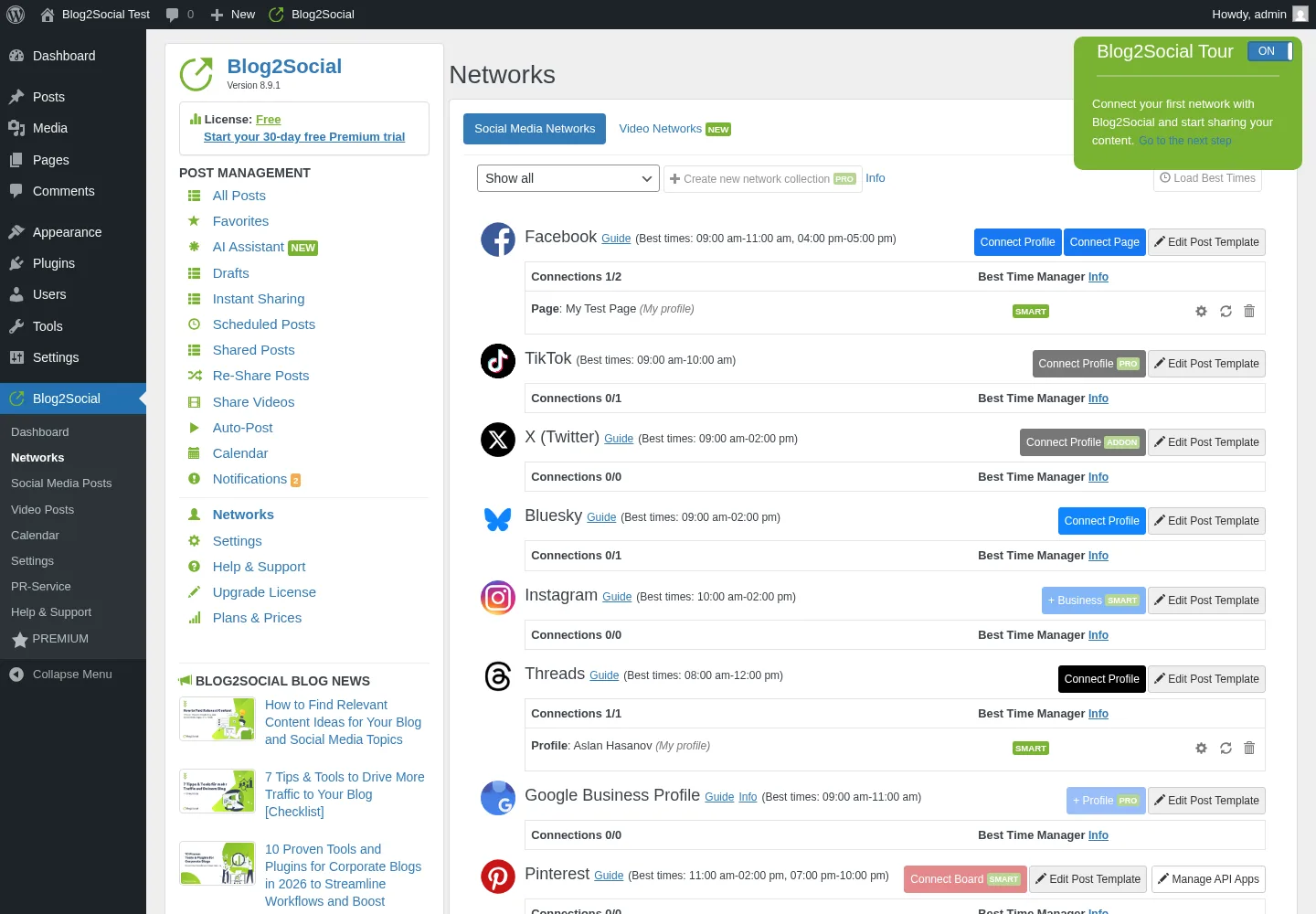
Blog2Social is Adenion's flagship social-publishing plugin for WordPress and the most direct "broad-network plus calendar" alternative to SchedulePress. It has its own dedicated admin area (Dashboard → Networks → Social Media Posts → Calendar → Settings) and pushes WordPress posts — or freshly-curated links, text, images, and videos — to a deep network set: up to 25 destinations on the Business tier, covering Facebook Pages and Profiles, LinkedIn Profile and Page, Instagram Business, Threads, Bluesky, TikTok, Pinterest, YouTube, Vimeo, Reddit, Medium, Mastodon, Discord, Telegram, Google Business Profile, Xing, VK, Tumblr, Blogger, Flickr, and more. With 2,088 reviews and 4.5 / 5 stars on WordPress.org plus 50,000+ active installs, it is the highest-volume trust signal in this category.
Key features:
- 25 networks on Business tier (12 on Free), including Reddit, Bluesky, TikTok, Mastodon, Discord, Telegram, and VK that SchedulePress does not support
- Per-network share editor — each connected account gets its own textarea, character counter, image controls — even on Free
- Best Time Manager presets visible per-network on the Networks page — even on Free
- Drag-and-drop social-media calendar inside WordPress — the closest analog to SchedulePress's editorial calendar
- Re-Share Posts evergreen planner with a rich rule builder (post types, dates, categories, authors, image-only, share-cap, day-of-week)
- AI Post Templates per-network (tone + writing-style switches) added in v8.9.0
- First-comment automation for 10 networks (Facebook, Flickr, Reddit, VK, YouTube, Vimeo, Mastodon, Discord, Threads, Band)
- In-product share log with per-network "shared by admin" rows and timestamps
- 30-day free Premium Pro trial (auto-downgrades to Free)
Pricing: Free covers 12 networks with manual share, 1 account per network, 1 user, 1 site. Paid tiers are billed yearly as Smart €72.00/year (≈€6.00/month equivalent; 16 networks, 2 sites), Pro €118.80/year (≈€9.90/month equivalent; 24 networks, 5 sites), and Business €299.88/year (≈€24.99/month equivalent; 25 networks, 10 sites) — all base-plan annual totals checkout-verified May 2026. X (Twitter) is always a separate paid add-on, sold as a genuine monthly subscription at $14.99–$59.99/month (priced by 70 / 100 / 250 posts per month). Video Posting is always a separate paid add-on (annual, $69/year). No Lifetime tier, no month-to-month billing.
Best for: Editorial teams and content marketers who want a real calendar + Best Time + reshare planner inside WordPress, publishers who need broad network reach beyond the SchedulePress 8 (Reddit, TikTok, Bluesky, Mastodon, Discord, Telegram, VK), agencies and multi-author teams who can afford the Business tier at €299.88/year (≈€24.99/month equivalent, billed yearly) for team management, and buyers who specifically value the "Made in Germany" framing.
Why it is a strong SchedulePress alternative: It is the only alternative in this list that matches SchedulePress's calendar workflow and dramatically expands network coverage. 3× the network depth (25 vs 8) including every modern network SchedulePress does not support. The AI Post Templates per network answer SchedulePress's missing AI caption generation. The per-network share editor is more capable than SchedulePress's Social Templates page — each account gets its own textarea, character counter, post-format selector, and Best Time preset. And the in-product share log answers the "did my share fire?" question SchedulePress cannot.
What to watch for: Auto-share on publish is a Smart-tier feature (€72.00/year+). Free users must open Blog2Social → All Posts → Share on Social Media and click Share Now manually for every post — SchedulePress Free, in contrast, supports auto-share-on-publish on 7 of 8 networks. X (Twitter) is always an add-on on top of the base subscription, sold as a genuine monthly subscription ($14.99–$59.99/month). Video posting is always an add-on (annual, $69/year). The pricing matrix is four-dimensional (networks × accounts × users × websites + add-ons). No Lifetime tier. Telegram is Business-only; Mastodon and Google Business Profile are Pro-only; Pinterest is Smart-only — map the tiers carefully before you buy.
For the full walkthrough — including screenshots of live Threads shares — see the Blog2Social review.
3. Bit Social — The AI-first Lifetime alternative with a real share-logs panel
Starting price: Free (2 networks) · $89 one-time Starter LTD (1 site) / $149 one-time Agency LTD (unlimited sites).
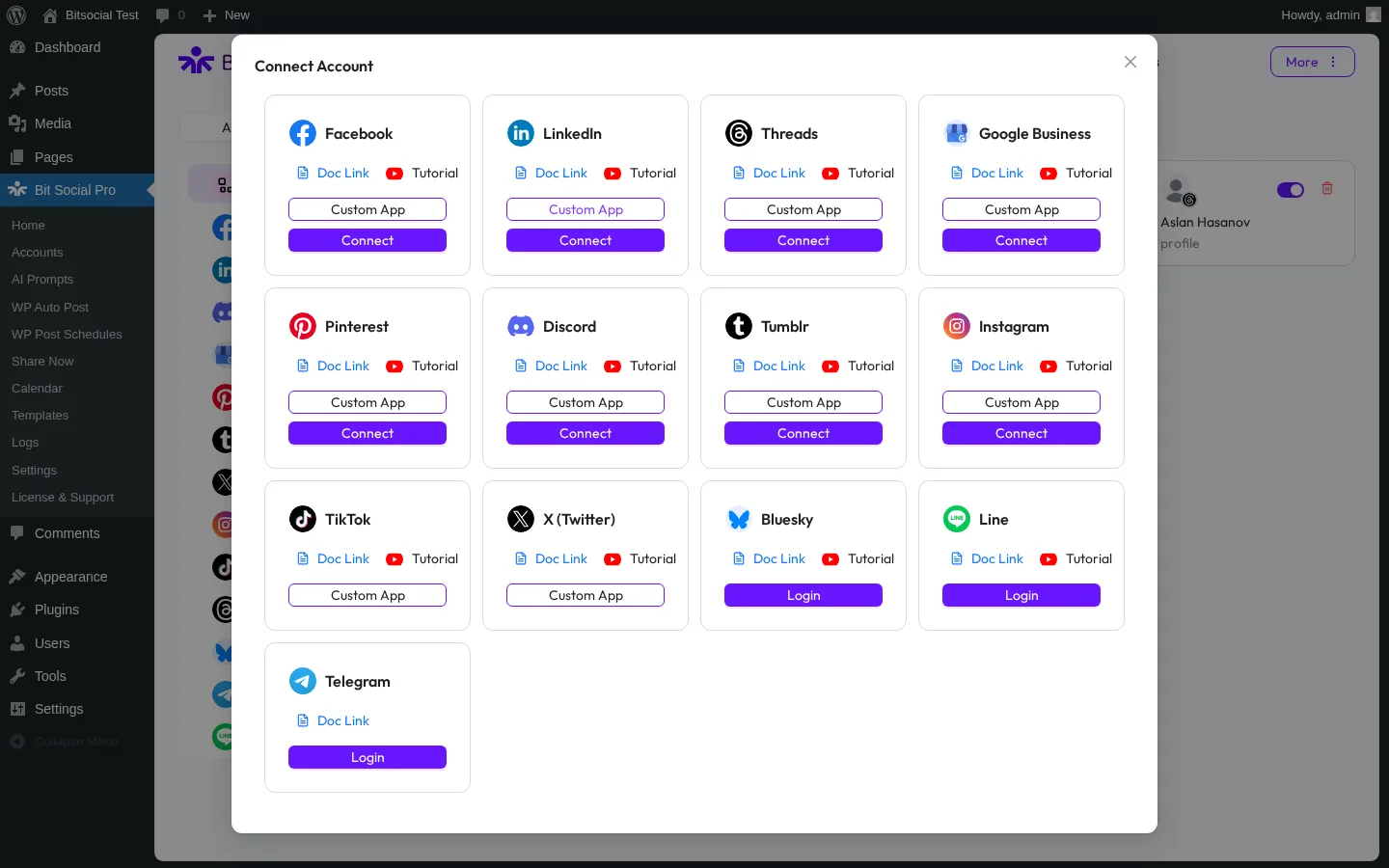
Bit Social is Bit Apps's challenger entry in the WordPress social-publishing category and the answer to two specific SchedulePress gaps at once — no AI caption generation and no in-product activity log. From a clean modern WordPress admin interface it auto-shares new posts to 13 networks — Facebook Pages, LinkedIn (Profile in free + Page in Pro), Threads, Google Business Profile, Pinterest, Discord, Tumblr, Instagram, TikTok, X (Twitter), Bluesky, Line, Telegram — and ships AI Prompts (ChatGPT + DALL·E, bring-your-own-OpenAI-key) plus a detailed share-logs panel that captures every share attempt with its outcome and a live link to the published post.
Key features:
- 13 networks in the Connect Account modal (Reddit is announced as "Coming Soon")
- Per-platform Templates with smart fields (Threads first-reply, Pinterest custom title) and auto-save on every keystroke
- AI Prompts (ChatGPT + DALL·E) with smart-tag templating + fallback content, BYO OpenAI key — the AI surface SchedulePress lacks
- Detailed per-share logs with response details and a live "Visit" link to each post — the audit trail SchedulePress is missing
- First-comment automation on Instagram, Threads, Bluesky
- WooCommerce + custom-post-type auto-share (Pro)
- External Cron toggle with clear cron-command instructions
- Open-source on GitHub
- Developer filter hook for engineers who need to customise outgoing payloads
Pricing (promo as of May 2026): Starter Annual $49/year (1 site), Starter LTD $89 one-time (1 site), Agency Annual $99/year (unlimited sites), Agency LTD $149 one-time (unlimited sites, "Most Popular"), Bit Apps Agency Bundle $1,149 one-time for 5 products. All paid plans include a 14-day money-back guarantee. The free WordPress.org build is restricted to 2 networks (Facebook + LinkedIn Profile) — every other network is Pro-only.
Best for: AI-curious buyers who want ChatGPT-generated captions + DALL·E images on a BYO-OpenAI-key basis, buyers who want the cheapest Lifetime + unlimited-sites licence in the category ($149), buyers who specifically want detailed per-share logs for "did my share fire?" debugging, Bit Apps ecosystem buyers already using Bit Form / Bit Integrations, and Threads + Bluesky + Pinterest + Twitter publishers who want all four covered.
Why it is a strong SchedulePress alternative: It plugs four specific SchedulePress gaps in one tier. AI Prompts (ChatGPT + DALL·E) versus zero AI in SchedulePress. Detailed per-share logs with live Visit links versus SchedulePress's missing activity log. TikTok, Bluesky, Telegram, Discord, and Line versus SchedulePress's 8-network ceiling. And $149 one-time for unlimited sites is a meaningfully cheaper Lifetime path than SchedulePress's $299 Lifetime Unlimited.
What to watch for: The Free tier is only 2 networks (Facebook + LinkedIn Profile) — the single most-cited 1★ complaint on WordPress.org. The active-install base is 6,000+ on WordPress.org (vs SchedulePress's 10,000+). No Reddit (Coming Soon), no Mastodon, no Webhook, no VK, no Medium. The Calendar planner does not visually overlay existing scheduled events — it is a schedule-creation entry-point only. The Share Now composer's Save Draft button does not reliably save a draft in this build — buyers who plan to "save and finish later" should test it on their own install first. Twitter/X and TikTok require the buyer's own Custom App credentials. The in-product License & Support page currently returns a 404. AI Prompts are OpenAI-only — no Anthropic / Google / local LLM support and no bundled credits.
See the Bit Social review for the full review, including a screenshot of the share-logs panel showing a successful share.
4. Jetpack Social — The 8-network simpler-and-cleaner alternative
Starting price: Free · €59.40 first year (≈€4.95/month) then €107.40/year renewal (≈€8.95/month) for the Social paid plan.
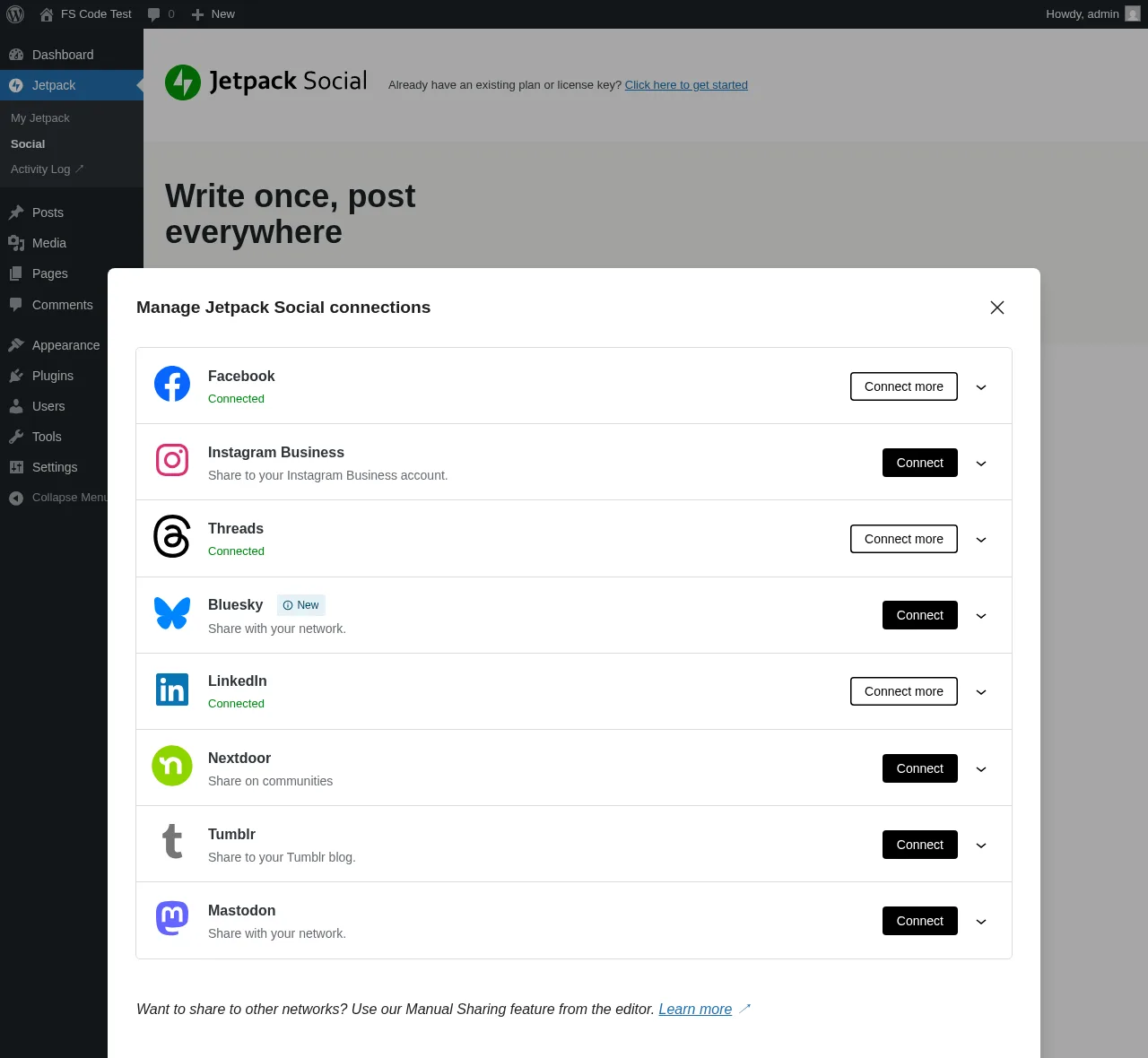
Jetpack Social is Automattic's stripped-down WordPress publishing plugin and the closest "same 8-network tier but simpler and brand-trusted" alternative to SchedulePress. From the Gutenberg sidebar it auto-shares a new post with featured image and excerpt to 8 supported networks — Facebook Pages, Instagram Business, Threads, LinkedIn, Bluesky, Nextdoor, Tumblr, Mastodon — three of which (Bluesky, Nextdoor, Mastodon) SchedulePress does not support. The Free tier covers the core auto-share, scheduling, content recycling, manual-share buttons, link preview, UTM-on-share, and a Social Notes beta — and has been unlimited shares since September 2024.
Key features:
- 8 networks — Facebook Pages, Instagram Business, Threads, LinkedIn, Bluesky, Nextdoor, Tumblr, Mastodon (Bluesky, Nextdoor, Mastodon are not in SchedulePress)
- Native Gutenberg sidebar widget — no context-switch out of the editor (SchedulePress uses a modal opened from the sidebar instead)
- Free tier has unlimited shares; auto-share, scheduling, manual re-share all included
- Sharing Activity dialog with per-row Shared/Scheduled status and live "View ↗" link — the in-product evidence surface SchedulePress lacks
- Per-account custom message + per-account custom image on the paid plan
- Social Image Generator (template-based branded share images) on paid
- 14-day money-back guarantee on annual plans
Pricing: Social Free covers the core flow on 8 networks with unlimited shares. The Social paid plan runs €59.40 first year (~$59) then €107.40/year renewal (~$107) — ≈ €4.95/month intro, €8.95/month renewal. A 2-year prepay at €133.44 offers an additional discount. The Growth bundle (Social + Stats + Search + Boost) is €107.40 first year, €227.40 renewal. Currency is IP-geolocated by Automattic, so US buyers should treat per-month numbers as approximately $5/mo and $10/mo.
Best for: Solo bloggers and small businesses publishing to 2–4 mainstream networks, buyers already paying for Jetpack (Stats, Security, Growth), and less-technical WordPress users who value the Automattic name and the absence of a separate SaaS subscription.
Why it is a strong SchedulePress alternative: It does not match SchedulePress on network count — both cap at 8 — but it answers two specific gaps. The Sharing Activity dialog with per-share View ↗ links is the in-product evidence surface SchedulePress is missing entirely. When you publish a post and want to confirm the share fired, Jetpack Social tells you inside the editor; SchedulePress sends you to each social network manually. The Gutenberg sidebar workflow lives inside the editor, where SchedulePress opens a Schedule And Share modal. And the Automattic brand trust is a real factor for non-technical buyers who would rather be on a first-party Automattic plugin than a third-party scheduler. Bluesky and Mastodon are bonuses if those audiences matter.
What to watch for: Only 8 networks — and the network set is different from SchedulePress's. No Twitter/X (permanently removed post-2023 API change), no Pinterest, no TikTok, no YouTube, no Reddit, no Discord, no Telegram, no VK, no Truth Social, no Webhook, no Google Business Profile, no Medium. The WordPress.org rating is 3.3 / 5 from 74 reviews — bimodal sentiment, with the 1★ cluster centred on OAuth-reconnection issues. There is no per-channel category filter, no recurring evergreen-reshare planner, no WP Posts-list bulk action, no WooCommerce-aware logic, no multi-site / agency licensing, and no editorial calendar (where SchedulePress's drag-and-drop calendar is the centrepiece).
For the full walkthrough — including a screenshot of the Sharing Activity dialog — see the Jetpack Social review.
5. NextScripts SNAP — The 30-destination technical alternative
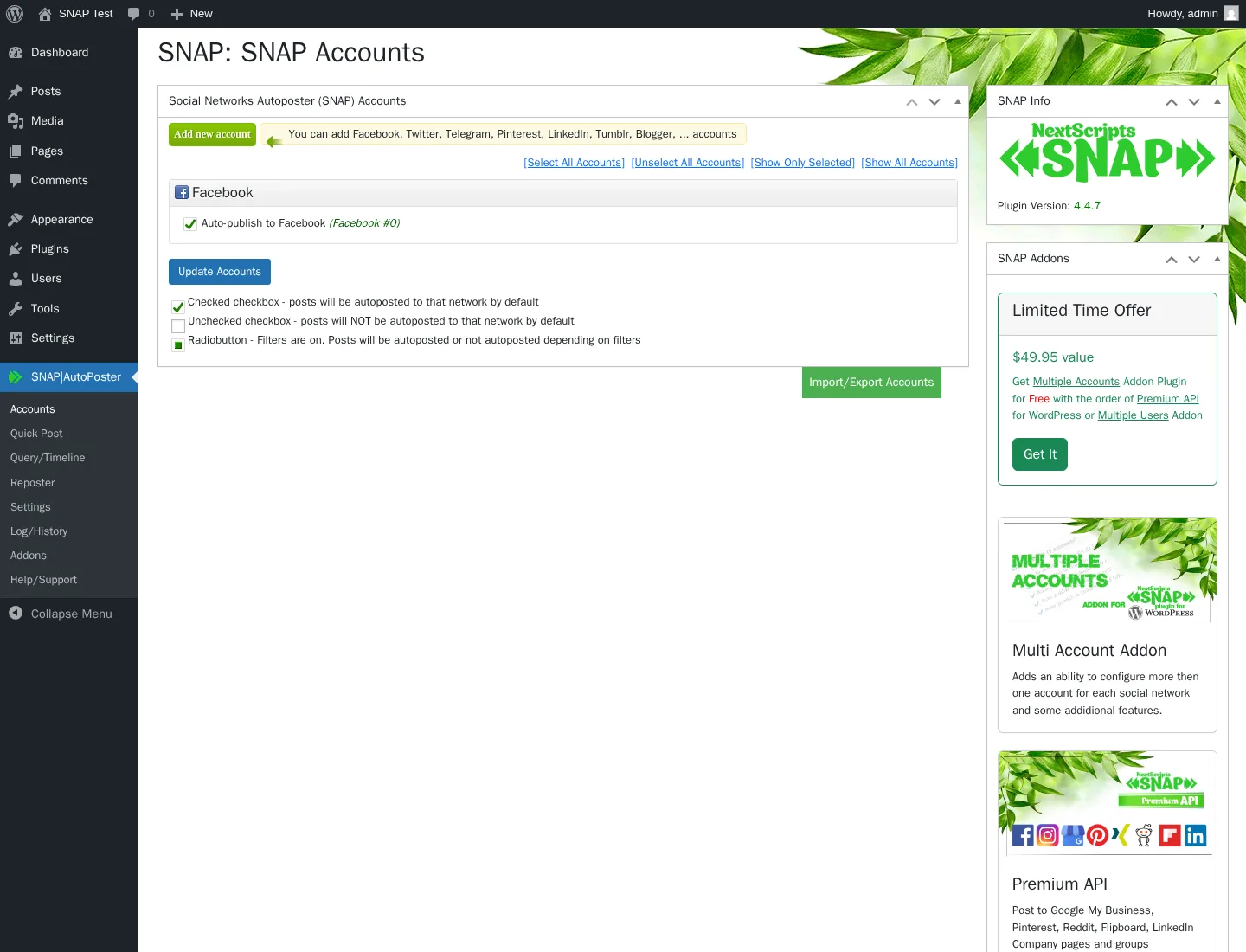
Starting price: Free (24 networks) · paid add-ons from $14.95/year · $69.95/year Autopost bundle · $249.95/year All-Access Pass.
NextScripts: Social Networks Auto-Poster (SNAP) is the 14-year-old workhorse WordPress auto-poster — first published March 2012. From its own top-level admin area it auto-shares to 30 listed network destinations: Facebook, Twitter, LinkedIn, Tumblr, Blogger, Pinterest, Reddit, Instagram, Telegram, Flickr, Flipboard, Google Business Profile, Line, LiveJournal, MailChimp, Medium, ok.ru, Plurk, Scoop.It, SETT, XING, VK.com, weibo, Diigo, Instapaper, deviantART, vBulletin, WordPress-to-WordPress, YouTube channel feed, and Yo. The flagship differentiator is 100% white-label posting — buyers register their own Facebook/Twitter/LinkedIn developer apps so every share is attributed to their brand, with no "shared via NextScripts" footer.
Key features:
- 30 listed network destinations — the broadest reach in the WordPress auto-poster category
- 24 networks work on the free tier; 6 require the Premium API addon (Pinterest, Reddit, Flipboard, GMB, Scoop.It, YouTube + LinkedIn Company pages)
- 100% white-label posts via the buyer's own developer apps
- Reposter (recycler) with full rule-builder on Free — category/tag/post-type/author filters, frequency, randomized posting time
- 15+ replacement tags including %TITLE%, %URL%, %SURL%, %IMG%, plus "spin" syntax
{a|b|c}for per-post variation — vs SchedulePress's 4 smart tags - 11 URL shorteners built-in (is.gd, bit.ly, YOURLS, Rebrandly, and more) — SchedulePress has no URL shortener
- Open Graph injection + Quick Post composer (share without creating a WP post) on Free
- Auto-import comments from Twitter and Facebook → WP comments (unique in the category)
- WordPress-to-WordPress cross-posting (unique in the category)
Pricing: Base plugin is $0 on WordPress.org. Paid features ship as 5 separately-billed annual add-ons: Multi Account $49.95/year, Premium API $49.95/year, Multi User $149.95/year, Scheduled & Delayed Posting $14.95/year, Proxies $14.95/year. The Autopost bundle at $69.95/year compresses Multi Account + Premium API + Scheduled & Delayed + Proxies; the All-Access Pass at $249.95/year covers every current and future add-on. No Lifetime tier, no monthly billing, no trial.
Best for: Technical site owners and developers who will register their own Facebook/Twitter/LinkedIn developer apps, publishers needing oddball / regional networks (ok.ru, VK, weibo, XING, LiveJournal, Plurk, MailChimp, vBulletin, SETT, Diigo, Instapaper, Scoop.It) that mainstream auto-posters don't cover, buyers who specifically need WordPress-to-WordPress cross-posting, and cost-sensitive solo bloggers who can run the free tier on 24 networks.
Why it is a strong SchedulePress alternative: It is the only candidate in this list with direct connectors for VK, ok.ru, weibo, Plurk, LiveJournal, vBulletin, SETT, Scoop.It, MailChimp, Diigo, Instapaper, and WordPress-to-WordPress — networks SchedulePress simply does not support. The white-label developer-app model means every share is attributed to the buyer's own brand without a SchedulePress-style platform middle layer. The 15+ replacement tags plus spin syntax dwarf SchedulePress's 4-tag library, and the 11 built-in URL shorteners answer one of SchedulePress's flat-out missing features. For technical buyers, SNAP's depth on the publishing engine is unmatched.
What to watch for: 3.3 / 5 average rating from 617 reviews on WordPress.org — with 37% of reviews 1-star. The admin interface looks and feels dated next to SchedulePress's modern WordPress admin design — a real downgrade for non-technical buyers. Per-network setup is heavy DIY (the buyer registers their own developer apps for Facebook, Twitter, LinkedIn, Pinterest, etc.). Facebook tokens expire every 30 days. There is no in-WordPress calendar (SchedulePress's headline feature) and no Gutenberg sidebar widget. Scheduling is paid ($14.95/year Scheduled & Delayed Posting addon). Pinterest is paid. Multiple accounts per network is paid. Support throughput is thin — the WordPress.org listing shows 0 of 1 issues resolved in the trailing two months.
For the honest middle-ground review — including a screenshot of a live Facebook auto-post — see the NextScripts SNAP review.
6. Revive Social — The pure evergreen-recycling alternative
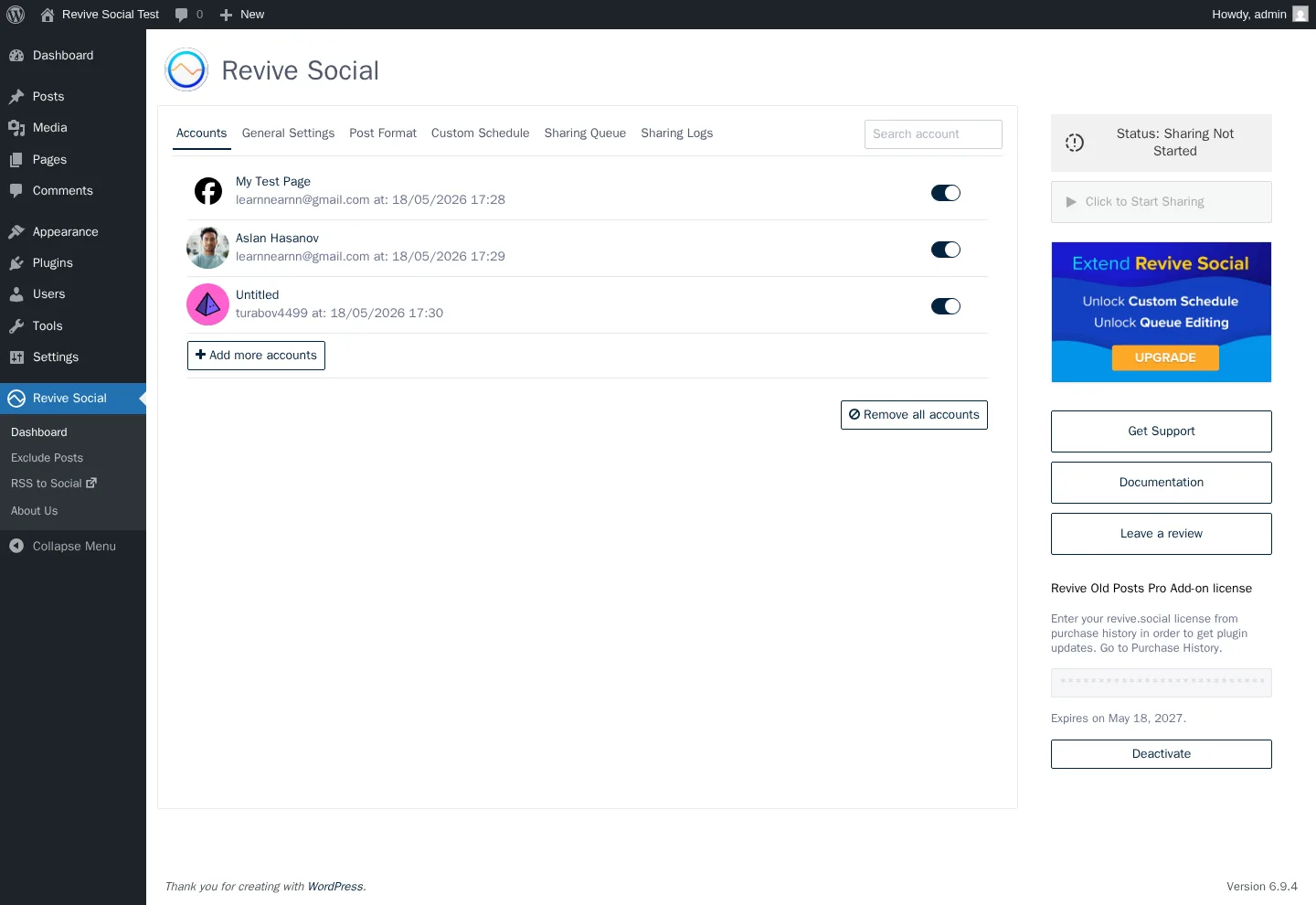
Starting price: Free (Facebook Pages + X/Twitter) · $99/year Starter · $199/year Business · $399/year Marketer.
Revive Social — the modern brand for the long-running "Revive Old Posts" plugin (WordPress.org slug tweet-old-post, first published December 2009 by Themeisle) — is the WordPress publishing plugin built around the evergreen-reshare job. The Free tier on WordPress.org auto-shares new posts and recycles old ones on a recurring "every X hours" schedule to Facebook Pages and X / Twitter only, with UTM tagging, URL shorteners, common-hashtag automation, taxonomy include/exclude filters, and a per-post exclusion list.
Key features:
- Recurring evergreen-reshare on every X hours — the original specialism since 2009
- Per-account Post Format tab — Share Content (Title / Content / Title & Content / Excerpt / Custom Field), Additional Text with position picker, Hashtags from categories / tags / custom field, Share As Image Post
- Sharing Queue with 12+ staggered entries visible — Skip / Block / Edit actions per row
- Diagnostic-grade share logs showing each share attempt with its real per-network response — the audit trail SchedulePress lacks
- UTM tagging, 6 URL shorteners (bit.ly, is.gd, rviv.ly, rebrandly, Google Firebase, native WP shortlinks)
- 30+ extra networks via Zapier webhook on Pro
- 30-day money-back guarantee
Pricing: Free covers Facebook Pages + X / Twitter (2 networks only). Pro tiers (Pro Add-on is a separately-installed second plugin) run $99/year Starter (1 site, intro from $129 list), $199/year Business (3 sites, intro from $259 list), $399/year Marketer (unlimited sites, intro from $529 list). Each tier renews at full price. No Lifetime tier. Starter adds LinkedIn Profiles, Tumblr, and Mastodon; Business adds Instagram Business, LinkedIn Company Pages, Bluesky, Telegram, Google Business Profile, VK, plus per-account Custom Schedule, queue editing, and per-account taxonomy filters.
Best for: Solo bloggers and lifestyle publishers with a deep evergreen archive who want recycling on autopilot, WooCommerce stores wanting category-aware reposts via custom-post-type support, non-profits and educational sites that re-promote older campaigns repeatedly, and sites whose primary KPI is "social referral traffic to existing posts" tracked through Google Analytics UTM.
Why it is a strong SchedulePress alternative: SchedulePress's Auto Scheduler queue and Republish toggles are workflow additions to a calendar-first plugin; Revive's entire product is purpose-built for recurring archive recycling. The per-account Post Format panel is more flexible than SchedulePress's Social Templates page (custom-content tab, hashtag-from-custom-field, position-picker for additional text). The Sharing Queue makes the future cadence visually inspectable, and the detailed share logs show each share attempt with its real per-network response — the in-product evidence SchedulePress is missing. If your buying job is "resurface my archive every X hours forever," Revive is more focused than SchedulePress.
What to watch for: As of May 2026, LinkedIn auto-share is currently broken on the latest Pro Add-on. LinkedIn changed its API and Revive's plugin has not been updated to match yet, so LinkedIn shares fail until Themeisle ships a patched build. Re-test LinkedIn on your own install before relying on it. The Free tier is only 2 networks (Facebook Pages + X / Twitter) versus SchedulePress's 7. Custom Schedule (fixed days × times) is Business+ only — Starter only allows "every X hours" with a 0.5-hour minimum. Queue editing is Business+ only. There is no Pinterest, TikTok, YouTube, Reddit, Discord, Threads, or Nextdoor direct connector (Zapier-only). There is no Lifetime tier. And the third-party SaaS reviewer score (~6.45 / 10) sits meaningfully lower than the 4 / 5 WordPress.org bracket.
For the full review — including a screenshot of the share-logs panel — read the Revive Old Posts review.
How to Choose the Right SchedulePress Alternative
There is no universally "best" alternative — the right pick depends on which SchedulePress gap is the deal-breaker for your workflow.
If you need 10+ networks and an in-product audit trail → FS Poster
SchedulePress caps at 8 networks and has no activity log. FS Poster starts at $58/year on the Single plan and covers 26 networks (including Reddit, Bluesky, TikTok, Discord, Mastodon, Truth Social, Webhook, YouTube, and YouTube Shorts), ships a detailed in-product activity log with "Go to post" deep links that answers the "did my share fire?" question directly, and offers an optional Lifetime licence covering 30 websites for long-term/multi-site buyers. For agencies, network-breadth buyers, and anyone who wants verifiable share evidence inside the plugin, this is the cleanest swap.
If you want a real calendar plus AI captions and 25 networks → Blog2Social
SchedulePress has the deepest editorial calendar in the WordPress plugin segment, but it lacks AI caption generation and tops out at 8 networks. Blog2Social ships a drag-and-drop social-media calendar inside WordPress, an AI Post Templates surface per network (with tone + writing-style switches), and 25 destinations on Business including Reddit, TikTok, Bluesky, Mastodon, Discord, Telegram, and VK. Skip Blog2Social if you need a Lifetime tier (none) or if your Free-tier requirement includes auto-share on publish (Blog2Social Free is manual-only; SchedulePress Free covers auto-share on 7 of 8 networks).
If you want AI captions and detailed share logs at the lowest possible Lifetime price → Bit Social
Bit Social's Agency LTD at $149 one-time is the cheapest Lifetime + unlimited-sites licence in the category — cheaper than SchedulePress's $299 Lifetime Unlimited. You get 13 networks (including TikTok, Bluesky, Telegram, Discord, and Line), AI Prompts with ChatGPT + DALL·E on a BYO-OpenAI-key basis, and the cleanest detailed share-logs panel in the category — every share row shows the per-network response and a live Visit link. Skip Bit Social if you need Reddit (Coming Soon), Mastodon, VK, Webhook, or Medium, or if you depend on Twitter/X without registering your own dev app.
If you want simplicity, an Automattic-stack brand, and a Gutenberg-native sidebar → Jetpack Social
Jetpack Social keeps the same 8-network ceiling as SchedulePress but trades the editorial calendar depth for a cleaner, editor-native Gutenberg sidebar and three networks SchedulePress does not have (Bluesky, Nextdoor, Mastodon). The Sharing Activity dialog with per-row View ↗ links is the in-product evidence surface SchedulePress is missing. Skip Jetpack Social if you need Twitter/X (permanently removed), Pinterest, TikTok, Reddit, Telegram, Google Business Profile, Medium, or an editorial calendar.
If you need VK, ok.ru, weibo, MailChimp, or WordPress-to-WordPress cross-posting → NextScripts SNAP
SNAP is the only plugin in this list with direct connectors for VK, ok.ru, weibo, Plurk, LiveJournal, Diigo, Instapaper, Scoop.It, MailChimp, vBulletin, SETT, and WordPress-to-WordPress. The Free tier covers 24 of its 30 networks. The 15+ replacement tags plus spin syntax dwarf SchedulePress's 4-tag library, and 11 built-in URL shorteners answer another SchedulePress gap. Skip SNAP if you are non-technical (the per-network developer-app setup is hostile), if you want a calendar (none), or if you want responsive vendor support (the WordPress.org listing shows 0 of 1 forum issues resolved in the trailing two months).
If your job-to-be-done is recycling a deep archive → Revive Social
Revive's entire product is built around the recurring evergreen-reshare. The Sharing Queue makes the future cadence visually inspectable, the per-account Post Format panel is more flexible than SchedulePress's Social Templates page, and the share logs are diagnostic-grade — the in-product evidence surface SchedulePress is missing. Skip Revive if you need broad multi-network distribution at publish (Free is only 2 networks), Pinterest/TikTok/YouTube/Reddit/Threads direct connectors (Zapier-only), or LinkedIn auto-share working reliably right now — as of May 2026 LinkedIn shares are failing on the latest Pro Add-on because Revive has not yet updated for LinkedIn's current API version, and the fix requires a patched build from Themeisle.
Frequently Asked Questions
What is the best alternative to SchedulePress? For most WordPress publishers who outgrow SchedulePress's 8-network ceiling, FS Poster is the strongest single alternative. It starts at $58/year on the Single plan (renews at $65/year) and covers 26 networks (including Reddit, Bluesky, TikTok, Discord, Mastodon, Truth Social, Webhook, YouTube, and YouTube Shorts), ships a detailed in-product activity log with "Go to post" deep links that answers the "did my share fire?" question directly, includes click tracking and URL shorteners SchedulePress lacks, and offers an optional Lifetime licence covering 30 websites for long-term/multi-site buyers. It has 50K+ active installs and 25K+ paid customers per fs-poster.com.
Is there a free alternative to SchedulePress? Yes — several. SchedulePress Free itself already covers 7 of 8 networks (only Google Business Profile is Pro-gated), so the "free alternative" question really means "free alternative with a different feature mix." NextScripts SNAP Free covers 24 networks with full Reposter and Quick Post functionality. Jetpack Social Free covers 8 networks (Facebook, Instagram Business, Threads, LinkedIn, Bluesky, Nextdoor, Tumblr, Mastodon) with unlimited shares and a Gutenberg sidebar. Blog2Social Free covers 12 networks with manual share. Revive Social Free covers Facebook Pages + X / Twitter for evergreen recycling. Bit Social Free covers 2 networks (Facebook + LinkedIn Profile). Pick the free option whose network coverage matches your distribution, not the one with the longest feature list.
Is FS Poster better than SchedulePress? For agencies, network-breadth buyers, click-tracking publishers, and anyone who wants a long-term/multi-site path with in-product share evidence, yes. FS Poster starts at $58/year on the Single plan, covers 26 networks on a single licence (vs SchedulePress's 8), offers an optional Lifetime tier covering 30 websites, ships a WooCommerce-native flow, exposes a detailed activity log with live "Go to post" links, and offers a one-click bulk action on the WordPress Posts list. For editorial teams that specifically need a deep drag-and-drop calendar, multi-author email notifications, the Missed Schedule Handler, or the Advanced Schedule (update a published post) feature, SchedulePress remains the right pick — those are workflow features FS Poster does not match. The two products solve overlapping but genuinely different buying jobs.
What does SchedulePress lack compared to its alternatives?
Six specific gaps. (1) Network breadth — only 8 networks (no Reddit, Bluesky, TikTok, Discord, Mastodon, VK, Webhook, YouTube, Truth Social); FS Poster covers 26, Blog2Social 25, SNAP 30. (2) No in-product activity log / share-history panel — buyers debugging share fires have no in-product surface; Bit Social, Jetpack Social, Blog2Social, NextScripts SNAP, and Revive Social all expose detailed share logs. (3) No AI-driven caption generation — Bit Social, Blog2Social, and FS Poster all ship AI surfaces. (4) No URL shortener — FS Poster, NextScripts SNAP, and Revive Social all ship a built-in URL shortener; SchedulePress does not. (5) Smart-tag library is only 4 tags ({title} {content} {url} {tags}) — SNAP has 15+ plus spin syntax. (6) No webhook / Zapier / IFTTT dispatcher — FS Poster, SNAP, and Revive Social (via Zapier) all support webhook destinations.
Which SchedulePress alternative is best for multi-author editorial teams? Blog2Social if you want a real social-media calendar plus broader network reach (25 destinations) plus AI Post Templates with tone + writing-style switches and the Business-tier team management. FS Poster if your editorial team is small enough that the calendar depth matters less than the network breadth, the detailed activity log, and the Lifetime licence economics. Jetpack Social only if your editorial team publishes to ≤8 mainstream networks and prefers Automattic brand simplicity over editorial-calendar depth.
Is there a SchedulePress alternative with a working URL shortener? Yes — three of the alternatives in this list ship a built-in URL shortener. NextScripts SNAP has 11 of them on the free plugin (is.gd, bit.ly, YOURLS, Rebrandly, Go2Ln, u.to, x.co, clk.im, po.st, adf.ly, and the WordPress built-in shortlink). Revive Social has 6 (bit.ly, is.gd, rviv.ly, rebrandly, Google Firebase, native WordPress shortlinks). FS Poster ships its own URL-shortening integration on every plan. Blog2Social, Bit Social, and Jetpack Social do not include a native URL shortener — Blog2Social adds UTM parameters but leaves shortening to external tools. SchedulePress has no URL shortener either.
Is there a SchedulePress alternative that covers Reddit, Bluesky, and TikTok? FS Poster covers all three directly on every plan (plus Discord, Mastodon, Truth Social, Webhook, and YouTube Shorts). Blog2Social covers Reddit, Bluesky, and TikTok on its Pro / Business tiers. Bit Social covers Bluesky and TikTok directly (Reddit is listed as "Coming Soon" on bitapps.pro). NextScripts SNAP covers Reddit on the Premium API addon and is the only plugin in this list with direct connectors for ok.ru, VK, weibo, and Plurk. SchedulePress itself does not cover any of Reddit, Bluesky, or TikTok.
Conclusion
The "best SchedulePress alternative" depends on which SchedulePress gap is the deal-breaker for your workflow. If you want 26 networks, a detailed activity log for verifiable share evidence, click tracking, and a Lifetime licence, FS Poster is the cleanest swap and the alternative I would shortlist first. If you want a real calendar plus AI captions and 25 networks, look at Blog2Social. If you want AI Prompts and detailed share logs at the cheapest Lifetime price, look at Bit Social. If you want Automattic brand simplicity and a Gutenberg-native sidebar on the same 8-network ceiling, look at Jetpack Social. If you need VK, ok.ru, weibo, MailChimp, or WordPress-to-WordPress cross-posting, look at NextScripts SNAP. If your only job is recycling a deep archive, look at Revive Social.
For the full walkthrough of each option — including the screenshots and the honest weaknesses — start with the FS Poster review. If you want the whole category in a single comparison frame, the WordPress social media scheduler plugins roundup pulls every option above (and a few more) together.
Write once. Post to 26 networks.
- 26 social networks
- Schedule & auto-repost
- Runs inside wp-admin


