


FS Poster and NextScripts SNAP both help WordPress sites auto-share new posts to a long list of social networks, but they answer two different buying questions. FS Poster is a single-licence, WordPress-native plugin from FS Code that ships every feature — including a modern React-based admin and a one-time Lifetime tier — on every plan. NextScripts SNAP is the 14-year-old WordPress.org freemium workhorse from NextScripts Corp: a fully white-label auto-poster that runs through your own Facebook / Twitter / LinkedIn developer apps and unlocks premium capability through five separate annual add-ons.
I tested both plugins on a clean WordPress site, cross-checked the official pricing pages and public review data, and reviewed the core publishing workflow in each plugin. This FS Poster NextScripts SNAP comparison also covers NextScripts SNAP vs FS Poster, FS Poster or NextScripts SNAP buying logic, FS Poster vs NextScripts SNAP pricing, FS Poster vs NextScripts SNAP features, and when FS Poster is an alternative to NextScripts SNAP or NextScripts SNAP is an alternative to FS Poster. Below is the practical breakdown of features, pricing, ease of use, limitations, and who should pick which.
FS Poster vs NextScripts SNAP: Quick Verdict
Choose FS Poster if you want a modern admin, flat per-site licensing starting at $58/year on the Single plan (with an optional Lifetime tier covering 30 websites for long-term/multi-site buyers), X (Twitter) / Pinterest / Reddit / TikTok / Telegram / Threads / Bluesky / Truth Social / YouTube Shorts included on every plan, scheduling and a real calendar out of the box, AI captions and AI image generation, and WooCommerce-native automation. Choose NextScripts SNAP if you specifically need long-tail destinations FS Poster does not cover (weibo, MailChimp campaigns, LiveJournal / DreamWidth, Scoop.It, SETT, vBulletin, Diigo, Instapaper, deviantART, Yo, Line, Flipboard), want fully white-label posts through your own developer apps, are comfortable with a more traditional WordPress editing workflow, and need a genuinely free base plugin that covers 24 networks at $0/yr.
Overall winner: FS Poster — broader network coverage on every plan with no add-on stacking (FS Poster's 26 networks cover the mainstream Western stack plus regional destinations including OK.ru, VK, Xing, Plurk, Medium, Tumblr, Blogger, Flickr, and WordPress-to-WordPress), scheduling and a calendar included from the cheapest plan, AI captions and AI image generation in one licence, WooCommerce-native automation, a modern React-based admin, a 4.9 / 5 rating from 650+ reviews, and the only Lifetime tier in the category. NextScripts SNAP only wins decisively on its 12-strong long-tail-exclusive roster (weibo, MailChimp campaigns, LiveJournal / DreamWidth, Scoop.It, SETT, vBulletin, Diigo, Instapaper, deviantART, Yo, Line, Flipboard) and the $0 entry point.
Quick Comparison Table
| Category | FS Poster | NextScripts SNAP |
|---|---|---|
| Starting price | $58 / yr intro on Single (renews at $65 / yr) | $0 — free base plugin on WordPress.org |
| Free plan | No free plan; 14-day money-back guarantee | ✅ Free — 24 of 30 networks, 1 account / network, manual scheduling only |
| Lifetime option | ✅ $490 one-time for 30 websites | ❌ Annual add-ons only — no Lifetime tier |
| Supported networks | 26 on every plan (incl. YouTube Shorts, Truth Social, Webhook) | 30 listed — 24 free + 6 behind the $49.95 / yr Premium API add-on |
| Mainstream four (FB / X / LinkedIn / IG) | ✅ All included on every plan | ✅ All on Free (LinkedIn Profile only; Company pages need Premium API) |
| Pinterest / Reddit / GMB / YouTube | ✅ All included | ⚠️ Premium API add-on ($49.95 / yr) |
| Scheduling on cheapest plan | ✅ Calendar + recurring Planner included | ⚠️ Manual "Set Time" picker only — delayed-cron dispatch requires Scheduled & Delayed add-on ($14.95 / yr) |
| Multiple accounts per network | ✅ Unlimited on every plan | ⚠️ Multi Account add-on ($49.95 / yr) |
| In-WordPress calendar | ✅ Modern Month / Week / List views | ❌ No calendar surface |
| AI captions + AI image generation | ✅ BYO OpenAI key | ❌ Not offered |
| WP Posts list bulk action | ✅ Native "Bulk Schedule [FS Poster]" | ❌ Not offered |
| WooCommerce / custom post types | ✅ Native — Product auto-share + per-channel filters | ⚠️ Documented support — no per-product UI |
| White-label posting | ⚠️ OAuth via FS Poster's Standard Apps (own apps optional) | ✅ Always through your own developer apps |
| Comments import (Twitter / Facebook → WP) | ❌ | ✅ Built-in |
| URL shorteners | ⚠️ Built-in click tracking + shortener | ✅ 11 native shorteners |
| Replacement-tag library | ✅ {title}, {short_, etc. + AI Templates |
✅ 15+ tags incl. %HCATS%, %AUTHORTWHANDLE%, %MYURL% + "spin" syntax |
| Public rating | 4.9 / 5 from 650+ reviews on fs-poster.com (vendor surface) | 3.3 / 5 from 617 reviews on WordPress.org |
| Active installs / paid customers | 50K+ active installs / 25K+ paid customers | 30,000+ active installs on WordPress.org |
| Best for | Agencies, WooCommerce stores, multi-site operators, non-technical buyers | Technical site owners who need regional networks + white-label developer-app posting |
Prices checked in May 2026.
FS Poster Overview
FS Poster is a premium WordPress plugin from FS Code that turns any WordPress site — including WooCommerce stores — into a multi-network social publishing engine. It auto-shares new posts to 26 networks, lets you schedule one-off social posts directly from a Calendar (no backing WordPress post required), recycles archive content with a recurring Planner, bulk-schedules existing posts via a native WordPress Posts-list action, customises captions per network with template variables, and integrates AI for both captions and share images on a bring-your-own-OpenAI-key basis. It is sold exclusively through fs-poster.com with Single, Plus, Developer, and Lifetime tiers and a 14-day money-back guarantee. There is no free version. The vendor's public figures sit at 50K+ active installs, 25K+ paid customers, and a 4.9 / 5 rating from 650+ reviews.
For the standalone testing notes behind this side of the comparison, read the FS Poster review.
NextScripts SNAP Overview
NextScripts: Social Networks Auto-Poster (SNAP) is the long-running WordPress auto-poster from NextScripts Corp — a freemium plugin first published on WordPress.org in 2012 with a dedicated WordPress admin area instead of a Gutenberg-first sidebar experience. It auto-shares every new WordPress post to 30 listed social-network destinations — 24 of those work on the free tier, and 6 (Pinterest, Reddit, Flipboard, Google Business Profile, Scoop.It, YouTube channel feed) plus LinkedIn Company Pages sit behind the $49.95 / yr Premium API add-on. It also includes a manual quick-share composer, a free Reposter recycler, 11 built-in URL shorteners, and a 15+ tag replacement library with "spin" syntax. Premium features ship as five separate annual add-ons sold off-site at nextscripts.net. WordPress.org currently shows 30,000+ active installs and a 3.3 / 5 rating from 617 reviews.
For the standalone testing notes behind this side of the comparison, read the NextScripts SNAP review.
Pricing & Plans
| Plan | FS Poster | NextScripts SNAP |
|---|---|---|
| Free | No free plan; 14-day money-back guarantee | ✅ $0 — 24 networks, 1 account / network, Reposter, filters, OG tags, 11 shorteners |
| Cheapest paid | $58 / yr Single (intro) — 1 site, 6 mo support | $14.95 / yr Scheduled & Delayed add-on (adds exact-time scheduling + Custom Field / Taxonomy / Search filters) |
| Mid tier | $109 / yr Plus — 3 sites, 12 mo support | $49.95 / yr Multi Account add-on or Premium API add-on (unlocks 6 networks) |
| Top tier | $229 / yr Developer — 15 sites, 12 mo support | $149.95 / yr Multi User add-on (per-WP-user accounts + WP Multisite) |
| Lifetime | $490 one-time intro ($890 regular) — 30 websites, 12 mo support included | ❌ Not offered |
| Bundle | — | Autopost bundle $69.95 / yr (Premium API + Multi Account + Scheduled & Delayed + Proxies — ~46 % off list) |
| Top bundle | — | All-Access Pass $249.95 / yr (every current + future add-on) |
| Refund / trial | 14-day money-back guarantee | No public refund policy URL; no free trial of the add-ons |
| Renewal note | Intro prices renew at full price (Single $65 / Plus $195 / Developer $449) | All add-ons auto-renew annually |
FS Poster's pricing axis is the simplest in this category. You pay per site, and every plan ships the full 26-network roster, unlimited connected channels, unlimited schedules, AI integration, watermarking, multisite, RTL, translations, and a staging licence. The only differences between tiers are the number of websites (1 / 3 / 15 / 30), the support window (6 months on Single, 12 months on the rest), and AI template quotas (limited / 30 images + 10 videos / unlimited / unlimited). The Lifetime tier breaks even against the Developer renewal at $449 / year within twelve months and stays "free" forever afterwards apart from the optional yearly support renewal.
NextScripts SNAP's pricing axis is the most fragmented in the category. The base plugin is genuinely free on WordPress.org and covers 24 networks with 1 account each — a real advantage for cost-sensitive technical buyers. But the moment a real publisher needs Pinterest auto-pinning, more than one Facebook Page, exact-time scheduling, or WP Multisite, the cost stacks across five separate annual add-ons sold off-site at nextscripts.net. A typical agency buyer wants at least Premium API + Multi Account + Scheduled & Delayed, which is $114.85 / yr a-la-carte; the Autopost bundle compresses that to $69.95 / yr if Proxies are also useful. There is no Lifetime tier, no monthly billing, and no published free-trial path for any add-on.
There is one more friction point worth flagging: the in-plugin admin sidebar carries a permanent "Limited Time Offer — $49.95 value — Get Multi Account Addon for free with the order of Premium API or Multi Users Addon" banner. That promo copy is hard-coded into the current release line and has been visible for years — treat it as the standard cross-sell, not a real expiring offer.
Winner: FS Poster — flat per-site licensing, every feature included on every plan, and the only Lifetime tier in the category. NextScripts SNAP wins the absolute-zero entry point, and on a single-site 3-year horizon SNAP's Autopost bundle ($210 total) lands close to FS Poster's Single tier ($188 total, intro + two renewals) on raw spend. The Lifetime tier is not the value play for a single-site short-horizon buyer — at $490 one-time, it only breaks even against SNAP's $69.95 / yr bundle around year 7 on one site. Lifetime becomes the decisive economic argument for multi-site operators (one payment covers 30 websites — roughly $16 per site) and for long-horizon owners running the same WordPress install for 7+ years, where the no-renewals model also rules out the $149.95 / yr Multi User add-on SNAP requires for WP Multisite.
Network Coverage
| Coverage detail | FS Poster | NextScripts SNAP |
|---|---|---|
| Headline count | 26 networks on every plan | 30 listed — 24 on Free + 6 behind the $49.95 / yr Premium API add-on (Pinterest, Reddit, Flipboard, Google Business Profile, Scoop.It, YouTube channel feed; LinkedIn Company Pages and Groups are also gated by the same add-on) |
| ✅ Included | ✅ Free (profile / page / group) | |
| X (Twitter) | ✅ Included | ✅ Free (profile) |
| LinkedIn Profile | ✅ Included | ✅ Free |
| LinkedIn Company Pages | ✅ Included | ⚠️ Premium API ($49.95 / yr) |
| ✅ Included | ✅ Free | |
| ✅ Included | ⚠️ Premium API ($49.95 / yr) | |
| ✅ Included | ⚠️ Premium API ($49.95 / yr) | |
| Google Business Profile | ✅ Included | ⚠️ Premium API ($49.95 / yr) |
| YouTube (Community + channel feed) | ✅ Included | ⚠️ Premium API ($49.95 / yr — channel feed only) |
| YouTube Shorts | ✅ Included (new destination) | ❌ Not supported |
| Threads | ✅ Included | ❌ Not supported |
| Bluesky | ✅ Included | ❌ Not supported |
| Mastodon | ✅ Included | ❌ Not supported |
| Truth Social | ✅ Included | ❌ Not supported |
| TikTok | ✅ Included | ❌ Not supported |
| Discord | ✅ Included | ❌ Not supported |
| Webhook (Zapier / IFTTT / custom HTTP) | ✅ Native | ❌ Not supported |
| Telegram | ✅ Included | ✅ Free |
| Tumblr | ✅ Included | ✅ Free |
| Blogger | ✅ Included | ✅ Free |
| Medium | ✅ Included | ✅ Free |
| Flickr | ✅ Included | ✅ Free |
| VK | ✅ Included | ✅ Free |
| OK.ru (Odnoklassniki) | ✅ Included | ✅ Free |
| ✅ Included | ✅ Free | |
| Plurk | ✅ Included | ✅ Free |
| WordPress-to-WordPress (post to another WP site) | ✅ Included | ✅ Free |
| ❌ Not supported | ✅ Free — SNAP-exclusive | |
| MailChimp campaigns | ❌ Not supported | ✅ Free — SNAP-exclusive |
| LiveJournal / DreamWidth | ❌ Not supported | ✅ Free — SNAP-exclusive |
| Scoop.It | ❌ Not supported | ⚠️ Premium API — SNAP-exclusive |
| SETT | ❌ Not supported | ✅ Free — SNAP-exclusive |
| vBulletin (forum auto-submit) | ❌ Not supported | ✅ Free — SNAP-exclusive |
| Diigo | ❌ Not supported | ✅ Free — SNAP-exclusive |
| Instapaper | ❌ Not supported | ✅ Free — SNAP-exclusive |
| ❌ Not supported | ⚠️ Premium API — SNAP-exclusive | |
| Line | ❌ Not supported | ✅ Free — SNAP-exclusive |
| deviantART | ❌ Not supported | ⚠️ Free (legacy / flagged unstable) — SNAP-exclusive |
| Yo | ❌ Not supported | ⚠️ Free (legacy) — SNAP-exclusive |
The two rosters overlap heavily on the mainstream Western stack and on regional destinations that often surprise buyers. Both plugins natively support Facebook, X (Twitter), LinkedIn Profile, Instagram, Telegram, Tumblr, Blogger, Medium, Flickr, VK, OK.ru, Xing, Plurk, and WordPress-to-WordPress cross-posting. The differences sit at the edges.
Where FS Poster wins outright — Threads, Bluesky, Mastodon, Truth Social, TikTok, Discord, YouTube Shorts, and a Webhook destination (for Zapier / IFTTT / n8n / any custom HTTP endpoint) are all in the FS Poster roster but not supported by SNAP at all. FS Poster also covers Pinterest, Reddit, Google Business Profile, YouTube (Community + channel feed), and LinkedIn Company Pages on every single plan, with no add-on. On SNAP, those same six destinations sit behind the $49.95 / yr Premium API add-on: Pinterest, Reddit, Flipboard, Google Business Profile, Scoop.It, YouTube channel feed — plus LinkedIn Company Pages and Groups, which are gated by the same add-on.
Where SNAP wins outright — SNAP is the only WordPress auto-poster in the category that natively supports weibo, MailChimp campaigns, LiveJournal / DreamWidth, Scoop.It, SETT, vBulletin forums, Diigo, Instapaper, deviantART, Yo, Line, and Flipboard. Twelve destinations in total, all of them long-tail rather than mainstream — but a real moat for the buyer whose audience genuinely lives there. Chinese-language publishers running weibo, EDM / email-marketing publishers who want to fan content into MailChimp campaigns, classic forum operators on vBulletin, and saved-link communities on Diigo / Instapaper have no other candidate in the WordPress-plugin category.
Winner: Tie — context-dependent. SNAP wins outright if you need any of weibo / MailChimp campaigns / LiveJournal / Scoop.It / SETT / vBulletin / Diigo / Instapaper / deviantART / Yo / Line / Flipboard. FS Poster wins outright if you need Threads, Bluesky, Mastodon, Truth Social, TikTok, Discord, YouTube Shorts, Webhook, or any of Pinterest / Reddit / GMB / YouTube (channel feed or Community) / LinkedIn Company Pages without a separate $49.95 / yr add-on. For most 2026 buyers chasing a mainstream Western network mix plus regional destinations like OK.ru / VK / Xing / Plurk / Medium / Blogger / Tumblr / WP-to-WP, FS Poster's included-on-every-plan roster covers everything in one licence.
Auto-Posting Workflow
| Auto-posting detail | FS Poster | NextScripts SNAP |
|---|---|---|
| Auto-share on WordPress publish | ✅ Default on every plan | ✅ Default on Free — fires at publish |
| Per-channel auto-share toggle | ✅ One cog modal per channel | ✅ Per-account checkbox on the Accounts page |
| Per-post editing workflow | ⚠️ Sidebar panel on the edit screen | ⚠️ Traditional panel beneath the editor, not a Gutenberg sidebar widget |
| Quick / manual share without a WP post | ✅ Calendar "Share Now" with featured media via WP media library | ✅ Built-in quick-share composer |
| WordPress Posts-list bulk action | ✅ Native "Bulk Schedule [FS Poster]" | ❌ Not offered |
| Custom post type support | ✅ Post-type selection in settings | ✅ Post-type include / exclude filters |
| Publishing cadence controls | ⚠️ Single auto-share pipeline (server cron recommended) | ✅ Immediate, WP-cron, and rate-limited posting options |
| Randomized posting time (± N minutes) | ❌ Not in auto-share path | ✅ Setting in the global cadence options |
| Comments import (Twitter / Facebook → WP) | ❌ | ✅ Unique in the category |
Both plugins auto-share new WordPress posts at publish time, and both work. With FS Poster, connected channels show clear success states and timing inside the WordPress editor. With SNAP, the share fires at the publish moment itself, and the per-post confirmation panel beneath the editor links straight to the live social-network post — strong, in-place proof that the share went through.
Where the two diverge is the workflow around that auto-share. FS Poster's Channels list exposes a clean per-channel cog modal with General / Permissions / Labels tabs and a customise-per-channel content editor with template variable chips, a Use AI button, a Keywords helper, an HTML toggle, and a preview pane — all in one modal. FS Poster also adds a "Bulk Schedule [FS Poster]" entry to the native WordPress Posts-list bulk-actions dropdown that drops you into the Planner wizard with the selected posts pre-filtered, which is the highest-leverage workflow in either product for rehydrating an archive of hundreds of historic posts.
SNAP's compensating strengths are configurability and the unique 3-mode publishing cadence — immediate posting, WP-cron posting, or rate-limited posting by day, hour, or minute with an over-limit policy. SNAP also includes a randomized posting-time jitter to avoid bot-like cadence — a feature FS Poster does not expose — and the comments-import-from-Twitter-and-Facebook → WordPress feature, which is unique in the entire category.
Winner: FS Poster — auto-share on publish is included on the cheapest plan upward (no equivalent of SNAP's Pro-tier feature gates), the per-channel customise modal is the cleanest in the category, and the WP Posts-list bulk action is unique. SNAP wins on the publishing-cadence configurability and the comments-import oddity that no other plugin offers.
Scheduling, Calendar & Planner
| Scheduling detail | FS Poster | NextScripts SNAP |
|---|---|---|
| In-WordPress calendar | ✅ Modern Calendar with Month / Week / List views | ❌ No calendar surface |
| Drag-and-drop reschedule | ✅ Included | ❌ Not offered |
| Exact-time scheduling | ✅ Included on every plan | ⚠️ Per-post "Set Time" picker on Free; delayed-cron dispatch requires Scheduled & Delayed add-on ($14.95 / yr) |
| Recurring evergreen planner / reposter | ✅ 4-step Planner wizard (Filter → Share type → Sort → Summary) | ✅ Reposter rule builder with 5 panels — frequency in days / hours / minutes + randomize ± N minutes on Free |
| Per-DOW / hour-of-day restrictions | ✅ Inside Planner + sleep-time exclusion windows | ⚠️ Day-of-week + hour-of-day restrictions require Scheduled & Delayed add-on |
| Random reposter mode | ❌ Not exposed | ⚠️ Paid (Pro Only) |
| One-by-one Old→New / New→Old reposter | ⚠️ Inside Planner sort step | ✅ Free |
| Custom Field / Custom Taxonomy / Search filters | ⚠️ Categories + tags + post types | ⚠️ Custom Field / Taxonomy / Search filters require Scheduled & Delayed add-on |
| Schedule "Share now" from one button | ✅ Schedule / Share now in the same modal | ⚠️ Quick Post Publish radio (Immediately / Schedule to…) |
| Pending-queue / timeline view | ✅ Calendar with future cards | ✅ Query / Timeline page |
| Per-share Insights / analytics | ✅ Inside Calendar share-detail modal + Analytics tab | ❌ Activity log only records errors and cron events in immediate-posting mode — successful autoposts are verified post by post |
FS Poster ships the most polished scheduling surface in the WordPress auto-poster category. The Calendar opens to a Month view with direct-share cards and recurring Planner cards mixed together; clicking any card opens a share-detail panel with a channel-avatar row at the top so you can walk left-to-right through every network's result and use Retry, Reschedule, or Insights without leaving the screen. Setting up an evergreen Planner on a cadence of "every 2 days" is a four-step wizard, and the next scheduled occurrences appear on the calendar immediately — direct visual confirmation that the cadence is honoured before you commit.
NextScripts SNAP does not offer a calendar at all. Scheduling on the Free tier is handled from the post editor and is useful for one-off delayed shares, but the actual delayed-cron dispatch sits behind the Scheduled & Delayed Posting add-on ($14.95 / yr). The free Reposter rule builder is genuinely capable — it covers timeframes, dates older / newer, post types, post formats, authors, category / tag include and exclude, and exact-post selection, with a base frequency in days / hours / minutes plus a randomize option — but day-of-week + hour-of-day restrictions, the "Random" mode, and Custom Field / Custom Taxonomy / Search filters all require the same $14.95 / yr add-on. SNAP also has no central successful-share history on the default immediate-posting mode, so per-share verification depends on opening the individual post.
Winner: FS Poster — included calendar, drag-and-drop reschedule, sleep-time exclusion, exact-time scheduling on every plan, and per-share Insights inside the share-detail modal. SNAP's Reposter on Free is competitive on raw rule-builder depth, but with no calendar and paid-add-on gating for delayed-cron dispatch + day-of-week filtering, it cannot match FS Poster's day-one scheduling workflow.
Content Customization
| Customization detail | FS Poster | NextScripts SNAP |
|---|---|---|
| Per-network captions | ✅ Customize content editor per channel (every plan) | ✅ Per-account default + per-post override on Free |
| Template variables / placeholders | ✅ {title}, {short_, {post_, {post_ + AI Templates |
✅ 15+ tags incl. %TITLE%, %URL%, %SURL%, %EXCERPT%, %FULLTEXT%, %HTAGS%, %HCATS%, %AUTHORNAME%, %AUTHORUNAME%, %AUTHORTWHANDLE%, %MYURL%, %POSTDATE%, %POSTTIME%, %SITENAME%, %NTNAME% / %NTCODE% / %ACCNAME% for UTM tagging |
"Spin" syntax {a|b|c} for per-post variation |
❌ | ✅ Free (since v2.7, ~2014) |
| AI caption generation | ✅ BYO OpenAI key — Use AI button in every per-channel editor | ❌ Not offered |
| AI image generation | ✅ Built-in via BYO OpenAI key | ❌ Text-only |
| URL shorteners | ⚠️ Built-in click tracking + shortener | ✅ 11 shorteners — is.gd (default), wp.me, bit.ly, YOURLS, Rebrandly, u.to, x.co, clk.im, po.st, adf.ly, Go2Ln.com |
| Open Graph injection | ⚠️ Relies on theme / SEO plugin | ✅ Free — full og:image / og:title / og:description + author-FB-URL |
| Per-network image swap | ✅ Featured media per channel | ✅ Per-account image-size picker (Original / Thumbnail / Medium / Large / 1536² / 2048²) |
| Per-post per-account URL override | ⚠️ Calendar Share Now URL field | ✅ %MYURL% per-post override on Free |
| Raw HTML mode | ✅ Toggle in editor | ⚠️ Plain-text textarea — no HTML preview |
| Featured-image lookup in non-standard themes | ❌ | ✅ Advanced image finder + custom-field image-path support |
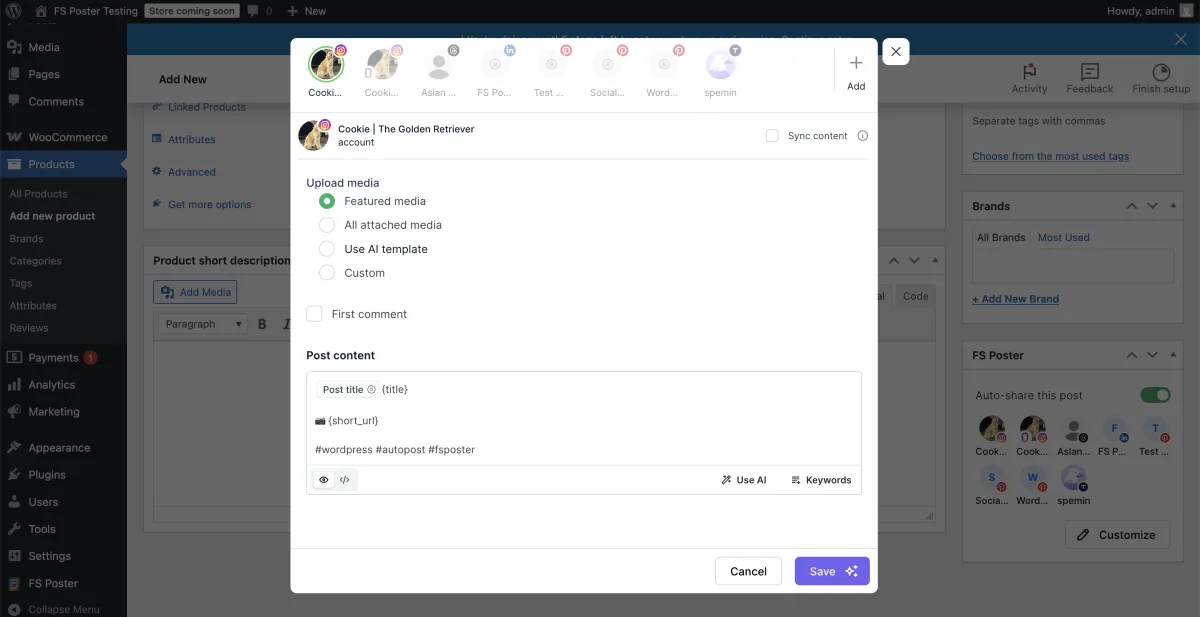
Both plugins let you write a different caption per network — and both deliver that on Free / cheap-paid. FS Poster's customise-content editor inside each channel's cog modal exposes template-variable chips for Post title (which renders as {title}) and {short_url}, a Use AI button for one-click caption generation, a Keywords helper for hashtag suggestions, a preview mode (eye icon), and a raw-HTML mode (</>) for power users. In testing on a live install, I enabled Customize content on six channels (Facebook, Instagram feed, Threads, LinkedIn, Pinterest, Truth Social), wrote a different template per network, and saw the customised text fire correctly through to the live Facebook share with the {title} and {short_url} substitutions resolved at publish time.
NextScripts SNAP wins on raw templating breadth. The 15+ replacement-tag library is the deepest in the category — %HCATS% (categories as hashtags), %AUTHORUNAME% (author username), %AUTHORTWHANDLE% (author Twitter handle), %MYURL% (per-post URL override), %POSTDATE% / %POSTTIME%, and the UTM-tagging trio %NTNAME% / %NTCODE% / %ACCNAME% for cross-network attribution tracking. The "spin" syntax {option1|option2|option3} for per-post template variation, the 11 native URL shorteners (so you can route through your own YOURLS install or Rebrandly account without a third-party plugin), and the Open Graph injection with author-FB-URL support are all included on the Free tier. SNAP also exposes an "advanced image finder" + custom-field image-path picker that handles themes which hide featured images outside the standard WordPress meta — a niche feature that matters for buyers wrangling legacy theme code.
The big delta is AI: FS Poster includes both AI caption generation and AI image generation on every plan (you provide an OpenAI key), and NextScripts SNAP does not offer either. For 2026 content-marketing workflows, this is the larger trade-off than any individual replacement tag.
Winner: Tie. FS Poster wins on AI captions + AI image generation, per-channel HTML preview, and modern variable chips. NextScripts SNAP wins on tag-library depth, spin syntax, 11 native URL shorteners, OG-tag injection, and the advanced image finder. Pick by which trade-off you care about — AI-assisted modern workflows or deep, scriptable templating.
WooCommerce & Custom Post Types
| WooCommerce detail | FS Poster | NextScripts SNAP |
|---|---|---|
| Auto-share new WooCommerce products at publish | ✅ Native — Product appears in Allowed post types | ✅ Documented per vendor tutorial (nextscripts.com tutorial page) |
| Per-product social config inside the product editor | ✅ FS Poster sidebar on Product edit screen | ⚠️ Same traditional SNAP post panel also appears on Products |
| Per-channel category routing on products | ✅ Same per-channel rules apply to products | ⚠️ Global filters only |
| Custom post type multi-select | ✅ Built-in post-type selection | ✅ Post-type include / exclude filters |
| BuddyPress posts auto-share | ❌ | ✅ Documented (v4.2.0+) |
| Bulk action on Posts / Products list | ✅ "Bulk Schedule [FS Poster]" | ❌ Not offered |
| What it looks like in use | ✅ Publish a Woo product → FS Poster sidebar shows per-channel status + deep links + skipped-by-filter proof | ⚠️ Same generic SNAP post panel as a standard post — no Woo-specific surface |
WooCommerce is the category where FS Poster clearly separates itself. Activate WooCommerce, publish a new product, and FS Poster schedules the share to every eligible connected channel without any extra licence or paid add-on. The FS Poster sidebar on the product edit page shows per-channel status pills with timestamps and deep links to the live social posts — and if you set a per-channel category filter that excludes the product's category, that channel is correctly skipped, exactly as expected. This is genuine three-in-one proof for a buyer: WooCommerce auto-share works, per-channel category filters apply to products, and image-required networks (Instagram, Pinterest) surface clear retryable errors when the product has no featured image.
NextScripts SNAP is officially WooCommerce-compatible per the vendor tutorial at nextscripts.com/tutorials/how-to-post-woocommerce-products/, and its standard post-level sharing controls also appear on WooCommerce products. But the experience is generic rather than WooCommerce-aware: there is no per-channel category routing surface inside the product editor, no dedicated product-feed view, and no Posts-list bulk action for rehydrating an existing product catalogue. SNAP also supports BuddyPress auto-share since v4.2.0, which FS Poster does not.
Winner: FS Poster — WooCommerce-native automation, per-channel category filters that apply to products, the FS Poster sidebar inside the product edit screen, and the WP Posts / Products list bulk action. For agencies running multi-brand WooCommerce stores, this is the workflow that justifies the Plus or Developer tier on its own.
Ease of Use / UI & UX
| UI / UX detail | FS Poster | NextScripts SNAP |
|---|---|---|
| Admin app style | Modern single-page admin app built on React | Traditional WordPress-style admin — functional but visually dated |
| Default landing surface | Calendar Month view | Accounts list with permanent right-rail upsell sidebar |
| Per-channel settings | ✅ Clean cog modal per channel | ✅ Collapsible settings block per account |
| Channel connection flow | One-click OAuth via FS Poster Standard Apps (own app optional) | DIY — register your own Facebook / Twitter / LinkedIn / Pinterest developer app per network |
| Gutenberg sidebar widget | ❌ | ❌ — uses a traditional panel beneath the editor |
| WP Posts list bulk action | ✅ | ❌ |
| Translations | 7 locales | 1 locale (Russian) in addition to default English (US) |
| Permanent in-product upsell | ⚠️ Single AI / Lifetime banners | ✅ "Limited Time Offer" + 5 add-on cross-sell sidebar on every admin page |
| Notable safety friction | No free trial; AI requires own OpenAI key | "Evil buttons" on Help / Support page (Delete all SNAP Data, Clear Query, Remove all SNAP metainfo, Restore from last backup) — none have a confirm dialog |
| Setup time for the mainstream four (FB / X / LinkedIn / IG) | ~10 minutes per network via Standard App OAuth | 1–4 hours per network — register your own developer app, copy App ID / Secret, complete review process, paste in SNAP |
This is the largest experience gap in the comparison. FS Poster's admin app feels like a 2026 product: a clean five-tab layout, consistent modal styling, clear ON / OFF channel states, and a share-detail view that makes it easy to check each network's result. Channel setup is a one-click OAuth flow because FS Poster ships Standard Apps — pre-configured OAuth apps maintained by the FS Poster team — that cover every supported network. Buyers who want their own developer app and quota can configure one as an optional advanced path, but it is not a requirement to connect any of the supported networks.
NextScripts SNAP uses a traditional WordPress admin experience that long-time WordPress users will understand, but it feels more dated and busier than FS Poster. The bigger friction is the DIY developer-app setup per network: SNAP's white-label posting model means you register your own Facebook App ID and Secret, Twitter consumer keys, LinkedIn client ID and secret, and Pinterest API library yourself. SNAP's official setup pages live at nextscripts.com/instructions/, and 1★ reviewers consistently flag that those pages reference Facebook / LinkedIn / Pinterest developer-portal screens that no longer exist on current portals — adding real friction. Add the 30-day Facebook token expiry flagged inside the Facebook account panel, and you need to re-authorize at least once a month to keep Facebook shares firing.
One more honest UX caveat for SNAP: the Help / Support page exposes seven "Evil buttons" that the plugin literally labels as "Don't click unless you know what you are doing" — Delete all SNAP Data (factory reset), Clear Query, Remove all SNAP metainfo in the posts, Restore settings from the last backup, Remove all pending SNAP Cron Tasks, Clear Cache, and Set Post-Type filter for all accounts to Post only. None have a confirm dialog. They are useful for advanced operators but a real hazard for anyone clicking around to explore.
Winner: FS Poster — modern v7 React SPA, one-click OAuth via Standard Apps, the WP Posts-list bulk action, and 7 contributed locales versus SNAP's 1. NextScripts SNAP's UI is consistent and serviceable, but the heavy DIY developer-app setup, the 30-day Facebook token re-authorization treadmill, the unguarded "Evil buttons", and the dated visual idiom add up to a clear UX gap for non-technical buyers.
Logs, Reliability & Troubleshooting
| Reliability detail | FS Poster | NextScripts SNAP |
|---|---|---|
| Per-share log inside the plugin | ✅ Calendar share-detail modal + sidebar on post edit | ⚠️ Per-post confirmation panel shows live URL; central log records errors + cron events only |
| Retry on failed share | ✅ Retry button in share modal | ⚠️ Per-network retry from the individual post, but no central retry queue |
| Clear failure message | ✅ Specific network-side reason shown in the share details | ⚠️ Errors land in the central log; email alerts depend on WordPress mail delivery |
| Email error notifications | ❌ | ✅ Built-in error-notification option |
| Activity Log filters | ❌ | ✅ Filters for SNAP errors, events, cron warnings, and system events |
| Pending-queue / timeline view | ✅ Calendar | ✅ Query / Timeline page |
| WP cron vs server cron | ⚠️ Server cron recommended | ⚠️ Immediate, WP-cron, and rate-limited posting options |
| Anti-duplication on manual share | ✅ Schedule + Share now from one button | ⚠️ Manual reposting tools do not de-duplicate |
| Security disclosure track record | No public security incidents disclosed in the current release line | Enrolled in a public vulnerability disclosure program; security fixes have shipped on a regular cadence in recent years |
Both plugins log share activity — but they expose that history very differently. FS Poster's Calendar share-detail modal is the cleanest single evidence surface in the category: channel avatars, per-channel status, content body, sharing date, post reference, and Retry / Delete / Reschedule / Insights actions in one place. When a network-side share fails, the modal explains the practical issue — for example, a missing image for image-first networks — and lets you retry after fixing the post media without rebuilding the schedule.
NextScripts SNAP records per-share success on the per-post panel under the editor rather than a central success log. That panel shows the live social-network URL — strong evidence the share fired, useful for spot-checks, but cumbersome for monitoring hundreds of posts at scale. SNAP's central log records errors and cron events only on the default immediate-posting mode; successful auto-shares do not appear there. Retry is also handled from the individual post, with no central failed-queue or one-click bulk retry. SNAP compensates with built-in email error notifications and an active security-patch cadence — vulnerabilities are disclosed and fixed publicly, which is the right framing for any buyer auditing plugin risk.
The single biggest reliability gotcha on SNAP is the 30-day Facebook token expiry flagged inside the Facebook account panel: every 30 days the Facebook token rolls, and if you do not re-authorize on schedule, Facebook shares silently fail. Most reviews citing "auto-share stopped working" map to this lifecycle event rather than a defect in the plugin — but it is a real maintenance task for anyone running SNAP on Facebook in 2026.
Winner: FS Poster — central Retry, share-detail Insights, in-place failure messages with exact text, and no token-expiry treadmill. NextScripts SNAP wins on email error notifications, configurable activity-log filters, and the rate-limit cadence option.
Support, Docs & Reputation
| Support / reputation detail | FS Poster | NextScripts SNAP |
|---|---|---|
| Public rating | 4.9 / 5 from 650+ reviews on fs-poster.com | 3.3 / 5 from 617 reviews on WordPress.org (about 37% of those reviews are 1★) |
| Active installs / paid customers | 50K+ active installs · 25K+ paid customers | 30,000+ active installs on WordPress.org |
| Support channels | Email / ticket via fs-poster.com, plus a Discord community | nextscripts.com support form, per-network setup pages at nextscripts.com/ |
| Recent support throughput | Active vendor support | WordPress.org shows very few support-forum issues resolved in recent months |
| Locales | 7 contributed translations | 1 contributed translation (Russian); default UI in English |
| Years in market | 8+ years | 14+ years (since 2012) |
| Release cadence | Frequent feature + maintenance updates | Security-only releases recently, after a roughly 4-year feature-development gap |
| Refund policy | 14-day money-back guarantee | No publicly published refund policy — email support before purchase |
| Reputation distribution | Strongly positive | Bimodal — a large 5★ base alongside a large 1★ cluster dominated by abandoned-support complaints from past paying customers |
FS Poster's headline figure is 4.9 / 5 from 650+ reviews on fs-poster.com, paired with 25K+ paid customers and 50K+ active installs. The plugin is sold exclusively through fs-poster.com — there is no WordPress.org listing — so the rating and review counts come from the vendor's own surfaces. The vendor's 8+ year operating history and the active release cadence are the supporting trust signals.
NextScripts SNAP's headline figure is 3.3 / 5 from 617 reviews on WordPress.org — the lowest average rating in the WordPress social-plugin category and the loudest 1★ tail by ratio. About 37% of those reviews are 1★, and they cluster around three buyer-relevant risks:
- Thin recent support. Past paying customers report tickets going unanswered for weeks. The WordPress.org listing also shows very few support-forum issues resolved in recent months.
- Out-of-date per-network setup docs. Reviewers say SNAP's official setup pages reference Facebook / LinkedIn / Pinterest developer-portal screens that no longer exist, which makes the per-network developer-app step harder than it should be.
- Slow feature development. SNAP's recent release stream has been security-focused, and the long-promised next major version has not landed.
The 5★ tail is also real and runs deep, built on a decade of long-time users who praised SNAP's early and broad long-tail-network coverage. Treat the 3.3 / 5 average as a real warning sign for any non-technical buyer — but recognise that a publisher whose distribution mix actually depends on the still-SNAP-exclusive destinations (weibo, MailChimp, LiveJournal, Scoop.It, SETT, vBulletin, Diigo, Instapaper, deviantART, Yo, Line, Flipboard) has no other candidate in the WordPress-plugin category.
Winner: FS Poster — higher absolute rating, more responsive support, and a frequent release cadence with no multi-year feature-development gap. NextScripts SNAP's WordPress.org review volume is comparable to FS Poster's vendor-surface review count, but the bimodal distribution and the abandoned-support cluster decide the category for buyers who care about long-term vendor reliability.
FS Poster vs NextScripts SNAP Scorecard
| Category | Winner | Why |
|---|---|---|
| Pricing & Plans | FS Poster | Flat per-site licence, every feature on every plan, only Lifetime tier in the category |
| Network Coverage | Tie | FS Poster wins the mainstream Western mix + Threads / Bluesky / Mastodon / Truth Social / TikTok / Discord / Webhook included-on-every-plan, plus Pinterest / Reddit / GMB / YouTube without an add-on; SNAP wins on its 12-strong long-tail-exclusive roster (weibo / MailChimp / LiveJournal / Scoop.It / SETT / vBulletin / Diigo / Instapaper / deviantART / Yo / Line / Flipboard) |
| Auto-Posting Workflow | FS Poster | Per-channel cog modal, WP Posts-list bulk action, sidebar on post edit; SNAP wins the rate-limit cadence + unique comments-import |
| Scheduling, Calendar & Planner | FS Poster | Calendar + Planner + drag-and-drop reschedule + sleep-time exclusion included on every plan; SNAP has no calendar and gates real scheduling behind an add-on |
| Content Customization | Tie | FS Poster wins on AI captions + AI image generation; SNAP wins on tag-library depth + spin syntax + 11 native URL shorteners + OG injection |
| WooCommerce & Custom Post Types | FS Poster | Native Product auto-share, per-channel filters applied to products, sidebar on product edit, WP Products-list bulk action |
| Ease of Use / UI & UX | FS Poster | Modern React-based admin, one-click OAuth via Standard Apps, 7 locales; SNAP requires DIY developer-app setup per network and re-authorization every 30 days for Facebook |
| Logs, Reliability & Troubleshooting | FS Poster | In-place Retry button, share-detail Insights, exact failure messages, no Facebook-token treadmill |
| Support, Docs & Reputation | FS Poster | 4.9 / 5 vs 3.3 / 5; no 4-year feature-development gap; no abandoned-support pattern |
| Overall | FS Poster | Seven clear category wins, two ties, no NextScripts SNAP wins on its own — modern admin, scheduling on day one, AI included, and a real Lifetime tier decide it |
Who Should Choose FS Poster?
Choose FS Poster if:
- You want flat per-site pricing without a multi-axis add-on stack.
- You want scheduling, a calendar, multiple accounts per network, and AI included from the cheapest plan upward — not behind five separate annual add-ons.
- You want the only Lifetime tier in the category — $490 one-time covering 30 websites with 12 months of support and lifetime updates.
- You run a WooCommerce store and want product auto-share with per-channel category filters out of the box.
- You manage 3+ WordPress sites for clients or your own brands and want predictable per-site licensing.
- Your distribution mix is built on the mainstream Western network stack plus Pinterest, Reddit, TikTok, YouTube, YouTube Shorts, Threads, Bluesky, Mastodon, Truth Social, GMB, Discord, Telegram, or a Webhook to Zapier / IFTTT.
- You are non-technical and want one-click OAuth via Standard Apps, not a per-network developer-app registration treadmill.
- You are happy without a free tier in exchange for a 14-day money-back guarantee and a public live demo.
Who Should Choose NextScripts SNAP?
Choose NextScripts SNAP if:
- Your audience genuinely lives on weibo, MailChimp campaigns, LiveJournal / DreamWidth, Scoop.It, SETT, vBulletin forums, Diigo, Instapaper, deviantART, Yo, Line, or Flipboard — SNAP is the only WordPress plugin in the category that natively supports those 12 destinations.
- You are technically comfortable registering your own Facebook / Twitter / LinkedIn / Pinterest developer apps and willing to re-authorize the Facebook token every 30 days.
- You want 100 % white-label posts — every share attributed to your own brand with no "shared via NextScripts" footer.
- You are cost-sensitive enough that the fully-functional free base plugin covering 24 networks is the deciding factor.
- You explicitly want comments imported from Twitter and Facebook → WordPress comments — a feature unique to SNAP.
- You need a 15+ tag replacement library plus "spin" syntax for scriptable per-post template variation, and 11 native URL shorteners (YOURLS / bit.ly / Rebrandly) routed through your own accounts.
Alternatives to Both
If neither FS Poster nor NextScripts SNAP is the right fit, three other WordPress social plugins are worth shortlisting. For a NextScripts SNAP-specific shortlist, see the NextScripts SNAP alternatives page.
- Blog2Social — Adenion's freemium plugin with a genuinely usable Free tier (12 networks), an in-WordPress drag-and-drop calendar, Best Time Manager presets, and AI Post Templates (Assistini). Best for editorial teams who want a calendar workflow + AI assistance without the SNAP developer-app setup. Read the Blog2Social review for the hands-on walkthrough.
- Jetpack Social — Automattic's WordPress-publishing-first plugin with a Gutenberg-native sidebar and a usable Free tier on roughly 8 mainstream networks. Best for solo bloggers who already trust the Automattic stack and only need Facebook + LinkedIn + Threads + a couple of others. Read the Jetpack Social review.
- Revive Old Posts (Revive Social) — built specifically for evergreen recycling of archive content. Best when your only job-to-be-done is "keep republishing my archive forever" and you do not need day-one auto-share, AI, or modern admin chrome. Read the Revive Old Posts review.
If you are still shopping the whole category, the WordPress auto poster plugins roundup pulls every option above into a single comparison frame.
FS Poster vs NextScripts SNAP FAQ
Is FS Poster better than NextScripts SNAP?
For most paid buyers, yes. FS Poster wins seven of nine head-to-head categories outright and ties the remaining two, mainly because it bundles scheduling, a real calendar, multiple accounts per network, AI captions and AI image generation, WooCommerce-native automation, the WP Posts-list bulk action, and Pinterest / Reddit / TikTok / YouTube / Threads / Truth Social / Bluesky / Mastodon / Discord / GMB into a single licence — and tops it with the only Lifetime tier in the category. NextScripts SNAP only wins decisively when a buyer specifically requires the long-tail destinations SNAP uniquely supports (weibo, MailChimp campaigns, LiveJournal / DreamWidth, Scoop.It, SETT, vBulletin, Diigo, Instapaper, deviantART, Yo, Line, Flipboard), or specifically values 100 % white-label posting through their own developer apps.
Which is cheaper: FS Poster or NextScripts SNAP?
It depends on what you need, how many sites you run, and your time horizon. NextScripts SNAP is cheaper if you stay on the free base plugin ($0 indefinitely, 24 networks, 1 account per network, manual scheduling only). FS Poster is cheaper for any buyer who needs Pinterest, Reddit, GMB, multiple accounts per network, real scheduling, or WP Multisite — those features stack to $114.85 / yr on SNAP a-la-carte (Premium API + Multi Account + Scheduled & Delayed) or $69.95 / yr via the Autopost bundle, while FS Poster includes all of them in the $58 / yr Single tier (~$188 over three years counting intro + two renewals).
For a single site on a 3-year horizon, SNAP's Autopost bundle ($210 total) and FS Poster Single ($188 total) land at comparable absolute spend — FS Poster Single is actually slightly cheaper while including AI captions, AI image generation, a real calendar, and the mainstream-Western network mix SNAP does not cover at any price. FS Poster's $490 Lifetime tier is not the value play for a single-site short-horizon buyer — at $490 one-time vs SNAP's $69.95 / yr bundle, breakeven on one site is around year 7. Lifetime becomes the decisive economic argument for multi-site operators — one payment covers 30 websites at roughly $16 per site, whereas every additional SNAP site that needs WP Multisite support requires the $149.95 / yr Multi User add-on on top of the Autopost bundle — or for owners on a 7+ year horizon who want to lock in zero renewals.
Which tool supports more social networks?
By headline count, NextScripts SNAP lists 30 destinations vs FS Poster's 26 — but the lists overlap heavily on the mainstream and regional middle. Both natively support Facebook, X (Twitter), LinkedIn Profile, Instagram, Telegram, Tumblr, Blogger, Medium, Flickr, VK, OK.ru, Xing, Plurk, and WordPress-to-WordPress cross-posting. The differences sit at the edges. FS Poster includes on every plan — Threads, Bluesky, Mastodon, Truth Social, TikTok, Discord, YouTube Shorts, a Webhook destination for Zapier / IFTTT / n8n, plus Pinterest, Reddit, Google Business Profile, YouTube (Community + channel feed), and LinkedIn Company Pages with no add-on. SNAP is the only candidate for weibo, MailChimp campaigns, LiveJournal / DreamWidth, Scoop.It, SETT, vBulletin forums, Diigo, Instapaper, deviantART, Yo, Line, and Flipboard — twelve long-tail-exclusive destinations FS Poster does not cover. SNAP also gates Pinterest, Reddit, Flipboard, GMB, Scoop.It, YouTube channel feed, and LinkedIn Company Pages behind the $49.95 / yr Premium API add-on, so the practical "free" SNAP roster is 24 networks, not 30. Pick by which list actually matches your audience.
Which tool is better for WooCommerce?
FS Poster, decisively. WooCommerce products auto-share to every connected channel once Woo is active — no extra licence, no paid add-on, and the FS Poster sidebar inside the product edit screen shows per-channel status with timestamps and deep links to the live social posts. Per-channel category filters apply to products too, so per-collection or per-tag routing is one cog-modal away. NextScripts SNAP is officially WooCommerce-compatible per the vendor tutorial, and its standard post-level sharing controls also appear on WooCommerce products, but the experience is generic — there is no per-channel category routing surface inside the product editor and no Posts / Products-list bulk action.
Which tool is better for agencies or multiple sites?
FS Poster. The Plus tier ($109 intro / $195 renewal, 3 sites), Developer tier ($229 intro / $449 renewal, 15 sites), and Lifetime tier ($490 one-time, 30 sites) all use flat per-site licensing — no per-user or per-account multiplier. NextScripts SNAP requires the $149.95 / yr Multi User add-on for WordPress Multisite support, and a single-network agency that needs more than one account per network must also stack the $49.95 / yr Multi Account add-on on top. By the time a 3-site agency adds Premium API + Multi Account + Multi User + Scheduled & Delayed + Proxies, the SNAP bill is $279.75 / yr — comparable to FS Poster's Developer renewal ($449 / yr for 15 sites) but with no Lifetime escape hatch.
Which tool is easier for beginners?
FS Poster, by a wide margin. The plugin ships Standard Apps — pre-configured OAuth apps maintained by the FS Poster team — so connecting Facebook, X, LinkedIn, Instagram, Pinterest, Reddit, Threads, or Bluesky is a one-click flow inside the Channels list. NextScripts SNAP's flagship differentiator is 100 % white-label posting through your own developer apps, which means a non-technical buyer has to register a Facebook App ID + Secret, complete Meta's developer-portal review, register Twitter consumer keys, register a LinkedIn client ID + secret, and configure a Pinterest API library before any of those networks fire. The vendor's 1★ reviewer cluster on WordPress.org consistently flags that the per-network setup instructions reference dev-portal UI screens that no longer exist on current portals, which adds real friction for first-time setup.
Does NextScripts SNAP still work in 2026?
Yes — on a current install with fresh developer-app tokens. Testing SNAP on a clean WordPress site in 2026, a real WordPress post auto-shared to a connected Facebook Page at the moment the post went live, with the live Facebook URL visible in the SNAP panel under the editor as in-place proof. The "auto-share doesn't work anymore" complaints in the 1★ tail map predominantly to Facebook / LinkedIn / Pinterest API changes that broke specific developer-app flows for buyers who could not finish the re-authorization, not to a defect in the plugin itself. The honest framing: SNAP works if you can complete the per-network developer-app setup and keep the tokens fresh — especially the 30-day Facebook token rotation.
Final Verdict
FS Poster wins this comparison for any non-technical buyer with a mainstream Western distribution mix. The single-licence-per-site model, the included scheduling and calendar, the AI captions and AI image generation, the WooCommerce-native automation, the WP Posts-list bulk action, the modern React-based admin, and the $490 one-time Lifetime tier covering 30 websites add up to a meaningfully simpler purchase than NextScripts SNAP's free-base-plus-five-annual-add-ons stack. For agencies, WooCommerce stores, and publishers running 3+ sites who want Pinterest / Reddit / TikTok / YouTube / Threads / Bluesky / Truth Social on every plan, FS Poster is the easy call — start with the FS Poster review and shortlist the Plus or Lifetime tier based on your site count.
The honest exception is the long-tail-destination and white-label developer-app buyer. If your audience actually lives on weibo, MailChimp campaigns, LiveJournal / DreamWidth, Scoop.It, SETT, vBulletin forums, Diigo, Instapaper, deviantART, Yo, Line, or Flipboard, NextScripts SNAP is the only candidate — FS Poster does not cover any of those twelve destinations. The free base plugin covers most of them at $0 / yr (Scoop.It and Flipboard are Premium API only), the per-network white-label posting is real, the comments-import-from-Twitter-and-Facebook → WordPress feature is unique in the category, and security patches still ship on a regular cadence. Read the NextScripts SNAP review for the full walkthrough — or browse the NextScripts SNAP alternatives shortlist if you have already decided that the DIY developer-app setup, the 3.3 / 5 review distribution, or the missing Lifetime tier rule it out.
Write once. Post to 26 networks.
- 26 social networks
- Schedule & auto-repost
- Runs inside wp-admin


