


Revive Old Posts (rebranded as Revive Social) is a fair fit for solo bloggers and lifestyle publishers who want a no-fuss recurring-reshare engine on Facebook Pages and X/Twitter. But it is not always the right install — especially if you need an alternative to Revive Old Posts, a Revive Old Posts replacement, or Revive Old Posts competitors for WordPress because you need Pinterest, TikTok, or YouTube directly, want a one-time Lifetime licence, can't wait for Themeisle to ship the next LinkedIn fix, or don't want to pay $199/year just to unlock per-account day-and-time scheduling.
To shortlist the strongest Revive Old Posts alternatives, I compared each plugin's network coverage, pricing model, evergreen-recycling capability, and overall best-fit audience against the same buyer profile. Below is the short list of tools worth considering and where each one fits best.
Why Look for a Revive Old Posts Alternative?
Revive Old Posts earns its 4 / 5 rating from 557 reviews on WordPress.org (checked in May 2026) — the recurring evergreen-reshare engine is genuinely battle-tested after 16+ years of iteration since December 2009. The reasons buyers shortlist alternatives in 2026 are concrete, however, and they cluster around five specific gaps.
The Free tier is genuinely thin — only two networks. Facebook Pages and X / Twitter, full stop. Buyers expecting LinkedIn, Tumblr, Instagram, Pinterest, or Mastodon on Free will need a paid Pro Add-on tier from day one. Multiple WordPress.org 1★ reviews flag the two-network ceiling explicitly.
The Starter→Business upgrade wall hits exactly where buyers expect it not to. Custom Schedule (per-account fixed days × times), queue editing, per-account taxonomy filters, Instagram Business, LinkedIn Company Pages, Bluesky, Telegram, Google Business Profile, and VK all require the Business plan at $199/year intro / $259/year renewal — not the $99 Starter plan. The Custom Schedule tab is rendered but disabled on Starter, which is the single most-complained-about upsell in the 1★ reviews.
LinkedIn auto-share is broken on the current Pro Add-on. In my May 2026 review, Revive's latest Pro Add-on was still calling a retired LinkedIn API version, so LinkedIn shares failed consistently. The in-product Sharing Logs make the failure easy to spot, but until Themeisle ships a fix, LinkedIn auto-share should be treated as unreliable and retested before purchase.
No Pinterest, TikTok, YouTube, Reddit, Discord, Threads, or Webhook direct connectors. The Zapier webhook integration on the Pro Add-on is the only path to those networks, which is a separate Zapier subscription and a manual workflow on top of Revive's annual renewal. There is also no agency multi-site console — the Marketer plan at $399/year just removes the 3-site cap.
No Lifetime tier. Every paid plan is an ongoing annual subscription that renews at the full struck-through "Was" price ($129 / $259 / $529 per year on Starter / Business / Marketer). For agencies, freelancers managing several sites, or anyone who would rather pay once and stop tracking renewals, this is a deal-breaker.
If any of those gaps maps to your situation, the six alternatives below are the ones I would shortlist.
Quick Comparison Table
| Tool | Starting Price | Best For | Strongest Advantage | Main Limitation |
|---|---|---|---|---|
FS Poster |
$58/ |
Agencies, WooCommerce stores, multi-network publishers |
26 networks + recurring Planner + optional Lifetime, no Starter→Business wall |
No free tier |
Blog2Social |
Free (12 networks) · €72.00/ |
Editorial teams wanting a real calendar + 25-network reach |
In-WordPress calendar + Best Time Manager + 12 networks free |
X (Twitter) and Video are paid add-ons; no Lifetime |
NextScripts SNAP |
Free (24 networks) · $14.95–$249.95/ |
Technical buyers needing oddball networks |
Reposter (recycler) on Free + 30 destinations incl. VK/ |
Dated admin UI + per-network DIY developer-app setup |
Jetpack Social |
Free · €59.40 first year (€4.95/ |
Solo bloggers already on the Automattic stack |
Gutenberg-native sidebar + 8-network free tier |
No recurring evergreen-recycle engine; only 8 networks |
SchedulePress |
Free (7 of 8 networks) · $39/ |
Editorial calendar + multi-author publishers |
Cheapest annual entry + Missed Schedule Handler + Advanced Schedule |
Only 8 networks; no Activity Log; no recurring reshare engine |
Bit Social |
Free (2 networks) · $89 LTD / $149 Agency LTD |
Budget Lifetime + AI-curious buyers |
Cheapest Lifetime in the category + ChatGPT/ |
Free is only 2 networks; smaller installed base |
Prices checked in May 2026. Free plans, intro pricing, and add-on tiers shift frequently — always re-verify on the vendor pricing page before you buy.
Best Revive Old Posts Alternatives
1. FS Poster — The 26-network Lifetime-tier alternative with a real recurring Planner
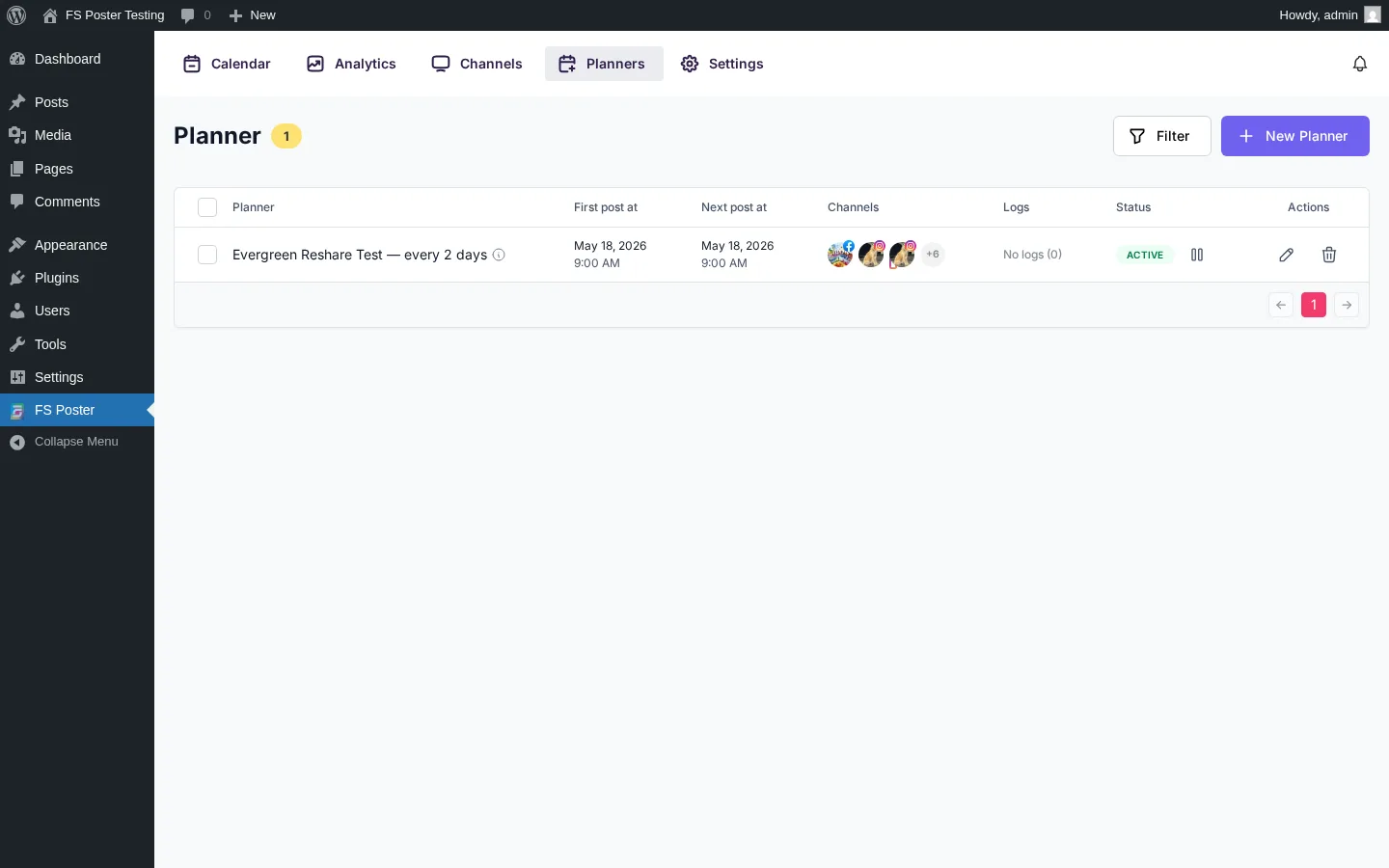
Starting price: $58/year intro on Single (renews at $65/year), with an optional Lifetime tier for 30 websites.
FS Poster is the strongest direct alternative for Revive Old Posts buyers who want the same recurring evergreen-reshare job done on a far wider network set, with a one-time payment instead of annual renewal, and without the Starter→Business upgrade wall. It is a WordPress plugin first — installed and activated inside WP-Admin like Revive — with a clean, modern in-WordPress admin, a 26-network channel inventory (including the newly added YouTube Shorts destination), a calendar, a recurring Planner that handles exactly the "share every X days/weeks with sleep-time exclusions" job Revive specialises in, a one-click bulk action on the standard WordPress Posts list, and a native WooCommerce hook so products auto-share without a separate add-on.
Key features:
- 26 social networks covered on every plan — Facebook, X/Twitter, LinkedIn (Profile + Company Page), Instagram, Threads, Pinterest, TikTok, YouTube, YouTube Shorts, Bluesky, Mastodon, Reddit, Telegram, Discord, VK, Google Business Profile, Truth Social, Plurk, Flickr, Webhook, and more
- Optional Lifetime tier covering 30 websites for long-term/multi-site buyers; updates included for the life of the plugin
- Recurring Planner with weekday × time matrix and sleep-time exclusions — direct replacement for Revive's "share every X hours" engine
- WooCommerce-native — products auto-share once Woo is active, no extra licence
- Per-channel category filters (include/exclude by taxonomy) for keeping irrelevant posts out of each social queue
- WP Posts-list bulk action ("Bulk Schedule [FS Poster]") to rehydrate an archive in one click
- AI captions + image generation (bring your own OpenAI key)
- Per-channel proxy, watermarking, click tracking, URL shorteners, multisite support
- 14-day money-back guarantee
Pricing: Starts at $58/year intro on Single (renews at $65/year, 1 site). Plus is $109/year intro / $195/year renewal (3 sites) and Developer is $229/year intro / $449/year renewal (15 sites). For long-term/multi-site buyers, an optional one-time Lifetime tier covers 30 websites with 12 months of support and lifetime updates. 14-day money-back guarantee. No free tier.
Best for: WordPress agencies and freelancers running 3+ client sites, publishers with deep archives that need an evergreen Planner (the exact Revive job-to-be-done), WooCommerce stores that want product auto-promotion, anyone who outgrows Revive's two-network Free tier and the Starter→Business upgrade wall, and any operator who would rather pay once and stop tracking annual renewals.
Why it is a strong Revive Old Posts alternative: It closes Revive's biggest gaps in one tier. The 26-network coverage includes every direct connector Revive ships (Facebook Pages, X, LinkedIn Profile + Company Pages, Tumblr, Mastodon, Instagram Business, Bluesky, Telegram, Google Business Profile, VK) plus the ones Revive doesn't reach directly at all (Pinterest, TikTok, YouTube, YouTube Shorts, Reddit, Discord, Threads, Truth Social) — no Zapier middleman required. The recurring Planner does the same evergreen-recycle job as Revive's "share every X hours" engine but with a weekday × time matrix and proper sleep-time exclusions, and the optional Lifetime tier is available as a long-term/multi-site path that replaces Revive's annual-only Starter/Business/Marketer ladder (Marketer alone renews at $529/year — FS Poster's Lifetime pays for itself before year 2 versus Marketer). And FS Poster has no Starter→Business upgrade wall — per-account scheduling, queue editing, taxonomy filters, and every connected network are unlocked on every paid tier.
What to watch for: There is no free tier — buyers either purchase or evaluate via the live demo (the 14-day money-back guarantee is the trial). Twitter/X is the most volatile network across the whole category and its sharing rules shift frequently for every WordPress plugin, not just FS Poster, and Instagram, Pinterest, and Instagram Story share require a featured image (this is platform behaviour, not a defect). AI features depend on the buyer's own OpenAI key.
If you want to see exactly how FS Poster stacks up before deciding, the FS Poster review walks through the full feature set, pricing, and where it fits best, and the FS Poster vs Revive Old Posts comparison gives you the direct side-by-side. If you'd rather pressure-test Revive itself first, the Revive Old Posts review lays out the LinkedIn issue, the Starter→Business upgrade wall, and the trade-offs in plain terms.
2. Blog2Social — The calendar-first alternative with 12 free networks
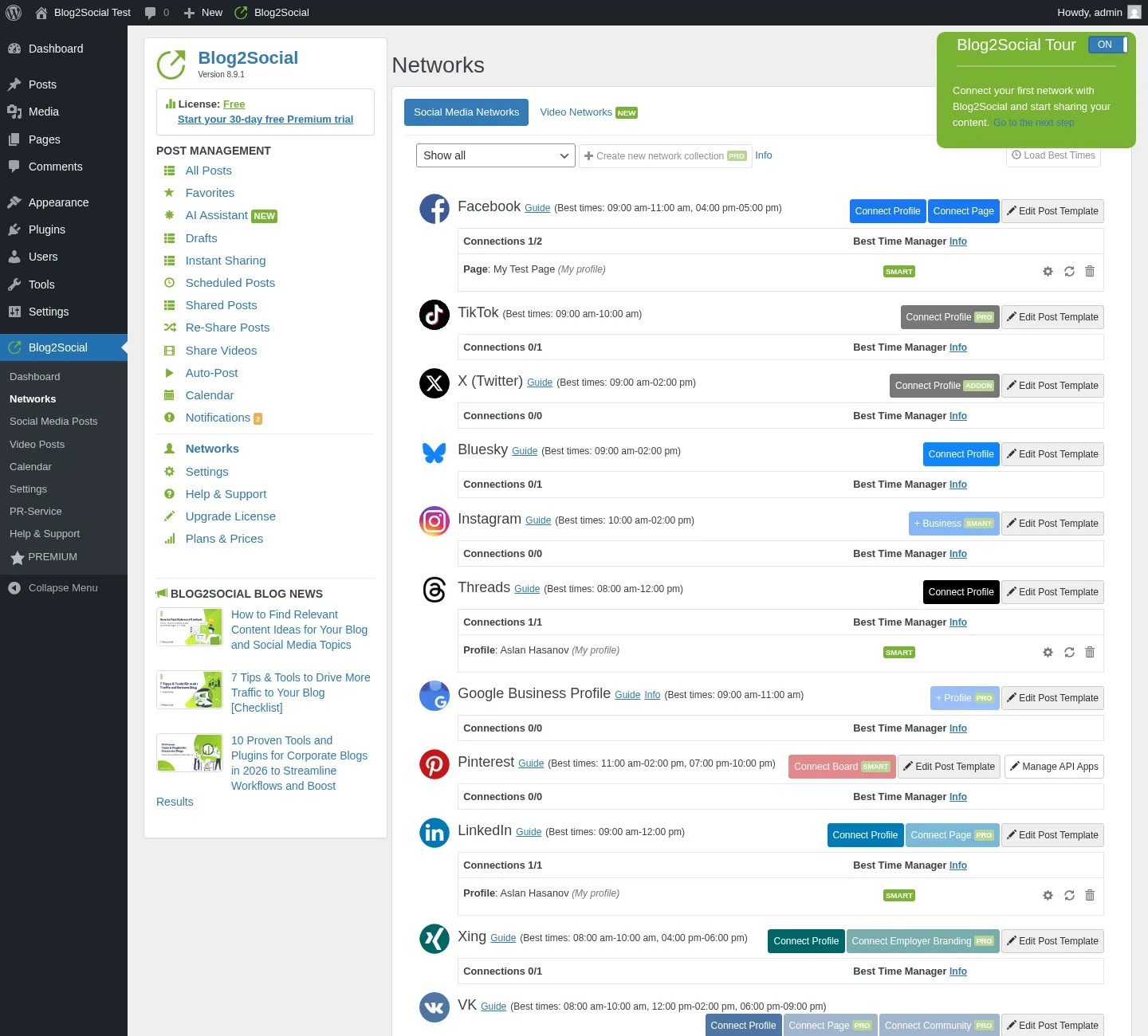
Starting price: Free (12 networks) · Smart €72.00/year (base plan, ≈ €6.00/mo equivalent) · Pro €118.80/year (≈ €9.90/mo equivalent) · Business €299.88/year (≈ €24.99/mo equivalent), each billed yearly (checkout-verified May 2026).
Blog2Social is Adenion's flagship social-publishing plugin and the right pick when Revive's two-network Free ceiling is the deal-breaker. From its own admin area inside WordPress it pushes posts to a deep network set — up to 25 destinations on the Business tier including Facebook (Pages + Profiles), LinkedIn (Profile + Page), Instagram Business, Threads, Bluesky, TikTok, Pinterest, YouTube, Vimeo, Reddit, Medium, Mastodon, Discord, Telegram, Google Business Profile, Xing, VK, Tumblr, Blogger, Flickr, Diigo, Ravelry, Instapaper, HumHub, and Band — and exposes a real drag-and-drop social-media calendar, Best Time Manager presets per network, an AI Post Templates layer (Assistini, text-only), and a recurring Re-Share Posts evergreen planner with a 5–100 post rule builder.
Key features:
- 12 networks on Free with 1 account per network, scaling to 25 networks on the Business tier
- In-WordPress drag-and-drop social-media calendar with stacked share-batch entries
- Per-network share editor — each connected account gets its own textarea, character counter, post-format selector, and image controls (even on Free)
- Best Time Manager presets visible per network — e.g. Facebook 09:00–11:00 & 16:00–17:00, LinkedIn 09:00–12:00, Threads 08:00–12:00, Reddit 19:00–21:00 — even on Free
- Re-Share Posts evergreen planner with category, author, post-type, dates, image-only, and share-cap filters (Smart+)
- AI Post Templates per network with tone + writing-style switches (Pro+)
- First Comment automation on Facebook + 9 additional networks (Pro+)
- 30-day free Premium Pro trial (no manual cancel required — auto-downgrades to Free)
Pricing: Free covers 12 networks (1 account each, 1 user, 1 site). Paid tiers (checkout-verified May 2026, EUR base-plan totals) are Smart €72.00/year (base plan, ≈ €6.00/mo equivalent), Pro €118.80/year (≈ €9.90/mo equivalent), and Business €299.88/year (≈ €24.99/mo equivalent) — each billed yearly. Final payable amount may vary by locale, currency, VAT, or discount state. X (Twitter) is a separate monthly subscription at $14.99–$59.99/month depending on volume; Video Posting is an annual add-on ($69/year). There is no Lifetime tier and no monthly billing on the plugin plans themselves.
Best for: Editorial teams and content marketers who want a real calendar + Best Time + evergreen planner inside WordPress, publishers who need broad network reach beyond Facebook + X without juggling a Zapier subscription, cost-sensitive buyers who want to start on Free and graduate to paid only when scheduling automation becomes necessary, and buyers who specifically value the "Made in Germany" trust framing.
Why it is a strong Revive Old Posts alternative: Where Revive's Free tier covers two networks, Blog2Social's Free tier covers twelve — Facebook Profile and Page, LinkedIn Profile, Threads, Bluesky, XING Profile, VK Profile, Reddit, Torial, Medium, Tumblr, Flickr, and Diigo are all reachable without paying (Pinterest moves in at the Smart tier, Instagram Business at Smart, Mastodon at Pro, and Telegram at Business). Blog2Social also ships a real in-WordPress calendar (Revive does not), Best Time Manager presets on every network row (Revive defaults to a single "every X hours" interval), and a 30-day free Premium Pro trial (Revive has no trial of the Pro Add-on). The Re-Share Posts evergreen planner is more rule-rich than Revive's recurring engine — filters by category, author, post type, dates, image-only, and a share-cap toggle. With 4.5 / 5 from 2,088 reviews on WordPress.org, it is also the highest-volume trust signal in this category.
What to watch for: Auto-share on publish is a paid-tier feature — Free users must manually open Blog2Social and click Share Now for every post. X (Twitter) and Video Posting are always separate paid add-ons stacked on top of the base plan. The pricing matrix is four-dimensional (networks × accounts × users × websites + X + Video). There is no Lifetime tier. And Blog2Social does not have a Gutenberg sidebar widget — every action lives inside the plugin's own admin area.
If Blog2Social looks like the right swap for your team, the Blog2Social review walks through where its calendar workflow, free tier, and add-on stacking will help or hurt your buying decision.
3. NextScripts SNAP — The 30-network technical alternative with a Reposter on Free
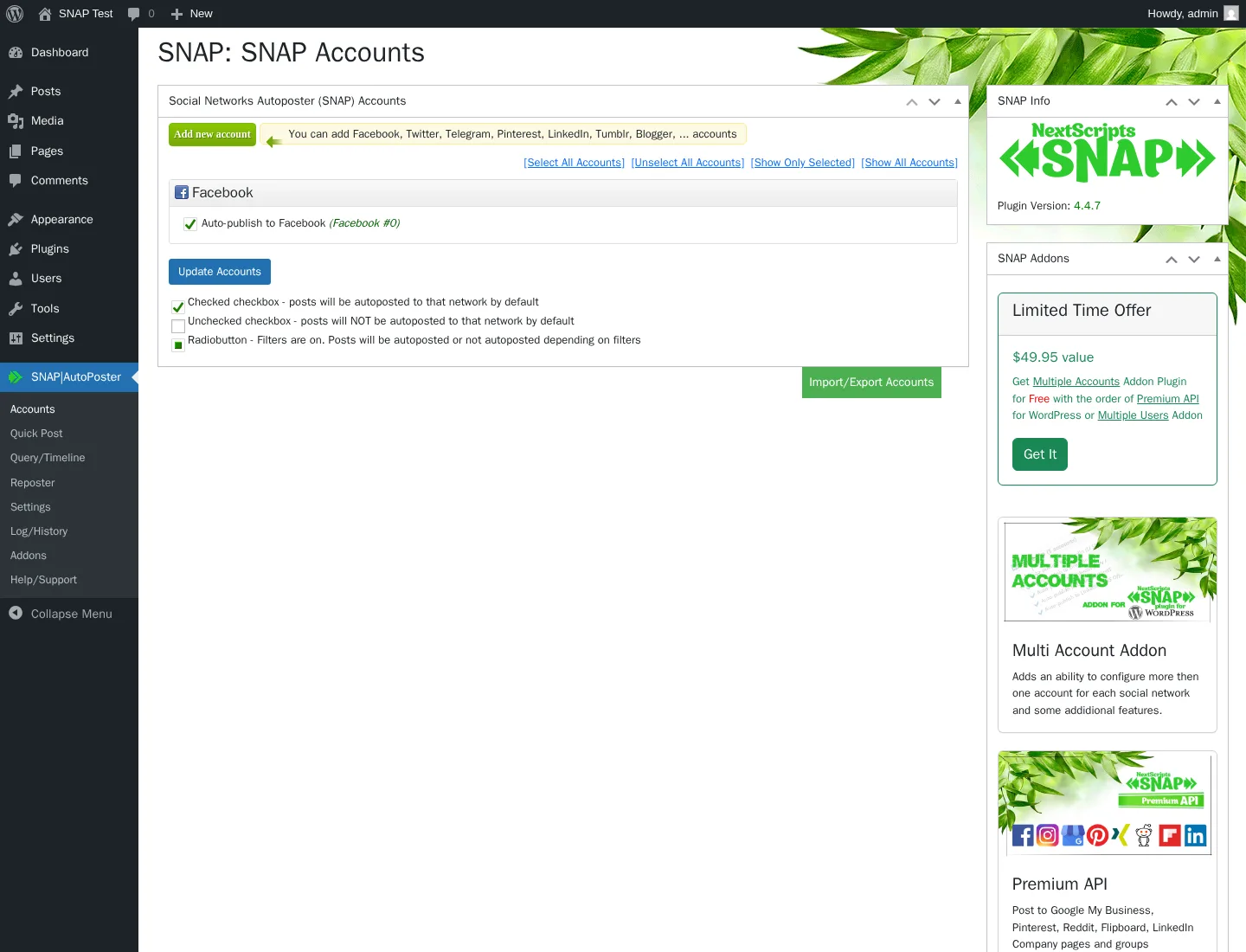
Starting price: Free (24 networks) · paid add-ons from $14.95/year · $69.95/year Autopost bundle · $249.95/year All-Access Pass.
NextScripts SNAP is the 14-year-old workhorse WordPress auto-poster — first published March 2012 and still actively patched (current version 4.4.7, released February 2026). From its own top-level admin area it auto-shares to 30 listed network destinations: Facebook (Profile / Page / Group), Twitter, LinkedIn (Profile), Tumblr, Blogger, Pinterest, Reddit, Instagram, Telegram, Flickr, Flipboard, Google Business Profile, Line, LiveJournal, MailChimp, Medium, ok.ru, Plurk, Scoop.It, SETT, XING, VK.com, weibo, Diigo, Instapaper, deviantART, vBulletin, WordPress-to-WordPress, YouTube channel feed, and Yo. The flagship differentiator is 100% white-label posting — buyers register their own Facebook/Twitter/LinkedIn developer apps so every share is attributed to their brand, with no "shared via SNAP" footer.
Key features:
- 30 listed network destinations — the broadest reach in the WordPress auto-poster category
- 24 networks work on the free tier; 6 require the Premium API addon ($49.95/yr) — Pinterest, Reddit, Flipboard, Google Business Profile, Scoop.It, YouTube, LinkedIn Company pages
- Reposter (recycler) with full rule-builder on Free — category/tag/post-type/format/author filters, timeframes, dates, exact-post selection, frequency in days/hours/minutes, and randomized posting time (± N minutes)
- 100% white-label posts via the buyer's own developer apps
- 15+ replacement tags including %TITLE%, %URL%, %SHORTURL%, %IMG%, %AUTHORTWHANDLE%, plus "spin" syntax
{a|b|c}for per-post variation - 11 URL shorteners built-in (is.gd, bit.ly, YOURLS self-hosted, Rebrandly, and more)
- Open Graph injection + Quick Post composer (share without creating a WP post) on Free
- Auto-import comments from Twitter and Facebook → WP comments (unique in the category)
Pricing: Base plugin is $0 on WordPress.org. Paid features ship as 5 separately-billed annual add-ons: Multi Account $49.95/year, Premium API $49.95/year, Multi User $149.95/year, Scheduled & Delayed Posting $14.95/year, Proxies $14.95/year. The Autopost bundle at $69.95/year compresses Multi Account + Premium API + Scheduled & Delayed + Proxies; the All-Access Pass at $249.95/year covers every current and future add-on. No Lifetime tier, no monthly billing, no trial.
Best for: Technical site owners and developers who'll register their own Facebook / Twitter / LinkedIn / Pinterest developer apps and want every share white-labelled, publishers needing oddball / regional networks (ok.ru, VK, weibo, XING, LiveJournal, Plurk, MailChimp, vBulletin, SETT, Diigo, Instapaper, Scoop.It) that mainstream auto-posters do not cover, buyers who specifically need WordPress-to-WordPress cross-posting, and cost-sensitive solo bloggers who can run the free tier on 24 networks without paying anything.
Why it is a strong Revive Old Posts alternative: It is the only candidate in this list with direct connectors for VK, ok.ru, weibo, Plurk, LiveJournal, vBulletin, SETT, Scoop.It, MailChimp, and WordPress-to-WordPress — networks Revive either gates behind Business (VK) or does not support at all. The free tier covers 24 networks with the Reposter recycler and Quick Post composer fully unlocked — twelve times the network reach of Revive's two-network Free. And SNAP's Reposter is more rule-rich on Free than Revive's Starter recycler: category/tag/post-type/author filters, timeframes, exact-post selection, and randomized posting time are all available without paying, whereas Revive only unlocks per-account taxonomy filters on the Business plan at $199/year.
What to watch for: 3.3 / 5 average rating from 617 reviews on WordPress.org — the lowest in this category, with 37% of reviews 1-star (most of the 1★ tail tracks back to Facebook, LinkedIn, and Pinterest changing the rules on the plugin rather than to SNAP itself, but the rating is still what buyers see first). The admin UI feels mid-2010s, not modern. Per-network setup is heavy DIY — buyers register their own developer apps for Facebook, Twitter, LinkedIn, Pinterest, and so on. Facebook connections need to be re-authorised about every 30 days. There is no in-WordPress calendar, no Gutenberg sidebar widget, and exact-time scheduling is paid ($14.95/year Scheduled & Delayed Posting addon). Pinterest is paid. Multiple accounts per network is paid. Support throughput is thin — the WordPress.org listing shows 0 of 1 issues resolved in the trailing two months.
If your network list pushes you toward SNAP, the NextScripts SNAP review is the honest middle-ground take — what works, what's dated, and whether the DIY developer-app setup is worth it for your workflow.
4. Jetpack Social — The simple Automattic-stack alternative
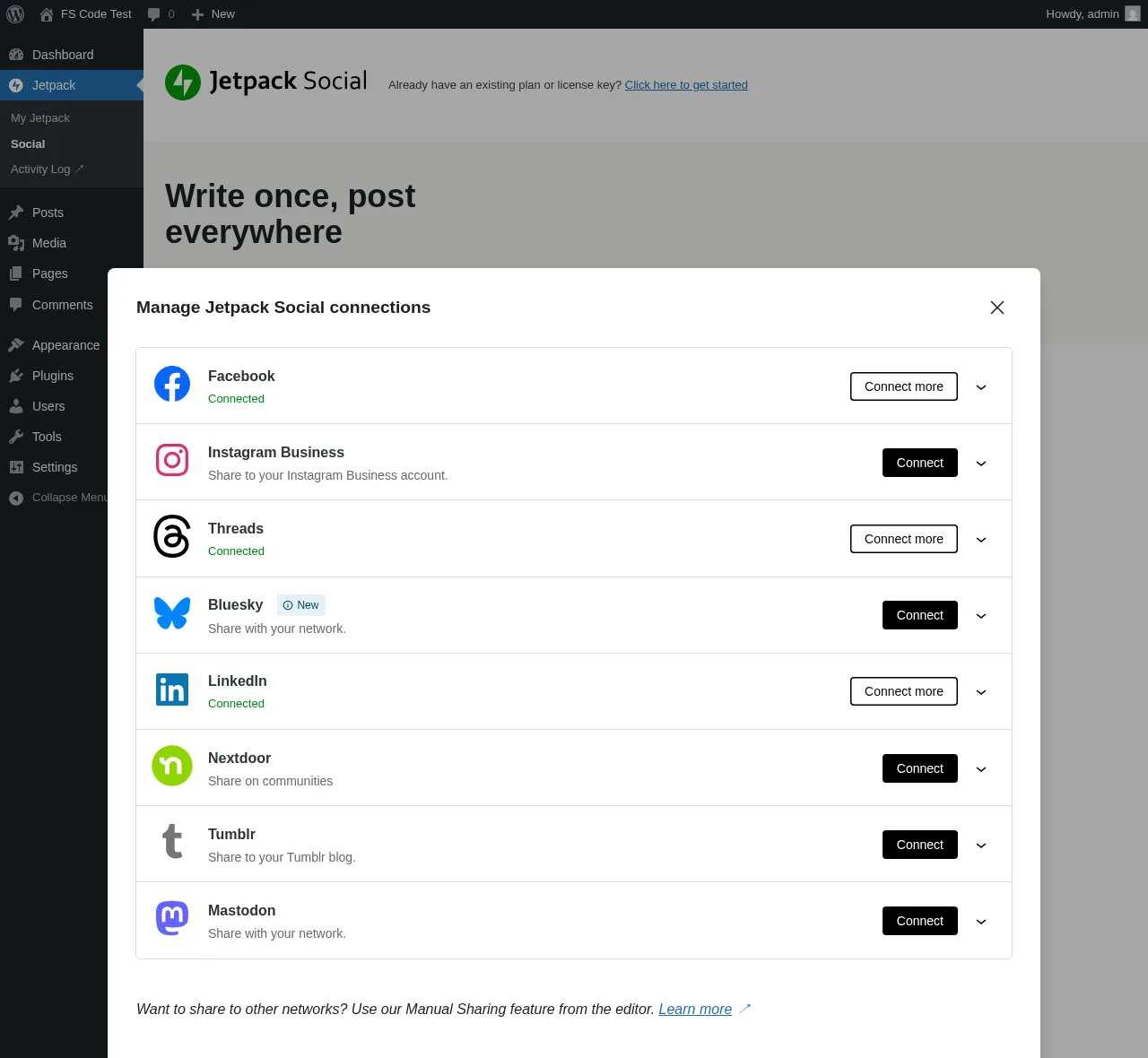
Starting price: Free · €59.40 first year (€4.95/month equivalent), €107.40/year renewal (€8.95/month equivalent) for the Social paid plan (annual billing; approximately $59 first year, $107 renewal in USD).
Jetpack Social is Automattic's stripped-down WordPress publishing plugin and the right pick when Revive's six-tab admin and Exclude Posts page feel heavier than the job needs. From the Gutenberg sidebar — exactly where Revive does not surface — it auto-shares a new post with featured image and excerpt to 8 supported networks (Facebook Pages, Instagram Business, Threads, LinkedIn, Bluesky, Nextdoor, Tumblr, Mastodon). The Free tier covers the core auto-share, scheduling, content recycling, manual-share buttons, link preview, UTM-on-share, and a Social Notes beta — and has been unlimited shares since September 2024 (the old 30/month cap is gone).
Key features:
- 8 networks — Facebook Pages, Instagram Business, Threads, LinkedIn, Bluesky, Nextdoor, Tumblr, Mastodon
- Native Gutenberg sidebar widget — no context-switch out of the editor
- Free tier has unlimited shares; auto-share, scheduling, manual re-share all included
- Per-account custom message + per-account custom image on the paid plan
- Social Image Generator (template-based branded share images) on paid
- Sharing Activity dialog with per-row Shared / Scheduled status and live "View ↗" link
- 14-day money-back guarantee on annual plans
Pricing: Social Free covers the core flow on 8 networks with unlimited shares. The Social paid plan runs €59.40 first year (~$59; €4.95/month equivalent) then €107.40/year renewal (~$107; €8.95/month equivalent). A 2-year prepay at €133.44 offers an additional discount. The Growth bundle (Social + Stats + Search + Boost) is €107.40 first year, €227.40 renewal. Currency is IP-geolocated by Automattic, so US buyers should treat those annual totals as approximately $59 first year and $107/year renewal.
Best for: Solo bloggers and small businesses publishing to 2–4 mainstream networks, buyers already paying for Jetpack (Stats, Security, Growth), and less-technical WordPress users who value the Automattic name and the absence of a separate SaaS subscription.
Why it is a strong Revive Old Posts alternative: It is the simpler, more editor-native option. The Gutenberg sidebar workflow is dramatically cleaner than Revive's separate admin area + Exclude Posts page (Revive has no Gutenberg sidebar at all), the Free tier covers 8 networks including Instagram Business, LinkedIn, Bluesky, Threads, Tumblr, and Mastodon — four times the reach of Revive's two-network Free — and the per-row View ↗ link in the Sharing Activity dialog is a cleaner share-verification surface than Revive's text-only logs. The brand trust around Automattic is also a real factor for non-technical buyers who don't want to manage a separate Pro Add-on plugin file.
What to watch for: Only 8 networks — no Pinterest, X/Twitter, TikTok, YouTube, Reddit, Discord, Telegram, VK, Truth Social, Webhook, or Google Business Profile. Twitter/X support was permanently removed in 2023. Jetpack Social does not recycle archives — there is no recurring evergreen-reshare planner, so if Revive's recycle engine is the reason you bought it, Jetpack Social is the wrong swap. The WordPress.org rating is 3.3 / 5 from 74 reviews — a love-it-or-hate-it pattern, with the 1★ cluster centred on accounts repeatedly disconnecting and needing to be re-linked. And there is no per-channel category filter, no WP Posts-list bulk action, no WooCommerce-aware logic, and no multi-site / agency licensing.
If you want to know whether Jetpack Social's 8-network ceiling and Gutenberg-first workflow are right for your site, the Jetpack Social review breaks down what it covers, what it skips, and where the recurring account-reconnection pain shows up in real use.
5. SchedulePress — The editorial-calendar-first alternative
Starting price: Free (7 of 8 networks) · $39/year Individual · $112/year Business Unlimited · $299 one-time Lifetime Unlimited.
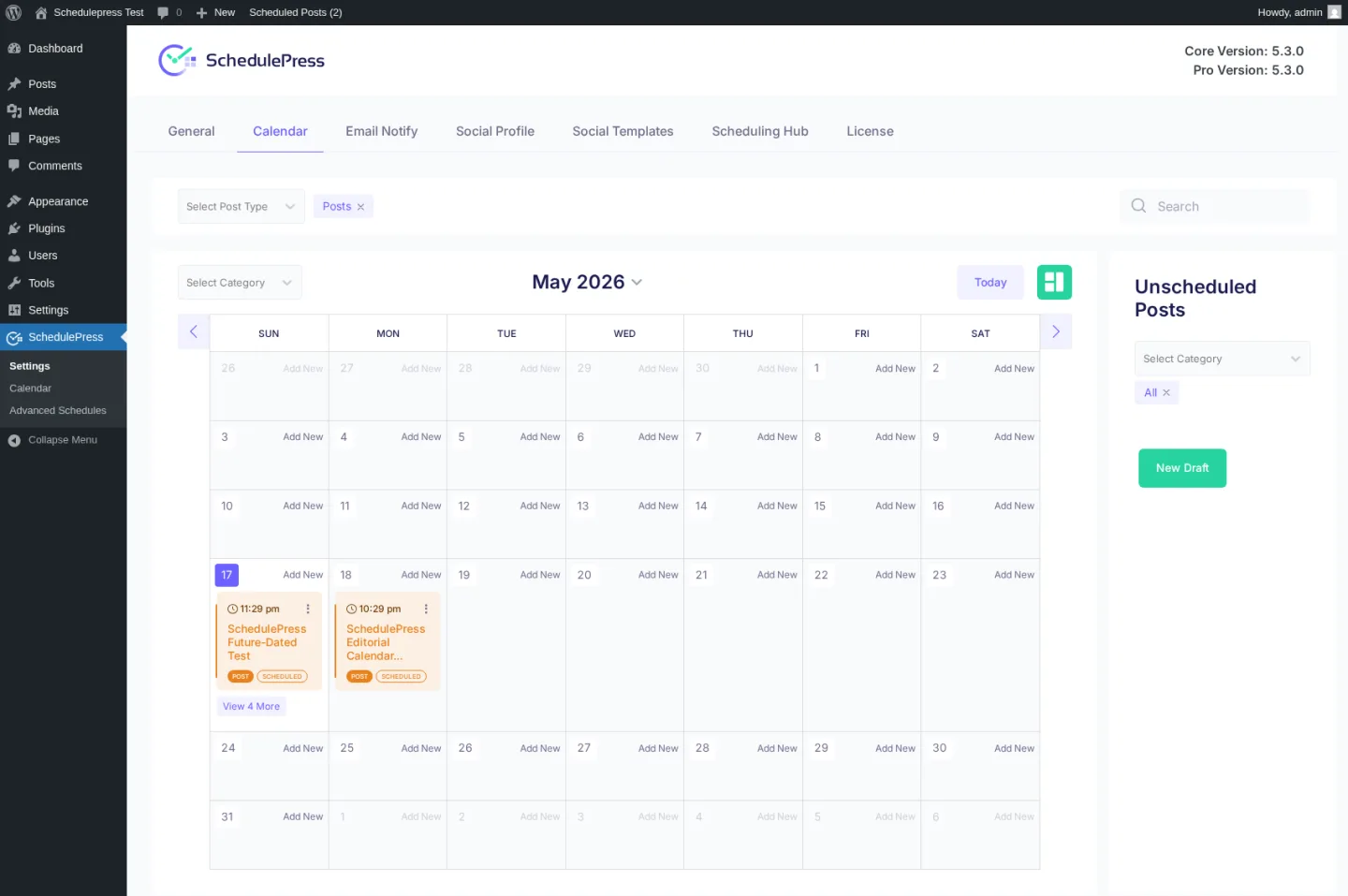
SchedulePress (WPDeveloper, formerly "WP Scheduled Posts") is the editorial-calendar-first competitor in this category. It started as a WordPress scheduling plugin and has expanded into auto-social-sharing. From a clean, modern dashboard inside WordPress it offers a drag-and-drop calendar of every WordPress post, an Auto Scheduler queue with a weekday × time × count matrix, a Manual Scheduler for explicit per-day slots, a Missed Schedule Handler that recovers schedules WordPress would otherwise drop, and an Advanced Schedule mode that schedules an update to an already-published post (no other plugin in this list does this).
Key features:
- 8 networks — Facebook, Twitter/X, LinkedIn (Profile + Page), Pinterest, Instagram, Medium, Threads, Google Business Profile
- Free tier covers 7 of 8 networks (only Google Business Profile is Pro-gated)
- Drag-and-drop calendar planner of every WordPress post + dedicated Editorial Calendar inside the Posts list
- 3-tier scheduling — Auto Scheduler (weekday × time × count matrix), Manual Scheduler (per-day slots), Missed Schedule Handler (recovers schedules WordPress would otherwise drop)
- Advanced Schedule — schedule an update to an already-published post without unpublishing it
- Per-post Schedule And Share modal with Add Social Message composer (smart tags + relative date/time offsets)
- 5 transactional Email Notify toggles for multi-author workflows
- 14-day money-back guarantee
Pricing: Free on WordPress.org (7 of 8 networks). Pro tiers: Individual $39/year (1 site), Business $112/year (unlimited sites), Lifetime Unlimited $299 one-time (unlimited sites), and the WPDeveloper Agency Bundle Lifetime $749 one-time covering 10+ products. Pricing is promotion-driven — always re-check the wpdeveloper.com page before you buy.
Best for: Editorial teams publishing daily to WordPress (multi-author blogs, news sites) who need the drag-and-drop calendar as the primary workflow, low-traffic site owners whose WordPress site drops scheduled posts and who need an automatic recovery for them, marketers who need to schedule an update to a published post without unpublishing, and price-sensitive buyers who want the cheapest annual entry ($39/year) or a Lifetime under $300.
Why it is a strong Revive Old Posts alternative: Free covers 7 of 8 networks — Facebook, Twitter, LinkedIn Profile + Page, Pinterest, Instagram, Medium, Threads — which is 3.5× the reach of Revive's two-network Free. The drag-and-drop calendar is dramatically better at "what is queued where" than Revive's Sharing Queue list (which has no calendar view), and the Advanced Schedule feature is unique to SchedulePress — schedule an update to an already-published post without unpublishing it, useful when a marketing team needs to swap an evergreen post's content at a campaign date. The Lifetime Unlimited at $299 undercuts FS Poster's optional Lifetime tier on sticker price and is meaningfully cheaper than any 5-year Revive Marketer renewal stack ($529/year × 5 = $2,645).
What to watch for: Only 8 networks — the narrowest paid-tier coverage in this list. No Reddit, Bluesky, TikTok, Discord, Tumblr, Mastodon, VK, or Webhook. Twitter is still labeled "Twitter" in the UI (the X rebrand has not landed). There is no in-product Activity Log / Share History panel — share-fire verification depends on the buyer manually checking each connected social account. SchedulePress is calendar-first, not recycler-first — there is no recurring evergreen-reshare engine equivalent to Revive's "share every X hours" loop, so if archive recycling is your core job, this is the wrong swap. End-to-end auto-share confirmation was also harder to verify than in competitor plugins — the Save flow persists per-network templates correctly, but there is no Activity Log to confirm dispatch in-product, so buyers planning to rely on auto-share-on-publish should validate end-to-end on their own install with their own connected accounts.
If SchedulePress's editorial calendar is what's pulling you away from Revive, the SchedulePress review is the buyer's-eye read on what it does well, where the 8-network ceiling will hurt, and whether the Lifetime Unlimited tier is worth it for your workflow.
6. Bit Social — The budget-friendly Lifetime + AI alternative
Starting price: Free (2 networks) · $89 one-time Starter LTD (1 site) / $149 one-time Agency LTD (unlimited sites).
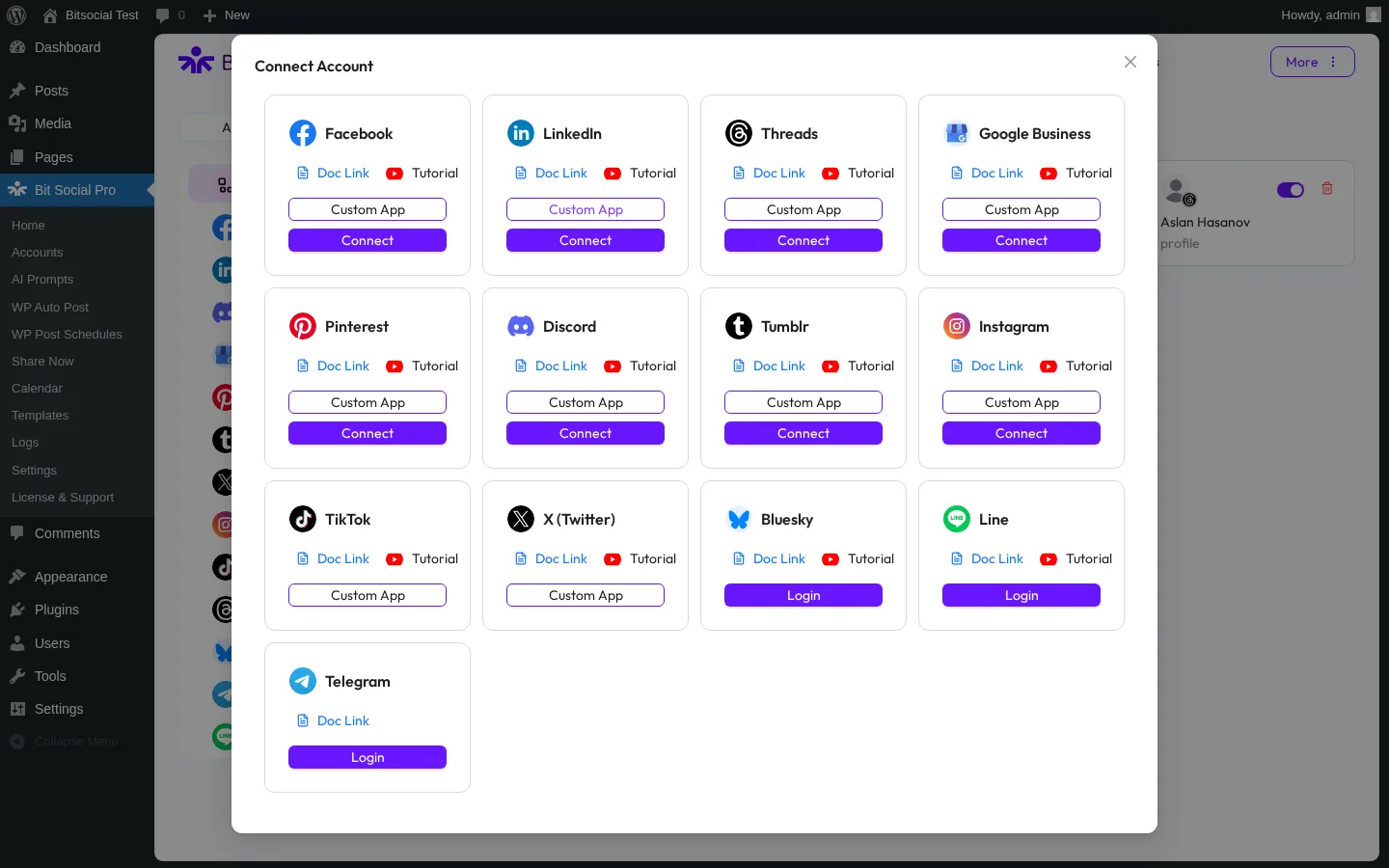
Bit Social is Bit Apps's challenger entry in the WordPress social-publishing category. From a clean, modern dashboard inside WP-Admin it auto-shares new posts to 13 networks — Facebook Pages, LinkedIn (Profile in free + Page in Pro), Threads, Google Business Profile, Pinterest, Discord, Tumblr, Instagram, TikTok, X (Twitter), Bluesky, Line, Telegram — and ships AI Prompts (ChatGPT + DALL·E, bring-your-own-OpenAI-key) plus a detailed per-share Logs panel that surfaces exactly why each share succeeded or failed.
Key features:
- 13 networks in the Connect Account modal (Reddit is announced as "Coming Soon")
- Per-platform Templates with smart fields (Threads first-reply, Pinterest custom title) and auto-save on every keystroke
- AI Prompts (ChatGPT + DALL·E) with smart-tag templating + fallback content, BYO OpenAI key
- First-comment automation on Instagram, Threads, Bluesky
- WP Post Schedule recurring planner with interval + sleep days + post type + category + tag filters (Pro)
- WooCommerce + custom-post-type auto-share (Pro)
- External cron toggle with clear step-by-step instructions for reliable scheduling on low-traffic sites
- Open-source codebase
- Detailed per-share Logs panel with clear success/failure details and a live Visit link to the published post on each network — one of the cleanest share-verification surfaces in the category
Pricing (May 2026 promo): Starter Annual $49/year (1 site), Starter LTD $89 one-time (1 site), Agency Annual $99/year (unlimited sites), Agency LTD $149 one-time (unlimited sites, "Most Popular"), Bit Apps Agency Bundle $1,149 one-time for 5 products. All paid plans include a 14-day money-back guarantee. The free WordPress.org build is restricted to 2 networks (Facebook + LinkedIn Profile) — every other network is Pro-only.
Best for: Budget-driven buyers who want Lifetime + unlimited-sites under $200, Bit Apps ecosystem buyers already using Bit Form / Bit Integrations, AI-curious buyers who want ChatGPT-generated captions + DALL·E images on a BYO-OpenAI-key basis, and Threads + Bluesky + Pinterest + Twitter publishers who want all four covered.
Why it is a strong Revive Old Posts alternative: It is the cheapest Lifetime path in the category. $149 for unlimited sites lifetime undercuts Revive's entire SaaS ladder — no annual renewal, no Starter→Business upgrade wall, no $529/year Marketer renewal. The AI Prompts surface generates captions and images on a BYO-OpenAI-key basis (Revive has no AI features). The detailed share Logs panel with live Visit links is one of the cleanest share-verification surfaces in the category — Revive's logs are good, but Bit Social's success/failure details + Visit link combination makes it even easier to confirm what hit each network. And the WP Post Schedule module covers Revive's recurring-recycle job with interval + sleep days + post type + category + tag filters on the Pro tier.
What to watch for: The Free tier is only 2 networks (Facebook + LinkedIn Profile) — the same ceiling as Revive's Free, with no Twitter on top of that. The active-install base is 6,000+, meaningfully smaller than Revive's 20,000+ or Blog2Social's 50,000+. There is no Mastodon, Webhook, VK, OK.ru, Truth Social, Reddit (Coming Soon), or Medium connector. The Calendar view does not show your existing scheduled events on the grid. The in-product License & Support page is currently broken. Twitter/X and TikTok need the buyer to register their own developer app inside each network's console before connecting — Bit Social does not connect those two directly. And the Home dashboard's "Published Post" counter does not update after successful auto-shares, so always use the Logs page to confirm a share fired.
If the $149 Agency Lifetime is the number that closes the decision for you, the Bit Social review covers where the Lifetime + AI surface earn the spend and where the smaller install base and 2-network Free tier are honest trade-offs.
Revive Old Posts vs FS Poster — Which Is Better?
For most Revive Old Posts buyers who outgrow either the two-network Free ceiling or the Starter→Business upgrade wall, FS Poster is the more complete swap. FS Poster starts at $58/year on the Single plan (renews at $65/year) and covers 26 networks on every paid tier (vs Revive's roughly 10 direct connectors, with the most useful ones — Instagram Business, LinkedIn Company Pages, Bluesky, Telegram, Google Business Profile, VK — gated behind Revive's $199/year Business plan), ships a recurring Planner that does the same evergreen-reshare job as Revive's "share every X hours" engine but with a weekday × time matrix and proper sleep-time exclusions, offers an optional Lifetime tier covering 30 websites for long-term/multi-site buyers, and includes a WP Posts-list bulk action plus WooCommerce-native auto-share that Revive does not match. Revive Old Posts remains the right pick only when the buying job is specifically "recycle Facebook Pages + X/Twitter on a deep evergreen archive with the lowest possible cost and complexity" — Revive's two-network Free is fine for that single use case.
For the full side-by-side breakdown, read our FS Poster vs Revive Old Posts comparison.
How to Choose the Right Revive Old Posts Alternative
There is no universally "best" alternative — the right pick depends on which Revive Old Posts gap is the deal-breaker for your workflow.
If you want a Lifetime licence with 26 networks and a recurring Planner → FS Poster
Revive Old Posts has no Lifetime tier and only reaches Pinterest, TikTok, YouTube, Reddit, Discord, and Threads through Zapier. FS Poster starts at $58/year on the Single plan with all 26 networks direct-connected and a recurring Planner that handles the same evergreen-reshare job Revive specialises in, plus an optional one-time Lifetime tier covering 30 websites for long-term/multi-site buyers. For agencies, freelancers managing 3+ sites, or anyone who'd rather pay once and stop tracking annual renewals, this is the cleanest financial swap. FS Poster's optional Lifetime vs Marketer $529/year renewal × 5 years = the break-even point arrives in roughly year 2.
If you want a real in-WordPress calendar plus 12 free networks → Blog2Social
Revive's queue is a list, not a calendar — there is no drag-and-drop or visual schedule overview. Blog2Social ships a drag-and-drop social-media calendar with stacked share-batch entries, Best Time Manager presets on every network row, and a 12-network Free tier that includes Facebook (Pages + Profiles), LinkedIn Profile, Threads, Bluesky, Reddit, Tumblr, Medium, XING Profile, VK Profile, Flickr, Torial, and Diigo without paying. (Pinterest unlocks on Smart, Instagram Business on Smart, Mastodon on Pro, and Telegram on Business if your distribution needs them.) Skip Blog2Social if you need X (Twitter) without paying a separate X add-on, want a Lifetime licence, or refuse to context-switch out of the Gutenberg editor.
If you need oddball / regional networks like VK, ok.ru, weibo, or MailChimp → NextScripts SNAP
Revive Old Posts covers VK Profiles + Communities on the Business plan but does not cover ok.ru, weibo, XING, LiveJournal, Plurk, Diigo, Instapaper, Scoop.It, MailChimp, vBulletin, SETT, or WordPress-to-WordPress at all. SNAP covers every one of those, with 24 networks free including the Reposter recycler. Skip SNAP if you are non-technical (the per-network developer-app setup is hostile), need a calendar (none), or expect responsive vendor support (the WordPress.org listing shows 0 of 1 forum issues resolved in the trailing two months).
If you only need 2–4 mainstream networks and want a Gutenberg-native flow → Jetpack Social
The Jetpack Social Gutenberg sidebar is the cleanest in-editor publishing widget in the category — Revive has no Gutenberg sidebar at all. If your distribution is Facebook Pages + Instagram Business + LinkedIn + Threads and you are already paying for Jetpack Stats / Security / Growth, the Social paid plan is effectively almost free. Skip Jetpack if you need Twitter/X (permanently removed), Pinterest, TikTok, YouTube, Reddit, Telegram, or VK, and skip it if you specifically need a recurring evergreen-reshare engine — Jetpack does not recycle archives.
If your editorial team lives in a multi-author calendar and only needs 8 networks → SchedulePress
SchedulePress is the WordPress editorial-calendar plugin that has expanded into social. The drag-and-drop calendar planner, Auto Scheduler queue, Missed Schedule Handler, and Advanced Schedule (update a published post) are the deepest editorial workflow surface in this list. $39/year Individual is the cheapest annual entry; $299 one-time Lifetime Unlimited is cheaper than FS Poster. Skip SchedulePress if you need more than the 8 supported networks, need an in-product Activity Log, or need a recurring evergreen-recycle engine (there is none).
If you want Lifetime + unlimited sites under $200 and AI captions → Bit Social
Bit Social's Agency LTD at $149 one-time is the cheapest Lifetime option in the WordPress social-publishing category. You get 13 networks, AI Prompts (ChatGPT + DALL·E with your own OpenAI key), first-comment automation on Instagram/Threads/Bluesky, and a detailed per-share Logs panel that makes it easy to confirm what actually fired. The trade-off is a smaller installed base (6,000+ vs Revive's 20,000+) and a Free tier limited to 2 networks — exactly the same ceiling as Revive's Free, just on different networks.
Frequently Asked Questions
What is the best alternative to Revive Old Posts? For most WordPress publishers, FS Poster is the strongest single alternative. It starts at $58/year on the Single plan and is the only option in this list that closes Revive's biggest gaps at once: 26 networks (vs Revive's roughly 10 direct connectors, with the most useful ones gated behind the $199/year Business plan), a recurring Planner that handles the same evergreen-reshare job as Revive's "share every X hours" engine, an optional Lifetime tier covering 30 websites for long-term/multi-site buyers (vs Revive's annual-only Starter/Business/Marketer ladder), WooCommerce-native auto-share, and flat per-site licensing with no Starter→Business upgrade wall. It has 50K+ active installs and 25K+ paid customers per fs-poster.com.
Is FS Poster better than Revive Old Posts? For agencies running multiple client sites, publishers needing Pinterest, TikTok, YouTube, Reddit, Discord, or Threads coverage on the cheap, anyone who wants an optional Lifetime licence on top of an annual entry to lock the cost in, and anyone who needs per-account day-time scheduling without paying $199/year, yes. FS Poster starts at $58/year on the Single plan and covers 26 networks on every paid tier (Revive caps direct connectors at roughly 10 and gates the most useful ones behind Business), offers an optional Lifetime tier covering 30 websites (Revive has none), ships a WooCommerce-native flow (Revive does not), and offers a one-click bulk action on the WordPress Posts list (Revive does not). Revive Old Posts remains the right pick only for solo bloggers whose primary job is recycling a deep archive on Facebook Pages + X/Twitter at the lowest possible cost — its two-network Free is fine for that single use case.
What does Revive Old Posts lack compared to its alternatives? Five specific gaps. (1) The Free tier is only two networks (Facebook Pages + X/Twitter); Blog2Social Free covers 12, Jetpack Social Free covers 8, NextScripts SNAP Free covers 24, SchedulePress Free covers 7 of 8. (2) No Lifetime tier — every paid plan is annual; FS Poster (optional Lifetime tier on top of its $58/yr Single entry), Bit Social ($89/$149), and SchedulePress ($299) all offer Lifetime. (3) No Pinterest, TikTok, YouTube, Reddit, Discord, Threads, or Webhook direct connectors — Zapier webhook is the only path, which is a separate subscription. (4) The Starter→Business upgrade wall hits exactly where buyers expect it not to — Custom Schedule, queue editing, per-account taxonomy filters, Instagram Business, LinkedIn Company Pages, Bluesky, Telegram, Google Business Profile, and VK all require Business ($199/year intro / $259/year renewal), not the $99 Starter plan. (5) LinkedIn auto-share is currently broken on the latest Pro Add-on — Revive is still calling a retired LinkedIn API version, so LinkedIn shares fail every time until Themeisle ships a fix.
Is there a free alternative to Revive Old Posts? Yes — several. NextScripts SNAP Free covers 24 networks on a single install with the Reposter recycler unlocked (the closest free match to Revive's recycle engine). Blog2Social Free covers 12 networks with the in-WordPress calendar, per-network share editor, and Best Time Manager presets. Jetpack Social Free covers 8 networks with unlimited shares and a Gutenberg sidebar. SchedulePress Free covers 7 of 8 networks with the drag-and-drop calendar. Bit Social Free covers 2 networks (Facebook + LinkedIn Profile). Pick the free option whose network coverage matches your distribution — if recurring evergreen recycling is the core job, SNAP's Reposter on Free or Blog2Social's Re-Share Posts on Smart (€72.00/year base plan, billed yearly) are the closest matches.
Which Revive Old Posts alternative is best for evergreen archive recycling? FS Poster — its recurring Planner module is the closest one-for-one replacement for Revive's "share every X hours" engine, with a weekday × time matrix, sleep-time exclusions, per-channel category filters, and a WP Posts-list bulk action to rehydrate an existing archive in one click. Blog2Social is the runner-up with its Re-Share Posts evergreen planner (Smart tier, €72.00/year base plan, ≈ €6.00/mo equivalent, billed yearly — checkout-verified May 2026) including a 5–100 post rule builder with category, author, post-type, image-only, and share-cap filters. NextScripts SNAP is the budget pick — its Reposter on the Free tier covers category/tag/post-type/format/author filters with randomized posting time. Jetpack Social and SchedulePress have no recurring evergreen-recycle engine and are the wrong swaps if archive recycling is your primary job.
Is LinkedIn really broken on Revive Old Posts right now? In my May 2026 review, LinkedIn auto-share failed on the latest Pro Add-on because Revive was still calling a retired LinkedIn API version. The in-product Sharing Logs surface the failure clearly, so the issue is easy to spot, but buyers should treat LinkedIn auto-share as unreliable until Themeisle ships a fix. If LinkedIn auto-share is critical to your workflow, retest before buying, or shortlist FS Poster, Blog2Social, or NextScripts SNAP.
Conclusion
The "best Revive Old Posts alternative" depends on which Revive gap is the deal-breaker for your workflow. If you want a Lifetime licence, 26 networks, and a recurring Planner that does the same evergreen-reshare job Revive specialises in, FS Poster is the cleanest swap and the alternative I would shortlist first. If you want a real in-WordPress calendar + 12 free networks, look at Blog2Social. If you need oddball / regional networks like VK, ok.ru, or weibo plus a Reposter recycler on Free, look at NextScripts SNAP. If you only need a few mainstream networks and want the cleanest Gutenberg sidebar, look at Jetpack Social. If your editorial team lives in a multi-author drag-and-drop calendar, look at SchedulePress. If you want the cheapest Lifetime + AI captions, look at Bit Social.
When you're ready to lock in the decision, start with the FS Poster review for the full picture of the strongest swap, then read the FS Poster vs Revive Old Posts comparison for the direct side-by-side against the tool you're leaving. If you want the whole category in a single comparison frame, the social media scheduler plugins for WordPress roundup pulls every option above (and a few more) into one buyer's view.
Write once. Post to 26 networks.
- 26 social networks
- Schedule & auto-repost
- Runs inside wp-admin


