


Sprout Social is one of the strongest social media management platforms on the market, but it is also one of the most expensive once you move past the entry tier. Essentials starts at $79 per seat per month on annual billing, but the modules most teams associate with Sprout (full Smart Inbox, listening, advocacy, premium analytics) sit higher up the ladder, so real-world per-seat cost climbs into the hundreds quickly. Per-seat pricing plus paid add-ons for listening, advocacy, reviews, and premium analytics means many teams pay near-enterprise prices for a workflow they only partially use.
If you are reading this, you have probably already done the math. Maybe Sprout's renewal quote came in higher than expected, maybe the social inbox is overkill for your size, or maybe most of the content you publish actually starts inside WordPress and never needs to touch a SaaS calendar at all. The right alternative depends on which of those problems you are trying to solve.
I compared the strongest Sprout Social alternatives across full SMM suites, lighter SaaS schedulers, and WordPress-native publishing tools, using each vendor's current pricing pages and the workflows they are actually built for. Below is the short list worth considering, with honest notes on where each one wins and where it falls short.
Why Look for a Sprout Social Alternative?
Sprout Social is good at what it does. The reason teams look for alternatives is rarely "it does not work." It is almost always one of these four problems.
Per-seat pricing is hard to defend at small and mid-team sizes. Sprout's public pricing page now starts at $79 per seat per month on Essentials (annual billing), but most teams quickly land on Standard at $199 per seat per month or Professional at $299 per seat per month once they want the full Smart Inbox, broader profile limits, and richer reporting. A modest team of five people on Standard is just under $1,000 per month on annual billing before any add-ons, and closer to $1,500 per month on Professional. For organizations that already have a social presence but do not have a dedicated social ops team, that is a lot of fixed cost for a tool a few people open daily.
Add-on pricing for the features you may actually want. Listening, Reviews, Employee Advocacy, and Premium Analytics are not bundled into the entry-tier seat price. Once you start adding the modules that originally attracted you to Sprout, the total cost climbs faster than the headline per-seat number on the pricing page suggests. Buyers often discover this after the first renewal cycle.
Half-used modules. A common pattern is teams using Sprout's publishing calendar, basic reporting, and Smart Inbox, while listening, advocacy, advanced workflows, and CRM data largely go untouched. If two or three modules carry the entire weight, it is fair to ask whether a leaner tool would do the same job.
No first-class WordPress workflow. Sprout is built for the social ops team, not for the content team that publishes posts in WordPress. There is no native trigger that turns a new WordPress post, page, or WooCommerce product into a scheduled social post. Teams either copy and paste content, build a Zapier or RSS bridge, or accept that the social calendar will always live outside the editorial calendar.
If any of those four sentences sound familiar, the right alternative depends on which problem you are solving. The rest of this article makes that choice concrete.
Quick Comparison Table
| Tool | Starting Price | Best For | Strongest Advantage | Main Limitation |
|---|---|---|---|---|
| Hootsuite | From $99 per user/mo (Standard, annual) | Mid-market teams that want inbox, basic listening, and reporting in one suite | Broad SMM suite at lower per-seat cost than Sprout | Still SaaS, still per-user, learning curve is real |
| Statusbrew | Custom pricing | Teams that need publishing, engagement inbox, analytics, collaboration, and approvals | Team-ready social management with inbox, reporting, and approval workflows | Pricing is quote-based; not WordPress native |
| Agorapulse | $99 per user/mo (Standard, annual) | Agencies and teams that need a real social inbox and reporting without Sprout pricing | Strong inbox, social CRM, and reporting per dollar | Adds up at larger team sizes; not WordPress native |
| Buffer | Free; from $5 per channel/mo (Essentials) | Solo creators and small teams that only need scheduling and basic analytics | Transparent per-channel pricing and the cleanest queue UX | No real inbox, no listening, no WordPress trigger |
| SocialBee | $29/mo (Bootstrap) | Solopreneurs and small teams using content categories and evergreen recycling | Category buckets and evergreen reposting on a low monthly cost | SaaS only; not built for full social CRM use cases |
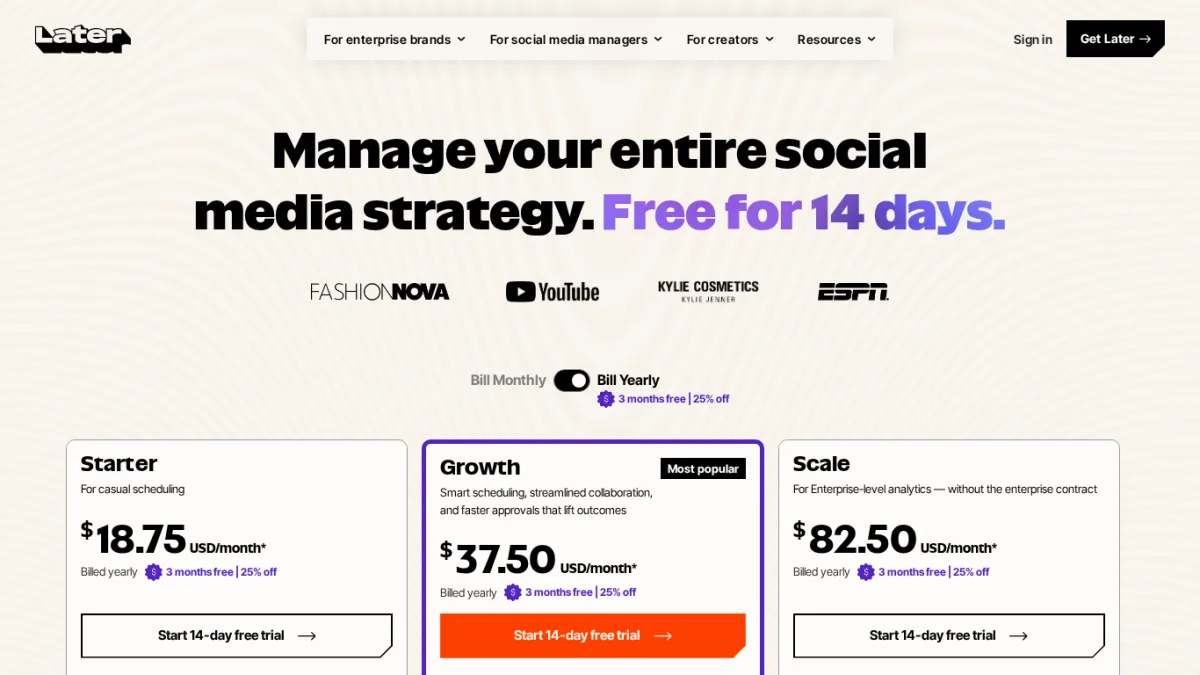
| Later | $25/mo (Starter) or $18.75/mo on annual billing | Visual-first brands, creators, and Instagram-heavy accounts | Strong visual planner, link-in-bio, and creator workflow | Light on analytics, no real inbox at lower tiers; no X support |
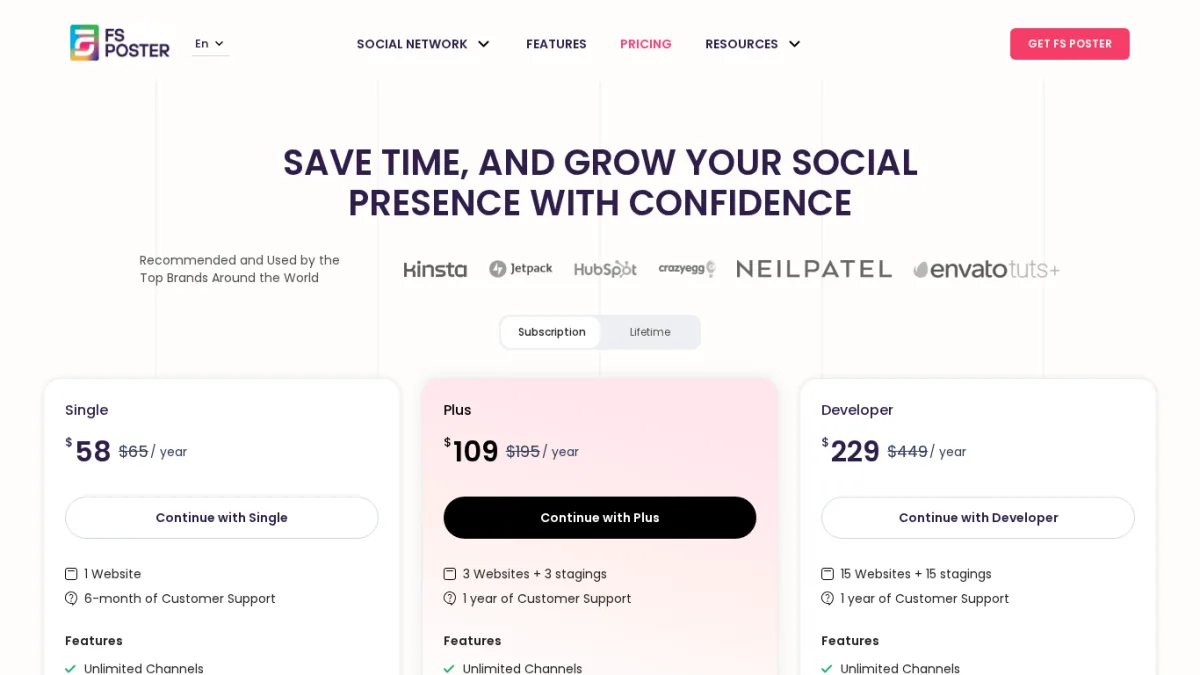
| FS Poster | From $58/yr (Single, intro) | WordPress publishers, WooCommerce stores, and content teams that publish from WordPress | Auto-posts WordPress content to 26 networks with no per-channel fee | Not a social inbox, listening, or customer-care suite |
Prices checked in June 2026. Sprout Social, Hootsuite, Statusbrew, Agorapulse, Buffer, Later, and SocialBee paid tiers use current public pricing pages; some vendors apply promotional or annual discounts.
Best Sprout Social Alternatives for 2026
1. Hootsuite, the closest like-for-like SMM suite
Starting price: From $99 per user/month on the Standard plan, billed annually
Hootsuite is the most direct alternative for teams that want Sprout-style functionality at a noticeably lower per-seat cost. It covers publishing, a unified inbox, basic listening through streams, analytics, approvals, and team workflows in one place. It is the tool most often used to replace Sprout when the social ops team still wants a single suite.
The current public pricing page has consolidated the plan naming around three tiers: Standard, Advanced, and Enterprise. The older Professional and Team plan names are no longer surfaced as separate purchase options.
Key features:
- Multi-network publishing and a planner with calendar view
- Streams for monitoring brand mentions and keywords
- Inbox with team assignment, response templates, and saved replies
- Analytics dashboards, with customizable reports and templates on Advanced
- Employee Advocacy (Amplify) and full Listening powered by Talkwalker on Enterprise
- App integrations with CRMs, helpdesks, and analytics tools
Pricing: Standard starts at $99 per user/mo on annual billing and covers up to 10 social accounts per user. Advanced steps up to unlimited social accounts, customizable analytics, saved message replies, and team assignment workflows on annual billing. Enterprise is custom and adds Amplify (Employee Advocacy) and Listening powered by Talkwalker. Listening and advocacy are reserved for the Enterprise tier rather than offered as smaller add-ons across all plans.
Best for: Mid-market in-house social teams and agencies that still want one suite for publishing, monitoring, inbox, and reporting, but cannot justify Sprout's per-seat pricing.
Why it is a strong Sprout Social alternative: It covers the same broad surface area. Reporting and listening are not as polished as Sprout's, but the gap is much smaller than the price gap, especially at small to mid team sizes.
What to watch for: It is still SaaS, still per-seat, and still has a real learning curve. If your team only uses Sprout for publishing, you may be over-buying again. For budget-sensitive teams in particular, the dedicated cheaper Hootsuite alternatives roundup is the better entry point.
2. Statusbrew, the team workflow and engagement alternative
Starting price: Custom pricing
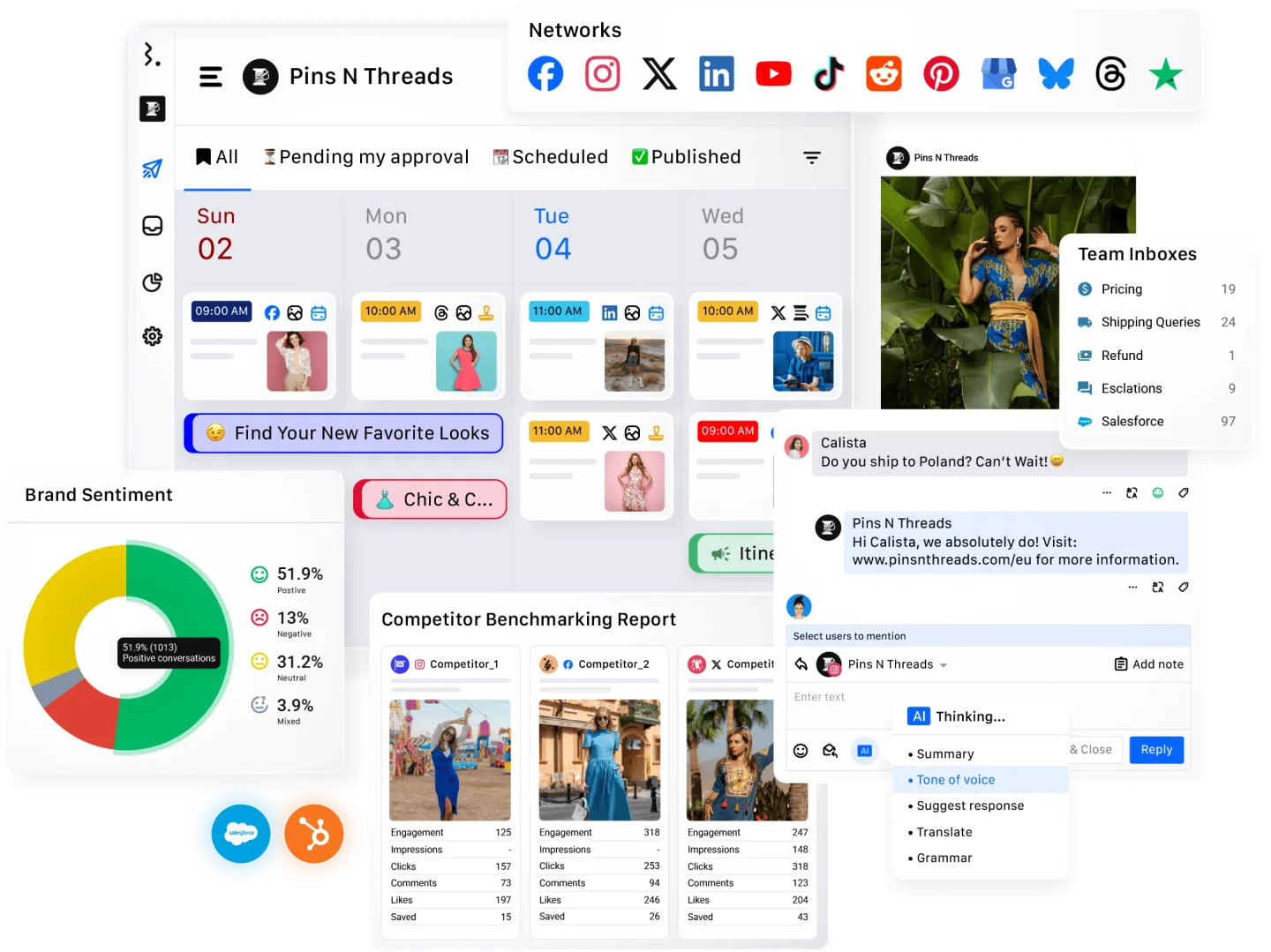
Statusbrew is a strong Sprout Social alternative for teams that need social media management without turning the workflow into a patchwork of tools. It brings publishing, engagement inbox, analytics and reporting, collaboration, and approval workflows into one platform, which makes it useful when several people review, schedule, and respond from the same social calendar.
Its best fit is a team that has outgrown a simple scheduler but does not want every approval, reply, and report to live in separate tools. Publishing and engagement sit close together, so managers can plan campaigns, keep conversations organized, assign work, and review performance from one place.
Key features:
- Multi-channel publishing and scheduling calendar
- Engagement inbox for managing replies, mentions, and social conversations
- Analytics and reporting for campaign and account performance
- Team collaboration with assignments and internal review workflows
- Approval flows for brands, agencies, and regulated teams
- Useful for distributed teams that need governance around social publishing
Pricing: Statusbrew uses custom pricing, so teams need to request a quote instead of choosing from a simple public self-serve plan. That makes it less transparent than Buffer or SocialBee, but it also reflects a more team-oriented workflow.
Best for: Teams, agencies, and brands that need publishing, engagement inbox, analytics, collaboration, and approvals in one social media management platform.
Why it is a strong Sprout Social alternative: It covers many of the operational reasons teams buy Sprout in the first place: managing conversations, reviewing content before it goes live, collaborating across roles, and reporting on results. It is especially relevant when the team needs workflow control as much as scheduling.
What to watch for: Statusbrew is still a SaaS social media management platform, not a WordPress-native auto-poster. If your main pain is turning WordPress posts or WooCommerce products into social updates automatically, FS Poster is the more direct fit. If your pain is inbox, approvals, reporting, and team coordination, Statusbrew belongs high on the shortlist.
3. Agorapulse, the inbox-first alternative
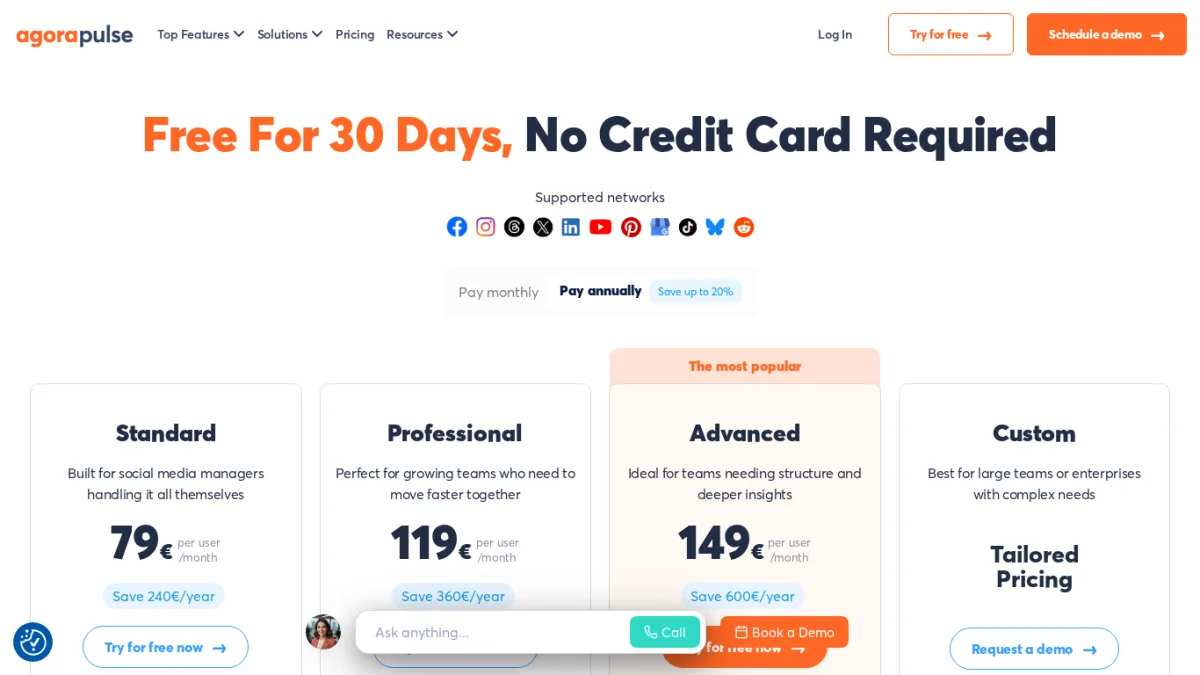
Starting price: $99 per user/mo on the Standard plan (annual)
Agorapulse is one of the most credible direct alternatives for teams that bought Sprout primarily for inbox, social CRM, and reporting. It has long focused on engagement and inbox quality and tends to win head-to-head reviews when those modules are the deciding factor.
Key features:
- Unified social inbox with assignment, labels, saved replies, and SLA tracking
- Social CRM that stores conversation history per user across networks
- Publishing with calendar, queues, and approval workflows
- Reporting suite with white-label options at higher tiers
- Coverage for Facebook, Instagram, X, LinkedIn, TikTok, YouTube, Threads, and Google Business Profile
Pricing: Standard $99 per user/mo, Professional $149 per user/mo, Advanced $199 per user/mo on annual billing. Custom plans available for larger organizations.
Best for: Agencies and in-house teams whose Sprout invoice is being justified mainly by the inbox and reporting, not by listening or advocacy.
Why it is a strong Sprout Social alternative: It addresses the same buyer profile, but at lower per-user prices and with an inbox most teams find friendlier in day-to-day work. It is the most common "Sprout-shaped" replacement for agencies.
What to watch for: Cost still scales linearly with users. For very small teams or solo operators, Agorapulse is still more tool and more spend than necessary. It is also SaaS, with no WordPress-native publishing trigger.
4. Buffer, the simple queue for small teams and creators
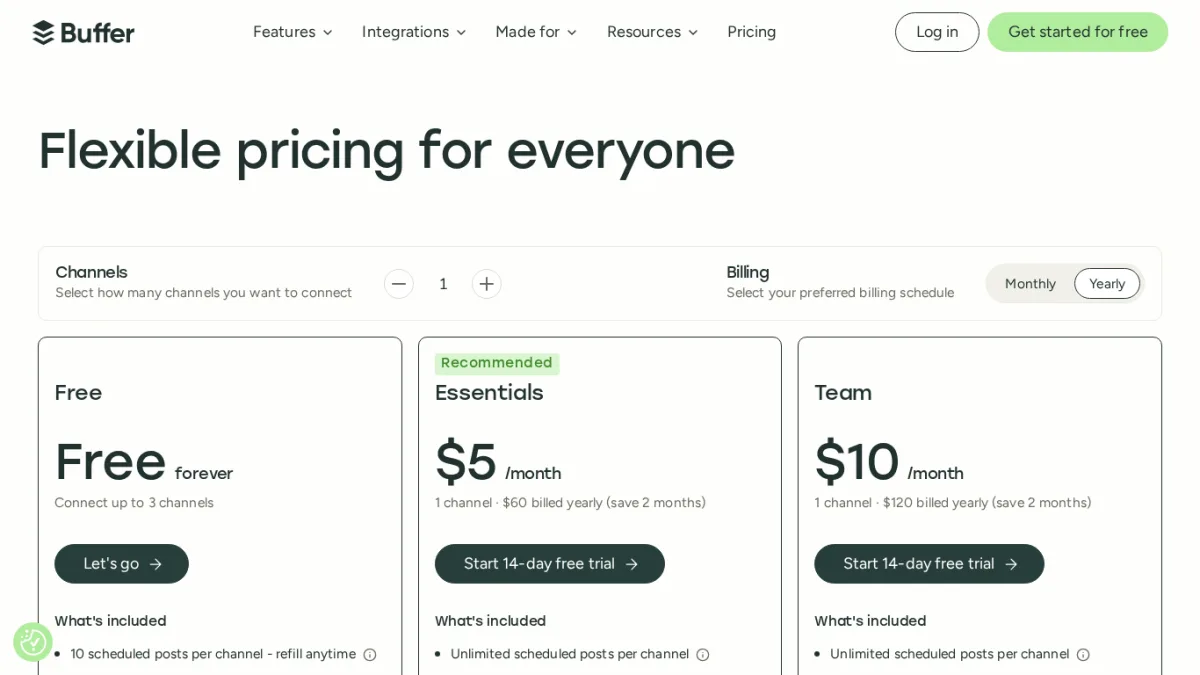
Starting price: Free for 3 channels; Essentials at $5 per channel per month; Team at $10 per channel per month
Buffer is the right exit from Sprout when the honest answer to "what did we actually use" is "publishing, a calendar, and the basic engagement view." It is significantly simpler and significantly cheaper. It is not a Sprout replacement on features, but it does not pretend to be.
Key features:
- Calendar, queue, and per-network customization
- Engagement view for comments on selected networks
- Basic analytics on paid tiers
- Free plan that covers three channels with limited scheduling
Pricing: Free tier; Essentials $5 per channel/mo; Team $10 per channel/mo with collaboration features; Agency $100/mo for 10 channels.
Best for: Solo creators, small businesses, and small marketing teams whose Sprout usage never really went beyond scheduling and the calendar.
Why it is a strong Sprout Social alternative: It strips out the modules you were not using and prices around channels rather than seats. For a small team publishing across five or six channels, Buffer costs a fraction of Sprout.
What to watch for: No real social inbox, no listening, and no WordPress publishing trigger. The per-channel model also climbs quickly once you add many networks. If you want a direct head-to-head with Hootsuite and Later before picking, our Buffer vs Hootsuite vs Later breakdown is the most useful starting point.
5. SocialBee, the category-based scheduler
Starting price: $29/mo (Bootstrap)
SocialBee takes a different approach from Sprout. Instead of one queue per network, you define content categories like "blog posts," "promotions," "evergreen tips," and "case studies," then schedule each category on its own cadence. For solo creators and small teams with a recurring content mix, this removes a lot of weekly planning.
Key features:
- Category-based queues with evergreen recycling
- AI post generation and bulk editor for variants
- Content sources from RSS, blogs, and bookmarklets
- Support for Facebook, Instagram, Threads, LinkedIn, X, Pinterest, TikTok, YouTube, Google Business Profile, and Bluesky
Pricing: Bootstrap $29/mo for 5 profiles, Accelerate $49/mo for 10 profiles and advanced analytics, Pro $99/mo for 25 profiles and team features. Promotional discounts run regularly.
Best for: Solopreneurs, content creators, and small marketing teams whose content naturally falls into categories and who do not rely on a social inbox.
Why it is a strong Sprout Social alternative: It directly attacks the "blank queue" problem that Sprout users face on simpler accounts, and it costs roughly an order of magnitude less per month. For a one-person social operation, SocialBee often does the actual work of a Sprout seat.
What to watch for: No full inbox, no listening, no real reporting suite, and no WordPress-native trigger. It is also priced per profile/account, which can climb if you manage many client brands.

6. Later, the visual planner for creators
Starting price: $25/mo (Starter)
Later is built for visual-first brands and creators. The strongest reason to pick Later is the planner: a drag-and-drop calendar that lets you build a grid before posts go out, with link-in-bio, hashtag tools, and creator-friendly workflows on top.
Key features:
- Visual drag-and-drop media planner and grid preview
- Link-in-bio landing page and click analytics
- Best-time-to-post recommendations and hashtag suggestions
- Coverage of Instagram, Facebook, TikTok, Threads, YouTube, Pinterest, LinkedIn, and Snapchat
Pricing: Starter $25/mo, Growth $50/mo, Scale $110/mo on standard monthly rates. Annual billing brings each tier down to roughly $18.75/mo on Starter, $37.50/mo on Growth, and $82.50/mo on Scale. Larger creator and team plans sit above that.
Best for: Instagram-heavy brands, creators, and small DTC teams whose Sprout usage is mostly content planning and visual scheduling.
Why it is a strong Sprout Social alternative: If the part of Sprout you actually love is the visual calendar, Later does that one job better and at a fraction of the cost.
What to watch for: No real social inbox at the lower tiers, lighter reporting, and no WordPress-native publishing. Later also does not list X (Twitter) on its current public pricing page, so teams that depend on X scheduling alongside Instagram and TikTok will need a different tool for that one channel. If your reason for being on Sprout was inbox or listening, Later is the wrong direction.
7. FS Poster, the WordPress-native publishing alternative
Starting price: $58/yr (Single, introductory rate)
FS Poster is a different category of tool from Sprout, and that is exactly the point. It is a WordPress plugin built around one idea: the social calendar belongs next to the post editor, not in a separate SaaS tab. New posts, pages, and WooCommerce products can auto-post the moment they go live, evergreen content can be reshared on a schedule, and the Planner gives a full calendar view inside WordPress.
It is not a Sprout Social replacement on inbox, listening, or social CRM. It is the right tool for the slice of Sprout buyers whose real, day-to-day job is "turn WordPress content into social posts without copy-paste work."
Key features:
- 26 supported networks, including YouTube Shorts, YouTube Community, Facebook Groups, LinkedIn Company pages, Pinterest, TikTok, Threads, Bluesky, Mastodon, and Google Business Profile
- Auto-posting for WordPress posts, pages, custom post types, and WooCommerce products
- Planner with calendar view, scheduled reposting, account groups, and queue management
- AI-assisted captions, content ideas, and dynamic text and watermark templates for images and video
- Unlimited connected accounts on every paid tier and no per-channel meter
Pricing: Single $58/yr for one site, Plus $109/yr for three sites, Developer $229/yr for fifteen sites, and a Lifetime license at $490 one-time (introductory rates listed in June 2026). All tiers ship with all 26 networks included.
Best for: WordPress publishers, WooCommerce stores, agencies running client WordPress sites, and any content team where the editorial workflow already lives inside WordPress.
Why it is a strong Sprout Social alternative for WordPress-driven teams: It removes the part of the Sprout workflow that has nothing to do with social management itself, which is copying content from WordPress into a SaaS calendar. The total annual cost for a typical WordPress site is less than a single month of Sprout. For multi-site agencies, the math gets steeper still.
What to watch for: FS Poster does not replace Sprout's Smart Inbox, listening, CRM data, or executive reporting. If those are the reasons you bought Sprout in the first place, look at Hootsuite or Agorapulse instead. For a full feature-by-feature view of FS Poster against the rest of the WordPress-native field, the best WordPress social media auto-posting plugins roundup is the most useful next read.
How to Choose the Right Sprout Social Alternative
There is no universal best replacement. The right answer follows from which Sprout feature you actually used.
If you need full social management (inbox, listening, governance): Hootsuite, Statusbrew, or Agorapulse
These are the tools to evaluate when the reason you bought Sprout was the suite itself, not just publishing. Hootsuite leans broader. Statusbrew leans into team workflows, engagement inbox, reporting, and approvals. Agorapulse leans deeper on inbox and reporting. All three are worth evaluating before renewing Sprout.
If you mostly used Sprout for scheduling and the calendar: Buffer or SocialBee
Buffer wins on simplicity and per-channel pricing for small teams. SocialBee wins for category-based scheduling and evergreen reposting on a low monthly cost. Both are dramatically cheaper than Sprout and remove modules you were not using.
If you publish a visual-heavy Instagram and TikTok calendar: Later
Later is the strongest visual planner in this list. If the part of Sprout you actually liked is the visual calendar grid, Later does that one job better.
If your content lives in WordPress: FS Poster
For WordPress publishers and WooCommerce stores, the bottleneck is rarely listening or inbox quality. It is the manual work of turning a new post into a social post. FS Poster removes that step entirely, includes every network in every plan, and bills per year rather than per seat. It does not replace the social CRM side of Sprout, but for most WordPress-driven teams that side was never the main reason for the spend.
If WordPress is only part of the picture: pair FS Poster with a lighter SMM tool
A common pattern is to handle the WordPress publishing layer with FS Poster and keep a lighter Buffer or SocialBee seat for the campaigns that do not start in WordPress. The combined cost is usually still well below a single Sprout seat.
FAQ
What is the best alternative to Sprout Social?
There is no single best alternative. Hootsuite, Statusbrew, and Agorapulse are the closest like-for-like SMM options for teams that still need inbox, reporting, and governance. Buffer, SocialBee, and Later are leaner schedulers. FS Poster is the right choice when the real job is turning WordPress content into social posts without copy-paste work.
Is Hootsuite a true Sprout Social replacement?
For most teams, yes. Hootsuite covers publishing, inbox, basic listening through streams, analytics, and approvals in one suite. Sprout's listening and reporting are more polished, but the per-seat price gap is large enough that mid-market teams routinely move from Sprout to Hootsuite.
Why does Sprout Social cost so much?
Sprout's public pricing page opens at $79 per seat per month on the Essentials tier (annual billing), but most teams move up to Standard at $199 per seat per month or Professional at $299 per seat per month to get the full Smart Inbox, broader profile limits, and richer reporting. On top of that, Listening, Reviews, Employee Advocacy, and Premium Analytics are paid add-ons rather than features bundled into the entry tier. The model fits large social ops teams where the suite is used daily across many seats. It can feel expensive when only two or three modules actually drive the value.
Which Sprout Social alternative is best for a WordPress site?
For sites where most social content starts as a WordPress post or WooCommerce product, FS Poster is the most direct fit because it auto-posts that content to 26 networks from inside the WordPress admin. SaaS alternatives like Buffer or SocialBee still require the content to be copied into their own calendar.
Is there a free alternative to Sprout Social?
Sprout has a free trial but no free plan. The most useful free tiers in this list are Buffer's free plan, which covers three channels, and the free starter tier on Blog2Social if you specifically want a WordPress plugin. Each free tier has tight limits on the number of channels and scheduled posts.
Is FS Poster cheaper than Sprout Social?
By a large margin. FS Poster's Single plan is $58 per year on the current introductory rate, with all 26 networks included and unlimited connected accounts. A single Sprout Standard seat is several times that on a monthly basis. The two tools solve different problems, so the comparison only makes sense when the underlying job is WordPress publishing.
Can I use FS Poster alongside Sprout Social?
Yes. A common setup is to let FS Poster handle WordPress and WooCommerce publishing, and keep Sprout, Hootsuite, or Agorapulse for inbox, listening, and reporting on campaigns that do not start in WordPress. The combined workflow usually costs less than expanding Sprout to cover every publishing scenario. If you are also considering Buffer as the lighter SaaS side of that pair, the best Buffer alternative for WordPress breakdown explains the WordPress side of that decision in more detail.
Conclusion
The right Sprout Social alternative depends on which part of Sprout you were really paying for. If it was the full SMM suite, look at Hootsuite, Statusbrew, or Agorapulse. If it was scheduling and the calendar, Buffer, SocialBee, or Later will do the job for a small fraction of the cost. If it was publishing WordPress content across social, FS Poster removes the bottleneck entirely and keeps the workflow inside the CMS where it already lives.
For most WordPress-driven teams, the most practical next step is to run FS Poster on the WordPress side and reassess the Sprout renewal once the publishing work is no longer the reason you log in.
Write once. Post to 26 networks.
- 26 social networks
- Schedule & auto-repost
- Runs inside wp-admin


