


Real estate marketing has a timing problem. A new listing goes live on the brokerage site, an open house is set for Saturday, the market report drops Monday, a closed deal becomes a testimonial on Wednesday, and every one of those moments deserves a Facebook post. Most agents end up either copy-pasting the listing into Facebook by hand or skipping the post because the day got away from them.
This guide is for realtors, listing agents, team leads, and small brokerage marketers running their site on WordPress. It covers where automation belongs, how to set up FS Poster for Facebook Pages (and where Groups fit with caveats), how to plan the week, and how FS Poster compares with the usual SaaS suites.
The timing problem that breaks generic schedulers
A typical brokerage week brings a Monday market update, two or three new listings mid-week, a Thursday price change, a Friday "just listed" push, and a Saturday open house. Generic schedulers assume you sit down once a week, write captions, and queue them up. Real estate content does not work that way: listings are created and edited in the site or MLS feed, open houses change, and price drops come in late. Retyping every post into Buffer or Meta Business Suite turns into a missed-post problem the moment the inbox gets noisy.
The fix is to push the trigger upstream. When a listing or a market update is published in WordPress, the right Facebook post should be created automatically, scheduled where it makes sense, and routed to the correct Pages without manual copy-paste.
What automation should solve, and what to keep human
Automation belongs on distribution. Replies, negotiations, and lead qualification do not.
Automate these:
- New listings flowing from WordPress to brokerage and agent Facebook Pages.
- Open-house reminders on a recurring cadence in the week before the event.
- Weekly market updates and blog posts pushed at consistent times.
- Evergreen content (neighborhood guides, mortgage tips, buyer FAQs) re-shared on a slow rotation.
- "Just sold" and testimonial posts triggered when a closed-deal post is published with written client consent.
Keep these manual: DMs, comment replies, price negotiations, lead qualification, and anything that names a buyer or seller without written consent. People expect a human reply when they ask about square footage, schools, or HOA fees.
Map your real estate content before you pick a tool
Before connecting any account, write down the content types that will feed Facebook:
- Listings: posts, custom post types like Listing or Property, or MLS-plugin output.
- Market updates: weekly or monthly blog posts on the same category.
- Neighborhood guides: long-form evergreen posts.
- Open houses: tied to a listing or a separate event post type.
- Closed-deal stories and testimonials: client consent required before sharing.
- Buyer and seller education: FAQs, mortgage explainers, checklists.
For each type, decide where it is created, which Facebook Pages should receive it, and how often it should re-share. That sheet becomes the blueprint for the rest of this guide.
Why WordPress belongs at the center
Most brokerages already use WordPress for their public site, so it is the natural source of truth. Adding a separate SaaS calendar means typing the same listing twice. A WordPress-first workflow removes that duplication: publish or update the listing in WordPress and the social post is generated, scheduled, and routed automatically. This is what FS Poster is built for: it runs inside the WordPress admin, reads from your posts, pages, and Custom Post Types, and turns them into scheduled Facebook posts without a separate caption editor.
Connect Facebook Pages (and understand the Groups caveat)
FS Poster connects to Facebook through two different mechanisms, and the distinction matters.
Facebook Pages: the App (API) method. This is the recommended path. You authorize FS Poster as a Meta app, it reads your Page admin permissions, and the connected Page receives scheduled and auto-posted content reliably. Brokerage Pages, agent Pages, and partner Pages all connect this way.
Facebook Groups and personal-account timelines: the Cookie method. This is the only way FS Poster can post into a Group from WordPress, because Meta does not expose a general Pages-to-Groups posting API. FS Poster's own documentation describes the Cookie method as "private" and reliable "70% of the time", and warns that "if you use this method, especially if you spam, Facebook might block you." Newly created or unverified accounts get flagged more often, and high-frequency Group posting is the pattern that triggers blocks.
Practical guidance for realtors:
- Build core automation on Pages via the App method. That carries "just listed", "just sold", market updates, and open-house content.
- Use the Cookie method for Groups sparingly, from a verified, well-aged account, only in Groups whose rules allow it.
- If brokerage policy prohibits Cookie-method tools, stay on Pages and post manually into the handful of Groups that matter.
The detailed Pages setup is in the FS Poster guide on how to auto-post WordPress posts to Facebook. Inside FS Poster, group your connected accounts into logical channels ("Main Page", "Agent Pages", "Partner Pages") to keep routing rules clean.
Auto-post listings with category and tag filters
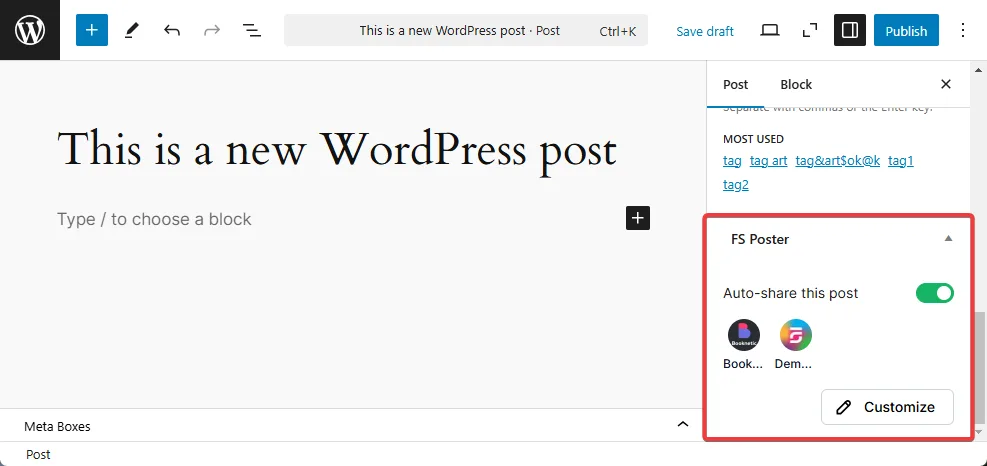
You almost never want every WordPress post going to every Facebook destination. FS Poster's category and tag filters handle this rule layer. A clean Pages-first configuration:
- Category "Listings" + tag "North Side" goes to Main Page plus North Side agent Pages.
- Category "Listings" + tag "South Side" goes to Main Page plus South Side agent Pages.
- Category "Market Update" goes to Main Page plus all Agent Pages.
- Category "Buyer Tips" or "Seller Tips" goes only to the Main Page.
- Category "Testimonial" goes to Main Page plus the closing agent's Page, with manual approval.
Custom messages per channel make the post sound right in each context. A first-time-buyer Page can lead with a different hook than a luxury Page, but keep the variation small enough that a reader who follows both does not feel spammed.
Plan the week with Calendar and Planner
Auto-posting handles the trigger. Calendar and Planner handle the cadence. Accounts that post randomly look chaotic; accounts that batch every listing at once look like a flood.
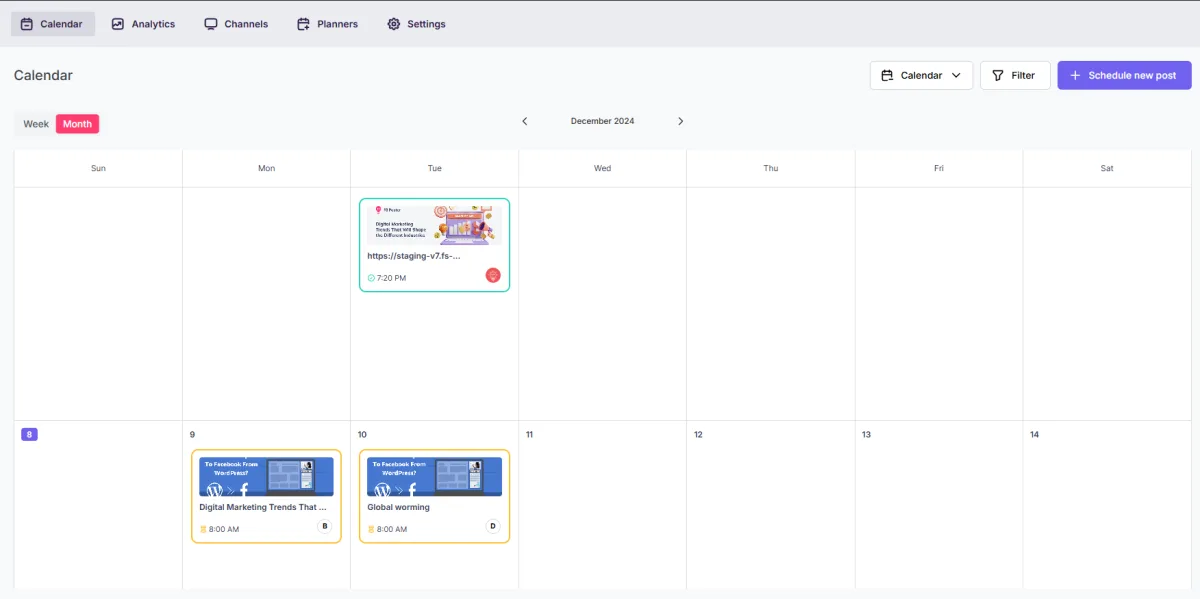
The FS Poster Calendar view shows every scheduled and recurring Facebook post on a week grid. You can drag posts, see overlaps between Pages, and confirm you are not stacking three listings on the same Saturday afternoon.
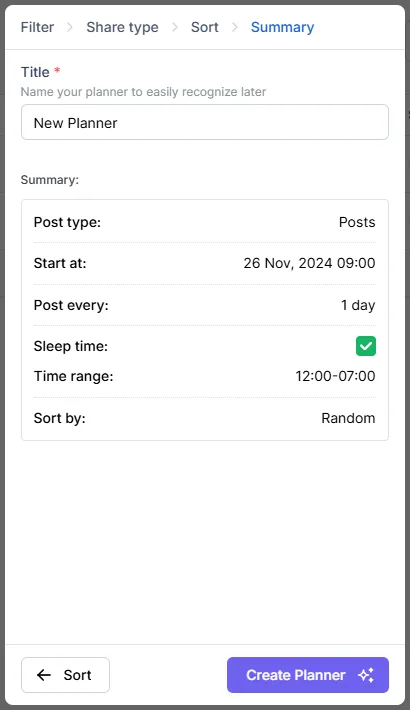
Planner lets you build a multi-step campaign at once.
- Day 0 (listing live): "just listed" on Main Page and agent Page.
- Day 1: open-house save-the-date on Main Page and agent Page.
- Day 3: photo highlight on Main Page only.
- Day 5: open-house reminder on Main Page.
- Day 6: open-house "today" on Main Page and agent Page.
- Day 14: status update if still on market.
For time-slot guidance, the FS Poster note on the best time to share a post on Facebook is the natural next read.
Build an evergreen library
Real estate has a deep evergreen layer that most brokerages underuse: neighborhood guides, school district overviews, buyer FAQs, affordability explainers, seller checklists. FS Poster's recurring schedule lets a small evergreen library cycle quietly:
- Tag evergreen posts in WordPress with an "Evergreen" tag.
- Build a recurring schedule that picks a random post from that tag once or twice a week.
- Route it to the Main Page only.
- Add light caption variation so the post does not look identical every cycle.
Testimonials and "just sold" stories sit in a similar bucket with a consent rule on top: build a "Closed deals" category that only contains posts the client has signed off on, then let FS Poster re-share those on a slow rhythm.
Use AI captions without sounding like a bot
Pulling the listing title and first paragraph works for a heads-up post, but it can sound flat. FS Poster's AI integration can draft a short caption from a WordPress listing and let you tweak it. The pattern that works for realtors:
- Use AI for the hook line only. Keep price, bedrooms, bathrooms, and neighborhood as literal text from the listing fields.
- Pre-write a few "voice" prompts that match the brokerage tone (warm, premium, fast).
- Always review high-stakes posts (price changes, sold posts, sensitive listings) before they go live.
- Never let AI describe legal terms or financial details.
If a caption could be about any house, rewrite it.
FS Poster vs Meta Business Suite, Buffer, Hootsuite, and Later
A short, honest comparison so you can pick by workflow, not by brand.
| Tool | Best fit for realtors | Strengths | Watch-outs |
|---|---|---|---|
| FS Poster | Brokerages and listing agents on WordPress. | Auto-post listings, blog posts, and CPTs to Facebook Pages via the official App method, with category/tag rules, Calendar, Planner, recurring schedules, and AI captions inside WordPress. | Not a customer-service inbox. Facebook Group posting works only through the Cookie method, which is private and around 70% reliable per the FS Poster docs and should be used sparingly. |
| Meta Business Suite | Teams that only use Facebook and Instagram and do not publish in WordPress. | Native to Meta, free, useful for Page posting and limited Group scheduling from a Page you admin. | No WordPress trigger; manual copy-paste for every listing. |
| Buffer | Small teams wanting a simple visual queue with shared approvals. | Clean calendar, easy collaboration, transparent channel pricing. | Light WordPress integration; Group support is limited. |
| Hootsuite | Larger brokerages or franchises needing monitoring and reporting at scale. | Strong governance, social inbox, reporting. | Often more platform than a single brokerage needs. |
| Later | Solo agents and visual brands focused on photo and video. | Great visual calendar, Instagram-first planning. | Weak for text-based listing posts and WordPress-driven distribution. |
For a broader, non-real-estate view, the parent post on Facebook automation software walks through the same vendors with a wider angle.
Approvals, exclusions, and what stays human
A setup that runs without governance will eventually post something it should not. Build the guardrails before they are needed.
- Use a "Do not auto-post" tag in WordPress for sensitive listings (off-market, NDA, high-net-worth clients). Add it to the FS Poster exclusion filter.
- Add a status check on "Closed" or "Sold" tags so finished listings stop re-sharing.
- Require manual approval for testimonials. Build the post as a draft and only publish after client confirmation.
- Run a monthly Calendar audit and kill any scheduled post that no longer makes sense.
- Keep Cookie-method Group posting low frequency and human-reviewed to avoid Meta blocks.
- Designate one person on the team as the social owner.
A practical brokerage workflow example
A mid-size brokerage with one Main Page and four Agent Pages publishes three to five listings a week, one weekly market update, and around eight evergreen posts a month.
Their FS Poster setup groups accounts into Main and Agents, all connected via the App method. Category rules push "Listings + North" to Main plus North agents and "Listings + South" to Main plus South agents. Market updates go to Main and all Agents. "Closed deals" requires manual approval. Evergreen posts run on a recurring schedule that picks one post per week from the Evergreen tag and posts to Main only.
For Facebook Groups, the team lead manually posts a handful of high-value listings each week into a small, hand-picked set of neighborhood Groups from a verified personal account, rather than wiring those Groups into automated rules. That keeps heavy volume on Pages where it is officially supported and keeps the Group presence human and low-risk.
When a listing goes live, the just-listed post hits all targeted Pages within minutes. A Planner campaign queues the save-the-date, mid-week highlight, Friday reminder, and Saturday "today" post automatically. Replies and DMs are handled by the assigned agent, not by the automation.
When FS Poster is enough, and when you still need more
FS Poster is the right call when WordPress is the source of truth and the team wants automation that lives inside the admin. It handles the trigger, the schedule, the routing, the cadence, and the AI captions for Facebook Pages.
FS Poster is not a unified inbox, a social listening suite, or an ads manager, and it is not a substitute for human moderation in Groups. If you need inbox replies across Facebook, Instagram, and DMs, pair FS Poster with a lightweight inbox tool. For a heavy paid budget, Meta Ads Manager still owns that workflow. For a solo agent who does not publish in WordPress, Meta Business Suite is enough.
FAQ
Can FS Poster post listings to Facebook Groups, not just Pages?
Pages and Groups are handled differently. Pages connect through FS Poster's App (API) method and support reliable scheduled and auto-posted content. Groups (and personal-account timelines) only work through the Cookie method, which FS Poster's own documentation describes as private and reliable around 70% of the time, with real risk of Meta blocking the account if you spam, post too frequently, or use a newly created or unverified account. Some Groups also require admin approval per post. Treat Group automation as supplemental and low-frequency, and keep the main listing volume on Pages.
Does it work with MLS-driven listings or only with native WordPress posts?
It works with anything WordPress treats as a post or a custom post type. If your MLS plugin creates listings as a CPT (Listing, Property), FS Poster can target that CPT. If the feed renders client-side without writing to the database, you need a different MLS plugin first.
Will automation hurt my organic Facebook reach?
Automation does not change the reach algorithm. What hurts reach is repetitive captions, identical link previews, and posting the same listing to every Page at the same time. Caption variation and channel-specific routing keep reach healthy.
How do I avoid posting a sold listing by accident?
Add a "Sold" or "Closed" tag the moment the listing is off-market and include that tag in the FS Poster exclusion filter so the recurring schedule skips it. Remove sold listings from the evergreen rotation too.
Can AI captions sound on-brand for a luxury brokerage?
Yes, if the prompt is tight. Pre-write a brand voice prompt, lock the listing fields, and review every high-end post before it goes live. AI removes the blank-page problem; the agent still owns the brand.
Which FS Poster plan do real estate teams need?
FS Poster is sold as a paid plugin with no free tier; a live demo is available to test the workflow before you buy. Pick by site count and team scale: the Single plan covers one site, Plus covers three sites plus staging, Developer covers fifteen sites plus staging, and Lifetime is a one-time license for thirty sites plus staging. Every paid plan unlocks the modules that matter for real estate: multiple Page connections, Custom Post Type targeting, category and tag filters, the Calendar view, recurring schedules, Planner campaigns, and the AI integration. FS Poster's site lists a 14-day money-back guarantee, which gives a low-risk window to confirm the workflow fits your brokerage.
Final word
The Facebook automation that wins for real estate lives next to where your listings already are, runs reliably on Pages, and treats Groups as a supplemental human-curated channel rather than an automation pipeline. If your site is on WordPress, map your content, set your category rules, plan the week in Calendar and Planner, and let the agents focus on the buyers.
Write once. Post to 26 networks.
- 26 social networks
- Schedule & auto-repost
- Runs inside wp-admin